

Flutter testing strategy requires four distinct layers: unit tests (pure Dart logic, fast, no UI), widget tests (Flutter's flutter_test package, isolated widget rendering and interactions), integration tests (Flutter's integration_test package, multi-widget flows on a real device or emulator), and E2E tests (Playwright for web, Appium for mobile, full user journeys through the running app). The recommended Flutter testing pyramid allocates roughly 60% unit / 25% widget / 10% integration / 5% E2E - but that top 5% E2E layer is where most teams fall short. This article covers each layer in depth: what to test, when to use it, code examples, and maintenance cost. It also covers Flutter-specific challenges: widget testing with providers, golden tests, testing navigation with GoRouter, and why the E2E layer is harder to maintain than the rest combined.
Most Flutter teams invert the pyramid without realizing it. They write a handful of E2E tests first because those feel like "real" coverage, then add unit tests around the edges. The result: a test suite that is slow, brittle, and expensive to maintain. When the CI starts taking 40 minutes and tests fail randomly, teams stop trusting it. Coverage drops. Bugs ship.
The 60/25/10/5 ratio for flutter testing isn't arbitrary. It comes from the actual cost and failure rate at each layer. Unit tests at 60% because they run in milliseconds and catch pure logic regressions instantly. Widget tests at 25% because flutter_test isolates rendering cheaply without a device. Integration at 10% because device-dependent tests are slow and you need them only for multi-widget flows. E2E at 5% because full user journeys are the most expensive tests you own.
That top 5% is where most flutter test automation strategies fall apart. It is the smallest slice and the hardest to maintain, but it is the only layer that would have caught your permissions-dialog regression before it reached production.
The Flutter Testing Pyramid
The classic testing pyramid applies to Flutter, but with an extra layer most frameworks don't have. Standard web or backend testing has three tiers: unit, integration, E2E. Flutter has four, because widget tests occupy a distinct middle ground that doesn't map cleanly to either unit or integration.
Here is what the Flutter testing pyramid looks like in practice:
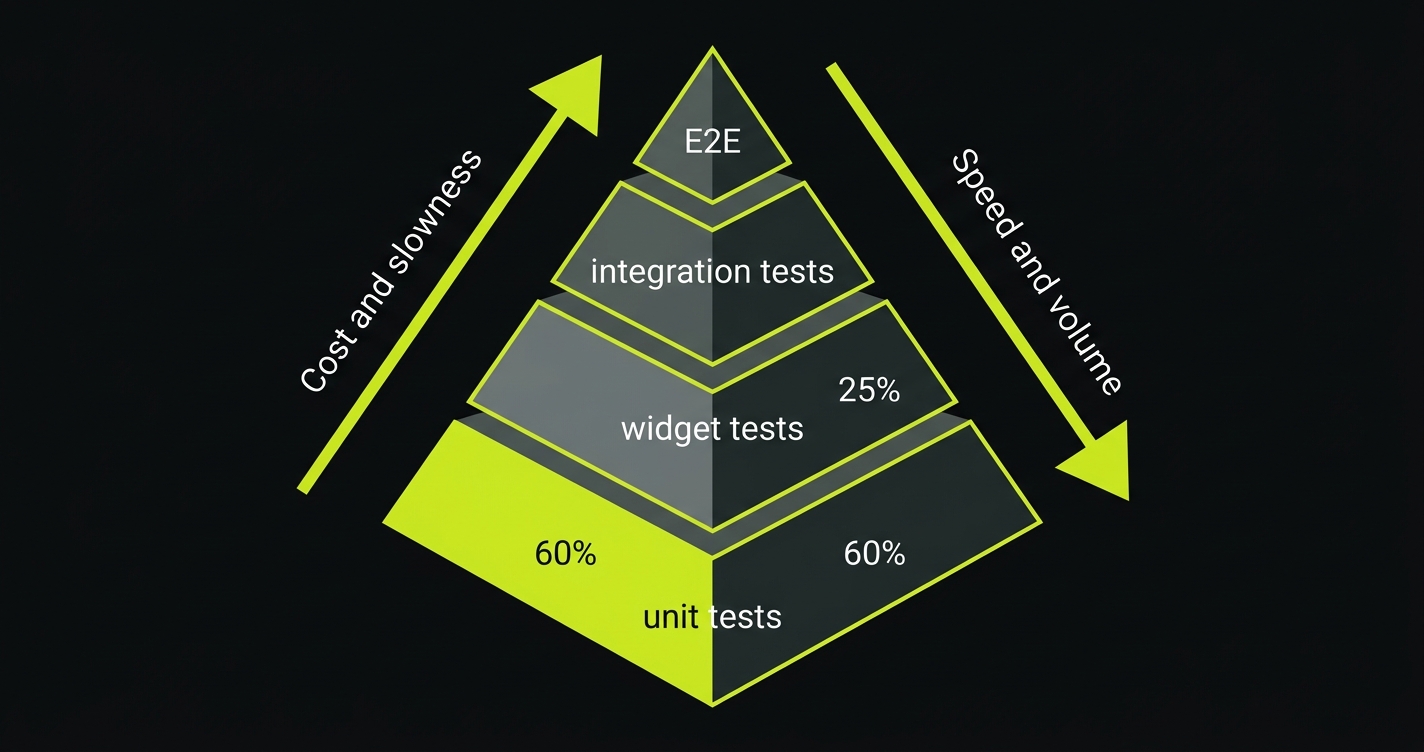
| Layer | Package / Tool | What It Tests | Recommended Share | Feedback Speed |
|---|---|---|---|---|
| Unit | dart test | Business logic, state, utilities | ~60% | Milliseconds |
| Widget | flutter_test | Widget rendering and interactions | ~25% | Seconds |
| Integration | integration_test | Multi-widget flows on real device | ~10% | Minutes |
| E2E | Playwright / Appium | Full user journeys in browser or device | ~5% | Minutes |
| Full-stack (all layers) | Autonoma | Auto-generated E2E + regression from codebase | Scales with code | Under 10 min |
The percentages are a starting point, not a law. Teams that ship a Flutter web app heavily will tilt toward more E2E coverage. Teams that build a complex offline-capable mobile app will tilt toward more integration tests. The principle holds regardless: you want many fast tests at the base and few slow tests at the top.
The practical challenge is that the top two layers, integration and E2E, account for nearly all the maintenance cost. A change to a navigation route or a widget's key can break a dozen integration tests at once.
Layer 1: Unit Tests
Unit tests in Flutter are pure Dart. They use the standard dart test package and run without Flutter's widget engine. No rendering, no platform channels, no UI. Just your logic.
What belongs here: Business logic, state management, repository layer functions, utility functions, validation, data transformations. If a function takes inputs and returns outputs without touching the widget tree or platform, test it here.
What does not belong here: Anything that depends on BuildContext, widget layout, or platform channels. Those need the widget layer.
A unit test for a Riverpod state notifier:
// counter_notifier.dart
import 'package:riverpod_annotation/riverpod_annotation.dart';

part 'counter_notifier.g.dart';

@riverpod
class Counter extends _$Counter {
  @override
  int build() => 0;

  void increment() => state++;
  void reset() => state = 0;
}
// counter_notifier_test.dart
import 'package:flutter_riverpod/flutter_riverpod.dart';
import 'package:flutter_test/flutter_test.dart';
import 'package:my_app/counter_notifier.dart';
void main() {
test('counter increments correctly', () {
final container = ProviderContainer();
addTearDown(container.dispose);
expect(container.read(counterProvider), 0);
container.read(counterProvider.notifier).increment();
expect(container.read(counterProvider), 1);
});
test('counter resets to zero', () {
final container = ProviderContainer();
addTearDown(container.dispose);
container.read(counterProvider.notifier).increment();
container.read(counterProvider.notifier).increment();
container.read(counterProvider.notifier).reset();
expect(container.read(counterProvider), 0);
});
}Run with dart test or flutter test test/unit/. Tests complete in milliseconds. You can run the entire unit suite on every save.
Maintenance cost: Low. Unit tests break when business logic changes, which is when they should break. They are not affected by UI refactors, widget key changes, or navigation changes.
Layer 2: Widget Tests
Widget tests use flutter_test, which pumps widgets into a test environment without running a real device or emulator. You render a widget, interact with it programmatically, and assert on the widget tree.
This is Flutter's most distinctive testing layer. There is no direct equivalent in React or Vue testing that works at this depth. You can test that a TextFormField shows an error message when given an invalid email, that a ListView renders items correctly, that a StreamBuilder transitions from loading to loaded state. All in under a second.
What belongs here: Individual widget rendering, widget state transitions, user interactions within a single widget or a small widget composition, form validation feedback.
What does not belong here: Full navigation flows across screens, platform-specific behavior, or anything requiring a real device sensor (camera, GPS).
Widget test with Provider/Riverpod:
// login_screen_test.dart
import 'package:flutter/material.dart';
import 'package:flutter_riverpod/flutter_riverpod.dart';
import 'package:flutter_test/flutter_test.dart';
import 'package:my_app/screens/login_screen.dart';
import 'package:my_app/providers/auth_provider.dart';

void main() {
  testWidgets('shows error when email is empty', (WidgetTester tester) async {
    await tester.pumpWidget(
      ProviderScope(
        child: MaterialApp(home: LoginScreen()),
      ),
    );

    // Tap submit without filling email
    await tester.tap(find.byType(ElevatedButton));
    await tester.pump();

    expect(find.text('Please enter your email'), findsOneWidget);
  });

  testWidgets('enables submit button only when form is valid', (tester) async {
    await tester.pumpWidget(
      ProviderScope(
        child: MaterialApp(home: LoginScreen()),
      ),
    );

    final submitButton = tester.widget<ElevatedButton>(
      find.byType(ElevatedButton),
    );
    expect(submitButton.onPressed, isNull); // disabled initially

    await tester.enterText(find.byKey(Key('email-field')), 'user@example.com');
    await tester.enterText(find.byKey(Key('password-field')), 'pass123');
    await tester.pump();

    final updatedButton = tester.widget<ElevatedButton>(
      find.byType(ElevatedButton),
    );
    expect(updatedButton.onPressed, isNotNull); // enabled after valid input
  });
}
Golden tests: pixel-perfect rendering
Golden tests are a special category of widget test. They render a widget and compare the output against a saved reference image (the "golden"). If the visual output changes, the test fails.
testWidgets('ProductCard matches golden', (tester) async {
  await tester.pumpWidget(
    MaterialApp(
      home: Scaffold(
        body: ProductCard(
          title: 'Running Shoes',
          price: 89.99,
          imageUrl: 'https://example.com/shoe.jpg',
        ),
      ),
    ),
  );

  await expectLater(
    find.byType(ProductCard),
    matchesGoldenFile('goldens/product_card.png'),
  );
});
Update goldens with flutter test --update-goldens. Use golden tests sparingly. They are brittle across platforms and Flutter versions. They are most valuable for design system components where unintended visual changes are a real risk.
Maintenance cost: Medium. Widget tests break when widget structure changes (keys, types, hierarchy). They are mostly insulated from business logic changes but sensitive to UI refactors.
Layer 3: Integration Tests
Flutter's integration_test package runs tests on a real device or emulator against the full running app. This is different from widget tests: instead of pumping widgets into a simulated environment, you launch the actual app binary.
The key distinction from E2E testing: integration tests in Flutter run inside the Dart process. They can call your app's code directly, set up state programmatically, and access internal APIs. E2E tools like Playwright or Appium operate from the outside, through the UI only.
What belongs here: Multi-screen flows, navigation correctness, deep links, platform channel integrations (camera, notifications), offline behavior, complex widget compositions that span multiple providers.
// integration_test/onboarding_test.dart
import 'package:flutter_test/flutter_test.dart';
import 'package:integration_test/integration_test.dart';
import 'package:my_app/main.dart' as app;

void main() {
  IntegrationTestWidgetsFlutterBinding.ensureInitialized();

  group('Onboarding flow', () {
    testWidgets('user can complete all onboarding steps', (tester) async {
      app.main();
      await tester.pumpAndSettle();

      // Step 1: Welcome screen
      expect(find.text('Welcome to MyApp'), findsOneWidget);
      await tester.tap(find.text('Get Started'));
      await tester.pumpAndSettle();

      // Step 2: Permissions
      expect(find.text('Enable Notifications'), findsOneWidget);
      await tester.tap(find.text('Allow'));
      await tester.pumpAndSettle();

      // Step 3: Profile setup
      await tester.enterText(find.byKey(Key('display-name-field')), 'Alice');
      await tester.tap(find.text('Continue'));
      await tester.pumpAndSettle();

      // Verify we reached the home screen
      expect(find.text('Hello, Alice'), findsOneWidget);
    });
  });
}
Testing GoRouter navigation
GoRouter is now Flutter's recommended routing package. Testing navigation requires either an integration test or a widget test with a mocked router.
// Widget test with GoRouter
testWidgets('tapping product navigates to detail', (tester) async {
  final router = GoRouter(
    routes: [
      GoRoute(path: '/', builder: (_, __) => ProductListScreen()),
      GoRoute(path: '/products/:id', builder: (context, state) {
        return ProductDetailScreen(id: state.pathParameters['id']!);
      }),
    ],
  );

  await tester.pumpWidget(
    ProviderScope(
      child: MaterialApp.router(routerConfig: router),
    ),
  );

  await tester.tap(find.text('Running Shoes'));
  await tester.pumpAndSettle();

  expect(find.byType(ProductDetailScreen), findsOneWidget);
});
Maintenance cost: High. Integration tests are slow (run time measured in minutes per test on CI), require a device or emulator, and are sensitive to timing. pumpAndSettle() waits for all pending animations to complete, but real-world apps with network calls or streams can cause it to timeout. Use pump(Duration(...)) for time-controlled async operations.
Layer 4: Flutter E2E Testing
E2E tests treat your app as a black box. They drive it the same way a real user would, through the UI, without access to internal state. For Flutter web, this means Playwright. For mobile, it means Appium. For teams evaluating alternatives to Playwright on web, Cypress is also an option.
The gap between integration tests and E2E tests is often underestimated. Flutter's integration_test package runs inside the Dart VM. It can mock dependencies, access providers directly, and control timing. E2E tests cannot. They see what the user sees, nothing more.
What belongs here: Critical user journeys (signup, checkout, key activation flows), cross-browser behavior (web), real device behavior (mobile), flows that must work with real backend state.
Playwright E2E example (Flutter web):
// tests/checkout.spec.ts
import { test, expect } from '@playwright/test';

test('user completes checkout flow', async ({ page }) => {
  await page.goto('/');

  // Wait for Flutter initialization
  await page.waitForSelector('flt-glass-pane', { timeout: 15000 });

  // Navigate to product
  await page.getByText('Running Shoes').click();
  await expect(page).toHaveURL(/\/products\/\d+/);

  // Add to cart
  await page.getByRole('button', { name: 'Add to Cart' }).click();
  await expect(page.getByText('1 item in cart')).toBeVisible();

  // Proceed to checkout
  await page.getByRole('button', { name: 'Checkout' }).click();
  await page.waitForURL('/checkout');

  // Fill shipping details
  await page.getByLabel('Full Name').fill('Alice Johnson');
  await page.getByLabel('Address').fill('123 Main St');

  await page.getByRole('button', { name: 'Place Order' }).click();
  await expect(page.getByText('Order confirmed')).toBeVisible();
});
The maintenance problem
Every E2E test is tightly coupled to the UI. A renamed button label, a restructured widget key, a changed route path: any of these can break multiple tests at once. This is the reason most teams underinvest in E2E coverage: the write cost is manageable, but the ongoing maintenance cost is not.
There are two ways to address this. The first is the Page Object Model, which centralizes selectors and interaction logic so that a UI change only requires updating one place. The second is automated test maintenance. This is exactly the gap we built Autonoma to fill: our agents read your codebase, generate Flutter web E2E tests automatically, and self-heal them when your routes, widgets, or flows change. The E2E layer gets covered without anyone writing or maintaining selectors by hand.
Maintenance cost: Very High (manual). E2E tests break on any UI change. They are the most valuable tests for catching user-facing bugs and the most expensive to maintain at scale.
For a deeper comparison of the integration vs E2E testing distinction, see our dedicated guide.
Flutter-Specific Challenges
Widget testing with providers
Testing widgets that depend on Provider, Riverpod, or Bloc requires wrapping them in the correct scope. Missing this is the most common reason widget tests fail unexpectedly.
For Riverpod, always wrap in ProviderScope. Override providers to inject test doubles:
testWidgets('shows user name from auth provider', (tester) async {
  await tester.pumpWidget(
    ProviderScope(
      overrides: [
        // Override the auth provider with a fake implementation
        authProvider.overrideWithValue(
          AsyncValue.data(User(id: '1', name: 'Test User')),
        ),
      ],
      child: MaterialApp(home: ProfileScreen()),
    ),
  );

  expect(find.text('Test User'), findsOneWidget);
});
For Bloc, use BlocProvider with a manually constructed bloc:
testWidgets('shows loading state', (tester) async {
  final bloc = MockAuthBloc();
  when(() => bloc.state).thenReturn(AuthLoading());

  await tester.pumpWidget(
    BlocProvider<AuthBloc>.value(
      value: bloc,
      child: MaterialApp(home: LoginScreen()),
    ),
  );

  expect(find.byType(CircularProgressIndicator), findsOneWidget);
});
Testing animations
Flutter animations use a Ticker driven by the framework clock. In tests, you control this clock directly.
await tester.pump() advances one frame. await tester.pumpAndSettle() pumps until no more frames are scheduled (all animations complete). For timed animations:
testWidgets('fade-in animation completes', (tester) async {
  await tester.pumpWidget(MaterialApp(home: FadeInScreen()));

  // Widget starts transparent
  final opacity = tester.widget<FadeTransition>(find.byType(FadeTransition));
  expect(opacity.opacity.value, 0.0);

  // Advance animation by 300ms
  await tester.pump(const Duration(milliseconds: 300));

  // Widget is now visible
  final updatedOpacity = tester.widget<FadeTransition>(
    find.byType(FadeTransition),
  );
  expect(updatedOpacity.opacity.value, 1.0);
});
Be careful with pumpAndSettle() in apps that have continuous animations (like a loading spinner). It will timeout waiting for the animation to stop because it never does. Pump a fixed duration instead.
Testing navigation with GoRouter and auto_route
Both GoRouter and auto_route support testing through a test-specific router configuration. The key principle: inject the router as a dependency rather than constructing it inside the widget tree.
// Testable router setup for GoRouter
class AppRouter {
  static GoRouter create({List<NavigatorObserver> observers = const []}) {
    return GoRouter(
      observers: observers,
      routes: [
        GoRoute(path: '/', builder: (_, __) => HomeScreen()),
        GoRoute(
          path: '/settings',
          builder: (_, __) => SettingsScreen(),
        ),
      ],
    );
  }
}

// In your test
testWidgets('settings screen accessible from home', (tester) async {
  final router = AppRouter.create();

  await tester.pumpWidget(
    ProviderScope(
      child: MaterialApp.router(routerConfig: router),
    ),
  );

  await tester.tap(find.byIcon(Icons.settings));
  await tester.pumpAndSettle();

  expect(find.byType(SettingsScreen), findsOneWidget);
  expect(router.routerDelegate.currentConfiguration.fullPath, '/settings');
});
The Decision Framework: Which Test for This Scenario?
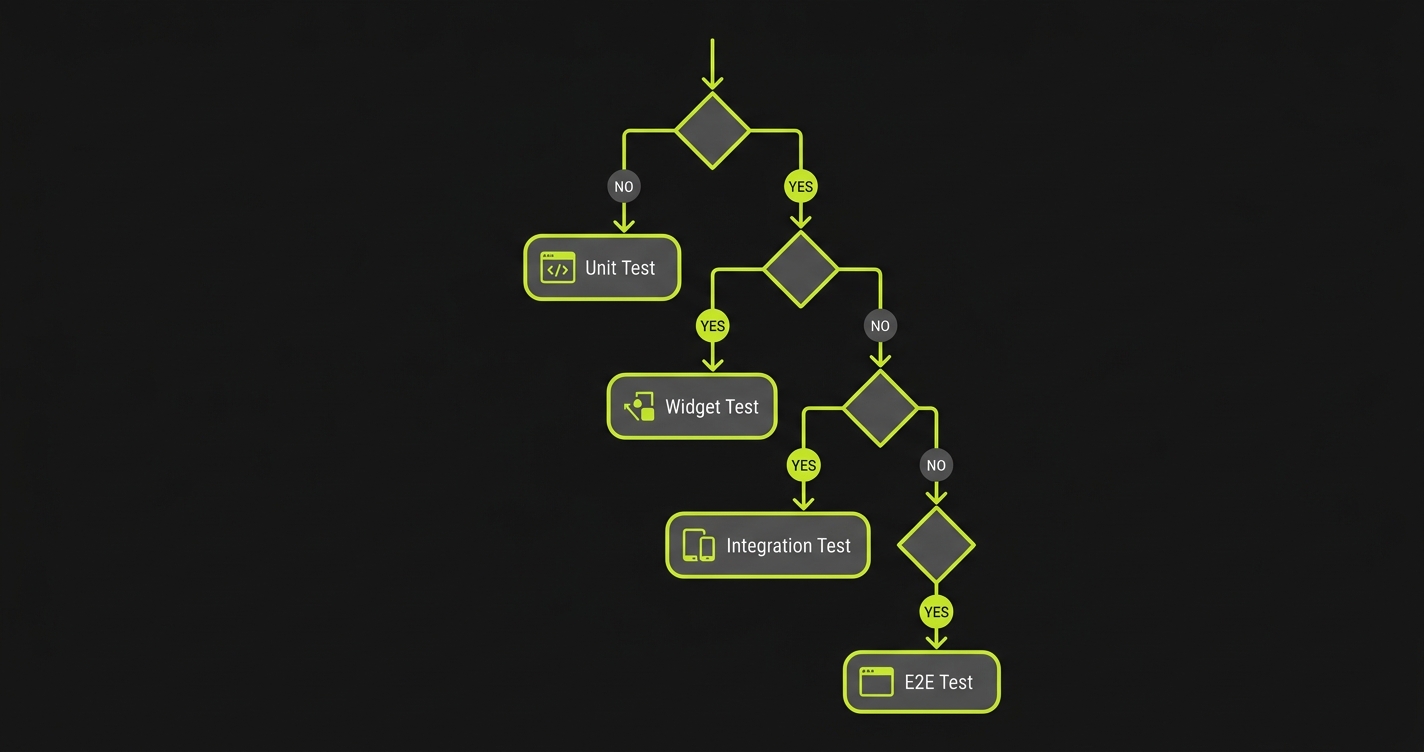
Rather than a flowchart, here is the practical question to ask for each thing you want to test. The key distinction for flutter widget testing vs integration testing is scope: widget tests isolate individual components in a simulated environment, while integration tests launch the full app on a real device.
Does it involve UI rendering? If no, write a unit test. A function that validates an email address, a class that formats a price, a repository method that calls an API: none of these need a widget.
Does it involve a single widget or a small widget composition? If yes, write a widget test. The button enables when the form is valid, the error message appears when input is invalid, the list renders the correct number of items.
Does it involve a multi-screen flow or platform integration? If yes, write an integration test. The onboarding sequence completes correctly, the deep link opens the right screen, the camera permission dialog appears when expected.
Is it a critical user journey that must work in a real browser or on a real device? If yes, write an E2E test. The checkout flow completes end-to-end, signup works across Chrome and Safari, push notifications fire correctly on a real Android device.
| Scenario | Recommended Layer | Why |
|---|---|---|
| Email validation logic | Unit | Pure function, no UI, fast feedback |
| Shopping cart total calculation | Unit | Business logic, no rendering needed |
| Login form shows error on empty fields | Widget | Widget rendering, single screen |
| Product card renders correct price format | Widget (+ golden) | Visual output, single component |
| Onboarding sequence (3 screens) | Integration | Multi-screen, navigation, state across screens |
| Deep link opens correct product screen | Integration | Platform URL handling, GoRouter behavior |
| Checkout flow end-to-end | E2E | Real user journey, real backend, cross-browser |
| Signup works on Chrome and Safari | E2E | Browser-specific rendering, real network |
Handling the E2E Layer Without the Maintenance Burden
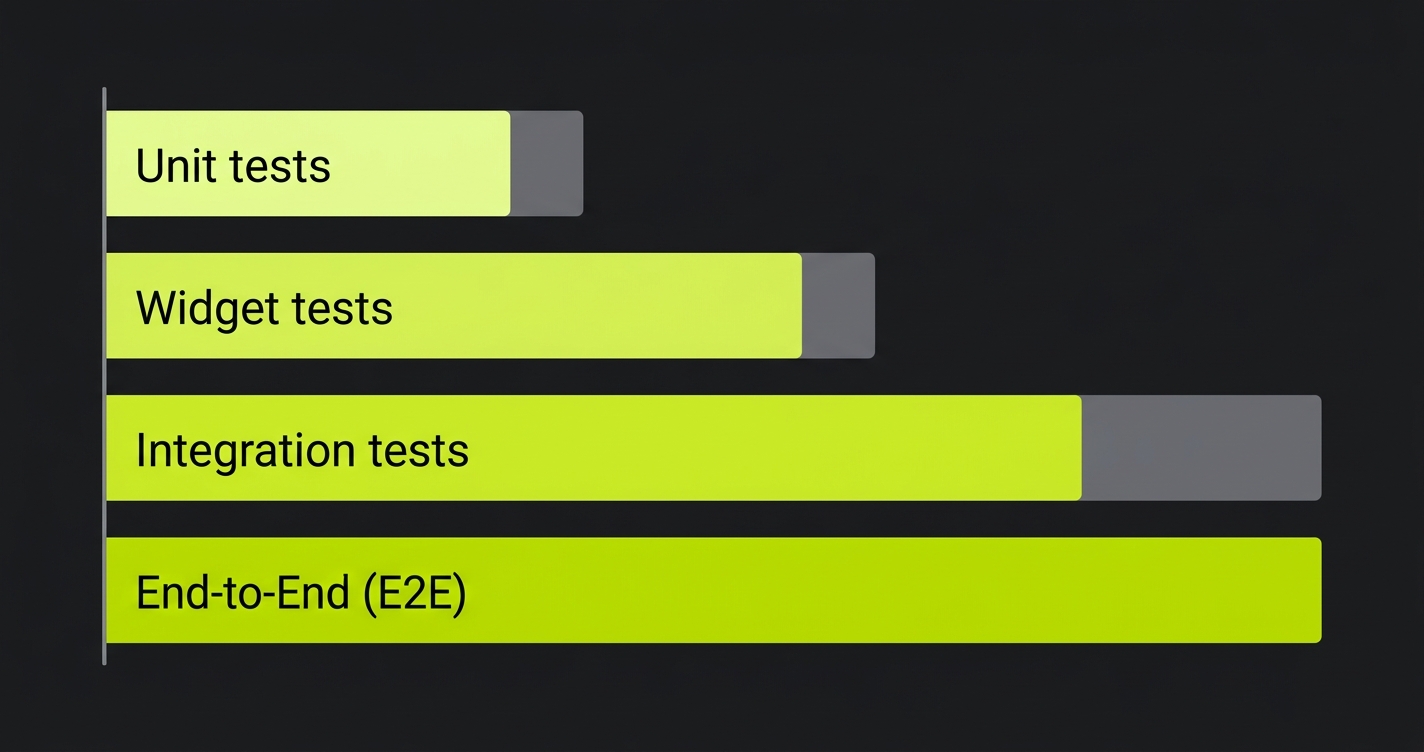
The E2E layer is where most Flutter teams have the biggest coverage gap. It is also the hardest layer to maintain. For a Flutter web app, a typical E2E setup with Playwright requires someone to write tests for every critical flow, update selectors when the UI changes, and debug flaky tests when the environment behaves differently in CI.
Most engineering teams do not have spare cycles for that. So the E2E layer stays thin, and user-facing bugs slip through. If that sounds familiar, explore our plans: Autonoma generates and maintains E2E tests from your Flutter codebase.
We built Autonoma specifically for this problem. Our Planner agent reads your Flutter codebase (routes, widgets, user flows) and generates E2E test cases automatically. When you ship a UI change, the Diffs Agent detects the delta from your code changes and updates the affected tests. Nobody writes or maintains selectors by hand. The test automation frameworks guide covers the broader landscape, but for Flutter web teams the practical question is: how do you get E2E coverage without it becoming a second job?
The answer we landed on is codebase-first generation. Your Flutter routes and widget tree are the spec. The agents derive what to test from the code, not from recordings or manual scripts. When the code changes, the tests follow. See pricing for the free tier and beyond.
Flutter Testing Best Practices: Key Takeaways
Flutter's four-layer testing strategy is not just an academic framework. Each layer owns a distinct class of bugs. Unit tests catch logic errors in milliseconds. Widget tests verify rendering and interactions in seconds. Integration tests confirm multi-screen flows work on real devices in minutes. E2E tests validate that real users can complete real journeys in real browsers.
The allocation that works for most Flutter teams: 60% unit, 25% widget, 10% integration, 5% E2E. The percentages matter less than the principle: heavy investment in fast layers, deliberate coverage in slow layers, and a maintenance strategy for the top of the pyramid where breakage is expensive.
The Flutter-specific pitfalls are real. Widget tests with providers require careful scoping. Animations need clock control, not pumpAndSettle(). GoRouter navigation requires injectable router configurations. Golden tests are brittle across Flutter versions. Each of these is solvable, but you need to know the pitfall exists before you hit it in CI at 2am.
Start with the unit and widget layers. Get those solid. Then decide deliberately how much integration and E2E coverage you need, and how you will maintain it. When you're ready to tackle the E2E layer without the maintenance burden, start free.
Frequently Asked Questions
Widget tests (flutter_test) run in a simulated environment without a real device. They pump widgets into a test harness and are very fast, seconds per test. Integration tests (integration_test package) launch the actual app binary on a real device or emulator and run tests against the running application. Integration tests are slower but test real device behavior, platform channels, and multi-screen navigation flows.
A starting point that works for most Flutter teams: 60% unit tests, 25% widget tests, 10% integration tests, 5% E2E tests. Teams building Flutter web apps will typically increase E2E coverage. Teams with complex offline-first mobile apps will increase integration test coverage. The principle is consistent regardless: many fast tests at the base, few slow tests at the top.
Wrap your widget under test in a ProviderScope (Riverpod) or MultiProvider (Provider) within the pumpWidget call. For Riverpod, use ProviderScope with an overrides list to inject test doubles: ProviderScope(overrides: [myProvider.overrideWithValue(fakeValue)], child: MyWidget()). This avoids real network calls or database access in widget tests.
Create the router in a factory method that accepts test configuration, then inject it into the widget tree during tests. This lets you assert on router.routerDelegate.currentConfiguration.fullPath after a tap. For integration tests, use the full app with a test-specific router configuration. Avoid hardcoding GoRouter inside widget constructors. It makes them untestable.
Golden tests render a widget and compare the output to a saved reference image. They fail if the visual output changes. Use them for design system components where unintended visual regressions are high-risk: buttons, cards, typography components. Avoid using them for screens with dynamic data. They are brittle across Flutter versions and platforms, so run golden tests on a pinned Flutter version in CI.
Use Flutter's integration_test when you need access to internal app state, need to control timing precisely, or need tests that run on both mobile and web. Use Playwright for browser-specific E2E testing: cross-browser validation (Chrome, Firefox, Safari), testing how your Flutter web app handles real network conditions, and user journeys where you want the purest black-box perspective with no access to internal state.
pumpAndSettle() keeps pumping frames until no more animation frames are scheduled. If your app has a continuous animation (loading spinner, infinite scroll animation, periodic timer), it will never settle and pumpAndSettle() will timeout. Use pump(Duration(...)) to advance by a fixed time, or wrap the animation in a conditional so it only runs when necessary. In integration tests, use await tester.pump(const Duration(seconds: 2)) instead of pumpAndSettle() for flows with network calls.
For Android: use a GitHub Actions runner with an Android emulator (use reactivecircus/android-emulator-runner action). For iOS: use macOS runners with the iOS Simulator. For Flutter web: use flutter test integration_test/ -d chrome after installing ChromeDriver. Set timeouts generously for CI (emulators are slower than local devices). Consider running integration tests on pull request merges rather than every commit to manage CI costs.
Widget tests break when widget structure changes (types, keys, hierarchy). They are mostly unaffected by business logic changes and routing changes. E2E tests break on any visible UI change: renamed button labels, changed routes, restructured widget keys, or modified API responses. E2E maintenance cost scales with the size of your test suite and the pace of UI change. Automated E2E maintenance tools (like [Autonoma](https://getautonoma.com) for Flutter web) address this by self-healing tests when the codebase changes.
For pure Dart logic with no Flutter dependencies (no widgets, no BuildContext, no platform channels), use dart test directly. It runs faster because it doesn't initialize the Flutter framework. For anything that imports flutter/, uses material widgets, or depends on Flutter-specific packages, use flutter test. Many teams just use flutter test for everything to avoid the distinction, at the cost of slightly slower unit test runs.


