

If you've ever looked at your AWS bill and wondered why data transfer costs keep climbing, you're not alone. At Autonoma, we run thousands of end-to-end tests daily across real iOS and Android devices. Every test run requires installing an app build. Every app installation means downloading from S3. And every download means egress fees.
The math gets scary fast.
The Hidden Tax on Mobile Testing
When you're building an AI-powered E2E testing platform like Autonoma, you're constantly installing apps on devices. A typical customer might have:
- 50+ app builds stored in S3 (different versions, feature branches, etc.)
- Hundreds of test runs per day
- Multiple devices per test run
Each APK or IPA file ranges from 50MB to 500MB. With S3 egress costing $0.09/GB (after the first 10TB), a single busy customer could rack up thousands in transfer fees monthly—just for downloading the same files over and over.
But the cost wasn't even our biggest problem. Speed was.
Every second waiting for an app to download from S3 is a second your test isn't running. When you're executing tests across a fleet of devices, network latency to S3 becomes a bottleneck. Our test devices would sit idle, waiting for builds to transfer from us-east-1 while the clock ticked.
The Obvious Solution (That Nobody Builds)
The fix seems straightforward: cache the files locally. Download once from S3, serve subsequent requests from disk. Yet we couldn't find a production-ready solution that did exactly this—lightweight, zero-config, and purpose-built for S3.
So we built Midway.
Introducing Midway: A Local S3 Caching Proxy
Midway is a single Go binary that sits between your applications and S3. It's dead simple:
Your App → Midway (local cache) → S3 (only on cache miss)
When a file is requested:
- Cache hit: Serve directly from local disk (~1ms latency)
- Cache miss: Download from S3, store locally, then serve
The architecture looks like this in our infrastructure:
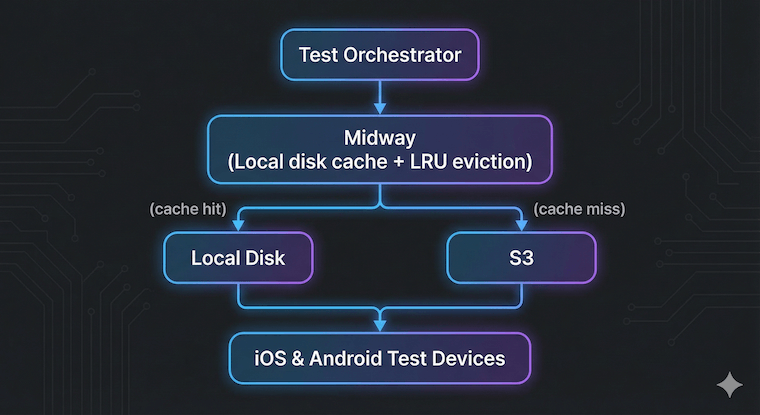
Why LRU Eviction Matters
Mobile app builds have a natural access pattern: recent builds get tested frequently, older builds rarely. Midway uses LRU (Least Recently Used) eviction to automatically manage cache size:
- Set a maximum cache size (e.g., 100GB)
- When the cache is full, the least recently accessed files get evicted
- Hot files stay cached; cold files get evicted and re-fetched if needed
This means you can deploy Midway with a fixed disk allocation and forget about it. No manual cache invalidation, no TTLs to tune—just set it and let the access patterns drive eviction.
Zero Configuration
Getting Midway running takes seconds:
# Download and run
./midway

# That's it. Default: port 8900, 50GB cache
To fetch a file through Midway instead of directly from S3:
# Before (direct S3)
aws s3 cp s3://my-bucket/builds/app-v1.2.3.apk ./app.apk

# After (through Midway)
curl http://localhost:8900/my-bucket/builds/app-v1.2.3.apk -o app.apk
Midway automatically detects bucket regions, handles AWS authentication via the standard credential chain, and persists cache metadata across restarts.
The Results: 70% Cost Reduction, 10x Faster
After deploying Midway across our test infrastructure, the numbers spoke for themselves:
S3 Egress Costs: Down 70%
Our cache hit rate stabilized around 85-90% for active test workloads. Most test runs use recent builds that are already cached. The only cache misses are genuinely new builds being tested for the first time.
The /stats endpoint makes this easy to monitor:
{
    "hits": 15420,
    "misses": 890,
    "evictions": 120,
    "totalBytes": 53687091200,
    "entryCount": 156
}
App Installation: 10x Faster
This was the bigger win. Serving a 200MB APK from local NVMe storage takes milliseconds. Downloading the same file from S3 takes 5-15 seconds depending on network conditions.
| Metric | Before (S3 Direct) | After (Midway) |
|---|---|---|
| Avg install time | 8.2s | 0.8s |
| P99 install time | 18.5s | 1.2s |
| Cache hit rate | N/A | 87% |
When you're running thousands of tests daily, shaving 7+ seconds off each app installation adds up to hours of faster feedback loops for our customers.
Deployment Patterns
We've tested Midway in several configurations:
Sidecar (Kubernetes)
Run Midway as a sidecar container with a persistent volume. Each pod gets its own cache, ideal for workloads with predictable file access patterns.
containers:
- name: midway
image: autonoma/midway:latest
volumeMounts:
- name: cache
mountPath: /var/cache/midway
env:
- name: CACHE_MAX_SIZE_GB
value: "50"
Shared Service
Run a single Midway instance that multiple services connect to. Better cache efficiency since all consumers share the same cache, but introduces a network hop.
Multi-Cloud & Multi-Region
This is where Midway really shines. Modern infrastructure rarely lives in a single region or even a single cloud provider.
The cross-region problem: Your S3 buckets might be in us-east-1, but your compute runs in eu-west-1, ap-southeast-1, and an on-prem data center. Every cross-region transfer incurs latency and higher egress costs. AWS charges $0.02/GB for inter-region transfer on top of standard egress.
The multi-cloud problem: Maybe your ML training runs on GCP, your mobile device farm is on-prem, and your CI/CD artifacts live in S3. Each environment needs access to the same files, but you're paying egress every single time.
Midway solves both:
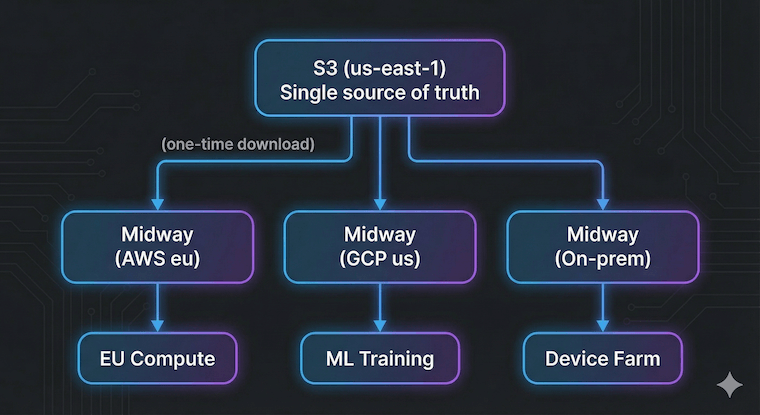 Deploy a Midway instance in each location. The first request to each instance fetches from S3; every subsequent request is served locally. Your
 us-east-1 bucket becomes effectively "local" to every region and cloud.
At Autonoma, we run test infrastructure across multiple regions to minimize latency to our customers' devices. Without Midway, we'd be paying cross-region transfer fees constantly. With Midway, each region maintains its own cache, and S3 egress only happens once per unique file per region.
Bonus: Midway auto-detects bucket regions, so a single instance can transparently serve files from buckets in us-east-1, eu-west-1, and ap-northeast-1 without any configuration changes.
Open Source
We're releasing Midway as open source under the MIT license. If you're dealing with similar S3 egress costs or latency issues, give it a try:
GitHub: github.com/autonoma-ai/midway
The entire codebase is a few hundred lines of Go. No external dependencies beyond the AWS SDK. It's the kind of infrastructure tool that does one thing well.
When Should You Use Midway?
Midway shines when:
- Same files are accessed repeatedly: CI/CD artifacts, ML model weights, app builds, shared assets
- Latency matters: Local disk is always faster than network I/O to S3
- Egress costs are significant: High-volume workloads where the same data is transferred multiple times
- Multi-cloud or multi-region architecture: S3 as your source of truth, with compute distributed across AWS regions, GCP, Azure, or on-prem
- You want simplicity: No Redis, no complex cache invalidation logic, just files on disk
It's probably not the right fit if your access pattern is purely write-once-read-once, or if you need sophisticated cache invalidation based on S3 object versions.
What's Next
We're continuing to improve Midway based on our production experience:
- Metrics export: Prometheus endpoint for better observability
- Pre-warming: API to proactively cache files before they're needed
- Compression: Optional gzip for text-based files
If you're running into similar infrastructure challenges, we'd love to hear from you. Drop us a line or open an issue on GitHub.


