
Quick summary: AI for QA transforms software testing through self-healing tests, smart AI-powered assertions, and autonomous test automation. This guide covers 10 practical steps: defining test cases with AI agents, using no-code tools, enabling self-healing capabilities, implementing smart assertions, generating random test data, organizing tests with tags, integrating into CI/CD pipelines, intelligent device selection, configuring AI-powered alerting, and triaging issues with AI reasoning. Unlike traditional automation that breaks with UI changes, AI-powered testing understands intent, adapts automatically, and reduces maintenance by up to 90%.
Introduction
AI for QA has evolved through three distinct eras. First came manual testing: slow, expensive, humans clicking through applications. Then automated testing promised freedom. Write scripts once, run them forever.
But it wasn't perfect. A designer changed a button's CSS class, and thirty tests failed. Teams spent more time maintaining tests than building features. Test automation platforms became their own maintenance problem.
Therefore, AI for QA emerged. AI agents write tests, heal them when UIs change, and explain failures. The maintenance burden vanishes.
This guide covers ten practical steps for integrating AI into your QA workflow, from AI-assisted testing to fully autonomous AI QA engineers that handle testing end-to-end. You'll understand how generative AI for software testing works in practice and how to implement it.
What You'll Learn: 10 Steps to AI-Powered QA
This comprehensive guide covers:
- Define Test Cases with AI Agents
- Use No-Code AI Tools for QA Automation
- Enable Self-Healing Tests
- Use Smart AI-Powered Assertions
- Generate Random Test Data with AI
- Group Tests with Tags
- Integrate Tests into CI/CD Pipelines
- Intelligent Device Selection
- Configure AI-Powered Alerting and Monitoring
- Triage Issues with AI for Monitoring
Define Test Cases with AI Agents
Writing good test cases requires thinking through edge cases, user flows, and failure modes. It's time-consuming and requires experience.
But AI agents like Claude and ChatGPT excel at structured thinking. Therefore, they analyze requirements, suggest test scenarios, and help you write comprehensive test cases faster.
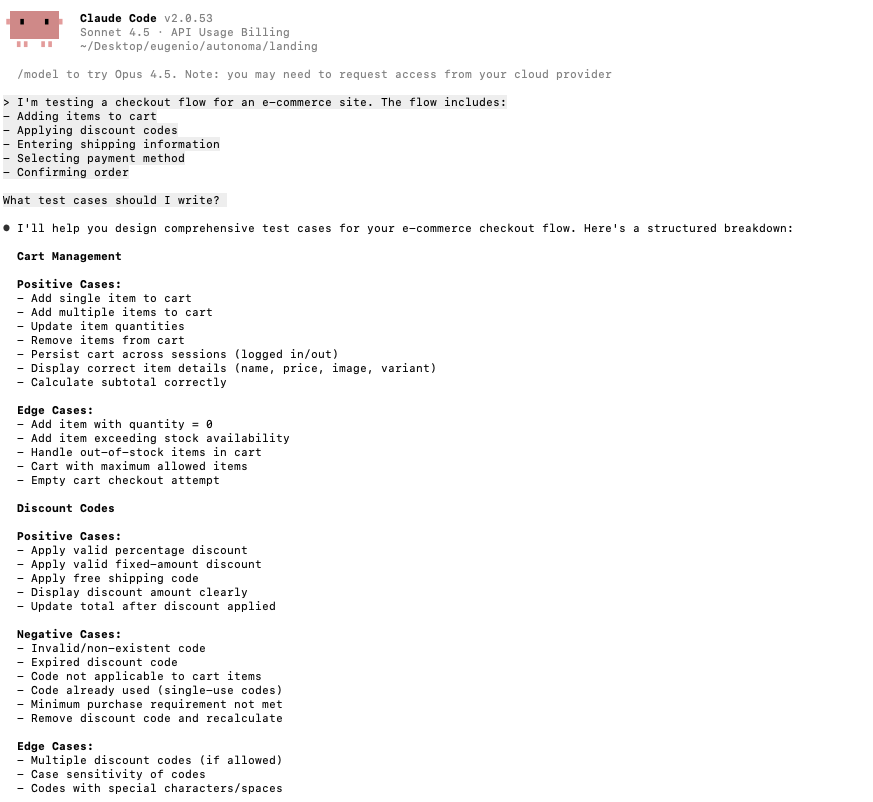
Here's how it works in practice. You provide context about what you're testing:
I'm testing a checkout flow for an e-commerce site. The flow includes:
- Adding items to cart
- Applying discount codes
- Entering shipping information
- Selecting payment method
- Confirming order

What test cases should I write?
The AI responds with structured test cases covering happy paths, edge cases, and error conditions, scenarios you might not have considered: discount codes expiring mid-checkout, session timeouts after payment entry.
This isn't about replacing human judgment but augmenting it. The AI generates a comprehensive starting point. You review, refine, and add domain-specific cases.
For teams building test automation platforms with Playwright or Selenium, this becomes your test planning phase.
Use No-Code AI Tools for QA Automation
Traditional test automation requires coding skills: Playwright scripts, Page Object Models, debugging flaky selectors. It's effective but slow. Only engineers can do it.
But no-code AI testing tools change this. You interact with your application naturally while AI observes and learns. The AI records your intent, not just your actions.
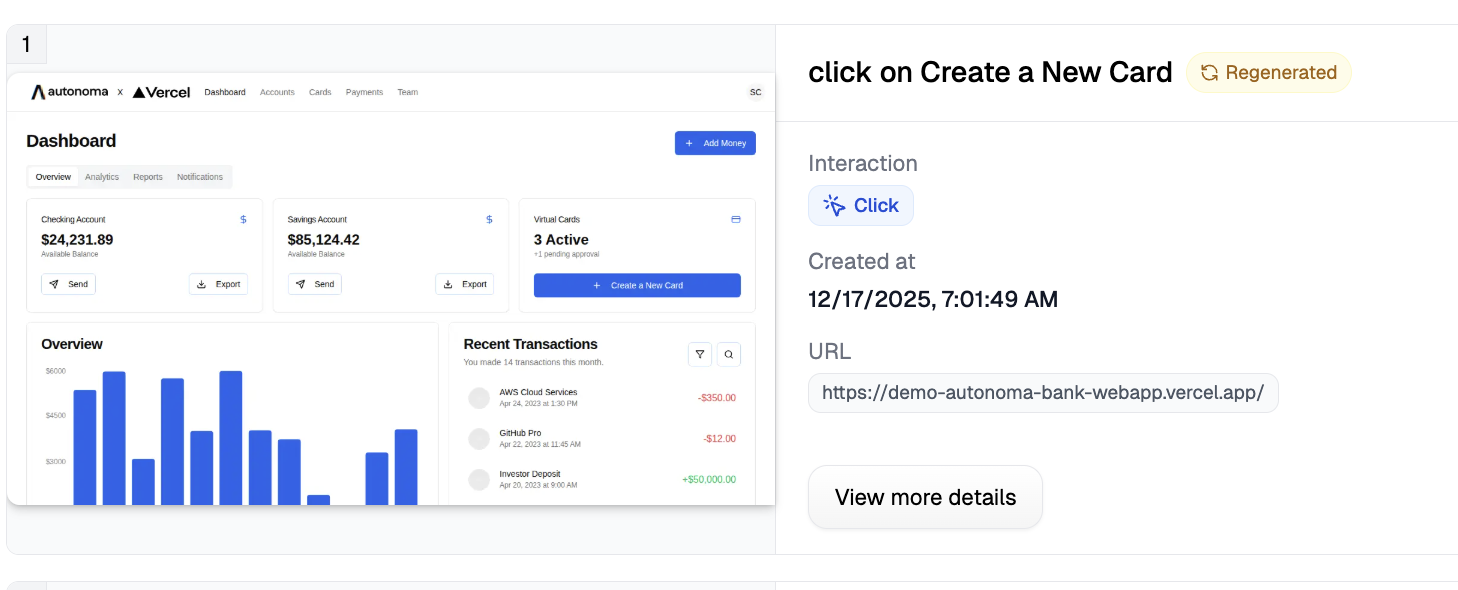
Take Autonoma's Canvas: click through a user flow and describe validations in plain language. "Verify the user sees their order confirmation." The AI creates a test that captures intent.
This matters because intent-based testing adapts when UIs change. Traditional automation breaks when a button class changes from 'btn-primary' to 'button-submit'. Intent-based tests just find "the submit order button" regardless of implementation.
Therefore, no-code tools democratize testing. Product managers create smoke tests. Designers verify their work. QA engineers build regression suites without code.
Enable Self-Healing Tests
Self-healing tests distinguish AI-assisted testing from truly autonomous testing. This is where AI agents for software testing become transformative.
Traditional automated tests break for trivial reasons. A developer changes a CSS class from btn-primary to button-primary. Your test fails, not because functionality broke, but because your test relied on exact strings.
But self-healing tests understand intent, not implementation details. Therefore, they resist trivial changes.
Here's the key distinction:
Bad selector description (brittle): "Click the blue button with rounded corners, 14px padding, white text, located in the top-right corner of the navigation header, positioned 20px from the right edge"
This test breaks when:
- The button's color changes from blue to green
- Padding increases to 16px
- The button moves 30px from the right edge
- The designer adds rounded corners to other buttons too
Good selector description (resilient): "Click the login button"
This test works when:
- The button's color changes
- Its position shifts
- The designer completely redesigns the header
- As long as there's still a login button, the test finds it
Self-healing works by matching elements based on semantic meaning rather than exact attributes. When the AI sees "click the login button," it looks for elements serving the login purpose: checking text content, ARIA labels, and context.
When UIs change, the AI re-evaluates and finds elements matching the original intent. This is generative AI for testing in action, dynamically generating new selectors based on current page structure.
Therefore, traditional quality assurance automation teams spending 30-40% of their time on test maintenance drop to nearly zero. Tests update only when functionality changes, not when designers move pixels. This is why AI-powered software testing fundamentally differs from traditional automation.
Use Smart AI-Powered Assertions
Once you can reliably interact with elements through self-healing, the next challenge is validation.
Traditional assertions are boolean: element exists, element is visible, text equals "expected value." They work but can't check visual appearance or complex conditions without brittle custom code.
Here's a simple example of traditional assertions:
// Traditional assertions - brittle and limited
test('checkout flow', async ({ page }) => {
  await page.goto('/checkout');

  // Basic boolean checks
  await expect(page.locator('.submit-button')).toBeVisible();
  await expect(page.locator('.total-price')).toHaveText('$99.99');
  await expect(page.locator('.discount-badge')).toHaveCount(1);

  // The following are difficult or impossible with traditional assertions:
  // - Checking if the button is actually blue
  // - Verifying that items are correctly sorted
  // - Detecting any typos
  // - Ensuring the badge is positioned as expected
});
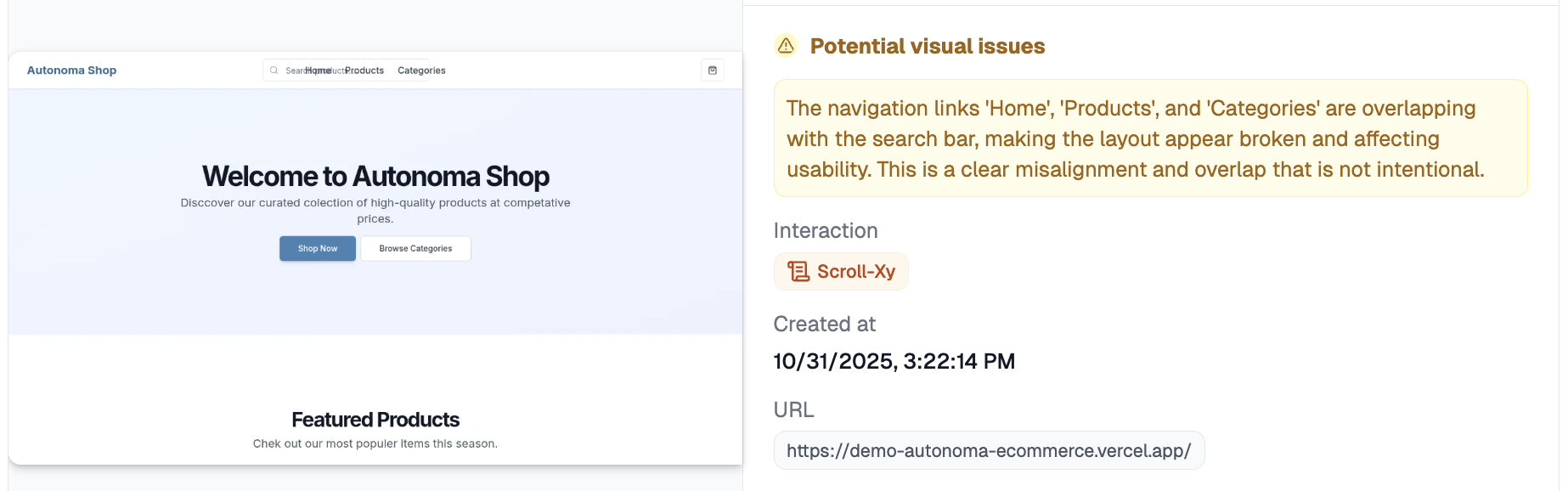
But AI-powered assertions validate anything visually present using natural language. Therefore, you get powerful, maintainable validation.
Visual validation examples:
- "Verify the primary button is blue, not red": color validation without hex codes
- "Verify items are sorted by price, lowest to highest": complex ordering logic without loops
- "Verify no spelling errors in the product description": natural language processing
- "Verify the discount badge appears next to products on sale": relative positioning
- "Verify all product images loaded successfully": visual completeness checks
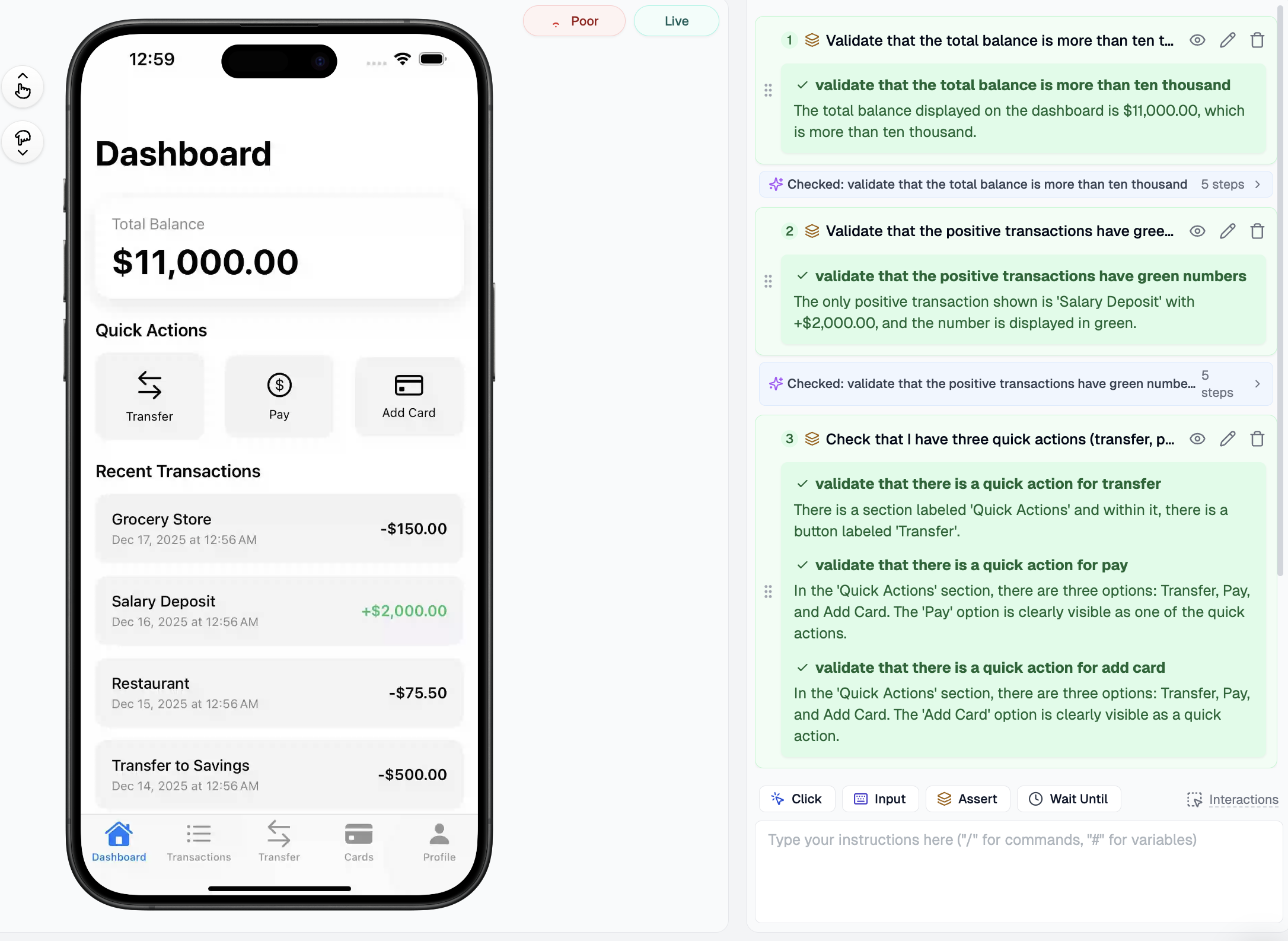
Each assertion uses computer vision and natural language understanding to validate conditions requiring dozens of lines in traditional frameworks. These assertions are readable by non-engineering stakeholders, product managers and designers can understand exactly what's being validated.
When assertions fail, AI provides context about what it saw versus what it expected. When UIs evolve, semantic assertions continue validating intent rather than brittle pixel positions.
Generate Random Test Data with AI
Tests using the same data miss edge cases. A registration form working with "test@example.com" might break with "user+tag@subdomain.co.uk".
Static test data creates blind spots. But dynamic, randomized data catches edge cases.
Traditional test frameworks require writing code for data generation libraries: emails, phone numbers, addresses, credit cards. It works but requires maintenance.
Therefore, AI-powered test data generation simplifies this. Instead of writing generators, you describe what you need:
"Generate a valid email address" "Create a realistic US shipping address" "Generate a credit card number that passes Luhn validation"
The AI generates appropriate data and varies it across test runs automatically. Run the same test ten times, get ten different valid inputs.
With static data, you test once with "John Smith, john@example.com, password123." With AI-generated data, you test with variations: names with apostrophes ("O'Brien"), hyphens ("Mary-Jane Watson"), special characters ("François Müller"), email plus signs ("user+tag@domain.com"), and passwords at minimum length boundaries.
Each test run exercises different code paths. Edge cases that might occur once in a thousand real users get tested regularly.
AI understands context. "Generate a valid phone number" produces the right format (US, UK, or international). "Generate an address" creates plausible streets, real cities, and valid postal codes.
This becomes powerful for testing data validation logic. If your application claims to accept "any valid email," AI-generated test data stress-tests that claim with edge cases you never thought to code.
Group Tests with Tags
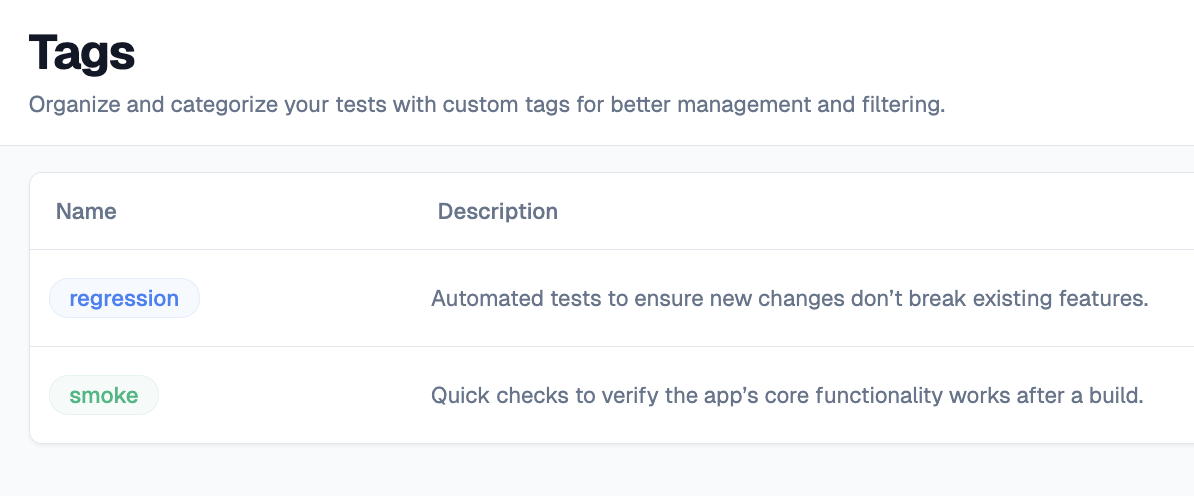
Not all tests need to run all the time. Organizing tests into meaningful groups is essential for efficient QA.
Regression tests cover everything, every feature, edge case, and integration point. They're slow (hours) but comprehensive. Run them before releases.
Smoke tests cover only critical happy paths: login, purchase, account access. They're fast (minutes). Run them constantly: after every deployment, on production schedules.
The distinction matters because execution context determines test selection. A CI/CD pipeline might run smoke tests only. A nightly build runs full regression.
Therefore, AI-powered testing platforms intelligently suggest which tests belong where based on historical data. Tests catching bugs frequently belong in smoke. Tests that haven't failed in six months belong in extended regression.
Tags also enable parallel execution: smoke tests on Chrome desktop, regression across all browsers.
Integrate Tests into CI/CD Pipelines
Tests that only run manually aren't protecting production. Real value comes from automated execution: run tests on every commit, every pull request, every deployment.
Modern CI/CD platforms like GitHub Actions, GitLab CI, and Jenkins all support test automation integration. The pattern is consistent:
- Developer pushes code
- CI/CD pipeline triggers
- Application deploys to staging
- Automated tests run against staging
- If tests pass, deploy to production
- Run smoke tests in production to verify
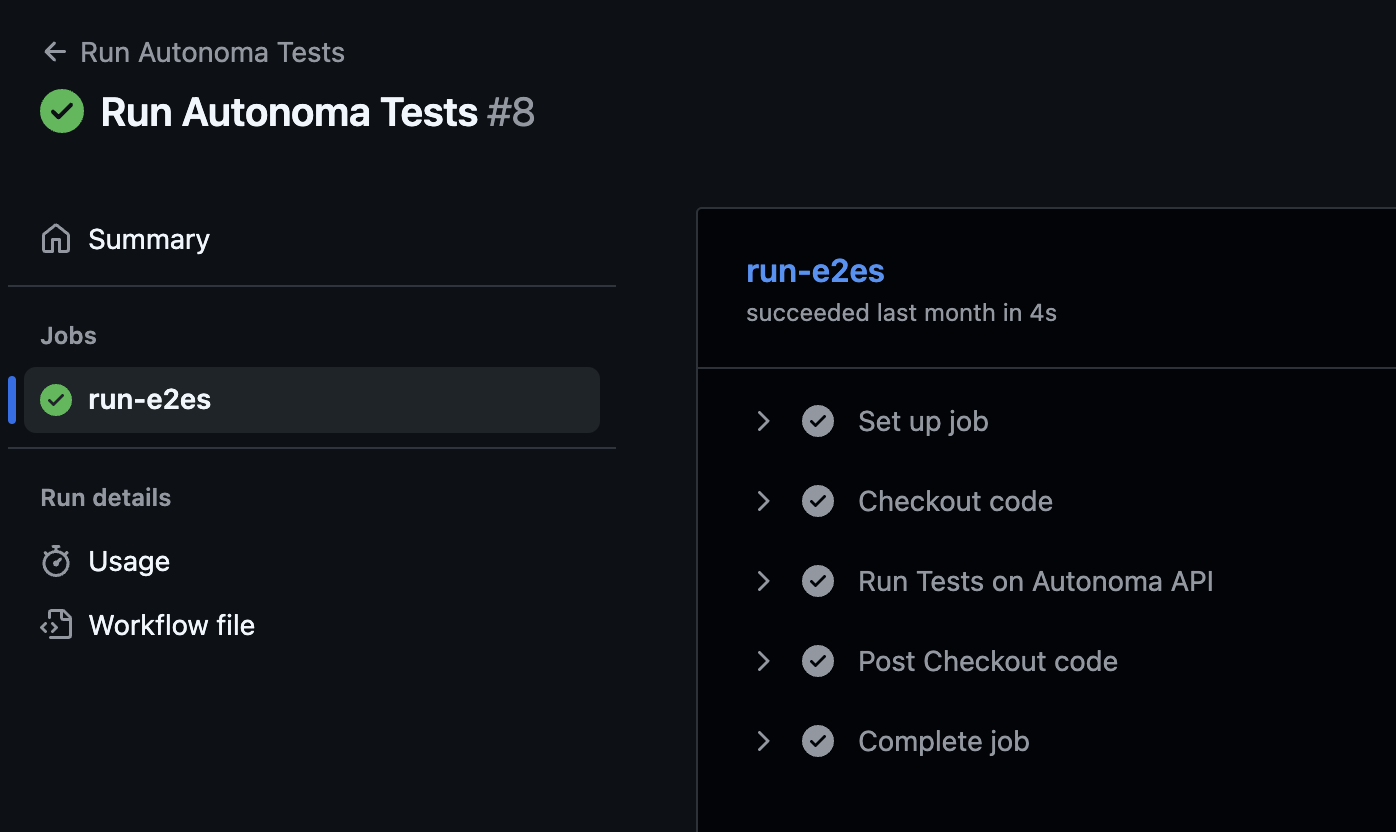
For fully autonomous AI QA engineer systems and intelligent test automation platforms, this integration becomes even more powerful. Instead of running a static test suite, the AI can analyze what changed in the commit and determine which tests are most relevant.
A commit that modifies payment processing logic should trigger payment-related tests with higher priority. A commit that updates a blog post template doesn't need full regression, smoke tests suffice.
Here's a typical GitHub Actions configuration for AI-powered testing:
name: Autonomous QA Tests
on:
  push:
    branches: [main]
  pull_request:
    branches: [main]

jobs:
  smoke-tests:
    runs-on: ubuntu-latest
    steps:
      - name: Trigger smoke tests
        run: |
          curl -X POST https://api.testing-platform.com/run \
            -H "Authorization: Bearer ${{ secrets.API_KEY }}" \
            -d '{"tags": ["smoke"], "environment": "staging"}'

  regression-tests:
    runs-on: ubuntu-latest
    if: github.event_name == 'push'
    steps:
      - name: Trigger full regression
        run: |
          curl -X POST https://api.testing-platform.com/run \
            -H "Authorization: Bearer ${{ secrets.API_KEY }}" \
            -d '{"tags": ["regression"], "environment": "staging"}'
The key is making test execution automatic and non-blocking when appropriate. Smoke tests should block deployment: if critical flows break, don't ship. Regression tests can run asynchronously: start the deployment, run extended tests in parallel, and alert if they find issues.
Intelligent Device Selection
Users browse on various devices: Chrome desktop, Safari mobile, Android phones, iPads. Your tests should reflect this diversity.
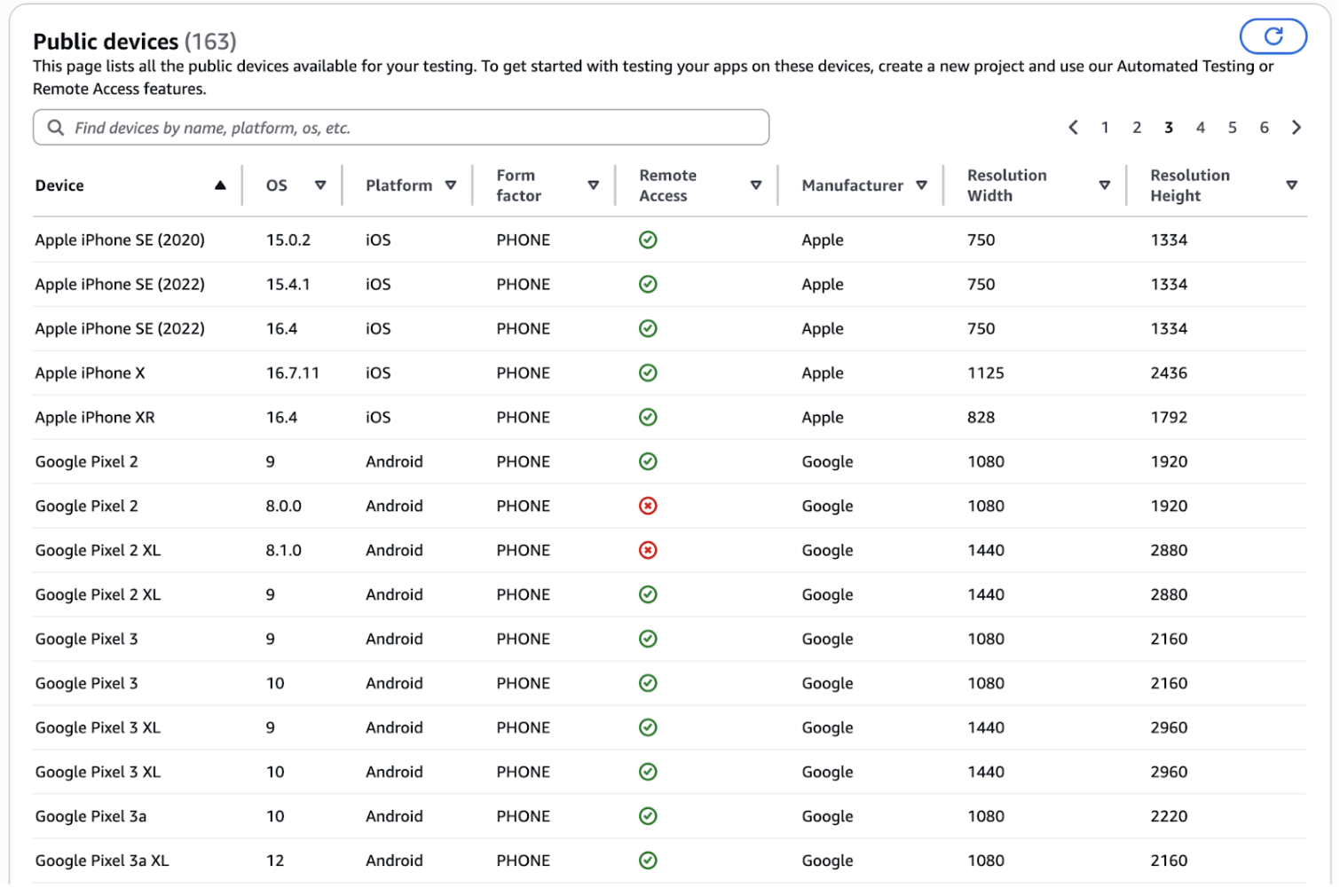
But testing every flow on every device is impractical. A single test across 10 device combinations becomes 10 tests. Your 500-test suite becomes 5,000 tests.
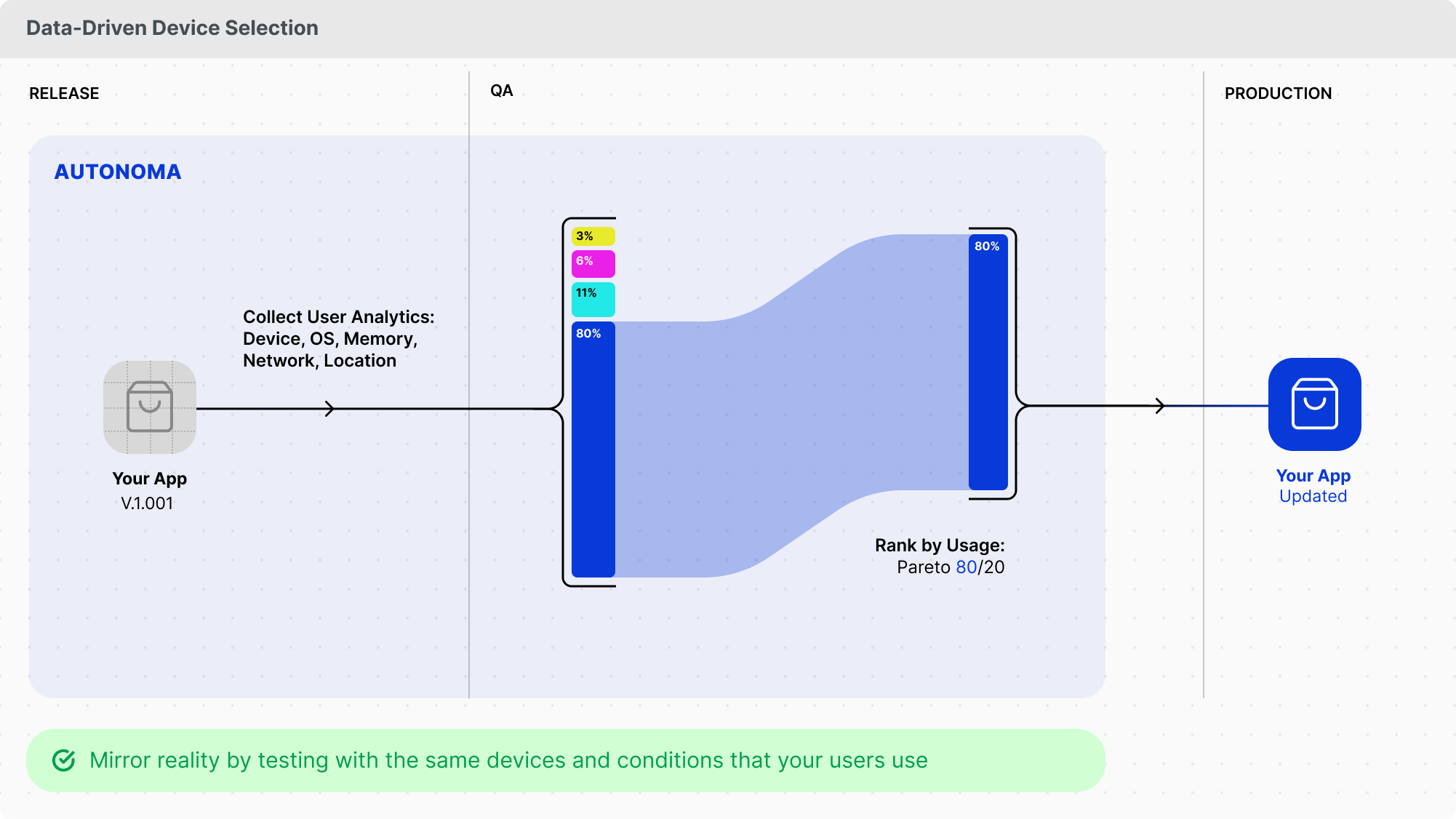
Therefore, use data-driven device selection. Analyze application logs to identify which devices users actually use. If 60% of traffic comes from Chrome desktop, prioritize that. If 25% comes from Safari iPhone, test that second. If only 2% comes from Internet Explorer, skip it.
AI systems analyze this data and recommend optimal coverage. They identify patterns: "80% of checkout failures happen on Safari mobile." That's where to focus effort.
Modern testing platforms offer device emulation and real device clouds. Run the same test across multiple devices without duplicating code.
Configure AI-Powered Alerting and Monitoring
Tests that run but don't notify anyone when they fail are pointless. The goal is proactive detection: finding issues before users report them.
But not every test failure deserves immediate escalation. A flaky test shouldn't wake anyone at 3 AM. A critical checkout flow failing repeatedly does.
Therefore, AI-powered alerting distinguishes between noise and signal by analyzing failure patterns:
- Consistent failures across multiple runs indicate real bugs: alert immediately
- Intermittent failures might indicate flakiness: alert after pattern confirmation
- Environmental issues like network timeouts: retry before alerting
- Self-healing successful (test adapted to UI change): log but don't alert
Integration options include:
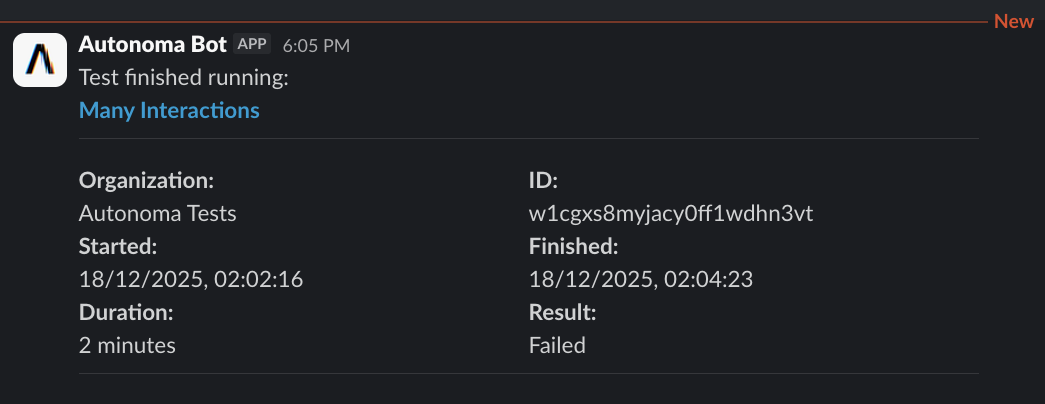
Slack messages provide immediate visibility with failure details, screenshots, and direct links.
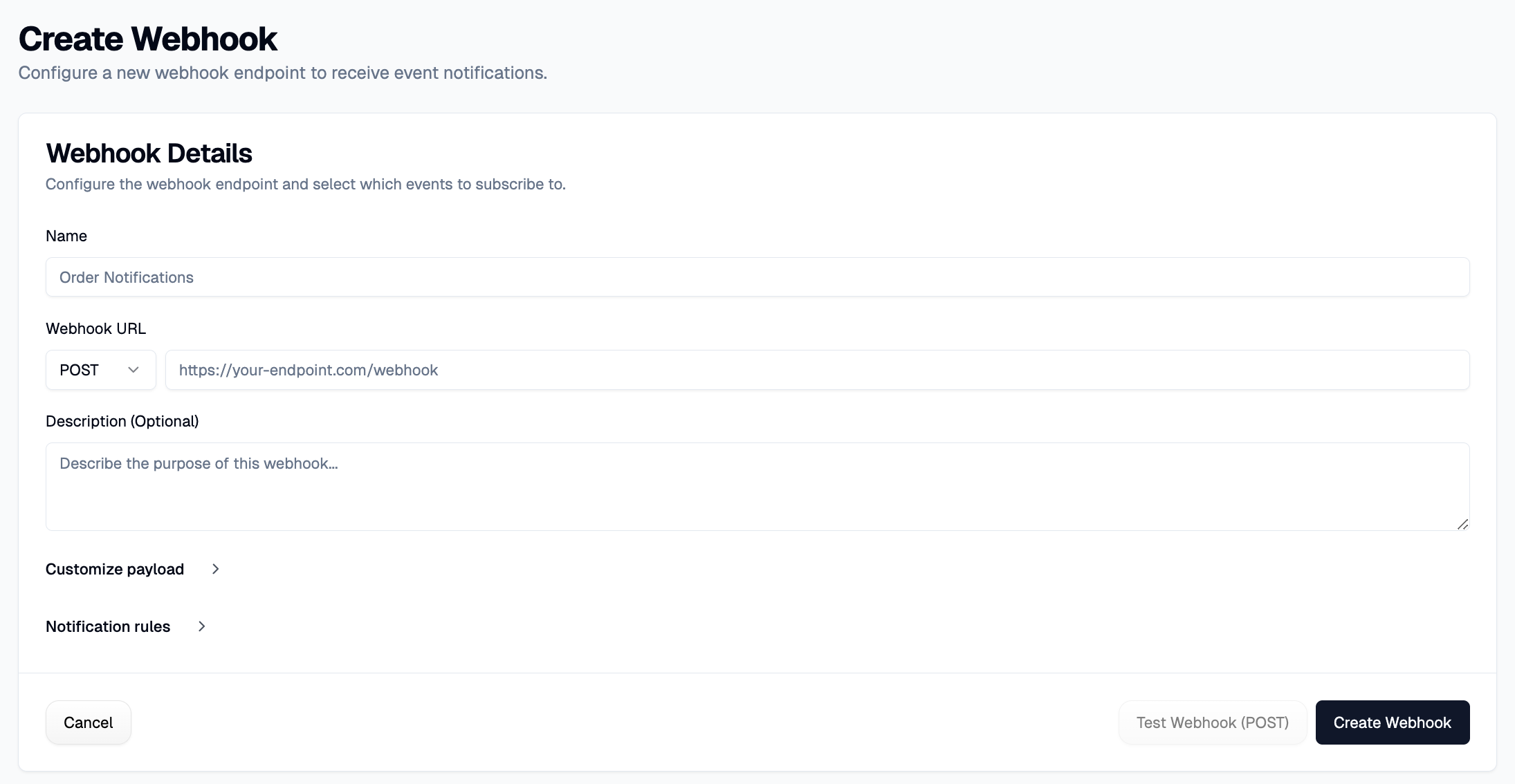
Webhooks enable custom integrations, send failure data to incident management systems or create tasks in project management tools.
Jira integration automatically creates tickets for confirmed failures. Kavak uses this approach: when Autonoma's AI agents detect customer-facing issues in production, they automatically create Jira tickets routed to Kavak's Solutions Center. Read the full Kavak case study.
The result? Kavak detects and resolves issues before customers notice them.
Smart alerting includes escalation policies: if a critical failure isn't acknowledged within 15 minutes, escalate to on-call engineers. This ensures appropriate attention without notification fatigue.
Triage Issues with AI for Monitoring
Traditional test failures provide stack traces and error messages. They tell you what broke. They don't tell you why.
"Element not found: .btn-submit", okay, but why? Did the selector change? Is there a JavaScript error preventing the element from rendering? Is the page loading slowly? Did functionality actually break, or is this test flakiness?

AI-powered failure analysis provides reasoning, not just error messages. When a test fails, the AI agent analyzes:
- What the test was trying to do: "Attempting to complete checkout process"
- What actually happened: "Submit button never appeared after entering payment info"
- Possible causes: "Payment validation API returned error 500. Server logs show database connection timeout."
- Recommended actions: "Check payment service health. Previous incidents resolved by restarting payment microservice."
This reasoning comes from the AI's understanding of your application architecture, historical failure patterns, and the specific context of the current failure. It's not just pattern matching, it's genuine analysis.
For QA agents, this reasoning capability is transformative. Instead of QA engineers spending hours debugging why a test failed, they get a detailed explanation immediately. They can act on the information rather than investigating to find it.
The AI can even categorize failures automatically:
- Infrastructure issues: network timeouts, service unavailability
- Application bugs: logic errors, broken features
- Test issues: flaky selectors, incorrect assertions
- Environmental problems: staging data issues, configuration mismatches
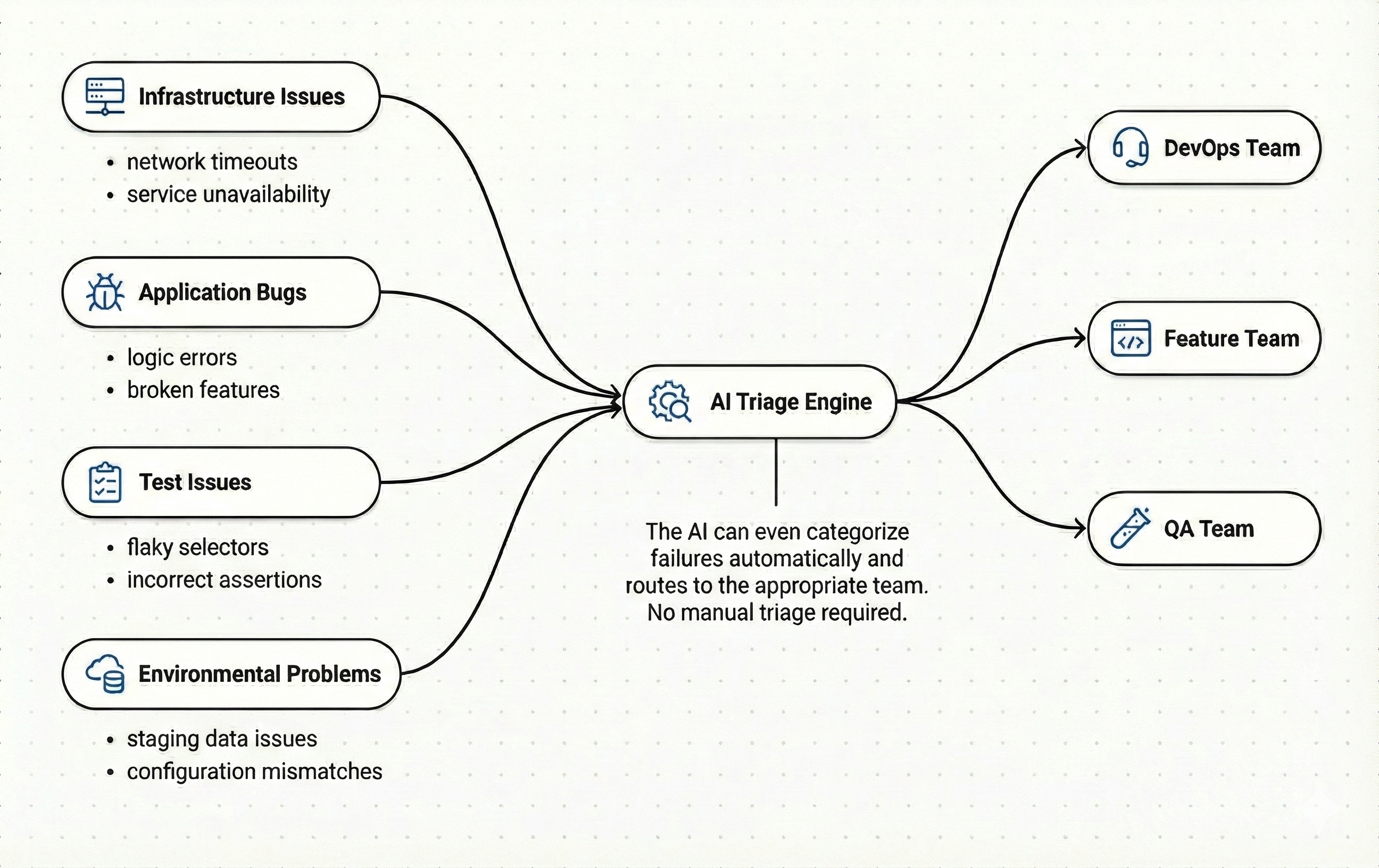
Each category routes to the appropriate team. Infrastructure issues go to DevOps. Application bugs go to the feature team. Test issues get fixed by QA. No manual triage required.
This is the final piece of fully autonomous AI QA engineer systems. The AI doesn't just run tests and report pass/fail. It understands what broke, why it broke, and what should happen next.
Autonoma takes this further by combining AI-driven test generation with execution on real browsers and devices — agents read your codebase, plan test cases, and run them end-to-end on every PR.
Frequently Asked Questions About AI for QA
AI for QA uses artificial intelligence and machine learning to automate software testing processes, including test creation, execution, maintenance, and failure analysis. Unlike traditional test automation, AI-powered testing can adapt to UI changes through self-healing, understand intent rather than exact selectors, and provide intelligent insights about test failures.
Self-healing tests use AI to understand the intent behind test actions rather than relying on brittle CSS selectors or XPaths. When UI elements change, the AI re-evaluates the page structure and finds elements that match the original intent, automatically updating selectors without manual intervention.
Traditional test automation requires manual script maintenance whenever UI changes occur. AI-powered testing uses self-healing capabilities to automatically adapt to changes, reducing maintenance by up to 90%. Additionally, AI testing can write tests in natural language, provide intelligent failure analysis, and make decisions about test execution priority.
AI transforms the role of QA engineers rather than replacing them. Instead of writing and maintaining test scripts, QA engineers focus on test strategy, identifying critical flows, and interpreting AI-generated insights. AI handles repetitive tasks while humans provide domain expertise and strategic direction.
AI testing platforms typically cost between $500-$3,000 per month depending on team size and features. This is significantly less than traditional QA automation costs, which can exceed $200,000 annually when factoring in engineer salaries, tool licenses, and maintenance time.
Implementation typically takes 2-4 weeks for initial setup and pilot testing. Teams can start with a small set of critical test cases, validate the approach, and then scale to comprehensive test coverage. The fastest results come from starting with smoke tests for critical user journeys.
Yes, AI testing platforms integrate with all major CI/CD systems including GitHub Actions, GitLab CI, Jenkins, CircleCI, and Azure DevOps. Integration typically involves adding API calls to trigger test runs and receive results.
Conclusion
AI transforms QA from a bottleneck into an accelerator.
Traditional software testing tools promised to eliminate manual testing. But test maintenance became a full-time job. Every UI change broke tests. The promise of "write once, run forever" never materialized.
Therefore, generative AI for software testing solves the maintenance problem through self-healing and intent-based testing. Tests understand goals, not implementation. When UIs change, tests adapt. When tests fail, AI explains why.
AI enables capabilities impossible with traditional automation:
- Tests that understand visual appearance, not just DOM structure
- Natural language assertions readable by non-technical stakeholders
- Failure analysis with reasoning, not just stack traces
- Adaptive execution responding to application state
- Production monitoring catching issues before users report them
The ten steps in this guide provide a roadmap. Start small: use AI to write test cases. Adopt no-code tools to democratize testing. Implement self-healing to eliminate maintenance. Build toward fully autonomous systems handling continuous testing end-to-end.
The future of QA is autonomous AI QA engineers that understand applications, validate functionality, adapt to changes, and explain failures. Teams embracing this future ship faster with higher quality.
The question isn't whether AI will transform QA. It already has. The question is how quickly your team will adopt these practices.


