

If maintaining Cypress tests for your Flutter web app adds too much overhead, Autonoma generates E2E coverage from your codebase automatically: a Planner agent plans the test cases and a Diffs Agent keeps them current, without requiring test scripts or selectors.
Table of Contents
- Introduction
- Understanding Flutter Web Architecture
- Why Testing Flutter Web Apps is Different
- Setting Up Cypress for Flutter Web
- Finding Flutter Widgets: Semantic Selectors
- Testing Flutter Widget Interactions
- Testing Navigation and Routing
- API Mocking and Network Testing
- Common Problems and Solutions
- Cypress vs Playwright for Flutter Web
- Debugging Flutter Web Tests
- Best Practices
- Conclusion
- Frequently Asked Questions
Introduction
Testing Flutter web apps with Cypress is possible, but not straightforward. Flutter's approach to web rendering creates unique challenges that traditional browser testing frameworks weren't designed to handle.
I tested three Flutter web apps last month. The first used CanvasKit renderer (Flutter's default). Cypress couldn't find any widgets. Every selector returned nothing. The content existed visually but was invisible to the DOM. I switched to HTML renderer mode. Suddenly, Cypress could see elements, but only with the right semantic labels.
This guide shows you exactly how to test Flutter web applications with Cypress. You'll learn how Flutter's rendering modes affect testing, how to make your widgets discoverable using Semantics, how to write stable tests that survive Flutter's widget tree updates, and when Cypress is the right choice compared to Playwright or other tools.
As Autonoma's CEO with 8+ years building test automation at scale, I've seen teams struggle with Flutter web testing more than any other framework. The rendering architecture is fundamentally different from React or Vue, requiring a testing approach built around accessibility rather than DOM structure.
Understanding Flutter Web Architecture
Flutter wasn't built for the web originally. It was designed for mobile, where it renders everything using Skia graphics engine. When Flutter added web support, it had to make a choice: prioritize visual consistency or web compatibility.
CanvasKit vs HTML Renderer
Flutter web offers two rendering modes, each with different testing implications.
CanvasKit Renderer (default for most deployments):
- Renders everything to HTML canvas using WebAssembly
- Pixel-perfect consistency with mobile apps
- Content is invisible to DOM inspection tools
- Cypress sees a canvas element, nothing inside it
- Better performance for complex animations
- Smaller bundle size after initial load
HTML Renderer:
- Converts Flutter widgets to HTML, CSS, and DOM elements
- Content is accessible to Cypress selectors
- May have visual inconsistencies compared to mobile
- Larger DOM tree, slightly slower rendering
- Required for most automated testing scenarios
You choose the renderer at build time:
# CanvasKit (default) - harder to test
flutter build web

# HTML renderer - easier to test
flutter build web --web-renderer html

# Auto mode - Flutter chooses based on device
flutter build web --web-renderer auto
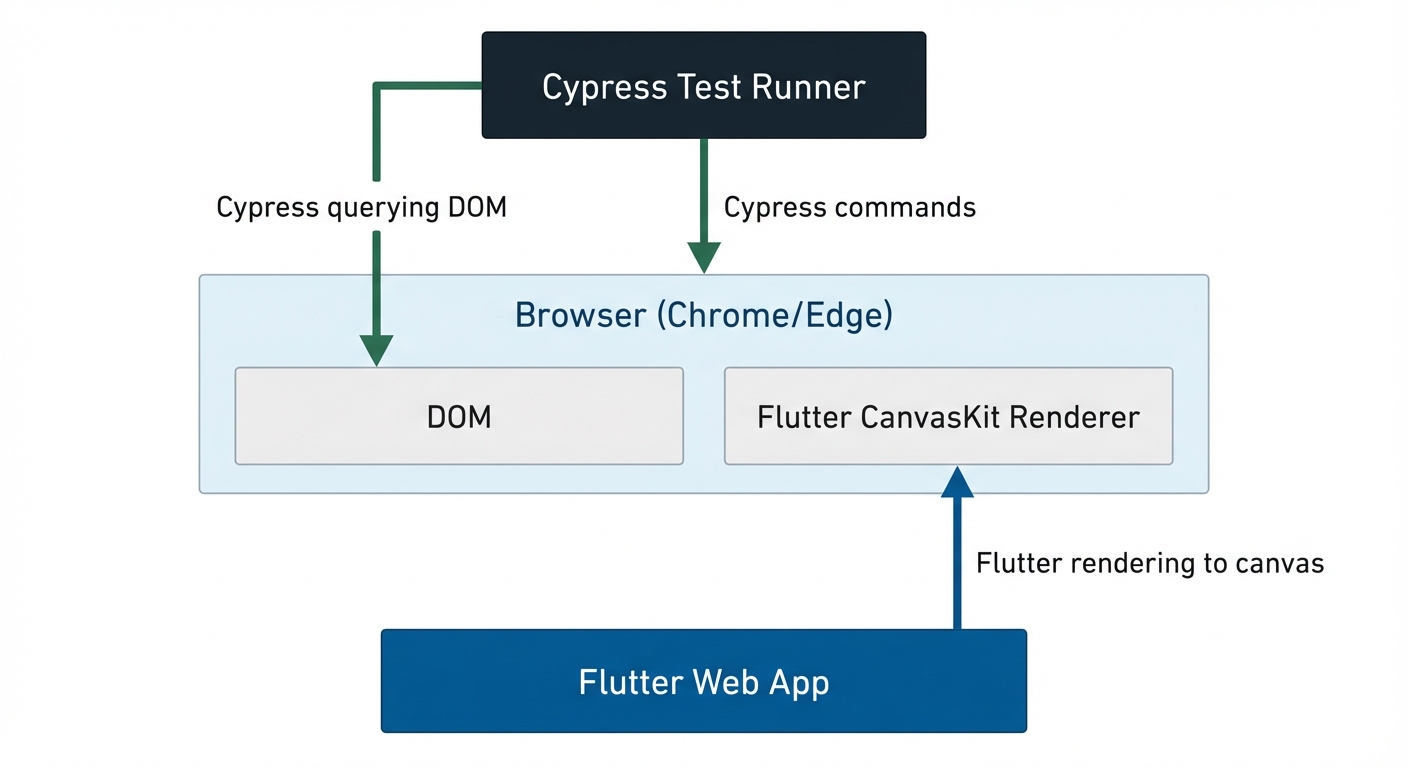
For Cypress testing, you almost always need HTML renderer. CanvasKit renders your entire app to a single canvas. Cypress can't query inside that canvas. It's like trying to find specific pixels in an image file.
The Flutter Widget Tree vs DOM
In React, components map directly to DOM elements. A button becomes a <button>. Cypress finds it easily. Flutter doesn't work this way.
Flutter builds a widget tree internally. This tree describes your UI. Then the rendering engine (CanvasKit or HTML) converts that tree to visual output. With HTML renderer, Flutter generates DOM elements, but they're synthetic. A Flutter Button doesn't become <button>. It becomes a complex structure of <div> elements with generated class names like flt-semantics-container-xx.
This creates three testing challenges:
Challenge 1: No semantic HTML. Flutter doesn't use standard HTML elements. You can't rely on selectors like cy.get('button') or cy.get('input[type="email"]').
Challenge 2: Generated classes change. Class names are auto-generated and non-deterministic. flt-semantics-container-43 today might be flt-semantics-container-87 tomorrow.
Challenge 3: Shadow DOM and iframes. Flutter web uses shadow DOM for encapsulation. Some elements live in shadow roots, making them harder to query.
The solution: Flutter's Semantics system, which exposes widgets through ARIA attributes that Cypress can query reliably.
Why Testing Flutter Web Apps is Different
If you've tested React or Vue apps with Cypress, Flutter web will surprise you. The techniques that work for standard web frameworks often fail.
What Makes Flutter Web Testing Harder
No stable selectors by default. React apps have consistent classes, IDs, or data attributes. Flutter generates everything. A button you added yesterday has no identifier today unless you explicitly add one.
Canvas rendering hides content. With CanvasKit, the entire UI is pixels on a canvas. Cypress queries DOM. Canvas content isn't in the DOM. It's like testing a video game - the graphics are there, but they're not queryable elements. Even with HTML renderer, you can't rely on text content alone. Flutter might split text across multiple elements or hide it in ARIA labels.
Widget lifecycle complexity. Flutter rebuilds widgets aggressively. When state changes, Flutter tears down and rebuilds parts of the widget tree. React reconciliation is predictable. Flutter's rebuild behavior can surprise you. A widget that existed a moment ago might be destroyed and recreated with a new identity.
When Cypress Works Well with Flutter Web
Cypress isn't the wrong choice for every Flutter web app. It works well when:
You control the Flutter codebase and can add Semantics widgets. If you can modify Flutter code to add semantic labels, Cypress becomes viable. Without this, you're stuck guessing at selectors.
You use HTML renderer in production. Some teams deploy with HTML renderer for better SEO or accessibility. If your production app uses HTML renderer, testing matches reality.
Your app is semantically rich. Apps that already prioritize accessibility (screen reader support, ARIA labels, keyboard navigation) are easier to test. The same semantic information that helps screen readers helps Cypress.
You're already invested in Cypress. If your team uses Cypress for other apps and knows it well, adapting it for Flutter might be easier than learning Playwright.
Setting Up Cypress for Flutter Web
Installing Cypress
Start with a standard Cypress installation:
npm install cypress --save-devInitialize Cypress:
npx cypress openThis creates cypress.config.ts and a cypress directory.
Configuring for Flutter Web
Open cypress.config.ts:
import { defineConfig } from 'cypress';

export default defineConfig({
  e2e: {
    baseUrl: 'http://localhost:8080', // Flutter web dev server default
    viewportWidth: 1280,
    viewportHeight: 720,
    video: false,
    screenshotOnRunFailure: true,
    defaultCommandTimeout: 10000, // Flutter can be slower than React

    setupNodeEvents(on, config) {
      // implement node event listeners here
    },
  },
});
Note the longer defaultCommandTimeout. Flutter web, especially with CanvasKit, can take longer to initialize than typical React apps.
Running Flutter Web Dev Server
Unlike React's npm start, Flutter uses its own dev server:
# HTML renderer (required for Cypress testing)
flutter run -d chrome --web-renderer html --web-port 8080

# Or for release mode testing
flutter build web --web-renderer html
# Then serve the build/web directory with any static server
Critical: Always use HTML renderer for Cypress tests. CanvasKit will cause all your tests to fail because Cypress can't see content inside the canvas.
Project Structure
Your Flutter project now has Cypress tests alongside Flutter code:
your-flutter-app/
├── lib/
│   └── main.dart
├── test/           # Flutter unit tests
├── integration_test/ # Flutter integration tests
├── cypress/
│   ├── e2e/
│   │   ├── auth/
│   │   │   └── login.cy.ts
│   │   └── home.cy.ts
│   ├── fixtures/
│   └── support/
├── cypress.config.ts
└── package.json
Keep Flutter integration tests (integration_test/) separate from Cypress E2E tests (cypress/). They serve different purposes. Flutter integration tests run in the Flutter test environment. Cypress tests run in real browsers.
Your First Flutter Web Test
Create cypress/e2e/home.cy.ts:
describe('Flutter App Home', () => {
  it('loads the app', () => {
    cy.visit('/');

    // Wait for Flutter to initialize
    // Look for the Flutter view container
    cy.get('flutter-view', { timeout: 15000 }).should('exist');

    // Check for semantic content
    cy.get('[role="main"]').should('exist');
  });
});
This test does three things: visits your Flutter app, waits for the Flutter view to exist (Flutter's initialization can take several seconds), and verifies semantic structure is present. If this test fails with "element not found," you're likely running CanvasKit renderer instead of HTML.
Finding Flutter Widgets: Semantic Selectors
Finding Flutter widgets is the hardest part of Cypress testing. You can't use typical selectors. Here's how to make widgets discoverable.
Adding Semantics to Flutter Widgets
Flutter's Semantics widget exposes information to accessibility tools (and to Cypress). Wrap your widgets with Semantics:
import 'package:flutter/material.dart';

class LoginPage extends StatelessWidget {
  @override
  Widget build(BuildContext context) {
    return Scaffold(
      body: Column(
        children: [
          // Add semantic label to TextField
          Semantics(
            label: 'email-input',
            child: TextField(
              decoration: InputDecoration(labelText: 'Email'),
            ),
          ),

          // Add semantic label to password field
          Semantics(
            label: 'password-input',
            child: TextField(
              decoration: InputDecoration(labelText: 'Password'),
              obscureText: true,
            ),
          ),

          // Add semantic label to button
          Semantics(
            label: 'login-button',
            button: true,
            child: ElevatedButton(
              onPressed: () => _handleLogin(context),
              child: Text('Sign In'),
            ),
          ),
        ],
      ),
    );
  }

  void _handleLogin(BuildContext context) {
    // Login logic
  }
}
These Semantics widgets generate ARIA attributes in the HTML renderer output. Semantics(label: 'email-input') becomes aria-label="email-input" in the DOM.
Cypress Selectors for Flutter Widgets
Now query them in Cypress using ARIA attributes:
describe('Login Flow', () => {
  it('user can log in', () => {
    cy.visit('/login');

    // Select by aria-label from Semantics
    cy.get('[aria-label="email-input"]').type('[email protected]');
    cy.get('[aria-label="password-input"]').type('securePassword123');
    cy.get('[aria-label="login-button"]').click();

    // Verify navigation after login
    cy.url().should('include', '/dashboard');
  });
});
Using Keys as Test Identifiers
Flutter's Key system provides another option. Assign Keys to widgets:
ElevatedButton(
  key: Key('submit-button'),
  onPressed: () => _submit(),
  child: Text('Submit'),
)
Query by the data-key attribute (varies by Flutter version):
// This might work depending on Flutter web version
cy.get('[data-key="submit-button"]').click();
Keys are less reliable than Semantics for Cypress. Semantics generates standard ARIA attributes. Keys generate custom attributes that Flutter might change between versions.
Finding Text in HTML Renderer
With HTML renderer, you can sometimes use text content:
describe('Home Page', () => {
  it('displays welcome message', () => {
    cy.visit('/');

    // Find by visible text (works in HTML renderer)
    cy.contains('Welcome to Flutter').should('be.visible');

    // Click a button by text
    cy.contains('button', 'Get Started').click();
  });
});
Warning: Text selectors are fragile in Flutter. Flutter might split text across multiple DOM elements, apply transformations, or hide it in shadow DOM. Always prefer semantic labels.
Handling Shadow DOM
Flutter web sometimes uses shadow DOM. Cypress handles shadow DOM with the shadow() command, but it's experimental:
// If element is in shadow DOM
cy.get('flt-glass-pane')
  .shadow()
  .find('[aria-label="menu-button"]')
  .click();
Avoid relying on this. If your tests need shadow DOM traversal frequently, reconsider your approach (or switch to Playwright, which handles shadow DOM better).
Selector Strategy Hierarchy
Use selectors in this priority order:
Most reliable: ARIA labels from Semantics widgets (cy.get('[aria-label="widget-name"]')). These are stable, semantic, and intentional.
Sometimes reliable: Text content with cy.contains(). Works if text is unique and not split across elements.
Least reliable: Generated classes like .flt-semantics-container. Never use these. They change between builds.
Never use: XPath or complex CSS paths that rely on DOM structure. Flutter's DOM output is an implementation detail that changes.
Testing Flutter Widget Interactions
Interacting with Flutter widgets through Cypress requires understanding how Flutter handles events in the browser.
Clicking Buttons and Widgets
Basic clicks work the same as React, but only if the widget has proper semantic markup:
describe('Button Interactions', () => {
  it('increments counter when button clicked', () => {
    cy.visit('/');

    // Initial state
    cy.contains('Counter: 0').should('be.visible');

    // Click button (must have Semantics label)
    cy.get('[aria-label="increment-button"]').click();

    // Verify state update
    cy.contains('Counter: 1').should('be.visible');

    // Multiple clicks
    cy.get('[aria-label="increment-button"]').click();
    cy.get('[aria-label="increment-button"]').click();

    cy.contains('Counter: 3').should('be.visible');
  });
});
If clicking doesn't work, the widget might not be receiving pointer events. Flutter handles touch and mouse events differently than standard HTML. Ensure your Flutter widget uses GestureDetector or button widgets that handle web events properly.
Typing in TextField Widgets
TextField interactions require the HTML renderer and proper focus handling:
describe('Form Input', () => {
  it('fills out form fields', () => {
    cy.visit('/signup');

    // Type in Flutter TextField (with Semantics label)
    cy.get('[aria-label="username-input"]').type('johndoe');
    cy.get('[aria-label="email-input"]').type('[email protected]');
    cy.get('[aria-label="password-input"]').type('securePass123');

    // Submit form
    cy.get('[aria-label="submit-button"]').click();

    // Verify submission
    cy.contains('Account created').should('be.visible');
  });
});
Flutter TextField in HTML renderer generates an actual <input> element behind the scenes. Cypress's .type() command works because it triggers real keyboard events that Flutter's web engine captures.
Interacting with Dropdowns and Selects
Flutter doesn't use HTML <select> elements. DropdownButton creates custom UI. You need to click to open, then click an option:
// Flutter code
Semantics(
  label: 'country-dropdown',
  child: DropdownButton<String>(
    value: selectedCountry,
    items: ['USA', 'Canada', 'UK'].map((country) =>
      DropdownMenuItem(
        value: country,
        child: Semantics(
          label: 'country-option-$country',
          child: Text(country),
        ),
      )
    ).toList(),
    onChanged: (value) => setState(() => selectedCountry = value),
  ),
)
Test it:
describe('Dropdown Selection', () => {
  it('selects country from dropdown', () => {
    cy.visit('/profile');

    // Click to open dropdown
    cy.get('[aria-label="country-dropdown"]').click();

    // Click specific option
    cy.get('[aria-label="country-option-Canada"]').click();

    // Verify selection
    cy.contains('Selected: Canada').should('be.visible');
  });
});
Testing Scrollable Lists
ListView and GridView widgets create scrollable containers. Cypress can scroll, but Flutter's virtual scrolling can make this tricky:
describe('Product List', () => {
  it('loads products as user scrolls', () => {
    cy.visit('/products');

    // Find scrollable container (needs Semantics label)
    cy.get('[aria-label="product-list"]').as('list');

    // Check initially visible products
    cy.contains('Product 1').should('be.visible');

    // Scroll down
    cy.get('@list').scrollTo('bottom');

    // Wait for lazy-loaded products
    cy.contains('Product 20', { timeout: 10000 }).should('be.visible');
  });
});
Flutter's ListView.builder() only renders visible items. Scrolling triggers item builds. This is fast in mobile apps, but can be slow in web browsers, especially with CanvasKit. Increase timeouts for scroll-triggered content.
Gestures and Drag-and-Drop
Cypress's drag command works, but Flutter's gesture detection might not recognize it:
describe('Drag Interaction', () => {
  it('reorders list items by dragging', () => {
    cy.visit('/tasks');

    // Attempt to drag (might not work reliably)
    cy.get('[aria-label="task-1"]').drag('[aria-label="task-position-3"]');

    // Alternative: Use programmatic interactions
    // Better: Test drag via Flutter integration tests, not Cypress
  });
});
Drag-and-drop is one area where Flutter integration tests (integration_test package) work better than Cypress. Flutter's GestureDetector expects touch or pointer events structured in specific ways. Browser-generated drag events might not match.
Testing Navigation and Routing
Flutter web apps use Navigator for routing. Testing navigation requires understanding how Flutter updates the URL.
Testing Named Routes
If your Flutter app uses named routes:
// Flutter router setup
MaterialApp(
  initialRoute: '/',
  routes: {
    '/': (context) => HomePage(),
    '/products': (context) => ProductsPage(),
    '/products/details': (context) => ProductDetailsPage(),
    '/cart': (context) => CartPage(),
  },
)
Test navigation:
describe('App Navigation', () => {
  it('navigates through app routes', () => {
    cy.visit('/');

    // Click navigation link
    cy.get('[aria-label="products-link"]').click();

    // Verify URL changed
    cy.url().should('include', '/products');

    // Verify new page loaded
    cy.contains('Our Products').should('be.visible');

    // Navigate to product details
    cy.get('[aria-label="product-1"]').click();

    cy.url().should('include', '/products/details');
    cy.contains('Product Details').should('be.visible');

    // Browser back button
    cy.go('back');

    cy.url().should('include', '/products');
  });
});
Flutter's Navigator updates the browser URL when you use named routes with Navigator.pushNamed(). Cypress sees these URL changes immediately.
Testing go_router Package
Many Flutter web apps use the go_router package for declarative routing:
// Flutter go_router setup
final router = GoRouter(
  routes: [
    GoRoute(
      path: '/',
      builder: (context, state) => HomePage(),
    ),
    GoRoute(
      path: '/products/:id',
      builder: (context, state) => ProductPage(id: state.params['id']!),
    ),
  ],
);
Test parameterized routes:
describe('Go Router Navigation', () => {
  it('navigates to product with ID', () => {
    cy.visit('/');

    // Click product link
    cy.get('[aria-label="product-link-123"]').click();

    // Verify URL includes parameter
    cy.url().should('match', /\/products\/\d+/);
    cy.url().should('include', '/products/123');

    // Verify correct product loaded
    cy.contains('Product #123').should('be.visible');
  });
});
Handling Deep Links
Test that deep links work (direct navigation to nested routes):
describe('Deep Linking', () => {
  it('loads app from deep link', () => {
    // Navigate directly to nested route
    cy.visit('/products/456/reviews');

    // Flutter should handle this route
    cy.contains('Reviews for Product 456').should('be.visible');

    // Navigation history should work
    cy.go('back');
    cy.url().should('include', '/products/456');
  });
});
Flutter web doesn't always handle deep links perfectly. If your app uses URL-based routing, test that refreshing a nested route doesn't break the app.
API Mocking and Network Testing
Flutter web apps make HTTP requests using http package or dio. Cypress can intercept these.
Intercepting HTTP Requests
Use cy.intercept() before visiting the page:
describe('User List with Mocked API', () => {
  it('displays users from API', () => {
    // Mock API response before page loads
    cy.intercept('GET', '**/api/users', {
      statusCode: 200,
      body: [
        { id: 1, name: 'Alice Johnson', email: '[email protected]' },
        { id: 2, name: 'Bob Smith', email: '[email protected]' },
      ],
    }).as('getUsers');

    cy.visit('/users');

    // Wait for Flutter to call API
    cy.wait('@getUsers');

    // Verify Flutter rendered the data
    cy.contains('Alice Johnson').should('be.visible');
    cy.contains('Bob Smith').should('be.visible');
  });
});
Critical timing: Set up intercepts before cy.visit(). Flutter apps often fetch data in initState() or build(). If you intercept after visiting, the real API call might already be in flight.
Testing Error States
Mock API failures to test error handling:
describe('API Error Handling', () => {
  it('shows error message when API fails', () => {
    // Mock API error
    cy.intercept('GET', '**/api/products', {
      statusCode: 500,
      body: { error: 'Internal server error' },
    }).as('getProductsError');

    cy.visit('/products');

    cy.wait('@getProductsError');

    // Verify Flutter shows error UI
    cy.contains('Failed to load products').should('be.visible');
    cy.get('[aria-label="retry-button"]').should('be.visible');
  });

  it('retries after error', () => {
    // First call fails
    cy.intercept('GET', '**/api/products', {
      statusCode: 500,
    }).as('firstCall');

    cy.visit('/products');
    cy.wait('@firstCall');

    // Setup successful retry
    cy.intercept('GET', '**/api/products', {
      statusCode: 200,
      body: [{ id: 1, name: 'Product 1' }],
    }).as('retryCall');

    // Click retry button
    cy.get('[aria-label="retry-button"]').click();
    cy.wait('@retryCall');

    cy.contains('Product 1').should('be.visible');
  });
});
Testing Loading States
Verify that Flutter shows loading indicators while waiting for API responses:
describe('Loading States', () => {
  it('shows spinner while loading', () => {
    // Add artificial delay to see loading state
    cy.intercept('GET', '**/api/dashboard', (req) => {
      req.reply((res) => {
        res.delay = 2000; // 2 second delay
        res.send({
          statusCode: 200,
          body: { data: 'Dashboard data' },
        });
      });
    }).as('getDashboard');

    cy.visit('/dashboard');

    // Loading indicator should appear
    cy.get('[aria-label="loading-spinner"]').should('be.visible');

    // Wait for API to complete
    cy.wait('@getDashboard');

    // Loading indicator disappears, data appears
    cy.get('[aria-label="loading-spinner"]').should('not.exist');
    cy.contains('Dashboard data').should('be.visible');
  });
});
Common Problems and Solutions
Element Not Found Errors
Problem: Cypress can't find any Flutter widgets. Every selector returns "element not found."
Root cause: You're running CanvasKit renderer. Cypress sees a canvas, no DOM elements.
Solution: Build Flutter web with HTML renderer:
flutter run -d chrome --web-renderer html
# or
flutter build web --web-renderer html
Always verify renderer mode in Cypress:
describe('Renderer Check', () => {
  it('verifies HTML renderer is active', () => {
    cy.visit('/');

    // If this finds a canvas, you're using CanvasKit
    cy.get('canvas').should('not.exist');

    // Should find semantic containers instead
    cy.get('[role="main"]').should('exist');
  });
});
Slow Test Execution
Problem: Tests take 30+ seconds to run simple interactions.
Root cause: Flutter web initialization is slow. The framework loads WASM modules, initializes the engine, and builds the widget tree. Each cy.visit() triggers full initialization.
Solution 1: Increase timeouts:
// cypress.config.ts
export default defineConfig({
  e2e: {
    defaultCommandTimeout: 10000, // 10 seconds
    pageLoadTimeout: 30000, // 30 seconds for initial load
  },
});
Solution 2: Reduce per-test visits:
// ❌ SLOW - visits page in every test
describe('Dashboard', () => {
  it('shows user name', () => {
    cy.visit('/dashboard');
    cy.contains('John Doe').should('be.visible');
  });

  it('shows balance', () => {
    cy.visit('/dashboard'); // Another 10+ second load
    cy.contains('$1,234').should('be.visible');
  });
});

// ✅ FASTER - visit once, test multiple things
describe('Dashboard', () => {
  before(() => {
    cy.visit('/dashboard');
  });

  it('shows user name', () => {
    cy.contains('John Doe').should('be.visible');
  });

  it('shows balance', () => {
    cy.contains('$1,234').should('be.visible');
  });
});
Solution 3: Consider Playwright instead. It's significantly faster for Flutter web testing.
Selector Instability
Problem: Tests pass today, fail tomorrow with "element not found," even though the UI looks identical.
Root cause: You're using generated class names like .flt-semantics-container-43. These change between builds.
Solution: Always use semantic labels:
// ❌ WRONG - No semantic label
ElevatedButton(
  onPressed: _submit,
  child: Text('Submit'),
)

// ✅ CORRECT - Explicit semantic label
Semantics(
  label: 'submit-button',
  button: true,
  child: ElevatedButton(
    onPressed: _submit,
    child: Text('Submit'),
  ),
)
Then query reliably:
// ❌ WRONG - Fragile
cy.get('.flt-semantics-container-43').click();

// ✅ CORRECT - Stable
cy.get('[aria-label="submit-button"]').click();
Text Content Not Found
Problem: cy.contains('Welcome') fails even though "Welcome" is visible on screen.
Root cause: Flutter might split text across multiple DOM elements, or the text might be in a shadow DOM, or it's rendered to canvas (CanvasKit mode).
Solution: Add explicit semantic labels instead of relying on text:
// Instead of relying on cy.contains('Welcome')
Semantics(
  label: 'welcome-message',
  child: Text('Welcome to our app'),
)
Test the semantic label:
cy.get('[aria-label="welcome-message"]').should('exist');Click Events Not Triggering
Problem: Cypress clicks an element but nothing happens. No error, just no response.
Root cause 1: Element is covered by another widget (loading overlay, modal backdrop).
Solution: Wait for overlays to disappear:
// Wait for loading overlay to disappear
cy.get('[aria-label="loading-overlay"]').should('not.exist');

// Then click
cy.get('[aria-label="submit-button"]').click();
Root cause 2: Flutter's GestureDetector isn't receiving the event. The DOM element exists, but Flutter's event system doesn't see it.
Solution: Ensure your Flutter widget uses proper event handlers:
// Make sure GestureDetector covers the entire widget
Semantics(
  label: 'card-item',
  button: true, // Tells accessibility tools this is clickable
  child: GestureDetector(
    onTap: _handleTap,
    child: Container(
      width: double.infinity, // Ensure it's tappable
      child: Card(...),
    ),
  ),
)
Cypress vs Playwright for Flutter Web
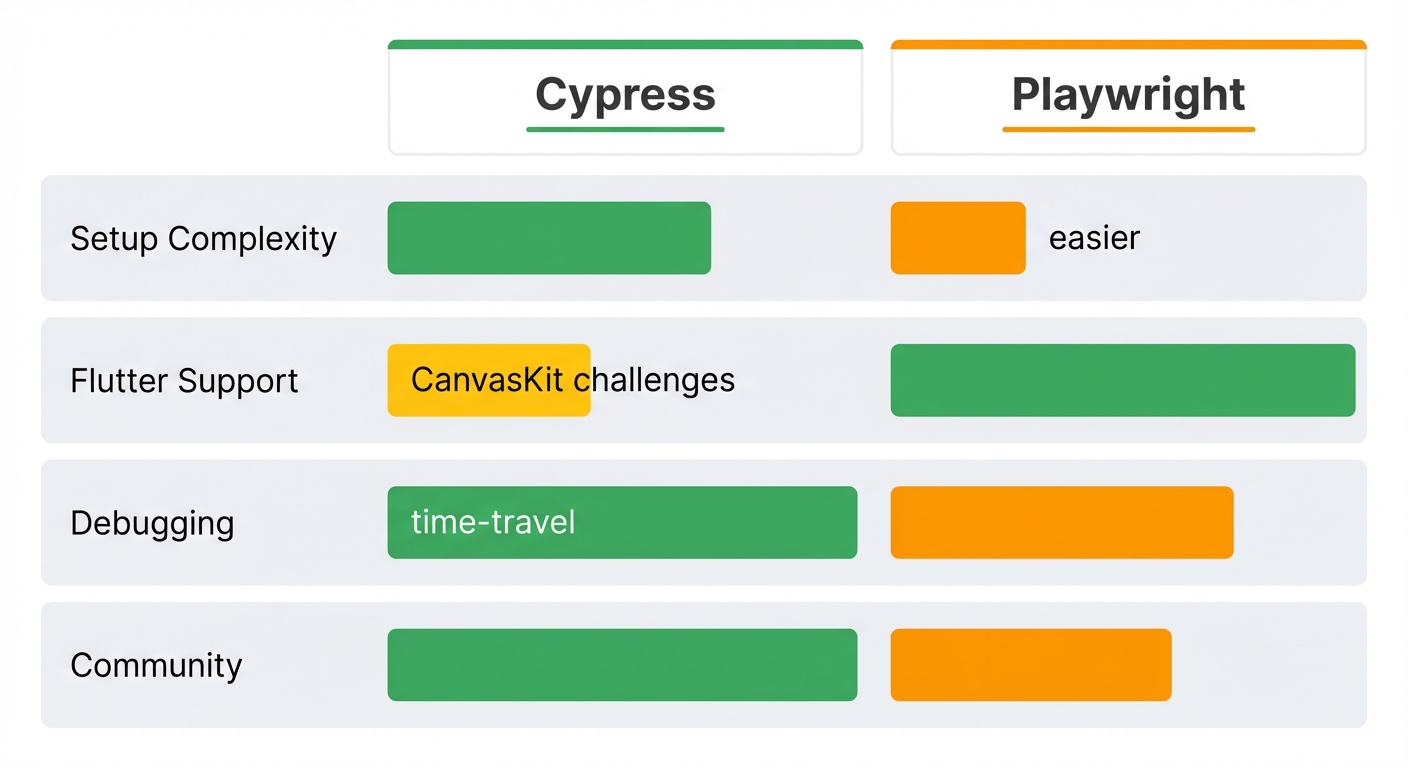
Should you use Cypress or Playwright for Flutter web testing? Having tested both extensively, Playwright is usually the better choice for Flutter, but Cypress has specific advantages.
Setup Complexity
Cypress: Easier initial setup. npm install cypress, run npx cypress open, write tests. The Test Runner makes getting started faster. However, making Cypress work with Flutter requires adding Semantics to every widget you want to test. That's significant Flutter code changes.
Playwright: Setup is slightly more involved (install browsers, understand Page Object Model), but it handles Flutter's rendering modes better out of the box. You still need Semantics, but Playwright's locator strategies are more forgiving. See our Flutter Playwright testing guide for detailed setup.
Flutter Rendering Mode Support
Cypress: Requires HTML renderer. CanvasKit makes Cypress completely unusable. If your production app uses CanvasKit (Flutter's default), your tests run in a different rendering mode than production. This creates a confidence gap.
Playwright: Works with both CanvasKit and HTML renderer. Playwright's canvas inspection capabilities (limited but present) can sometimes interact with CanvasKit apps. It's not perfect, but better than Cypress's zero support.
Execution Speed
Cypress: Slower. Flutter web initialization combined with Cypress's architecture creates a performance bottleneck. Tests that take 5 seconds in Playwright can take 15 seconds in Cypress.
Playwright: Significantly faster. Parallel execution works well. Tests run in true headless mode (Cypress's "headless" still has overhead). For large test suites, Playwright can be 2-3x faster.
Debugging Experience
Cypress: Best-in-class time-travel debugging. The Test Runner's ability to click any command and see the DOM state at that moment is unmatched. For Flutter web (where debugging selector issues is common), this is invaluable. You can inspect what ARIA attributes Flutter generated, verify shadow DOM structure, and understand why selectors fail.
Playwright: Good debugging with Playwright Inspector and trace viewer, but not as intuitive as Cypress's time-travel. You get screenshots, DOM snapshots, and network logs, but exploring them requires more clicks.
Community and Resources
Cypress: Larger community, more tutorials, more Stack Overflow answers. However, most Cypress content focuses on React/Vue/Angular. Flutter-specific Cypress content is rare.
Playwright: Growing rapidly. Microsoft's backing means excellent documentation. Flutter web testing is better documented in Playwright community than Cypress community.
When to Choose Cypress
Choose Cypress for Flutter web if:
- Your team already uses Cypress for other apps and knows it well
- You deploy Flutter web with HTML renderer in production (rare but happens)
- You prioritize debugging experience over execution speed
- Your app is small and test suite is <100 tests (performance matters less)
When to Choose Playwright
Choose Playwright for Flutter web if:
- You need to test CanvasKit renderer or need confidence your tests match production
- You have a large test suite and need fast execution
- You're starting fresh (no existing Cypress investment)
- You want better cross-browser testing (Playwright's WebKit support is superior)
Debugging Flutter Web Tests
When Flutter web tests fail in Cypress, debugging requires understanding both Cypress and Flutter's rendering.
Using Cypress Test Runner
Run tests in headed mode:
npx cypress open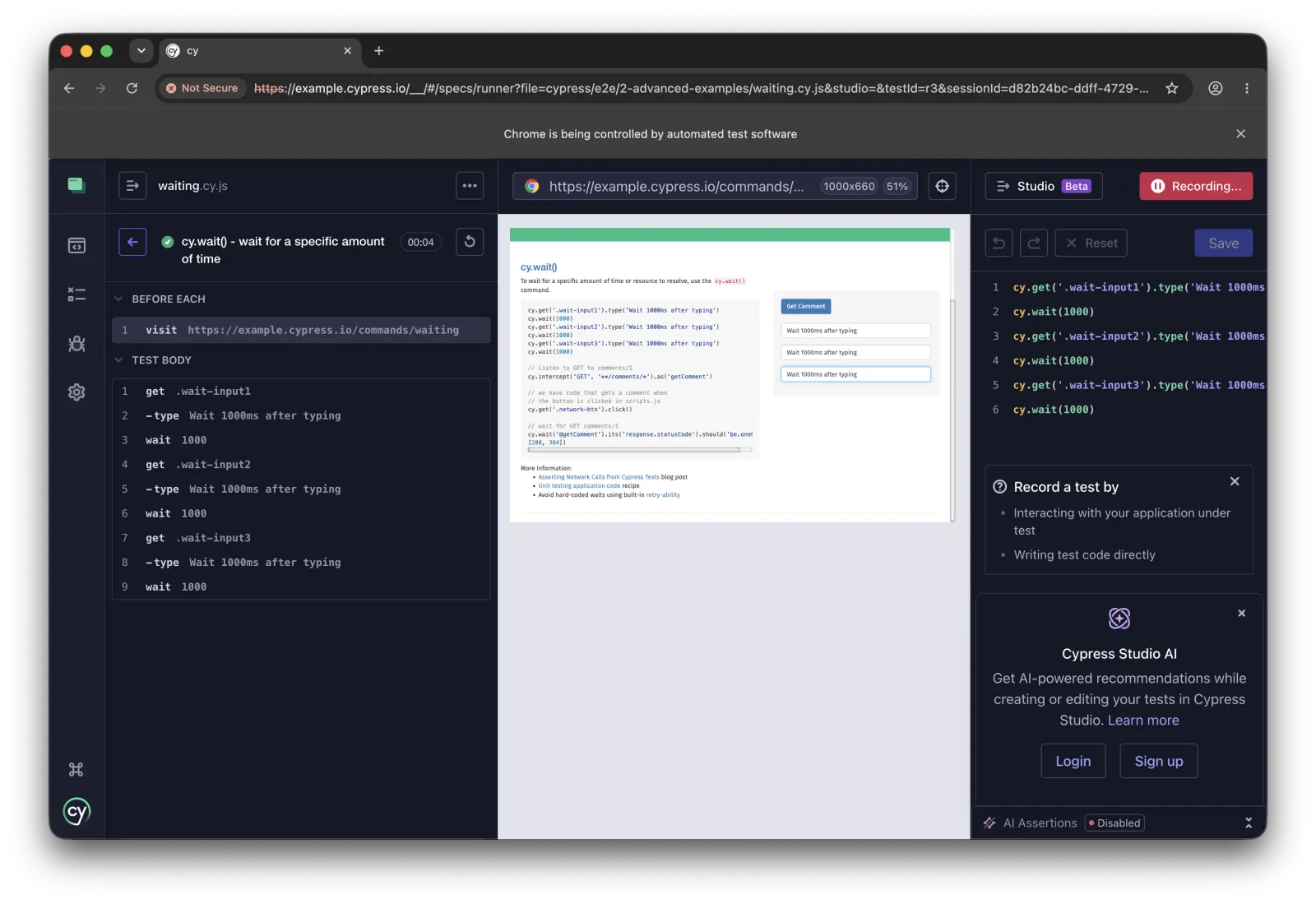
Select your test. Cypress opens a browser showing each command. Click any command to see the DOM state at that moment. This is critical for Flutter because you need to verify what ARIA attributes Flutter actually generated.
Debugging workflow:
- Test fails with "element not found"
- Click the failed command in Test Runner
- Open DevTools (right-click → Inspect)
- Search for the text that should be there
- Check what aria-label or role it has (if any)
- Update your Flutter Semantics or Cypress selector
Inspecting Flutter's DOM Output
Flutter's HTML renderer generates complex DOM. Inspect it carefully:
describe('DOM Inspection', () => {
  it('logs DOM structure for debugging', () => {
    cy.visit('/');

    // Wait for Flutter to load
    cy.get('[role="main"]').should('exist');

    // Log the entire body to see what Flutter generated
    cy.get('body').then(($body) => {
      console.log('Flutter DOM:', $body[0]);
    });

    // Or get specific elements
    cy.get('[aria-label="submit-button"]').then(($el) => {
      console.log('Button element:', $el[0]);
      console.log('All attributes:', $el[0].attributes);
    });
  });
});
Look for:
- ARIA attributes Flutter generated from your Semantics widgets
- Shadow DOM boundaries (look for
#shadow-rootin DevTools) - Whether text content is split across elements
- Generated class names (to understand what NOT to use as selectors)
Handling Async Flutter State Updates
Flutter's setState() triggers rebuilds asynchronously. If your test checks state immediately after an action, it might check before the rebuild completes:
// ❌ WRONG - Might check before Flutter rebuilds
describe('Counter', () => {
  it('increments', () => {
    cy.visit('/');
    cy.get('[aria-label="increment"]').click();

    // This might fail if checked too quickly
    cy.contains('Count: 1').should('be.visible');
  });
});

// ✅ CORRECT - Cypress auto-retries assertions
describe('Counter', () => {
  it('increments', () => {
    cy.visit('/');
    cy.get('[aria-label="increment"]').click();

    // .should() retries automatically until text appears or timeout
    cy.contains('Count: 1', { timeout: 5000 }).should('be.visible');
  });
});
Cypress's built-in retry-ability usually handles this, but Flutter can be slower than React. Increase timeouts if needed.
Using Cypress Debug Commands
Add cy.pause() or cy.debug() to inspect state:
describe('Debug Example', () => {
  it('debugs widget state', () => {
    cy.visit('/dashboard');

    cy.pause(); // Test pauses here, DevTools open automatically

    cy.get('[aria-label="user-menu"]').click();

    cy.debug(); // Inspect element at this point

    cy.contains('Sign Out').click();
  });
});
Best Practices
Add Semantics to every interactive widget: Don't wait until writing tests. Add Semantics(label: '...') during development. This improves accessibility for screen readers and makes testing possible.
Use HTML renderer for tests: Set --web-renderer html explicitly. Never assume Flutter will choose HTML mode automatically.
Never use generated class names: .flt-semantics-container-XX changes between builds. Only use ARIA attributes from Semantics.
Increase default timeouts: Flutter web is slower than React. Set defaultCommandTimeout: 10000 in cypress.config.ts.
Test user flows, not widget implementation: Don't verify internal widget state. Test what users see and do.
Limit cy.visit() calls: Flutter initialization is expensive. Use before() or beforeEach() to visit once per test suite when possible.
Mock APIs aggressively: Real API calls make tests slow and flaky. Use cy.intercept() for predictable responses.
Keep Flutter integration tests separate: Cypress tests (browser E2E) serve a different purpose than Flutter's integration_test (Flutter environment). Use both, but don't mix them.
Consider Playwright for complex apps: If your test suite grows beyond 50-100 tests, Playwright's performance advantage becomes significant.
Conclusion
Testing Flutter web apps with Cypress is possible but requires specific strategies. You've learned how Flutter's rendering modes affect testing (CanvasKit hides content, HTML renderer exposes DOM), how to make widgets testable using Semantics and ARIA labels, how to write stable tests that survive widget tree updates, and when Cypress makes sense compared to Playwright.
The key insight: Flutter web wasn't designed with DOM-based testing tools in mind. You're testing a canvas-based framework through a DOM interface. This works when you explicitly bridge the gap with semantic information.
Start by adding Semantics to your critical user flows. Test login, checkout, or core features first. Use HTML renderer for tests. Run tests in the Cypress Test Runner to debug selector issues. Then gradually expand coverage.
Want to avoid this complexity entirely? While Cypress can test Flutter web with the right setup, maintaining tests as your Flutter app evolves is time-consuming. Autonoma's autonomous testing works differently. Our Planner agent understands Flutter's widget tree directly, without needing explicit Semantics on every widget, and the Diffs Agent adapts tests automatically when you refactor code, eliminating maintenance overhead.
Next steps:
- Add Semantics widgets to your Flutter app's critical paths
- Set up Cypress with HTML renderer mode
- Write your first test for the main user flow
- Compare test execution speed with Playwright (see our Flutter Playwright guide)
- Or skip the setup: Try Autonoma AI for autonomous testing that works with Flutter web, Flutter mobile, and any other framework without framework-specific configuration
Resources:
- Flutter Web Renderers Documentation
- Flutter Semantics Widget Guide
- Cypress Documentation
- Flutter Playwright Testing Guide - Better alternative for Flutter web
- Flutter Appium Testing Guide - For Flutter mobile apps
The tools are ready. Your Flutter app is waiting. Choose the right testing approach for your needs.
Frequently Asked Questions
Yes, Cypress can test Flutter web apps, but only with HTML renderer mode. CanvasKit (Flutter's default renderer) makes all content invisible to Cypress because everything renders to a canvas element. Build your Flutter app with --web-renderer html, add Semantics widgets with labels, and use ARIA selectors in Cypress tests.
Most likely you're using CanvasKit renderer. Cypress queries the DOM. CanvasKit renders everything to a canvas, which has no queryable DOM elements inside it. Solution: Build with flutter run -d chrome --web-renderer html. Also ensure your Flutter widgets have Semantics labels that generate ARIA attributes.
CanvasKit renders your entire Flutter app to an HTML canvas using WebAssembly, providing pixel-perfect consistency with mobile but making content invisible to DOM selectors and screen readers. HTML renderer converts Flutter widgets to HTML/CSS/DOM elements, making them accessible to Cypress and assistive technologies but with potential visual differences from mobile. For testing, use HTML renderer. For production, CanvasKit is usually better.
Wrap widgets with Semantics(label: 'widget-name') in your Flutter code. This generates aria-label attributes in the DOM. Then use cy.get('[aria-label="widget-name"]') in Cypress. Never use generated class names like .flt-semantics-container. Only use intentional semantic labels or ARIA attributes.
Flutter web initialization is slow. The framework loads WebAssembly modules, initializes the rendering engine, and builds the widget tree. Each cy.visit() triggers full initialization. Solutions: Increase timeouts (defaultCommandTimeout: 10000), reduce cy.visit() calls by using before() hooks, or switch to Playwright which is 2-3x faster for Flutter web.
Playwright is better for Flutter web in most cases. It supports both CanvasKit and HTML renderer, executes tests 2-3x faster, and has better documentation for Flutter. Use Cypress only if you're already invested in Cypress ecosystem or you prioritize its superior time-travel debugging. See our Flutter Playwright testing guide for comparison.
Wrap the TextField with Semantics(label: 'input-name'), build with HTML renderer, then use cy.get('[aria-label="input-name"]').type('text') in tests. Flutter's HTML renderer generates actual input elements that Cypress can interact with using standard .type() commands.
Yes, but Flutter's DropdownButton doesn't use HTML select elements. Add Semantics labels to both the dropdown and each option. In tests, cy.get('[aria-label="dropdown"]').click() to open, then cy.get('[aria-label="option-name"]').click() to select. Custom dropdowns might require more complex selectors.
Flutter's Navigator updates browser URLs when using named routes or go_router package. Test with cy.get('[aria-label="nav-link"]').click(), then cy.url().should('include', '/route') to verify navigation. Use cy.go('back') to test browser history. Always verify both URL change and page content load.
Use cy.intercept() before cy.visit(). Example: cy.intercept('GET', '**/api/users', {body: [...]}).as('getUsers'), then cy.visit('/users'), then cy.wait('@getUsers'). Set up intercepts before visiting because Flutter often fetches data in initState() immediately on page load.
Flutter might split text across multiple DOM elements, or text might be in shadow DOM, or you're using CanvasKit (text is in canvas, not DOM). Solution: Don't rely on text selectors. Add explicit Semantics labels and use cy.get('[aria-label="..."]') instead.
Add Semantics label to scrollable container, then cy.get('[aria-label="list"]').scrollTo('bottom'). Be aware Flutter's ListView.builder() only renders visible items. Scrolling triggers new item builds which can be slow. Increase timeouts when waiting for scroll-triggered content: { timeout: 10000 }.
No, not practically. Cypress queries the DOM. CanvasKit renders everything to a canvas element with no queryable content inside. You could theoretically use canvas pixel inspection, but this is unreliable and slow. For CanvasKit testing, use Playwright (limited canvas support) or Flutter integration tests.
Run npx cypress open to use Test Runner. Click the failed command to see DOM state at that moment. Inspect with DevTools to see what ARIA attributes Flutter actually generated. Use cy.pause() or cy.debug() to stop execution. Log DOM structure with cy.get('body').then(($el) => console.log($el[0])).
Semantics is a Flutter widget that exposes accessibility information to screen readers and testing tools. It generates ARIA attributes in HTML renderer output. Without Semantics, your widgets have no stable selectors for Cypress. Wrap every testable widget with Semantics(label: 'name') to make it discoverable.


