

Introduction
Your Percy bill jumped 40% after BrowserStack's acquisition. You exceed snapshot limits every month. Visual regression tests catch font rendering differences but miss actual layout bugs.
Percy pioneered visual regression testing, but rising costs and snapshot limitations push teams to explore alternatives. Some want deeper Storybook integration, others need AI-powered accuracy, and many seek open source control without subscription fees.
This guide covers eight proven Percy alternatives, from established platforms like Chromatic and Applitools to open source tools like BackstopJS, plus AI-powered solutions that eliminate false positives.
You'll see code examples, pricing breakdowns, migration effort, and a clear decision framework to choose the right tool.
Why Teams Look for Percy Alternatives
Common reasons teams explore Percy alternatives:
- BrowserStack pricing - After acquisition, pricing increased and snapshot limits tightened for some plans
- Snapshot limits - Teams with large applications hit monthly caps, forcing careful rationing
- False positives - Pixel-perfect comparison flags font rendering, anti-aliasing, and dynamic content
- Platform costs - Teams want visual testing without ongoing subscription fees
- Storybook integration - Percy works with Storybook but isn't built specifically for it
- Limited AI capabilities - Traditional pixel comparison lacks intelligent diff detection
- Self-hosting needs - Some teams require on-premise visual testing for compliance
What Percy Does Well
Before exploring alternatives, understand Percy's strengths:
Easy setup and integration - Percy works with Cypress, Playwright, Selenium, Puppeteer, and Storybook. Installation is straightforward. You add the Percy SDK, capture snapshots in your tests, and Percy handles comparison in the cloud.
Comprehensive review workflow - Percy's UI shows visual diffs side-by-side with smart highlighting. You approve or reject changes with one click. The review process is collaborative with comments and approvals.
CI/CD integration - Percy integrates with GitHub, GitLab, Bitbucket, and all major CI platforms. Pull requests get automatic visual checks. Failed visual tests block merges.
Responsive testing - Percy captures multiple viewport sizes in a single snapshot. You test desktop, tablet, and mobile layouts without writing separate tests.
Browser coverage - Percy renders snapshots across Chrome, Firefox, Safari, and Edge (on paid plans). Cross-browser visual testing without managing infrastructure.
Where Percy Falls Short
Percy's limitations drive teams to alternatives:
Snapshot limits create testing anxiety - Even the $399/month Business plan caps at 50,000 snapshots. Large applications with responsive testing across browsers quickly exceed limits. Teams ration snapshots instead of comprehensive coverage.
Pricing scales aggressively - After BrowserStack acquisition, prices increased for some teams. Enterprise pricing is custom (often $10,000+ annually). Small teams struggle to justify costs.
Pixel-perfect comparison generates false positives - Font rendering differences across browsers, sub-pixel anti-aliasing variations, and dynamic timestamps all trigger failures. Teams waste time approving "changes" that aren't bugs.
Limited Storybook optimization - Percy works with Storybook but lacks the deep integration Chromatic provides (Chromatic is built by the Storybook team).
No self-hosting option - Percy is cloud-only. Teams with compliance requirements or air-gapped environments can't use it.
Basic diff intelligence - Percy shows pixel differences but doesn't understand semantic meaning. A moved button that's still functional triggers the same alert as a broken layout.
The Top 8 Percy Alternatives: Comparison & Analysis
When evaluating Percy alternatives, consider these eight proven solutions. Each excels in different scenarios, from Storybook specialists to open source freedom fighters.
Let's explore these alternatives, from established platforms to cutting-edge AI solutions.
List of Alternatives:
- Chromatic: The Storybook Specialist
- Applitools: The AI-Powered Accuracy Engine
- BackstopJS: The Open Source Freedom Fighter
- Playwright Visual Comparisons: The Built-In Solution
- Cypress Visual Testing: The Plugin Ecosystem
- LambdaTest SmartUI: The Affordable Cloud Option
- reg-suit: The GitHub Integration Champion
- Autonoma: The AI Self-Healing Visual Testing Solution
1. Chromatic: The Storybook Specialist
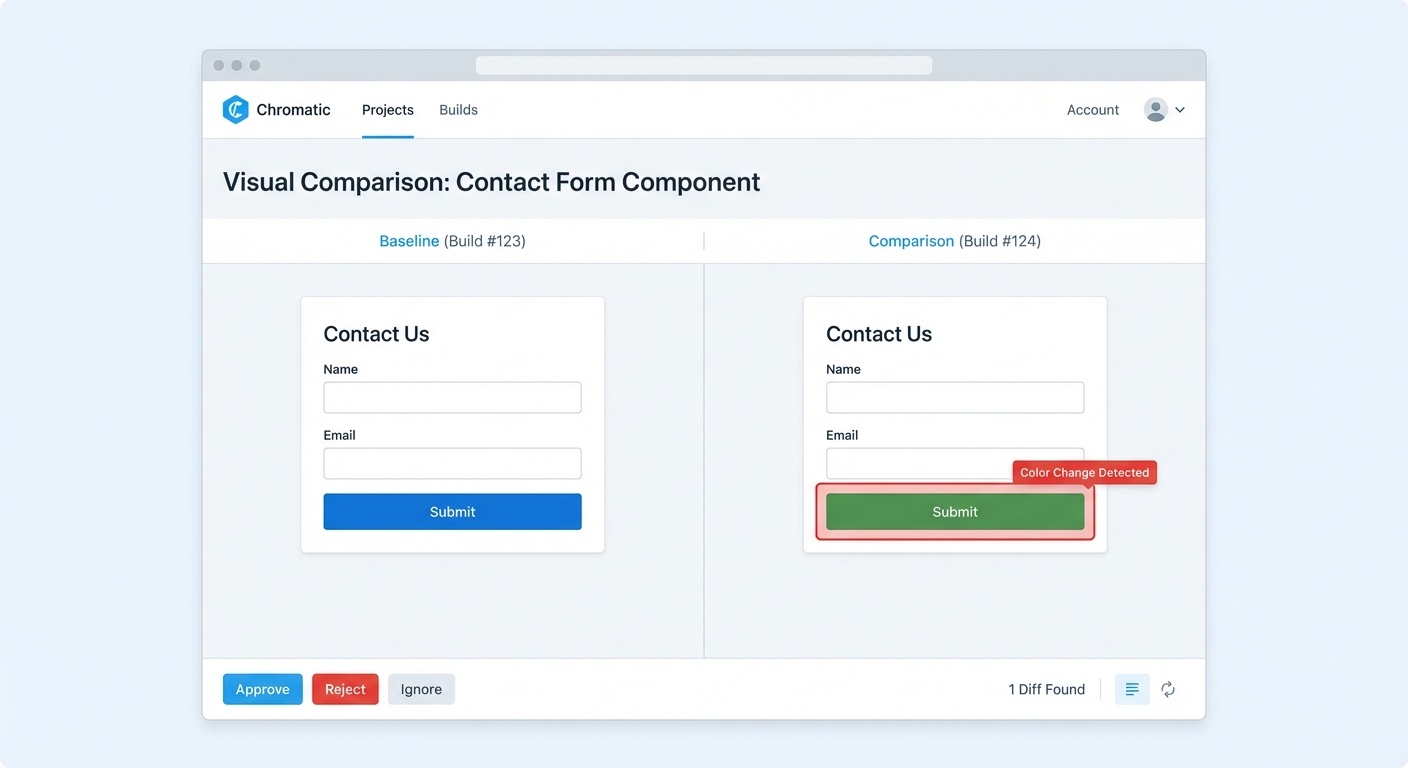
Built by the Storybook maintainers, Chromatic is visual testing purpose-built for component-driven development. It automatically captures every Storybook story as a visual test. When you update a component, Chromatic shows exactly which stories changed visually.
Here's how Chromatic works with your existing Storybook setup:
# Install Chromatic
npm install --save-dev chromatic

# Run Chromatic (automatically tests all stories)
npx chromatic --project-token=<your-token>
That's it. Chromatic finds your stories, captures screenshots, and shows visual diffs. No test scripts to write.
When you change a component, Chromatic highlights affected stories:
// Button.stories.js
export default {
  title: 'Components/Button',
  component: Button,
};

// Chromatic automatically tests all these variants
export const Primary = () => <Button variant="primary">Click me</Button>;
export const Secondary = () => <Button variant="secondary">Cancel</Button>;
export const Disabled = () => <Button disabled>Can't click</Button>;
Change the button padding. Chromatic shows all three stories with visual diffs. You approve or reject in the cloud UI.
When Chromatic beats Percy:
- Built specifically for Storybook (Percy supports it, Chromatic is built for it)
- Instant Storybook deployment to chromatic.com for component review
- Component-level visual testing without writing separate test scripts
- Generous free tier for open source (5,000 snapshots/month)
When Chromatic falls short:
- Storybook-only (no support for non-Storybook applications)
- Snapshot limits similar to Percy (though pricing is more transparent)
- Not ideal for full E2E application testing (focused on components)
At a Glance:
| Aspect | Details |
|---|---|
| Best For | Storybook users, component testing |
| Integration | Storybook only |
| Languages | JavaScript/TypeScript (works with React, Vue, Angular, etc.) |
| Browsers | Chrome (Firefox and others on request) |
| Pricing | Free for open source (5,000 snapshots/mo), Paid from $149/mo |
| Migration Effort | Low (1-2 days setup for existing Storybook) |
| Community Size | Large (Storybook ecosystem) |
Pricing: Free tier for open source projects (5,000 snapshots/month). Paid plans start at $149/month for teams. Enterprise pricing available.
Migration from Percy: Low effort if you use Storybook. Chromatic auto-discovers stories. For non-Storybook tests, you'll need a different solution. Expect 1-2 days for setup and configuration.
2. Applitools: The AI-Powered Accuracy Engine
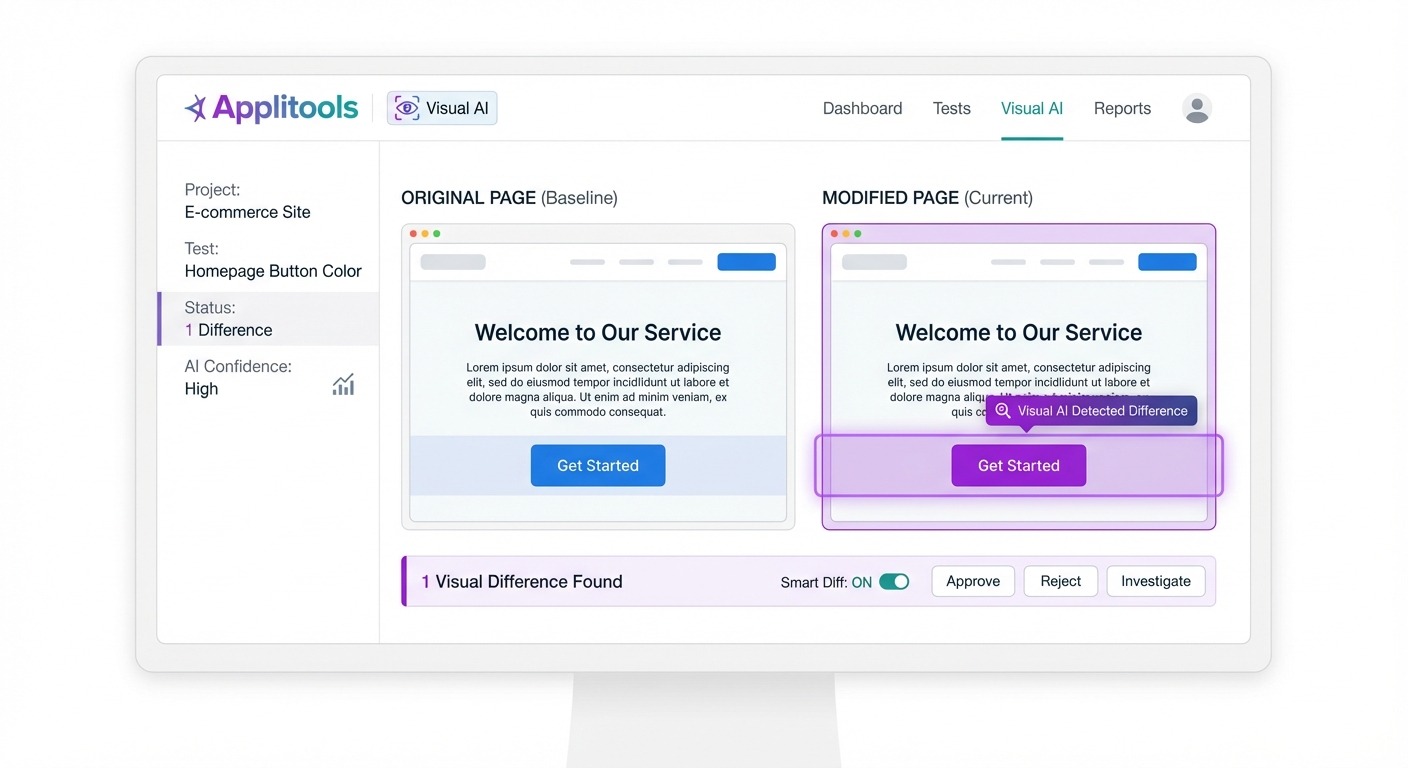
Applitools uses Visual AI instead of pixel-by-pixel comparison. It understands which visual changes matter and ignores rendering variations, dynamic content, and minor positioning shifts. This eliminates 90% of false positives that plague traditional visual testing.
Here's Applitools integrated with Selenium:
const { Eyes, Target } = require('@applitools/eyes-selenium');

async function visualTest() {
  const eyes = new Eyes();

  // Start visual testing session
  await eyes.open(driver, 'My App', 'Login Page Test');

  // Capture checkpoint
  await eyes.check('Login page', Target.window());

  // Click login
  await driver.findElement(By.id('login-button')).click();

  // Capture after login
  await eyes.check('Dashboard', Target.window());

  // Applitools AI compares intelligently
  await eyes.close();
}
The difference is the AI. Change a font from Arial to Helvetica, Applitools understands it's intentional if the visual hierarchy is preserved. Change a critical button color from green to red, Applitools flags it as significant.
Applitools also offers Ultrafast Grid for cross-browser visual testing:
// Test across 10 browser/device combinations in parallel
const configuration = eyes.getConfiguration();
configuration.addBrowser({width: 1200, height: 800, name: BrowserType.CHROME});
configuration.addBrowser({width: 1200, height: 800, name: BrowserType.FIREFOX});
configuration.addBrowser({width: 768, height: 1024, name: BrowserType.SAFARI});
configuration.addDevice({deviceName: DeviceName.iPhone_X});
One test run, ten browser/device combinations tested in parallel. Applitools renders screenshots in the cloud.
When Applitools beats Percy:
- AI eliminates false positives (90% reduction in noise)
- Ultrafast Grid tests 10+ browsers in parallel without infrastructure
- Works with any test framework (Selenium, Cypress, Playwright, Puppeteer, etc.)
- Root Cause Analysis shows exactly which component changed
When Applitools falls short:
- Expensive (starts at $99/user/month, scales to enterprise pricing)
- Learning curve for Visual AI configuration
- Requires trust in AI (less explicit control than pixel comparison)
At a Glance:
| Aspect | Details |
|---|---|
| Best For | Enterprise teams, AI-powered accuracy |
| Integration | All major frameworks (Selenium, Cypress, Playwright, etc.) |
| Languages | JavaScript, Python, Java, C#, Ruby, PHP |
| Browsers | All major browsers via Ultrafast Grid |
| Pricing | From $99/user/month, Enterprise custom |
| Migration Effort | Moderate (1-2 hours per test to add SDK) |
| Community Size | Large enterprise user base |
Pricing: Starts at $99/user/month. Enterprise plans are custom (typically $20,000+ annually for teams).
Migration from Percy: Moderate effort. You add Applitools SDK to existing tests. The API is different but integration is straightforward. Expect 1-2 hours per test for SDK integration and checkpoint configuration.
3. BackstopJS: The Open Source Freedom Fighter
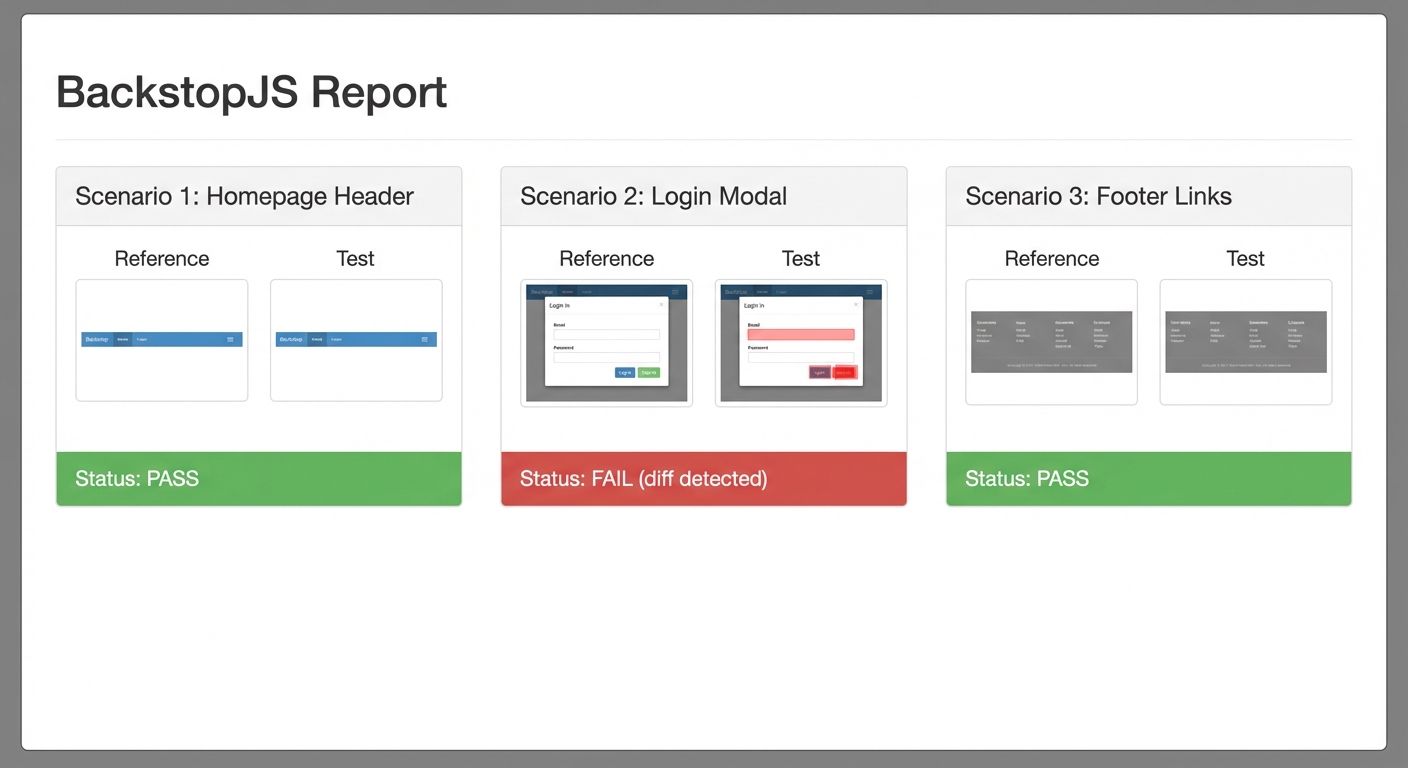
BackstopJS is a free, open source visual regression tool that runs entirely on your infrastructure. No cloud dependency, no subscription fees, no snapshot limits. You define test scenarios in JSON, BackstopJS captures screenshots with headless Chrome, and it generates a local report with visual diffs.
Here's a BackstopJS configuration:
{
  "id": "my_app_visual_tests",
  "viewports": [
    { "label": "phone", "width": 375, "height": 667 },
    { "label": "desktop", "width": 1920, "height": 1080 }
  ],
  "scenarios": [
    {
      "label": "Homepage",
      "url": "https://example.com",
      "selectors": ["document"],
      "delay": 1000
    },
    {
      "label": "Login Page",
      "url": "https://example.com/login",
      "selectors": [".login-form"],
      "delay": 500
    }
  ]
}
Run BackstopJS:
# Capture reference screenshots
backstop reference

# Run visual tests
backstop test

# If differences are intentional, approve them
backstop approve
BackstopJS generates an HTML report showing side-by-side comparisons. Red highlighting shows pixel differences. You review locally, no cloud needed.
When BackstopJS beats Percy:
- Completely free (open source, no limits)
- Runs locally or in CI/CD (no cloud dependency)
- Full control over infrastructure and data
- No vendor lock-in or subscription costs
When BackstopJS falls short:
- Manual setup required (no magic cloud integration)
- No collaborative review UI (HTML reports are local)
- You manage infrastructure, screenshot storage, and browser versions
- Pixel-perfect comparison (no AI, same false positive issues as Percy)
At a Glance:
| Aspect | Details |
|---|---|
| Best For | Budget-conscious teams, self-hosting |
| Integration | Any application (URL-based testing) |
| Languages | JSON config (no coding required) |
| Browsers | Headless Chrome/Chromium (via Puppeteer) |
| Pricing | Free (open source) |
| Migration Effort | Moderate-High (3-5 days for setup + scenarios) |
| Community Size | Active open source community |
Pricing: Free and open source.
Migration from Percy: Moderate to high effort. You rewrite Percy snapshots as BackstopJS scenarios in JSON. No SDK integration, just configuration. Expect 3-5 days for initial setup, CI/CD integration, and creating scenarios for 50-100 screens.
4. Playwright Visual Comparisons: The Built-In Solution
Playwright has built-in visual testing with expect(page).toHaveScreenshot(). No additional libraries, no cloud platform, no subscription. You write Playwright tests, capture screenshots, and Playwright compares pixel-by-pixel. Differences generate visual diffs in the test report.
Here's visual testing in Playwright:
import { test, expect } from '@playwright/test';

test('homepage visual test', async ({ page }) => {
  await page.goto('https://example.com');

  // Visual regression test
  await expect(page).toHaveScreenshot('homepage.png');
});

test('login page visual test', async ({ page }) => {
  await page.goto('https://example.com/login');

  // Test specific element
  const loginForm = page.locator('.login-form');
  await expect(loginForm).toHaveScreenshot('login-form.png');
});
On first run, Playwright captures reference screenshots. On subsequent runs, it compares new screenshots to references. If pixels differ beyond threshold, the test fails. The HTML reporter shows side-by-side diffs.
Playwright's visual comparison configuration:
// playwright.config.js
export default {
  expect: {
    toHaveScreenshot: {
      maxDiffPixels: 100,           // Allow 100 different pixels
      threshold: 0.2,                // 20% threshold for pixel matching
    }
  },
  use: {
    screenshot: 'only-on-failure',   // Capture on failures
  }
};
The threshold setting helps with anti-aliasing and minor rendering differences.

When Playwright Visual Comparisons beats Percy:
- Zero cost (built into Playwright)
- Full control (runs locally or in CI/CD)
- No snapshot limits or subscription fees
- Integrated with your E2E tests (no separate tool)
When Playwright falls short:
- No cloud review UI (reports are HTML files)
- Pixel-perfect comparison (false positive issues)
- No cross-browser rendering (tests use Playwright's browser engines)
- You manage screenshot storage and versioning
At a Glance:
| Aspect | Details |
|---|---|
| Best For | Playwright users, zero-cost visual testing |
| Integration | Playwright tests only |
| Languages | JavaScript/TypeScript (Playwright) |
| Browsers | Chromium, Firefox, WebKit (Playwright engines) |
| Pricing | Free (built into Playwright) |
| Migration Effort | Low-Moderate (1-2 hours per test if already using Playwright) |
| Community Size | Large (Playwright ecosystem) |
Pricing: Free (built into Playwright).
Migration from Percy: Low to moderate effort if you already use Playwright. Add expect(page).toHaveScreenshot() to existing tests. If you're not using Playwright, you'll need to rewrite tests entirely (high effort). Expect 1-2 hours per test for adding screenshot assertions.
5. Cypress Visual Testing: The Plugin Ecosystem
Cypress doesn't have built-in visual testing like Playwright, but several plugins provide it. The most popular is cypress-image-snapshot, which uses jest-image-snapshot under the hood for pixel comparison.
Here's visual testing in Cypress:
import { addMatchImageSnapshotPlugin } from 'cypress-image-snapshot/plugin';

// cypress/plugins/index.js
module.exports = (on, config) => {
  addMatchImageSnapshotPlugin(on, config);
};

// cypress/support/commands.js
import { addMatchImageSnapshotCommand } from 'cypress-image-snapshot/command';
addMatchImageSnapshotCommand();

// Test file
describe('Visual Regression Tests', () => {
  it('homepage looks correct', () => {
    cy.visit('https://example.com');
    cy.matchImageSnapshot('homepage');
  });

  it('login form looks correct', () => {
    cy.visit('https://example.com/login');
    cy.get('.login-form').matchImageSnapshot('login-form');
  });
});
The plugin captures screenshots and compares them using image diff algorithms. Differences beyond threshold fail the test. Visual diff images are saved to a diff_output folder.
You can also use Percy's Cypress integration:
import '@percy/cypress';

describe('Percy Visual Tests', () => {
  it('homepage', () => {
    cy.visit('https://example.com');
    cy.percySnapshot('Homepage');
  });
});
This sends snapshots to Percy's cloud (but you're looking for Percy alternatives, so the plugin approach is more relevant).

When Cypress Visual Testing beats Percy:
- Free (plugins are open source)
- Integrated with Cypress tests (no separate tool)
- Full control (runs locally or in CI/CD)
When Cypress falls short:
- Plugin ecosystem fragmented (multiple options, different quality)
- No cloud review UI (unless using Percy)
- Pixel-perfect comparison (false positives)
- Manual configuration required
At a Glance:
| Aspect | Details |
|---|---|
| Best For | Cypress users, plugin-based flexibility |
| Integration | Cypress tests only |
| Languages | JavaScript/TypeScript (Cypress) |
| Browsers | Chrome, Firefox, Edge (Cypress-supported browsers) |
| Pricing | Free (plugins open source) |
| Migration Effort | Low-Moderate (1-2 hours per test if already using Cypress) |
| Community Size | Large (Cypress ecosystem) |
Pricing: Free (plugins are open source).
Migration from Percy: Low to moderate effort if you already use Cypress. Install plugin, add snapshot commands to existing tests. If you're not using Cypress, you'll need to rewrite tests (high effort). Expect 1-2 hours per test for adding visual assertions.
6. LambdaTest SmartUI: The Affordable Cloud Option
LambdaTest SmartUI is a cloud-based visual regression platform with AI-powered comparison. It's more affordable than Applitools or Percy while providing similar cloud infrastructure. SmartUI integrates with Selenium, Cypress, Playwright, and Puppeteer.
Here's LambdaTest SmartUI with Playwright:
const { chromium } = require('playwright');
const { smartuiSnapshot } = require('@lambdatest/playwright-driver');

(async () => {
  const browser = await chromium.connect({
    wsEndpoint: `wss://cdp.lambdatest.com/playwright?capabilities=${encodeURIComponent(JSON.stringify(capabilities))}`
  });

  const page = await browser.newPage();
  await page.goto('https://example.com');

  // Capture SmartUI snapshot
  await smartuiSnapshot(page, 'Homepage');

  await browser.close();
})();
LambdaTest's cloud infrastructure handles screenshot capture across browsers and devices. The SmartUI dashboard shows visual diffs with AI-powered comparison that reduces false positives.

When LambdaTest SmartUI beats Percy:
- More affordable ($15/user/month vs Percy's higher pricing)
- Cross-browser cloud testing included
- AI-powered comparison reduces false positives
- Integrated with broader LambdaTest platform (E2E testing, real devices, etc.)
When LambdaTest SmartUI falls short:
- Smaller user base than Percy or Applitools
- AI comparison less mature than Applitools
- Cloud-only (no self-hosting)
At a Glance:
| Aspect | Details |
|---|---|
| Best For | Budget-conscious teams wanting cloud infrastructure |
| Integration | Selenium, Cypress, Playwright, Puppeteer |
| Languages | JavaScript, Python, Java, C#, Ruby |
| Browsers | All major browsers (cloud-based) |
| Pricing | From $15/user/month |
| Migration Effort | Moderate (1-2 hours per test for SDK integration) |
| Community Size | Growing (newer platform) |
Pricing: Starts at $15/user/month. Higher tiers offer more screenshots and parallel executions.
Migration from Percy: Moderate effort. You integrate LambdaTest SDK into existing tests. The workflow is similar to Percy (cloud-based snapshots and review). Expect 1-2 hours per test for SDK changes.
7. reg-suit: The GitHub Integration Champion
reg-suit is an open source visual regression tool optimized for GitHub workflows. It captures screenshots, uploads them to cloud storage (AWS S3, Google Cloud Storage, or GitHub), and comments on pull requests with visual diff reports. It's designed for teams who want open source control with GitHub-native integration.
Here's reg-suit configuration:
{
  "core": {
    "workingDir": ".reg",
    "actualDir": "screenshots",
    "thresholdRate": 0.05
  },
  "plugins": {
    "reg-keygen-git-hash-plugin": true,
    "reg-publish-s3-plugin": {
      "bucketName": "my-visual-regression-bucket"
    },
    "reg-notify-github-plugin": {
      "clientId": "github-app-client-id"
    }
  }
}
Run reg-suit in CI/CD:
# Capture screenshots with your preferred tool
# (Puppeteer, Playwright, etc.)

# Run reg-suit comparison
reg-suit compare

# Publish results
reg-suit publish
reg-suit comments on your pull request with a visual diff report link. Teammates review screenshots directly from GitHub. Approved changes update the baseline automatically.

When reg-suit beats Percy:
- Free open source (no subscription)
- GitHub-native workflow (PR comments, approvals)
- Works with any screenshot tool (Puppeteer, Playwright, etc.)
- Self-hosted storage (S3, GCS, or GitHub)
When reg-suit falls short:
- Manual setup and configuration required
- No cloud UI (reports are static HTML)
- GitHub-specific (limited value for GitLab/Bitbucket users)
- You manage infrastructure and storage
At a Glance:
| Aspect | Details |
|---|---|
| Best For | GitHub teams, open source control |
| Integration | Any screenshot tool + GitHub |
| Languages | JavaScript/Node.js (CLI tool) |
| Browsers | Depends on screenshot tool used |
| Pricing | Free (open source) + cloud storage costs |
| Migration Effort | Moderate-High (2-4 days setup + integration) |
| Community Size | Moderate (niche but active) |
Pricing: Free and open source. You pay for cloud storage (AWS S3, Google Cloud Storage) separately (typically $5-20/month for most teams).
Migration from Percy: Moderate to high effort. You set up reg-suit, configure cloud storage, integrate with GitHub, and capture screenshots with your preferred tool. Expect 2-4 days for initial setup and configuration.
8. Autonoma: The AI Self-Healing Visual Testing Solution
Autonoma uses AI to understand visual intent rather than pixel-perfect matching. You describe what should be visually correct in plain English. AI validates the visual state without brittle screenshot comparison. When your UI changes, Autonoma adapts automatically.
Here's an Autonoma visual test:
Navigate to the homepage
Verify the hero section is prominently displayed at the top
Verify the call-to-action button is green and visible
Verify the navigation menu contains Home, Products, About, Contact
Navigate to the login page
Verify the login form has email and password fields
Verify the submit button is blue and centered
No screenshots. No pixel comparison. Just plain English describing visual expectations. Autonoma's AI validates these conditions using computer vision.
Change your hero section layout. Autonoma understands it's still "prominently displayed at the top" even if the exact pixels differ. Change your button from #00FF00 to #00CC00, Autonoma sees it's still green. Change from a 16px to 18px font, Autonoma validates readability is preserved.

When layout shifts happen (intentional or not), Autonoma distinguishes between "button moved 2px left" (noise) and "button disappeared" (bug). Traditional pixel comparison treats both as failures.
At a Glance:
| Aspect | Details |
|---|---|
| Best For | Zero maintenance, AI self-healing |
| Integration | Any application (browser-based) |
| Languages | Natural language (no coding) |
| Browsers | All major browsers (cloud-based) |
| Pricing | Custom pricing + free tier |
| Migration Effort | Low-Moderate (translate visual expectations to natural language) |
| Community Size | Growing (newer platform) |
When Autonoma beats Percy:
- No screenshot maintenance (AI understands intent)
- Zero false positives from pixel-level changes
- Natural language (non-developers can write tests)
- Self-healing when UI changes
When Autonoma falls short:
- Requires trust in AI (less explicit control)
- Smaller community and ecosystem
- Different paradigm (not screenshot-based)
Pricing: Custom pricing based on team size and test volume. Free tier available for small projects.
Migration from Percy: Low to moderate effort. The paradigm shift is significant (screenshots to intent), but migration is fast. Translate each Percy snapshot into natural language visual expectations. Expect 30-60 minutes to understand the approach, then 15-20 minutes per test for translation.
Side-by-Side Comparison
Choosing between eight Percy alternatives is overwhelming. Here's how they compare across critical dimensions:
Quick Comparison Table
| Tool | Best For | Integration | Pricing | AI/Smart Diff | Migration |
|---|---|---|---|---|---|
| Chromatic | Storybook users | Storybook | $149/mo + free tier | ❌ Pixel-perfect | Low |
| Applitools | AI accuracy | All frameworks | $99/user/mo | ✅ Visual AI | Moderate |
| BackstopJS | Open source, budget | URL-based | Free | ❌ Pixel-perfect | Moderate-High |
| Playwright | Playwright users | Playwright only | Free | ❌ Pixel-perfect | Low-Moderate |
| Cypress | Cypress users | Cypress only | Free (plugins) | ❌ Pixel-perfect | Low-Moderate |
| LambdaTest | Affordable cloud | Multiple frameworks | $15/user/mo | ⚠️ Basic AI | Moderate |
| reg-suit | GitHub integration | Any + GitHub | Free + storage | ❌ Pixel-perfect | Moderate-High |
| Autonoma | AI self-healing | Any application | Custom | ✅ Full AI | Low-Moderate |
False Positive Handling:
- Best: Applitools, Autonoma (AI-powered filtering)
- Good: LambdaTest SmartUI (basic AI)
- Manual: Chromatic, BackstopJS, Playwright, Cypress, reg-suit (pixel-perfect, you filter manually)
Cloud vs Self-Hosted:
- Cloud-only: Chromatic, Applitools, LambdaTest, Autonoma
- Self-hosted capable: BackstopJS, Playwright, Cypress, reg-suit (with cloud storage)
Cross-Browser Testing:
- Comprehensive: Applitools (Ultrafast Grid), LambdaTest (cloud browsers)
- Limited: Chromatic (Chrome + others on request), Percy (multiple browsers)
- Single browser: BackstopJS (Chrome), Playwright (Chromium/Firefox/WebKit via Playwright engines), Cypress (Chrome/Firefox/Edge)
- Depends on setup: reg-suit (uses your screenshot tool)
Collaboration & Review:
- Best: Chromatic, Applitools, LambdaTest (cloud review UIs)
- GitHub-native: reg-suit (PR comments)
- Local/CI reports: BackstopJS, Playwright, Cypress (HTML reports)
- Cloud platform: Autonoma (test management UI)
Integration Ease:
- Easiest: Chromatic (auto-discovers Storybook stories), Playwright/Cypress (already using the framework)
- Moderate: Applitools, LambdaTest (SDK integration)
- Complex: BackstopJS, reg-suit (setup and configuration required)
- Different paradigm: Autonoma (natural language, low code)
Pricing Breakdown
| Tool | Free Tier | Paid Plans Start | Enterprise | Hidden Costs |
|---|---|---|---|---|
| Chromatic | 5,000 snapshots/mo (open source) | $149/mo | Custom | Snapshot overages |
| Applitools | Limited trial | $99/user/mo | $20,000+ annually | Per-user scaling |
| BackstopJS | Unlimited (free) | N/A | N/A | Infrastructure management |
| Playwright | Unlimited (free) | N/A | N/A | Screenshot storage |
| Cypress | Unlimited (free plugins) | N/A | N/A | Screenshot storage |
| LambdaTest | Limited trial | $15/user/mo | Custom | Screenshot limits |
| reg-suit | Unlimited (free) | N/A | N/A | Cloud storage ($5-20/mo) |
| Autonoma | Small projects | Custom | Custom | Test volume scaling |
Cost Efficiency for Different Team Sizes:
Solo developers or small teams (1-3 people):
- Best value: BackstopJS, Playwright, Cypress (free)
- If budget allows: LambdaTest SmartUI ($15/user/mo)
Mid-size teams (4-15 people):
- Budget-conscious: BackstopJS, reg-suit (free + minimal storage)
- Best balance: Chromatic (if using Storybook), LambdaTest SmartUI
- Premium: Applitools ($99/user/mo gets expensive fast)
Enterprise teams (15+ people):
- Centralized platform: Applitools, Autonoma (custom pricing makes sense)
- Storybook-heavy: Chromatic (enterprise plans)
- Cost-sensitive: Self-hosted BackstopJS or Playwright at scale
Common Problems When Switching from Percy
Migration isn't just learning new syntax. Each alternative introduces unique challenges.
Migration Complexity Matrix
| Challenge | Chromatic | Applitools | BackstopJS | Playwright | Autonoma |
|---|---|---|---|---|---|
| Workflow Changes | Low (similar cloud workflow) | Medium (SDK integration) | High (local/CI setup) | Medium (test integration) | High (paradigm shift) |
| Baseline Migration | Medium (re-capture) | Medium (re-capture) | High (re-capture + organize) | Medium (re-capture) | Low (describe intent) |
| CI/CD Updates | Low (similar) | Medium (SDK + keys) | High (full setup) | Low (if using Playwright) | Medium (new integration) |
| Team Training | Low (similar UI) | Medium (Visual AI concepts) | Medium (JSON config) | Low (if familiar with Playwright) | Medium (new approach) |
| Overall Time | 1-2 weeks | 2-3 weeks | 3-5 weeks | 2-4 weeks | 1-2 weeks |
Key migration challenges:
-
Baseline screenshots - All alternatives require re-capturing reference screenshots. Percy baselines don't transfer. Budget 1-3 days for capturing new baselines across your application.
-
CI/CD integration - Different tools need different environment variables, authentication, and build steps. Percy's seamless GitHub integration won't automatically transfer. Expect 1-2 days for CI/CD updates and testing.
-
Review workflow - Teams accustomed to Percy's cloud review UI must adapt. BackstopJS and Playwright use local HTML reports. reg-suit uses GitHub PR comments. Chromatic and Applitools have cloud UIs but different interfaces.
-
Snapshot organization - Percy organizes snapshots by name and build. BackstopJS uses JSON scenarios. Playwright uses test structure. You'll restructure how tests are named and grouped.
-
Responsive testing - Percy captures multiple viewports automatically. Some alternatives require explicit configuration for each viewport (BackstopJS, Playwright).
-
Cross-browser support - Percy handles browser rendering in the cloud. BackstopJS and Playwright test in your environment. You may lose Safari or Edge coverage unless you use cloud platforms (Applitools, LambdaTest).
Best migration approach:
Start with 10-15 critical user journeys. Set up the new tool, capture baselines, integrate with CI/CD, and validate the workflow. Get team feedback. If the experience is positive, migrate in batches of 25-50 tests. Run Percy and the new tool in parallel during transition (1-2 months). Once confidence is high, deprecate Percy.
Resist the urge to migrate everything at once. Parallel runs catch edge cases and give your team time to adapt.
How to Choose the Right Percy Alternative for Your Team
Decision criteria:
| Criteria | Recommendation |
|---|---|
| Current tools | Storybook → Chromatic Playwright → Playwright Visual Comparisons Cypress → Cypress plugins None of the above → Applitools or Autonoma |
| Budget | $0 → BackstopJS, Playwright, Cypress $15-100/user/mo → LambdaTest, Chromatic $100+/user/mo → Applitools Custom → Autonoma |
| False positive tolerance | High (we'll filter manually) → Any pixel-perfect tool Low (we need AI) → Applitools or Autonoma |
| Team skills | Technical (devs/QA) → Any tool Non-technical → Autonoma Mixed → Applitools or Chromatic (easier UIs) |
| Infrastructure preference | Cloud-managed → Chromatic, Applitools, LambdaTest, Autonoma Self-hosted → BackstopJS, Playwright, Cypress, reg-suit |
| GitHub integration | Critical → reg-suit (native GitHub) Important → Chromatic, Applitools (cloud + GitHub) Not critical → Any tool |
Run a proof of concept: Test 3-5 scenarios with your top two choices. Time the setup, observe team struggles, measure false positives. Ask the team which they prefer.
If you use Storybook heavily: Chromatic. If you need AI to eliminate false positives: Applitools or Autonoma. If you want zero subscription costs: BackstopJS, Playwright, or Cypress (depending on your test framework). If you use Playwright already: Playwright Visual Comparisons. If you use Cypress already: Cypress plugins. If budget is tight but you want cloud infrastructure: LambdaTest SmartUI. If GitHub is your workflow hub: reg-suit. If you want AI-powered self-healing tests with natural language: Autonoma.
The right answer depends on your context, not a universal ranking.
Frequently Asked Questions
Chromatic is the best Percy alternative for Storybook users. Built by the Storybook team, it integrates seamlessly with your existing workflow. You get visual regression testing, component review, and instant Storybook deployment. Pricing starts at $149/month with generous free tier (5,000 snapshots/month for open source). If you already use Storybook, Chromatic is the obvious choice.
Yes, migration from Percy to Playwright Visual Comparisons is straightforward. Playwright has built-in screenshot comparison with expect(page).toHaveScreenshot(). You write tests in Playwright, capture screenshots, and Playwright handles pixel-by-pixel comparison. Migration effort: 1-2 hours per test. The trade-off is losing Percy's cloud infrastructure and review UI. You gain full control and zero ongoing costs.
BackstopJS and reg-suit are the cheapest options (completely free and open source). Playwright Visual Comparisons is also free. These tools run locally or in your CI/CD with zero subscription costs. The trade-off is manual setup, no cloud review UI, and you manage infrastructure yourself. For teams wanting cloud convenience, LambdaTest SmartUI offers the most affordable commercial option starting at $15/user/month.
No. Applitools and Autonoma offer low-code or no-code options. Applitools integrates with existing test frameworks (minimal code required). Autonoma uses natural language for tests (no coding needed). BackstopJS requires JSON configuration (technical but not coding). Chromatic, Playwright, Cypress, and reg-suit require JavaScript/TypeScript skills. If your team lacks developers, focus on Applitools or Autonoma.
- To Chromatic: 1-2 weeks (similar workflow, different platform)
- To Applitools: 2-3 weeks (different SDK integration)
- To Playwright Visual Comparisons: 2-4 weeks (rewrite as Playwright tests)
- To BackstopJS: 3-5 weeks (JSON config + local setup)
- To Autonoma: 1-2 weeks (natural language rewrite)
These estimates assume part-time migration with continued testing. Full-time focused migration can be 50% faster.
- You're satisfied with pricing and snapshot limits
- Your team is productive with Percy's workflow
- You value comprehensive cloud infrastructure and review UI
- You don't want migration risk
Switch to an alternative if:
- BrowserStack pricing is too high (Percy was acquired by BrowserStack)
- You exceed monthly snapshot limits frequently (consider open source alternatives)
- You want deeper Storybook integration (consider Chromatic)
- You prefer AI-powered visual testing (consider Applitools or Autonoma)
- You want full control without subscriptions (consider Playwright or BackstopJS)
The cost of switching is moderate to high. Only switch if benefits clearly outweigh migration effort and risk.
Applitools uses Visual AI to ignore dynamic content and anti-aliasing differences. Autonoma uses computer vision to validate visual correctness without brittle pixel matching. The trade-off is cost (AI tools are more expensive) and trust (you rely on AI judgment).
For teams drowning in false positives, AI tools provide massive productivity gains. For teams that need explicit pixel control, traditional tools remain superior.
Yes, but it adds complexity. Some teams use Chromatic for Storybook component testing and Playwright Visual Comparisons for E2E flows. Others use Percy for critical user journeys and BackstopJS for comprehensive coverage. Running multiple tools requires separate configs, CI/CD pipelines, and dependency management. This approach makes sense during migration periods or when different tools excel at different scenarios. Long-term, consolidating on one tool reduces maintenance burden.
Conclusion
Each Percy alternative solves different problems: Chromatic for Storybook integration, Applitools for AI accuracy, BackstopJS for open source freedom, Playwright/Cypress for framework integration, LambdaTest for affordable cloud, reg-suit for GitHub workflows, and Autonoma for AI self-healing.
Next step: Test 5-10 real scenarios in your top two choices. Real experience beats comparison charts.
If Percy's pricing or snapshot limits are blocking comprehensive visual testing, alternatives exist at every price point and capability level. If false positives waste your team's time, AI-powered alternatives like Applitools or Autonoma eliminate the noise entirely.


