
Quick summary: Software testing verifies code works correctly before users encounter problems. Testing saves money by catching bugs early (fixing production bugs costs 100x more). Multiple roles handle testing: QA Engineers design strategies, SDETs build automation, developers write unit tests. Good testing balances speed and coverage by automating repetitive checks while using human expertise for complex scenarios.
Table of Contents
- Introduction
- What Is Software Testing?
- Verification vs Validation
- Principles of Software Testing
- Types of Software Testing
- Testing Levels: Building Quality Layer by Layer
- Why Testing Matters
- Who Does Software Testing?
- Testing Approaches: Good vs Bad
- The Real Cost of Not Testing
- Getting Started with Software Testing
- Frequently Asked Questions
- What's Next
Welcome to the Software Testing Basics Course
This is a series of 8 chapters where we will dive from the most basic testing concepts and terminology up to a deep dive comparison on different coding automation frameworks with real code examples for you to follow. Wrapping up with how AI is changing this industry as a whole. Feel free to read it in order or jump between sections. Hope you enjoy it!
- Chapter 2: The Language of Testing
- Chapter 3: Test Planning and Organization
- Chapter 4: Test Automation Frameworks Guide
- Chapter 5: Page Object Model & Test Architecture
- Chapter 6: How to Reduce Test Flakiness
- Chapter 7: Test Automation with Python and JavaScript
- Chapter 8: AI-Powered Software Testing with Autonoma
Introduction
On August 1, 2012, Knight Capital deployed new trading software. They forgot to remove old test code from the production environment. In 45 minutes, that single oversight triggered 4 million errant trades. The company lost $440 million. Eight days later, they were acquired at a fraction of their former value.
One untested line of code destroyed a company. This is why software testing basics matter, not as an academic exercise, but as a critical business safeguard.
Software testing isn't about perfection. It's about survival. Every app you've used today, your email, your bank, your ride-sharing service, stands on thousands of tests preventing similar catastrophes. When testing works, you never notice. When it fails, everyone notices.
This guide starts from zero. You'll understand what software testing actually is, why teams invest millions in it, and how it works in practice. No prior experience required.
What Is Software Testing?
Software testing is the practice of verifying that code behaves correctly before it reaches users. You write code that checks other code.
Here's the simplest possible test. You have a function that adds two numbers:
function add(a, b) {
    return a + b;
}
A test verifies it works:
// Test: Does add(2, 3) equal 5?
const result = add(2, 3);
if (result === 5) {
    console.log("Test passed");
} else {
    console.log("Test failed: Expected 5, got " + result);
}
That's testing. You define expected behavior, run the code, compare results. When they match, the test passes. When they don't, you've found a bug.
Real applications are vastly more complex. Here's a functional test example for a banking app:
This test verifies the complete flow: authentication, balance checking, money transfer, and transaction history. It catches bugs in any part of that system.
Modern software has millions of lines of code, dozens of integrated services, and thousands of possible user paths. Testing scales from simple function checks to comprehensive system validation.
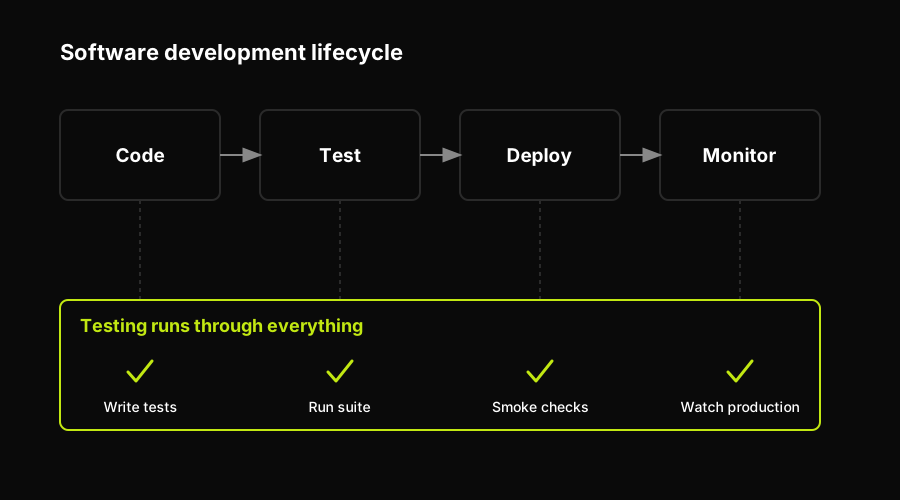
Testing is woven through every stage of the development lifecycle, not bolted on at the end.
Weaving testing through all of these stages takes real effort. That is exactly the work tools like Autonoma take off your plate: AI agents read your codebase, decide what needs testing, and generate and maintain the end-to-end tests automatically, so coverage keeps up as you ship.
Wherever testing sits in your workflow, it rests on a distinction worth getting straight from the very beginning.
Verification vs Validation
Two words get used interchangeably in testing, but they answer different questions. Getting them straight early saves a lot of confusion later.
Verification asks: "Are we building the product right?" It checks the software against its specification. Does the code match the design? Do the functions return what the docs promise? Verification happens through code reviews, static analysis, and tests that compare behavior to the requirements.
Validation asks: "Are we building the right product?" It checks the software against real user needs. A feature can work exactly as specified and still be the wrong feature. Validation happens through acceptance testing, user feedback, and demos with actual stakeholders.
A build can pass verification and fail validation: it does what the spec said, but the spec described something nobody wanted. Strong teams do both.
While we are defining terms, three more get confused constantly:
- A defect (or bug) is a flaw in the code. It exists whether or not anyone has triggered it yet.
- An error is the human mistake that introduced the defect: a wrong assumption, a typo, a misread requirement.
- A failure is what the user actually sees when a defect gets executed: the crash, the wrong total, the frozen screen.
One error can create one defect that causes many failures. Testing hunts for defects before they turn into failures your users experience.
Principles of Software Testing
Decades of practice have distilled testing down to a handful of principles. They explain why testing works the way it does, and why "just test everything" is never the answer.
- Testing shows the presence of defects, not their absence. A passing test proves only that you did not find a bug, not that none exist. Testing reduces risk; it never guarantees perfection.
- Exhaustive testing is impossible. Even a simple form has a near-infinite number of input combinations. You cannot test them all, so you prioritize by risk and impact instead.
- Testing early saves the most. The earlier a defect is caught, the cheaper it is to fix. This is why testing starts alongside development, not after it.
- Defects cluster. A small number of modules usually contain most of the bugs. Find the hot spots and concentrate your effort there.
- The pesticide paradox. Run the same tests over and over and they stop finding new bugs. Test suites have to evolve, just as pests grow resistant to a repeated pesticide.
- Testing is context dependent. You test a banking app differently than a mobile game. The risks, the users, and the stakes decide the approach.
- The absence-of-errors fallacy. Software with zero known bugs can still fail if it solves the wrong problem. Working correctly and being useful are not the same thing.
Keep these in mind and testing stops feeling like an endless checklist. It starts feeling like risk management.
Types of Software Testing
Software testing divides into several categories based on what you're testing and how you test it. Understanding these categories helps you choose the right testing approach.
Functional vs Non-Functional Testing
Functional testing verifies that features work correctly. Does the login button log users in? Does the calculator add numbers correctly? Does money transfer successfully between accounts? Functional tests check behavior against requirements.
Non-functional testing checks qualities like performance, security, and usability. How fast does the page load? Can the system handle 10,000 concurrent users? Is user data encrypted properly? These qualities don't relate to specific features but affect overall user experience.
Black-Box, White-Box, and Grey-Box Testing
Black-box testing treats the application as a mystery box. Testers don't see the code, they only test inputs and outputs. You enter a username and password, does it log you in? This mirrors how real users interact with software.
White-box testing requires full code access. Testers examine the internal logic, checking code paths, branches, and conditions. Does this if-statement handle null values? Does this loop terminate correctly? Developers typically perform white-box testing through unit tests.
Grey-box testing combines both approaches. Testers have partial knowledge of internal systems, allowing smarter test design without full code access. This is common in integration testing where you understand the architecture but don't need to see every line of code.
Beyond these categories, you'll hear teams talk about regression testing, smoke testing, and sanity testing: quick re-runs and checks that confirm existing features still work and that a build is stable enough to test further. We unpack those, along with the rest of the testing vocabulary, in Chapter 2: The Language of Testing.
Testing Levels: Building Quality Layer by Layer
Software testing happens at different levels, each catching different types of bugs. The industry uses a pyramid structure where you have many tests at the bottom and fewer at the top.
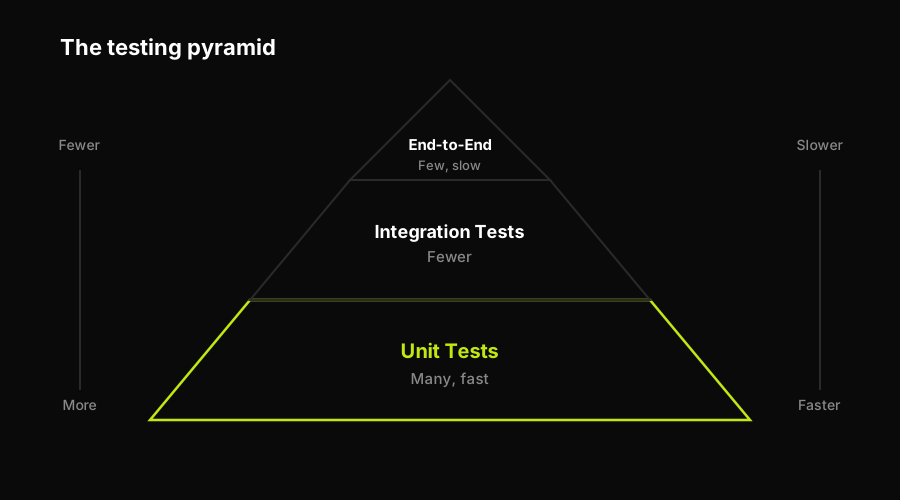
The testing pyramid: many fast unit tests at the base, fewer slow end-to-end tests at the top.
Unit Testing
Tests individual functions or methods in isolation. These are the fastest tests and form the base of the testing pyramid. A unit test might verify that an add(a, b) function returns the correct sum, or that a validation function rejects invalid email addresses.
Unit tests run in milliseconds. You can execute thousands in seconds. Developers write unit tests as they code, before committing changes. This catches bugs immediately when context is fresh.
Integration Testing
Tests how multiple components work together. Unit tests verify individual pieces work. Integration tests verify those pieces communicate correctly. Do your login system and database interact properly? Does your payment processor integrate with your order system? Does your API correctly call third-party services?
Integration tests are slower than unit tests because they involve multiple systems. They often require database connections, API calls, or file operations. But they catch bugs that unit tests miss the gaps between components.
System Testing
Tests the complete application from end to end. This verifies that all integrated components work together as a full system. System testing happens in an environment that closely mirrors production: same database, same configuration, same infrastructure.
System tests are the slowest and most expensive. They require the entire application running. But they provide the highest confidence that your software works as users will experience it.
Acceptance Testing
The final verification before release. Does the software meet business requirements? Would actual users find this usable? Acceptance testing often involves stakeholders, product managers, or real users testing the application.
Some teams call this User Acceptance Testing (UAT). It answers the question: "Would we ship this?" If acceptance tests fail, the feature returns to development regardless of how many unit tests pass.
This pyramid structure guides testing strategy: write many fast unit tests, some integration tests, and few slow end-to-end tests. This maximizes coverage while minimizing execution time and maintenance burden.
Why Testing Matters
Testing isn't bureaucracy. It's economics.
According to our State of QA 2025 research, teams that invest in comprehensive testing ship features faster and with fewer production incidents than teams that skip it. That sounds counterintuitive. Testing takes time. How does it accelerate development?
The answer lies in the cost of bugs over time.
Finding bugs during development costs $1 to fix. The developer is already working in that code. Context is fresh. The fix takes minutes.
Finding bugs during QA costs $10. Now you need bug reports, reproduction steps, developer context switching, and retesting. The same fix takes hours.
Finding bugs in production costs $100. Add customer support tickets, emergency hotfixes, deployment processes, and reputation damage. Days of work.
Finding bugs after they cause real damage costs $1,000+. Knight Capital's 45-minute failure cost $440 million. That's $163,000 per second.
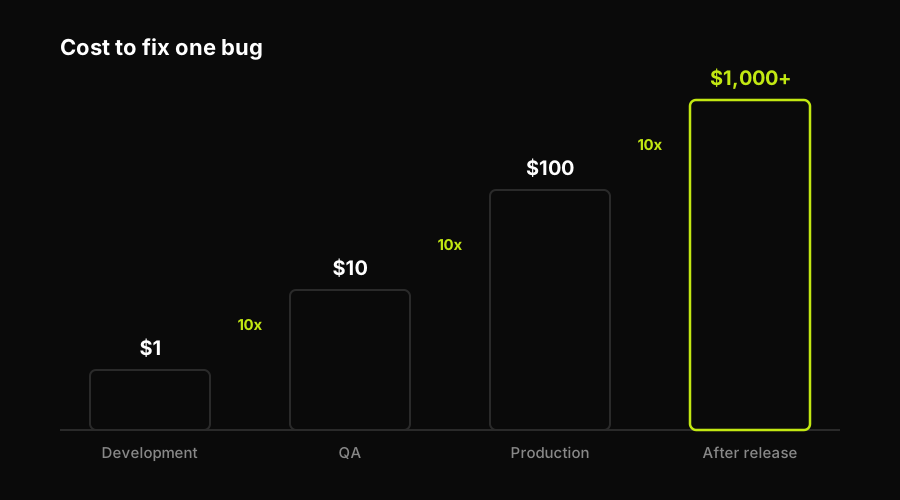
The cost of a bug climbs by roughly an order of magnitude at each stage it slips through, from development to production and beyond.
Beyond cost, testing enables confidence. Teams with comprehensive test coverage deploy multiple times per day. Teams without it deploy monthly and pray. The difference isn't talent. It's infrastructure.
Testing also serves as documentation. A well-written test suite shows exactly how the system should behave. New developers read tests to understand features. Tests outlive the original developers.
Who Does Software Testing?
Testing isn't one job. It's several roles with different focuses.
QA Engineers design testing strategy. They think like users, identify edge cases, and decide what needs testing. When you test manually, clicking through flows and trying to break things, you're doing QA work. These engineers understand the product deeply, they know which features are fragile, where users get confused, and what broke last time.
Software Development Engineers in Test (SDETs) build automation. They're developers who write code that tests code. While QA Engineers identify what to test, SDETs build frameworks that execute tests automatically. They work in the same languages as developers: Python, JavaScript, Java, creating tools that run thousands of tests in minutes.
Developers write unit tests for their own code. When you build a new function, you write tests that verify it works. This happens before code review. Most bugs never leave the developer's machine. Unit tests are the first line of defense.
Manual Testers explore the application like users would. They don't follow scripts. They try unexpected inputs, test on different devices, and discover bugs that automation misses. This role requires creativity, the best manual testers think like adversaries, deliberately trying to break the system.
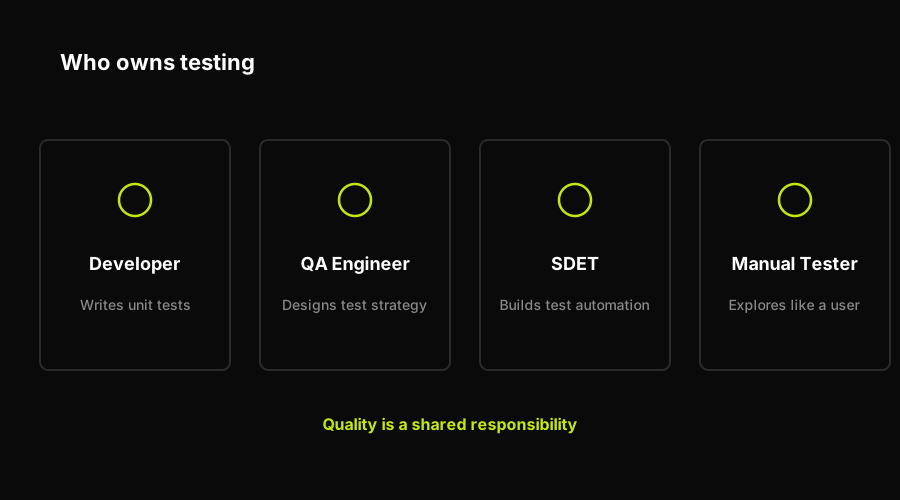
Testing is a shared responsibility split across developers, QA engineers, SDETs, and manual testers.
The boundaries blur in practice. Some developers do all their own testing. Some QA Engineers write automation. Some SDETs design test strategy. Modern teams trend toward "quality as a shared responsibility" where everyone owns testing.
But the skills remain distinct. Understanding the difference helps you decide which path to pursue.
Testing Approaches: Good vs Bad
Testing can accelerate or strangle development. The difference lies in approach.
Manual testing catches unknown problems but doesn't scale. When you test by hand, you discover things automation misses visual bugs, confusing user flows, performance issues on specific devices. Human intuition spots problems that scripts can't detect. Manual testing excels at exploratory work, new features, and edge cases you haven't considered yet.
The weakness is repeatability. Running the same manual tests every release wastes time. If you're clicking through login flows for the hundredth time, you should automate.
Automated testing scales infinitely but only finds known issues. Once you've written a test, it runs forever at near-zero cost. You can execute 10,000 automated tests in 10 minutes. This makes automation perfect for regression testing, verifying that old features still work after changes.
The weakness is upfront investment. Writing tests takes longer than manual checking initially. Maintenance costs add up if tests break frequently. Bad automation creates busywork instead of preventing it.
The best teams combine both strategically. Automate repetitive checks: login, core user flows, critical business logic. Let humans explore new features, try unexpected inputs, and test subjective qualities like usability. This division of labor maximizes both coverage and efficiency.
Fast feedback beats comprehensive coverage. Some teams write thousands of slow tests. Every commit triggers a 2-hour test suite. Developers stop running tests locally. They commit and hope.
Better teams prioritize fast tests. Run critical tests in under 5 minutes. Developers see failures immediately, fix them, and move on. Slower tests run overnight or before releases. This balances thoroughness with velocity.
Testing in production complements pre-deployment testing. The most sophisticated teams test continuously in production using feature flags, canary deployments, and monitoring. They catch bugs that only appear at scale or under real user behavior. This isn't careless it's acknowledging that no pre-production environment perfectly mirrors reality.
The shift toward production testing doesn't eliminate pre-deployment testing. It extends it. You still need automated tests before code ships. Production testing catches the remaining 5% that inevitably escapes.
The Real Cost of Not Testing
Production incidents from insufficient testing aren't small bugs. They're outages, data corruption, security breaches, and financial losses that can destroy companies.
Consider these well-documented software testing failures:
Heathrow Terminal 5 Baggage System (2008): The software handling 12,000 bags per hour failed on opening day. Root cause: insufficient integration testing. Engineers tested individual software components in isolation but never verified the complete system worked together. The baggage sorting software couldn't handle real-world load. Result: 500 flights cancelled, 42,000 bags lost, £16 million in direct costs. Proper load testing and integration testing would have caught this before launch.
Target Payment System Security (2013): Hackers exploited weak access controls in Target's vendor management software to steal 40 million credit cards. The security flaw existed because Target didn't test their third-party integration code for authorization vulnerabilities. Penetration testing would have revealed that HVAC vendor credentials could access payment systems. Result: $162 million in settlements, CEO resignation, years of reputation damage.
Boeing 737 MAX Flight Control Software (2019): The MCAS flight control software contained a critical defect: it relied on a single sensor without redundancy checks. When that sensor failed, the software forced the plane into a dive. Testing failed to simulate sensor failure scenarios. Result: 346 deaths, global fleet grounding, $20 billion in costs, criminal charges. This is what happens when test scenarios don't cover critical failure modes.
These aren't edge cases. They're predictable outcomes of insufficient testing. Every software failure follows the same pattern: shortcuts seemed acceptable until they weren't.
Getting Started with Software Testing
If you're new to testing, start simple. You don't need frameworks or tools initially. You need the mental model.
Pick one function in your codebase. Write down what it should do. Then write code that verifies it does that. Run it. Did it pass? You've written your first test.
Once that clicks, explore testing frameworks for your language. JavaScript has Jest and Mocha. Python has pytest. Java has JUnit. These frameworks handle the repetitive parts, running tests, reporting results, organizing suites, so you focus on what to test.
Learn the testing pyramid next. Unit tests form the base, fast, isolated tests of individual functions. Integration tests sit in the middle, verifying that components work together. End-to-end tests top the pyramid, simulating complete user flows. You want many unit tests, some integration tests, and few end-to-end tests. This balance maximizes coverage while minimizing maintenance.
Finally, practice test-driven development (TDD) on small projects, one of several practices Chapter 2 covers in depth. Write tests before code. It feels backward initially. Over time, it becomes natural. TDD forces you to think about behavior before implementation. This produces better designs and more testable code.
Frequently Asked Questions
Software testing is the process of checking whether code works correctly before it reaches users. Testers write code that verifies other code behaves as expected, catching bugs early when they're cheap to fix. Think of it like a quality control checkpoint, you test products before shipping them to customers.
It depends on the role. Manual QA testers don't need programming skills, they test by clicking through applications like real users would. But Software Development Engineers in Test (SDETs) need strong programming skills to build automated tests. Most modern QA roles benefit from basic coding knowledge in Python or JavaScript, even if you start without it.
The main types are: 1) **Unit testing** (testing individual functions in isolation), 2) **Integration testing** (testing how components work together), 3) **System testing** (testing the complete application end-to-end), 4) **Acceptance testing** (verifying it meets user requirements), and 5) **Regression testing** (ensuring old features still work after changes). Each level catches different types of bugs.
Neither is universally better, they serve different purposes. Automated testing scales infinitely and is perfect for repetitive tasks like regression testing. Manual testing excels at exploratory work, finding visual bugs, and testing new features where human intuition matters. The best teams use both strategically: automate regression tests while humans explore new features and edge cases.
Basic testing concepts take 1-2 weeks to understand. Becoming job-ready as a manual QA tester takes 2-3 months of practice with real applications. Learning test automation frameworks like Playwright or Selenium takes 3-6 months of dedicated practice writing code. Mastery takes years of real-world experience across different applications, technologies, and testing scenarios.
Popular testing tools include: **Playwright** and **Selenium** (browser automation), **Postman** (API testing), **JMeter** (performance testing), **Jest** and **pytest** (unit testing frameworks), **JIRA** (bug tracking), and **TestRail** (test case management). Most modern teams also use CI/CD tools like GitHub Actions or Jenkins to run tests automatically on every code commit.
Yes. Software testing is one of the most accessible tech careers. Many successful QA engineers come from non-technical backgrounds: teaching, customer service, even the arts. Manual testing requires no coding initially, and you can learn automation through online courses, bootcamps, and practice. Employers value practical testing skills, attention to detail, and critical thinking over formal degrees.
Testing is the act of running tests and finding bugs. Quality Assurance (QA) is broader: it's about preventing bugs through better processes, not just finding them. QA Engineers design testing strategies, improve development workflows, and think about quality throughout the entire software development lifecycle. Testing is a subset of QA activities.
What's Next
You now understand what software testing is, why it matters, who does it, and how to think about testing strategy. You know the cost of bugs increases exponentially over time. You understand that good testing combines automation with human intuition.
But you don't need to wait. Start testing today. Take one function. Write one test. See what breaks. That's how every expert began.
The best time to start testing was before your first commit. The second best time is now.
And if writing and maintaining those test scripts sounds like the part you'd rather skip, that is exactly what tools like Autonoma automate: AI agents that read your codebase, decide what needs testing, and generate and maintain the end-to-end tests automatically, so you get the safety net of automated testing without writing a single script.
Course Navigation
Chapter 1 of 8: Introduction to Software Testing ✓
Next Chapter →
Chapter 2: The Language of Testing
Learn essential testing terminology every QA professional needs. Master TDD, BDD, Gherkin syntax, and understand the difference between regression, smoke, and sanity tests. Includes code examples in Python and JavaScript.


