

SAST vs DAST is the first real security decision a growing engineering team faces. SAST (Static Application Security Testing) scans your source code without running it, catching vulnerabilities like hardcoded secrets, SQL injection patterns, and insecure dependencies at commit time. DAST (Dynamic Application Security Testing) sends live requests to a running application, catching runtime issues like misconfigured headers, authentication bypasses, and injection flaws that only appear in a deployed environment. Both are necessary. Both have well-documented gaps. The gap that security vendors do not talk about - business logic flaws, multi-step authorization bugs, and behavioral compliance failures - requires a third layer that neither scanner can provide.
Enterprise application security testing reviews do not go the way the checklist implies. You get the questionnaire. You check the SAST box. You check the DAST box. You submit. Two weeks later, a security architect from the prospect's team schedules a call and starts asking about your business logic testing coverage. About how you catch authorization bugs that span multiple API calls. About your testing approach for multi-tenant data isolation.
SAST does not cover that. DAST does not cover that. And "we rely on our QA team" is not the answer that closes the deal.
The honest reality of SAST vs DAST is that both tools were built to solve specific, well-defined problems - and those problems do not include the class of vulnerabilities that sophisticated buyers care most about. Understanding what each tool actually catches, where each one stops, and what sits in the gap between them is the starting point for a security posture that can survive scrutiny.
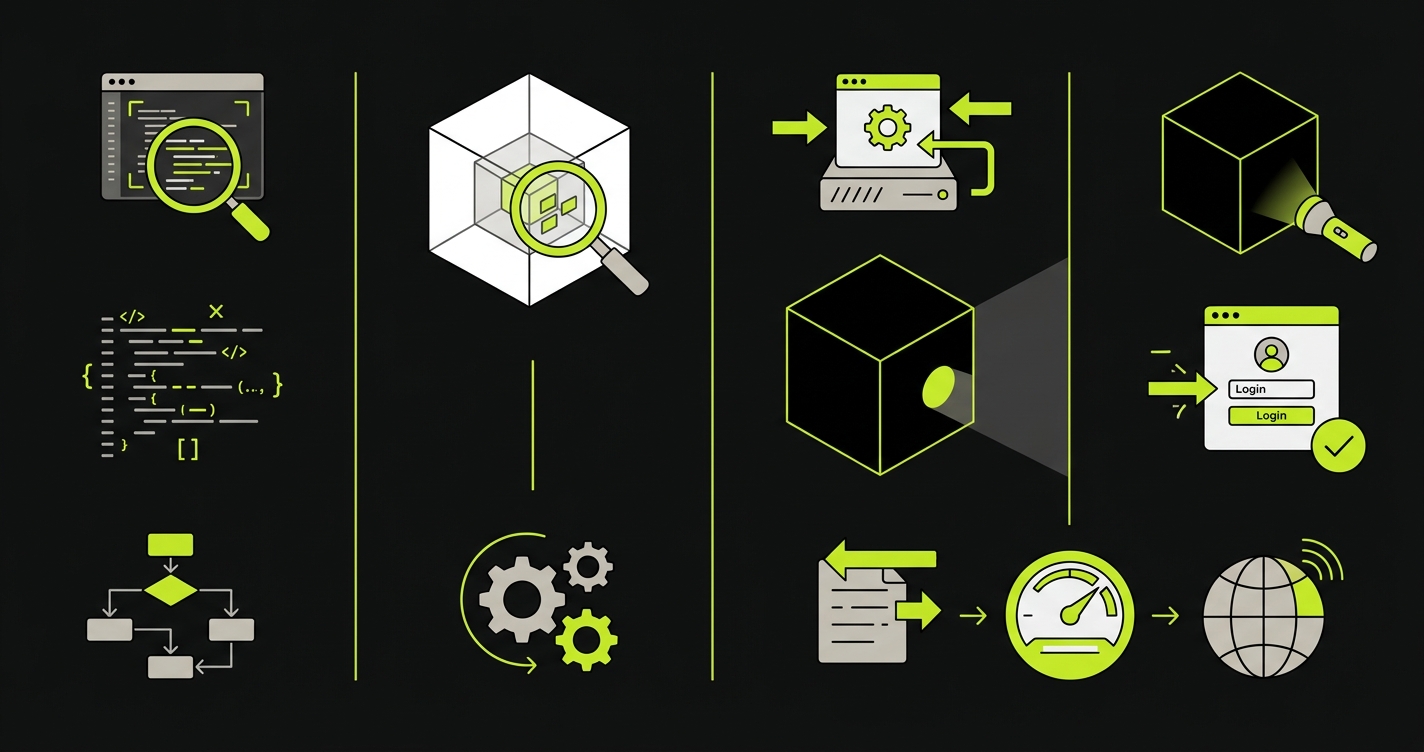
What SAST Actually Does (and Where It Breaks Down)
Static analysis reads your code the way a compiler does - traversing the abstract syntax tree, following data flows, checking for patterns that match known vulnerability signatures. It does not run your application. It does not care whether your application is deployed. Give it source code and it returns findings within minutes.
This makes SAST fast and cheap to run. A Semgrep scan on a 100k-line TypeScript codebase takes under two minutes in a typical CI job. You get results on every pull request before anything gets deployed. That speed is the core value proposition: catch the issue before it moves further down the pipeline.
What SAST finds is a real and useful list: hardcoded credentials, SQL string concatenation, use of deprecated cryptographic functions, calls to unsafe deserialization methods, dependency versions with known CVEs. These map directly to OWASP Top 10 categories like A03:2021 Injection and A02:2021 Cryptographic Failures. These are code-level mistakes that a developer made, and static analysis is genuinely good at finding them.
Here is what a classic SQL injection vulnerability looks like in practice, and what the secure alternative should be:
// Vulnerable: string concatenation opens the door to SQL injection
const query = "SELECT * FROM users WHERE email = '" + userInput + "'";
db.execute(query);

// Secure: parameterized queries prevent injection by design
const query = "SELECT * FROM users WHERE email = $1";
db.execute(query, [userInput]);
And a hardcoded secret, the kind of finding SAST catches in seconds:
// Vulnerable: API key committed to source control
const stripe = new Stripe("sk_live_4eC39HqLyjWDarjtT1zdp7dc");

// Secure: loaded from environment at runtime
const stripe = new Stripe(process.env.STRIPE_SECRET_KEY);
The false positive problem is real and gets worse at scale. The average false positive rate for SAST tools sits between 20% and 40% in production codebases, according to research from NIST's SATE studies and various academic studies on static analysis tooling. On a codebase with 500 findings, that is 100 to 200 tickets your team will triage and close as "not applicable." Every false positive trains developers to view security findings as noise. Over time, they stop reading them carefully. This is how real vulnerabilities get triaged away.
Beyond false positives, there is a deeper structural gap. SAST sees what your code says it will do. It cannot see what your running application actually does under real conditions. A server that returns stack traces in error messages. A missing Strict-Transport-Security header. A session that does not invalidate on logout. These are not code mistakes in the traditional sense - they are configuration and runtime behavior that only surfaces when the application is live.
See our web application security testing guide for a broader overview of how SAST fits into a complete security testing strategy.
What DAST Actually Does (and Where It Breaks Down)
Dynamic analysis is the opposite approach. You deploy your application - to a staging environment, a preview environment, or a dedicated security testing environment - and point a scanner at it. The scanner crawls your application like an automated attacker would: sending HTTP requests, injecting payloads, observing responses, looking for behavior that indicates a vulnerability.
DAST catches a different class of issues than SAST, mapping to OWASP Top 10 categories like A05:2021 Security Misconfiguration and A07:2021 Identification and Authentication Failures. Missing security headers. Server-side request forgery. Reflected and stored XSS that actually executes in a browser. Authentication endpoints that accept weak credentials. Rate limiting that does not exist. These findings depend on the application running and responding - static analysis cannot find them because they are not in the code, they are in the behavior.
The fundamental limitation of DAST is coverage. A scanner can only test what it can reach. Modern applications built with React, Next.js, or other SPA frameworks are difficult to crawl because navigation is JavaScript-driven. API-first architectures require authenticated sessions and specific request sequences that a generic crawler does not understand. DAST tools have improved their handling of authenticated flows and modern architectures, but coverage remains an open problem.
The other issue is speed. A full DAST scan against a mid-sized application typically takes 30 to 90 minutes. Running it on every pull request is impractical for most teams. The standard approach is to run DAST against a staging or preview environment on merge to main, or on a scheduled basis against production. This means DAST findings arrive after the code is already deployed, not before.
| Dimension | SAST | DAST |
|---|---|---|
| When it runs | On every commit/PR | Against a deployed environment |
| What it needs | Source code or bytecode | Running application with a URL |
| Scan duration | 1-5 minutes | 30-90 minutes |
| False positive rate | 20-40% | 10-20% (lower but context-dependent) |
| Catches runtime config issues | No | Yes |
| Catches hardcoded secrets | Yes | No |
| Catches business logic flaws | No | No |
| Works on SPAs/API-first apps | Yes | Limited |
| Language dependent | Yes (requires language-specific rules) | No (tests HTTP behavior regardless of stack) |
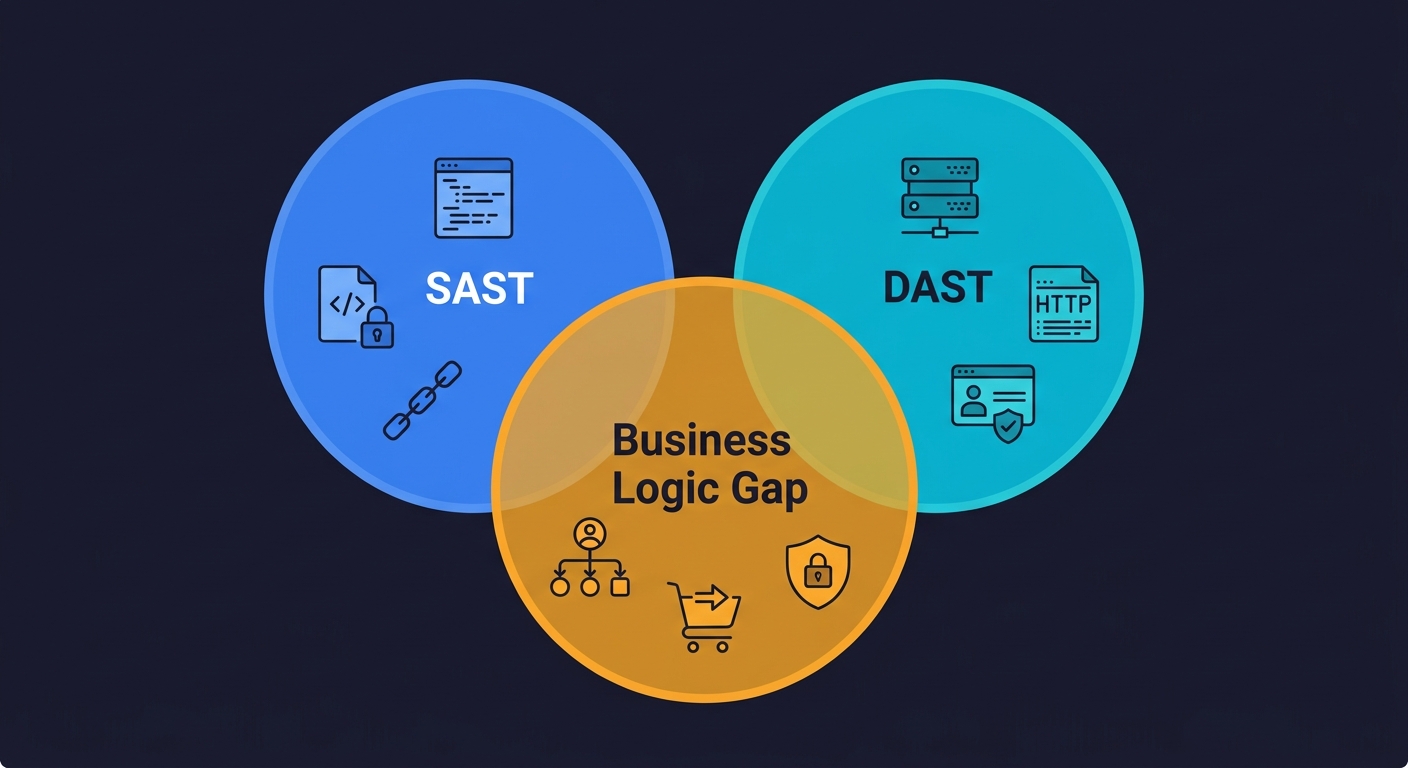
The Gap Both Tools Share: Business Logic
This is the part every "SAST vs DAST" article skips.
Neither SAST nor DAST can find a bug where a user cancels a subscription and the cancellation flow charges them one more billing cycle anyway. Neither can find a bug where a user with a free-tier account can access a premium feature by manipulating a parameter in a multi-step checkout flow. Neither can find a bug where a patient portal allows a user to view another patient's records by changing a single ID in a URL sequence that was validated at step one but not re-validated at step three.
These are not injection vulnerabilities. They are not missing headers. They are not unsafe function calls. They are business logic flaws - bugs in how your application enforces the rules that your business model and your compliance obligations depend on.
For a startup pursuing enterprise deals, business logic flaws are often the most consequential class of vulnerability. SOC 2 auditors care about access control. HIPAA auditors care about PHI access patterns. PCI DSS auditors care about whether your payment flows can be manipulated. None of these compliance requirements can be validated by a code scanner or a generic HTTP fuzzer. They require functional tests that understand your application's user journeys.
Where Each Tool Fits in a Real CI/CD Pipeline
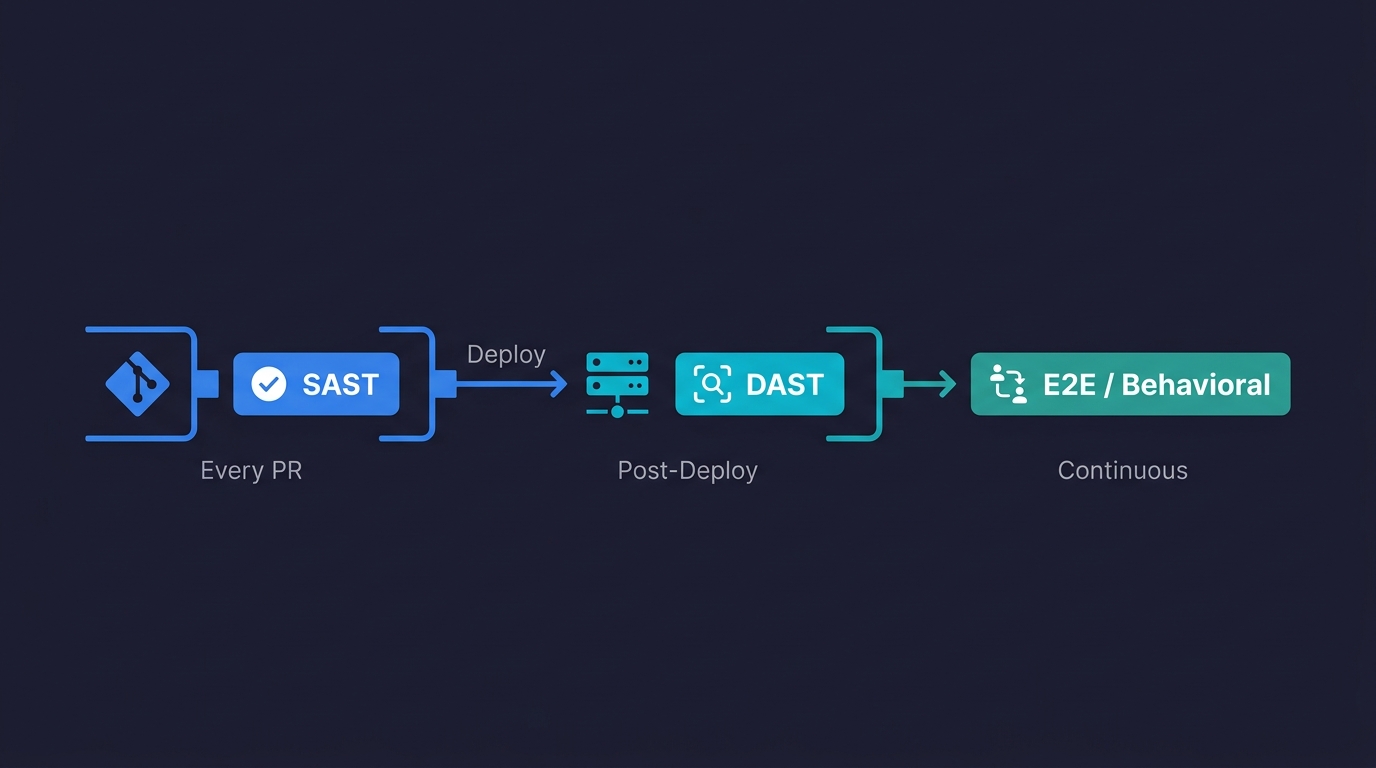
The shift-left security movement gets talked about constantly in DevSecOps circles. Every vendor says their tool belongs in CI. In practice, putting the wrong tool in the wrong pipeline stage just makes your pipeline slower and your developers angrier.
Here is how a mature DevSecOps pipeline actually structures these layers:
Stage 1: Pre-commit and PR (SAST)
SAST belongs here. It is fast enough to run on every push, it requires no deployed environment, and it catches code-level issues before they ever reach a review. Configure incremental scanning on PR branches (scan changed files only) and full scans on main merges.
# GitHub Actions: SAST on every PR
name: Security - SAST

on:
  pull_request:
    branches: [main, develop]
  push:
    branches: [main]

jobs:
  sast:
    runs-on: ubuntu-latest
    steps:
      - uses: actions/checkout@v4

      - name: Run Semgrep SAST
        uses: semgrep/semgrep-action@v1
        with:
          config: >-
            p/owasp-top-ten
            p/secrets
            p/typescript
        env:
          SEMGREP_APP_TOKEN: ${{ secrets.SEMGREP_APP_TOKEN }}

      - name: Upload SARIF results
        uses: github/codeql-action/upload-sarif@v3
        if: always()
        with:
          sarif_file: semgrep.sarif
Stage 2: Post-deploy to staging (DAST)
DAST belongs here, not in the PR stage. Run it after your application is deployed to a preview or staging environment. Gate the merge to main on DAST passing, or run it asynchronously and alert on high-severity findings.
# GitHub Actions: DAST against preview environment
name: Security - DAST

on:
  deployment_status:

jobs:
  dast:
    runs-on: ubuntu-latest
    if: github.event.deployment_status.state == 'success'
    steps:
      - name: Checkout
        uses: actions/checkout@v4

      - name: Run OWASP ZAP Baseline Scan
        uses: zaproxy/action-baseline@v0.12.0
        with:
          target: ${{ github.event.deployment_status.target_url }}
          rules_file_name: .zap/rules.tsv
          cmd_options: '-a -j'

      - name: Upload ZAP Report
        uses: actions/upload-artifact@v4
        if: always()
        with:
          name: zap-report
          path: report_html.html
Stage 3: Continuous against staging or production (Behavioral/E2E)
Business logic testing belongs here. Unlike SAST and DAST, behavioral tests validate actual user workflows - the exact flows your compliance certifications depend on. These run continuously against a live environment and catch regression in behavior, not just code patterns.
# GitHub Actions: Full pipeline with all three security layers
name: Full Security Pipeline

on:
  push:
    branches: [main]

jobs:
  sast:
    name: Static Analysis
    runs-on: ubuntu-latest
    steps:
      - uses: actions/checkout@v4
      - name: Semgrep SAST
        uses: semgrep/semgrep-action@v1
        with:
          config: p/owasp-top-ten p/secrets
        env:
          SEMGREP_APP_TOKEN: ${{ secrets.SEMGREP_APP_TOKEN }}

  deploy-staging:
    name: Deploy to Staging
    needs: sast
    runs-on: ubuntu-latest
    steps:
      - uses: actions/checkout@v4
      - name: Deploy
        run: ./scripts/deploy-staging.sh
        env:
          STAGING_URL: ${{ vars.STAGING_URL }}

  dast:
    name: Dynamic Analysis
    needs: deploy-staging
    runs-on: ubuntu-latest
    steps:
      - uses: actions/checkout@v4
      - name: ZAP Full Scan
        uses: zaproxy/action-full-scan@v0.10.0
        with:
          target: ${{ vars.STAGING_URL }}

  behavioral:
    name: Behavioral / E2E Tests
    needs: deploy-staging
    runs-on: ubuntu-latest
    steps:
      - uses: actions/checkout@v4
      - name: Run [Autonoma](https://autonoma.app) Tests
        run: npx autonoma run --env staging
        env:
          AUTONOMA_API_KEY: ${{ secrets.AUTONOMA_API_KEY }}
Three jobs run after SAST passes. DAST and behavioral tests run in parallel against the deployed staging environment. The pipeline fails if any layer finds a high-severity issue.
The False Positive Tax on Developer Velocity
One cost that never appears in SAST or DAST vendor benchmarks is the time developers spend triaging false positives. This is a real and measurable velocity drag.
A team running Checkmarx or Veracode on a large codebase can expect anywhere from 200 to 800 initial findings. A large fraction of these are not actionable: findings in vendor libraries, legitimate dynamic queries that the tool misidentifies as injection risks, cryptographic code that is non-standard but intentional. Each finding requires a developer to read it, understand it, and either fix it or suppress it with a documented justification.
In practice, suppression becomes the default over time. Teams create allow-lists, override rules, and eventually run SAST in "advisory mode" where findings do not block the pipeline. The tool is still running. The dashboard still looks green. It has stopped doing security work.
The false positive problem is manageable but only with deliberate investment. Customize rules to your stack. Suppress with explicit reasoning. Review suppressions quarterly. Assign a security champion who owns the findings backlog. This is non-trivial ongoing work that most engineering teams at Series A or B have not staffed for.
DAST false positive rates are lower (typically 10-20%) because the tool is observing real behavior rather than inferring intent from code patterns. But DAST introduces its own operational overhead: managing authenticated test sessions, keeping the target environment stable during scans, ensuring DAST does not mutate production data.
Choosing Tools for Your Stack
For teams just starting to build a security testing pipeline, the practical starting point is free and open-source tooling that integrates cleanly with GitHub Actions.
On the SAST side, Semgrep offers a generous free tier, an extensive community ruleset, and scan times that stay under five minutes on most codebases. For Python-specific work, Bandit covers the OWASP top-ten patterns without configuration overhead. For JavaScript and TypeScript, CodeQL is the most thorough option (it powers GitHub's built-in security scanning). See our SAST tools comparison for a deeper breakdown of these tools including performance benchmarks and false positive rates by language.
On the DAST side, OWASP ZAP is the standard open-source option and has GitHub Actions support. For teams that want more automation in authenticated flows, BrightSec (now Bright Security) handles modern SPA architectures better than ZAP. For enterprise requirements, Invicti and Veracode provide compliance reporting outputs that satisfy SOC 2 and PCI auditors directly. Our DAST tools comparison covers these in more detail with specific integration patterns.
For behavioral testing, Autonoma connects to your codebase, reads your routes and user flows, and generates tests automatically. A Planner agent maps your application's business logic. An Automator agent executes tests against your running application. A Maintainer agent keeps tests passing as your code changes. The tests are derived from your code, not from manual recording, so they stay current as your application evolves.
What About IAST and SCA?
Any serious conversation about SAST vs DAST eventually leads to two adjacent tools: IAST (Interactive Application Security Testing) and SCA (Software Composition Analysis).
IAST combines elements of both approaches. It installs an agent inside your running application that monitors code execution paths while the application handles real or test traffic. When a request triggers a vulnerable code path, IAST can correlate the runtime behavior with the exact source code location. This gives you lower false positive rates than SAST and better coverage than DAST, but IAST requires instrumenting your application and typically only supports specific language runtimes (Java, .NET, Python, Node.js).
SCA takes a different angle entirely. Instead of scanning your code for vulnerabilities, it scans your dependencies. SCA tools like Snyk, Dependabot, and Socket read your lock files, match dependency versions against public CVE databases, and flag packages with known security issues. For most modern applications where 70-80% of the codebase is third-party dependencies, SCA coverage is essential.
Both IAST and SCA close real gaps in a SAST-plus-DAST setup. Neither addresses the business logic gap. An IAST agent can tell you that a request reached a vulnerable code path. It cannot tell you that your multi-step checkout flow allows a user to apply two discount codes when the business rule says one. SCA can tell you that a dependency has a known CVE. It cannot tell you that your authorization logic lets a regular user access admin endpoints through a specific sequence of API calls.
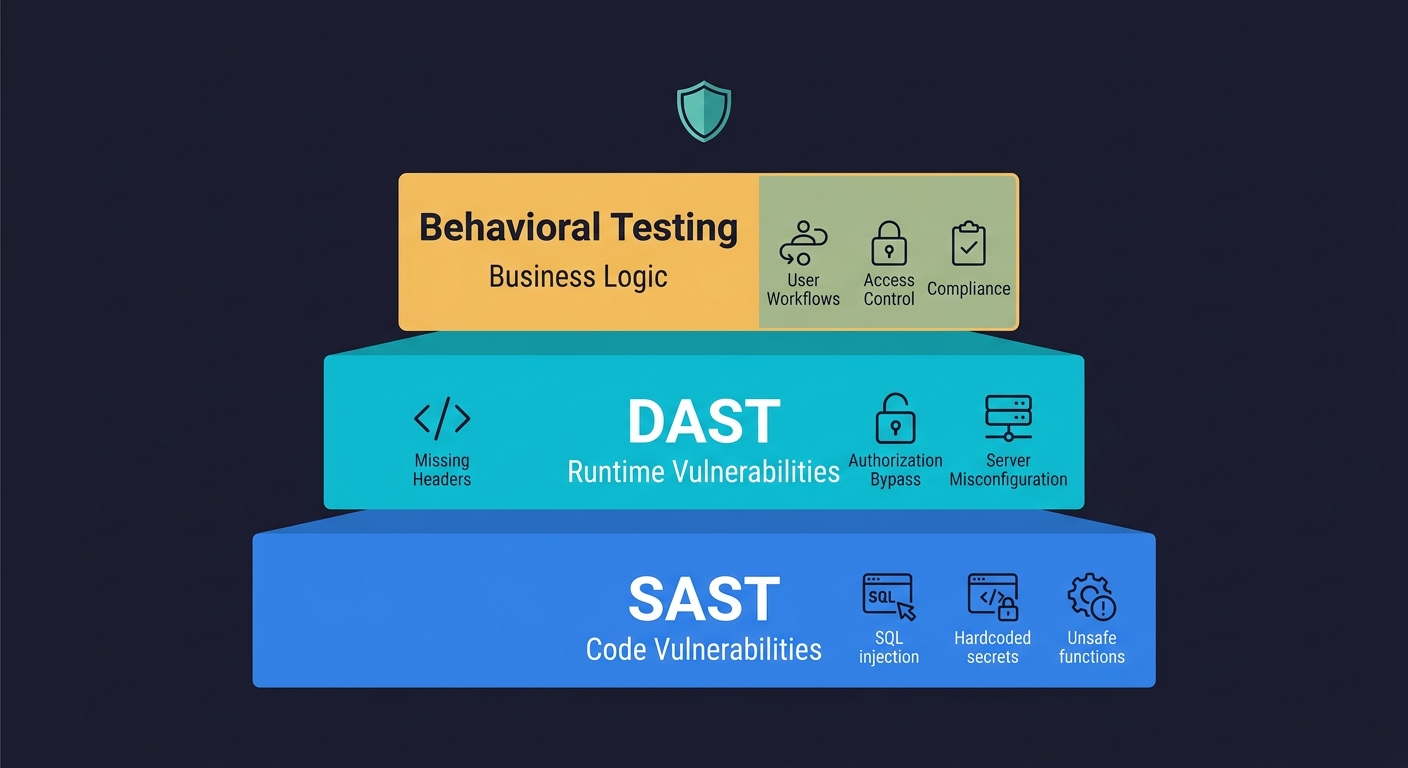
What a Complete Security Testing Stack Looks Like
The standard answer in every SAST vs DAST article is "use both." That is correct but incomplete.
SAST finds code-level vulnerabilities before deployment. DAST finds runtime and configuration vulnerabilities after deployment. Behavioral testing validates that your application's actual workflows enforce your business rules, access controls, and compliance obligations correctly.
For a startup pursuing enterprise deals, the compliance question is not whether you have a scanner. It is whether your testing infrastructure can demonstrate that your application behaves correctly under real conditions. SOC 2 Type II requires evidence of continuous monitoring. HIPAA requires evidence that access controls work as designed. These requirements cannot be satisfied by showing an auditor a SAST scan report. They require functional test evidence.
The teams that move through enterprise security reviews fastest are not the ones with the most sophisticated scanners. They are the ones who can produce test evidence showing that their authorization logic, data handling, and user workflow controls work correctly across every release.
SAST and DAST get you into the conversation. Behavioral testing is what closes the deal.
Frequently Asked Questions
SAST (Static Application Security Testing) analyzes source code without running the application, catching code-level vulnerabilities at commit time. DAST (Dynamic Application Security Testing) sends live requests to a running application, catching runtime and configuration issues that only appear when the application is deployed. SAST is faster and runs earlier in the pipeline; DAST is slower but catches a different class of vulnerability that static analysis cannot see.
Most teams need both. SAST runs on every commit and catches code-level issues early. DAST runs against a deployed environment and catches runtime vulnerabilities. For startups pursuing enterprise deals, you also need a third layer of behavioral testing to validate business logic and access controls - the class of issues that neither SAST nor DAST can find.
SAST misses runtime configuration issues (missing headers, TLS problems), business logic flaws, and any vulnerability that depends on how the application behaves under real traffic. It also generates false positive rates of 20-40%, which creates developer overhead and alert fatigue over time.
DAST misses code-level vulnerabilities that require source context, business logic flaws in multi-step workflows, and authorization bugs that only appear after a specific sequence of actions. It also struggles with coverage on modern SPA and API-first architectures where automated crawling is unreliable.
SAST belongs in the PR stage, running on every commit before deployment. Configure it to scan changed files on PR branches for speed, and run full scans on main merges. Common tools include Semgrep, Bandit (Python), and CodeQL (JavaScript/TypeScript).
For SAST: Semgrep (fast, free tier, customizable), Bandit (Python), CodeQL (JavaScript/TypeScript). For DAST: OWASP ZAP (open-source, CI-friendly), BrightSec (better SPA support), Invicti (enterprise compliance reporting). For behavioral and business logic testing: Autonoma (https://getautonoma.com) generates tests automatically from your codebase.
SAST scans source code without running the application (white-box testing). DAST sends requests to a running application without seeing the source code (black-box testing). IAST combines both by installing an agent inside the running application that monitors code execution in real time (gray-box testing). SAST is fastest and runs earliest in CI. DAST catches runtime issues SAST cannot see. IAST reduces false positives by correlating runtime behavior with source code, but requires instrumenting your application and only supports specific language runtimes.
SAST and DAST are necessary but not sufficient for most compliance frameworks. SOC 2 Type II requires evidence of continuous monitoring and access control validation. HIPAA requires evidence that PHI access controls work as designed. PCI DSS requires evidence that payment flows cannot be manipulated. These requirements demand functional test evidence showing that business logic and authorization controls work correctly under real user conditions.


