

Dynamic Application Security Testing (DAST) scans a running application by sending malicious inputs and observing responses. Unlike static analysis, DAST tools have no access to source code: they probe your app the same way an attacker would, looking for known vulnerability patterns like SQL injection, XSS, insecure headers, and authentication bypass. The leading tools in 2026 are OWASP ZAP (open source), Burp Suite (developer-focused), StackHawk (CI/CD-native), Invicti, Checkmarx DAST, Qualys WAS, Rapid7 InsightAppSec, Tenable.io WAS, and HCL AppScan. Each has a different strength profile. None of them can validate business logic.
The first five results for "best DAST tools 2026" are written by Invicti's content team, Checkmarx's marketing department, and PortSwigger. All of them rank themselves at or near the top. None of them tell you what the tools actually miss.
This comparison of DAST tools covers nine scanners across six dimensions: SPA and JavaScript coverage, authentication handling, CI/CD integration, pricing model, false positive management, and the coverage categories where the entire DAST category falls short by design. The goal is a resource that engineering leaders can actually use when evaluating options or filling out a security questionnaire.
Spoiler: every tool on this list has a legitimate use case. The choice between DAST tools is mostly about team maturity, stack complexity, and where you sit in your security program. The harder question is what happens after you pick one.
How Dynamic Application Security Testing Works (and Where It Breaks Down)
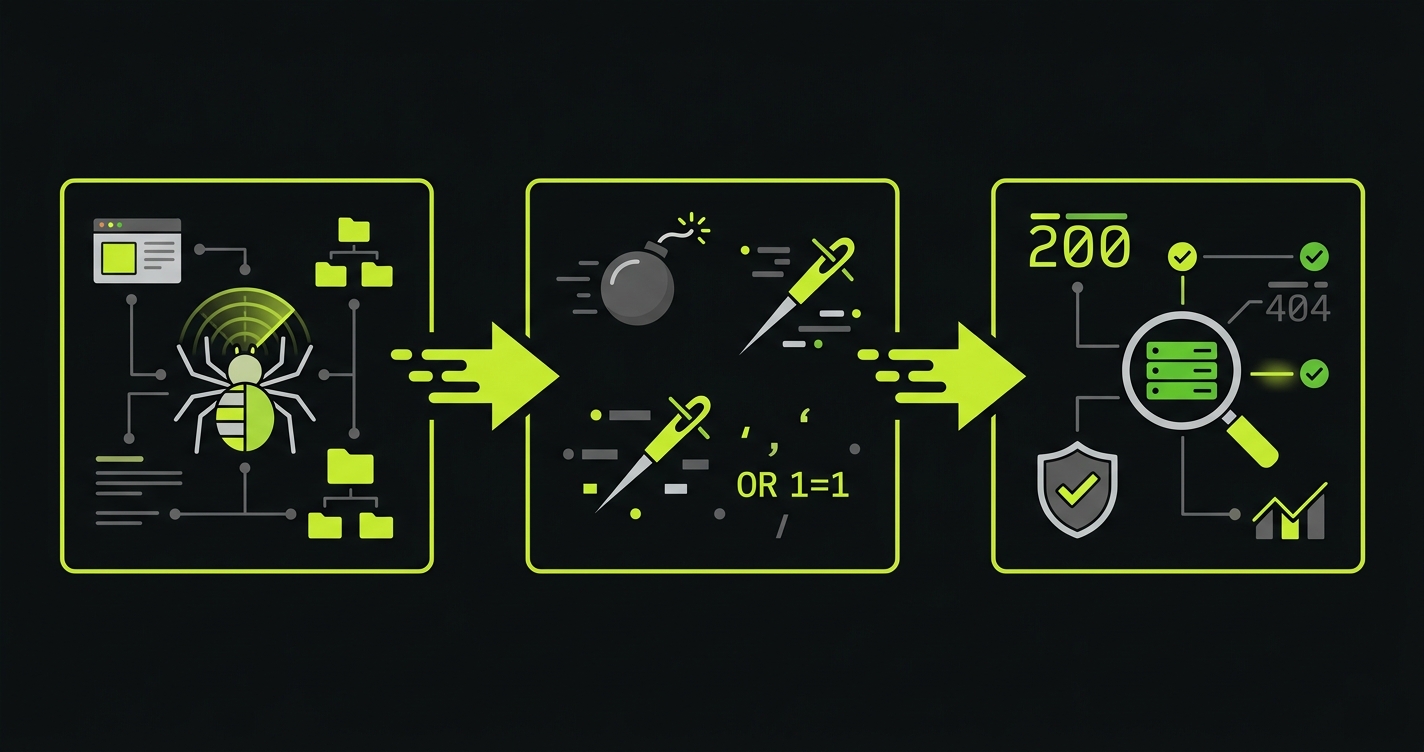
A DAST scanner discovers your application's attack surface by crawling it, then fires a library of payloads at every discovered endpoint. It checks whether the response indicates a vulnerability: did the SQL injection cause an error? Did the reflected XSS payload execute? Did the server return a stack trace?
This approach is genuinely useful for a specific class of bugs. Injection vulnerabilities, server misconfiguration, weak TLS settings, missing security headers, and known CVEs in exposed frameworks are all things DAST can reliably detect. These are the bugs that appear in OWASP Top 10 lists and that penetration testers find in the first hour of an engagement.
The problem is coverage gaps, and they are significant. DAST tools operate on HTTP request/response pairs in isolation. They do not understand your application's state, your business rules, or the sequence of actions that constitute a real user session. A scanner that fires payloads at /api/checkout cannot understand that the checkout endpoint should reject orders where the coupon discount exceeds the cart total. It does not know what "correct" looks like. It only knows what "looks vulnerable to SQL injection" looks like.
For a deeper look at how DAST fits alongside static analysis in a complete security program, see our post on web application security testing. If you are evaluating both approaches, our SAST vs DAST comparison covers the tradeoffs in detail.
DAST vs SAST vs IAST: Where Each Fits
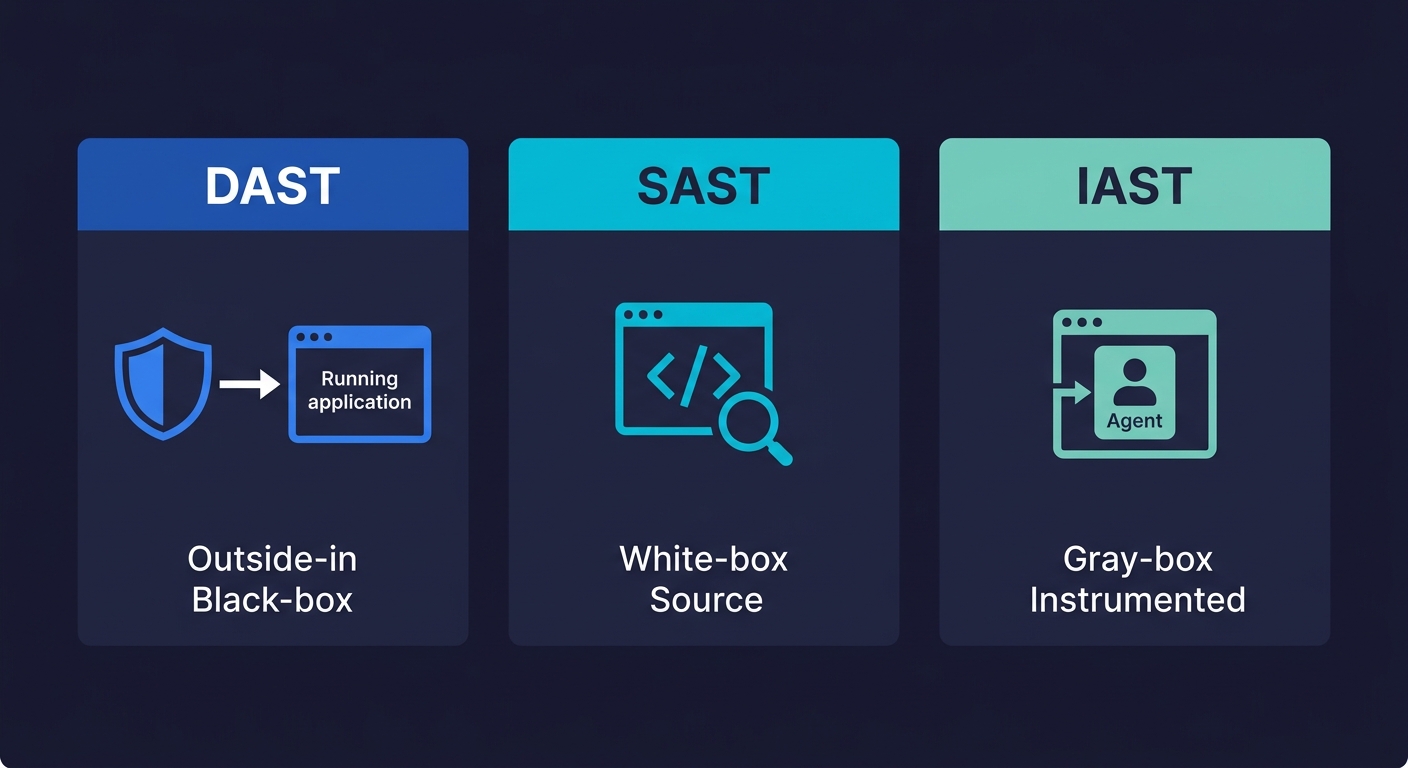
DAST is one of three primary approaches to application security testing. Understanding the differences matters because each catches a different class of bugs, and no single approach covers everything.
SAST (Static Application Security Testing) analyzes source code or binaries without running the application. It catches code-level issues like hardcoded secrets, SQL injection patterns in source, and dangerous function calls. IAST (Interactive Application Security Testing) instruments the running application from the inside, combining runtime context with code-level visibility.
| Dimension | DAST | SAST | IAST |
|---|---|---|---|
| Testing approach | Black-box (outside-in) | White-box (source code) | Gray-box (instrumented runtime) |
| When it runs | Against running app | Pre-deployment (code/build) | Runtime with agent |
| What it catches | Injection, misconfig, headers, auth bypass | Hardcoded secrets, code patterns, dependency vulns | Runtime flaws with code context |
| What it misses | Business logic, auth boundaries, workflows | Runtime config, deployment issues | External attack vectors |
| False positive rate | Moderate to high | High | Low |
| Best for | Production-like vulnerability scanning | Early dev-cycle security checks | Teams needing runtime + code context |
For most teams, the practical starting point is DAST plus SAST. IAST adds value but requires application instrumentation, which means agent deployment and performance overhead. The tools reviewed below are all DAST tools. For SAST tool options, see our SAST tools comparison.
9 DAST Tools Honestly Assessed
OWASP ZAP
ZAP is the baseline. It is free, actively maintained, and has been the entry point for application security testing for over a decade. If you are not running any DAST at all, ZAP is where you start.
Its strengths are real: extensive documentation, a large community, good API support, and reasonable CI/CD integration through its Docker image and GitHub Actions. The active scan covers the OWASP Top 10 with solid fidelity, and the spider can handle traditional multi-page applications well.
The weaknesses are equally real. ZAP's SPA and JavaScript-heavy application support has improved but remains its weakest area. The AJAX spider is slow and often incomplete against modern React or Vue frontends. Authentication handling is functional but requires significant manual configuration, and token refresh flows for OAuth or session-based auth can be brittle. For teams running complex auth patterns (SSO, multi-factor, API keys plus session tokens), expect to invest real time in ZAP configuration before you get useful scan results.
Pricing: Free and open source. Commercial support is available from third parties.
Best for: Teams new to DAST, or teams that need a free scanner for basic CI/CD integration. Not the right choice if your frontend is a complex SPA or your auth flow is non-trivial.
Burp Suite
Burp is the professional's tool. Security engineers and penetration testers use Burp Suite Professional almost universally because of its proxy-based workflow: you intercept your own traffic, build a precise model of your application's behavior, and then scan with that model as context. This is fundamentally different from automated crawling.
The Burp Scanner inside Burp Suite Professional is excellent at finding complex vulnerabilities that automated tools miss, specifically because a human operator is driving the context. It handles SPAs well when used interactively because a human is navigating the application and feeding the scanner real state.
Burp Suite Enterprise is the automated, CI/CD-focused version. It is good but expensive, and the automation story is less polished than the interactive product. The enterprise offering starts at pricing that puts it out of reach for most Series A companies unless security scanning is a core compliance requirement.
Pricing: Burp Suite Professional runs around $449/year per user. Burp Suite Enterprise starts around $5,000/year and scales significantly with crawl concurrency. PortSwigger does not publish enterprise pricing publicly.
Best for: Security engineers doing thorough assessments, penetration testing teams, and organizations where a human security professional will be operating the tool. Less suited to fully automated pipeline scanning without dedicated security expertise.
StackHawk
StackHawk is built specifically for developer teams who want DAST in CI/CD without a dedicated security team. Its configuration is YAML-based, it integrates cleanly with GitHub Actions and CircleCI, and it is designed to run fast enough to be usable in a pull request workflow.
The authentication handling story is better than ZAP out of the box. StackHawk supports cookie-based auth, form auth, and Bearer token auth with less configuration friction. SPA support is reasonable through its Selenium-based crawling, though deep JavaScript-heavy applications still require configuration effort.
The tradeoff is depth. StackHawk prioritizes speed and developer ergonomics over the breadth of an enterprise scanner. Its finding library is solid but narrower than Invicti or Burp Enterprise. For teams that want "is this PR introducing a new injection vulnerability" rather than "give me a comprehensive security posture report," StackHawk is genuinely well-suited.
Pricing: Free tier for small teams. Paid plans start around $99/month. Pricing scales by application and team size.
Best for: Developer-first teams wanting DAST in pull request workflows without a security engineer managing the tool.
Invicti (formerly Netsparker)
Invicti is the enterprise-grade scanner most often seen in compliance questionnaire responses. Its standout feature is "Proof-Based Scanning," a method that actually exploits confirmed vulnerabilities rather than just flagging potential ones. This dramatically reduces false positives, which is the chronic problem with automated DAST.
Invicti's crawler is among the best in the category for handling JavaScript-heavy applications. It uses a real browser engine for crawling, which means React, Angular, and Vue frontends get meaningfully better coverage than with traditional HTTP-level crawling. Authentication handling supports SAML, OAuth, form-based, and custom header auth.
The downsides are enterprise-typical: pricing is opaque, sales-driven, and substantial. It is not a tool you buy without a procurement conversation. Configuration for complex applications requires real investment. And the CI/CD integration, while available, is clearly a secondary use case compared to the scheduled enterprise scan workflow.
Pricing: Not publicly listed. Expect $15,000 to $30,000+ per year for enterprise licenses. Request a demo to get a quote.
Best for: Organizations with a dedicated application security team, compliance requirements that need proof-based vulnerability confirmation, and budgets to match.
Checkmarx DAST
Checkmarx is primarily known for SAST, but its DAST offering (part of the Checkmarx One platform) deserves mention because many teams encounter it when they already have the SAST license. The integrated workflow, where SAST findings and DAST findings appear in the same dashboard with correlation between them, is genuinely valuable for engineering leaders who want a unified view.
The scanner itself is competent but not differentiated from other enterprise tools. Its primary value is integration with the Checkmarx SAST workflow rather than standalone DAST capabilities. If your organization is already paying for Checkmarx SAST, the DAST addition is worth evaluating. If you are buying DAST standalone, there are better choices.
Pricing: Part of Checkmarx One platform pricing, which is enterprise and opaque. Typically bundled with existing SAST contracts.
Best for: Teams already using Checkmarx SAST who want correlated findings in one platform.
Qualys WAS
Qualys Web Application Scanning sits inside the Qualys Cloud Platform alongside vulnerability management, container security, and other enterprise security tools. For organizations already using Qualys for infrastructure scanning, adding WAS to the existing workflow has real operational value: one agent, one dashboard, one vendor relationship.
The scanner is solid for traditional web applications. Like Invicti, it uses a browser-based crawler for better JavaScript coverage. Authentication support is comprehensive. The reporting is enterprise-grade and audit-friendly.
The weaknesses are familiar. Complex SPAs and API-first applications require careful configuration. The tool is clearly built for the security operations center workflow, not the CI/CD developer workflow. It is not something developers will run locally.
Pricing: Part of Qualys platform pricing. WAS is available as an add-on to the Qualys Cloud Platform. Pricing is per web application per year and varies by contract.
Best for: Security teams already using Qualys for infrastructure vulnerability management who want to extend coverage to web applications.
Rapid7 InsightAppSec
InsightAppSec is Rapid7's application security scanner, part of the Insight platform alongside InsightVM (infrastructure vulnerability management) and InsightIDR (SIEM). The same integrated-platform argument applies: organizations running InsightVM get value from bringing web applications into the same visibility plane.
InsightAppSec's attack library is comprehensive, its reporting is audit-ready, and it handles the standard authentication patterns adequately. The Macro Recorder feature, which lets you record a browser session and replay it for authentication during scanning, is useful for complex auth flows that scripted approaches struggle with.
CI/CD integration exists through its API and Jenkins/GitHub plugins but, like most enterprise scanners, pipeline integration is an afterthought relative to the scheduled-scan model.
Pricing: Part of Rapid7 Insight platform. InsightAppSec starts around $2,000/year per application with volume discounts. Contact sales for exact pricing.
Best for: Organizations invested in the Rapid7 ecosystem, or teams that need macro-recorded authentication handling for complex auth flows.
Tenable.io WAS
Tenable's web application scanning capability (now part of Tenable One) follows the same pattern as Qualys and Rapid7: it is strongest for teams already using Tenable for infrastructure vulnerability management who want web applications in the same risk picture.
The scanner uses a Chrome-based crawler, giving it reasonable SPA coverage. Its reporting integrates with Tenable's unified risk scoring, which is useful when presenting security posture to boards or enterprise customers who ask for a single risk number.
Pricing: Add-on to Tenable.io or Tenable One. Pricing starts around $3,000/year per application. Enterprise contracts vary.
Best for: Tenable ecosystem customers who want web application scanning in a unified vulnerability management platform.
HCL AppScan
HCL AppScan (formerly IBM AppScan, acquired by HCL Technologies in 2019) is one of the oldest names in application security testing. It has a deep finding library, solid enterprise reporting, and an established presence in financial services and healthcare compliance workflows where it was sold for years as the IBM product.
The tooling has aged. The developer experience is 2015-era: thick clients, complex configuration UIs, and CI/CD integration that feels bolted on. Teams running modern cloud-native stacks often find the configuration overhead disproportionate to the value.
Pricing: Enterprise licensing, not publicly listed. Expect legacy enterprise pricing commensurate with its history as an IBM product.
Best for: Enterprise organizations already standardized on HCL AppScan through legacy IBM contracts, particularly in regulated industries. Not a recommended choice for new evaluations unless there is a specific compliance or vendor-relationship reason.
DAST Tool Comparison at a Glance
| Tool | SPA/JS Coverage | API Testing | Auth Handling | CI/CD Fit | False Positives | Pricing Model |
|---|---|---|---|---|---|---|
| OWASP ZAP | Partial (AJAX spider) | REST (OpenAPI import) | Manual config required | Good (Docker/Actions) | Moderate (manual triage) | Free / open source |
| Burp Suite Pro | Excellent (interactive) | REST, GraphQL (extensions) | Excellent (human-driven) | Manual / indirect | Low (human-validated) | ~$449/yr per user |
| StackHawk | Good (Selenium) | REST, GraphQL, gRPC | Good (bearer, cookies) | Excellent (PR-native) | Low-moderate | Free tier, from $99/mo |
| Invicti | Excellent (browser engine) | REST, SOAP, GraphQL | Excellent (SAML, OAuth) | Available, secondary | Very low (proof-based) | $15k-$30k+/yr |
| Checkmarx DAST | Good | REST, GraphQL | Good | Good (Checkmarx One) | Moderate | Bundled w/ SAST contract |
| Qualys WAS | Good (browser crawler) | REST (OpenAPI) | Comprehensive | Limited | Moderate | Per-app, enterprise |
| Rapid7 InsightAppSec | Good | REST | Good (macro recorder) | API/plugin | Moderate | From ~$2k/yr per app |
| Tenable.io WAS | Good (Chrome-based) | REST | Good | Limited | Moderate | From ~$3k/yr per app |
| HCL AppScan | Partial | REST, SOAP | Adequate | Dated integration | Moderate-high | Legacy enterprise pricing |
What DAST Tools Miss: The Coverage Gap Nobody Talks About
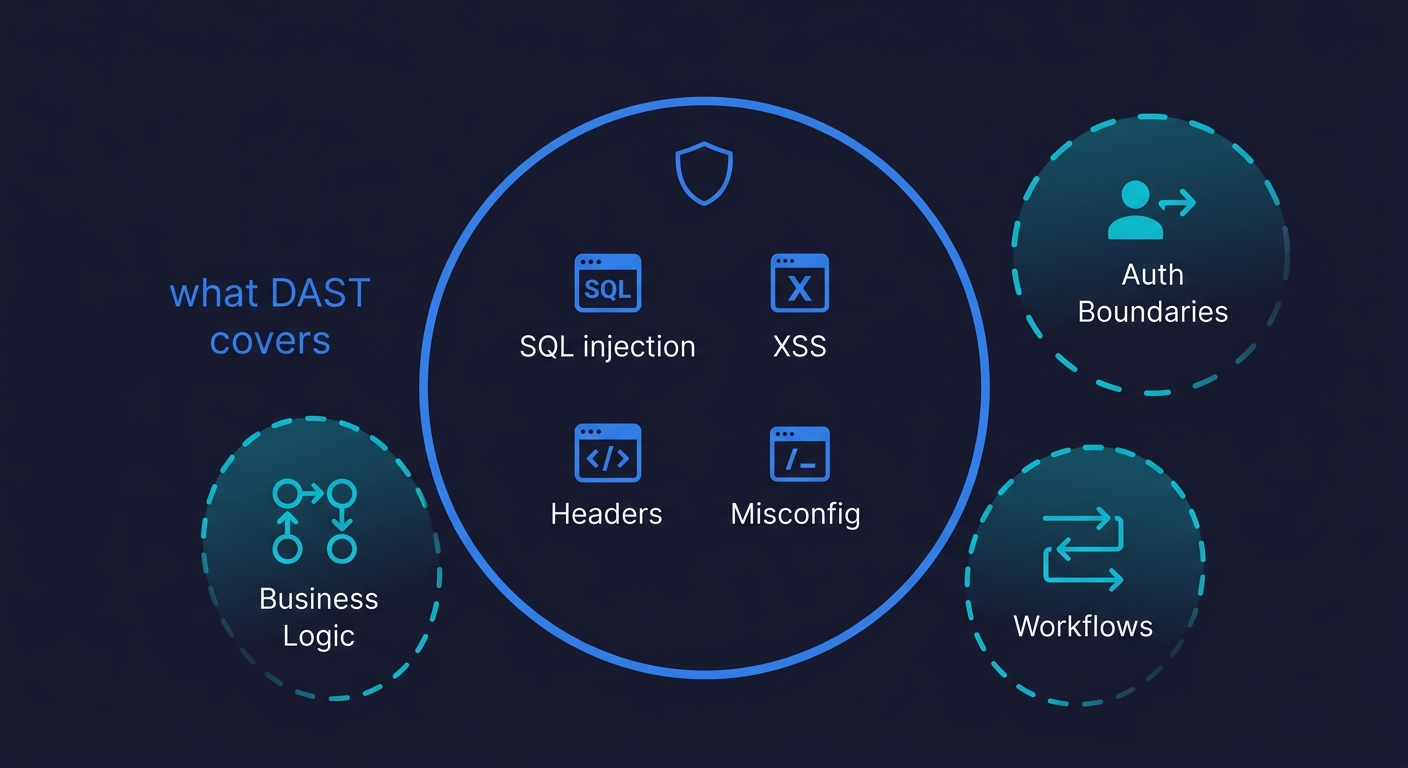
Every DAST tool listed above answers the same question: does this application have known vulnerability patterns that an attacker could exploit? SQL injection, XSS, CSRF, misconfigured CORS, weak TLS, missing headers. These are well-understood problems with well-understood detection signatures.
What none of them can answer is a different class of question entirely: does this application do what it is supposed to do, correctly, across the scenarios that matter to your business?
Consider three categories of issues that enterprise security reviews and SOC 2 audits increasingly surface, and that DAST tools are structurally unable to address.
Business Logic Validation
A DAST scanner fires payloads. It does not understand your business rules. Your checkout flow might accept a coupon code that reduces the price below cost. Your subscription upgrade might allow a user to downgrade their plan while retaining enterprise features. Your invoice generation might allow decimal quantities that produce billing errors.
These are bugs, and sometimes they are security bugs (if an attacker deliberately exploits them for financial gain). But they look like normal HTTP requests. A POST to /api/checkout with a valid session token and a large coupon code does not trigger any DAST signature. The scanner sees a 200 response and marks it as fine.
Finding these issues requires understanding the application's intended behavior, constructing test scenarios that exercise boundary conditions in business rules, and verifying that the output matches the specification. DAST tools have no access to a specification. They have only HTTP traffic.
Multi-Step Workflow Testing
DAST tools probe individual endpoints. Enterprise applications work in workflows: create an account, verify email, set up payment method, create a workspace, invite a team member, assign a role, generate an API key. Each step depends on the state from the previous step.
An authorization flaw might only appear when a user who was downgraded from admin to member attempts to perform an action they used to be able to perform. The request to the action endpoint looks perfectly normal. The flaw is in the state transition, not in the endpoint itself.
Scanners cannot traverse these workflows reliably. They can make individual requests but cannot maintain and reason about application state across a multi-step session with complex dependencies.
Authorization Boundary Testing
This is the category that produces the most expensive security incidents for SaaS companies: horizontal authorization failures, where User A can access User B's data by manipulating a resource ID. Also called Broken Object Level Authorization (BOLA), sometimes referred to as Insecure Direct Object Reference (IDOR), and consistently the top-ranked finding in API security assessments.
DAST tools can detect some BOLA patterns if they scan with two accounts simultaneously and compare responses. But this requires knowing what IDs belong to which account, understanding which resources are supposed to be scoped to a user, and having enough context about the data model to know when a response is wrong. Enterprise DAST tools have added some multi-user scanning capabilities, but coverage is shallow compared to what a targeted test can achieve.
The deeper problem is that testing authorization correctness requires understanding your authorization model. A scanner does not know that GET /api/documents/1234 should only be accessible to the user who owns document 1234. It knows what an authorization header looks like. The semantic meaning of the endpoint is invisible to it.
Where Behavioral Testing Fills the Gap
The coverage categories above are not edge cases. They are exactly the issues that appear on enterprise security questionnaires from customers in financial services, healthcare, and regulated SaaS markets. "How do you test that your authorization model is correctly enforced?" is a question that a DAST report does not answer.
This is where behavioral testing, specifically the kind that runs against your application with knowledge of its code and intended behavior, addresses what scanners cannot. Our approach at Autonoma starts from the codebase itself. A Planner agent reads your routes, components, and user flows, then constructs test cases that reflect how your application is actually supposed to work: what states are valid, what sequences of actions constitute a complete workflow, and what authorization boundaries should hold.
The result is tests that can ask questions DAST cannot: Does the discount calculation enforce the right cap? Can a team member access a workspace they were removed from? Does the invoice generation handle edge cases in line item quantities? These tests run against your live application and verify behavior against your own business rules, not against a generic vulnerability signature library. For teams already running end-to-end testing tools, behavioral security testing extends that same principle into the security domain.
The practical implication for teams pursuing enterprise deals: DAST is table stakes. A clean DAST report satisfies the "do you scan for known vulnerabilities" question on the security questionnaire. But the follow-up questions, the ones about authorization testing, business logic validation, and multi-step workflow integrity, require something that understands your application's behavior. DAST tools do not provide that.
How to Choose the Right DAST Tool
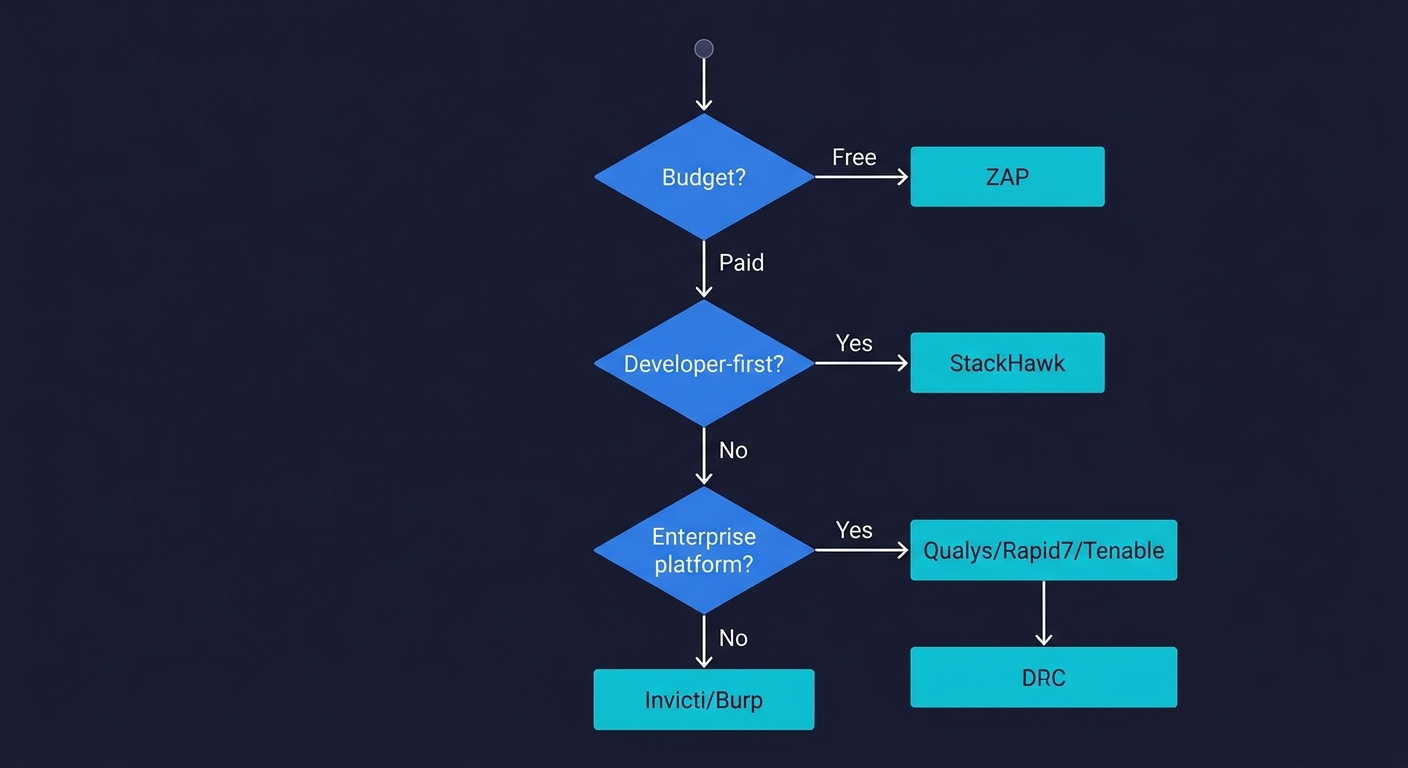
If you are starting from nothing, ZAP in CI covers the basics for free and gives you something to point to. When you outgrow ZAP's SPA coverage or authentication handling, StackHawk is the natural next step for developer-first teams.
If you already have an enterprise security platform (Qualys, Rapid7, Tenable), evaluating the native DAST add-on before buying a separate tool is sensible. Vendor consolidation has real operational value.
If you need a standalone enterprise DAST tool with the best combination of coverage depth and false-positive reduction, Invicti is the strongest product in the category. The price is high but the proof-based scanning is a meaningful differentiator.
If your team has a security engineer who does hands-on assessments, Burp Suite Professional is irreplaceable for thorough coverage. The Enterprise edition is worth evaluating for scaling those assessments into your continuous testing pipeline.
Whatever tool you choose, treat DAST as one layer of a security testing program, not the whole program. It will find the SQL injections. It will not find the broken checkout logic.
DAST for Compliance
If you are pursuing enterprise deals, specific compliance frameworks map directly to DAST capabilities:
PCI DSS (Requirements 6.5 and 11.3) requires vulnerability scanning and secure development practices. A DAST scan report provides evidence for both.
SOC 2 (CC6.1, CC7.1) requires documented vulnerability identification and monitoring. Regular DAST scans with tracked remediation satisfy these controls.
HIPAA (164.308) requires technical security measures for systems handling electronic protected health information. DAST demonstrates proactive vulnerability testing.
GDPR (Article 32) requires appropriate technical measures to ensure security of processing. DAST scans are accepted evidence of this.
A clean DAST report satisfies the "do you scan for known vulnerabilities" portion of these frameworks. But none of these frameworks stop at vulnerability scanning. SOC 2 CC6.1 also asks about logical access controls, PCI DSS 6.5 asks about secure coding practices, and HIPAA 164.312 asks about access controls. The authorization boundary and business logic testing gaps described above are directly relevant to these additional requirements.
FAQ
DAST (Dynamic Application Security Testing) scans a running application by sending probe requests and observing responses, without access to source code. SAST (Static Application Security Testing) analyzes source code or binaries without running the application. DAST finds runtime vulnerabilities like injection flaws and misconfigured headers. SAST finds code-level issues like hardcoded secrets and dangerous function calls. A complete security program uses both. See our post on web application security testing for a full comparison.
StackHawk is purpose-built for CI/CD and the easiest to integrate into pull request workflows. OWASP ZAP via Docker is the free alternative with good GitHub Actions support. For teams already on enterprise platforms, Invicti and Checkmarx DAST offer API-based automation. Burp Suite Enterprise supports CI/CD but requires more security expertise to configure effectively.
Yes, but coverage quality varies significantly. Most DAST tools can scan REST APIs if you provide an OpenAPI/Swagger specification. Authentication handling for API key, OAuth bearer token, and JWT flows varies by tool. StackHawk and Invicti have the best API testing support among the tools reviewed here. All DAST tools struggle with stateful API flows that require specific request sequencing.
DAST misses business logic vulnerabilities (incorrect discount calculations, broken billing rules), authorization boundary issues where the authorization model itself is flawed, multi-step workflow failures that require maintaining application state across sessions, and any vulnerability that requires understanding your application's intended behavior rather than matching known attack signatures. These gaps are why DAST should be combined with behavioral testing.
Yes, especially as a starting point. ZAP is free, actively maintained, and covers the OWASP Top 10 with solid fidelity for traditional web applications. Its weaknesses (SPA support, complex auth flows) are real but acceptable for teams early in their security testing journey. When you hit those limitations, StackHawk is the natural upgrade for CI/CD-focused teams.
With varying quality. Traditional HTTP-level crawlers miss content that requires JavaScript execution. OWASP ZAP's AJAX spider covers SPAs partially. Invicti and Tenable use browser engines for better coverage. Burp Suite with a human operator handles SPAs well because the operator can manually navigate. StackHawk uses Selenium-based crawling. No DAST tool covers deeply complex SPAs with client-side routing as thoroughly as it covers traditional server-rendered applications.
The best tools for business logic and authorization boundary testing are behavioral testing platforms that understand your application's code and intended behavior. Autonoma connects to your codebase, reads your routes and user flows, and generates tests that validate behavior against your business rules: authorization boundaries, multi-step workflows, and edge cases in business logic that DAST tools cannot reach.


