
Static Application Security Testing (SAST) tools scan your source code for known vulnerability patterns before the code runs. They catch issues like SQL injection, hardcoded credentials, insecure deserialization, and common CWE violations at commit time, integrating directly into CI/CD pipelines. The major tools in 2026 span a wide range: SonarQube and Semgrep are the developer-friendly defaults for most teams, CodeQL offers deep semantic analysis for GitHub users, Snyk Code excels at IDE-level real-time feedback, and Checkmarx serves enterprise compliance needs. Every one of them shares a fundamental limitation: they can only see code patterns, not behavior. That gap is larger than most security checklists acknowledge.
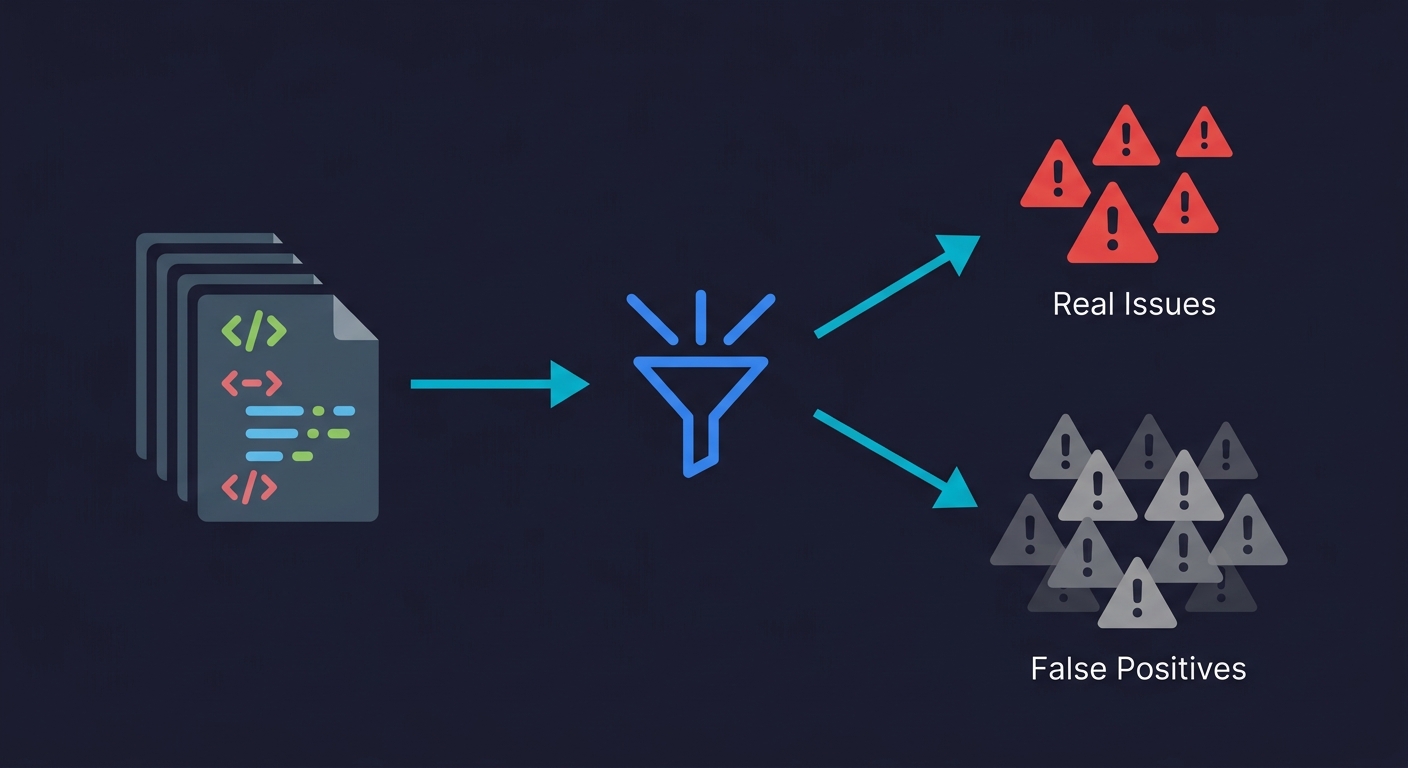
SonarQube on default configuration flags 40-60% of findings as non-issues on a typical Java or TypeScript codebase, consistent with industry benchmark data showing untuned SAST tools produce 60-90% false positives that drop to 10-20% when properly configured. That's not a criticism specific to SonarQube; it's the baseline reality of static analysis tools shipped to work for everyone. For a 10-developer team merging 4 PRs each per week, that translates to roughly 24 developer-hours of noise every week, reviewing findings that don't represent real risk.
The false positive rate is the number the vendor feature sheets don't lead with. It's also the number that determines whether your SAST investment improves security posture or teaches your developers to ignore CI failures.
The tools in this comparison differ substantially in how they handle signal quality: CodeQL's semantic data-flow analysis produces the lowest false positive rate of any tool here; Semgrep's tunable rule syntax lets teams converge on a clean signal faster; SonarQube's breadth makes it noisier out of the box but more useful once configured. The comparison below covers each honestly, including what all of them structurally cannot find.
What SAST Tools Actually Do
SAST tools work by parsing your source code into an abstract syntax tree (AST) or control-flow graph, then running pattern-matching rules against that representation. The better ones, like CodeQL, build a full semantic model of your codebase and trace data flows across function boundaries. The simpler ones, like Bandit or ESLint security plugins, apply regex-style rules to code structure.
Both approaches answer the same question: does this code match a pattern associated with a known vulnerability class? Neither approach can answer whether your application behaves correctly at runtime, handles unexpected inputs gracefully, or enforces the business rules your security model depends on. That distinction matters more than most teams realize, and we'll get into it in detail.
The practical output of any SAST tool is a list of findings ranked by severity. The quality of that list, measured by how many findings represent real exploitable issues versus false alarms, varies enormously across tools and is the single biggest determinant of whether developers trust the tool or start ignoring it.
The Tools: An Honest Assessment
SonarQube
SonarQube is the default choice for a reason. The community edition is free, it supports 30+ languages, and it integrates with every major CI/CD platform. The quality gate concept, where a PR must pass a defined threshold of issues before merging, is well-designed and easy to enforce.
The false positive rate is the real conversation. SonarQube applies a broad ruleset by default. On a typical Java or TypeScript codebase, 40-60% of initial findings require developer review to determine whether they represent actual risk. Many teams spend the first two weeks after adoption trialing rules on and off rather than fixing vulnerabilities. The commercial SonarQube Server (formerly SonarQube Developer/Enterprise Edition) adds taint analysis and cross-function data-flow tracking, which significantly improves signal quality. The community edition is better understood as a code quality tool with security features than a dedicated security scanner.
Pricing for the commercial tiers starts at roughly $15,000/year for the Developer Edition at 250K lines of code, scaling with LOC. For startups at Series A/B that need SOC 2 or ISO 27001 evidence, the community edition plus a tuned ruleset is usually sufficient. The commercial tier becomes relevant when you need the compliance reporting dashboards or have an enterprise customer requiring a specific report format.
Semgrep
Semgrep has become the preferred SAST tool among security-conscious engineering teams over the past two years, and the reason is developer experience. The rule syntax is designed to look like the code it's analyzing. Writing a custom rule to detect a pattern specific to your codebase takes minutes, not days. That matters because generic ruleset false positive rates improve dramatically once you tune for your stack.
The open-source Semgrep CLI is genuinely free and runs locally or in CI. Semgrep Code (the commercial product) adds cross-file analysis, secrets detection, and a managed rule registry maintained by the Semgrep security team. The community rule registry at semgrep.dev contains thousands of rules covering OWASP Top 10 violations across every major language.
Where Semgrep is weakest is deep semantic analysis. It operates primarily at the syntactic level with some dataflow support. A vulnerability that requires tracing a tainted input through five function calls and a database layer may not be caught by Semgrep where CodeQL would find it. For most startup codebases, this tradeoff is acceptable. The rules Semgrep catches reliably cover the vulnerabilities that appear on compliance questionnaires and bug bounty reports.
Semgrep Pro pricing starts at approximately $40/developer/month for cross-file analysis. The open-source tier handles most CI/CD enforcement use cases without cost.
CodeQL
CodeQL is GitHub's semantic code analysis engine, and it is technically the most sophisticated tool on this list. It builds a relational database of your codebase, representing every variable binding, function call, and data flow as queryable facts. A CodeQL query can ask: "does any user-controlled input reach a SQL execution point without sanitization?" across the entire codebase simultaneously.
The depth comes with tradeoffs. CodeQL is slow. On a medium-sized monorepo, analysis can take 20-45 minutes. The query language (QL) has a steep learning curve. Writing custom queries requires understanding both QL and CodeQL's database schema for your language. Out of the box, you run GitHub's standard query suites, which are well-maintained and cover major vulnerability classes with a relatively low false positive rate compared to SonarQube's defaults.
For GitHub users, CodeQL is free for public repositories and included in GitHub Advanced Security for private repositories (priced per active committer, roughly $49/committer/month as of 2026 or bundled with GitHub Enterprise). If your team is already on GitHub and your primary concern is finding real vulnerabilities rather than just checking a compliance box, CodeQL is the strongest signal-to-noise option for languages it supports well (Java, JavaScript/TypeScript, Python, Go, C/C++, C#, Ruby, Swift).
The CI integration through GitHub Actions is straightforward. The main friction is scan duration, which pushes teams to run CodeQL on merge to main rather than on every PR, limiting its shift-left value.
Snyk Code
Snyk Code is the IDE-first SAST tool. The core differentiator is the VS Code and JetBrains plugin, which surfaces findings inline as you write code rather than after a CI scan completes. This changes the feedback loop from "your PR was blocked" to "this line you just typed looks like an injection risk."
The underlying analysis uses a combination of pattern matching and machine learning trained on large vulnerability datasets. False positive rates are competitive with Semgrep and significantly better than SonarQube defaults. Snyk also integrates its software composition analysis (SCA) for dependency vulnerabilities in the same interface, so you get a unified view of code-level and dependency-level risk.
Snyk Free covers 100 tests/month with limited history. Snyk Team runs approximately $25/developer/month. At that price point, you're paying for the real-time IDE feedback and the integrated SCA, not just the SAST capability. For a 15-developer startup, Snyk Team is roughly $4,500/year. Comparable to tuned SonarQube community but with meaningfully better developer workflow integration.
The limitation: Snyk Code's deep dataflow analysis is less thorough than CodeQL. It catches the common patterns reliably and presents them where developers can act on them immediately.
Checkmarx
Checkmarx is the enterprise compliance tool. It exists primarily to produce reports that satisfy security auditors and enterprise procurement security reviews. The feature set is comprehensive: SAST, SCA, IaC scanning, API security, and container scanning, all under one contract with a single compliance report output.
The cost is significant. Checkmarx One pricing is not publicly listed and requires negotiation, but budget $60,000-$200,000/year for a typical startup or mid-size engineering organization. The false positive rates with default configuration are high, comparable to SonarQube, though the audit trail and suppression workflow are better designed for enterprise justification processes.
Checkmarx makes sense when a specific enterprise customer or compliance certification requires a named tool on their approved vendor list, when your security team has dedicated AppSec engineers who will actively tune the ruleset, or when you need a single contract that covers your entire ASPM (Application Security Posture Management) surface. For most Series A/B startups, Checkmarx is premature. You buy it when an enterprise deal depends on it, not before.
Veracode
Veracode is the other major enterprise SAST player alongside Checkmarx, and it has a unique technical approach: binary/bytecode analysis. Instead of requiring access to your source code, Veracode can scan compiled artifacts. This matters for organizations with third-party code, legacy binaries, or strict source code access policies.
The cloud-based SaaS model means no self-hosted infrastructure, but it also means your code (or bytecode) leaves your environment for analysis. Scan times vary significantly: pipeline scans complete in about 90 seconds, while full policy scans can take 1-8 hours depending on application size. Veracode claims a false positive rate below 1.1%, though this figure comes from their own benchmarking rather than independent testing.
For regulated industries, Veracode holds FedRAMP Moderate authorization, making it one of the few SAST tools approved for U.S. government workloads. Veracode Fix, their AI-powered remediation feature, generates code fixes for detected vulnerabilities directly in the developer workflow.
Pricing starts at roughly $50,000/year for enterprise contracts. Like Checkmarx, Veracode is a tool you buy when the deal or the regulation demands it. The technical capabilities are strong, but the cost puts it firmly in the enterprise category.
Open Source SAST: Bandit and ESLint Security Plugins
Bandit (Python) and the eslint-plugin-security package (JavaScript/TypeScript) are the zero-cost entry points for language-specific static analysis. Both are command-line tools with no server infrastructure, no per-seat pricing, and five-minute CI integration.
Bandit runs a battery of checks against Python code: hardcoded passwords, use of insecure hash algorithms, subprocess calls with shell injection risk, SSL certificate verification disabled, and similar patterns. It produces findings by severity and confidence, and the false positive rate at high confidence is reasonable. The coverage is narrower than SonarQube or Semgrep because Bandit is intentionally focused on Python security patterns rather than code quality broadly.
ESLint security plugins work similarly for JavaScript. The security-focused rules catch obvious patterns, hardcoded secrets, eval() usage, regex denial of service risks, but lack the cross-file taint analysis that catches more sophisticated injection paths.
Both tools are excellent starting points and remain useful as CI checks even after adopting a more comprehensive SAST tool. They are fast, deterministic, and free. If you're a Python shop building toward SOC 2 and you don't have any SAST in place, Bandit in CI is a one-afternoon implementation.
Tool Comparison
| Tool | Type | Starting Price | Languages | False Positive Rate | Best For |
|---|---|---|---|---|---|
| SonarQube | OSS + Commercial | Free / $15K+/yr | 30+ | High (default), Medium (tuned) | Broad code quality + security in one tool |
| Semgrep | OSS + Commercial | Free / ~$40/dev/mo | 30+ | Medium (improves with custom rules) | Tunable, fast scanning for developer teams |
| CodeQL | Free (public) / Paid | Free / ~$49/committer/mo | Java, JS/TS, Python, Go, C/C++, C#, Ruby, Swift | Low (best signal-to-noise) | GitHub-native teams wanting vulnerability depth |
| Snyk Code | Commercial (free tier) | Free / ~$25/dev/mo | 20+ | Low-Medium | IDE-first feedback with unified SCA + SAST |
| Veracode | Commercial (enterprise) | ~$50K+/yr | 30+ | Low (vendor-claimed <1.1%) | Regulated industries, binary/bytecode analysis |
| Checkmarx | Commercial (enterprise) | $60K-200K/yr | 30+ | High (default), Low (tuned) | Enterprise compliance, dedicated AppSec teams |
| Fortify (OpenText) | Commercial (enterprise) | $30K+/yr | 25+ | Medium-High | Gartner MQ leader, on-premise enterprise deployments |
| GitLab SAST | Built-in (GitLab Ultimate) | Included with GitLab Ultimate | Multi (via Semgrep, SpotBugs, others) | Medium | GitLab-native teams wanting zero-config scanning |
| Bandit | OSS | Free | Python only | Low-Medium | Python teams, zero-cost CI security checks |
| ESLint Security | OSS | Free | JavaScript / TypeScript | Low-Medium | JS/TS teams, no additional tooling needed |
AI-Assisted SAST: What's Changed in 2026
The SAST landscape has shifted in 2026 toward AI-augmented analysis. This isn't marketing noise; it's a meaningful change in how several tools handle detection and triage.
Snyk Code's underlying engine, DeepCode AI, uses machine learning trained on vulnerability datasets to improve detection accuracy beyond what rule-based matching achieves alone. Semgrep introduced Semgrep Assistant, which uses AI to filter and prioritize findings, claiming roughly 20% reduction in false positive noise. Veracode Fix generates AI-powered code patches for detected vulnerabilities directly in the developer workflow.
A newer category of AI-native SAST tools has emerged, including Qwiet AI and ZeroPath, which use large language models as primary detection engines rather than traditional pattern matching. These tools show promise in catching context-dependent vulnerabilities that rule-based engines miss, but they lack the decades of refinement and benchmark validation that established tools have. For most teams evaluating SAST in 2026, the practical advice is to look for AI as a triage and remediation accelerator within proven tools rather than betting on AI-native detection as a primary scanner.
The auto-remediation capability is worth watching. Tools that not only detect issues but suggest or apply fixes reduce the developer time cost per finding. Semgrep's autofix rules, Snyk's Agent Fix, and Veracode Fix represent different approaches to the same problem: closing the gap between detection and resolution. If your false positive rate is under control, auto-remediation is the next lever for reducing security overhead.
False Positives Are a Velocity Problem
Every SAST comparison lists false positive rates as a concern. Few quantify the actual cost.
When a developer opens a PR and sees 15 findings, they do one of three things: fix the real issues, suppress everything with a comment, or start ignoring CI failures. The third outcome is the one that damages security posture. It's also surprisingly common within three months of SAST adoption when the initial configuration is left at defaults.
The math is unfavorable. A team of 10 developers merging 4 PRs each per week generates 40 SAST scans weekly. If each scan produces 12 findings and 60% are false positives, that's 288 false positive reviews per week across the team. At 5 minutes per finding, that's 24 developer-hours of noise every week. The tool that seemed free suddenly costs more than the commercial alternative with better signal quality.
This is why Semgrep's approach of matching rule syntax to the language being analyzed has practical value beyond elegance. When your team can write and delete rules in the same afternoon, you can iterate toward a ruleset that reflects your actual risk surface. SonarQube's community edition ships with thousands of rules because it's designed to work for everyone; that makes it work poorly for any specific team until someone invests in configuration.
The practical recommendation: whatever tool you choose, audit your false positive rate at the 30-day mark. If more than 40% of findings are being suppressed or dismissed without code changes, the configuration needs tuning before you can measure whether the tool is improving your security posture.
CI/CD Integration Reality
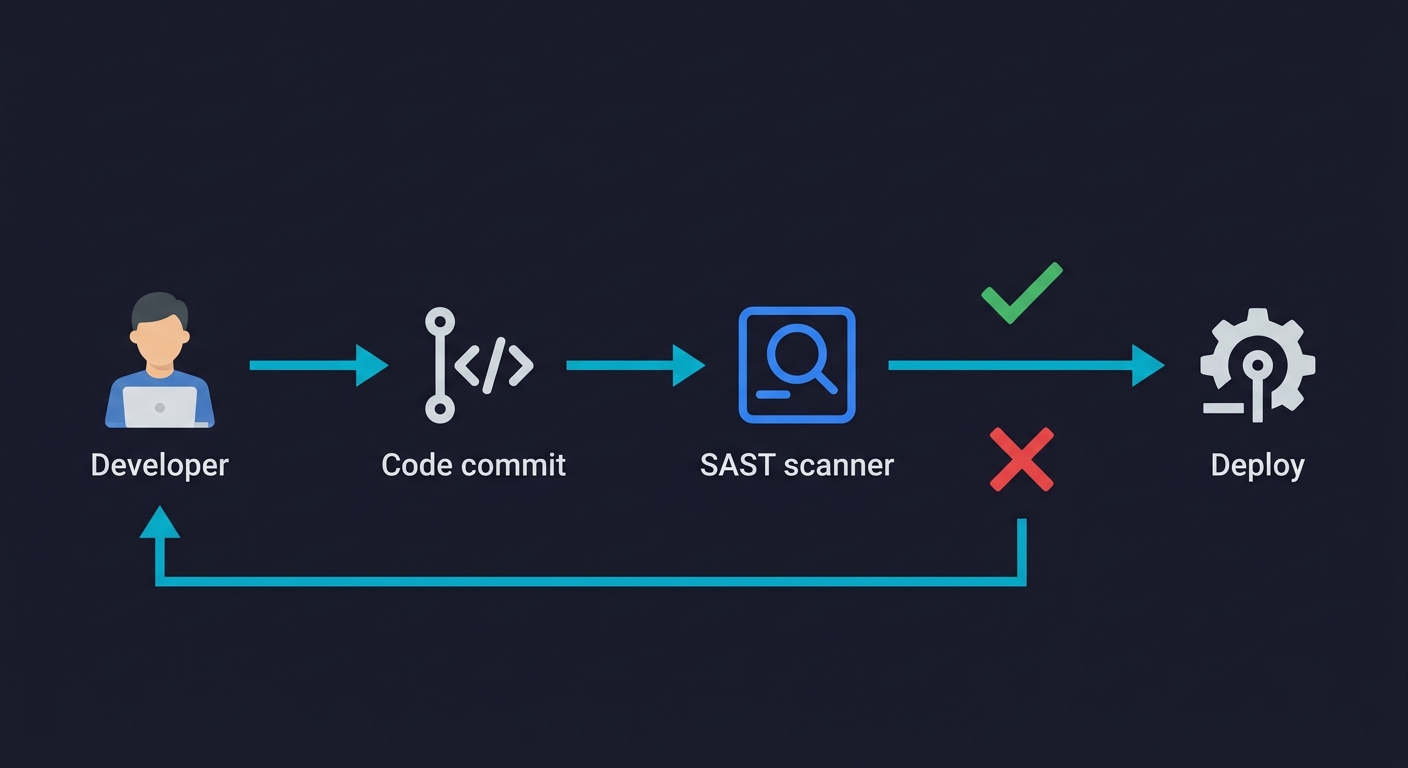
The marketing copy for every tool says "integrates with your CI/CD pipeline in minutes." The reality depends on your stack.
Semgrep and Bandit/ESLint integrate in under an hour for most pipelines. They are CLI tools with no server dependency. A GitHub Actions workflow that runs Semgrep on every PR is 15 lines of YAML. The scan completes in 2-5 minutes on most codebases.
SonarQube requires more infrastructure. The community edition needs a running server instance, either self-hosted (a container works) or using SonarCloud. The PR decoration that blocks merges requires configuring webhooks and Quality Gate policies. Budget a day for initial setup, not an hour. Once configured, it's reliable and the PR feedback is clear.
CodeQL integrates cleanly via GitHub Actions but the scan duration is the friction point. A 45-minute scan on every PR will generate developer complaints, and with good reason. Most teams move CodeQL to a scheduled nightly scan or to the merge-to-main gate, which means it stops functioning as a shift-left testing tool and becomes a post-merge safety net instead.
Snyk Code's IDE integration is genuinely useful for shifting left, but the CI component requires the Snyk CLI and a paid plan for anything beyond the free tier limits. The finding management dashboard in the Snyk web interface is well-designed for teams that want to triage and track findings over time.
Checkmarx CI integration is comprehensive and well-documented, but the initial setup requires engagement with their professional services team at the enterprise tier. Budget two weeks, not two days, for a full Checkmarx deployment.
What SAST Fundamentally Misses
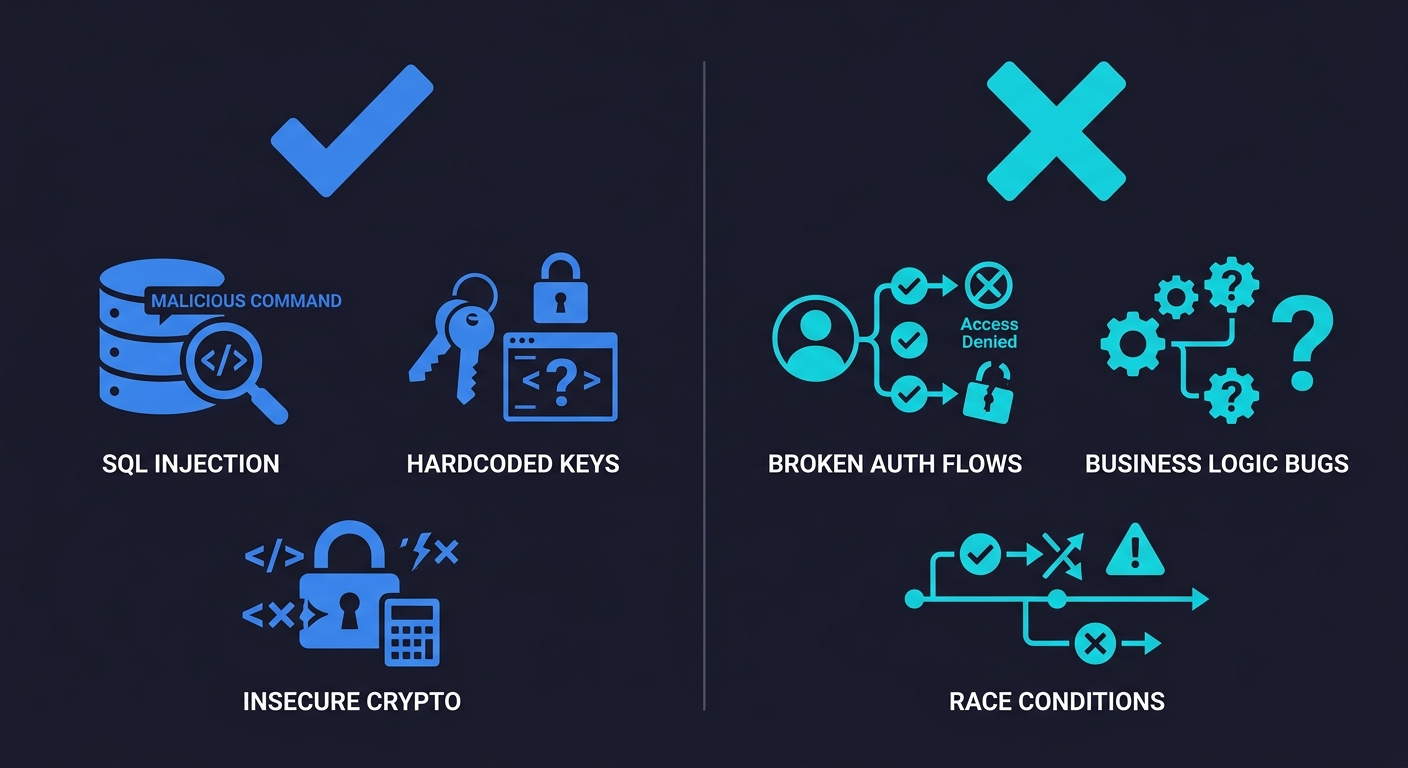
This is the section that other SAST comparisons skip, and it's the most important one for making an accurate assessment of what you're actually buying.
SAST tools analyze code at rest. They examine what your code says, not what your application does. This distinction creates a structural blind spot covering a large portion of real-world application vulnerabilities.
Business logic vulnerabilities are the primary gap. SAST cannot tell you whether a user can access another user's data by manipulating an ID parameter. It cannot tell you whether your checkout flow allows a negative quantity item to generate a refund. It cannot tell you whether your password reset flow can be abused to lock out legitimate accounts. These are the vulnerabilities that get exploited in production, that appear on bug bounty reports, and that enterprise security reviews ask about directly. They require understanding intent, not just pattern matching code structure.
Authentication and authorization flow coverage is limited. A SAST tool can flag a missing authentication decorator on a single function. It cannot reason about whether your entire permission model correctly enforces the principle of least privilege across your API surface. That requires testing the application as a running system with actual user roles and request sequences.
Runtime state and integration behavior is invisible to static analysis. Race conditions in database transactions, session fixation vulnerabilities that only appear under specific timing conditions, third-party integrations that accept malformed data in ways the code doesn't anticipate - these don't exist in the source code in a form a scanner can detect. They emerge from the interaction between your code and the environment it runs in.
Multi-step workflow vulnerabilities require sequential reasoning that SAST cannot perform. A user who completes step one of a multi-step form and then navigates directly to step three bypassing validation is exploiting a workflow assumption, not a code pattern. SAST sees three individual route handlers, each of which may look correct in isolation.
This isn't an argument against SAST. It's an argument for clarity about what SAST is buying you. SAST is excellent at catching known vulnerability patterns in code, hardcoded secrets, injection-prone string concatenation, insecure cryptographic algorithm usage, common OWASP violations. It is a valuable layer in a defense-in-depth approach. It is not sufficient alone.
The complement to SAST is testing the application as it runs: functional testing of security-relevant flows, E2E testing that exercises permission boundaries, and behavioral tests that validate your authorization model against real request sequences. Tools like Autonoma address this gap: its Planner agent reads your codebase and plans behavioral tests that exercise actual application flows, not code patterns. Where SAST catches the code smells, behavioral testing catches the logic gaps. Both layers are necessary for a complete picture of your application's security posture, and neither replaces the other.
For a broader look at how static and dynamic approaches compare, see SAST vs DAST. For the runtime testing counterpart, DAST Tools Compared covers the tooling landscape. And if you're building a web application security testing program from scratch, it's worth reading both before deciding where to invest.
Cost Breakdown for Startup Budgets
For a 15-developer team pursuing SOC 2 Type II, here's an honest cost comparison:
Zero-cost starting point: Bandit or ESLint security plugins in CI, plus Semgrep OSS. This covers the majority of OWASP Top 10 code-level violations, integrates in hours, and satisfies most SOC 2 security testing evidence requirements. Suitable for seed through Series A.
$5,000-15,000/year range: Semgrep Pro or Snyk Team. Semgrep Pro adds cross-file dataflow analysis; Snyk Team adds IDE real-time feedback and SCA in the same interface. Either is a meaningful upgrade from the free tier. This range makes sense when compliance requirements become more rigorous or when developer time spent on false positives becomes measurable.
$15,000-40,000/year range: SonarQube commercial tiers or GitHub Advanced Security (CodeQL). Both deliver enterprise-grade compliance reporting and better analysis depth. GitHub Advanced Security makes particular sense if your team is already paying for GitHub Enterprise.
$60,000+/year: Checkmarx. Justified when a specific enterprise customer or certification requires it by name, or when you have a dedicated AppSec team that will use its full feature set. Do not buy Checkmarx to satisfy a generic "SAST in CI" checkbox. The ROI isn't there for most startups.
The pattern that works well for most Series A/B startups is Semgrep OSS for fast CI scanning, CodeQL on a scheduled basis for deeper analysis, and Bandit or ESLint security plugins as lightweight pre-commit hooks. This combination is free, reasonably fast, and covers the evidence trail that SOC 2 auditors look for without the overhead of an enterprise tool.
Choosing the Right Tool
The decision framework is simpler than the vendor landscape suggests.
If your primary driver is compliance evidence and budget is the constraint, start with Semgrep OSS. It scans fast, the community ruleset is solid, and you can tune false positives without writing a single JIRA ticket to a vendor.
If your team is on GitHub and you want the best signal quality regardless of scan time, add CodeQL as a nightly or merge-gate scan. The findings it surfaces that Semgrep misses are worth the slow scan.
If developer workflow friction is the concern, Snyk Code's IDE integration changes the feedback loop meaningfully. Developers fix issues while the code is fresh rather than when the PR review blocks.
If an enterprise deal depends on a named tool, Checkmarx is a cost of sale, not a security investment. Factor it into the deal economics accordingly.
Whatever you choose: measure your false positive rate at 30 days, tune aggressively, and pair SAST with QA automation that exercises your application's behavioral security properties. A scanner that validates your code patterns and a test suite that validates your security model are not substitutes for each other. Both layers, combined, give you the coverage your compliance reviewers are actually looking for.
SAST (Static Application Security Testing) analyzes source code before it runs, catching vulnerability patterns at development time. DAST (Dynamic Application Security Testing) tests a running application by sending malicious inputs and observing responses. SAST is faster to integrate into CI/CD and catches issues earlier; DAST finds vulnerabilities that only appear at runtime, including business logic flaws and multi-step workflow issues. Most mature security programs use both. See our full SAST vs DAST comparison on the Autonoma blog.
CodeQL consistently produces the lowest false positive rate among the tools compared here, because its full semantic data-flow analysis means it only flags issues where it can trace an actual vulnerable path through your code. Semgrep with a tuned custom ruleset is a close second. SonarQube and Checkmarx with default configurations have significantly higher false positive rates that require substantial tuning to reduce.
SonarQube Community Edition is free and open-source. It covers static analysis for 30+ languages and integrates with major CI/CD platforms. The commercial tiers (SonarQube Server Developer, Enterprise, and DataCenter editions) start at approximately $15,000/year and add taint analysis, cross-function dataflow tracking, and enterprise compliance reporting. SonarCloud is the hosted version with a free tier for public repositories.
No. SAST tools catch code-level vulnerability patterns. Penetration testing uncovers business logic vulnerabilities, authorization model flaws, and multi-step attack sequences that static analysis cannot detect. SAST is a development-time safety net; penetration testing is an adversarial exercise against the running application. Both are typically required for enterprise security programs and compliance certifications like SOC 2 Type II.
For most Series A/B startups, the combination of Semgrep OSS (for CI scanning) and Bandit or ESLint security plugins (for language-specific checks) satisfies SOC 2 evidence requirements at zero licensing cost. If your team is on GitHub, adding CodeQL as a scheduled scan provides deeper analysis. Enterprise tools like Checkmarx are not necessary unless a specific customer or auditor requires them by name.
SAST misses business logic vulnerabilities, authorization model failures, runtime state issues, and multi-step workflow exploits, because these require testing the application as it runs, not analyzing code patterns. Behavioral and end-to-end testing tools, including Autonoma, complement SAST by testing actual application flows and permission boundaries. SAST and behavioral testing answer different questions and are most effective used together.


