

What is QA automation for startups with no QA team? It means automating your three to five most critical user flows (signup, checkout, core activation) so they run on every deploy without anyone manually clicking through the app. Start with your money flow, integrate tests into CI to block broken merges, and use agentic testing tools like Autonoma to generate and maintain those tests from your codebase automatically. The goal: production-grade quality coverage that costs you zero engineering hours per sprint to maintain.
If you're the founding engineer wearing the QA hat by default, you already know the pain: bugs in production, customers reporting issues before your monitoring catches them, and that sinking feeling every time you deploy on a Friday. The solution isn't hiring a QA engineer (not yet). It's setting up the right automation, in the right order, with the right tools — and this guide is built around the constraint that the person responsible for quality has approximately zero hours allocated to it.
Why You Don't Need a QA Team to Have QA
The default assumption in most engineering organizations is that quality assurance requires dedicated QA people. That assumption comes from enterprises with hundreds of engineers, complex release trains, and regulatory requirements. It doesn't apply to a ten-person startup shipping a SaaS product. (If you already hired a QA engineer and it's not working, here's why that happens.)
What you actually need is automated verification of your critical paths. That's QA automation. A human being manually clicking through your signup flow before every deploy is not scalable, and it's not reliable either. People miss things. Automation doesn't.
The real bottleneck for startups isn't knowing what to test. It's the time cost of writing and maintaining the tests. A CTO who's also managing infrastructure, reviewing PRs, and talking to customers doesn't have twenty hours a week to write Playwright scripts. That's the constraint this guide is built around: how to get real QA automation when the person responsible for quality has approximately zero hours allocated to it.
What QA Automation Actually Covers
QA automation, at its core, means using software to verify that your application behaves correctly. That includes several layers, and understanding which layer matters most for your situation saves you from over-investing in the wrong one.
Unit tests verify that individual functions return the correct output for given inputs. They're fast, cheap to write, and developers usually handle them naturally. If your team already writes unit tests for complex business logic, that's the foundation. If not, that's a separate problem from what this guide addresses.
Integration tests verify that two systems communicate correctly: your API talks to your database, your payment service returns the right response format. These matter when your architecture has multiple services or external dependencies. For a deeper look at where integration tests fit relative to E2E tests, see our integration vs E2E testing comparison.
End-to-end tests verify that a real user can accomplish a real goal through your application. Sign up, create a project, invite a teammate, check out. These are the tests that catch the bugs your customers actually hit. They're also the hardest to write and the most expensive to maintain.
For a startup CTO with no QA team, the highest-ROI investment is end-to-end testing on your critical happy paths plus unit tests on complex business logic. Skip integration tests until your architecture is complex enough to warrant them. Most products under fifty API endpoints don't need a dedicated integration test layer. This is effectively inverting the traditional testing pyramid by putting E2E tests first. The fundamentals of building a test automation strategy apply here, but the execution looks radically different when you have zero QA headcount.
QA Automation vs Manual Testing: When Each Makes Sense
QA automation does not replace manual testing entirely. It replaces the repetitive parts that a human shouldn't be doing every deploy. Understanding when each approach is appropriate prevents you from either over-automating (wasting setup time on tests you'll delete next month) or under-automating (burning hours on manual checks that a script handles in seconds).
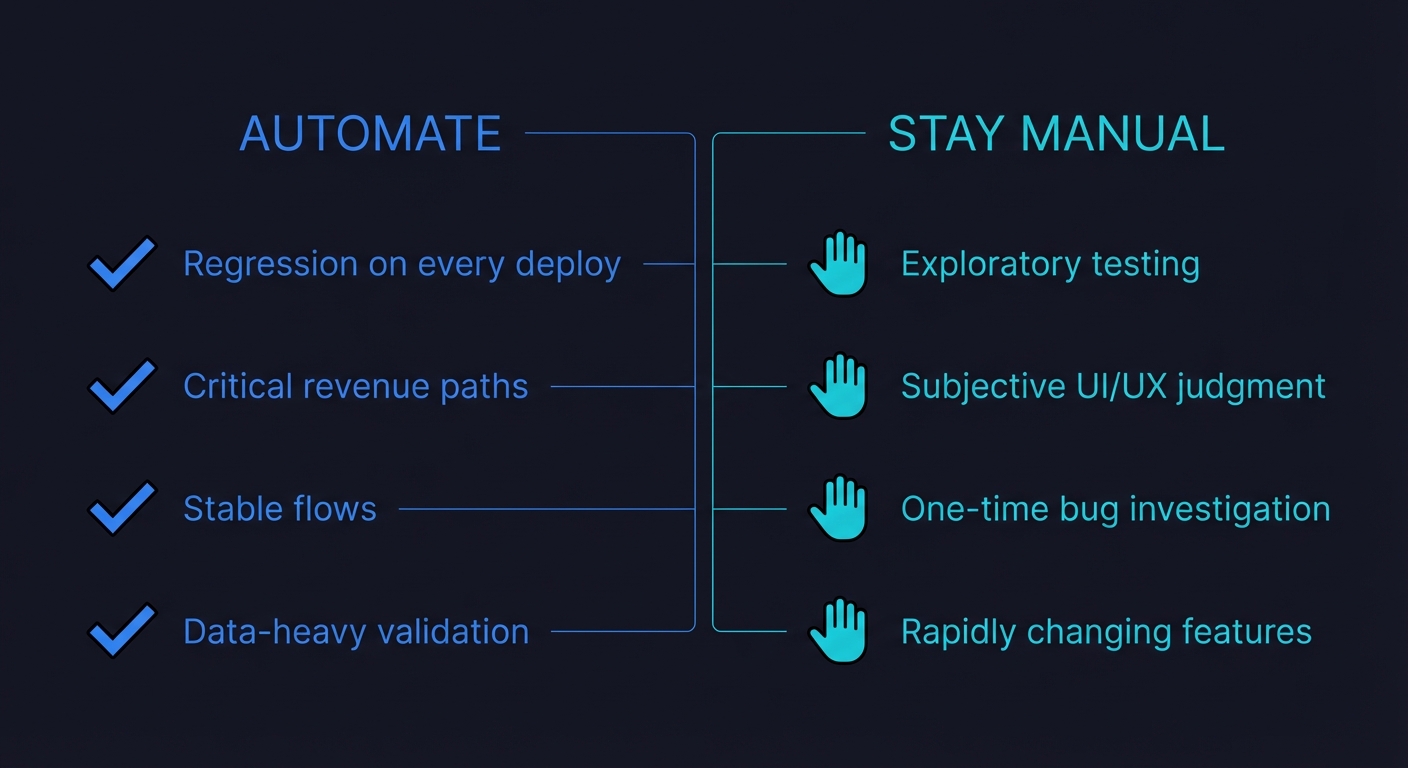
Automate when: the test runs on every deploy (regression), the test verifies a critical revenue path, the flow is stable enough that the test won't break every sprint, or the test involves data-heavy checks that humans are bad at (comparing API response fields across environments, for example).
Stay manual when: you're exploratory testing a brand-new feature that changes daily, you need subjective judgment (does this UI feel right? is this error message confusing?), or you're doing a one-time investigation of a reported bug. Exploratory testing and usability testing are inherently human activities. Don't try to automate them.
| Criteria | Automate | Stay Manual |
|---|---|---|
| Regression on every deploy | Yes | |
| Critical revenue path (checkout, subscription) | Yes | |
| Stable flow that rarely changes | Yes | |
| Data-heavy validation across environments | Yes | |
| Exploratory testing of new features | Yes | |
| Subjective UI/UX judgment | Yes | |
| One-time bug investigation | Yes | |
| Rapidly changing feature (iterating daily) | Yes |
LambdaTest's Future of Quality Assurance survey found that 88.9% of organizations now use CI/CD to test or deploy their apps, yet 45% still trigger their automated tests by hand. That gap is the opportunity: the pipeline is already there, but nearly half of teams are still burning human time kicking off runs that could fire automatically on every push. Wire the repetitive checks into CI and that time goes back into building product. For a five-person startup, that adds up fast.
For teams looking at the broader picture of how AI is transforming QA workflows, the manual-versus-automated boundary is shifting. Agentic testing tools handle not just the execution but the creation of tests, which means the "setup cost" argument against automation is weakening.
Types of QA Automation Tests You Should Know
Not all QA automation is the same. Different test types serve different purposes, and knowing which types to prioritize prevents wasted effort.
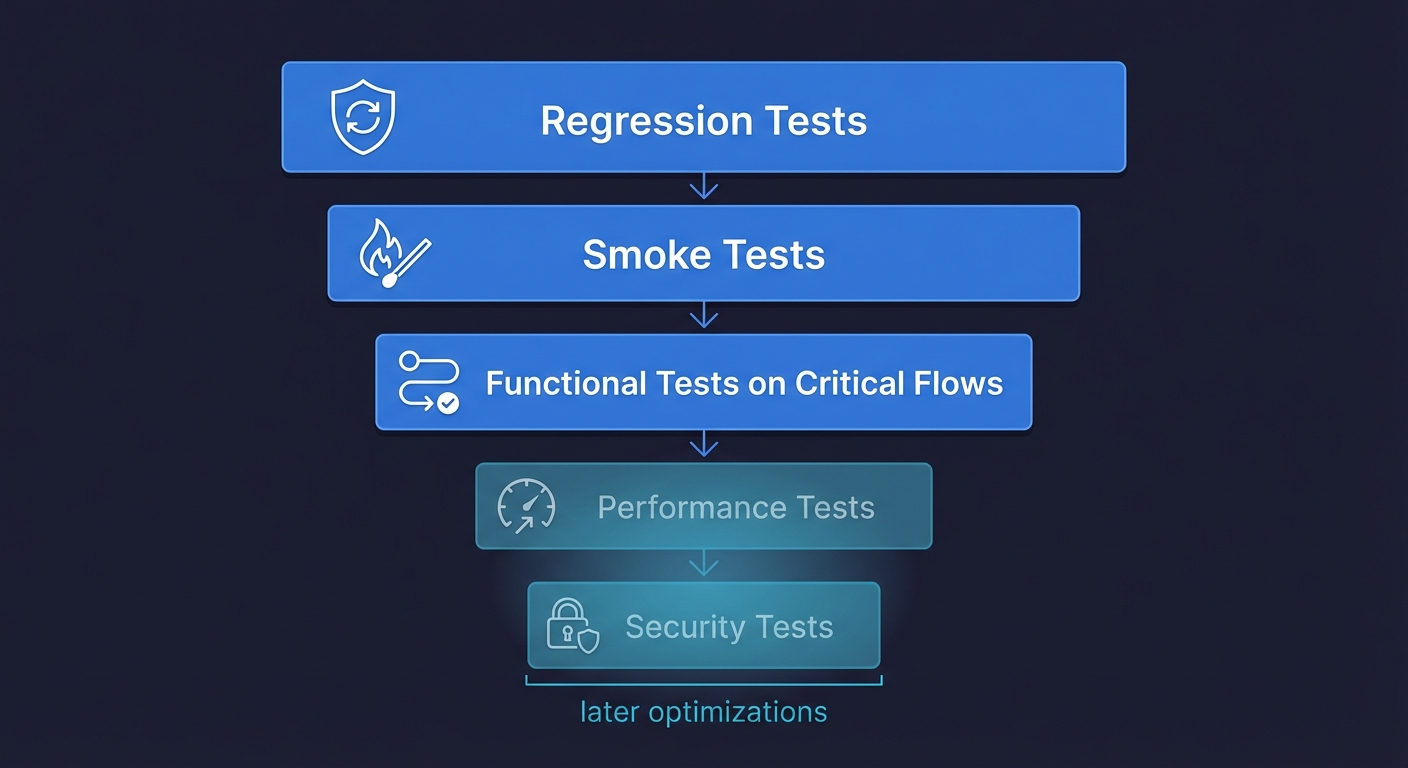
Regression testing verifies that existing functionality still works after code changes. This is the core of QA automation for startups. Every deploy should trigger regression tests on your critical paths. If you automate nothing else, automate regression tests.
Smoke testing is a quick, surface-level check that your application's most basic functions work: the homepage loads, login succeeds, the main dashboard renders. Smoke tests run in under a minute and catch catastrophic failures before deeper tests even start. Think of them as a circuit breaker for your deploy pipeline.
Functional testing verifies that specific features work according to requirements: "When a user clicks 'Add to Cart,' the item appears in the cart with the correct price." This is the bread and butter of E2E testing for startups.
Performance testing checks that your application responds within acceptable time limits under load. Most startups don't need this until they're seeing real traffic. If your P99 latency is fine today, skip performance automation and revisit it when load becomes a concern.
Security testing verifies authentication, authorization, and data protection. If you handle sensitive data (payments, health records, PII), basic security automation matters early. If not, deprioritize it.
For a startup with zero QA headcount, the priority stack is clear: regression tests first, smoke tests second, functional tests on critical flows third. Everything else is an optimization for later.
QA Automation Tools
The tooling landscape for QA automation is broad, but these are the tools teams most commonly evaluate when building their automation stack.
| Tool | Type | Best For | Open Source | Startup-Friendly |
|---|---|---|---|---|
| Selenium | E2E (browser) | Broad language support, legacy suites | Yes | Medium — high setup/maintenance cost |
| Playwright | E2E (browser) | Cross-browser testing, TypeScript-native teams | Yes | High — fast, modern API, good auto-waiting |
| Cypress | E2E (browser) | JavaScript teams wanting smooth DX | Yes | High — great interactive runner |
| Appium | Mobile E2E | Native and hybrid mobile app testing | Yes | Medium — complex setup for mobile |
| Katalon | All-in-one | Low-code teams wanting GUI-based test creation | Freemium | Medium — easy start, vendor lock-in risk |
| Postman | API testing | API contract and integration testing | Freemium | High — most teams already use it |
| Autonoma | Agentic E2E | Teams with no QA needing zero-maintenance coverage | No (SaaS) | Very high — zero scripts, self-healing |
For teams with no QA capacity, Autonoma takes a different approach entirely — AI agents read your codebase, generate E2E tests for your critical paths, and self-heal them when your UI changes, with no scripts to write or maintain.
The Three Happy Paths You Automate First
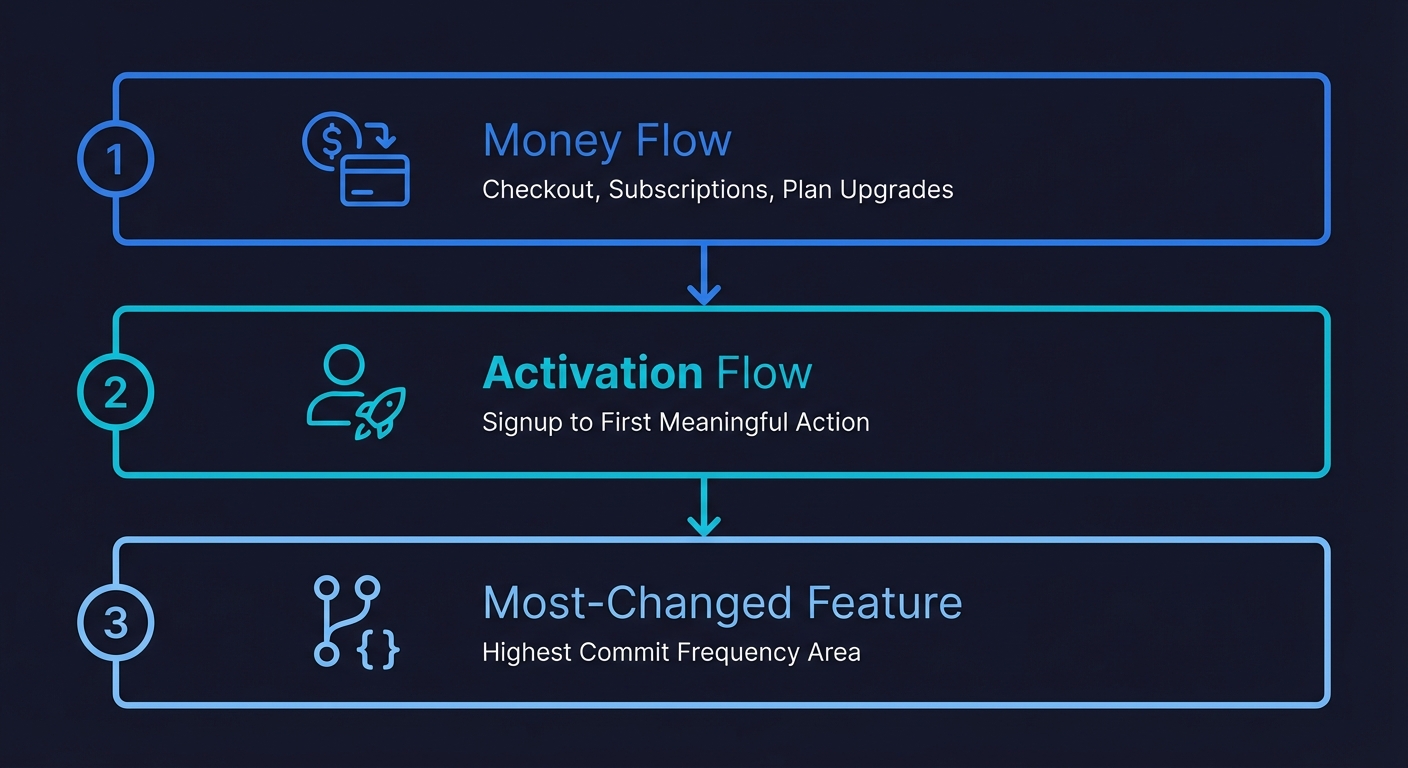
If you automate nothing else, automate these three flows. They represent the overwhelming majority of production incidents that actually cost you money or users.
Your money flow comes first. If your product accepts payments, your checkout, subscription creation, and plan upgrade paths are non-negotiable. A broken checkout doesn't show up in your error logs as a critical alert. It shows up as a quiet revenue drop that you notice three days later when reconciling Stripe. Automate the full flow: add to cart, enter payment details, complete purchase, verify confirmation. Run this test on every deploy.
Your activation flow is second. New user signup through their first meaningful action. Whatever your product's "aha moment" is, the path to reach it needs automated coverage. You're spending real money on acquisition. If the activation path breaks silently, you're paying for users who bounce on a broken experience and never come back. There's no retry for a first impression.
Your most-changed feature is third. Look at your git log. Which part of the codebase gets the most commits? That's where regressions live. If your team is actively iterating on a dashboard, a settings page, or an onboarding flow, that's where the next production bug will come from. Cover it.
Everything else can wait. Your admin panel, your reporting features, your settings page edge cases. Cover them when you have bandwidth. The goal is a small suite that protects you from the incidents that actually damage your business.
Setting Up QA Automation in CI: The Minimum Viable Pipeline
A test that doesn't run automatically is a test that gets forgotten. The entire value of QA automation comes from it running without anyone remembering to trigger it. The simplest CI setup that works for most startups:
# .github/workflows/qa.yml
name: QA Automation

on:
  pull_request:
    branches: [main]
  deployment_status:

jobs:
  e2e:
    if: github.event_name == 'pull_request' || github.event.deployment_status.state == 'success'
    runs-on: ubuntu-latest
    steps:
      - uses: actions/checkout@v4
      - uses: actions/setup-node@v4
        with:
          node-version: '20'
      - run: npm ci
      - run: npx playwright install --with-deps chromium
      - run: npx playwright test --project=chromium
        env:
          BASE_URL: ${{ github.event.deployment_status.target_url || secrets.STAGING_URL }}
This runs your E2E suite against every pull request and every successful deployment. One browser (Chromium) is enough to start. Block merges when tests fail. That's the entire pipeline. This is shift-left testing in its simplest form: catching bugs at the PR stage instead of in production.
Some implementation details that matter: run tests against a preview environment, not production. If you're on Vercel or Netlify, you can trigger tests against each preview deployment URL. If you have a staging environment, point tests there. Running against production is a last resort because it creates noise (real user data, third-party service latency) that makes tests flaky.
Keep the suite under five minutes. If it takes longer, you have too many tests or your tests are doing too much setup. A five-minute CI gate is something engineers will tolerate. A fifteen-minute gate will get bypassed.
Track three metrics, ignore the rest. For a startup-sized QA automation effort, you need exactly three numbers: pass rate (target 95%+ or your suite has flakiness issues), suite execution time (target under five minutes), and escaped defects (production bugs in flows that have test coverage). If escaped defects is zero, your suite is working. If it's not zero, you know exactly where to add coverage. Everything else (test count, code coverage percentage, lines of test code) is vanity metrics at this stage.
The Maintenance Trap That Kills QA Automation at Startups
Here's the part of QA automation that the tooling vendors don't emphasize: writing the tests is maybe 20% of the work. Maintaining them is 80%.
You write ten Playwright tests. They pass. You feel productive. Then your designer ships a component library update. Button classes change, form labels get reworded, a modal becomes a drawer. Six of your ten tests fail. Not because anything is broken, but because the tests are looking for HTML elements that no longer exist.
You spend half a day fixing selectors. Green again. Two sprints later, the onboarding flow gets redesigned. Four more tests break. The engineer who wrote them left the company. Nobody remembers what the tests were actually verifying versus what was incidental to the implementation.
This is the maintenance burden that kills test suites at startups. Tests break not because of real bugs but because of flaky timing issues and stale selectors. It's not a skill issue. It's a structural problem with scripted automation: every script encodes assumptions about the current state of your UI. When the UI evolves (which is the entire point of shipping fast), those assumptions become wrong. The regression testing maintenance problem compounds this: every sprint adds features, and every feature change potentially breaks existing tests.
The maintenance problem compounds. Each sprint adds features, and each feature change potentially breaks existing tests. Industry surveys consistently show that teams spend 20 or more hours per week on test maintenance alone. For a team with a dedicated QA engineer, this is manageable. For a CTO who's also the architect, the hiring manager, and the person debugging the Kubernetes cluster, it's not.
There are two ways out. You can invest heavily in writing resilient tests (data-testid attributes, semantic selectors, explicit waits) that are less brittle. Or you can use an approach where maintenance happens automatically.
Writing Resilient QA Automation Tests (If You Go the Scripted Route)
If you choose to write scripts manually, the following patterns will cut your maintenance burden significantly.
Use data-testid attributes everywhere. Adding data-testid="checkout-submit" to your components takes minutes and makes your selectors immune to CSS and structural changes. This is the single highest-ROI practice for scripted QA automation.
// Breaks when CSS changes
await page.click('.btn-primary.submit-checkout')

// Breaks when text changes
await page.getByText('Complete Purchase')

// Survives any UI change that doesn't remove the element
await page.getByTestId('checkout-submit')
Wait for state, not time. Never use sleep() or fixed delays. Wait for the condition you're asserting to be true. Playwright's auto-waiting handles most cases, but complex flows need explicit waits.
// Flaky
await page.click('#submit')
await expect(page.locator('.success')).toBeVisible()

// Reliable
await page.click('#submit')
await page.waitForURL('**/confirmation')
await expect(page.getByTestId('order-confirmation')).toBeVisible()
One assertion per test. A test that verifies signup, then project creation, then billing, then settings is a test that gives you no useful signal when it fails. Keep tests focused on a single flow so failures are immediately actionable.
Seed data through an API, not through the UI. If your test needs a user with an active subscription, don't make the test go through the full signup and checkout flow first. Create a seed endpoint that sets up the state directly. This is faster, more reliable, and decouples your test from flows it isn't actually testing. We cover this in depth in our guide to data seeding for E2E tests.
These practices will extend the life of a scripted suite. They won't eliminate maintenance entirely. Every UI refactor will still require some test updates. The question is whether you have the bandwidth to handle that ongoing cost. If you're evaluating which scripted framework to use, our Playwright vs Cypress comparison breaks down the tradeoffs for lean teams.
Delegating QA Automation to AI: The Agentic Alternative
Here's the core tension for a startup CTO with no QA team: you know you need QA automation, but you don't have time to write it, and you definitely don't have time to maintain it. Telling yourself you'll write tests "next sprint" is the QA equivalent of technical debt. You know how that ends.
Agentic testing solves this by delegating the entire process to an AI agent. Not a record-and-replay tool. Not a low-code visual builder. An autonomous agent that reads your codebase, understands your application's user flows, and generates real test coverage without you writing a single script.
This is fundamentally different from traditional test automation. With Playwright or Cypress, you're the author. You decide what to test, write the scripts, debug failures, and update selectors when the UI changes. With an agentic approach, the agent handles all of that. You provide the codebase. The agent does the rest.
At Autonoma, we built this specifically for the CTO-wearing-the-QA-hat scenario. Here's what the workflow looks like in practice:
Connect your codebase. Autonoma securely accesses your repository. The Planner agent reads your routes, components, API endpoints, and data models to understand your application's structure.
Agents identify critical flows. Based on your codebase analysis, agents identify user-facing flows that need coverage: signup sequences, checkout paths, CRUD operations, authentication flows. No manual test plan needed.
Tests are generated autonomously. The agent writes test cases that cover your critical happy paths. These aren't template-based or generated from recordings. They're built from understanding your actual code, including the database state setup needed for each scenario.
Tests self-heal when your UI changes. When your team ships a design update or refactors a component, agents detect the changes and update test cases automatically. No selector maintenance. No broken CI. The tests adapt because the agent understands intent, not just HTML structure.
Results integrate into your existing workflow. Test results appear in your CI pipeline, PR comments, or Slack. Failures are reported with context about what changed and why the test broke, not just a stack trace pointing at a stale selector.
The practical outcome: you get the QA automation coverage your product needs without spending your weekends writing test scripts. The agent is, functionally, your first automated QA employee. It shows up every day, reads every PR, tests every deploy, and never needs a sprint allocation.
For a broader look at how generative AI is reshaping software testing, including test generation, maintenance, and intelligent assertions, see our deep dive on the topic. For the ROI case specifically, our guide to autonomous testing covers how teams are measuring the impact.
Choosing Your QA Automation Approach by Company Stage
The right approach depends on where you are as a company and how much engineering time you can realistically allocate to testing.
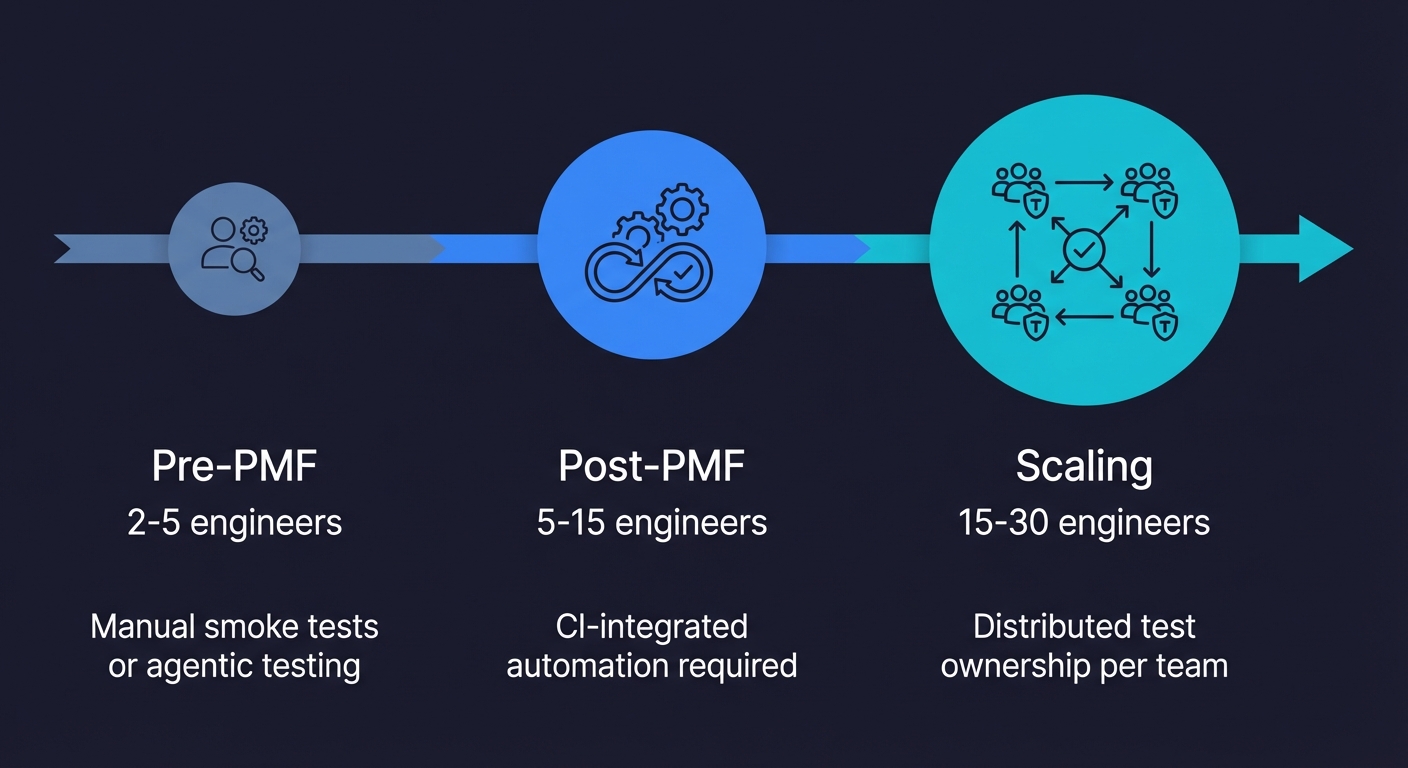
Pre-product-market fit (2-5 engineers, iterating fast): Your product changes weekly. A scripted test suite will be perpetually broken. At this stage, either rely on manual smoke testing of your checkout flow before each deploy, or use Autonoma so agents keep pace with your iteration speed. Don't invest in a scripted suite you'll rewrite three times before Series A.
Post-PMF, pre-scale (5-15 engineers, shipping frequently): This is where QA automation becomes non-negotiable. Production incidents start costing real money: churned users, emergency hotfixes, weekend on-call pages. You need automated coverage on your critical paths running in CI. Autonoma handles this with zero ongoing engineering time. If you prefer scripts, dedicate one engineer at 20% capacity to test maintenance. If you don't have that capacity, the decision framework for whether to hire a QA engineer becomes relevant.
Scaling (15-30 engineers, multiple teams): At this point, test ownership needs to be distributed. Each team owns the QA automation for their feature area. An agentic approach scales naturally because agents generate coverage per-repository or per-service. A scripted approach requires someone to coordinate standards, share utilities, and prevent duplication across teams. At this stage, QA automation becomes part of a broader quality engineering discipline where testing is embedded into every team's workflow. Teams at this scale also need to think carefully about their testing strategy and which layers to invest in, since the economics of testing change significantly with team size.
At every stage, the same principle applies: a small, reliable suite beats a large, unmaintained one. And the less time you spend maintaining your suite, the more time you spend building your product.
Common QA Automation Mistakes (And How to Avoid Them)
Before diving into implementation, here are the mistakes that derail QA automation at startups most often. Every one of these comes from real teams that invested time in automation and got burned.
Automating everything at once. The instinct is to cover your entire application. Resist it. A startup that tries to automate fifty flows before shipping ten will end up with a brittle, unmaintained suite that nobody trusts. Start with three flows. Get those stable. Add coverage incrementally.
Choosing tools before defining scope. Teams spend weeks evaluating Playwright versus Cypress versus Selenium before deciding what they're actually testing. Pick a tool in one afternoon. The tool matters far less than the decision of which flows to cover. If you're stuck, pick Playwright and move on.
Writing tests that mirror implementation. Tests that assert specific CSS classes, exact pixel positions, or internal state variables break every time a developer refactors. Test behavior, not implementation. "User can complete checkout" is a good test. "Button with class .btn-primary exists at coordinates (420, 300)" is a test that will break next week.
Ignoring test data management. Tests that depend on specific database state without setting it up explicitly are tests that pass locally and fail in CI. Every test should create the state it needs and clean up after itself. This is the most common source of flaky QA testing automation that teams dismiss as "intermittent failures."
Not blocking merges on test failure. A test suite that runs but doesn't gate deployments is a suggestion, not a quality check. If your CI runs tests but merges proceed regardless of results, engineers will stop looking at test output within two weeks. The suite becomes decoration. Block merges on failure from day one.
From Zero to QA Automation Coverage in One Week
If you're starting from nothing, here's a realistic plan that gets meaningful coverage in place within one week.
Day 1-2: Identify your critical flows. Map your three most important user journeys. Write them down in plain language: "User signs up with email, verifies account, creates first project." This takes thirty minutes, not two days. If you already know what breaks in production, start there.
Day 3: Set up your CI pipeline. Add the GitHub Actions workflow above (or your CI equivalent). Get it wired to run on pull requests against your staging environment. This is infrastructure work, not test writing. It takes an hour if your staging environment already exists.
Day 4-5: Get your first tests running. If using Autonoma: connect your repository, let agents analyze the codebase, and review the generated test cases. Your critical flows should have coverage by end of day. If going scripted: write one Playwright test for your most critical flow. Get it green in CI. That single test is more valuable than a plan to write fifty tests someday.
Day 6-7: Validate and refine. Run the suite against a few real PRs. Fix any environment issues (missing environment variables, auth tokens, seed data). Verify that failures produce actionable error messages. Once you trust the suite enough to block merges on failure, flip that switch.
One week. Zero QA headcount required. You now have automated verification of your most critical flows running on every deploy. That's more QA coverage than most startups have after six months of talking about it.
The Real Cost of QA Automation (And the Cost of Not Having It)
The math behind QA automation is straightforward once you quantify what production bugs actually cost.
A single broken checkout flow going undetected for 48 hours at a startup doing $50K in monthly revenue can cost $3,000-$5,000 in lost transactions. A broken signup flow during a marketing campaign can waste the entire ad spend. These aren't theoretical numbers. They're the actual incidents that push CTOs to finally invest in automation.
On the automation side, the costs look like this:
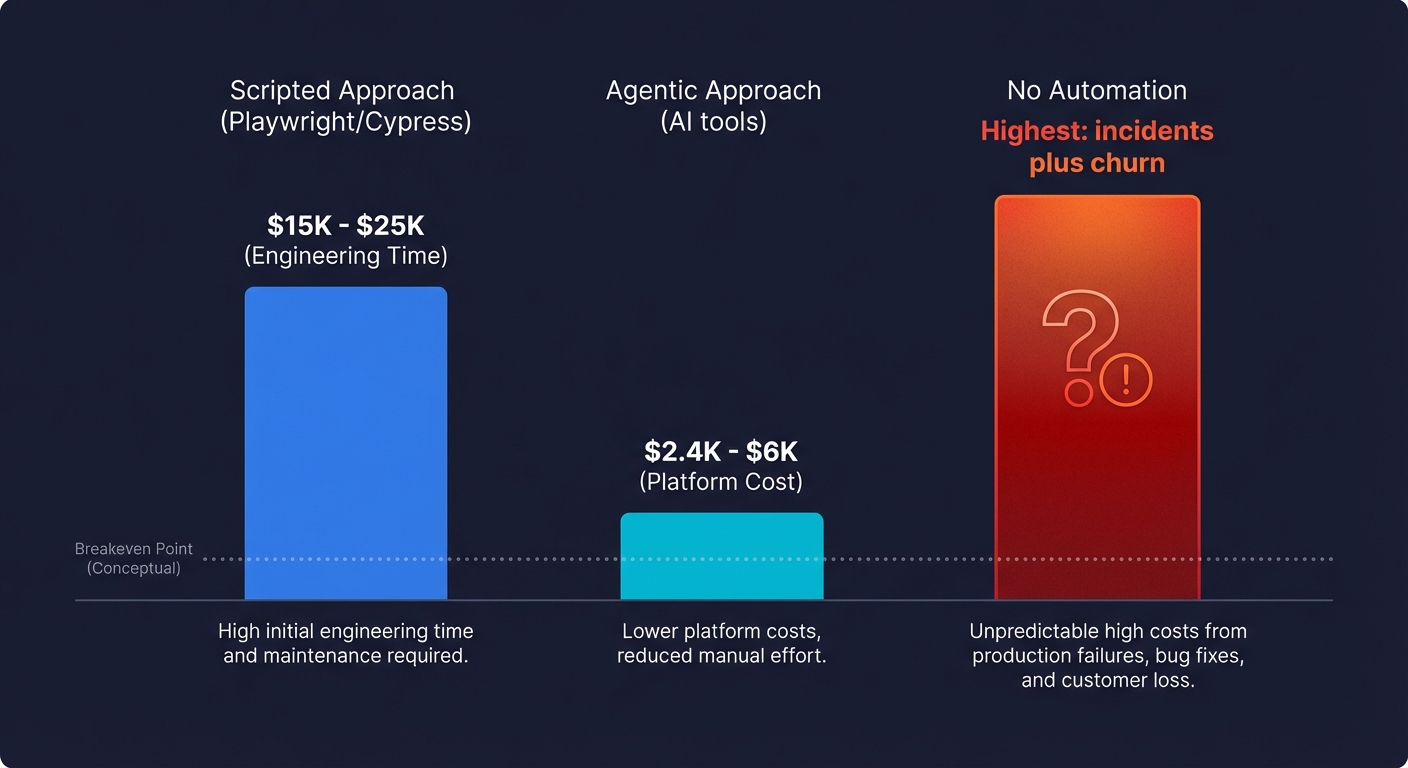
Scripted approach (Playwright, Cypress): The tools are free. The cost is engineering time. Writing a solid test suite for three critical flows takes 20-40 hours upfront. Maintaining it costs 5-10 hours per sprint as the product evolves. At a startup where engineering time is valued at $100-$150/hour, that's $2,000-$6,000 in initial setup and $500-$1,500 per sprint in maintenance. Over a year, you're looking at $15,000-$25,000 in engineering opportunity cost.
Agentic approach (Autonoma): Platform cost of $200-$500/month. Near-zero engineering time for setup and maintenance. Annual cost: $2,400-$6,000. The breakeven against scripted automation happens in the first two to three months.
No automation at all: The most expensive option. You're paying with production incidents, customer churn, emergency weekend debugging sessions, and the slow erosion of your team's confidence in their own deploys. One prevented P0 incident pays for a full year of any QA automation approach.
For teams evaluating whether to invest in automation versus hiring a QA engineer, the numbers are even clearer: a QA engineer costs $110K-$160K+ annually with benefits, while achieving comparable coverage through agentic automation costs a fraction of that.
Getting Started
If you've been meaning to set up QA automation but haven't found the time, that's exactly the problem agentic testing solves. You shouldn't have to choose between building features and building test coverage.
Connect your codebase to Autonoma and let agents handle the test creation, maintenance, and execution. Your first tests will be running within hours of connecting your repo, covering the critical paths that keep you up at night before deploys.
If you want to see it working on your specific application first, book a demo and we'll walk through what agents generate from your codebase. Or start with our documentation to understand the full platform.
Either way, the next time you deploy on a Friday, you'll know your checkout flow works.
Frequently Asked Questions
QA automation means using software to verify that your application behaves correctly, replacing manual testing with automated test execution. It covers unit tests (individual functions), integration tests (system communication), and end-to-end tests (complete user flows). For startups, QA automation typically focuses on end-to-end tests for critical happy paths: signup, checkout, and core feature activation. These tests run automatically in CI on every deploy, catching regressions before they reach production.
Start by identifying your three most critical user flows (money flow, activation flow, most-changed feature). Set up a CI pipeline that runs tests on every pull request. Then either write Playwright scripts for those flows or connect your codebase to an agentic testing tool like Autonoma that generates and maintains tests automatically. The key constraint is maintenance: choose an approach that doesn't require ongoing engineering time you don't have. A CTO wearing the QA hat needs automation that runs itself, not another system to babysit.
Your money flow, always. If your product takes payments, the checkout and subscription paths are your highest-priority automation targets. A broken checkout is a silent revenue loss that you might not notice for days. After that, automate your activation flow (the path from signup to the user's first meaningful action) and your most-changed feature (check your git log for the most-modified areas of your codebase). These three flows represent the vast majority of production incidents that actually cost you users or revenue.
Yes, once you've passed the inflection point where manual testing no longer scales. That typically happens when your team grows past three to five engineers, you ship multiple times per week, or you've had a production incident that manual testing missed. The ROI is clear: one prevented production incident in your checkout flow is worth more than the entire setup cost of QA automation. For teams using agentic tools like Autonoma, the ongoing cost is essentially zero engineering time because agents handle test generation and maintenance.
They refer to the same practice: using automated tools and scripts to verify software quality instead of relying on manual testing. 'QA automation' is the broader term covering the strategy and tooling. 'QA testing automation' emphasizes the testing aspect specifically. In practice, both mean setting up automated tests that run in CI, catch regressions, and provide confidence that your application works correctly before each deploy.
If you go the scripted route with open-source tools like Playwright, the direct cost is zero, but the hidden cost is engineering time: writing tests, maintaining them, and debugging failures. At a startup, engineering time is your most expensive resource. Agentic testing tools like Autonoma typically cost $200-$500/month, which is a fraction of the engineering hours they save. Compare that to a dedicated QA engineer at $110K-$160K+ annually. For most startups under 20 engineers, an AI-powered tool provides better coverage at lower total cost.
Yes. Agentic testing platforms like Autonoma use AI agents that read your codebase, identify critical user flows, generate test cases, and maintain them as your product evolves. This is different from record-and-replay tools or low-code builders. The agent understands your application's structure from the code itself and generates tests based on that understanding. When your UI changes, the agent updates tests automatically. This approach is particularly valuable for teams without QA headcount because it eliminates both the writing and maintenance burden of traditional scripted automation.
Add a GitHub Actions workflow (or equivalent for your CI provider) that runs your test suite on every pull request and every deployment. Point tests at a preview or staging environment, not production. Use one browser (Chromium) to start. Block merges when tests fail. Keep the suite under five minutes so engineers don't bypass it. That's the minimum viable CI integration. You can add parallelization, multiple browsers, and test sharding later if needed, but the core setup takes less than an hour.
QA automation uses scripts or AI agents to execute tests automatically, while manual testing relies on a human clicking through the application. Automation excels at repetitive regression checks, data-heavy validations, and tests that need to run on every deploy. Manual testing is better for exploratory testing, usability judgment, and investigating new bugs. Most teams need both: automate the repetitive critical-path checks, and stay manual for subjective or one-off investigations. The key insight for startups is that automating just your three to five most critical flows eliminates the majority of production risk.


