

Quick summary: Integration testing verifies component communication (APIs, databases, services). End-to-end testing validates complete user workflows through the UI. Integration tests are faster and catch interface bugs. E2E tests are slower but provide confidence that real user flows work. Use many integration tests for coverage, few E2E tests for critical paths. The choice depends on what you're testing: component interactions or user experiences.
Table of Contents
- Introduction
- What Is Integration Testing?
- What Is End-to-End Testing?
- Key Differences: Integration vs E2E Testing
- When to Use Integration Testing
- When to Use End-to-End Testing
- The Testing Pyramid: Finding the Right Balance
- Common Mistakes and How to Avoid Them
- Making the Decision: A Practical Framework
- Frequently Asked Questions
- What's Next
Integration testing and end-to-end (E2E) testing are two fundamental approaches to software testing that serve different purposes. Integration testing verifies that individual components or services communicate correctly with each other, focusing on interfaces, APIs, and data flow between modules. End-to-end testing (also called E2E testing or end to end testing) validates complete user workflows from start to finish through the entire application stack, including the user interface. Understanding when to use integration testing vs E2E testing is critical for building an effective continuous testing strategy that balances speed, coverage, and maintenance costs.
Introduction
Your test suite takes 45 minutes to run. Developers stop running tests locally. They commit code and hope CI catches problems. By the time failures appear, context is lost.
Half your tests are end-to-end tests that launch browsers and simulate complete workflows. They catch real bugs. They've also become a bottleneck that slows every deployment.
Could faster integration tests provide the same coverage? This is the question teams face: when do you need full end-to-end validation, and when is testing component integration enough?
The answer isn't "always use E2E" or "integration tests are sufficient." It's understanding what each test type catches, what they cost, and where they fit. This guide shows when to use each approach.
What Is Integration Testing?
Integration testing verifies that two or more components work together correctly. While unit tests isolate individual functions, integration tests check the connections between them.
Consider an e-commerce application. Your payment service needs to talk to your order service, which talks to your inventory service, which talks to your database. Integration tests verify these conversations happen correctly.
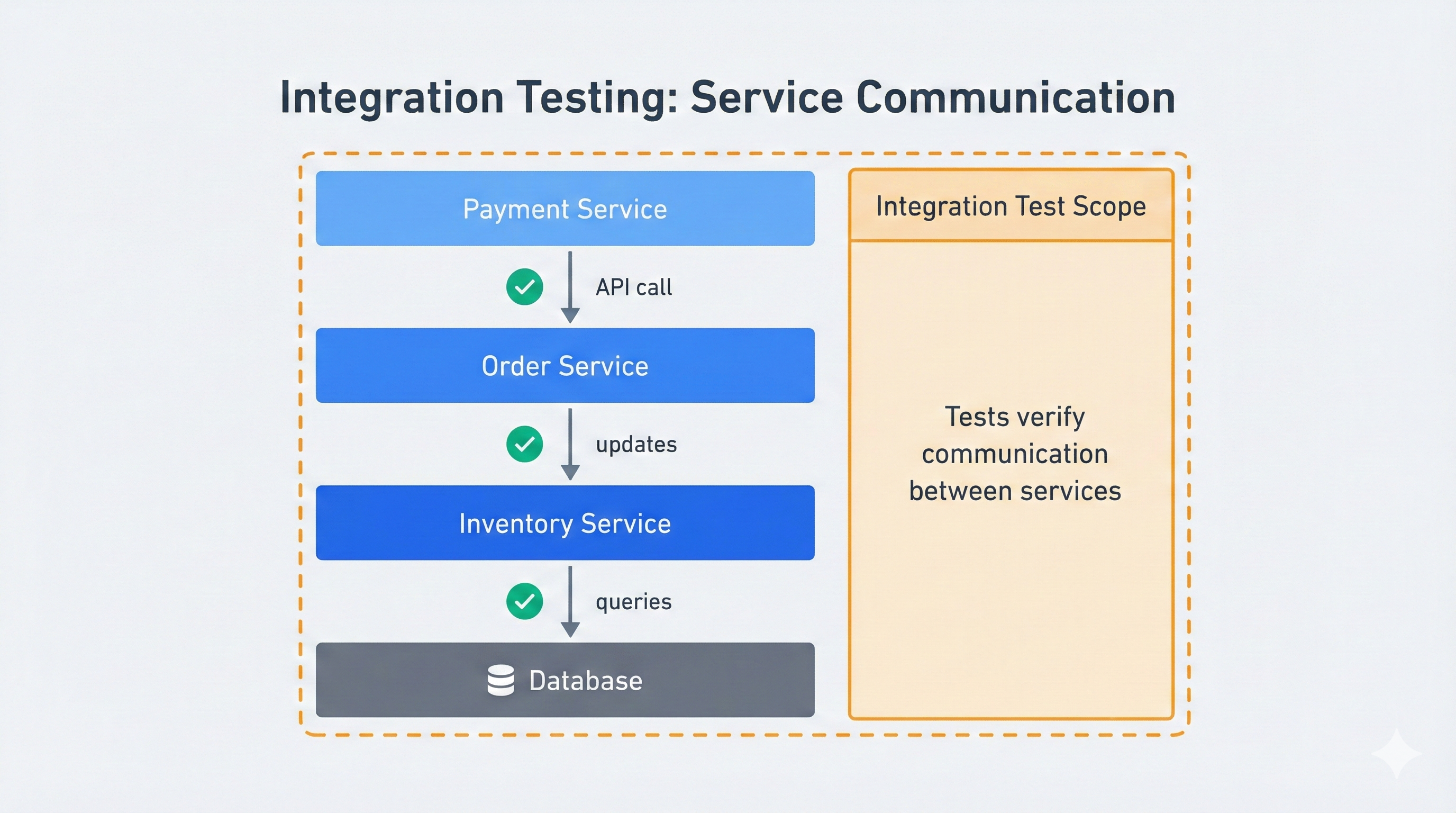
Here's a basic integration test checking API and database interaction:
def test_order_creation_updates_inventory():
    # This test verifies that creating an order reduces inventory count
    # It tests the integration between OrderService and InventoryService

    # Setup: Create a product with known inventory
    product = create_product(name="Widget", stock=10)

    # Action: Place an order through the API
    response = api_client.post("/orders", json={
        "product_id": product.id,
        "quantity": 3
    })

    # Verify: Order was created
    assert response.status_code == 201
    order_id = response.json()["order_id"]

    # Verify: Inventory decreased correctly
    updated_product = db.query(Product).get(product.id)
    assert updated_product.stock == 7

    # Verify: Order exists in database
    order = db.query(Order).get(order_id)
    assert order.product_id == product.id
    assert order.quantity == 3
This test doesn't launch a browser or simulate clicking buttons. It directly calls the API and checks the database. It tests the integration between three components: the API endpoint, the business logic, and the database layer.
Integration tests sit between unit tests and end-to-end tests. They're faster than E2E tests because they skip the UI layer. They're more comprehensive than unit tests because they verify real component interactions.
Integration testing bridges the gap between unit testing (testing individual functions in isolation) and component testing (testing UI components with their dependencies). While component testing typically focuses on frontend components with mocked backends, integration testing verifies real backend communication.
Integration Testing Approaches
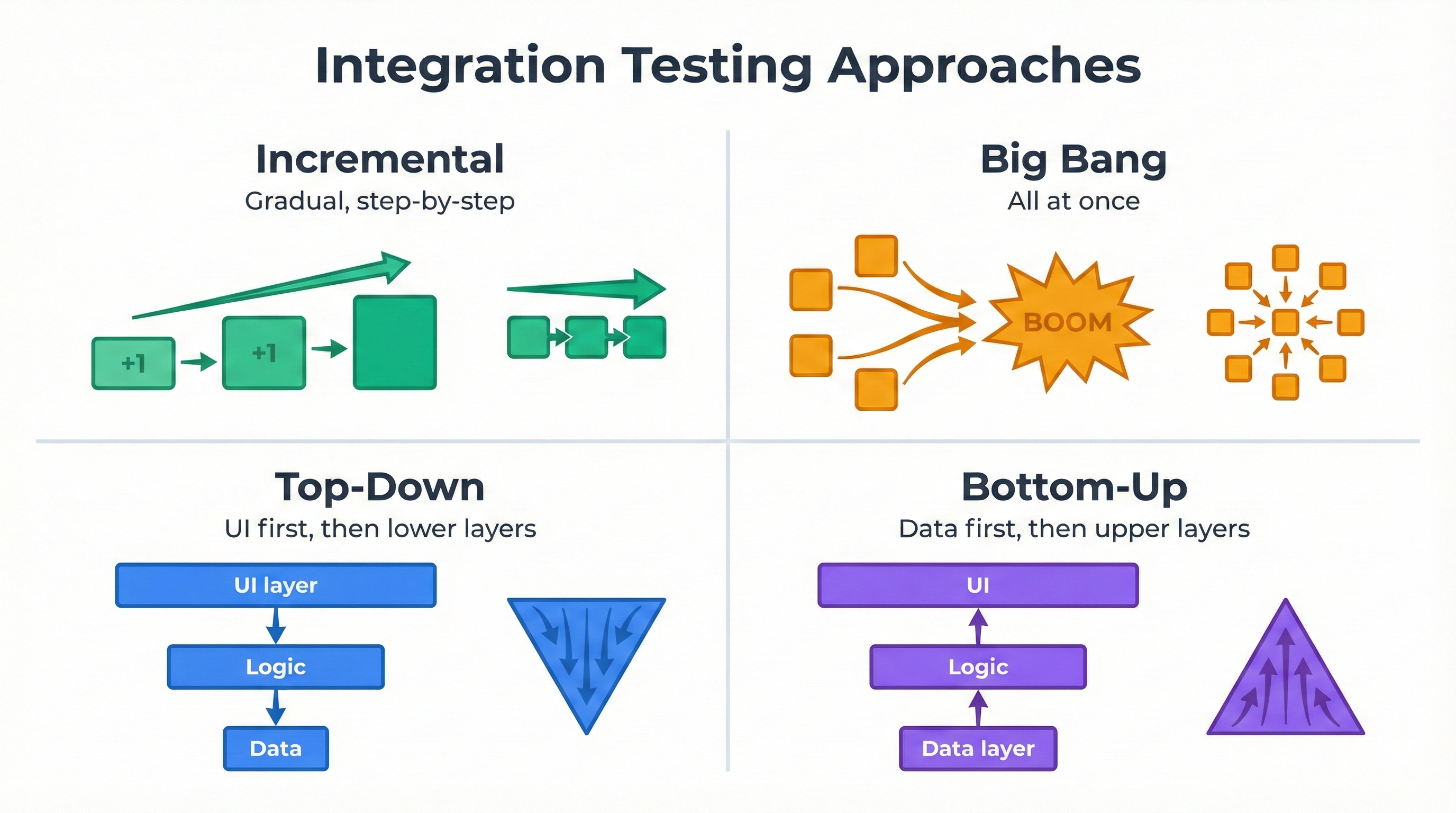
There are several ways to approach integration testing, each with different strategies for combining components:
Incremental Integration Testing combines modules gradually, testing integrations in small steps. This is the most common approach in modern development, where each commit triggers integration tests in CI/CD pipelines.
Big Bang Integration Testing combines all modules at once and tests the complete system. This approach is faster to set up but makes debugging harder when failures occur. Use this only for small applications where troubleshooting is manageable.
Top-Down Integration Testing starts with high-level modules and progressively adds lower-level modules. The main workflow is tested first, with stubs replacing components that aren't ready yet. This approach works well when the user interface drives development.
Bottom-Up Integration Testing starts with low-level modules and builds upward. Database and API layers are tested first, then business logic, then controllers. This works well for API-first development where backend services are built before frontend.
Most teams today use incremental integration testing with continuous integration, running tests on every commit rather than waiting for a "big bang" integration phase. This catches integration bugs early when they're cheapest to fix. According to IBM's research on software defects, bugs found during integration testing cost 15x less to fix than bugs found in production.
What Integration Tests Catch
Integration tests excel at finding bugs in component connections:
Data transformation errors: Your API returns timestamps in ISO format, but your reporting service expects Unix timestamps. Unit tests miss this because each component works in isolation. Integration tests catch it immediately.
API contract violations: Your inventory service changed stock_count to available_quantity. Both services' unit tests pass. When they communicate, everything breaks. Integration tests prevent this.
Database transaction issues: Your code creates an order, charges a card, and updates inventory. If the charge fails, everything should roll back. Integration tests verify this happens.
Authentication problems: Your microservice assumes the API gateway authenticated users. Integration tests catch this assumption when it's wrong.
Integration Testing in Practice
Real integration tests verify multiple services work together. Here's a payment flow example:
test('successful payment creates order and sends confirmation', async () => {
    // Setup test data
    const user = await createUser({ email: 'test@example.com' });
    const cart = await createCart({ userId: user.id, total: 99.99 });

    // Execute payment flow
    const result = await orderService.processCheckout({
        cartId: cart.id,
        paymentMethod: 'test_card_success'
    });

    // Verify payment was processed
    const payment = await testDatabase.query(
        'SELECT * FROM payments WHERE order_id = ?',
        [result.orderId]
    );
    expect(payment.status).toBe('completed');

    // Verify order was created
    const order = await testDatabase.query(
        'SELECT * FROM orders WHERE id = ?',
        [result.orderId]
    );
    expect(order.status).toBe('confirmed');

    // Verify email was queued
    const emailJobs = await getQueuedEmails();
    expect(emailJobs).toContainEqual(
        expect.objectContaining({
            to: 'test@example.com',
            template: 'order_confirmation'
        })
    );
});
This test verifies payment service, order service, database, and email queue integrate correctly. When payment succeeds, the order gets created and email sends. These are integration concerns unit tests can't verify.
What Is End-to-End Testing? (E2E Testing Explained)
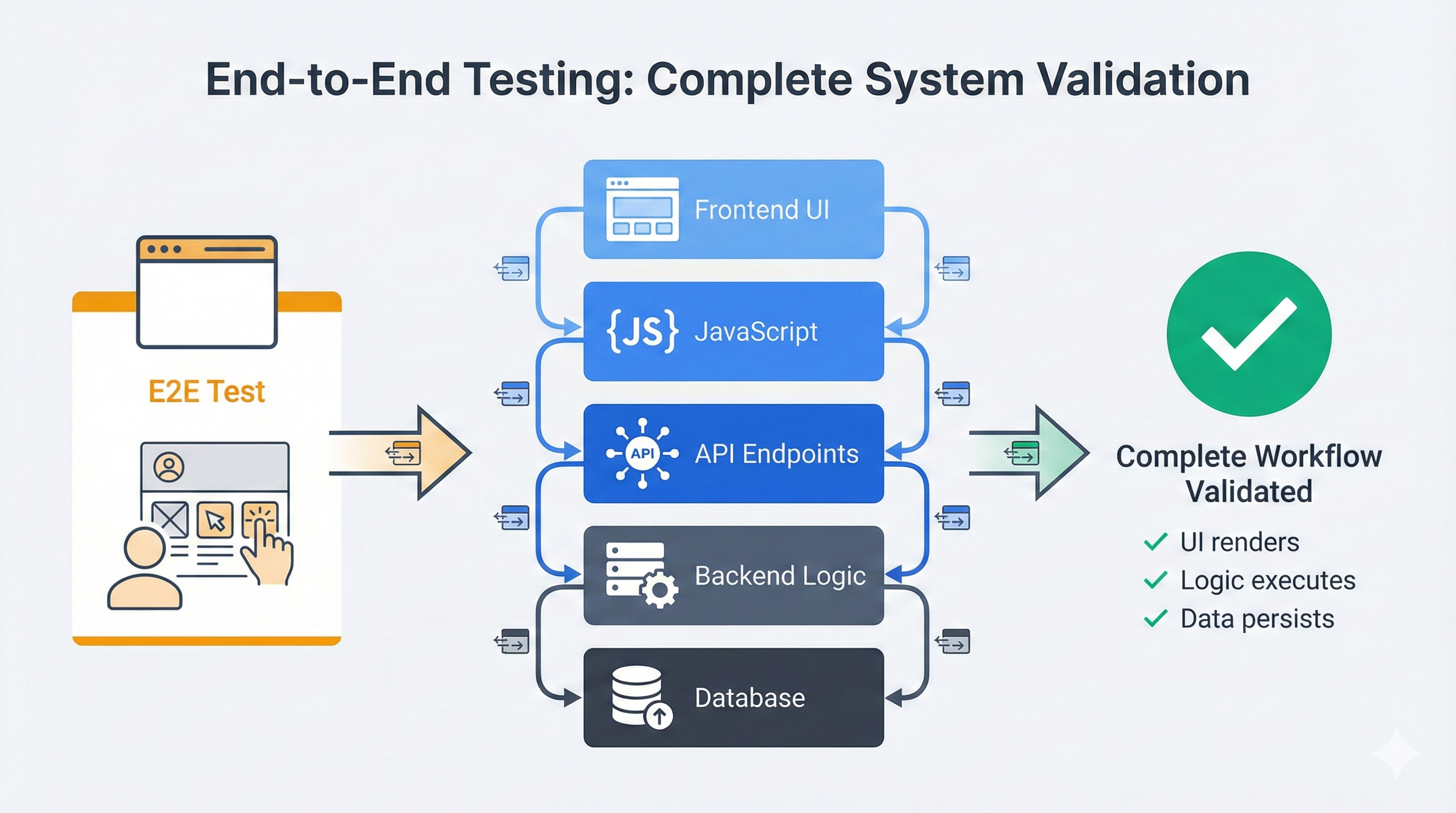
End-to-end testing validates complete user workflows from start to finish, exactly as a real user would experience them. While integration tests check component communication, E2E tests verify the entire system works together through the actual user interface. End-to-end testing is sometimes called acceptance testing because it validates whether the software meets acceptance criteria from a user's perspective.
An E2E test launches a real browser, navigates to your application, clicks buttons, fills forms, and verifies results appear correctly. It tests everything: frontend JavaScript, API calls, backend logic, database queries, and visual presentation.
Here's what an E2E test looks like:
test('user can complete checkout flow', async ({ page }) => {
    // Navigate to product page as real user would
    await page.goto('https://store.example.com/products/widget');

    // Add product to cart
    await page.click('button:has-text("Add to Cart")');
    await page.waitForSelector('.cart-badge:has-text("1")');

    // Go to checkout
    await page.click('.cart-icon');
    await page.click('button:has-text("Checkout")');

    // Fill shipping information
    await page.fill('input[name="email"]', 'customer@example.com');
    await page.fill('input[name="address"]', '123 Main St');
    await page.fill('input[name="city"]', 'San Francisco');
    await page.selectOption('select[name="state"]', 'CA');
    await page.fill('input[name="zip"]', '94102');

    // Enter payment details
    await page.click('button:has-text("Continue to Payment")');
    await page.fill('input[name="cardNumber"]', '4242424242424242');
    await page.fill('input[name="expiry"]', '12/25');
    await page.fill('input[name="cvc"]', '123');

    // Complete purchase
    await page.click('button:has-text("Place Order")');

    // Verify success page appears
    await page.waitForSelector('h1:has-text("Order Confirmed")');

    // Verify order details are shown
    await expect(page.locator('.order-summary')).toContainText('Widget');
    await expect(page.locator('.order-total')).toContainText('$99.99');

    // Verify confirmation email mention
    await expect(page.locator('.confirmation-message'))
        .toContainText('customer@example.com');
});
This test exercises the complete system. The frontend renders properly. The JavaScript handles click events. The API accepts requests. The backend processes logic. The database stores data. The payment service charges cards. The email service queues messages. Everything must work together or the test fails.
What End-to-End Tests Catch
E2E tests catch problems that only appear when the full system runs together:
UI rendering bugs: Your API returns correct data, but CSS makes it invisible or JavaScript errors prevent rendering. Integration tests never render the UI, so they miss this.
JavaScript errors: A typo in your event handler breaks form submission. The API works perfectly. When users click "Submit," nothing happens. E2E tests catch this by actually clicking buttons.
Workflow sequence problems: Your checkout requires shipping before payment. A refactor broke the validation. Each page works individually. The complete flow fails. E2E tests execute the full sequence.
Cross-browser compatibility: Your app works in Chrome but breaks in Safari. Integration tests run in Node.js and never see browser differences. E2E tests run in real browsers.
Performance issues: A page takes 10 seconds to load. Integration tests hit the API directly and don't measure page load. E2E tests time out waiting for rendering.
Key Differences: Integration vs E2E Testing
Integration tests and end-to-end tests serve different purposes and operate at different levels. Understanding these differences helps you choose the right tool for each testing scenario.
Scope and Coverage
Integration tests focus on component boundaries, testing that ServiceA and ServiceB communicate correctly. The scope is narrow: interface, data contract, response handling.
End-to-end tests cover complete user workflows from UI to database. The scope is wide: user interface, business logic, data flow, and user experience.
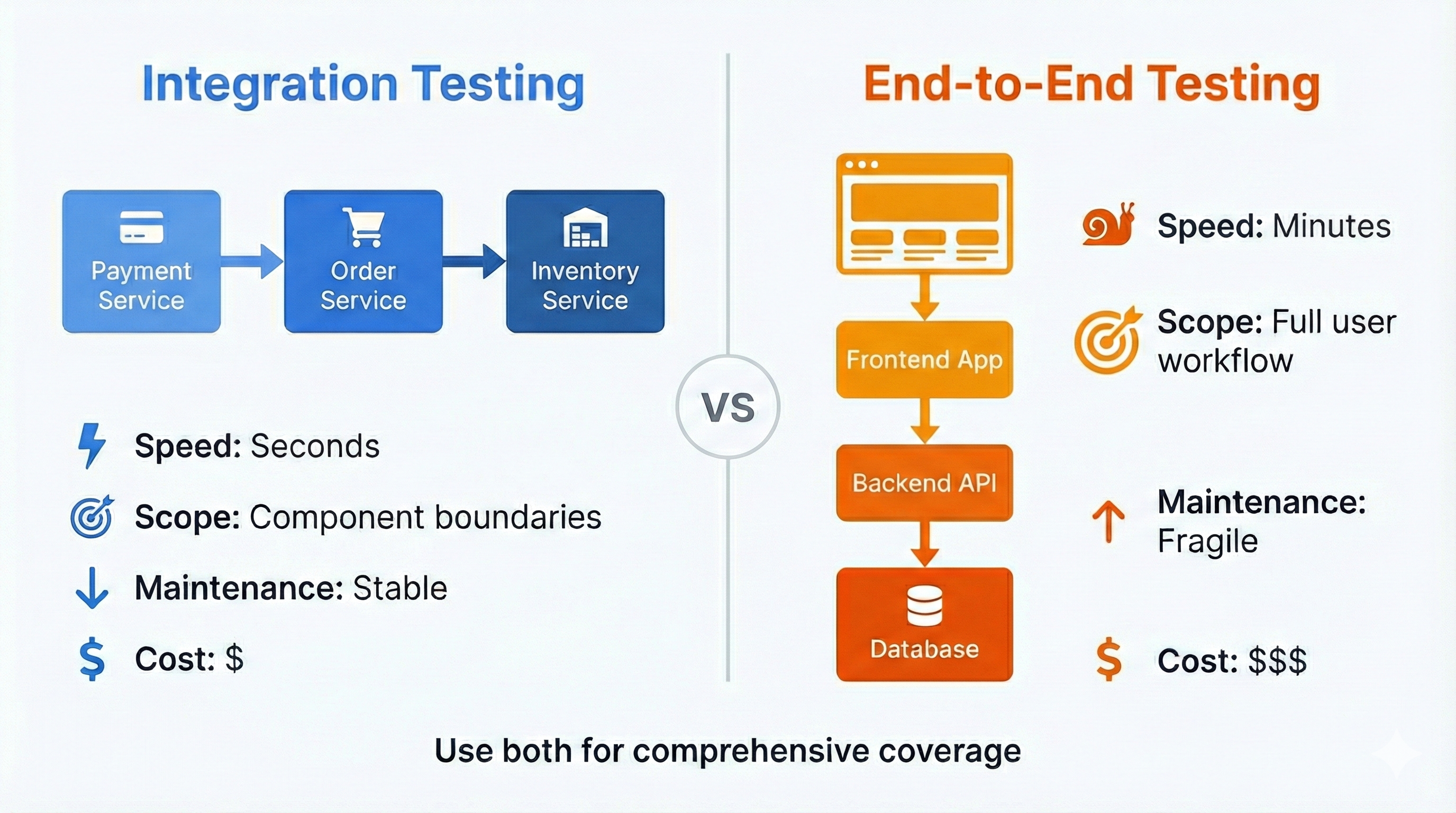
This creates a tradeoff. Integration tests verify the payment API accepts cards and returns transaction IDs. E2E tests verify users can check out, see confirmation, and receive receipts. Integration tests are narrow but fast. E2E tests are comprehensive but slow.
Speed and Execution Time
Speed separates these approaches dramatically. Consider 200 integration tests and 50 E2E tests. Integration tests complete in 90 seconds with direct API calls, database queries, and no browser. E2E tests take 15 minutes because they launch browsers, navigate pages, render animations, and fill forms.
This speed difference affects workflow. Developers run integration tests before every commit. E2E tests run before merge or deployment. Slow test suites discourage use, defeating their purpose.
Failure Precision and Debugging
Integration test failures pinpoint problems precisely. If test_payment_api_validates_card_numbers fails, the bug is in payment validation. The test hits one endpoint and one code path.
E2E test failures require investigation. "User cannot complete checkout" could mean broken JavaScript, failed API, database timeout, service down, CSS hiding buttons, or wrong assertions. Integration failures get fixed in minutes. E2E failures take hours to diagnose.
Environment and Maintenance
Integration tests run in controlled environments with a test database, a few services, and minimal dependencies. Lightweight and reproducible.
E2E tests require the complete stack: built frontend, running backend, populated database, external services or sophisticated mocks. When authentication providers change APIs or email services go down, E2E tests break. Integration tests isolate these concerns.
E2E tests are fragile. They depend on UI selectors, layouts, timing, and workflow sequences. Designers move a button, E2E tests break. Product adds required fields, tests need updates. Developers refactor the frontend, tests require maintenance. Research shows that UI-dependent tests require 3-5x more maintenance effort than API-level tests due to frequent interface changes.
Integration tests are stable. They test code interfaces that change less frequently. API contracts stay consistent, tests rarely need updates.
This maintenance burden is why testing pyramids recommend few E2E tests and many integration tests.
How Integration Testing and E2E Testing Fit with Other Test Types
Understanding where integration and E2E testing fit in the broader testing landscape helps you build a complete testing strategy.
| Test Type | Scope | Speed | When to Use | Example |
|---|---|---|---|---|
| Unit Testing | Single function/method in isolation | Milliseconds | Testing individual functions with mocked dependencies | Testing a price calculation function |
| Integration Testing | 2+ components communicating | Seconds | Testing API endpoints, database operations, service communication | Testing order creation updates inventory |
| End-to-End Testing | Complete user workflow through UI | Minutes | Testing critical business paths, user journeys, cross-browser behavior | Testing full checkout flow from cart to confirmation |
| Acceptance Testing | Business requirements validation | Varies | Verifying software meets stakeholder requirements | Testing that payment processing meets compliance requirements |
Key Insight: Integration testing bridges the gap between unit testing (too narrow) and E2E testing (too broad). Unit tests verify individual functions work. Integration tests verify functions work together. E2E tests verify users can accomplish their goals. For more on testing fundamentals, see our software testing basics guide.
When to Use Integration Testing
Integration tests excel in specific scenarios where you need to verify component communication without the overhead of running the full application. Understanding these scenarios helps you apply integration testing effectively.
Testing API Endpoints and Service Communication
When your application exposes APIs, integration tests verify the complete request-response cycle: route handling, validation, business logic, database queries, and response formatting.
An integration test covering API endpoint, password hashing, and database storage runs in milliseconds. An E2E test for the same functionality requires rendering a form, filling fields, clicking submit, and verifying UI responses, adding seconds of execution time for identical coverage.
Verifying Database Operations and Transactions
Database integration tests catch subtle bugs in transaction handling, constraint violations, and data integrity. Testing against real databases verifies actual behavior, not mocked assumptions.
Transaction rollback is critical: when payment fails, verify no order was created and inventory wasn't reduced. Integration tests confirm this. Unit tests with mocked databases miss this behavior entirely.
Testing Third-Party Service Integrations
Integration tests verify connections to payment processors, email providers, and cloud storage work correctly. Test against sandbox environments (like Stripe test mode) rather than mocks.
These tests verify payment intents create correctly, transactions process successfully, and database records update. All faster than E2E tests because they skip the UI layer.
When Speed Matters More Than UI Validation
Integration tests provide rapid feedback during development. You change business logic and get immediate confirmation it works. You don't care about button placement or animations. You care that logic executes correctly.
This tight feedback loop keeps developers productive. Save a file, tests run in seconds, see green checkmarks. E2E tests that take 10 minutes break this flow.
Continuous testing in development relies on integration tests for instant feedback. E2E tests run later, before merge or deployment, when comprehensive validation justifies the time cost. For more on building continuous testing into your workflow, see our guide on test automation frameworks.
When to Use End-to-End Testing
End-to-end tests justify their slower execution time and higher maintenance cost in specific scenarios where integration tests cannot provide adequate confidence. These are the situations where E2E testing becomes essential.
Testing Critical User Workflows
Revenue-generating flows demand E2E coverage. If bugs would prevent signup, login, or purchases, you need E2E tests confirming these workflows work from a user's perspective.
Integration tests verify each piece works (signup API, cart management, checkout processing) but can't confirm the complete workflow functions as users experience it. E2E tests validate the entire journey from account creation through purchase completion.
Validating UI Behavior and User Experience (UI Testing)
Visual bugs, broken layouts, and interaction problems are invisible to integration tests. When you need to verify buttons appear, forms validate visibly, and error messages display correctly, E2E tests are the only option.
Form validation illustrates this: E2E tests verify validation messages appear, error states display properly, and forms only submit when valid. Integration tests confirm the API rejects invalid data but can't verify users see error messages explaining what's wrong.
Testing Across Multiple Pages and Complex Flows
Multi-step workflows have bugs in transitions between steps. Data doesn't carry forward. Users skip required steps. Back buttons break state. These problems only appear when testing complete flows as users experience them.
Multi-page checkout demonstrates this: adding items, filling shipping, modifying cart mid-checkout, verifying state persistence. Integration tests verify each page individually. E2E tests catch bugs in how pages work together as a sequence.
Verifying Browser-Specific Behavior
Some bugs only appear in specific browsers. CSS rendering differs between Chrome and Safari. JavaScript APIs have browser-specific quirks. Mobile browsers behave differently than desktop.
Integration tests run in Node.js and never touch browser rendering engines. They can't detect date pickers breaking in Safari or checkout forms failing on mobile. E2E tests running in actual browsers catch these problems before users do.
The Testing Pyramid: Finding the Right Balance
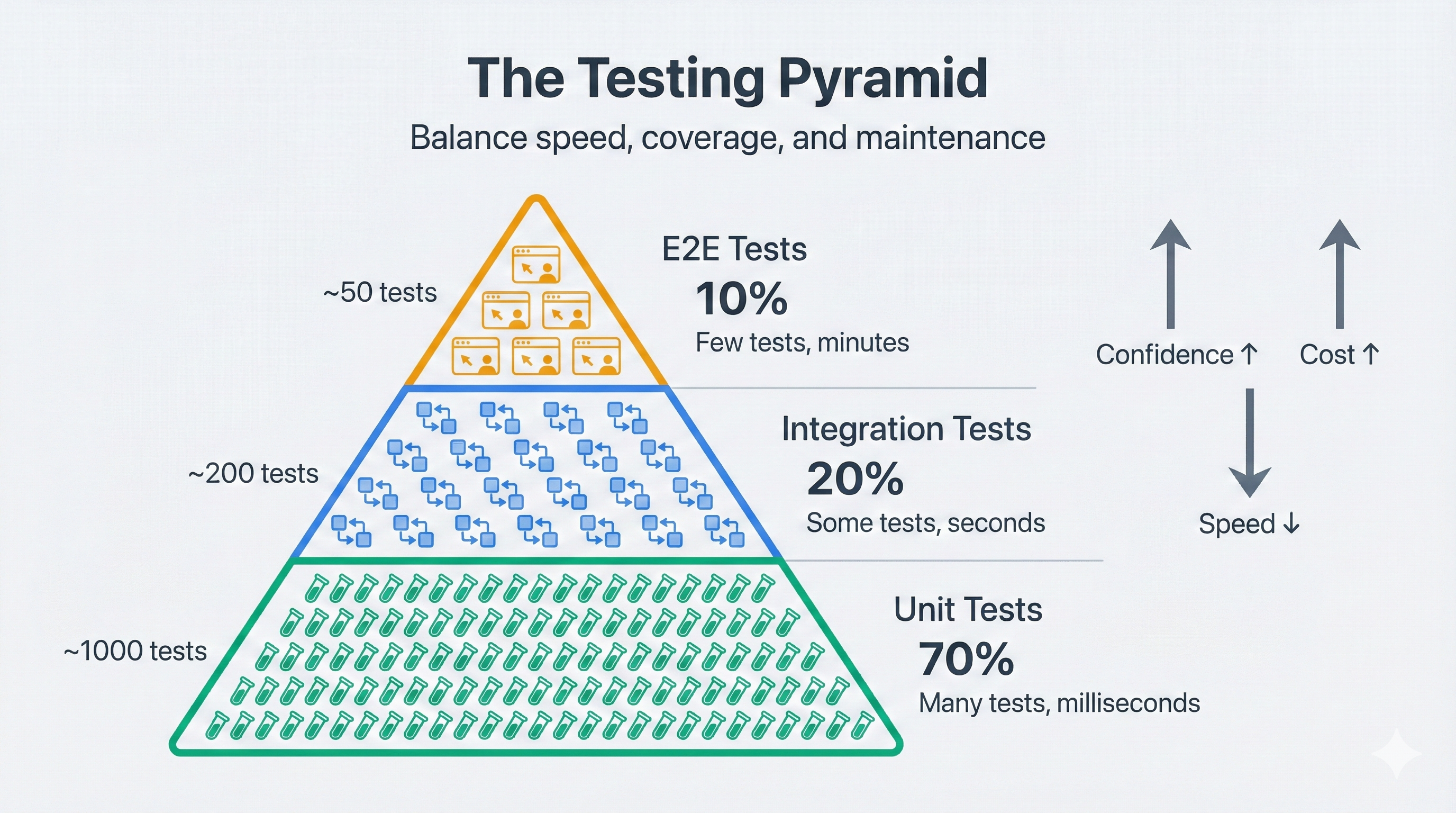
The testing pyramid, popularized by Mike Cohn in his book Succeeding with Agile, balances test types: 70% unit tests, 20% integration tests, 10% E2E tests. These ratios reflect cost-benefit tradeoffs.
Unit tests are cheapest: milliseconds to run, precise failures, thousands verifying individual functions. Integration tests cost more but provide higher confidence: seconds to run, catching boundary bugs, hundreds verifying service communication. E2E tests are most expensive: minutes to run, fragile, requiring maintenance, but providing highest confidence. Dozens covering critical business paths.
The Anti-Pattern: Inverted Pyramid
Teams often create inverted pyramids: few unit tests, some integration tests, many E2E tests. E2E tests are intuitive because they test like humans interact with software.
If you have 100 E2E tests and 50 integration tests, you have an inverted pyramid. Add more integration and unit tests covering the same logic, then eliminate redundant E2E tests.
Finding Your Team's Balance
The 70-20-10 ratio is a starting point. Your architecture should guide distribution.
API-heavy applications need more integration tests (60% unit, 30% integration, 10% E2E). Critical flows involve API contracts and service communication.
User-facing applications might need more E2E tests (60% unit, 20% integration, 20% E2E). Visual bugs and interaction problems pose higher risk.
Startups might have fewer absolute tests but maintain the ratio: 200 unit, 50 integration, 15 E2E.
Measuring Test Suite Health
Track three metrics:
Distribution ratio: Count tests by type. 500 unit, 100 integration, 30 E2E = 79%/16%/5%. Close to ideal.
Execution speed: Unit tests under 2 minutes. Integration under 5 minutes. E2E under 15 minutes. According to Google's testing best practices, test suites that run in under 10 minutes keep developers productive and encourage continuous testing. Slower means too many or poor optimization.
Maintenance burden: If updating tests more than once per feature, you have too many brittle tests. E2E tests should only break when user-facing behavior changes, not from internal refactoring.
For teams who want E2E coverage without the maintenance burden, Autonoma uses AI agents to generate and maintain E2E tests from your codebase automatically — so you get the confidence of full-stack user-flow validation without the selector upkeep.
Popular Tools for Integration and E2E Testing
Choosing the right tools depends on your tech stack and testing needs.
Integration Testing Tools
For Python:
- pytest - The standard testing framework with excellent fixture support for integration tests
- Testcontainers - Spins up real Docker containers (databases, message queues) for integration testing
- requests or httpx - For testing HTTP API integrations
For JavaScript/TypeScript:
- Jest - Fast test runner with built-in mocking, ideal for API integration tests
- Supertest - HTTP assertion library for testing Node.js API endpoints
- Testcontainers - Also available for Node.js
End-to-End Testing Tools
Playwright (recommended for most teams):
- Fast, reliable, modern E2E testing framework
- Built-in waiting and auto-retry mechanisms
- Cross-browser support (Chrome, Firefox, Safari, Edge)
- Excellent for both E2E and API integration testing
Cypress:
- Developer-friendly with great debugging experience
- Real-time reloading makes test development faster
- Strong community and ecosystem
Selenium:
- Mature, widely adopted framework
- Supports more browsers and platforms than competitors
- Slower and requires more setup than modern alternatives
For a detailed comparison of these tools and implementation guidance, see our comprehensive guide on test automation frameworks.
Common Mistakes and How to Avoid Them
Teams make predictable mistakes when implementing integration and E2E testing strategies. Understanding these patterns helps you avoid costly detours.
Mistake 1: Testing Everything with E2E Tests
The most common error is over-relying on E2E tests. Teams write E2E tests for every feature, creating slow suites and constant maintenance.
Consider a profile page with 20 fields. One E2E test verifying the save workflow works with a few fields. Integration tests verify all 20 fields persist at the API level. When UI changes, one E2E test needs updating. Integration tests remain stable. Learn more about maintaining stable tests in our article on reducing test flakiness.
Mistake 2: Using Mocks in Integration Tests
Integration tests should test real integrations. Mocking the database makes tests worthless because mocks test your assumptions, not reality.
Use tools like Testcontainers to spin up real database instances. Tests actually verify integration behavior, catching SQL errors, constraint violations, and transaction issues mocks miss. For testing strategies in specialized environments, see our guide on mocking external services for testing in fintech.
For external services, use sandbox environments (Stripe test mode) with real API calls, not mocks.
Mistake 3: Not Maintaining Test Data Hygiene
When tests don't clean up, leftover data causes random failures (flaky tests).
Every test needs a clean slate. Either reset the database between tests (thorough but slower) or use unique data per run (faster, may bloat database). Choose one pattern and stick with it.
Mistake 4: Ignoring Test Execution Speed
Slow tests kill productivity. When suites take 30 minutes, developers stop running them. Context is lost.
Set hard limits: unit tests under 2 minutes, integration under 5 minutes, E2E under 15 minutes. Use parallelization to run 50 E2E tests across 5 machines in 5 minutes instead of 25 minutes sequentially.
Mistake 5: E2E Tests That Don't Represent Real Users
Some E2E tests use shortcuts: setting authentication cookies directly, seeding databases, using APIs for setup. This makes tests faster but less realistic, missing bugs in authentication flows and user experience.
Use shortcuts selectively. API calls to create 10 test users is fine if you test the full login flow for one user. Balance speed with realistic coverage.
Making the Decision: A Practical Framework
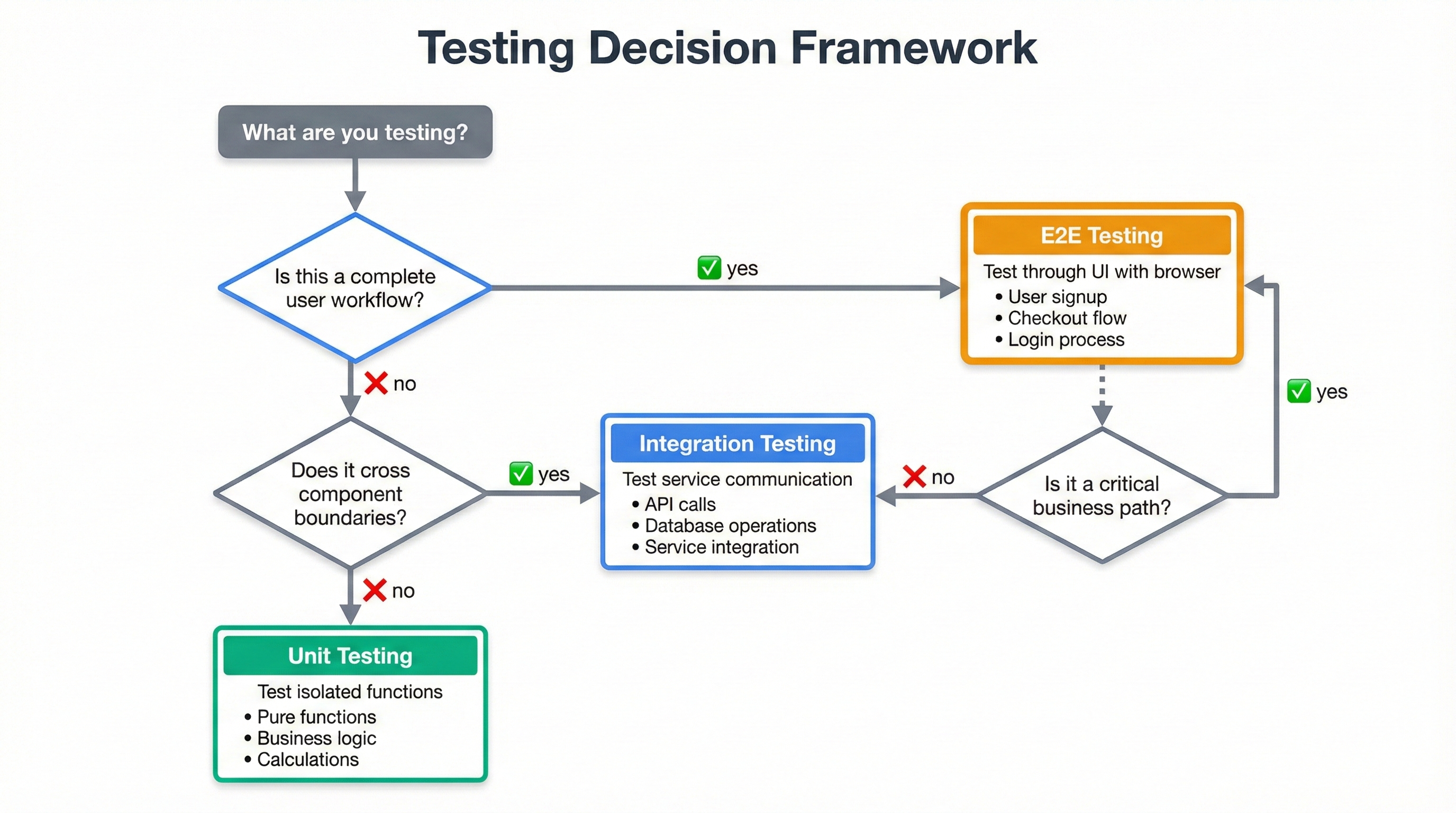
When you're writing a new test, how do you decide between integration and E2E? This framework provides a decision tree that works for most scenarios.
Step 1: Identify What You're Testing
Define what you're verifying. Components communicating correctly? Integration test. Users completing a workflow? E2E test.
API endpoint returns correct data format: integration. User successfully checks out: E2E.
Step 2: Consider the Failure Impact
How bad if this breaks in production? Users unable to sign up, purchase, or access accounts? Catastrophic failures need E2E coverage regardless of cost.
Minor failures like formatting errors, broken footer links, or missing analytics can be covered with integration or unit tests.
Step 3: Evaluate Existing Coverage
Check existing tests. Integration tests verifying backend logic? Add one E2E test confirming UI connects properly.
Avoid redundancy. Don't write unit, integration, and E2E tests all verifying the same logic. Each layer tests different aspects.
Step 4: Apply the Speed Test
"How often will we run this test?" Before every commit: needs to be fast, integration test. Before every deployment: E2E acceptable.
Rapid feedback loop: seconds. Deployment gate: minutes.
Step 5: Consider Maintenance Cost
UI-heavy features change frequently. Tests depending on button text, CSS selectors, or layouts require constant maintenance.
Stable APIs but changing UIs? Integration tests provide better ROI. Test API contracts with integration tests. Add one or two E2E tests for critical happy paths.
Decision Matrix
Quick reference:
- API Endpoints: Integration (fast, precise, minimal maintenance)
- Critical User Workflows: E2E (high confidence, catches UI bugs)
- Business Logic: Integration if multi-component, unit if isolated
- Third-Party Services: Integration against sandbox environments
- Browser Compatibility: E2E (integration can't verify browser behavior)
- Multi-Step Workflows: E2E for critical paths, integration for individual steps
- Data Validation: Integration for API rejection, limited E2E for error messages
- Performance/Load: Specialized performance testing
Frequently Asked Questions
Integration testing verifies that two or more components communicate correctly. End-to-end testing validates complete user workflows from start to finish. Integration tests focus on interfaces between systems (API calls, database connections). E2E tests simulate real user behavior through the entire application stack, including the UI.
Use integration testing when testing connections between components: API integrations, database operations, service communication, or data transformations. Integration tests run faster and pinpoint exactly where failures occur. They excel at catching bugs in how systems talk to each other, without the overhead of spinning up the entire application.
Yes, significantly slower. Integration tests typically run in seconds because they test specific component interactions. End-to-end tests take minutes because they spin up the entire application, launch browsers, simulate user actions, and wait for UI responses. A test suite might have 500 integration tests running in 2 minutes, but only 50 E2E tests taking 15 minutes.
No, they serve different purposes. Integration tests verify components work together correctly, but they miss UI bugs, rendering issues, JavaScript errors, and real user workflow problems. End-to-end tests catch bugs that only appear when the full system runs together. You need both: integration tests for speed and coverage, E2E tests for confidence.
Follow the testing pyramid: many unit tests (70%), some integration tests (20%), few end-to-end tests (10%). For a typical application, you might have 1,000 unit tests, 200 integration tests, and 50 E2E tests. The exact ratio depends on your architecture, but the principle remains: more fast tests at the bottom, fewer slow tests at the top.
For integration testing: use your language's testing framework (pytest for Python, Jest for JavaScript) with tools like Testcontainers for databases or Wiremock for API mocking. For end-to-end testing: Playwright and Cypress excel at browser automation, while tools like Selenium remain popular for cross-browser testing. Choose based on your tech stack and team expertise.
Use real databases for integration tests whenever possible. Mocks test your assumptions, not reality. Tools like Testcontainers spin up real database instances in Docker for each test run, giving you actual database behavior without the downsides of shared test databases. This catches bugs that mocks miss, like SQL syntax errors or transaction handling issues.
Prioritize critical business paths: user registration, login, checkout, payment processing, and core feature workflows. Test happy paths first, then add critical error scenarios. Don't try to E2E test everything because that creates maintenance nightmares. If a workflow generates revenue or would cause major problems if broken, it needs E2E coverage.
Unit testing tests individual functions or methods in isolation, mocking all dependencies. Integration testing tests how two or more components work together with real connections. For example, a unit test might verify a function calculates tax correctly, while an integration test verifies the function calls the tax service API, receives real data, and updates the database correctly.
E2E testing and acceptance testing overlap but are not identical. Acceptance testing verifies whether software meets business requirements and can be manual or automated. E2E testing is a type of acceptance testing that specifically validates complete user workflows through the UI using automated browsers. All E2E tests can serve as acceptance tests, but not all acceptance tests are E2E tests.
What's Next
Integration tests verify component communication quickly. E2E tests validate complete user workflows with higher confidence but slower execution and more maintenance. The key is balance.
Start by auditing your test suite. Count tests by type. Measure execution time. Inverted pyramid? Add integration tests, remove redundant E2E tests. No E2E tests? Add a few covering critical user flows.
Testing strategy evolves. As your codebase grows, rebalance distribution. As features ship, decide deliberately which need integration or E2E coverage. As critical paths change, update E2E priorities.
New to test automation? Start with our comprehensive guide to software testing basics or learn about Page Object Model for organizing integration and E2E tests effectively.
For teams looking to reduce test maintenance while maintaining coverage, AI-powered testing platforms like Autonoma reduce E2E brittleness through self-healing selectors and intelligent test generation, making broader E2E coverage practical without traditional maintenance costs.
The goal is confidence. Can you deploy without fear? Refactor without breaking things? Ship features without regression bugs? Good testing strategy (using the right test types in the right places) makes this possible.


