AWS CDK vs CloudFormation: 500 Lines vs 15

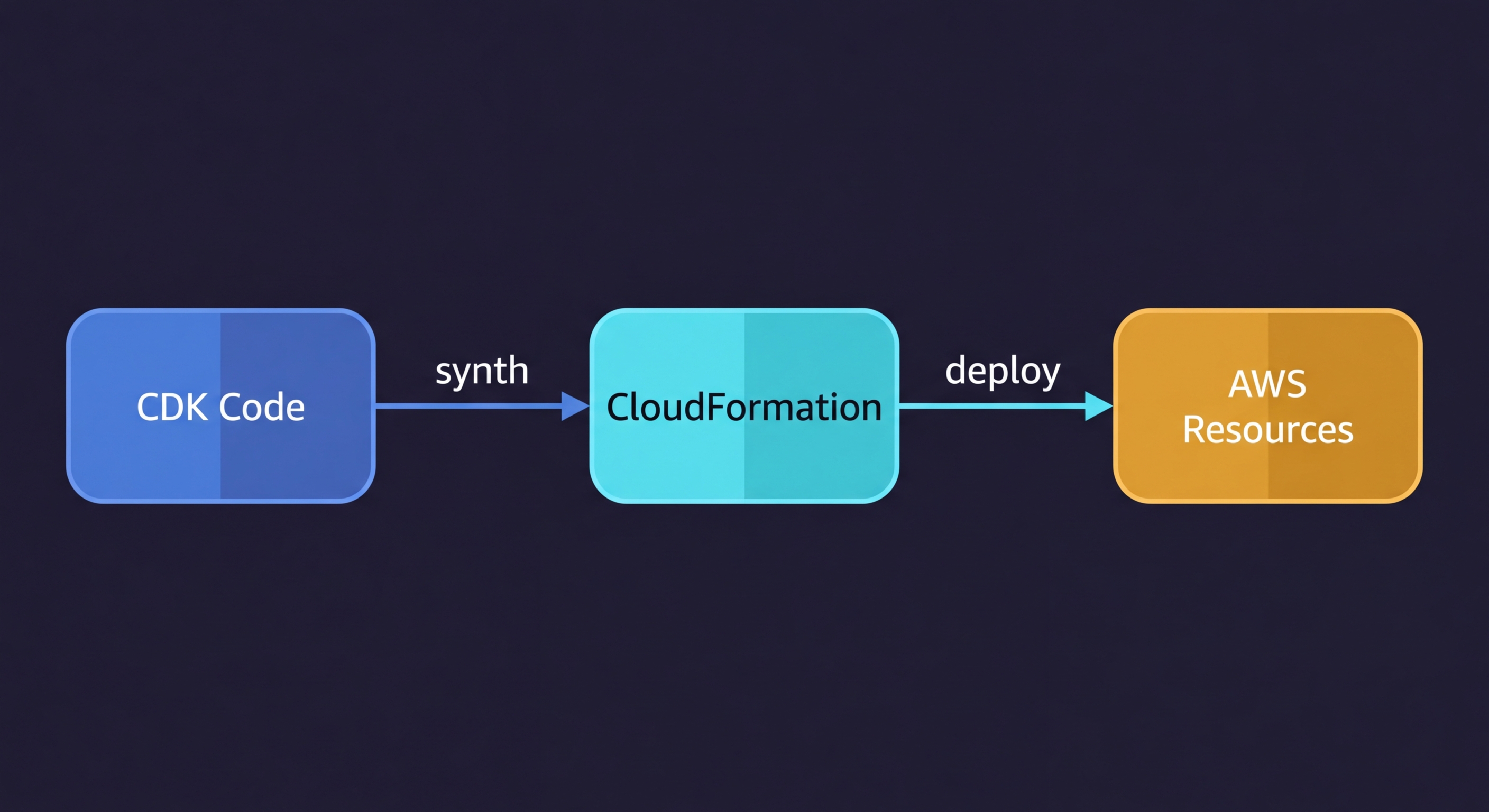
AWS CDK vs CloudFormation: AWS CDK (Cloud Development Kit) is a programming framework that lets you define AWS infrastructure in TypeScript, Python, Go, or Java. When you run cdk deploy, it synthesizes your code into a CloudFormation template and deploys it through the CloudFormation service. CloudFormation is the underlying deployment engine; CDK is the developer-friendly abstraction layer on top. The practical difference is dramatic: the same S3 bucket with a CloudFront distribution, Origin Access Identity, and SSL certificate takes 500+ lines of CloudFormation YAML and roughly 15 lines of CDK TypeScript.
I have written both at scale. The productivity gap is real. So is the learning curve, the synthesis overhead, and the new class of errors CDK introduces that raw CloudFormation never did. The numbers favor CDK. The tradeoffs still require judgment.
This comparison walks through what actually matters when deciding between AWS CDK and CloudFormation: real code side by side, how the three construct levels change your debugging surface, hotswap benchmarks for Lambda iteration, and the specific scenarios where CloudFormation is still the right call.
What CDK Actually Does Under the Hood
Before comparing the two, it is worth being precise about the relationship.
CDK is not a separate deployment system. When you run cdk deploy, CDK synthesizes your TypeScript (or Python, or Go) into a standard CloudFormation template, then submits that template to the CloudFormation API. The deployment, rollback, drift detection, and change set mechanics are all CloudFormation. CDK is the authoring layer.
This matters for a few reasons. First, any CloudFormation limitation applies to CDK: AWS-only resources, the same stack size limits (500 resources per stack), the same deployment engine speeds. Second, you can see exactly what CDK will deploy by running cdk synth, which outputs the raw CloudFormation YAML. If something is wrong, the CloudFormation template is the ground truth. Third, CDK stacks show up in the AWS console as regular CloudFormation stacks, with the same events, rollback behavior, and drift detection that any CloudFormation stack has.
CDK is also part of the broader infrastructure as code ecosystem, not a replacement for it. If you are deciding between Terraform and CloudFormation first, that comparison belongs in a separate discussion. For teams choosing between CDK and raw CloudFormation specifically, read on.
AWS CDK Examples vs CloudFormation: The Code Difference
Here is the thing most CDK vs CloudFormation comparisons get wrong: they pick a trivial example. One S3 bucket. One Lambda. Of course CDK looks cleaner for a toy example.
The real gap shows up when you build something realistic. Take a Lambda function with an API Gateway v2, an execution role with least-privilege permissions, a CloudWatch log group with a retention policy, and an SQS dead-letter queue for failed invocations. In CloudFormation:
Resources:
  ApiFunction:
    Type: AWS::Lambda::Function
    Properties:
      FunctionName: my-api-handler
      Runtime: nodejs20.x
      Handler: index.handler
      Role: !GetAtt ApiFunctionRole.Arn
      Code:
        S3Bucket: my-deployment-bucket
        S3Key: function.zip
      DeadLetterConfig:
        TargetArn: !GetAtt ApiFunctionDLQ.Arn
      Environment:
        Variables:
          TABLE_NAME: !Ref DataTable

  ApiFunctionRole:
    Type: AWS::IAM::Role
    Properties:
      AssumeRolePolicyDocument:
        Version: "2012-10-17"
        Statement:
          - Effect: Allow
            Principal:
              Service: lambda.amazonaws.com
            Action: sts:AssumeRole
      ManagedPolicyArns:
        - arn:aws:iam::aws:policy/service-role/AWSLambdaBasicExecutionRole
      Policies:
        - PolicyName: DynamoDBAccess
          PolicyDocument:
            Version: "2012-10-17"
            Statement:
              - Effect: Allow
                Action:
                  - dynamodb:GetItem
                  - dynamodb:PutItem
                  - dynamodb:UpdateItem
                  - dynamodb:DeleteItem
                  - dynamodb:Query
                Resource: !GetAtt DataTable.Arn
        - PolicyName: SQSAccess
          PolicyDocument:
            Version: "2012-10-17"
            Statement:
              - Effect: Allow
                Action:
                  - sqs:SendMessage
                Resource: !GetAtt ApiFunctionDLQ.Arn

  ApiFunctionLogGroup:
    Type: AWS::Logs::LogGroup
    Properties:
      LogGroupName: !Sub "/aws/lambda/${ApiFunction}"
      RetentionInDays: 30

  ApiFunctionDLQ:
    Type: AWS::SQS::Queue
    Properties:
      QueueName: my-api-handler-dlq
      MessageRetentionPeriod: 1209600

  HttpApi:
    Type: AWS::ApiGatewayV2::Api
    Properties:
      Name: my-api
      ProtocolType: HTTP
      CorsConfiguration:
        AllowOrigins:
          - "*"
        AllowMethods:
          - GET
          - POST
        AllowHeaders:
          - Content-Type

  HttpApiIntegration:
    Type: AWS::ApiGatewayV2::Integration
    Properties:
      ApiId: !Ref HttpApi
      IntegrationType: AWS_PROXY
      IntegrationUri: !Sub
        - "arn:aws:apigateway:${AWS::Region}:lambda:path/2015-03-31/functions/${LambdaArn}/invocations"
        - LambdaArn: !GetAtt ApiFunction.Arn
      PayloadFormatVersion: "2.0"

  HttpApiRoute:
    Type: AWS::ApiGatewayV2::Route
    Properties:
      ApiId: !Ref HttpApi
      RouteKey: "ANY /{proxy+}"
      Target: !Sub "integrations/${HttpApiIntegration}"

  HttpApiStage:
    Type: AWS::ApiGatewayV2::Stage
    Properties:
      ApiId: !Ref HttpApi
      StageName: "$default"
      AutoDeploy: true

  LambdaApiPermission:
    Type: AWS::Lambda::Permission
    Properties:
      FunctionName: !Ref ApiFunction
      Action: lambda:InvokeFunction
      Principal: apigateway.amazonaws.com
      SourceArn: !Sub "arn:aws:execute-api:${AWS::Region}:${AWS::AccountId}:${HttpApi}/*"
That is 85 lines, and this is a realistic minimum. The equivalent in CDK TypeScript, using L2 constructs:
import * as cdk from "aws-cdk-lib";
import * as lambda from "aws-cdk-lib/aws-lambda";
import * as logs from "aws-cdk-lib/aws-logs";
import * as dynamodb from "aws-cdk-lib/aws-dynamodb";
import * as apigwv2 from "aws-cdk-lib/aws-apigatewayv2";
import * as integrations from "aws-cdk-lib/aws-apigatewayv2-integrations";
import * as sqs from "aws-cdk-lib/aws-sqs";
import { Construct } from "constructs";

export class ApiStack extends cdk.Stack {
    constructor(scope: Construct, id: string, table: dynamodb.Table) {
        super(scope, id);

        const dlq = new sqs.Queue(this, "DLQ", {
            retentionPeriod: cdk.Duration.days(14),
        });

        const handler = new lambda.Function(this, "ApiFunction", {
            runtime: lambda.Runtime.NODEJS_20_X,
            handler: "index.handler",
            code: lambda.Code.fromAsset("src"),
            deadLetterQueue: dlq,
            logRetention: logs.RetentionDays.ONE_MONTH,
            environment: { TABLE_NAME: table.tableName },
        });

        table.grantReadWriteData(handler);

        const api = new apigwv2.HttpApi(this, "HttpApi", {
            corsPreflight: {
                allowOrigins: ["*"],
                allowMethods: [apigwv2.CorsHttpMethod.GET, apigwv2.CorsHttpMethod.POST],
            },
        });

        api.addRoutes({
            path: "/{proxy+}",
            methods: [apigwv2.HttpMethod.ANY],
            integration: new integrations.HttpLambdaIntegration("Integration", handler),
        });
    }
}
Notice what the CDK version does not have: no IAM role definition, no execution policy document, no Lambda permission resource, no CloudWatch log group resource, no API Gateway integration resource, no stage resource. CDK's L2 constructs generate all of that correctly and securely. The table.grantReadWriteData(handler) call creates precisely scoped IAM permissions. The logRetention property creates the log group with the right retention policy. The integration construct wires the Lambda permission automatically.
The same pattern scales. A VPC with public and private subnets, NAT gateways, route tables, and internet gateway is 300+ lines of CloudFormation. In CDK with the Vpc L2 construct, it is about 8 lines.
CDK Construct Levels Explained
CDK organizes its building blocks into three levels. Most guides mention them in passing. Here is what they actually mean in practice.
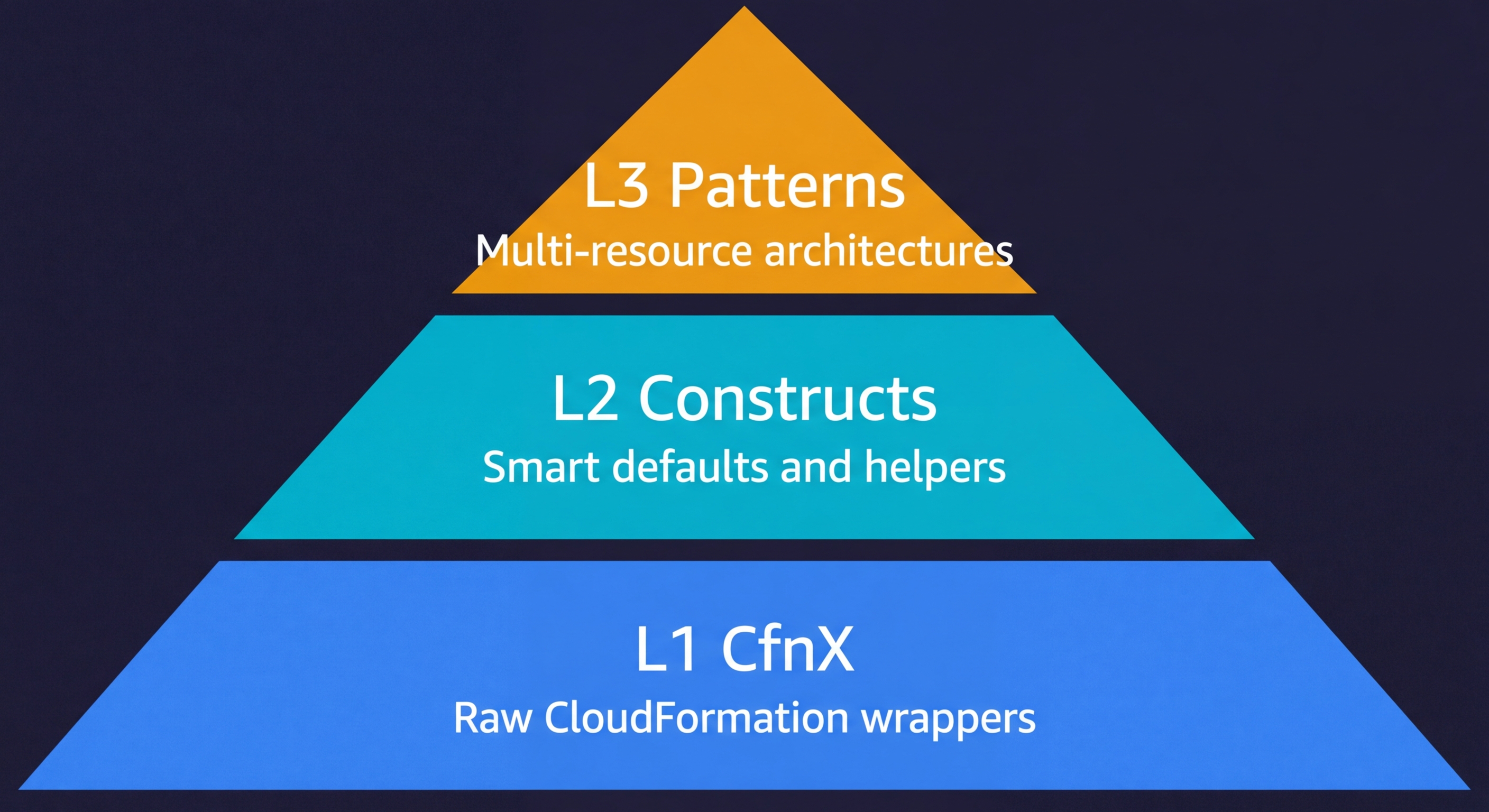
L1 constructs are direct CloudFormation resource wrappers. They follow the naming pattern CfnX (for example, CfnBucket, CfnFunction, CfnDistribution). Every property from the CloudFormation resource spec is exposed with no defaults. You write almost the same amount of configuration as raw CloudFormation, but in TypeScript instead of YAML. L1 constructs exist as a fallback when you need to set a property that the L2 construct does not yet expose.
L2 constructs are the constructs you will use for 90% of your CDK code. They represent a single AWS resource type but with sensible defaults, built-in IAM helpers, and security guardrails. s3.Bucket, lambda.Function, rds.DatabaseInstance are all L2. When you call bucket.grantRead(fn) or table.grantReadWriteData(role), that is L2 IAM integration doing the work of generating a least-privilege policy document for you. L2 constructs also emit sane defaults: new S3 buckets block public access by default, Lambda functions get a log group automatically, RDS instances get encrypted storage.
L3 constructs represent multi-resource patterns. The AWS Solutions Constructs library publishes patterns like LambdaToDynamoDB, ApiGatewayToLambda, and SqsToLambdaToSqs that wire together 3-5 AWS services with all the glue (IAM, logging, permissions) handled. The tradeoff is less flexibility: L3 patterns have opinionated defaults that may not match your requirements. When they fit, they are exceptional. When they do not, you drop down to L2 and wire things yourself.
In practice, you rarely choose a single level. A typical CDK stack mixes L2 constructs for most resources, drops to L1 for one or two resources where the L2 does not expose a property you need, and occasionally reaches for an L3 pattern when the architectural fit is good.
Deployment Speed: Where CDK Hotswap Changes Everything
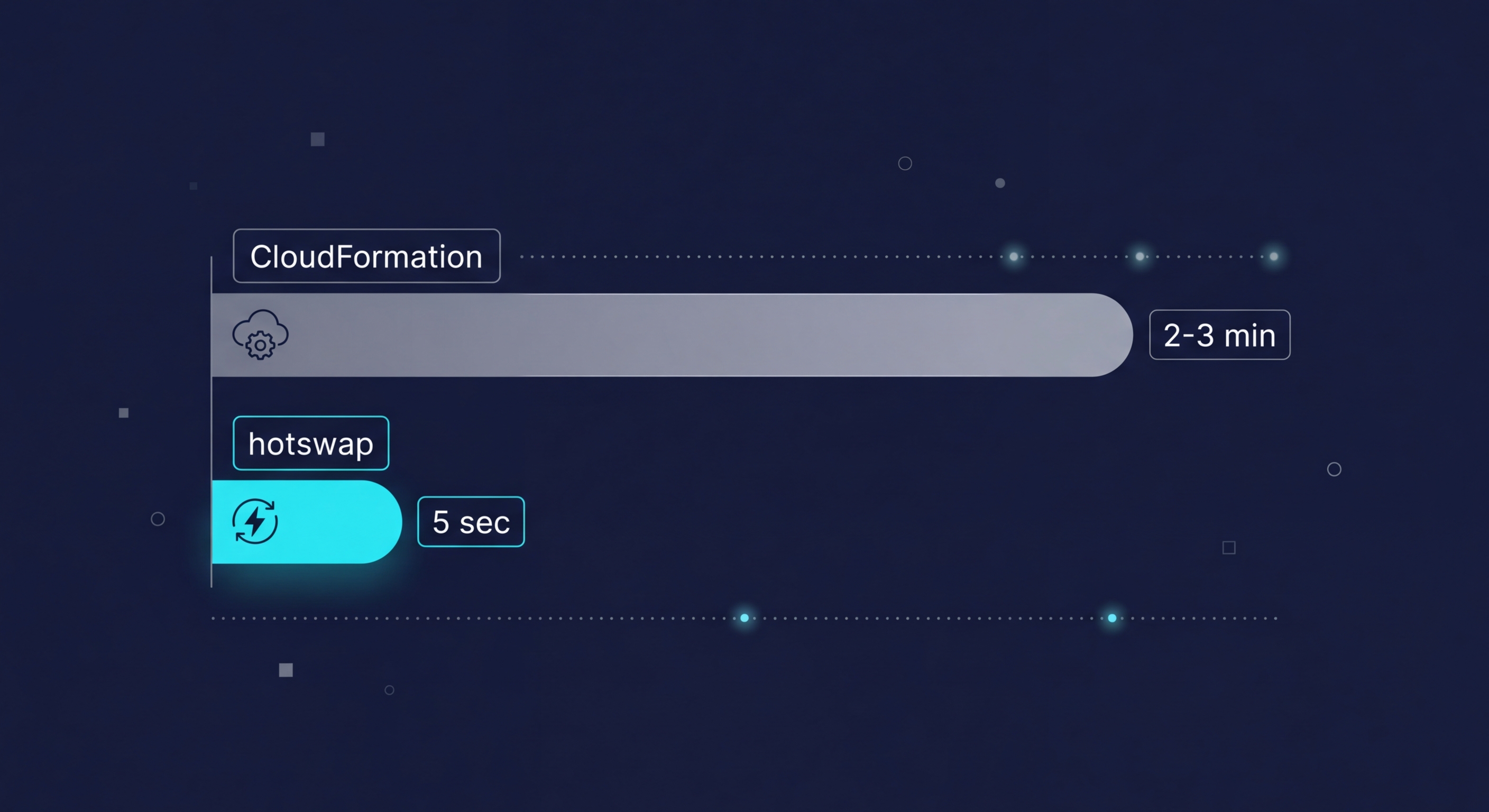
Full CDK deploys go through CloudFormation and take exactly as long as CloudFormation takes. For most stacks, that means 2-5 minutes for a Lambda update, longer for things like ECS service updates or RDS modifications. This is not a CDK problem; it is a CloudFormation constraint.
CDK's answer to this for development workflows is cdk deploy --hotswap.
Hotswap bypasses CloudFormation entirely for specific resource types. When your only change is a Lambda function's code or configuration, cdk hotswap detects this and directly calls the Lambda API to update the function, skipping the CloudFormation change set altogether. An update that takes 2-3 minutes through CloudFormation takes under 5 seconds through hotswap.
# Full deploy through CloudFormation (2-3 min for Lambda change)
cdk deploy

# Hotswap for development (under 5 seconds for Lambda change)
cdk deploy --hotswap

# Watch mode: re-synthesize and hotswap on every file save
cdk watch
Hotswap currently supports Lambda functions, ECS task definitions, Step Functions state machines, AppSync resolvers, and a few other resource types. When it detects a change to an unsupported resource type, it falls back to a full CloudFormation deploy automatically.
cdk watch goes one step further: it monitors your source files and automatically synthesizes and hotswaps on every save. The feedback loop for Lambda development with cdk watch running is comparable to local development with a hot-reload server. Save the file, test the function. No commit, no deploy wait.
The important caveat: hotswap is for development only. Do not use it in production deployments. Hotswapping bypasses CloudFormation's rollback guarantees. If the direct API call succeeds but causes a runtime error, CloudFormation has no record of what changed and cannot roll back. Production should always go through cdk deploy without the hotswap flag.
cdk diff: The Plan Step CloudFormation Always Lacked
One of the genuine pain points of raw CloudFormation is the absence of a local preview step. You create a change set, but reviewing it through the AWS console or CLI is cumbersome. You are comparing JSON structures rather than a readable diff.
CDK's cdk diff synthesizes your current code, compares it against the deployed stack, and outputs a readable diff:
$ cdk diff MyApiStack

Stack MyApiStack
IAM Statement Changes
┌───┬──────────────────────────────────┬────────┬───────────────────────┬──────────────────────────────┐
│   │ Resource                         │ Effect │ Action                │ Principal                    │
├───┼──────────────────────────────────┼────────┼───────────────────────┼──────────────────────────────┤
│ + │ ${ApiFunction/ServiceRole.Arn}   │ Allow  │ logs:CreateLogGroup   │ AWS:${ApiFunction/ServiceRole}│
└───┴──────────────────────────────────┴────────┴───────────────────────┴──────────────────────────────┘
Resources
[+] AWS::Logs::LogGroup ApiFunction/LogGroup ApiFunction/LogGroup

(NOTE: There may be security-related changes not in this list.)
This is the equivalent of terraform plan: a preview of exactly what will change before you commit to it. For infrastructure code reviews, running cdk diff in CI and posting the output as a PR comment gives reviewers a clear picture of what the infrastructure change set looks like.
Raw CloudFormation change sets do the same thing at the API level, but the developer experience is markedly worse. You have to create the change set through the CLI or console, wait for it to compute, then parse the output. cdk diff is instant and local.
Testing CDK Code vs CloudFormation
One of CDK's less discussed advantages is that your infrastructure becomes testable with the same tools you use for application code. The CDK assertions library lets you write unit tests against the CloudFormation template that CDK synthesizes, without deploying anything.
import * as cdk from "aws-cdk-lib";
import { Template, Match } from "aws-cdk-lib/assertions";
import { ApiStack } from "../lib/api-stack";

test("Lambda function has DLQ configured", () => {
    const app = new cdk.App();
    const stack = new ApiStack(app, "TestStack");
    const template = Template.fromStack(stack);

    template.hasResourceProperties("AWS::Lambda::Function", {
        DeadLetterConfig: {
            TargetArn: { "Fn::GetAtt": Match.anyValue() },
        },
    });
});

test("API Gateway has CORS enabled", () => {
    const app = new cdk.App();
    const stack = new ApiStack(app, "TestStack");
    const template = Template.fromStack(stack);

    template.hasResourceProperties("AWS::ApiGatewayV2::Api", {
        CorsConfiguration: {
            AllowOrigins: ["*"],
        },
    });
});
These tests run in milliseconds with no AWS credentials needed. Template.fromStack() synthesizes the stack locally, then hasResourceProperties() asserts against the generated CloudFormation output. You can verify that IAM policies are correctly scoped, that encryption is enabled on every S3 bucket, or that every Lambda has a dead-letter queue configured.
With raw CloudFormation, testing is limited to linting tools like cfn-lint and policy-as-code tools like CloudFormation Guard. These catch formatting errors and policy violations, but they cannot assert against the logical structure of your infrastructure the way CDK assertions can. The gap is significant: CDK lets you write infrastructure tests that read like application tests.
When to Use CloudFormation vs CDK
I have been building a case for CDK, and for most AWS-centric teams it is the right call. But there are scenarios where raw CloudFormation is genuinely the better choice.
Very simple stacks. If your CloudFormation template is under 50 lines and contains 5 or fewer resources, CDK introduces more overhead than it saves. You need Node.js installed, a CDK project initialized, a synthesis step, and a project structure. For a simple Lambda with an event rule, the raw YAML might actually be cleaner to read and maintain.
Non-engineer maintainers. CDK requires TypeScript or Python proficiency. If the person responsible for updating infrastructure is a DevOps engineer or IT ops specialist who is fluent in YAML but not in general-purpose programming languages, raw CloudFormation templates are more approachable. The CDK abstraction that helps developers creates a translation problem for people who think in infrastructure terms.
No build tooling constraints. In some environments (regulated industries, locked-down CI systems, air-gapped networks), installing Node.js and the CDK toolkit everywhere synthesis needs to run is non-trivial. A raw CloudFormation template is just a YAML file. You can deploy it from anywhere that has AWS CLI access.
Cutting-edge AWS features. CloudFormation gets day-one support for new AWS resource types. CDK L2 constructs lag by weeks or months because the construct library has to be updated separately. If you are building on a new AWS service that just launched, you may be writing L1 constructs (effectively raw CloudFormation in TypeScript) while waiting for the L2 to land. In that window, raw CloudFormation is actually simpler.
A Practical CDK vs CloudFormation Comparison
| Dimension | Raw CloudFormation | AWS CDK |
|---|---|---|
| Authoring language | YAML / JSON | TypeScript, Python, Go, Java, C# |
| Boilerplate for realistic stack | 300-600+ lines | 30-80 lines |
| IAM policy generation | Manual (every statement) | Automatic via grantX() helpers |
| Smart defaults | None (you specify everything) | L2 constructs include secure defaults |
| Deployment engine | CloudFormation directly | CloudFormation (via cdk synth) |
| Full deploy speed | Same as CloudFormation | Same as CloudFormation |
| Dev iteration speed | 2-5 min per change | Under 5 sec with --hotswap |
| Preview / diff | Change sets (manual step) | cdk diff (instant, local) |
| New AWS service support | Day one | L1 immediately, L2 weeks/months later |
| Reusable abstractions | Nested stacks, macros | Custom constructs (full OOP) |
| Testing infrastructure code | cfn-lint, CloudFormation Guard | CDK assertions library (unit tests) |
| Build tooling required | No (just AWS CLI) | Yes (Node.js for synthesis) |
| Cloud scope | AWS only | AWS only (compiles to CloudFormation) |
| Cost | Free | Free (CDK toolkit) + CloudFormation |
| Rollback on failure | Automatic | Automatic (full deploy) / None (hotswap) |
Migrating from CloudFormation to CDK
If you have existing CloudFormation stacks, migrating to CDK is possible without recreating any resources. CDK synthesizes back to CloudFormation, so you are updating the same stack that CloudFormation already manages.
The migration has three phases.
Phase one: generate a starting point. AWS provides cdk migrate, which reads an existing CloudFormation stack and generates a CDK app from it. The output uses L1 constructs (direct CloudFormation wrappers), so it is not idiomatic CDK yet, but it gives you a compilable starting point.
# Generate a CDK app from an existing CloudFormation stack
cdk migrate --stack-name my-production-stack --language typescript --from-stack

# Or generate from a local template file
cdk migrate --stack-name MyStack --language typescript --from-path ./template.yaml
Phase two: refactor to L2 constructs. The generated L1 code is a migration artifact, not a final state. Work through the constructs and replace L1 equivalents with L2 where they exist. Replace new iam.CfnRole(this, "Role", ...) with proper L2 IAM constructs and grant methods. Replace new lambda.CfnFunction(this, "Fn", ...) with new lambda.Function(this, "Fn", ...). This is where CDK pays back: as you refactor, the synthesized template should produce the same (or more secure) output with a fraction of the configuration.
Phase three: verify before deploying. Run cdk diff against your running stack before any deployment. You are looking for zero changes or only additive, safe changes. If cdk diff shows replacement of resources (indicated by [-] followed by [+] for the same resource), stop and investigate before deploying. Resource replacement means downtime for stateful resources like RDS instances or DynamoDB tables.
# Always run this before cdk deploy during migration
cdk diff MyProductionStack

# If diff is clean or only additive
cdk deploy MyProductionStack
Start with your least critical stacks. A development environment or a logging stack is a better first migration target than your production database stack. Build confidence with the CDK synthesis and diff process before touching anything stateful in production.
AWS CDK Tutorial: Getting Started in Five Commands
If you have decided CDK is the right fit, bootstrapping a new project takes under two minutes. You need Node.js installed and an AWS account with credentials configured.
# Install the CDK toolkit globally
npm install -g aws-cdk

# Create a new CDK project with TypeScript
mkdir my-infra && cd my-infra
cdk init app --language typescript

# Bootstrap your AWS account (one-time setup per account/region)
cdk bootstrap aws://ACCOUNT_ID/us-east-1

# Synthesize your stack to see the generated CloudFormation
cdk synth

# Deploy to AWS
cdk deploy
cdk init scaffolds a project with a sample stack, a bin/ entry point, and a lib/ directory for your constructs. cdk bootstrap creates a CloudFormation stack with an S3 bucket and IAM roles that CDK needs to deploy assets. You only run bootstrap once per account and region. From there, the workflow is cdk synth to preview, cdk diff to verify changes, and cdk deploy to ship.
CDK and Ephemeral Environments
One area where CDK genuinely shines is ephemeral environments: short-lived, per-PR infrastructure stacks that give each pull request its own isolated deployment.
With raw CloudFormation, you create per-PR stacks by parameterizing your template and passing the PR number as a stack parameter. It works, but the parameter mechanism is less ergonomic than CDK's approach. In CDK, environment-specific configuration flows naturally through the stack constructor:
// bin/app.ts
const prId = process.env.PR_ID ?? "local";

new ApiStack(app, `MyApp-PR-${prId}`, {
    env: { account: process.env.CDK_DEFAULT_ACCOUNT, region: "us-east-1" },
    prId,
    isProd: false,
});
Your CI pipeline sets PR_ID from the pull request number, synthesizes the stack, and deploys it with a unique stack name. When the PR closes, the pipeline destroys the stack with cdk destroy MyApp-PR-$PR_ID. The isolation is complete: each PR gets its own Lambda functions, its own API Gateway endpoint, its own database (if you include one in the stack), all cleaned up automatically.
Pair this with Autonoma and every PR gets tested as well. Connect your codebase and our Planner agent reads your routes, components, and user flows to generate test cases automatically. The Automator runs those tests against the ephemeral CDK stack URL on every push. When the stack changes, tests self-heal. No test scripts to write, no test maintenance as your CDK constructs evolve.
CDK vs CloudFormation: The Honest Summary
CDK is the right default for AWS-centric teams that write TypeScript or Python. The verbosity reduction is not marginal: it is an order of magnitude for realistic stacks. The IAM grant helpers eliminate an entire category of configuration error. The hotswap deployment transforms the development feedback loop. The cdk diff command makes infrastructure changes reviewable in the same pull request that contains the code changes.
CloudFormation still belongs in the toolkit. For simple stacks, non-developer maintainers, locked-down environments, or cutting-edge AWS features that CDK has not yet abstracted, raw YAML templates are the pragmatic choice.
Among CloudFormation alternatives, CDK is unique because it does not replace the deployment engine; it wraps it. Both CDK and raw CloudFormation are AWS-only tools. If your infrastructure touches Cloudflare, Datadog, GitHub, or any non-AWS service, the CloudFormation vs Terraform decision is the one that determines your long-term architecture. CDK does not change that constraint: it still compiles to CloudFormation, so it is still AWS-only.
For teams going deep on AWS, CDK on top of CloudFormation is the developer experience you wanted when you were writing your fourth 300-line YAML template. The abstraction is real, the tooling is mature, and the migration path from existing CloudFormation stacks is tractable. Start with a non-critical stack, run cdk diff obsessively, and you will be writing L2 constructs across your infrastructure within a sprint or two.
AWS CDK (Cloud Development Kit) is a framework that lets you define cloud infrastructure using general-purpose programming languages like TypeScript, Python, or Go. When you run cdk deploy, it synthesizes your code into a CloudFormation template and deploys it through the CloudFormation service. CloudFormation is the underlying deployment engine. CDK is the developer-friendly layer on top of it. The key difference is in how you write infrastructure: CDK uses real programming language constructs (classes, loops, abstractions), while raw CloudFormation uses verbose YAML or JSON templates that can exceed 500 lines for a single service.
If your team writes TypeScript, Python, or Go and you are building on AWS, CDK is almost always the better developer experience. You get real programming abstractions, smart defaults through L2 constructs, and dramatically less boilerplate. CloudFormation still makes sense for very simple stacks (a few resources with minimal configuration), teams where a non-developer needs to read and understand the templates, or situations where you want zero build tooling. For most startups building on AWS, CDK wins on maintainability and speed.
CDK has three construct levels. L1 (CfnX) constructs are direct CloudFormation resource mappings with no defaults. L2 constructs are the most commonly used: they represent AWS resource types with sensible defaults, built-in IAM helpers, and security best practices baked in. L3 constructs (patterns) represent entire architectural patterns — a complete API Gateway plus Lambda plus DynamoDB stack in one construct. Most CDK code mixes L2 and L3, only dropping to L1 when you need to set a property that L2 does not yet expose.
CDK synthesizes to CloudFormation and goes through the same deployment engine, so a full deploy takes the same time as raw CloudFormation for the same resources. The difference is cdk hotswap, which bypasses CloudFormation entirely for supported resource types (Lambda functions, ECS task definitions, Step Functions state machines). Hotswap can reduce a Lambda update from 2-3 minutes to under 5 seconds. For development iteration, this is transformative. Production deployments still go through full CloudFormation to maintain rollback guarantees.
The migration from CloudFormation to CDK has three phases. First, use cdk migrate to generate a CDK app from your existing CloudFormation template. Second, refactor the generated L1 constructs into L2 constructs to take advantage of CDK's smart defaults. Third, run cdk diff before any deploy to confirm the synthesized template matches your running stack. The migration preserves your existing resources because CDK synthesizes back to CloudFormation and updates the same stack. Start with non-critical stacks and work up to production.
CloudFormation remains the right choice for very simple stacks with 10 or fewer resources that do not justify the CDK build step, for infrastructure maintained by non-engineers who are not comfortable with TypeScript or Python, and for environments where installing Node.js everywhere that synthesis runs is a constraint. CDK also requires a build step, which adds friction in locked-down CI systems.
cdk diff synthesizes your CDK code into a CloudFormation template and compares it against the currently deployed stack, showing you exactly what will change before you deploy. It is functionally similar to terraform plan. For teams practicing pull-request-based infrastructure changes, running cdk diff in CI and posting the output as a PR comment gives reviewers visibility into exactly what infrastructure changes are proposed alongside the code changes.
Yes. CDK is well-suited for ephemeral environments because you can parameterize stacks using CDK context variables or environment variables, then use different CloudFormation stack names per PR. Your CI pipeline creates a uniquely named stack per pull request and destroys it when the PR closes. Tools like Autonoma integrate with CDK-based environments to automatically run end-to-end tests against each ephemeral stack on every PR.