
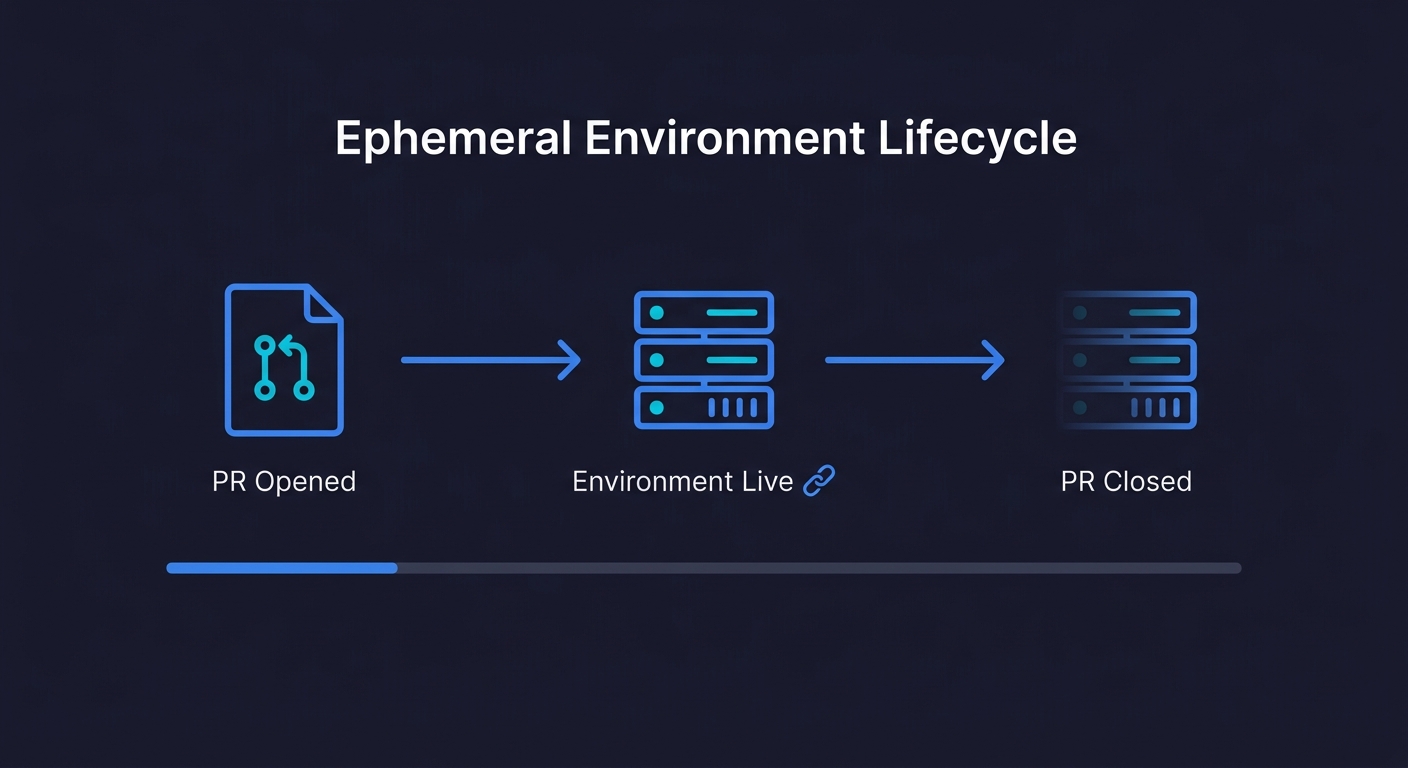
Ephemeral environments are short-lived, isolated infrastructure stacks created automatically for a pull request and destroyed when it closes. Each PR gets its own URL, its own database, and its own services, completely isolated from staging and production. They are sometimes called preview environments or per-PR environments. The goal is to eliminate the shared-environment bottlenecks (merge queue conflicts, environment pollution, "works on staging, breaks in prod") that slow down teams as they scale their deploy frequency.
The best-run engineering teams we have seen at Autonoma share a specific habit: every pull request gets its own environment. Not a shared staging server with a deployment on it, but a fully isolated stack, database included, that exists only for the lifetime of that branch. Stakeholders get a link. QA runs against real infrastructure. The branch merges, the environment disappears.
The result is a review process that actually reflects what will go to production, with zero interference from other engineers' work.
Getting there is not complicated in principle, but it involves real decisions: which platform fits your stack, whether the build-vs-buy math favors a managed solution, and how you handle database state across short-lived environments. This guide walks through all of it.
What Ephemeral Environments Actually Are
The term gets used loosely, so it is worth being precise. An ephemeral environment is an isolated infrastructure stack with three properties: it is created automatically (triggered by a PR open or push event), it is completely isolated (its own services, database, and network namespace), and it is destroyed automatically (triggered by PR close or merge).
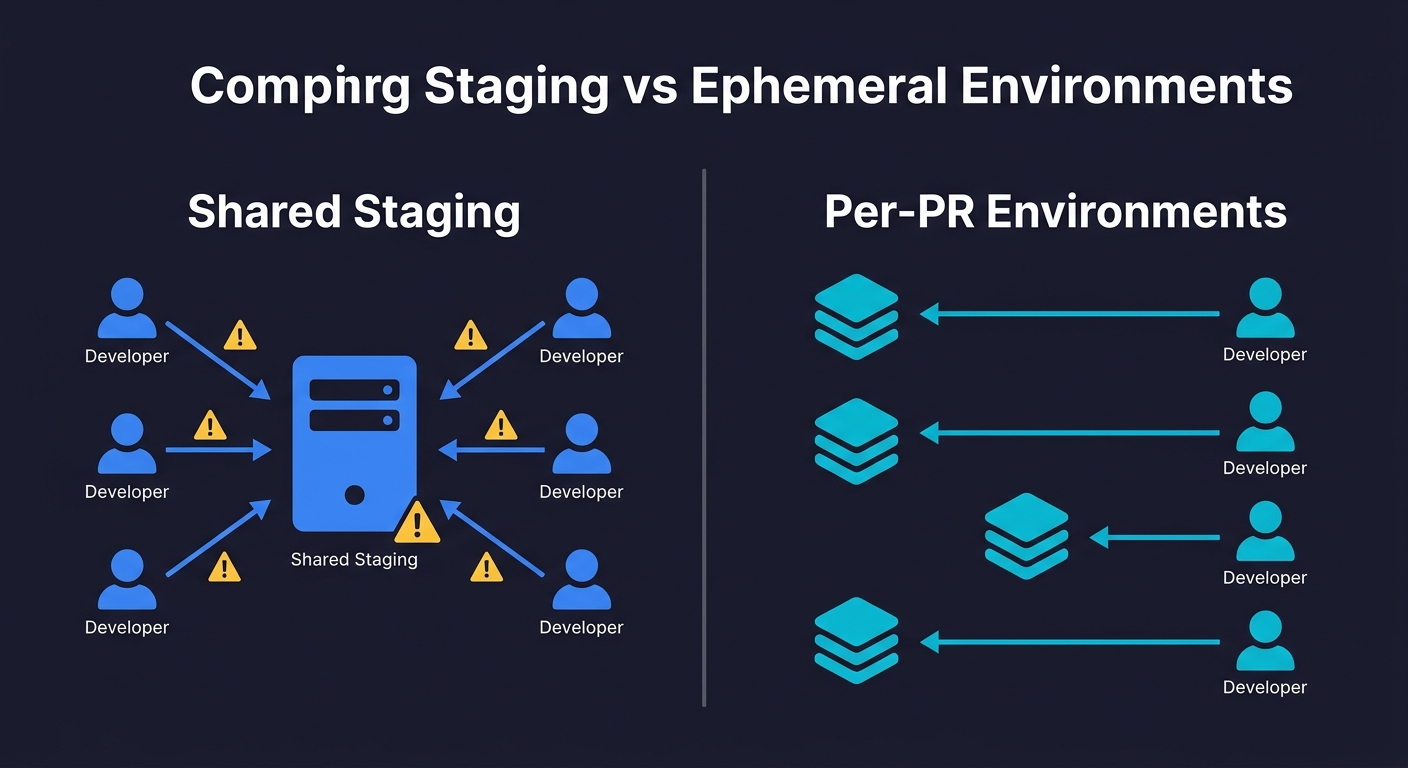
What makes them genuinely different from a staging environment is the isolation. Staging is shared state. If you break something in staging, you break it for everyone. If someone's migration is half-applied, your tests run against a corrupted schema. Ephemeral environments have none of this. Your PR-123 environment knows nothing about PR-124. They cannot interfere with each other.
The scope of "isolated" varies by team. At the lightweight end, you have frontend-only preview environments: a static build deployed to a CDN with a unique URL. Vercel calls these Preview Deployments. They are fast to create, cheap to run, and sufficient if your backend is stable. At the full-stack end, you have complete environment parity: containerized services, an isolated database with schema migrations applied, caches seeded with test data, and network rules that mirror production routing. The right scope depends on what you're actually trying to test.
A common mistake is creating frontend-only previews and calling them ephemeral environments. They are useful for visual review, but they test your UI against your shared staging backend. Any bug that lives in the interaction between a frontend change and a backend change will not surface until the code hits production. Full-stack ephemeral environments catch those bugs at the PR level.
How Ephemeral Environments Work: The Per-PR Architecture
The underlying pattern is consistent across cloud providers. Understanding it before choosing a platform or tooling strategy will save you significant rework.
The namespace pattern. Every resource in a per-PR environment gets tagged with the PR number (or a derived slug). Your database becomes myapp-pr-123-postgres. Your service gets DNS pr-123.preview.myapp.com. Your S3 bucket becomes myapp-pr-123-assets. This namespace is the isolation boundary. Without it, resources from different PRs collide.
Infrastructure as code is non-negotiable. You cannot create environments on demand without having your infrastructure defined in code. Terraform and Pulumi are the standard choices. The PR namespace becomes a variable that parameterizes the entire stack. When the CI pipeline runs, it executes terraform apply -var pr_id=123 and the entire isolated stack comes up.
The lifecycle is managed by CI. A GitHub Actions workflow (or equivalent) handles three events: pull_request opened triggers environment creation, pull_request synchronize (new push) redeploys changed services, and pull_request closed triggers terraform destroy. The destroy step is critical. Forgotten environments are the primary cost leak in DIY implementations.
Database state is the hardest part. You need each environment to have a database that reflects your current schema and contains enough seed data to make tests meaningful. The two standard approaches are branching (create a copy of a reference database snapshot per PR) and fresh provisioning (spin up a blank database and run all migrations and seed scripts). Branching is faster but requires a database service that supports it natively: Neon creates copy-on-write Postgres branches in under a second, PlanetScale offers MySQL branching, and AWS RDS snapshots work for any engine at the cost of slower spin-up times. Fresh provisioning is slower but simpler and works with any database. We cover the database isolation problem in depth in Database Branching Explained.
Autonoma plugs into ephemeral environments naturally — AI agents spin up E2E tests against each short-lived deployment, giving you full behavioral coverage without permanent infrastructure.
Do You Actually Need Ephemeral Environments?
Not every team does. The value compounds with deploy frequency and team size. Running this decision framework before investing in the infrastructure will tell you where you stand.
| Signal | You probably need them | You can probably wait |
|---|---|---|
| Deploy frequency | 10+ PRs/week merged to main | Fewer than 5 PRs/week |
| Team size | 4+ engineers opening PRs concurrently | 1-2 engineers, minimal contention |
| Staging conflicts | Regular "staging is broken" incidents | Staging queue manageable informally |
| Review process | Stakeholders or PMs need to review features before merge | Engineers only, local review sufficient |
| Test surface area | Integration or E2E tests that need real services | Unit tests only, no real backend needed |
| Incident pattern | Bugs from feature interactions discovered in production | Bugs caught in code review or local testing |
The clearest signal is the incident pattern. If you are regularly debugging production bugs that would have been visible if you had tested the full stack in isolation before merging, ephemeral environments address the root cause. If your bugs are logic errors that code review catches, you have a different problem.
If you track DORA metrics, the connection is direct: ephemeral environments improve Lead Time for Changes (no more waiting for staging) and Change Failure Rate (bugs caught per-PR instead of in production). Teams that adopt them typically see measurable improvement in both within the first quarter.
For most Series A startups with 6-15 engineers deploying multiple times a day, the inflection point arrives between months 8 and 14 of the company. Before that, a well-managed staging environment with strict reset protocols is often enough. After that, the coordination overhead becomes a tax on every engineer's day.
What Ephemeral Environments Actually Cost
Every vendor in this space presents cost information in a way that makes their platform look cheapest. Here is the honest breakdown by platform, assuming a team of 8 engineers opening an average of 20 PRs/month with environments that stay alive for 2-3 days each.
| Platform | What's included | Estimated monthly cost | Real constraint |
|---|---|---|---|
| Vercel Preview | Frontend only (static/SSR), CDN, unique URL per PR | $0 (included in Pro at $20/user/mo) | No backend, no database. Tests run against shared staging. |
| Netlify Preview | Frontend only, similar to Vercel | $0 (included in Pro at $19/user/mo) | Same constraint as Vercel. No database isolation. |
| AWS DIY (ECS + RDS) | Full stack: container services, isolated Postgres, ElastiCache | $200-600/mo (varies by PR duration and instance size) | High setup cost (2-4 weeks eng). Destroy automation must be airtight or costs spike. |
| GCP DIY (Cloud Run + Cloud SQL) | Full stack: serverless containers, isolated Cloud SQL | $150-400/mo (Cloud Run scales to zero, lower baseline) | Same setup cost. Cloud SQL minimum instances add floor cost. |
| Qovery | Full stack on your AWS/GCP account, managed control plane | $249/mo platform fee + underlying cloud costs (~$150-300) | You pay both platform and cloud. But saves 2-4 weeks setup time. |
| Bunnyshell | Full stack, managed, GitHub integration | $200-400/mo depending on environment count | Less flexible than DIY for complex architectures. |
In summary: expect to pay $0 for frontend-only previews (Vercel/Netlify), $150-600/month for DIY full-stack environments on AWS or GCP, or $400-700/month for a managed platform including underlying cloud costs.
The hidden cost in DIY implementations is engineering time: initial setup (2-4 weeks), ongoing maintenance (4-8 hours/month for infra drift, Terraform version upgrades, cost monitoring), and the periodic incident when the destroy workflow fails and orphaned environments run for a week unnoticed. That maintenance tax is what managed platforms are actually selling you relief from.
For a team billing engineering time at $150/hour, a single 20-hour setup sprint plus 6 hours/month of maintenance adds $3,900 in year one. Compared to Qovery at $3,000/year in platform fees, the cost difference is closer than the sticker price suggests.
DIY vs Managed: The Actual Decision
The DIY versus managed decision is not primarily about cost. It is about where you want to spend engineering attention.
DIY with Terraform on AWS or GCP makes sense when your architecture is complex enough that no managed platform supports it cleanly (microservices with custom networking, services outside the standard container model, data pipelines, ML workloads), when you already have strong Terraform expertise on the team and the setup cost is not a constraint, or when cost predictability matters more than convenience at high PR volume.
A managed platform (Qovery, Bunnyshell, or Vercel/Netlify for frontend) makes sense when the team does not have dedicated infrastructure engineering capacity, when you need something working in days rather than weeks, or when your architecture is a standard web stack (containers, a relational database, a cache). Most Series A engineering teams in this situation are running a stack that fits cleanly into a managed platform.
The middle path that many teams land on: use Vercel or Netlify for frontend preview deployments immediately (free, zero setup), add a DIY or managed full-stack layer 6-12 months later when staging contention becomes a daily friction point.
The Testing Problem No One Tells You About
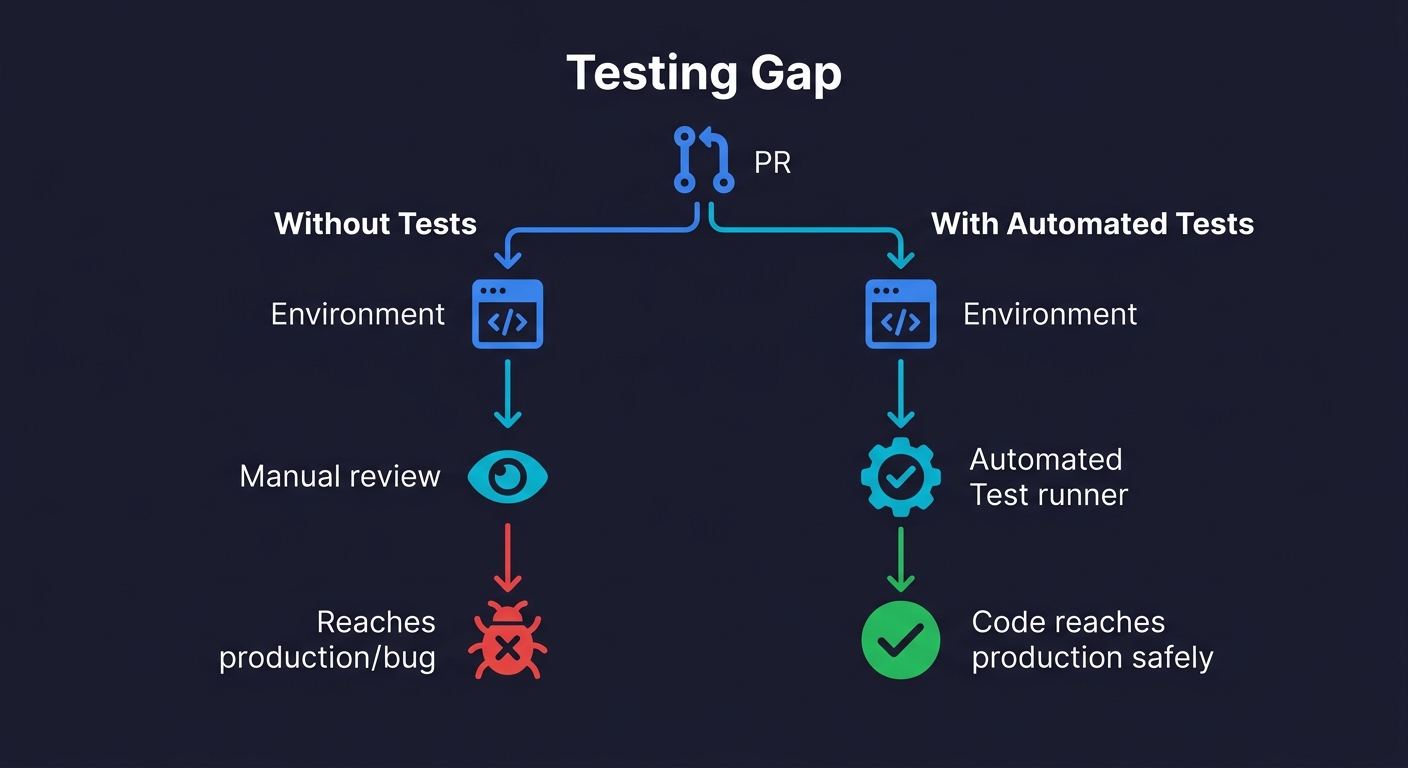
Here is the part every ephemeral environment vendor skips in their marketing: an isolated environment without automated tests is just an expensive demo link.
You have a fresh per-PR environment. The URL is in the PR description. Someone on the team clicks through it manually, verifies the happy path looks right, and approves the PR. The bug is in an edge case that nobody clicked. It ships.
Ephemeral environments create the conditions for thorough per-PR testing. They do not perform the testing. That gap is where teams get the infrastructure investment but not the quality improvement they were expecting.
The combination that actually works is ephemeral environments paired with automated tests that run against each environment automatically. Every time a PR is opened or updated, the environment spins up, the test suite runs against it, and the PR gets a pass/fail signal before any human reviews the code. Manual review becomes a confirmation step, not a quality gate.
This is where the testing approach matters as much as the infrastructure approach. Traditional test scripts (Playwright, Cypress) need to be written, maintained, and updated every time the app changes. For teams building fast, this maintenance overhead often means the tests never get written, or they get disabled when they start failing. We covered this maintenance problem in detail in Docker Compose for Testing - the same forces apply here.
The approach that pairs most cleanly with ephemeral environments is one where the tests generate and maintain themselves. When Autonoma connects to your codebase, its Planner agent reads your routes, components, and user flows and generates test cases automatically. When the environment URL changes per PR, the tests run against that URL. When your code changes, the Maintainer agent updates the tests. The result is a test suite that stays current with the codebase without anyone maintaining it, which is the only sustainable model when every PR gets its own environment.
How to Build Ephemeral Environments: The GitHub Actions Pattern
For teams building on AWS or GCP without a managed platform, this is the core CI pattern. It assumes your services are containerized and your infrastructure is in Terraform.
# .github/workflows/ephemeral-env.yml
name: Ephemeral Environment

on:
  pull_request:
    types: [opened, synchronize, reopened, closed]

env:
  PR_ID: pr-${{ github.event.number }}
  AWS_REGION: us-east-1

jobs:
  deploy:
    if: github.event.action != 'closed'
    runs-on: ubuntu-latest
    outputs:
      env_url: ${{ steps.deploy.outputs.env_url }}
    steps:
      - uses: actions/checkout@v4

      - name: Configure AWS credentials
        uses: aws-actions/configure-aws-credentials@v4
        with:
          aws-access-key-id: ${{ secrets.AWS_ACCESS_KEY_ID }}
          aws-secret-access-key: ${{ secrets.AWS_SECRET_ACCESS_KEY }}
          aws-region: ${{ env.AWS_REGION }}

      - name: Build and push Docker image
        id: build
        run: |
          IMAGE_TAG=${{ github.sha }}
          docker build -t ${{ secrets.ECR_REGISTRY }}/myapp:$IMAGE_TAG .
          docker push ${{ secrets.ECR_REGISTRY }}/myapp:$IMAGE_TAG
          echo "image_tag=$IMAGE_TAG" >> $GITHUB_OUTPUT

      - name: Terraform apply (create/update environment)
        id: deploy
        working-directory: ./infra/ephemeral
        run: |
          terraform init
          terraform apply -auto-approve \
            -var="pr_id=${{ env.PR_ID }}" \
            -var="image_tag=${{ steps.build.outputs.image_tag }}" \
            -var="aws_region=${{ env.AWS_REGION }}"
          ENV_URL=$(terraform output -raw env_url)
          echo "env_url=$ENV_URL" >> $GITHUB_OUTPUT

      - name: Post environment URL to PR
        uses: actions/github-script@v7
        with:
          script: |
            github.rest.issues.createComment({
              issue_number: context.issue.number,
              owner: context.repo.owner,
              repo: context.repo.repo,
              body: `Preview environment ready: ${{ steps.deploy.outputs.env_url }}`
            })

  run-tests:
    needs: deploy
    runs-on: ubuntu-latest
    steps:
      - uses: actions/checkout@v4
      - name: Wait for environment to be healthy
        run: |
          URL="${{ needs.deploy.outputs.env_url }}"
          for i in {1..30}; do
            if curl -sf "$URL/health" > /dev/null; then
              echo "Environment healthy"
              break
            fi
            echo "Waiting... attempt $i"
            sleep 10
          done
      # Add your test runner here - Playwright, Autonoma, etc.

  destroy:
    if: github.event.action == 'closed'
    runs-on: ubuntu-latest
    steps:
      - uses: actions/checkout@v4

      - name: Configure AWS credentials
        uses: aws-actions/configure-aws-credentials@v4
        with:
          aws-access-key-id: ${{ secrets.AWS_ACCESS_KEY_ID }}
          aws-secret-access-key: ${{ secrets.AWS_SECRET_ACCESS_KEY }}
          aws-region: ${{ env.AWS_REGION }}

      - name: Terraform destroy (clean up environment)
        working-directory: ./infra/ephemeral
        run: |
          terraform init
          terraform destroy -auto-approve \
            -var="pr_id=${{ env.PR_ID }}" \
            -var="image_tag=latest" \
            -var="aws_region=${{ env.AWS_REGION }}"
The Kubernetes Variant
If your stack runs on Kubernetes, the isolation model changes. Instead of provisioning separate cloud resources per PR, you create a dedicated namespace per PR within your existing cluster. The PR number parameterizes a Helm chart or Kustomize overlay: helm install pr-123 ./chart --namespace pr-123 --create-namespace. Each namespace gets its own pods, services, and optionally its own database. For stronger isolation, tools like vCluster create lightweight virtual clusters inside your physical cluster, giving each PR its own Kubernetes API server without the cost of a separate cluster. The tradeoff: namespace-per-PR is simpler and cheaper but offers weaker isolation. vCluster is heavier but prevents one environment's resource limits or CRDs from affecting another.
The GitHub Actions pattern above adapts cleanly: replace the Terraform steps with helm upgrade --install for creation and helm uninstall plus kubectl delete namespace for cleanup.
Security Considerations for Ephemeral Environments
Short-lived environments still need production-grade secrets handling. Never bake credentials into container images. Instead, inject secrets per environment from a vault (HashiCorp Vault, AWS Secrets Manager, or your CI's built-in secret store) using the PR namespace as a scope. Each environment should have its own set of credentials that are revoked on teardown.
Network isolation matters too. Security groups or network policies should prevent one PR's environment from reaching another. And if your seed data contains PII or production data, make sure your database seeding scripts use anonymized snapshots. Compliance auditors will ask about this, and "it is only ephemeral" is not an answer they accept.
A few things to watch in this pattern. The closed event triggers destruction regardless of whether the PR was merged or abandoned. This is intentional. The environment's purpose is to serve the PR, not the merged code. The health check before running tests prevents flaky failures from the environment not being ready. And the Terraform state per PR needs to be stored remotely (S3 + DynamoDB for AWS) with the PR ID in the state key, otherwise concurrent PRs will corrupt each other's state.
Ephemeral Environments vs Staging: What Changes and What Doesn't
Ephemeral environments do not replace staging. They change its role.
Staging remains valuable for integration testing across merged code, for non-blocking long-running tests, and as the final gate before production. What it stops being is the place where you catch per-PR bugs. That moves earlier, to the ephemeral environment. By the time code reaches staging, it has already been tested in isolation.
The teams that get this wrong try to eliminate staging entirely after adopting ephemeral environments. Then they discover that integration bugs between two features that were independently tested in isolation still exist. The two environments serve different purposes.
If you are evaluating whether your staging setup is the problem or a symptom, Staging Environments Are Dead makes the case for what changes and what doesn't.
What to Build First
The path that works for most engineering teams at the pre-seed to Series A stage:
Start with Vercel or Netlify preview deployments. If you are not already using them, enable them today. They are free, require zero infrastructure work, and eliminate "can you show me what this looks like?" review friction immediately. This alone is worth it.
Once you hit staging contention (measured by time: if your team spends more than 2 hours/week coordinating staging access), add full-stack isolation. If your stack is standard, start with a managed platform. The setup time for Qovery or Bunnyshell is measured in days, not weeks. Run it for a quarter and evaluate whether the cost is justified.
If you have specific infrastructure requirements that managed platforms cannot serve, or if you are past the point where managed platform costs exceed your DIY operating costs, invest in the Terraform pattern above.
In both cases, do not let the environment investment outpace your testing investment. A per-PR environment where someone clicks through a happy path is better than a shared staging environment. A per-PR environment with automated tests that cover your critical paths is where you actually start catching the bugs that matter.
Ephemeral environments are short-lived, isolated infrastructure stacks that are created automatically for a pull request or branch and destroyed when that PR closes. Each environment gets its own URL, its own database, and its own set of services, completely separate from staging or production. They are also called preview environments or per-PR environments.
Staging is a single shared environment that mirrors production. Ephemeral environments are many isolated environments, one per pull request. Staging creates merge conflicts, environment pollution, and coordination overhead. Ephemeral environments eliminate these by giving each branch its own isolated stack that lives only as long as the PR. Staging remains useful for integration testing across merged code; ephemeral environments are for per-PR isolation.
Costs vary significantly by platform. On Vercel, frontend-only preview deployments are free on the Pro plan. On AWS or GCP, a full per-PR environment (ECS, RDS, ElastiCache) runs $8-25/day per active environment, or $200-600/month for a team opening 20 PRs per month. Managed platforms like Qovery or Bunnyshell add a platform fee ($200-400/month) but reduce the infrastructure management overhead.
The core pattern: use infrastructure-as-code (Terraform or Pulumi) to define your stack, trigger a GitHub Actions workflow on pull_request events, create isolated resources namespaced by PR number, and add a cleanup workflow on PR close. For frontend-only apps, Vercel and Netlify handle this automatically at no extra cost. For full-stack apps with databases, you need either a DIY approach on AWS/GCP or a managed platform like Qovery.
The best tools for ephemeral environments include Autonoma (which integrates ephemeral environments with automated testing so every PR gets both an isolated stack and a test run), Vercel (for frontend preview deployments), Qovery, and Bunnyshell for managed full-stack environments. For teams that want full control, DIY with Terraform on AWS or GCP is the most flexible option.
No. Ephemeral environments and staging serve different purposes. Ephemeral environments catch bugs in isolated per-PR code before merge. Staging tests integration across merged code before production. Teams that eliminate staging after adopting ephemeral environments often rediscover integration bugs between independently-tested features.
The inflection point for most Series A startups is 6-14 months in, when deploy frequency passes 10+ PRs/week and staging contention becomes a daily friction point. Key signals: engineers regularly blocked waiting for staging, staging broken by concurrent use, stakeholders needing to review features before merge. Before that point, a well-managed staging environment is often sufficient.


