

Every engineering team has a story about a bug that made it to production. What's interesting is what that story sounds like in 2026. It's rarely "we forgot to deploy to staging." It's almost always "the PR looked fine, the preview loaded, someone clicked around for a minute, and we merged." The environment worked. The review process worked. There was just nothing in between that actually validated the application.
Preview environments solved the infrastructure problem beautifully. They didn't solve the confidence problem. That's the gap most teams are living in right now, and it's the gap this article is about.
What is a preview environment?
The definition matters because three different things are often called the same thing. In common usage, a preview environment is the per-PR deployment spun up by your hosting platform. You open a pull request, the platform builds the branch, you get a URL, and the URL dies when the PR closes. You don't provision it, you don't name it, you don't maintain it. It just appears.
What makes a preview environment distinct is the combination of lifecycle and scope. It's different from a staging environment in its lifecycle (ephemeral, not persistent) and its scope (per-PR, not shared). It's different from a local development environment in that it runs on real infrastructure, visible to anyone with the URL, reflecting the actual build artifact that would be deployed to production.
Vercel and Netlify arrived at this pattern around 2015-2017, and it spread fast because it solved a real coordination problem without requiring anything from the developer. You open a PR. You get a URL. Done.
Preview environment vs ephemeral environment
The relationship to ephemeral environments is worth clarifying because the SERP tends to treat them as synonyms. Preview environments are the developer-facing UI and workflow: the unique URL, the bot comment on the PR, the automatic lifecycle tied to git events. Ephemeral environments is the infrastructure-layer term for the broader pattern of spinning up and tearing down environments on demand. Every preview environment is an ephemeral environment, but ephemeral environments cover more ground than just PR previews (load-test environments, short-lived tenant sandboxes, and demo environments for prospects all qualify).
How preview environments work
The lifecycle is driven by git events. A developer opens a pull request. That event fires a webhook to the hosting provider (or triggers a GitHub Actions workflow in the DIY case). The provider picks up the PR's head commit, runs the build, and deploys the result to an isolated environment with a deterministic URL, typically something like pr-123.your-project.preview.app. A bot comments on the PR with the URL.
From that point, the environment is live. Anyone with the URL can access it. If the PR gets more commits, the platform automatically redeploys and updates the comment. The reviewer can click through the actual change rather than reading diffs and imagining the output. The PM can verify a feature without pulling a branch locally.
What happens next is where teams diverge. Most stop here: a human opens the URL, clicks around, approves. Some teams go further: after deployment succeeds, a CI job runs automated tests against the preview URL before review is even requested. The preview URL becomes a test target, not just a visual check.
When the PR is merged or closed, the platform tears down the environment. The URL goes dead. The resources are released. The next PR gets a fresh start.
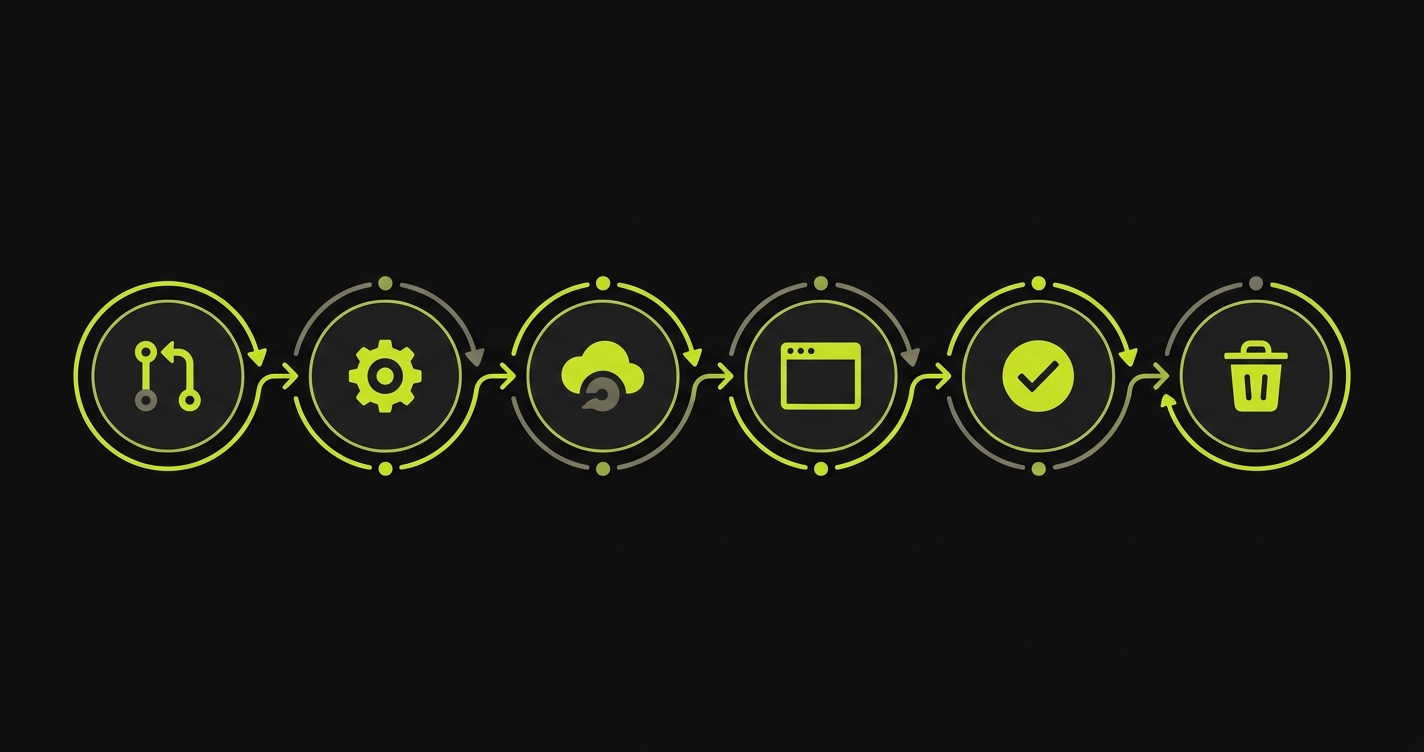
Vercel's implementation adds one more layer worth knowing about: the Deployment Checks API. Instead of just deploying and posting a URL, Vercel can hold the deployment in a "pending checks" state until external checks report back. This turns the deployment event into a gate. Other providers expose similar hooks through the deployment_status webhook that GitHub Actions can listen for. That webhook is what makes automated testing against previews work cleanly across providers.
One detail the simple lifecycle story glosses over: teardown isn't always clean. The default policy on most providers is "destroy on PR close," which works if your team actually closes stale PRs. Long-lived branches can leave zombie environments consuming resources for weeks. Most providers support TTL-based expiration and idle-shutdown policies (Render exposes expireAfterDays; Railway and Fly support similar knobs via their platform APIs), and on Vercel and Render you can downsize the instance class per preview to keep costs sane when you're running hundreds of PRs a week. If you plan to scale this pattern across a large team, configure the lifecycle controls before you need them.
Preview environment support by provider
Providers diverge on one axis that matters more than any feature checkbox: whether they preview just the frontend, or spin up the full backend and data layer per PR. Vercel and Netlify Deploy Previews popularized the frontend-only flavor. Railway's PR Environments, Render, Fly.io, and Coolify extend the pattern to the full stack. Teams previewing only the frontend get UI review but miss backend-driven regressions.
| Provider | Auto per-PR | Custom domains | Protection/auth | Native testing integration | Teardown policy | Cost model |
|---|---|---|---|---|---|---|
| Vercel | Yes | Yes (Pro+) | Deployment Protection (Pro+) | Yes (Deployment Checks API) | On PR close | Included in plan |
| Netlify | Yes (Deploy Previews) | Limited | Password protection (paid) | No native integration | On PR close | Included in plan |
| Railway | Yes (PR Environments) | Yes | Via Railway auth | Indirect (GitHub Actions) | On PR close | Usage-based |
| Render | Yes (Preview Environments) | Yes | Via service auth | Indirect (GitHub Actions) | On PR close | Per-service pricing |
| Fly.io | Via fly deploy in CI | Yes | Self-managed | Indirect (GitHub Actions) | Manual or scripted | Usage-based |
| Coolify (self-hosted) | Yes (PR deployments) | Yes | Built-in basic auth | Indirect | Configurable | Free (self-hosted) |
| GitHub Actions + Docker (DIY) | You build it | You build it | You build it | Full control | You build it | Runner minutes |
Vercel stands out for the Deployment Checks API: it's the only provider where test results can block the deployment status natively, without GitHub Actions orchestration glue. For teams on Netlify, Railway, Render, or the DIY path, testing integration happens at the GitHub Actions layer instead. The pattern is the same (wait for deployment_status: success, extract the URL, run tests, report back), but Vercel makes it cleaner to gate the PR directly.
Coolify deserves a specific mention for self-hosted teams. It handles Docker Compose, SSL, and PR deployments out of the box. If you're running your own server and don't want to pay per-seat platform costs, it's a legitimate option. The tradeoff is infrastructure maintenance on your end.
A few adjacent players fill out the landscape. Teams on GitLab get similar functionality through Review Apps, an older mechanism in the same space with a different workflow model. In the Kubernetes ecosystem, Argo CD can drive per-PR environments through its PR Generator pattern, and purpose-built tools like Uffizzi and Release.com target teams running heavier multi-service backend stacks.
What most teams get wrong
Teams that have preview environments configured tend to assume the problem is solved. The URL exists, the deployment works, reviewers can click through. That framing misses three failure modes that collectively allow bugs to reach production even in teams with well-configured preview setups.
Deploying previews but never testing them
The most common mistake is treating the deployment itself as the end of the process. CI runs linting and unit tests against source code. The preview deploys. Nothing tests the deployed application.
Unit tests confirm logic is internally consistent. They don't confirm the application renders correctly in a real browser, that the navigation works, that API calls succeed against the actual environment, or that three independently-correct components interact correctly when composed together for the first time. Deployed applications fail in ways source-code tests can't catch.
A missing environment variable silently breaks a feature. A CSS build artifact behaves differently in production mode. The preview URL is the only place these failures surface, and most teams never look at it with anything more rigorous than a human eyeballing it for thirty seconds. The fix is automated E2E tests on the deployed preview URL, gated on the same deployment event that already fires.
Treating previews as manual review tools only
Previews get shared in Slack. The PM opens the URL, confirms the button is in the right place, drops a thumbs-up emoji, closes the tab. Nobody systematically validates the user flows that touch the changed code.
This is manual review masquerading as testing. It catches visible UI regressions (wrong color, broken layout, missing copy) but misses functional failures (checkout flow breaks silently, auth token expires mid-session, background job fails without a visible error). The preview URL is pointed at a live environment. That environment can be tested automatically, end-to-end, on every PR. Most teams never configure this because it sounds expensive to set up. The GitHub Actions workflow that does it is under 40 lines.
Skipping database and data isolation
Previews that share a staging database lose the isolation that makes previews valuable in the first place. Two PRs hitting the same database means seeded data from one PR leaks into another, migration scripts run in unexpected orders, and tests that depend on a specific initial state fail intermittently based on what else is in flight.
The right answer is database branching: services like Neon (Postgres) and PlanetScale (MySQL) let you fork a database branch per PR, giving each preview its own isolated copy of the data, seeded to a known state.
Without this, the preview URL is isolated but the data isn't. You're testing in a shared state that happens to have a unique URL in front of it.
The Preview Maturity Model
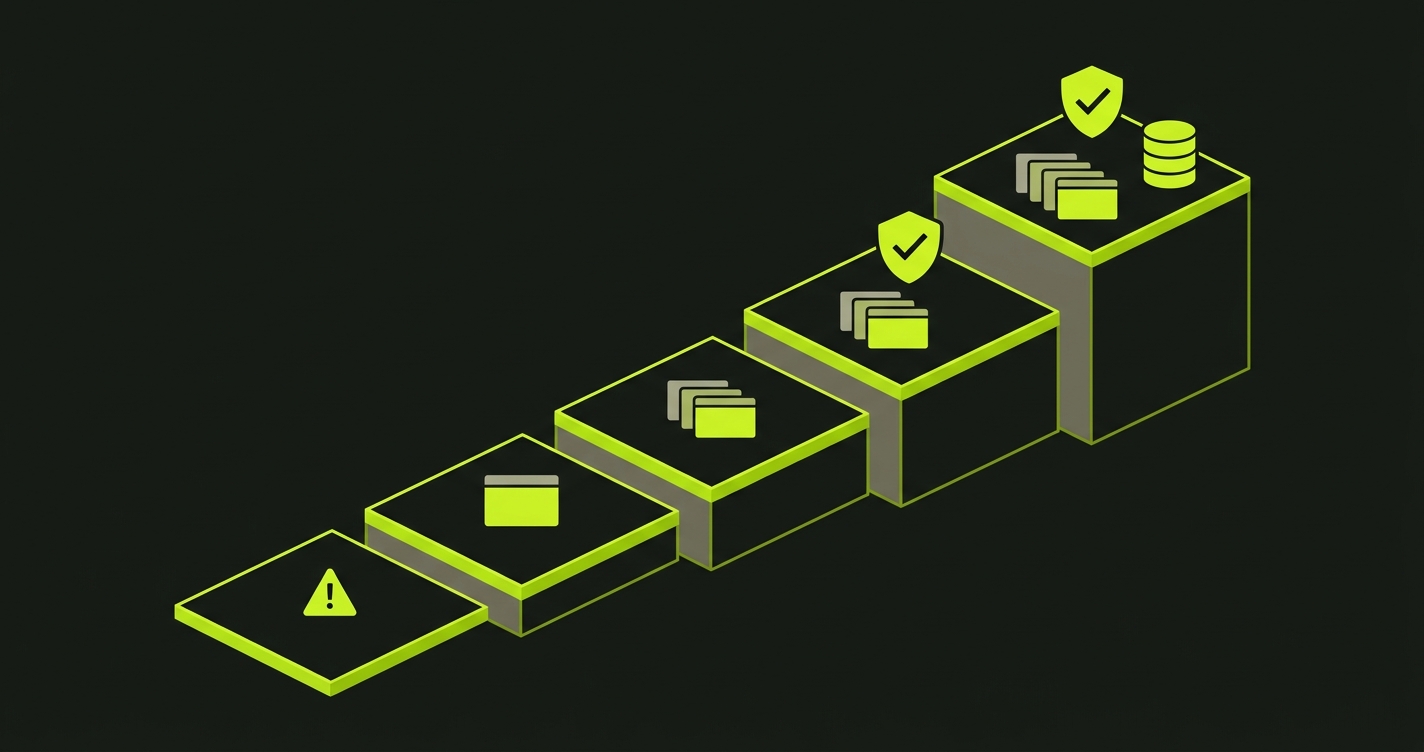
Teams don't adopt preview environments fully formed. They move through stages, and each stage unlocks a meaningfully different level of confidence in what they're shipping. The Preview Maturity Model stages the adoption curve across five levels, from ad-hoc production deploys to fully isolated per-PR environments with automated testing and dedicated data.
| Level | Name | What gets deployed | What gets tested | Typical signal the team is stuck here |
|---|---|---|---|---|
| 0 | Merge and pray | Nothing until main | Whatever reaches production | "We'll roll back if it breaks" |
| 1 | Shared staging | One long-lived environment | One feature at a time, manually | "Whose turn is it on staging?" |
| 2 | Per-PR previews | Frontend per PR, unique URL | Human eyeballs, 30 seconds | "The preview loaded, shipping it" |
| 3 | Tested previews | Frontend per PR, unique URL | Automated E2E on preview URL | Merge is gated on test success |
| 4 | Production parity | Frontend + backend + DB branch per PR | Full E2E against isolated data | Every PR tested against its own copy of the world |
Level 0 is where teams start before previews exist. Code merges to main and deploys. Bugs surface in production. Rollback is the safety net, and it gets used more than anyone wants to admit.
Level 1 is shared staging. There's a staging.example.com that the whole team deploys to. It's better than nothing, but one feature can be tested at a time. Whoever deployed last owns the environment until they merge. PRs queue up. The feedback loop is measured in hours.
Level 2 is where Vercel, Netlify, Railway, and their peers got most teams. Every PR gets its own URL. Reviewers can see changes live. The PM can verify before merge. Feedback loops collapse from hours to minutes. This is a genuine improvement. And this is where most teams stop.
Level 3 is when the preview URL becomes a test target. Automated E2E tests run against the deployed preview before a human ever opens it. CI blocks merge on test failure. The question shifts from "does it look right?" to "do all the critical user flows still work on this specific build?" This is the level that catches the bugs that reliably reach production at Level 2.
Level 4 is full production parity per PR. Not just a frontend URL, but a complete environment: a dedicated database branch seeded to a known state, real auth flows, isolated from every other in-flight change. Every PR is tested against its own copy of the world.
Most teams we work with are at Level 2. They have the infrastructure. They just haven't closed the validation loop.
How to reach Level 3: automated E2E testing on previews
The move from Level 2 to Level 3 requires connecting three things: the deployment event, the preview URL, and a test runner that can act on both.
On Vercel, the cleanest path is the Deployment Checks API. When a preview deploys, Vercel fires a webhook. Your integration receives it, runs tests against the preview URL, and posts the result back. Vercel holds the deployment in "pending checks" state until you respond. No GitHub Actions polling required.
For every other provider (and as an alternative on Vercel), the GitHub Actions path works well. The key is the trigger: listen for the deployment_status event rather than just push. This event fires after the provider has finished deploying, with the live preview URL in the payload. Your test job doesn't start until the environment is actually ready.
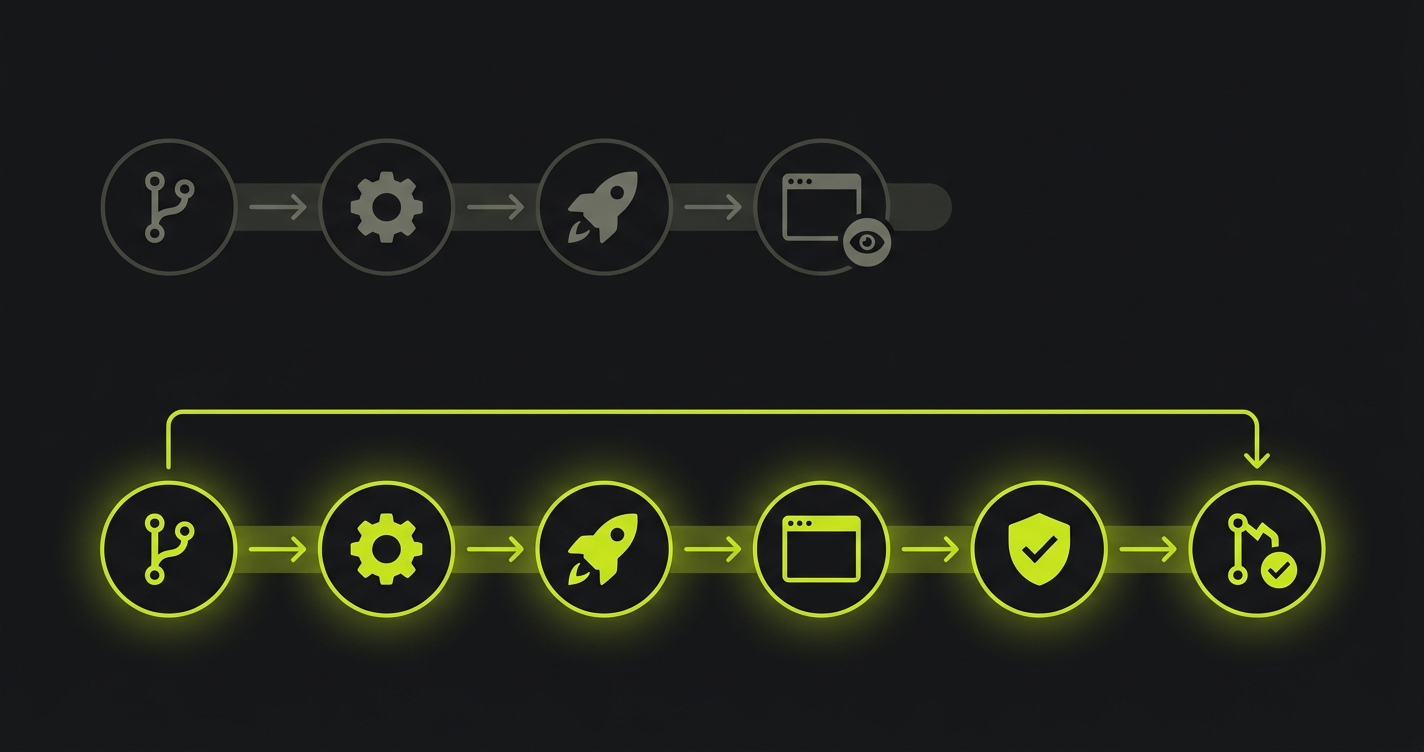
Here's what that workflow looks like:
The workflow waits for deployment_status: success, extracts the preview URL from the event payload, and passes it as the base URL for the test run. The trigger detail matters: running on deployment_status instead of push means the job waits for the deployment to actually succeed before tests start, rather than racing against it.
Running Playwright this way works. The maintenance cost is what gets teams. Every UI change that touches a selector breaks a test. Someone's job becomes keeping the tests green. That cost doesn't scale with the team or the codebase.
We built Autonoma to remove that overhead. Connect your codebase, and our agents plan and execute E2E tests from your routes and components, with no test scripts written by hand. When the UI changes, the tests update themselves. The Vercel Deployment Checks integration is built in: every preview triggers a full test run automatically, and the result gates the deployment. For teams that want Level 3 without writing and maintaining a test suite, that's the path. The Vercel integration is live on the Vercel Marketplace.
How to reach Level 4: database isolation and the Environment Factory
Level 4 requires solving the data problem. A frontend URL in isolation is a useful review artifact. A frontend URL backed by a shared, unpredictable database is a shared staging environment with a unique subdomain.
The infrastructure pattern at Level 4 is sometimes called the Environment Factory: instead of deploying only the application per PR, you provision a complete environment slice. Frontend deployment, backend service, dedicated database branch, seeded to a known state. The PR has everything it needs to be tested as if it were production, isolated from every other PR, with reproducible data.
Database branching is the enabling technology. Neon for Postgres and PlanetScale for MySQL both offer branch-per-PR workflows: when the preview environment spins up, it forks the main branch of your database, applies any pending migrations from the PR, and seeds it. When the PR closes, the branch is deleted. The preview application connects to that branch. No leakage, no ordering dependencies between PRs.
The implementation fits naturally in the same GitHub Actions workflow that handles deployment. Full detail on the branching setup, migration coordination, and seeding patterns is in our database branching guide. The short version: it's more moving parts than Level 3, but the combination of isolated database and automated E2E tests produces pre-merge confidence that's as close to production as you can get without shipping.
Frequently asked questions
A preview environment is an ephemeral, per-pull-request deployment of your application. When a PR is opened, the platform automatically builds and deploys that branch to a unique URL. When the PR is merged or closed, the environment is torn down. Each PR gets its own isolated environment, with no interference from other in-flight work.
Staging is a single, long-lived environment shared by the whole team. Preview environments are ephemeral and per-PR, each isolated to a specific branch and commit. Staging typically has a human QA step; preview environments usually don't, unless the team has added automated testing to the preview pipeline.
They overlap but describe different things. Preview environments is the developer-facing term for the UI and workflow: the per-PR deployment, the unique URL, the bot comment in the pull request. Ephemeral environments is the infrastructure-layer term for the pattern of spinning up and tearing down environments on demand. Every preview environment is an ephemeral environment, but not every ephemeral environment is a preview environment.
No. Vercel popularized the pattern, but preview environments are available on Netlify, Railway, Render, Fly.io, and self-hosted platforms like Coolify. Teams running custom infrastructure can implement the pattern using GitHub Actions with Docker, spinning up containers per PR and tearing them down on merge.
Yes. Deploying to a preview URL without running tests means you're shipping faster but not knowing if things actually work. The most effective pattern is to run E2E tests against the deployed preview URL in CI, blocking merge on failure. Vercel offers a Deployment Checks API for this. Tools like Autonoma can generate and run those tests automatically from your codebase, so you don't have to write or maintain them yourself.
If you're stuck at Level 2 and the jump to tested previews feels heavier than it should, we can walk through it. Grab 20 min with a founder
Previews are infrastructure you already paid for
If your team has preview environments but no automated testing on them, you've built a faster way to ship bugs. The preview deploys. The URL looks right. The reviewer approves. The bug ships. The pipeline worked exactly as designed, and production is still broken.
This isn't a knock on preview environments. They're genuinely better than staging for almost everything. The issue is that teams adopted the deployment pattern and stopped before closing the validation loop. Preview environments are real running infrastructure. They are the exact environment your users will see. They're the best possible place to catch a regression, available on every PR, automatically.
The teams getting the most out of previews are the ones who treat the preview URL as a test target, not just a review artifact. Not "can a human eyeball this and approve?" but "do the critical user flows actually work on this build?" That question has an automated answer. You just have to ask it.


