

Running E2E tests on preview environments means automatically executing your end-to-end test suite against the isolated, per-PR deployment that platforms like Vercel and Netlify create for every pull request. Instead of testing against localhost or a shared staging server, your tests hit a real deployment with production-like infrastructure, CDN routing, and environment variables. This catches deployment configuration bugs, environment-specific failures, and integration issues that local CI testing misses entirely.
Your team has preview environments. Vercel spins one up for every pull request. A bot drops the link in the PR. And then someone clicks around for thirty seconds, scrolls the page, maybe tries one form field, and hits "Approve."
That is not testing. That is a ceremony.
The real question is: if you already have a fully deployed copy of your app for every PR, why are your E2E tests still running against localhost:3000 inside a CI runner? You have the infrastructure. You just never wired it up.
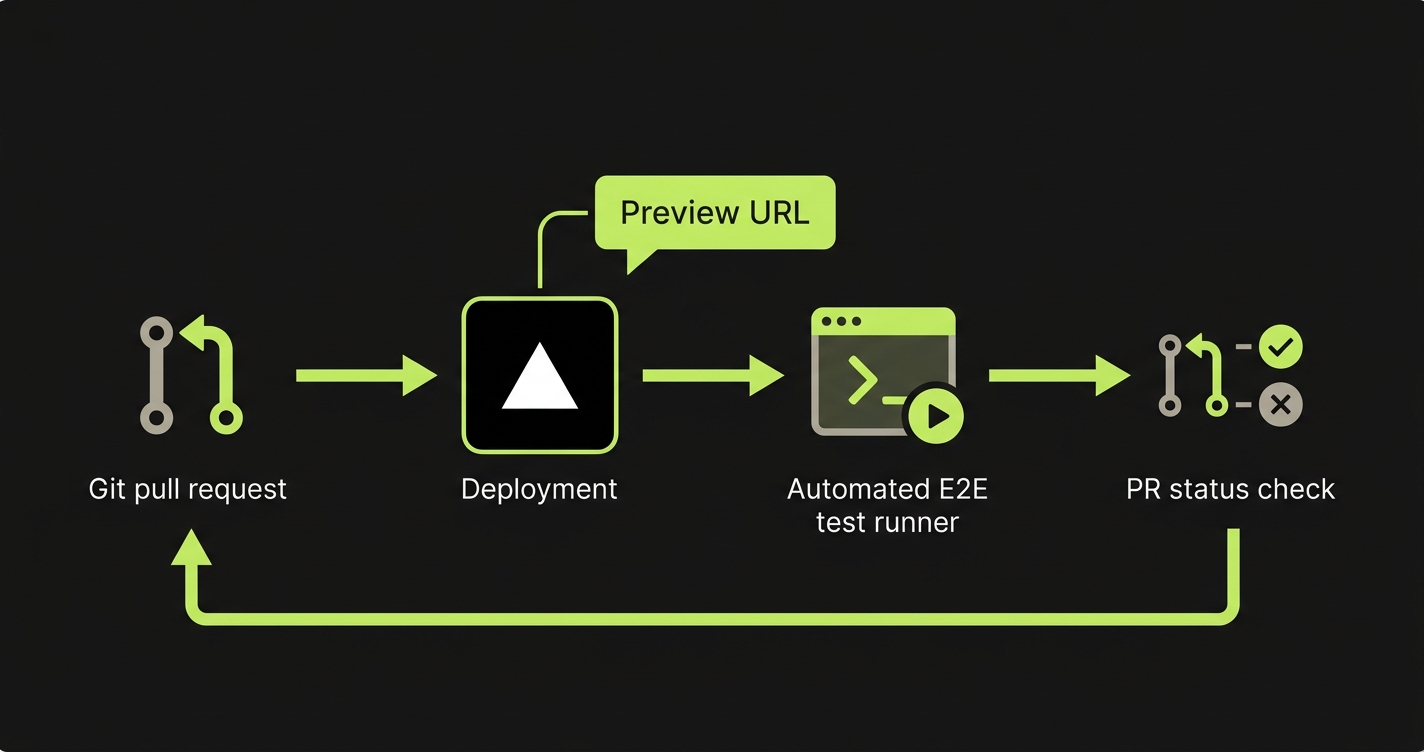
This post walks through exactly how to wire it up. A GitHub Actions workflow that listens for Vercel preview deployments, runs Playwright against the live URL, and posts results back to the PR. We will also cover the parts where teams get stuck: dynamic URLs, empty databases, and turning test results into merge gates.
What Changes When You Test a Preview Instead of Localhost
Most CI pipelines start a local dev server inside the runner (npm run dev) and then execute Playwright against it. This checks whether your code works. But it is testing a fundamentally different artifact than what your users will experience.
Your local dev server has no CDN. No edge middleware. No server-side rendering as it actually behaves on the hosting platform. No real environment variables. Your app might work flawlessly on localhost, then break in production because of a misconfigured rewrite rule, a missing NEXT_PUBLIC_ variable, or an edge function that only executes on Vercel's infrastructure.
A preview environment is your app deployed the same way production is deployed. Same build pipeline, same CDN layer, same serverless functions. When your tests hit a Vercel preview URL, they are exercising the actual deployment artifact.
The bugs preview testing catches are the ones hardest to debug after the fact: environment variable misconfigurations, middleware routing errors, build-time optimizations that break runtime behavior, and third-party integrations that behave differently per environment. These are the bugs that make it to production despite a green CI pipeline, because CI was never testing the right thing.
For teams building with ephemeral environments, the same principle applies with even more isolation per branch.
The Gap Nobody Closes
Here is the pattern we see at nearly every team using Vercel or Netlify. Preview deployments are on. Every PR gets a URL. A reviewer clicks the link, scrolls through the page, and approves.
That manual check catches layout breaks and obvious crashes. But it does not catch the checkout flow that fails because a payment webhook points to the wrong environment. It does not catch the authentication redirect that loops because the OAuth callback URL was never configured for the preview domain. It does not catch the API route returning a 500 that the frontend quietly swallows.
These are not edge cases. They are the exact class of bugs that regression testing on preview deployments exists to prevent. They only surface when you run real test scenarios against the real deployed environment.
The gap is not awareness. Teams know they should automate testing on preview deployments. The gap is wiring. Nobody has set up the GitHub Actions workflow, solved the dynamic URL problem, or figured out how to seed test data into an environment that starts empty. So it stays on the "we should do that" list forever.
Wiring Up GitHub Actions for Preview Deployment Testing
The mechanism that makes this work is the deployment_status event in GitHub Actions. When Vercel finishes deploying a preview, it fires a deployment status event containing the preview URL. Your workflow listens for that event, grabs the URL, and runs your test suite against it.
Here is the complete workflow:
# .github/workflows/e2e-preview.yml
name: E2E Tests on Preview

on:
  deployment_status:

jobs:
  e2e-tests:
    if: github.event.deployment_status.state == 'success'
    runs-on: ubuntu-latest
    timeout-minutes: 15

    steps:
      - uses: actions/checkout@v4

      - uses: actions/setup-node@v4
        with:
          node-version: 20
          cache: 'npm'

      - name: Install dependencies
        run: npm ci

      - name: Install Playwright browsers
        run: npx playwright install --with-deps chromium

      - name: Run E2E tests against preview
        run: npx playwright test
        env:
          BASE_URL: ${{ github.event.deployment_status.target_url }}
          TEST_USER_EMAIL: ${{ secrets.TEST_USER_EMAIL }}
          TEST_USER_PASSWORD: ${{ secrets.TEST_USER_PASSWORD }}

      - name: Upload test results
        if: always()
        uses: actions/upload-artifact@v4
        with:
          name: playwright-report
          path: playwright-report/
          retention-days: 7
A few things to note. The deployment_status event fires for every status change (pending, success, failure), so the if condition filtering for success is essential. Without it, your tests will attempt to run against a deployment that has not finished building.
The BASE_URL environment variable is the bridge between the GitHub event and your Playwright config. The workflow passes it through; your Playwright config reads it.
If your Vercel project has deployment protection enabled (password-protected previews), you will need the automation bypass header. Generate a bypass secret in Vercel Dashboard under Deployment Protection, add it to GitHub Secrets, and configure Playwright to include the x-vercel-protection-bypass header in every request.
Handling Dynamic Preview URLs in Playwright
Your Playwright config needs to accept the preview URL dynamically. Hardcoding http://localhost:3000 defeats the entire purpose.
// playwright.config.ts
import { defineConfig } from '@playwright/test';

export default defineConfig({
  testDir: './e2e',
  timeout: 30_000,
  retries: process.env.CI ? 2 : 0,

  use: {
    // Falls back to localhost for local development
    baseURL: process.env.BASE_URL || 'http://localhost:3000',
    trace: 'on-first-retry',
    screenshot: 'only-on-failure',
  },

  // Only start local dev server when not testing a preview
  ...(process.env.BASE_URL ? {} : {
    webServer: {
      command: 'npm run dev',
      port: 3000,
      reuseExistingServer: !process.env.CI,
    },
  }),

  projects: [
    {
      name: 'chromium',
      use: { browserName: 'chromium' },
    },
  ],
});
The conditional webServer block is the key detail. When BASE_URL is set (running against a preview), Playwright skips starting a local dev server entirely. When running locally without it, Playwright starts your dev server automatically. One config, both use cases.
Your test files need zero changes. Playwright's page.goto('/') and page.goto('/dashboard') calls automatically prepend the baseURL from the config.
For teams battling flaky tests in CI/CD, testing against a preview deployment can actually reduce flakiness. The deployment is stable and warm, unlike a dev server that just cold-started inside a CI runner.
The Database Problem: Your Preview Has No Data
This is where most teams hit a wall and give up. Your preview environment deploys your code. But the database behind it is either empty, shared with staging, or pointed at a dev instance with unpredictable state.
E2E tests need predictable data. A login test needs a user. A checkout test needs products. A dashboard test needs historical records. If the data is not there, the tests fail for reasons that have nothing to do with your code.
The simplest starting point is a shared development database. All preview environments connect to the same dev database, and tests use dedicated test accounts. The downside is data contention: two PRs running tests simultaneously can step on each other. This works for small teams where parallel PR testing is rare.
The more robust approach is database branching with Neon. Neon creates an instant copy-on-write branch for each preview environment. No contention, no stale data. A CI step creates the branch before tests run and tears it down when the PR closes.
For maximum control, there is API-driven data seeding, where your test suite creates exactly the data it needs via API calls before each run. This is the most reliable approach but requires maintaining seed scripts. Our data seeding guide covers this pattern in detail.
Whichever path you take, the principle is the same: tests should never depend on pre-existing state that might not be there.
The Feedback Loop: Results in the PR, Not Buried in CI Logs
Running tests is half the value. The other half is making results visible where the work happens. Engineers should not have to navigate to a separate CI dashboard to discover whether tests passed.
Here is a workflow step that posts results as a PR comment:
      - name: Post test results to PR
        if: always()
        uses: actions/github-script@v7
        with:
          script: |
            const fs = require('fs');

            let results = { passed: 0, failed: 0, skipped: 0 };
            try {
              const report = JSON.parse(
                fs.readFileSync('test-results.json', 'utf8')
              );
              results = {
                passed: report.suites.flatMap(s => s.specs)
                  .filter(s => s.ok).length,
                failed: report.suites.flatMap(s => s.specs)
                  .filter(s => !s.ok).length,
                skipped: report.suites.flatMap(s => s.specs)
                  .filter(s => s.tests[0]?.status === 'skipped').length,
              };
            } catch (e) {
              results = { passed: 0, failed: 0, skipped: 0, error: e.message };
            }

            const status = results.failed > 0 ? '❌' : '✅';
            const url = process.env.PREVIEW_URL;

            const body = `## ${status} E2E Test Results

            **Preview URL:** ${url}

            | Status | Count |
            |--------|-------|
            | Passed | ${results.passed} |
            | Failed | ${results.failed} |
            | Skipped | ${results.skipped} |

            ${results.failed > 0
              ? '⚠️ Failing tests must be fixed before merging.'
              : 'All tests passed against the preview deployment.'}

            [View full report](${context.serverUrl}/${context.repo.owner}/${context.repo.repo}/actions/runs/${context.runId})`;

            const { data: prs } = await github.rest.pulls.list({
              owner: context.repo.owner,
              repo: context.repo.repo,
              state: 'open',
              head: `${context.repo.owner}:${context.payload.deployment.ref}`,
            });

            if (prs.length > 0) {
              await github.rest.issues.createComment({
                owner: context.repo.owner,
                repo: context.repo.repo,
                issue_number: prs[0].number,
                body,
              });
            }
          env:
            PREVIEW_URL: ${{ github.event.deployment_status.target_url }}
To enforce test passage before merging, add a branch protection rule in GitHub that requires the e2e-tests job to pass. This turns preview testing from "nice to have" into a hard gate.
This feedback loop changes team behavior. Engineers start checking E2E status before requesting review. Reviewers trust the automated signal instead of manually clicking through the preview. The review cycle gets faster because confidence comes from automation, not from someone scrolling around for thirty seconds.
For teams building a broader continuous testing practice, preview environment testing is the natural anchor point. It is where automated quality gates live in a modern deployment pipeline.
How Autonoma Plugs Into This Pipeline
Everything above works. But it requires writing Playwright scripts, keeping selectors current, building seed data logic, and debugging failures every time the UI changes. For startups and small teams, that maintenance burden is often what kills the testing habit entirely.
Autonoma takes a different approach. You connect your codebase, and three AI agents handle the rest. The Planner agent reads your code and routes to generate test scenarios automatically. It also generates seed endpoints for database state setup, solving the data problem without manual scripts. The Automator agent executes those tests against your deployment. And the Maintainer agent self-heals tests when your UI changes, so you never chase broken selectors.
Your codebase is the spec. No recording, no manual test writing, no maintenance.
The integration is a single webhook. When Vercel (or Netlify, or any platform) deploys a preview, Autonoma receives the URL and runs the full suite. Results post back to the PR as a status check with screenshots, traces, and step-by-step explanations of what went wrong. Your team gets the entire pipeline described in this post without writing or maintaining any of it.
Start With One Flow, Then Expand
If you want to wire this up yourself, start small. Confirm your Playwright config accepts a dynamic BASE_URL by running BASE_URL=https://your-staging-url.vercel.app npx playwright test locally. Then add the GitHub Actions workflow with the deployment_status trigger, targeting a single test file that covers your most critical flow (signup, checkout, or core activation).
Once that single flow is green on every PR, solve the data problem. Start with a shared dev database, then graduate to Neon branching or API seeding as your suite grows. Add the PR commenting step so results are impossible to miss. Finally, enable branch protection to require the E2E job to pass before merging. That is the step that turns testing from optional to structural.
A single E2E test running against every preview deployment catches more real bugs than a hundred tests running against localhost. Start there.
Use the deployment_status event trigger. When Vercel finishes a preview deployment, it fires a GitHub deployment status event. The preview URL is available at github.event.deployment_status.target_url. This is more reliable than polling the Vercel API, because the event only fires after the deployment is fully ready to serve traffic.
Yes, with a minor difference. Netlify also fires deployment_status events in GitHub, so the same workflow structure works. The preview URL is available at the same event path. Some teams prefer using the Netlify CLI to query the latest deploy URL for a branch. Either method works; the deployment_status event approach is simpler.
Vercel offers an Automation Bypass secret for this. Go to your Vercel project settings, find Deployment Protection, and generate a bypass secret. Add it to your GitHub repository secrets. Then configure Playwright to send the x-vercel-protection-bypass header with every request by adding it to the extraHTTPHeaders in your Playwright config's use block.
Three options by complexity: connect all preview environments to a shared development database and use dedicated test accounts. Use Neon database branching to give each preview its own copy-on-write database. Or have your test setup create all required data via API calls before each test run. Most teams start with the shared database and move to Neon branching as the test suite grows.
Start with your three to five most critical user flows: signup, checkout, core activation. A full suite slows down the feedback loop and increases the chance of flaky failures blocking PRs. As your suite proves stable, expand coverage gradually. If a full run takes more than five minutes, consider splitting into critical (runs on every preview) and extended (runs nightly or on merges to main).
Standard CI testing runs your app as a local dev server inside the CI runner. Preview environment testing runs your app as an actual deployment on your hosting platform, with the same CDN, edge functions, middleware, environment variables, and build optimizations as production. This catches deployment-specific bugs that local testing cannot: misconfigured rewrites, missing environment variables, edge function failures, and third-party integration issues that only surface in a deployed context.