Database Branching: One Isolated Database Per Pull Request
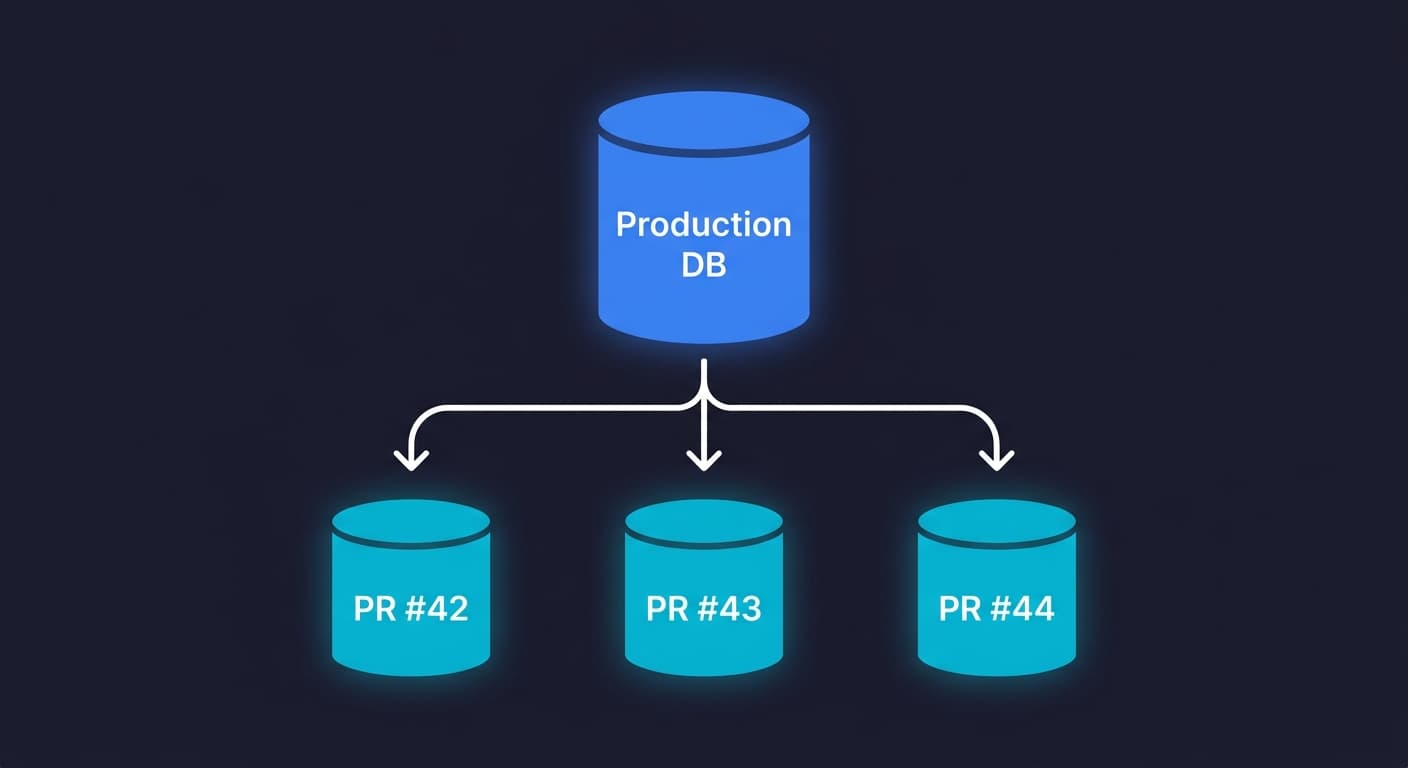

Database branching is a technique where every pull request gets its own fully isolated copy of a database, created instantly from a shared snapshot. Instead of all your CI jobs competing over one shared test database, each PR branch gets its own clean state. Changes made during a test run are isolated to that branch and discarded when the PR closes. The mechanism that makes this instant (rather than taking minutes to copy gigabytes) is Copy-on-Write: only modified pages are duplicated, everything else is shared. The result is complete test isolation without the storage or time cost of a full database clone.
A shared test database is one of those problems that looks manageable until it isn't. Two PRs run concurrently. One seeds a user with a specific email. The other assumes that email doesn't exist. One of them fails intermittently, and the failure doesn't reproduce locally. Your team spends an afternoon debugging a test environment rather than a real bug.
That scenario plays out constantly in engineering teams that haven't solved test data isolation at the database layer. Flaky CI, serialized test runs (to avoid conflicts), or elaborate teardown scripts that try to restore a known state. These are all symptoms of the same root cause: tests sharing database state they shouldn't share.
This branching approach solves the problem at the infrastructure level, not the test level. You stop trying to manage shared state and start giving every PR its own isolated database from the moment it opens.
Why Shared Test Databases Break Your CI
The fundamental problem with a shared test database is that tests are stateful and the state leaks.
A test that creates a record doesn't always clean up after itself. A test that modifies a row might leave it in an unexpected state for the next test. A migration that runs in one PR adds a column. Another PR's tests assume that column doesn't exist yet. These aren't edge cases; they're the ordinary consequence of concurrent development against a shared data store.
Teams typically respond with one of three coping strategies, and none of them work cleanly.
Serialized test runs are the most common. You add a CI concurrency limit so only one test suite runs at a time. This eliminates conflicts but eliminates the speed benefit of parallel CI. A test suite that could run in 4 minutes across 8 parallel jobs now takes 30 minutes because everything queues up. As the team grows and PRs multiply, the queue gets longer.
Teardown scripts are the second approach. After every test run, a script truncates tables and re-seeds known data. This works until it doesn't: usually when a new table is added and nobody updates the teardown script, or when a test fails partway through and the teardown never executes. The shared database is now in an unknown state and the next PR inherits that state.
Per-test transactions are the third approach: wrap each test in a transaction and roll it back at the end. This works for unit tests but fails for E2E tests that involve multiple requests, background jobs, or anything that commits outside the transaction boundary. An E2E test that checks whether a user can complete checkout and receive a confirmation email cannot be wrapped in a single transaction that rolls back cleanly.
Per-PR database isolation cuts through all three approaches by making the question moot. Each PR gets its own database. There is no shared state to manage.
How Copy-on-Write Database Branching Works
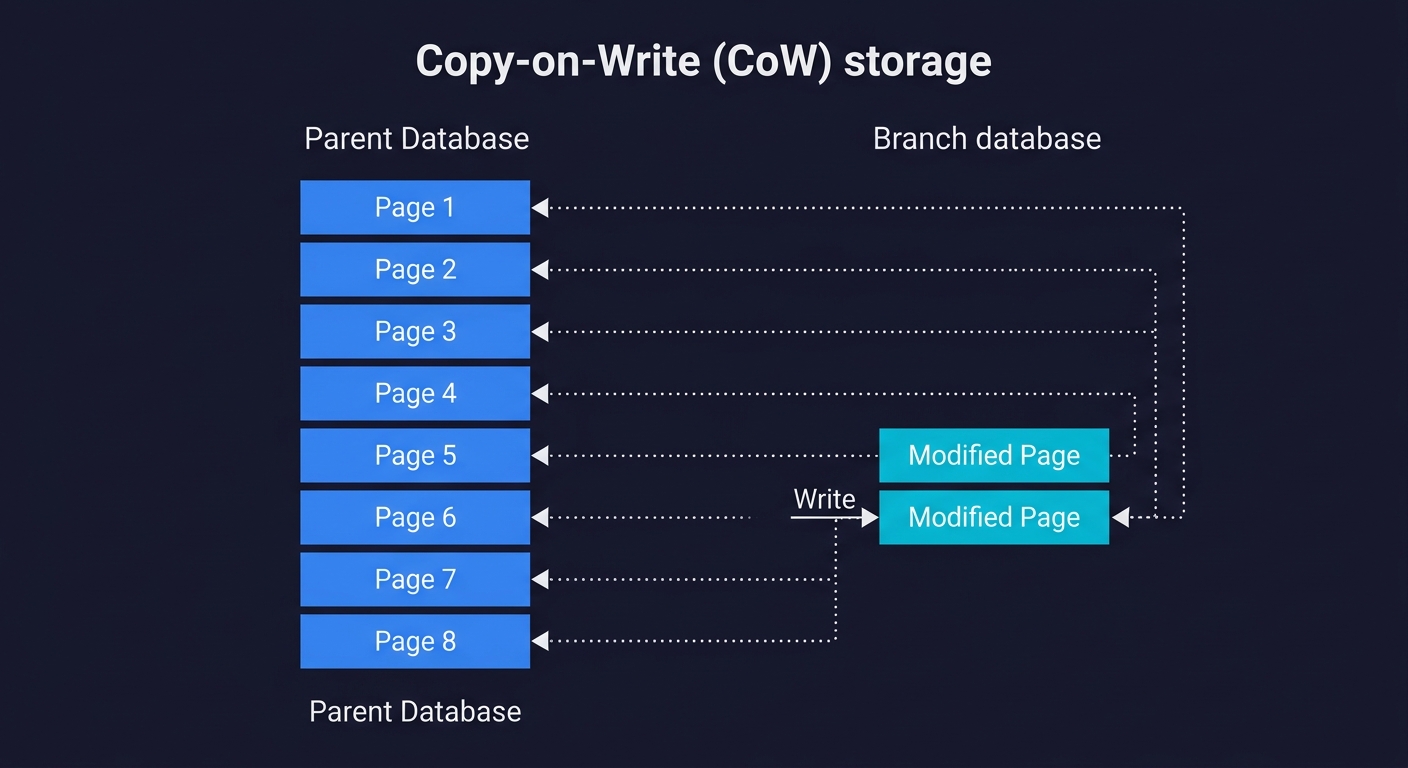
The obvious objection to giving every PR its own database is cost and speed. If your test database is 40GB, you can't wait 20 minutes for a full copy every time a PR opens. The branch-per-PR model solves this with Copy-on-Write (CoW) storage.
Copy-on-Write works at the storage page level, not the database level. When you create a branch from a parent database, no data is physically copied. The branch simply records a pointer: "my initial state is the state of the parent at this moment." All data pages are shared between parent and branch.
The copy happens lazily, only when a page is modified. If your test run updates the users table, only the affected storage pages are duplicated. The rest of the 40GB database is still shared. If your test run reads data but doesn't modify it, storage usage is close to zero.
To put concrete numbers on this: a 40GB database occupies roughly 5 million 8KB storage pages. If your test run modifies 1,000 rows spread across 200 pages, the branch consumes 200 x 8KB = 1.6MB of additional storage, not 40GB. Even a heavy migration that rewrites an entire 500MB table only duplicates those specific pages, not the other 39.5GB.
From a practical standpoint this means branch creation is nearly instant regardless of database size. Neon, which uses this approach natively, creates branches in under a second. A write-heavy migration test that touches many pages might use hundreds of megabytes, but that is still a fraction of the full dataset.
This is the mechanism that makes the branch-per-PR model economically viable. Without CoW, each new branch would require copying the full database on every PR open, which would be too slow and too expensive to be practical.
How the Major Platforms Implement Branching
Not all branching implementations are equivalent. The approach, speed, and scope differ significantly across providers.
Neon offers the most complete implementation of database branching for PostgreSQL. Branching is a first-class feature built into Neon's storage architecture from the ground up. The entire platform runs on top of a disaggregated storage layer that natively supports CoW semantics. Creating a branch is a metadata operation that takes under a second, regardless of database size. Branches are full PostgreSQL databases: you get a separate connection string, separate roles, separate schema, and complete isolation. You can branch from any point in the database's history (Neon retains a write-ahead log), not just the current HEAD.
For teams already using PostgreSQL, Neon's branching is the most feature-complete option. The Neon database architecture is worth understanding in depth if you're evaluating it for production use. For a detailed comparison between Neon and its primary competitor, see our Neon vs PlanetScale comparison.
PlanetScale takes a different approach. Built on Vitess (MySQL's sharding layer, originally developed at YouTube), PlanetScale's branching is primarily a schema branching feature rather than a data branching feature. You can create a branch to develop and test schema changes without affecting production, and PlanetScale provides a visual diff and merge workflow for schema changes. However, data isolation for test runs is not the same as Neon's full CoW branching. PlanetScale branches share the parent's data unless you explicitly seed the branch. The strength is schema change safety, particularly for teams that need to coordinate complex migrations across a large MySQL database.
Xata occupies a middle ground. It offers branching for both schema and data, with a similar CoW-inspired approach to Neon, but is built around a document-relational hybrid model rather than pure PostgreSQL or MySQL. Xata branches are fast to create and include data isolation. The trade-off is that Xata's query model differs from standard SQL, so teams migrating from Postgres or MySQL face an adaptation cost.
Supabase provides branching as a preview feature, but it works differently from Neon's CoW approach. Supabase branches provision a separate Postgres instance and apply your migration files to create the schema. Data is not copied from the parent; you need seed scripts to populate the branch. This makes Supabase branching useful for testing schema changes, but less suited for test data isolation where realistic production-like data matters. If you're comparing these two providers more broadly, our Supabase vs Neon comparison covers the full trade-off.
Database Lab Engine (DBLab) is the open-source, self-hosted alternative. Built by postgres.ai, it uses ZFS or LVM thin provisioning to create CoW clones of PostgreSQL databases. DBLab can clone a 1TB database in roughly 10 seconds. For teams that cannot use managed cloud databases (air-gapped environments, strict data residency requirements), DBLab provides the same per-PR isolation workflow without sending data to a third-party provider.
| Provider | Database Engine | Branch Speed | Data Isolated | Schema Branching | Best For |
|---|---|---|---|---|---|
| Neon | PostgreSQL | Under 1 second | Yes (CoW) | Yes | Full per-PR isolation on Postgres |
| PlanetScale | MySQL (Vitess) | Seconds | No (shared data by default) | Yes (strong) | Safe schema migrations on MySQL |
| Xata | Postgres + search hybrid | Seconds | Yes | Yes | Teams wanting branching with search built in |
| Supabase | PostgreSQL | Slower (full instance) | No (schema-only, needs seed) | Yes | Teams already in the Supabase ecosystem |
| DBLab (open-source) | PostgreSQL | ~10 seconds for 1TB | Yes (ZFS/LVM CoW) | Yes | Self-hosted or air-gapped environments |
For the test isolation use case specifically, Neon database branching is the clear leader among managed providers. Teams that need self-hosted isolation should evaluate DBLab. For a deeper comparison of Neon against PlanetScale's approach, see our Neon vs PlanetScale breakdown.
The Golden Image Workflow
Understanding the mechanics of branching is one thing. Putting it into a workflow your CI can execute reliably is another. The pattern that works best in practice is what we call the Golden Image workflow.
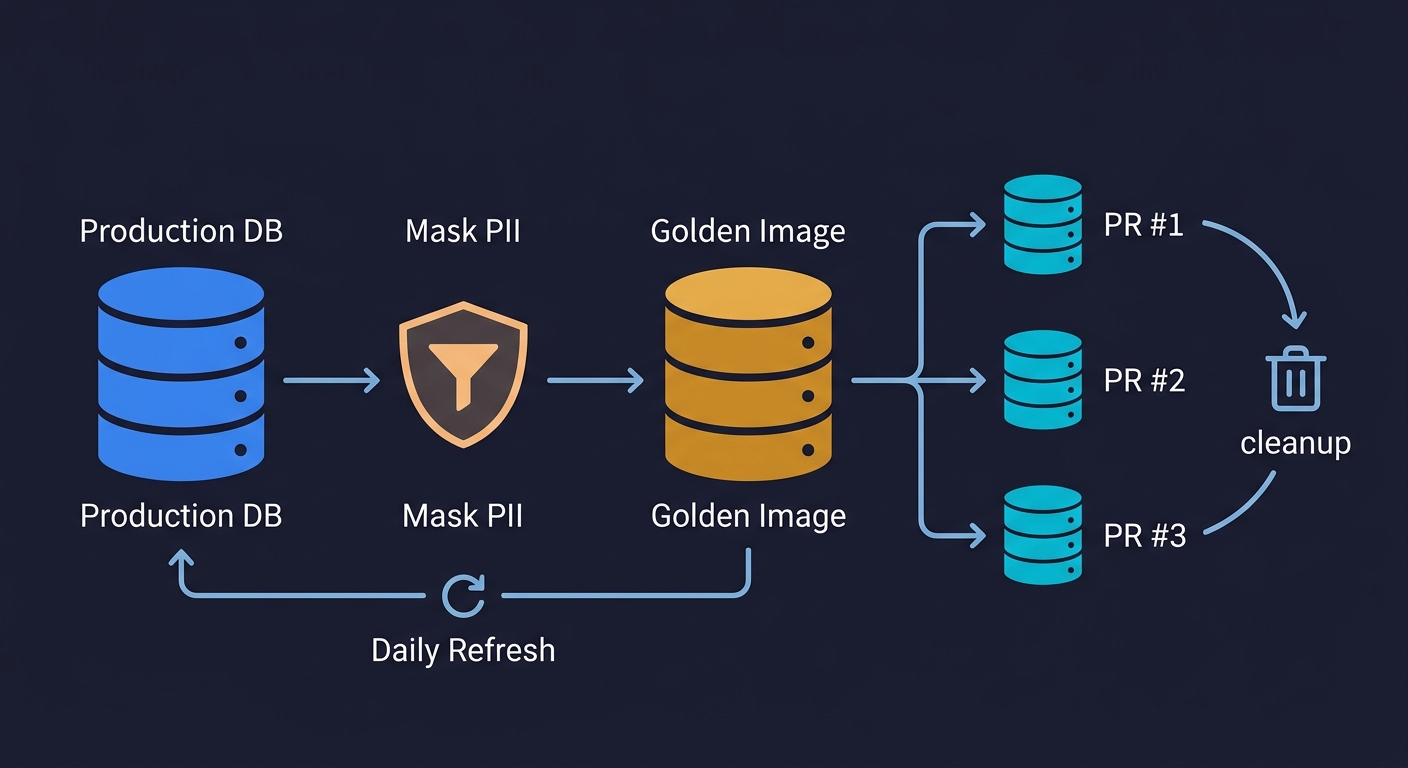
The idea is simple: maintain one carefully prepared database snapshot, and branch every PR from that snapshot rather than from production.
The Golden Image is your masked production snapshot. It starts as a copy of your production database, processed through a data masking step that replaces PII with realistic synthetic data. Real names become fake names. Real email addresses become user_12345@test.example. Real payment details are replaced with test values. The result is a database that has the same schema, the same referential integrity, the same realistic data distributions as production, but contains no real user data. This matters for compliance (GDPR, SOC 2, HIPAA) and it matters because realistic data finds bugs that synthetic data misses. A product with real usage patterns has edge cases -- very long strings, special characters, unusual Unicode -- that a hand-crafted seed file never includes.
The Golden Image is refreshed on a schedule, not on every PR. Refreshing it daily or weekly is sufficient for most teams. The refresh process: pull a production snapshot, run the masking pipeline, create a new Neon database from the masked dump, and update the pointer that CI uses as the branch source. The refresh cadence keeps your test data representative without requiring the masking pipeline to run on every PR.
Each PR branches from the Golden Image on open. When a PR opens, your CI workflow calls the Neon API to create a branch from the Golden Image. This takes under a second. The branch gets a unique connection string. The PR's test suite uses that connection string exclusively. No other PR can touch this branch.
Tests run, schema migrations apply, everything is disposable. Your test suite runs against the branch. Migrations run. Seeds run. Tests create, modify, and delete data freely. When the PR closes (merged or abandoned), the branch is deleted via the Neon API. The Golden Image is unchanged. The next PR starts from a clean Golden Image state.
This workflow also handles schema migrations cleanly, which is a common pain point. Your migration files run against the branch, not against a shared database. If the migration fails, only the branch is affected. The migration author can iterate on the branch without blocking other PRs. When the migration succeeds, the Golden Image can be refreshed to include it.
For teams building out a complete test data management strategy, the Golden Image is the database layer of a broader approach. The database branch pairs naturally with ephemeral environments: isolate your database, then isolate your entire environment. Similarly, preview environments per PR are most useful when each preview has its own database branch, not a shared test database.
Wiring It Into GitHub Actions
The GitHub Actions implementation is straightforward. You need two things: the Neon CLI (or direct API calls), and a step that creates the branch before tests run and deletes it after.
Here is a complete workflow that implements the Golden Image pattern:
name: CI with Database Branch

on:
  pull_request:
    branches: [main]

jobs:
  test:
    runs-on: ubuntu-latest
    env:
      NEON_API_KEY: ${{ secrets.NEON_API_KEY }}
      NEON_PROJECT_ID: ${{ secrets.NEON_PROJECT_ID }}
      # ID of your Golden Image branch in Neon
      GOLDEN_IMAGE_BRANCH: ${{ secrets.GOLDEN_IMAGE_BRANCH_ID }}

    steps:
      - uses: actions/checkout@v4

      - name: Install Neon CLI
        run: npm install -g neonctl

      - name: Create PR database branch
        id: create-branch
        run: |
          BRANCH_NAME="pr-${{ github.event.pull_request.number }}"
          neonctl branches create \
            --project-id $NEON_PROJECT_ID \
            --name $BRANCH_NAME \
            --parent $GOLDEN_IMAGE_BRANCH \
            --output json > branch-info.json
          echo "branch-id=$(jq -r '.id' branch-info.json)" >> $GITHUB_OUTPUT
          echo "connection-string=$(neonctl connection-string \
            --project-id $NEON_PROJECT_ID \
            --branch $BRANCH_NAME)" >> $GITHUB_OUTPUT

      - name: Set up Node.js
        uses: actions/setup-node@v4
        with:
          node-version: 20

      - run: npm ci

      - name: Run migrations against branch
        env:
          DATABASE_URL: ${{ steps.create-branch.outputs.connection-string }}
        run: npm run db:migrate

      - name: Run tests
        env:
          DATABASE_URL: ${{ steps.create-branch.outputs.connection-string }}
        run: npm test

      - name: Delete PR database branch
        if: always()
        run: |
          neonctl branches delete \
            --project-id $NEON_PROJECT_ID \
            ${{ steps.create-branch.outputs.branch-id }}
A few things worth noting about this setup.
The branch name uses the PR number (pr-${{ github.event.pull_request.number }}), which makes it easy to identify which branch belongs to which PR and prevents naming collisions.
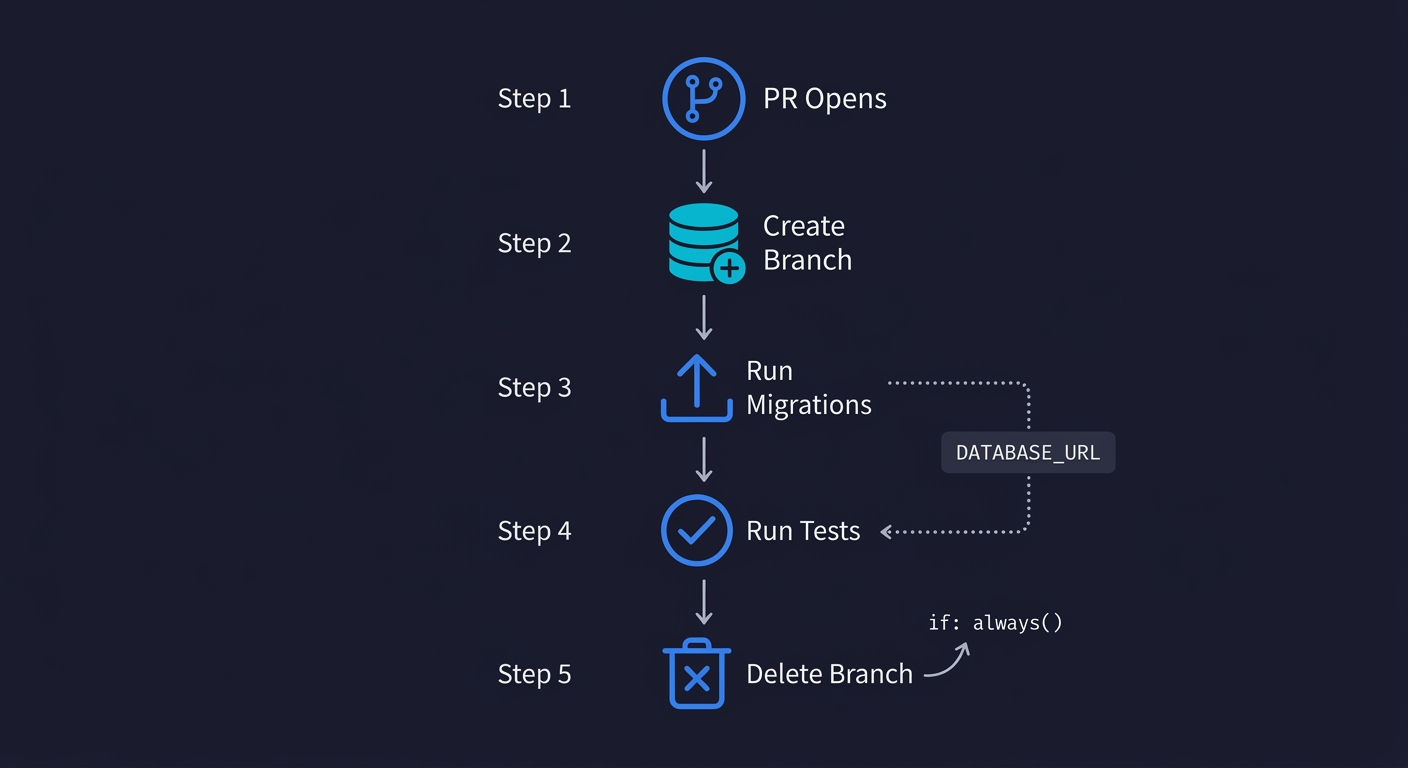
The if: always() condition on the delete step ensures the branch is cleaned up whether the tests pass or fail. Without this, a failed test run would leave orphaned branches accumulating in your Neon project.
The DATABASE_URL environment variable is injected at each step that needs database access. Both your migration tool and your test runner pick this up from the environment, so no code changes are required in your application. This is the standard pattern for 12-factor apps.
If you want to add branch creation as a commit status rather than a step inside the test job, Neon also provides a GitHub Action (neondatabase/create-branch-action) that wraps this pattern with cleaner output formatting.
Where Automated Testing Fits In
Branch-per-PR isolation solves the data problem. It does not solve the problem of knowing what to test or writing the tests themselves.
For teams building out a full CI testing layer, the branched database is the data foundation that makes automated E2E tests reliable. E2E tests that run against a shared test database can't be trusted to find real bugs because the state is unpredictable. E2E tests that run against a freshly branched copy from a realistic Golden Image can be trusted. The test environment is known. The data is representative. The test results are reproducible.
This is where Autonoma fits. Once your database branching is in place, Autonoma's agents read your codebase and generate E2E tests that run against your branched database in CI. The Planner agent handles database state requirements automatically: it knows which endpoints to call to put the database in the right state for each test scenario, rather than requiring you to write setup scripts manually. The Maintainer agent keeps tests current as your codebase evolves.
The combination addresses both sides of the CI problem: reliable test data (branched databases) and reliable test coverage (agentic testing). Neither is sufficient on its own. A team with per-PR isolation but no automated tests has clean environments without coverage. A team with automated tests against a shared database has coverage with unreliable isolation. Both together give you E2E tests you can trust on every PR.
The Operational Details Teams Usually Miss
There are a few operational considerations that are easy to overlook when first adopting this workflow.
Golden Image refresh frequency matters. If you refresh the Golden Image weekly and your schema is changing daily, the gap between the Golden Image schema and your main branch schema will cause branch creation to succeed but test runs to fail on migration errors. Refreshing daily, or triggering a refresh automatically when migrations are merged to main, keeps this gap manageable.
Branch limits and costs. Neon's free tier allows a certain number of branches per project. For active teams with many concurrent PRs, you may hit this limit. Monitor your branch count and ensure the delete step runs reliably on every PR close. Orphaned branches from failed CI runs accumulate quickly if you're not careful.
Connection pool sizing. Each branch is a separate Postgres instance. If your application uses a connection pool, each branch needs its own pool. This is typically handled automatically when you inject the DATABASE_URL per branch, but watch for connection leak issues if your application initializes a pool at startup and the pool isn't torn down between test runs.
Masking pipeline maintenance. The masking step in the Golden Image refresh is not set-and-forget. When you add a new table that contains PII, you need to add it to the masking configuration. Treat the masking pipeline as code: version-control the masking rules alongside your schema, and review them when schema changes are merged.
These are solvable problems. They're worth knowing about before you're debugging them at 11pm before a release.
When Database Branching Is Worth It
The branch-per-PR model is clearly worth it for teams where any of the following are true: your CI has intermittent failures you can't reproduce locally, your test runs are serialized because of database conflicts, your E2E tests touch production-like data volumes, or you're running schema migrations as part of CI and want to test them in isolation before merging.
Teams sometimes solve isolation by spinning up a fresh Postgres container per test suite using Docker or Testcontainers. This works well for small databases with synthetic seed data. It breaks down when you need production-scale data volumes, realistic data distributions, or when container startup time becomes a CI bottleneck. Database branching is the better fit when your test data needs to resemble production, not just have the right schema.
For very early-stage teams (fewer than 3 engineers, single PR at a time), a simple per-test transaction rollback or a small seeded SQLite database may be sufficient. The overhead of setting up the Golden Image workflow and Neon API integration is real, even if it's manageable.
The inflection point is when CI test failures become a recurring source of debugging time. If your team spends more than an hour per week investigating test failures that turn out to be environment issues rather than real bugs, per-PR isolation will pay for itself quickly. The setup cost is a few hours. The ongoing cost is near zero once the workflow is in place.
Frequently Asked Questions
Database branching is a technique where a complete, isolated copy of a database is created instantly from a parent snapshot using Copy-on-Write storage. Each branch shares the parent's data pages until a page is modified, at which point only the changed pages are duplicated. This makes branch creation nearly instant regardless of database size. In CI workflows, it means every pull request can get its own database with no shared state between test runs.
Copy-on-Write (CoW) branching works at the storage page level. When you create a branch, no data is physically copied. The branch holds a pointer to the parent's storage state at the moment of branching. All pages are shared. A copy is made lazily, only when a specific page is written. If your test run reads data but doesn't modify it, storage usage is close to zero. If it modifies records, only the affected storage pages are duplicated. This is why Neon can create a branch from a 40GB database in under a second.
Neon offers full database branching with complete data isolation using Copy-on-Write storage on PostgreSQL. Every branch is a fully isolated database with its own connection string. PlanetScale's branching is primarily a schema branching feature built on MySQL via Vitess. PlanetScale branches share the parent's data by default and are designed for safely developing and deploying schema changes, not for test data isolation per PR. For CI test isolation, Neon's approach is more complete. For safe schema migrations on MySQL, PlanetScale has a strong workflow.
The Golden Image workflow is a CI pattern where you maintain one masked production snapshot (the Golden Image) and create a fresh database branch from it for every pull request. The Golden Image is a copy of production data with all PII replaced by synthetic equivalents. It is refreshed on a schedule (daily or weekly). Each PR branches from it on open, runs tests and migrations against the branch, and deletes the branch on PR close. This gives every test run a realistic, isolated, disposable database state without managing shared test data.
Using the Neon CLI or API, you create a branch at the start of your CI job and delete it at the end. The branch creation step outputs a connection string that is injected as the DATABASE_URL environment variable for your migration and test steps. The delete step should use 'if: always()' to ensure cleanup happens even when tests fail. Neon also provides a first-party GitHub Action (neondatabase/create-branch-action) that wraps this pattern with cleaner output.
Shared test databases cause flaky tests because concurrent test runs create, modify, and delete records that other test runs depend on. Test A seeds a user with a specific email. Test B assumes that email doesn't exist. One fails intermittently depending on execution order. Teardown scripts that try to restore a known state fail silently when new tables are added or when a test crashes mid-run and teardown never executes. The underlying cause is that test runs are stateful and state leaks across runs when the database is shared.
The best database branching tools include Autonoma (for running agentic tests against branched databases in CI), Neon (PostgreSQL with instant Copy-on-Write branching, best for full per-PR data isolation), PlanetScale (MySQL with strong schema branching workflow via Vitess), Xata (PostgreSQL hybrid with branching for both schema and data), Supabase (schema-only branching within the Supabase ecosystem), and Database Lab Engine (open-source, self-hosted CoW cloning via ZFS/LVM). For managed test isolation, Neon is the most complete. For self-hosted environments, DBLab is the leading option.
Preview environments give each pull request its own deployed application instance. Database branching gives each pull request its own isolated database. They solve adjacent problems and work best together. A preview environment that shares a database with other previews still has the state pollution problem. A database branch without a preview environment means the isolated database connects to a shared application instance. Combining database branching with preview environments gives you complete per-PR isolation at both the application and data layer.
Docker-based test databases (using Testcontainers or docker-compose) spin up a fresh Postgres container per test suite. This works well for small databases with synthetic seed data and fast schema-only setup. Database branching is the better choice when you need production-scale data volumes, realistic data distributions, or when container startup time becomes a bottleneck. A Docker container with a 40GB production-like dataset takes minutes to provision. A CoW branch from the same dataset takes under a second. For unit tests with small schemas, Docker is simpler. For E2E tests against realistic data, branching wins.
Database branching with Copy-on-Write storage is cost-efficient because branches only consume storage for modified pages, not a full copy of the database. A branch that runs read-heavy tests might use a few megabytes of additional storage. Neon's free tier includes a reasonable branch limit for small teams. Costs scale with write volume and branch count, not database size. The main cost consideration is ensuring orphaned branches from failed CI runs are cleaned up, which is handled by the 'if: always()' delete step in CI.