

Introduction
You've built a Django application with rich templates, AJAX interactions, and JavaScript enhancements. Django's test client validates your views. Your unit tests pass. Then users report bugs: the dynamic form validation doesn't work, the AJAX-powered search shows stale results, the mobile navigation menu never opens.
Django's test client runs on the server. It never executes JavaScript. It doesn't test how your templates actually render in browsers or how users interact with your frontend.
When you test Django apps with Cypress, you write JavaScript tests that run in the same browser as your Django-rendered pages. This complete Django Cypress tutorial shows you exactly how to configure Cypress for Django, handle Django's CSRF protection, test authentication flows, and debug with Cypress's time-travel debugging.
Why Cypress for Django Testing?
Django's test client tests server-side logic: views receive requests, process them, return responses. It's fast and catches backend bugs.
Your Django templates render HTML with JavaScript for interactivity. A dropdown menu uses JavaScript to toggle visibility. Form validation runs client-side before submission. Search results update via AJAX. None of this runs in Django's test client.
Cypress tests your complete stack. It loads Django-rendered pages in a real browser, executes JavaScript, and interacts with elements the way users do. Cypress runs in the same run-loop as your application, giving you direct access to the DOM.
When to use each approach:
Django's test client excels at testing views, models, and forms in isolation. Fast feedback, easy debugging. Cypress catches client-side issues: JavaScript behavior, CSS rendering, complete user workflows across multiple pages. You need both. Django's test client for backend logic, Cypress for frontend integration. Learn more about integration testing vs E2E testing.
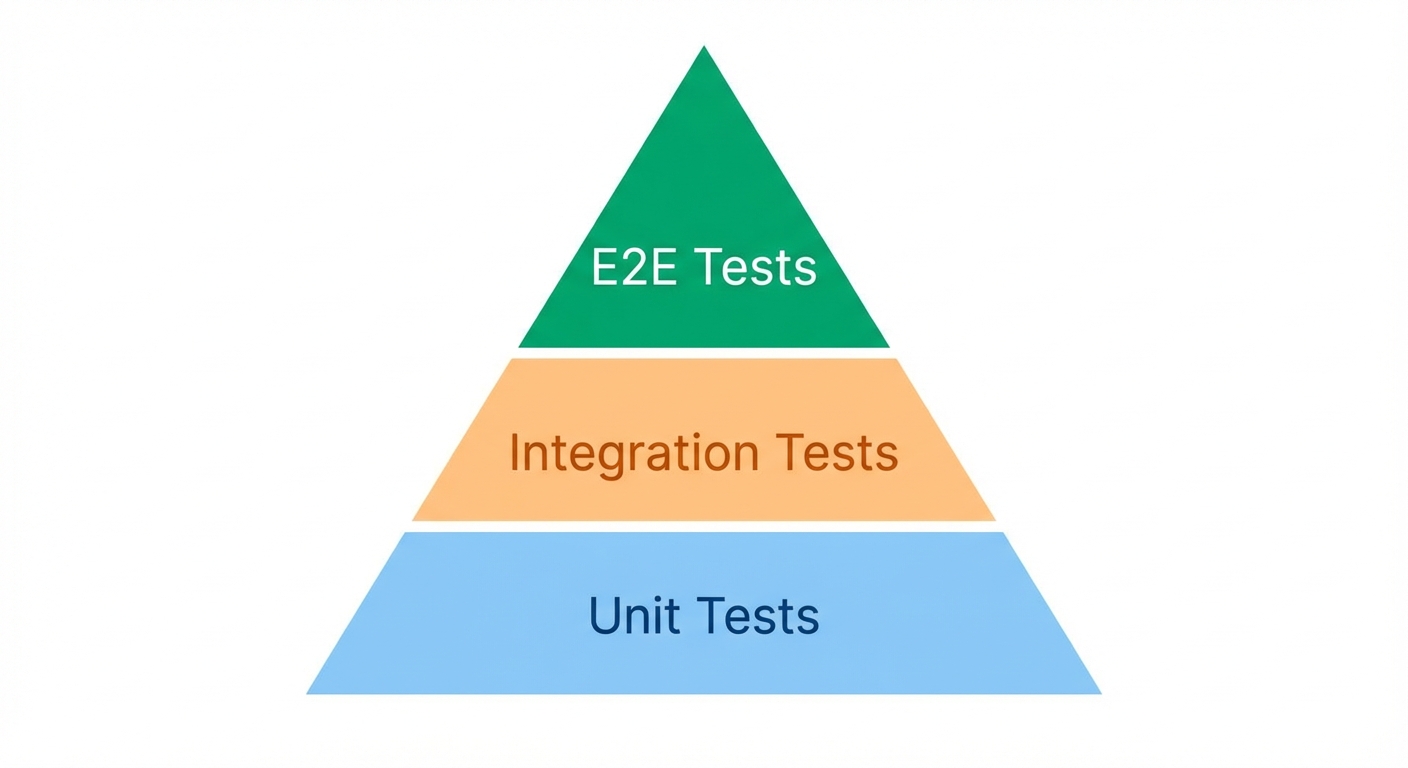
If maintaining Cypress tests alongside your Django backend feels like too much overhead, Autonoma can generate E2E coverage from your codebase automatically — AI agents test your full-stack flows without requiring JavaScript test scripts.
Setting Up Cypress for Django
Installation
In your Django project root, initialize npm and install Cypress:
npm init -y
npm install cypress --save-dev
Open Cypress to generate configuration:
npx cypress openConfiguration
Create or update cypress.config.js:
const { defineConfig } = require('cypress');

module.exports = defineConfig({
  e2e: {
    baseUrl: 'http://localhost:8000',
    viewportWidth: 1280,
    viewportHeight: 720,
    video: false,
    screenshotOnRunFailure: true,
    supportFile: 'cypress/support/e2e.js',

    setupNodeEvents(on, config) {
      // Node event listeners
    },
  },
});
The baseUrl points to your Django development server.
Project Structure
your_django_project/
├── manage.py
├── your_app/
├── cypress/
│   ├── e2e/
│   │   ├── auth/
│   │   │   └── login.cy.js
│   │   ├── forms/
│   │   │   └── contact.cy.js
│   │   └── homepage.cy.js
│   ├── fixtures/
│   │   └── users.json
│   └── support/
│       ├── commands.js
│       └── e2e.js
├── cypress.config.js
├── package.json
└── requirements.txt
Starting Your Django Server
Cypress doesn't start your Django server automatically. Before running tests:
python manage.py runserverFor CI, you'll automate this with wait-on (covered later).
Your First Test
Create cypress/e2e/homepage.cy.js:
describe('Homepage', () => {
  it('loads and displays title', () => {
    cy.visit('/');

    cy.title().should('include', 'My Django App');
    cy.get('h1').should('be.visible');
  });

  it('navigation works', () => {
    cy.visit('/');

    cy.contains('a', 'About').click();

    cy.url().should('include', '/about/');
    cy.contains('h1', 'About Us').should('be.visible');
  });
});
Run tests:
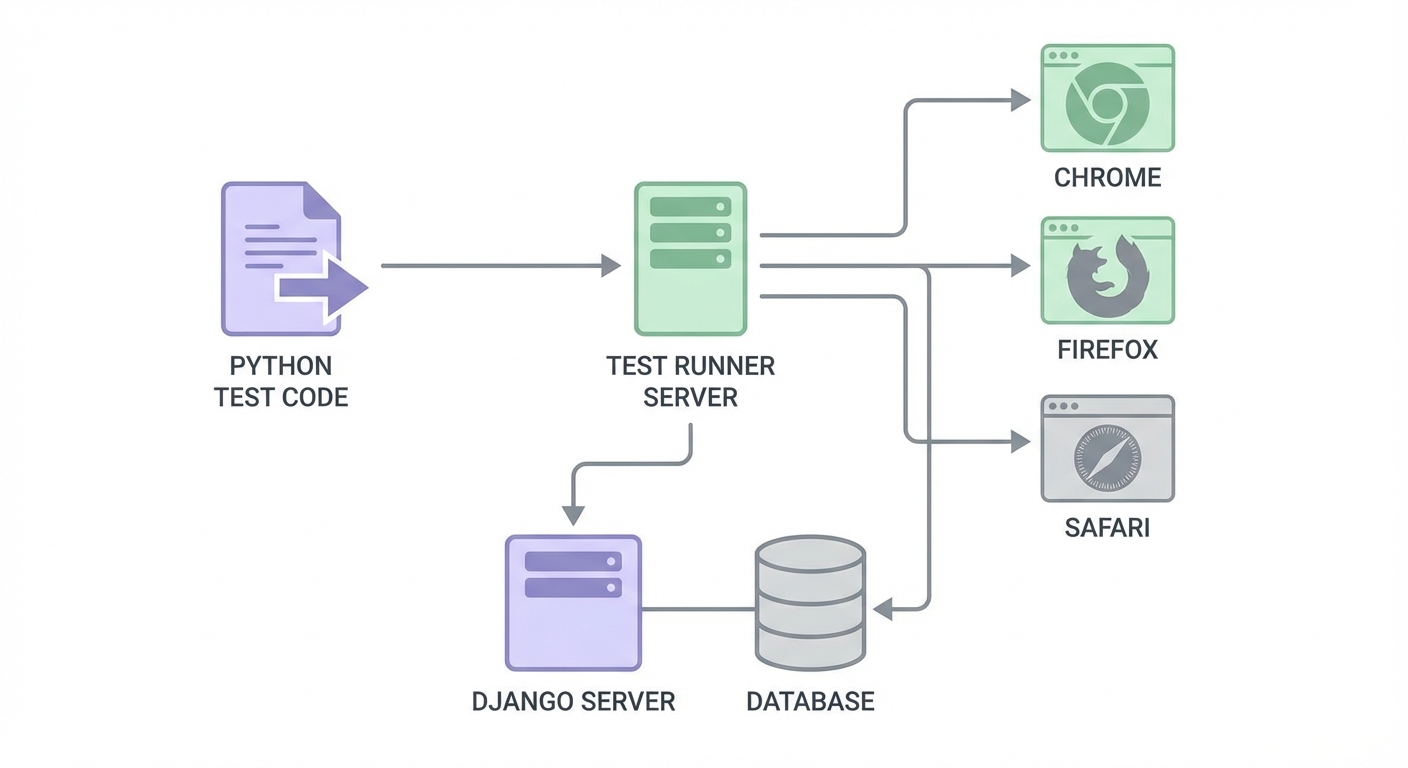
npx cypress openSelect E2E Testing, choose Chrome, and click your test file.
Core Testing Patterns for Django
Selector Strategies
Cypress recommends selecting elements by visible content or data attributes:
// By visible text (great for links, buttons)
cy.contains('Submit').click();

// By data-cy attribute (most resilient)
cy.get('[data-cy="login-form"]').should('be.visible');

// By label (for Django form fields)
cy.get('label').contains('Email').parent().find('input').type('test@example.com');

// By name attribute (Django forms use name)
cy.get('input[name="email"]').type('test@example.com');
Add data-cy attributes to your Django templates:
<button data-cy="submit-btn" type="submit">Submit</button>Testing Django Forms
Django forms render with predictable HTML. Test them by targeting form fields:
describe('Contact Form', () => {
  it('submits successfully', () => {
    cy.visit('/contact/');

    cy.get('input[name="name"]').type('John Doe');
    cy.get('input[name="email"]').type('john@example.com');
    cy.get('textarea[name="message"]').type('Hello from Cypress!');

    cy.contains('button', 'Send Message').click();

    cy.contains('Message sent successfully').should('be.visible');
  });

  it('shows validation errors', () => {
    cy.visit('/contact/');

    cy.contains('button', 'Send Message').click();

    cy.contains('This field is required').should('be.visible');
  });
});
Handling CSRF Tokens
Django's CSRF protection is automatic for normal form submissions. Cypress submits forms through the browser, which includes the CSRF token from the template:
it('form submission handles CSRF automatically', () => {
  cy.visit('/contact/');

  // CSRF token is already in the form
  cy.get('input[name="email"]').type('test@example.com');
  cy.contains('button', 'Submit').click();

  // Django validates CSRF - no extra steps needed
  cy.contains('Success').should('be.visible');
});
For AJAX requests or API calls:
it('makes API call with CSRF token', () => {
  cy.visit('/dashboard/');

  // Get CSRF token from cookie
  cy.getCookie('csrftoken').then((cookie) => {
    cy.request({
      method: 'POST',
      url: '/api/data/',
      headers: {
        'X-CSRFToken': cookie.value,
        'Content-Type': 'application/json',
      },
      body: { key: 'value' },
    }).then((response) => {
      expect(response.status).to.eq(200);
    });
  });
});
Testing Django Authentication
Login Flow
describe('Authentication', () => {
  it('user can log in', () => {
    cy.visit('/accounts/login/');

    cy.get('input[name="username"]').type('testuser');
    cy.get('input[name="password"]').type('testpass123');
    cy.contains('button', 'Log in').click();

    cy.url().should('include', '/dashboard/');
    cy.contains('Welcome, testuser').should('be.visible');
  });

  it('shows error for invalid credentials', () => {
    cy.visit('/accounts/login/');

    cy.get('input[name="username"]').type('wronguser');
    cy.get('input[name="password"]').type('wrongpass');
    cy.contains('button', 'Log in').click();

    cy.contains('Invalid username or password').should('be.visible');
    cy.url().should('include', '/accounts/login/');
  });
});
Custom Login Command
Create a reusable login command in cypress/support/commands.js:
Cypress.Commands.add('login', (username, password) => {
  cy.visit('/accounts/login/');
  cy.get('input[name="username"]').type(username);
  cy.get('input[name="password"]').type(password);
  cy.contains('button', 'Log in').click();
  cy.url().should('include', '/dashboard/');
});

// Faster login bypassing UI
Cypress.Commands.add('loginByApi', (username, password) => {
  cy.visit('/accounts/login/');
  cy.getCookie('csrftoken').then((cookie) => {
    cy.request({
      method: 'POST',
      url: '/accounts/login/',
      form: true,
      body: {
        username: username,
        password: password,
        csrfmiddlewaretoken: cookie.value,
      },
    });
  });
});
Use in tests:
describe('Dashboard', () => {
  beforeEach(() => {
    cy.login('testuser', 'testpass123');
  });

  it('displays user data', () => {
    cy.contains('Your Dashboard').should('be.visible');
  });
});
Testing Django Admin
describe('Django Admin', () => {
  beforeEach(() => {
    cy.visit('/admin/');
    cy.get('input[name="username"]').type('admin');
    cy.get('input[name="password"]').type('adminpass123');
    cy.get('input[type="submit"]').click();
  });

  it('can add a product', () => {
    cy.contains('Products').click();
    cy.contains('Add product').click();

    cy.get('input[name="name"]').type('Test Product');
    cy.get('input[name="price"]').type('29.99');
    cy.contains('input', 'Save').click();

    cy.contains('was added successfully').should('be.visible');
  });
});
Advanced Patterns
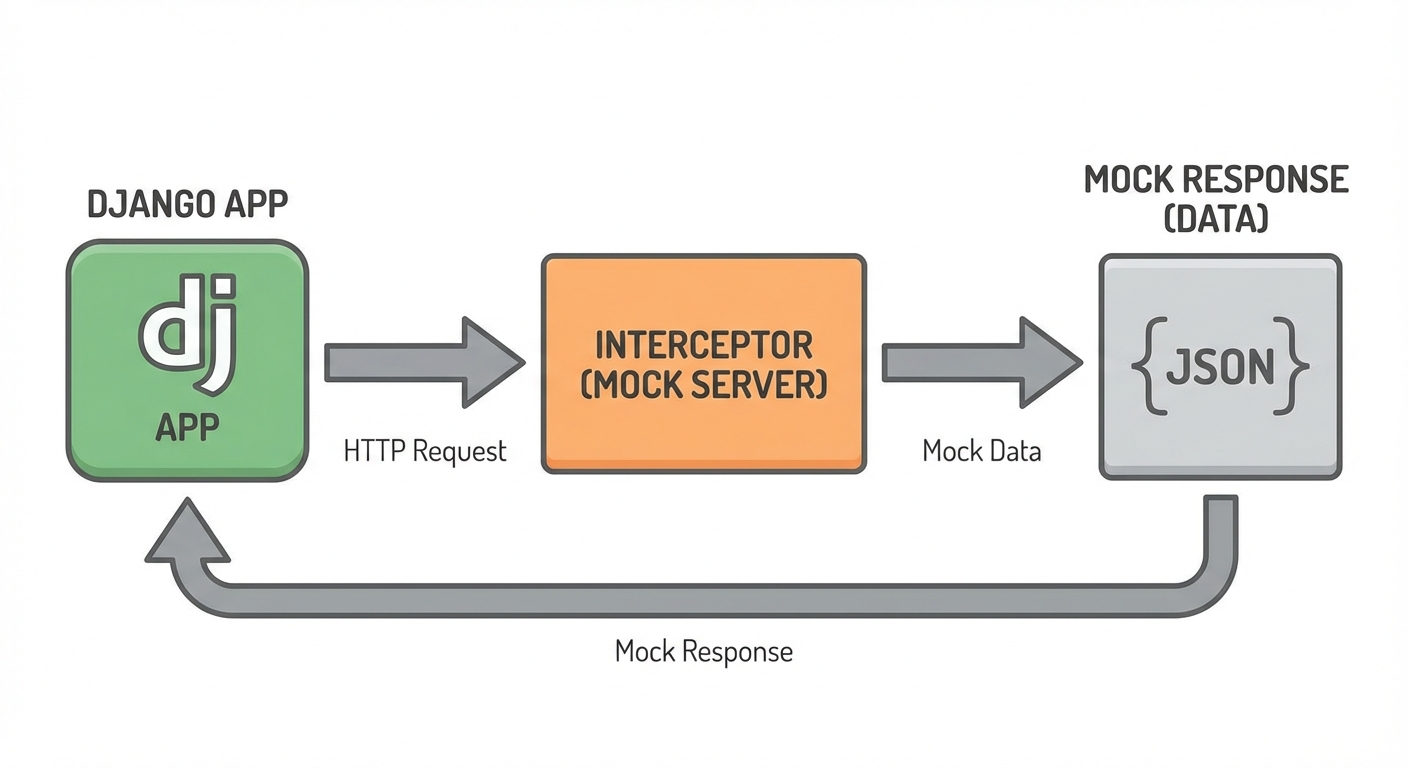
API Mocking with cy.intercept()
Mock Django REST Framework endpoints:
describe('Product List', () => {
  it('displays products from mocked API', () => {
    cy.intercept('GET', '/api/products/', {
      statusCode: 200,
      body: [
        { id: 1, name: 'Mock Product', price: '19.99' },
        { id: 2, name: 'Another Product', price: '29.99' },
      ],
    }).as('getProducts');

    cy.visit('/products/');
    cy.wait('@getProducts');

    cy.contains('Mock Product').should('be.visible');
    cy.contains('$19.99').should('be.visible');
  });

  it('handles API error', () => {
    cy.intercept('GET', '/api/products/', {
      statusCode: 500,
      body: { error: 'Server error' },
    }).as('getProductsError');

    cy.visit('/products/');
    cy.wait('@getProductsError');

    cy.contains('Failed to load products').should('be.visible');
  });
});
Using Fixtures
Create cypress/fixtures/users.json:
{
  "admin": {
    "username": "admin",
    "password": "adminpass123"
  },
  "regular": {
    "username": "testuser",
    "password": "testpass123"
  }
}
Use in tests:
describe('Login with fixtures', () => {
  beforeEach(() => {
    cy.fixture('users').as('users');
  });

  it('admin can login', function() {
    cy.visit('/accounts/login/');
    cy.get('input[name="username"]').type(this.users.admin.username);
    cy.get('input[name="password"]').type(this.users.admin.password);
    cy.contains('button', 'Log in').click();

    cy.url().should('include', '/dashboard/');
  });
});
Testing Django Messages
Django's messages framework shows flash messages. Test them:
it('shows success message after form submission', () => {
  cy.visit('/contact/');

  cy.get('input[name="name"]').type('Test User');
  cy.get('input[name="email"]').type('test@example.com');
  cy.get('textarea[name="message"]').type('Test message');
  cy.contains('button', 'Send').click();

  // Django messages typically render in a messages container
  cy.get('.messages').contains('Message sent successfully').should('be.visible');
});
Common Problems and Solutions
Timing Issues
Cypress has automatic retry-ability, but Django's server-rendered pages may need explicit waits:
// Wrong: element might not exist yet
cy.get('[data-cy="results"]').should('have.length', 10);

// Correct: wait for loading to complete
cy.get('[data-cy="loading"]').should('not.exist');
cy.get('[data-cy="results"]').should('have.length', 10);
Database State
Reset database between test runs:
// cypress/support/commands.js
Cypress.Commands.add('resetDb', () => {
  cy.exec('python manage.py flush --no-input');
  cy.exec('python manage.py loaddata fixtures/test_data.json');
});

// In tests
beforeEach(() => {
  cy.resetDb();
});
CSRF Token Expiry
If tests run long, CSRF tokens may expire:
// Visit page again to get fresh CSRF token
cy.visit('/form/');
// Then submit form
For more debugging strategies, see our guide on reducing test flakiness.
Debugging Failed Tests
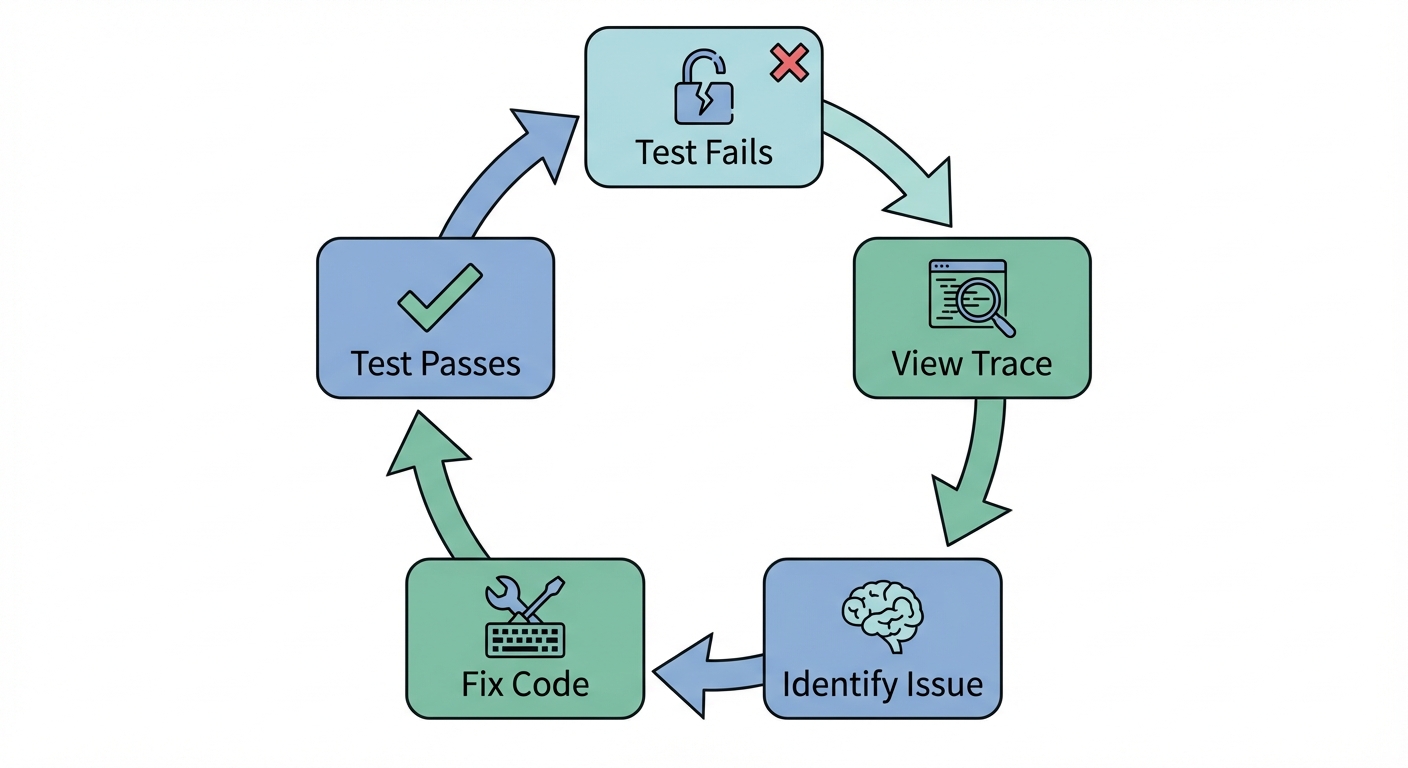
Time-Travel Debugging
Cypress's Test Runner shows each command with DOM snapshots. Click any command to see the page state at that moment.
npx cypress openScreenshots and Videos
Configure in cypress.config.js:
module.exports = defineConfig({
  e2e: {
    screenshotOnRunFailure: true,
    video: true,
  },
});
Debug Command
Pause test execution:
it('debugs an issue', () => {
  cy.visit('/dashboard/');
  cy.get('[data-cy="user-name"]').type('test');

  cy.debug(); // Pauses here, opens DevTools

  cy.contains('button', 'Save').click();
});
CI/CD Integration
Starting Django Server Automatically
Install start-server-and-test:
npm install --save-dev start-server-and-testUpdate package.json:
{
  "scripts": {
    "start:django": "python manage.py runserver",
    "cy:run": "cypress run",
    "test:e2e": "start-server-and-test start:django http://localhost:8000 cy:run"
  }
}
GitHub Actions
Create .github/workflows/cypress.yml:
name: Cypress Tests
on: [push, pull_request]

jobs:
  test:
    runs-on: ubuntu-latest

    services:
      postgres:
        image: postgres:13
        env:
          POSTGRES_PASSWORD: postgres
        options: >-
          --health-cmd pg_isready
          --health-interval 10s

    steps:
    - uses: actions/checkout@v4

    - name: Set up Python
      uses: actions/setup-python@v4
      with:
        python-version: '3.11'

    - name: Set up Node
      uses: actions/setup-node@v4
      with:
        node-version: '18'

    - name: Install Python dependencies
      run: pip install -r requirements.txt

    - name: Install Node dependencies
      run: npm ci

    - name: Run migrations
      run: python manage.py migrate

    - name: Run Cypress tests
      run: npm run test:e2e

    - name: Upload screenshots
      if: failure()
      uses: actions/upload-artifact@v4
      with:
        name: cypress-screenshots
        path: cypress/screenshots
Best Practices
Use data-cy attributes: Add data-cy to Django templates for stable selectors.
Create custom commands: Login, database reset, and common actions should be reusable.
Mock external services: Don't hit real payment APIs or email services.
Test user flows, not Django internals: Test what users see, not that Django processed forms correctly.
Keep tests independent: Each test should set up its own state.
For larger projects, consider implementing a Page Object Model.
Conclusion
You now have everything needed to test Django applications with Cypress. You can configure Cypress for Django, handle CSRF tokens, test authentication, mock APIs, and run tests in CI/CD.
Cypress's time-travel debugging makes finding issues straightforward. Start with one user flow. Add authentication tests. Watch Cypress catch client-side bugs your Django tests missed.
Next steps:
- Add Cypress to your Django project
- Write your first login test
- Set up CI with start-server-and-test
- Consider autonomous testing with AI to reduce maintenance
Resources:
Frequently Asked Questions
Run npm init -y then npm install cypress --save-dev in your Django project root. Configure cypress.config.js with baseUrl pointing to http://localhost:8000. Start your Django server before running Cypress tests.
For form submissions, CSRF tokens are handled automatically since Cypress submits forms through the browser which includes the token. For API calls, get the csrftoken cookie with cy.getCookie() and include it in the X-CSRFToken header.
Navigate to the login page, fill username and password fields with cy.get('input[name="username"]').type(), click login, and verify the redirect. Create a custom cy.login() command for reusability.
Use cy.intercept() to mock API responses. Call cy.intercept('GET', '/api/endpoint/', { body: [...] }) before visiting the page. Use .as('alias') and cy.wait('@alias') to wait for the request.
Create a custom command that runs Django management commands: cy.exec('python manage.py flush --no-input') followed by cy.exec('python manage.py loaddata fixtures/test.json'). Call it in beforeEach().
Use start-server-and-test to start Django before Cypress runs. Install with npm install --save-dev start-server-and-test. Add script: start-server-and-test start:django http://localhost:8000 cy:run.
Run npx cypress open for time-travel debugging. Click any command to see DOM state at that moment. Use cy.debug() to pause tests. Screenshots and videos are saved automatically on failure.
Navigate to /admin/, fill login credentials, click submit, then interact with admin interface. Use cy.contains() for links and cy.get('input[name="fieldname"]') for form fields.
After form submission, check for Django's message container: cy.get('.messages').contains('Success message').should('be.visible'). The exact selector depends on your template structure.
Yes. Use cypress-parallel or Cypress Cloud for parallelization. Ensure each test resets database state and doesn't depend on other tests. Consider using separate test databases per worker.


