Next.js Cypress Testing: Complete Guide
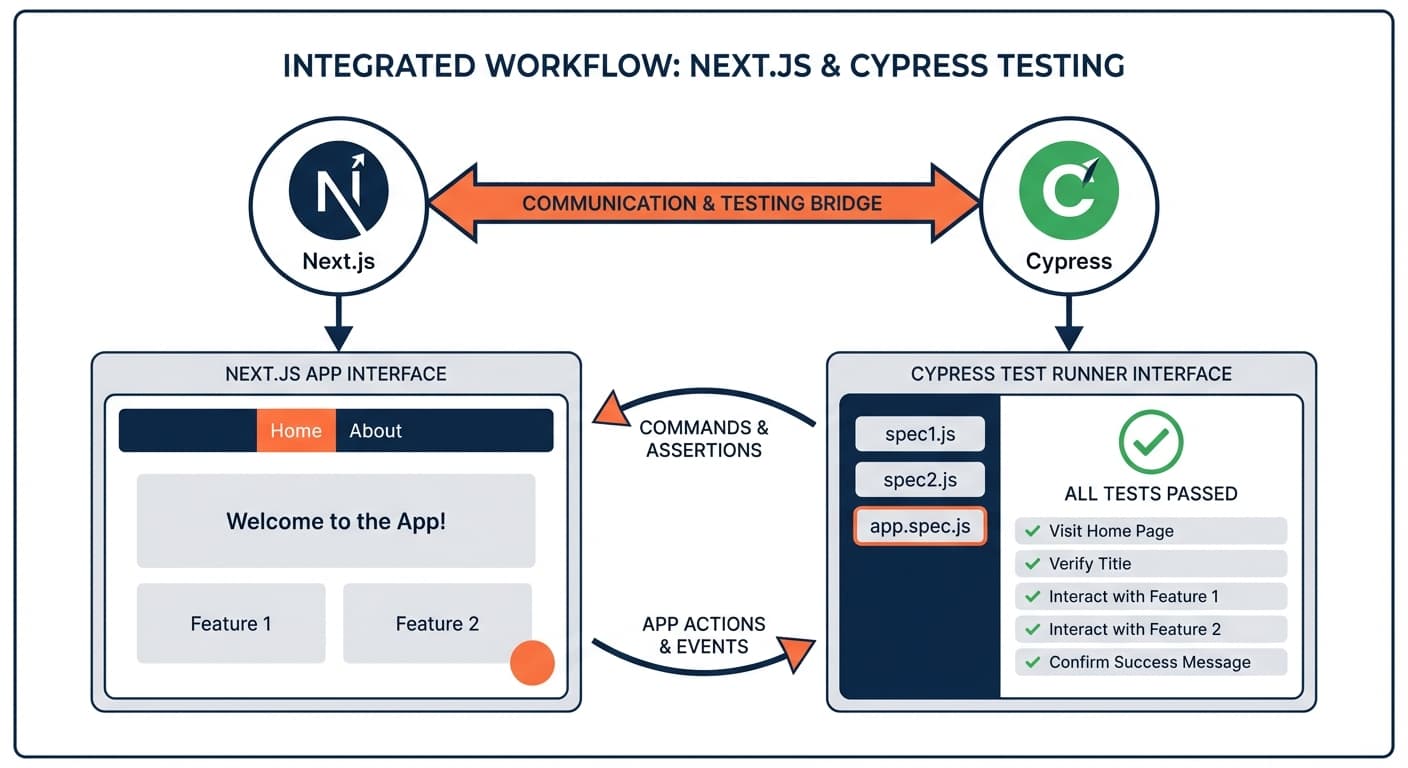

Table of Contents
- Introduction
- Why Test Next.js Apps with Cypress?
- Setting Up Cypress for Next.js
- Testing Next.js Pages and Routing
- Testing Server Components and Client Components
- Testing Next.js API Routes
- Testing Authentication in Next.js
- Advanced Patterns for Next.js Testing
- Cypress vs Playwright for Next.js
- Common Problems and Solutions
- CI/CD Integration
- Best Practices
- Conclusion
- Frequently Asked Questions
Introduction
Next.js apps fail where server meets client. You write unit tests that pass, deploy, and users find bugs: server-side data doesn't match client expectations, dynamic routes load wrong params, authentication redirects break. Unit tests miss these integration points.
This guide shows you how to test Next.js with Cypress, handling Server Components, Client Components, API Routes, authentication, and routing patterns. As Autonoma's CEO building test infrastructure for modern frameworks, I've seen how Next.js's hybrid rendering creates blind spots only E2E testing catches.
Why Test Next.js Apps with Cypress?
Next.js applications aren't just client-side React apps. You have server-rendered pages, statically generated pages at build time, API routes running on the server, middleware intercepting requests, and complex data fetching patterns using fetch with caching.
Unit tests can't verify this complexity. They test individual functions. They mock the framework. They never actually run your app the way users experience it.
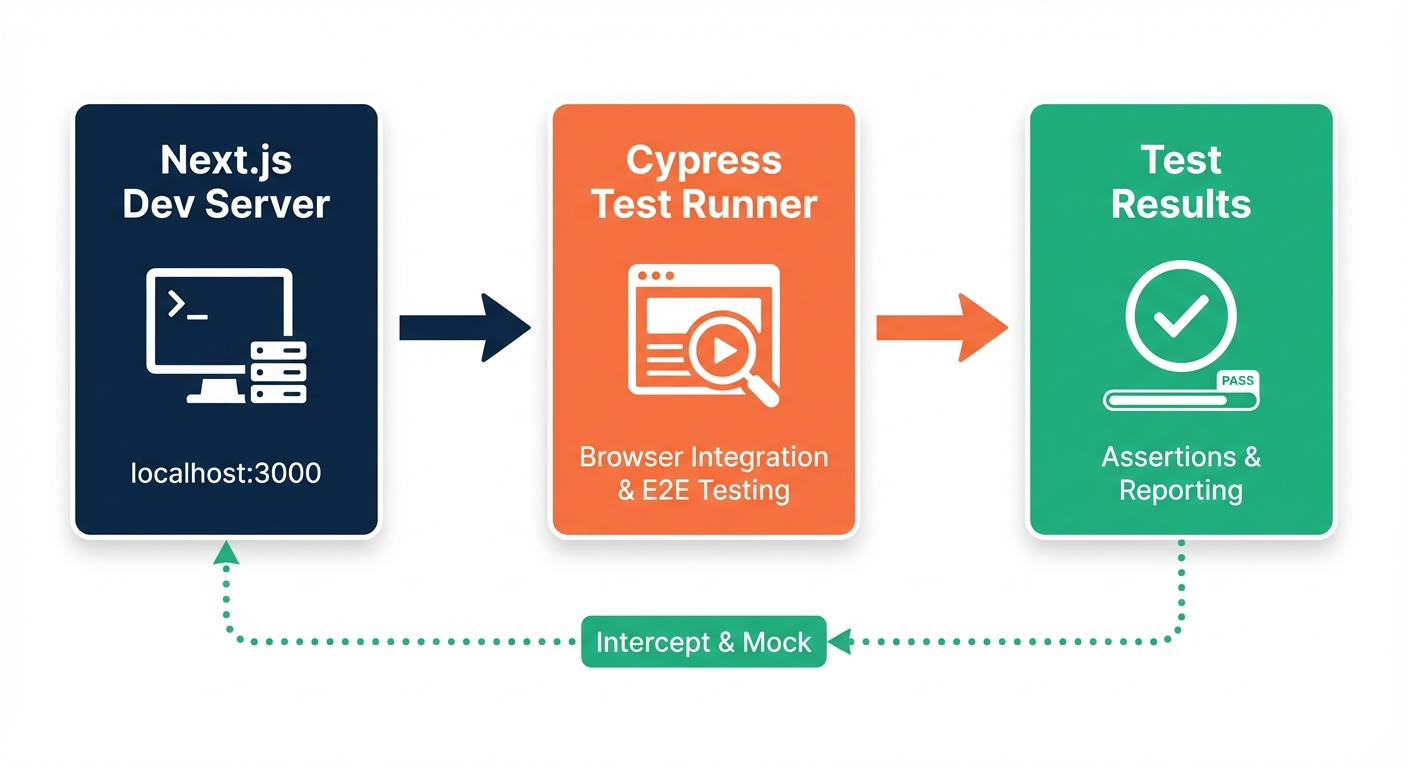
Cypress runs your entire Next.js application in a real browser. It starts your dev server (or production build), navigates like a user, and verifies the final rendered output. When Cypress finds a bug, it's a bug your users will hit.
What makes Next.js testing different from regular React:
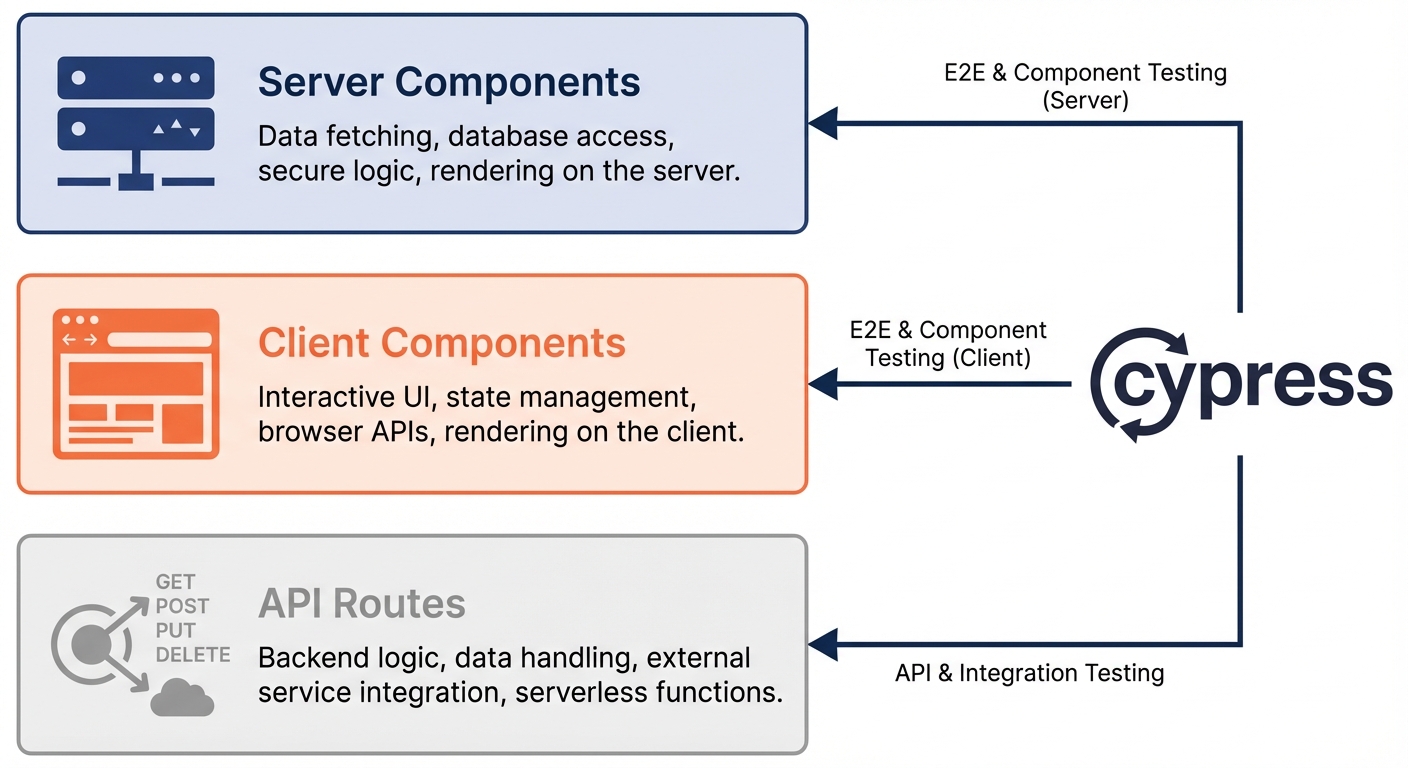
Next.js blurs the line between frontend and backend. A Server Component fetches data on the server and renders HTML. A Client Component hydrates that HTML and adds interactivity. API Routes handle mutations. The same "page" might be generated at build time, rendered on demand, or revalidated in the background.
Unit tests can't validate this flow. Cypress can. It sees what users see: the final HTML, the hydrated components, the API responses, the routing behavior.
When Cypress shines for Next.js:
Cypress excels at testing user journeys that cross boundaries. Login flows that call API routes, set cookies, and redirect to protected pages. Search forms that trigger client-side navigation, call API routes, and update the URL. Dynamic routes that load data server-side and display it client-side.
If your test crosses from server to client, from page to API, from static to dynamic, Cypress catches what unit tests miss. For more context, check our guide on integration testing vs E2E testing.
Setting Up Cypress for Next.js
Installation and Configuration
Install Cypress in your Next.js project:
npm install cypress --save-devInitialize Cypress to generate configuration files:
npx cypress openThis creates cypress.config.ts and a cypress directory. Configure Cypress for Next.js:
import { defineConfig } from 'cypress';

export default defineConfig({
  e2e: {
    baseUrl: 'http://localhost:3000',
    viewportWidth: 1280,
    viewportHeight: 720,
    video: false,
    screenshotOnRunFailure: true,

    setupNodeEvents(on, config) {
      // implement node event listeners here
    },
  },

  component: {
    devServer: {
      framework: 'next',
      bundler: 'webpack',
    },
  },
});
The key difference from other frameworks: Next.js dev server runs on port 3000 by default. The baseUrl tells Cypress where to find your app. Component testing configuration specifies framework: 'next' to use Next.js's webpack config.
Starting Your Next.js Dev Server
Cypress doesn't start your dev server automatically. Before running tests:
npm run devYour Next.js app starts on http://localhost:3000. Cypress connects when tests run. For production testing, build and start:
npm run build
npm start
This runs the production server. Test against production builds to catch build-time issues like static generation errors or missing environment variables.
Project Structure for Next.js
Organize tests to mirror your Next.js app structure:
your-nextjs-app/
├── app/                    # Next.js App Router
│   ├── page.tsx
│   ├── blog/
│   │   └── [slug]/
│   └── api/
│       └── users/
├── cypress/
│   ├── e2e/
│   │   ├── pages/
│   │   │   ├── homepage.cy.ts
│   │   │   └── blog.cy.ts
│   │   ├── api/
│   │   │   └── users-api.cy.ts
│   │   └── auth/
│   │       └── login.cy.ts
│   ├── fixtures/
│   └── support/
├── cypress.config.ts
└── package.json
Group tests by feature or route. The structure helps you find tests quickly and understand coverage.
Your First Next.js Test
Create cypress/e2e/pages/homepage.cy.ts:
describe('Homepage', () => {
  it('loads and displays content from Server Component', () => {
    cy.visit('/');

    // Next.js renders Server Component on server
    // Cypress sees the final HTML
    cy.contains('h1', 'Welcome to Next.js').should('be.visible');

    // Verify metadata rendered by Next.js
    cy.title().should('include', 'Home');
  });

  it('navigates to blog using next/link', () => {
    cy.visit('/');

    // Click Link component (client-side navigation)
    cy.contains('a', 'Blog').click();

    // Next.js Router pushes new route without page reload
    cy.url().should('include', '/blog');
    cy.contains('h1', 'Blog Posts').should('be.visible');
  });
});
Run it:
npx cypress openSelect "E2E Testing," choose Chrome, and click your test file. Cypress opens a browser, navigates to your Next.js app, and verifies it works.
Testing Next.js Pages and Routing
Testing Static Pages (SSG)
Next.js generates static pages at build time using generateStaticParams (App Router) or getStaticProps (Pages Router). Test them like any static HTML:
describe('About Page (SSG)', () => {
  it('displays static content generated at build time', () => {
    cy.visit('/about');

    // Content is pre-rendered as HTML
    cy.contains('h1', 'About Us').should('be.visible');
    cy.contains('Founded in 2024').should('be.visible');

    // No loading state - content is immediate
    cy.get('[data-cy="loading"]').should('not.exist');
  });
});
Static pages load instantly. No API calls, no loading states. The HTML is already rendered.
Testing Server-Side Rendered Pages (SSR)
SSR pages render on every request. They might fetch data from a database or API:
describe('User Profile (SSR)', () => {
  it('displays user data fetched server-side', () => {
    cy.visit('/users/123');

    // Next.js fetches data on server, renders HTML
    // Cypress sees the final result
    cy.contains('h1', 'John Doe').should('be.visible');
    cy.contains('[email protected]').should('be.visible');
  });

  it('shows 404 for non-existent user', () => {
    cy.visit('/users/999', { failOnStatusCode: false });

    // Next.js returns 404 status
    cy.contains('404').should('be.visible');
    cy.contains('User not found').should('be.visible');
  });
});
The failOnStatusCode: false option prevents Cypress from failing when Next.js returns a 404. This lets you test error pages.
Testing Dynamic Routes
Next.js dynamic routes use brackets ([slug], [id]). Test them with different parameters:
describe('Blog Post (Dynamic Route)', () => {
  it('loads post with slug parameter', () => {
    cy.visit('/blog/getting-started-with-nextjs');

    // Dynamic route extracts slug from URL
    cy.contains('h1', 'Getting Started with Next.js').should('be.visible');
    cy.contains('Published').should('be.visible');
  });

  it('loads different post with different slug', () => {
    cy.visit('/blog/cypress-testing-guide');

    cy.contains('h1', 'Cypress Testing Guide').should('be.visible');
  });

  it('handles catch-all routes', () => {
    // [...slug] or [[...slug]] catch-all route
    cy.visit('/docs/guides/testing/cypress');

    cy.contains('Cypress Testing').should('be.visible');
  });
});
Dynamic routes render different content based on URL parameters. Test multiple variations to ensure the route handler works correctly.
Testing Client-Side Navigation
Next.js next/link performs client-side navigation. No full page reload:
describe('Navigation with next/link', () => {
  it('navigates between pages without reload', () => {
    cy.visit('/');

    // Store a value on window to detect reload
    cy.window().then((win) => {
      win.testValue = 'preserved';
    });

    // Click Link component
    cy.contains('a', 'Products').click();

    // URL changes without reload
    cy.url().should('include', '/products');
    cy.contains('h1', 'Our Products').should('be.visible');

    // Value still exists (no reload occurred)
    cy.window().its('testValue').should('equal', 'preserved');
  });

  it('uses browser back button correctly', () => {
    cy.visit('/');

    cy.contains('a', 'Blog').click();
    cy.url().should('include', '/blog');

    cy.go('back');

    cy.url().should('eq', 'http://localhost:3000/');
    cy.contains('h1', 'Welcome').should('be.visible');
  });
});
The window property trick proves navigation happened client-side. On a full page reload, window.testValue would disappear.
Testing Parallel Routes and Intercepting Routes
Next.js App Router supports parallel routes (@folder) and intercepting routes ((.)folder). Test them like any route:
describe('Modal with Intercepting Route', () => {
  it('opens modal using intercepting route', () => {
    cy.visit('/photos');

    // Click photo thumbnail
    cy.get('[data-cy="photo-1"]').click();

    // Intercepting route shows modal
    cy.url().should('include', '/photos/1');
    cy.get('[data-cy="modal"]').should('be.visible');

    // Background still shows photos page
    cy.contains('Photo Gallery').should('be.visible');
  });

  it('direct navigation loads full page', () => {
    // Visit photo URL directly (not intercepted)
    cy.visit('/photos/1');

    // Full page loads, not modal
    cy.get('[data-cy="modal"]').should('not.exist');
    cy.contains('h1', 'Photo 1').should('be.visible');
  });
});
Intercepting routes behave differently based on navigation method. Test both client-side navigation and direct URL access.
Testing Server Components and Client Components
Understanding What Cypress Can Test
Next.js App Router introduces Server Components (default) and Client Components (marked with 'use client'). Cypress tests the rendered output, not the execution environment.
Server Components run only on the server. Cypress can't access their server-side code. But Cypress sees the HTML they produce. Test the final DOM, not the server-side logic:
// app/page.tsx - Server Component
async function HomePage() {
  // Runs on server only
  const data = await fetch('https://api.example.com/data');
  const json = await data.json();

  return <h1>{json.title}</h1>;
}
Test it:
describe('Homepage Server Component', () => {
  it('displays data fetched server-side', () => {
    cy.visit('/');

    // Can't test fetch() call - it ran on server
    // Can test the rendered HTML
    cy.contains('h1', 'Welcome').should('be.visible');
  });
});
Client Components hydrate in the browser and add interactivity. Cypress can test both the initial HTML and client-side behavior:
// app/counter.tsx - Client Component
'use client';

export function Counter() {
  const [count, setCount] = useState(0);

  return (
    <div>
      <p data-cy="count">{count}</p>
      <button onClick={() => setCount(count + 1)}>Increment</button>
    </div>
  );
}
Test it:
describe('Counter Client Component', () => {
  it('increments when button clicked', () => {
    cy.visit('/counter');

    // Initial state from server-rendered HTML
    cy.get('[data-cy="count"]').should('have.text', '0');

    // Click triggers client-side state update
    cy.contains('button', 'Increment').click();

    // Cypress waits for React re-render
    cy.get('[data-cy="count"]').should('have.text', '1');
  });
});
Cypress doesn't care whether a component is a Server Component or Client Component. It tests the final behavior users see.
Testing Data Fetching in Server Components
Server Components fetch data on the server. You can't mock the fetch in Cypress (it already happened on the server). Instead, test the rendered result or use Next.js rewrites to point to a mock server:
describe('Products Page (Server Component)', () => {
  it('displays products fetched server-side', () => {
    cy.visit('/products');

    // Server Component fetched data and rendered HTML
    cy.get('[data-cy="product-item"]').should('have.length.at.least', 1);
    cy.contains('Premium Plan').should('be.visible');
  });
});
For more control, use environment variables to point the server to a test database or mock API during Cypress runs:
// cypress.config.ts
export default defineConfig({
  e2e: {
    baseUrl: 'http://localhost:3000',
    setupNodeEvents(on, config) {
      // Set environment variable for test API
      config.env.API_URL = 'http://localhost:3001';
      return config;
    },
  },
});
Start a mock API server on port 3001 before tests run. Your Next.js app fetches from the mock instead of production.
Testing Hydration Errors
Next.js warns when server-rendered HTML doesn't match client-side render. Cypress can catch these errors:
describe('Hydration', () => {
  it('completes without hydration errors', () => {
    // Listen for console errors
    cy.visit('/', {
      onBeforeLoad(win) {
        cy.stub(win.console, 'error').as('consoleError');
      },
    });

    // Verify no hydration errors logged
    cy.get('@consoleError').should('not.be.called');
  });
});
Hydration errors appear in the console. Stubbing console.error lets you assert they don't occur.
Testing Suspense Boundaries
Server Components can use Suspense for streaming. Test loading states and final content:
describe('Dashboard with Suspense', () => {
  it('shows loading state then content', () => {
    cy.visit('/dashboard');

    // Suspense fallback renders first
    cy.contains('Loading dashboard...').should('be.visible');

    // Wait for data to stream in
    cy.contains('Welcome back').should('be.visible');
    cy.contains('Loading dashboard...').should('not.exist');
  });
});
Cypress's automatic retry-ability handles Suspense boundaries naturally. It waits for the loading state to disappear and content to appear.
Testing Next.js API Routes
Testing API Routes Directly
Next.js API routes are serverless functions in app/api (App Router) or pages/api (Pages Router). Test them directly with cy.request():
describe('Users API Route', () => {
  it('returns list of users', () => {
    cy.request('GET', '/api/users')
      .then((response) => {
        expect(response.status).to.eq(200);
        expect(response.body).to.be.an('array');
        expect(response.body[0]).to.have.property('id');
        expect(response.body[0]).to.have.property('name');
      });
  });

  it('creates a new user', () => {
    cy.request('POST', '/api/users', {
      name: 'Jane Doe',
      email: '[email protected]',
    })
      .then((response) => {
        expect(response.status).to.eq(201);
        expect(response.body).to.have.property('id');
        expect(response.body.name).to.eq('Jane Doe');
      });
  });

  it('returns 404 for non-existent route', () => {
    cy.request({
      url: '/api/nonexistent',
      failOnStatusCode: false,
    })
      .then((response) => {
        expect(response.status).to.eq(404);
      });
  });
});
cy.request() makes HTTP requests directly to your API routes. This is faster than testing through the UI and isolates API logic from frontend code.
Testing API Routes with Authentication
If your API routes require authentication (cookies, headers), set them in cy.request():
describe('Protected API Route', () => {
  it('requires authentication', () => {
    // Without auth - should fail
    cy.request({
      url: '/api/protected',
      failOnStatusCode: false,
    })
      .then((response) => {
        expect(response.status).to.eq(401);
      });
  });

  it('allows authenticated requests', () => {
    // Login first to get session cookie
    cy.request('POST', '/api/auth/login', {
      email: '[email protected]',
      password: 'password123',
    });

    // Now make authenticated request
    // Cypress automatically sends cookies from previous request
    cy.request('GET', '/api/protected')
      .then((response) => {
        expect(response.status).to.eq(200);
        expect(response.body.message).to.eq('Protected data');
      });
  });
});
Cypress maintains cookies between requests in the same test. After logging in, subsequent cy.request() calls include the session cookie automatically.
Mocking API Routes for Page Tests
When testing pages that call API routes, mock the responses with cy.intercept():
describe('Users Page', () => {
  it('displays users from API', () => {
    // Mock API route response
    cy.intercept('GET', '/api/users', {
      statusCode: 200,
      body: [
        { id: 1, name: 'Alice', email: '[email protected]' },
        { id: 2, name: 'Bob', email: '[email protected]' },
      ],
    }).as('getUsers');

    cy.visit('/users');

    // Wait for API call
    cy.wait('@getUsers');

    // Verify page displays mocked data
    cy.contains('Alice').should('be.visible');
    cy.contains('Bob').should('be.visible');
  });

  it('handles API errors gracefully', () => {
    // Mock API error
    cy.intercept('GET', '/api/users', {
      statusCode: 500,
      body: { error: 'Internal server error' },
    }).as('getUsersError');

    cy.visit('/users');

    cy.wait('@getUsersError');

    // Verify error message displays
    cy.contains('Failed to load users').should('be.visible');
  });
});
Set up intercepts before cy.visit(). Client Components that fetch data on mount will hit the mock instead of the real API.
Testing Route Handlers (App Router)
App Router uses Route Handlers instead of API routes. Same testing approach:
// app/api/posts/route.ts
export async function GET() {
  const posts = await db.posts.findMany();
  return Response.json(posts);
}

export async function POST(request: Request) {
  const body = await request.json();
  const post = await db.posts.create({ data: body });
  return Response.json(post, { status: 201 });
}
Test it:
describe('Posts Route Handler', () => {
  it('returns posts', () => {
    cy.request('GET', '/api/posts')
      .then((response) => {
        expect(response.status).to.eq(200);
        expect(response.body).to.be.an('array');
      });
  });

  it('creates post', () => {
    cy.request('POST', '/api/posts', {
      title: 'New Post',
      content: 'Content here',
    })
      .then((response) => {
        expect(response.status).to.eq(201);
        expect(response.body.title).to.eq('New Post');
      });
  });
});
Route Handlers support all HTTP methods (GET, POST, PUT, DELETE, PATCH). Test each method you implement.
Testing Authentication in Next.js
Testing Login Flow
Authentication typically involves calling an API route that sets a session cookie. Test the entire flow:
describe('Login Flow', () => {
  it('user logs in successfully', () => {
    cy.visit('/login');

    cy.get('[data-cy="email-input"]').type('[email protected]');
    cy.get('[data-cy="password-input"]').type('password123');
    cy.contains('button', 'Sign In').click();

    // Should redirect to dashboard
    cy.url().should('include', '/dashboard');
    cy.contains('Welcome back, Test User').should('be.visible');
  });

  it('shows error on invalid credentials', () => {
    cy.visit('/login');

    cy.get('[data-cy="email-input"]').type('[email protected]');
    cy.get('[data-cy="password-input"]').type('wrongpassword');
    cy.contains('button', 'Sign In').click();

    // Should stay on login page and show error
    cy.url().should('include', '/login');
    cy.contains('Invalid credentials').should('be.visible');
  });
});
This tests the UI flow. Click buttons, fill forms, verify redirects.
Creating a Custom Login Command
Don't repeat login UI steps in every test. Create a custom command that logs in via API:
// cypress/support/commands.ts
Cypress.Commands.add('login', (email: string, password: string) => {
  cy.request('POST', '/api/auth/login', {
    email,
    password,
  }).then((response) => {
    expect(response.status).to.eq(200);
  });
});

// Add TypeScript definition
declare global {
  namespace Cypress {
    interface Chainable {
      login(email: string, password: string): Chainable<void>;
    }
  }
}
Use it in tests:
describe('Dashboard', () => {
  beforeEach(() => {
    // Fast API login instead of UI login
    cy.login('[email protected]', 'password123');
  });

  it('displays user dashboard', () => {
    cy.visit('/dashboard');

    cy.contains('Welcome back').should('be.visible');
    cy.contains('Your Projects').should('be.visible');
  });
});
This is faster than filling login forms in every test. The session cookie persists, so navigation to protected pages works.
Using cy.session() for Authentication
Cypress 12+ includes cy.session() to cache authentication across tests. Login once, reuse the session:
// cypress/support/commands.ts
Cypress.Commands.add('login', (email: string, password: string) => {
  cy.session([email, password], () => {
    cy.request('POST', '/api/auth/login', {
      email,
      password,
    });
  }, {
    validate() {
      // Verify session is still valid
      cy.request('/api/auth/me').its('status').should('eq', 200);
    },
  });
});
cy.session() runs the login once, caches cookies and localStorage, and restores them for subsequent tests. Massive speed improvement when you have many authenticated tests.
Testing Protected Routes
Verify that unauthenticated users can't access protected pages:
describe('Protected Routes', () => {
  it('redirects to login when not authenticated', () => {
    cy.visit('/dashboard');

    // Next.js middleware redirects
    cy.url().should('include', '/login');
    cy.contains('Please sign in').should('be.visible');
  });

  it('allows access when authenticated', () => {
    cy.login('[email protected]', 'password123');

    cy.visit('/dashboard');

    // Should stay on dashboard
    cy.url().should('include', '/dashboard');
    cy.contains('Welcome back').should('be.visible');
  });
});
Test both authenticated and unauthenticated scenarios. Protected routes should redirect or show 401 errors when accessed without authentication.
Testing NextAuth.js Integration
If using NextAuth.js, test the provider flows:
describe('NextAuth Login', () => {
  it('shows sign in providers', () => {
    cy.visit('/api/auth/signin');

    cy.contains('Sign in with Google').should('be.visible');
    cy.contains('Sign in with GitHub').should('be.visible');
  });

  it('signs in with credentials provider', () => {
    cy.visit('/api/auth/signin');

    cy.get('[data-cy="email-input"]').type('[email protected]');
    cy.get('[data-cy="password-input"]').type('password123');
    cy.contains('button', 'Sign in').click();

    // NextAuth redirects after successful login
    cy.url().should('not.include', '/signin');
  });
});
For OAuth providers (Google, GitHub), you can't test the real OAuth flow in Cypress. Instead, mock the callback or test with a test OAuth provider.
Advanced Patterns for Next.js Testing
Testing Middleware
Next.js middleware intercepts requests before they reach pages. You can't test middleware code directly in Cypress, but you can test its effects:
// middleware.ts - Redirects /old-path to /new-path
import { NextResponse } from 'next/server';

export function middleware(request: Request) {
  const url = new URL(request.url);

  if (url.pathname === '/old-path') {
    return NextResponse.redirect(new URL('/new-path', request.url));
  }
}
Test it:
describe('Middleware Redirect', () => {
  it('redirects old path to new path', () => {
    cy.visit('/old-path');

    // Middleware redirects
    cy.url().should('include', '/new-path');
    cy.contains('New Page').should('be.visible');
  });
});
Test what users experience, not the middleware implementation.
Testing Image Optimization
Next.js next/image component optimizes images. Verify images load:
describe('Product Images', () => {
  it('loads optimized images', () => {
    cy.visit('/products');

    // Verify next/image rendered an img tag
    cy.get('img[alt="Product 1"]').should('be.visible');

    // Verify image loaded successfully (not broken)
    cy.get('img[alt="Product 1"]')
      .should('have.prop', 'naturalWidth')
      .and('be.greaterThan', 0);
  });

  it('uses correct image sizes for responsive design', () => {
    cy.viewport(375, 667); // Mobile
    cy.visit('/products');

    cy.get('img[alt="Product 1"]')
      .invoke('attr', 'src')
      .should('include', 'w=640'); // Smaller image for mobile
  });
});
next/image generates srcset attributes and loads appropriate sizes. Test that images render and aren't broken.
Testing Internationalization (i18n)
Next.js supports built-in i18n. Test different locales:
describe('Internationalization', () => {
  it('displays content in English', () => {
    cy.visit('/en');

    cy.contains('Welcome').should('be.visible');
  });

  it('displays content in Spanish', () => {
    cy.visit('/es');

    cy.contains('Bienvenido').should('be.visible');
  });

  it('switches language', () => {
    cy.visit('/en');

    cy.contains('Welcome').should('be.visible');

    // Click language switcher
    cy.get('[data-cy="language-select"]').select('Español');

    // URL changes to Spanish locale
    cy.url().should('include', '/es');
    cy.contains('Bienvenido').should('be.visible');
  });
});
Test each locale your app supports. Verify translations load correctly and language switching works.
Testing Streaming and Progressive Rendering
Next.js 13+ can stream Server Components. Test that content appears progressively:
describe('Streaming Page', () => {
  it('renders content progressively', () => {
    cy.visit('/streaming-demo');

    // Shell appears immediately
    cy.contains('h1', 'Dashboard').should('be.visible');

    // First Suspense boundary resolves
    cy.contains('User Stats').should('be.visible');

    // Second Suspense boundary resolves later
    cy.contains('Recent Activity', { timeout: 10000 }).should('be.visible');
  });
});
Use longer timeouts for slow-resolving Suspense boundaries. Cypress waits for content to stream in.
Testing Prefetching Behavior
next/link prefetches linked pages. Test that navigation is instant:
describe('Link Prefetching', () => {
  it('prefetches and navigates instantly', () => {
    cy.visit('/');

    // Hover over link to trigger prefetch
    cy.contains('a', 'Products').trigger('mouseenter');

    // Wait for prefetch to complete
    cy.wait(100);

    // Click and verify instant navigation
    const startTime = Date.now();
    cy.contains('a', 'Products').click();

    cy.url().should('include', '/products').then(() => {
      const endTime = Date.now();
      const duration = endTime - startTime;

      // Should be nearly instant (< 100ms)
      expect(duration).to.be.lessThan(100);
    });
  });
});
This tests that prefetching works. Navigation should feel instant after prefetch completes.
Cypress vs Playwright for Next.js
Both Cypress and Playwright test Next.js apps effectively. The choice depends on your priorities.
Cypress advantages for Next.js:
Cypress runs in the browser alongside your Next.js app. It has direct access to the window object, React components, and Next.js Router. Debugging is exceptional with time-travel through every command. Component Testing lets you mount Next.js components in isolation. The API is simpler and more intuitive for developers new to E2E testing.
When to choose Cypress: You value debugging experience. You want to test individual components. Your team is new to E2E testing and wants a gentler learning curve. You need direct access to your app's internals during tests.
Playwright advantages for Next.js:
Playwright runs out-of-process with better multi-browser support (Chrome, Firefox, Safari, Edge). It's faster for large test suites with built-in parallelization. Network interception is more powerful with full request modification. Auto-waiting is more aggressive, reducing flaky tests.
When to choose Playwright: You need cross-browser testing. Speed is critical for large test suites. You want better multi-tab and multi-context support. You're testing complex authentication flows across domains.
The practical difference:
Cypress feels like testing from inside your app. Playwright feels like testing as an external user. For Next.js apps with complex client-side state (Redux, Zustand, React Context), Cypress's direct access simplifies tests. For Next.js apps that are mostly server-rendered with simple client interactions, Playwright's speed advantage matters more.
Many teams use both. Cypress for component tests and critical user journeys (better debugging). Playwright for broad coverage and cross-browser tests (better speed). For a detailed comparison, see our React Playwright testing guide.
Common Problems and Solutions
Server Component Data Not Appearing
You test a page with a Server Component that fetches data. The test fails with "element not found." The issue: Server Component data fetching failed or timed out.
// ❌ WRONG - Doesn't wait for server data
describe('Products', () => {
  it('displays products', () => {
    cy.visit('/products');
    cy.contains('Premium Plan').should('be.visible'); // Fails if fetch is slow
  });
});
Solution: Use longer timeouts or verify the page loaded:
// ✅ CORRECT - Waits for content or shows clear error
describe('Products', () => {
  it('displays products', () => {
    cy.visit('/products');

    // Either loading state or content appears
    cy.get('body').should('exist');

    // Wait longer if needed
    cy.contains('Premium Plan', { timeout: 10000 }).should('be.visible');
  });
});
If data never appears, the Server Component fetch is failing. Check the Next.js terminal for errors.
API Route Middleware Issues
Your API route requires authentication via middleware. Cypress tests fail with 401 errors even after logging in.
The issue: Middleware runs on the server. Cypress cookies might not be sent correctly.
// ❌ WRONG - Cookie not sent to API route
describe('API', () => {
  it('calls protected route', () => {
    cy.visit('/login');
    // ... do UI login ...

    cy.request('/api/protected'); // Fails - cookie not sent
  });
});
Solution: Ensure cookies are preserved and sent:
// ✅ CORRECT - Explicitly handle cookies
describe('API', () => {
  it('calls protected route', () => {
    cy.request('POST', '/api/auth/login', {
      email: '[email protected]',
      password: 'password123',
    });

    // Cypress automatically includes cookies in subsequent requests
    cy.request('/api/protected').its('status').should('eq', 200);
  });
});
Use cy.request() for login instead of UI login to ensure cookies are set correctly.
Dynamic Import Failures
Next.js uses dynamic imports for code splitting. Tests fail with "module not found" errors.
The issue: Dynamic import failed to load, often due to network issues or incorrect paths.
// Component with dynamic import
const DynamicComponent = dynamic(() => import('./HeavyComponent'));
Solution: Wait for the component to load and verify it appears:
describe('Dynamic Component', () => {
  it('loads dynamic component', () => {
    cy.visit('/page-with-dynamic-component');

    // Wait for code chunk to download and render
    cy.contains('Heavy Component Loaded', { timeout: 10000 }).should('be.visible');
  });
});
If dynamic imports consistently fail, check your Next.js webpack config and ensure the build output includes the chunks.
Hydration Mismatches
Next.js logs hydration errors when server HTML doesn't match client render. Tests pass but console is full of errors.
The issue: Date/time rendering, random values, or browser-only APIs used during server render.
// ❌ WRONG - Causes hydration error
function Page() {
  return <div>Current time: {new Date().toString()}</div>;
}
Solution: Detect hydration errors in tests:
describe('Hydration', () => {
  it('hydrates without errors', () => {
    cy.visit('/', {
      onBeforeLoad(win) {
        cy.stub(win.console, 'error').as('consoleError');
      },
    });

    // Verify no hydration errors
    cy.get('@consoleError').should((stub) => {
      const calls = (stub as any).getCalls();
      const hydrationErrors = calls.filter((call: any) =>
        call.args[0]?.includes?.('Hydration')
      );
      expect(hydrationErrors).to.have.length(0);
    });
  });
});
This catches hydration errors and fails the test, forcing you to fix them.
Image Optimization in Production
next/image works in dev but fails in production builds.
The issue: Production image optimization requires a configured image loader or external image domains in next.config.js.
Solution: Configure image domains:
// next.config.js
module.exports = {
  images: {
    domains: ['example.com', 'cdn.example.com'],
  },
};
Test against production builds to catch this:
npm run build
npm start
npx cypress run
Images should load without 400 errors.
CI/CD Integration
Setting Up Automated Tests
Use start-server-and-test to automate server startup:
npm install --save-dev start-server-and-testAdd scripts to package.json:
{
  "scripts": {
    "dev": "next dev",
    "build": "next build",
    "start": "next start",
    "cy:run": "cypress run",
    "test:e2e": "start-server-and-test dev http://localhost:3000 cy:run",
    "test:e2e:prod": "start-server-and-test start http://localhost:3000 cy:run"
  }
}
Now npm run test:e2e starts dev server, waits for it, runs tests, and cleans up.
GitHub Actions for Next.js
Create .github/workflows/cypress.yml:
name: Cypress E2E Tests
on:
  push:
    branches: [ main, dev ]
  pull_request:
    branches: [ main ]

jobs:
  test:
    timeout-minutes: 60
    runs-on: ubuntu-latest

    steps:
    - uses: actions/checkout@v4

    - uses: actions/setup-node@v4
      with:
        node-version: 18
        cache: 'npm'

    - name: Install dependencies
      run: npm ci

    - name: Build Next.js app
      run: npm run build
      env:
        NEXT_PUBLIC_API_URL: ${{ secrets.NEXT_PUBLIC_API_URL }}

    - name: Run Cypress tests
      run: npm run test:e2e:prod
      env:
        CYPRESS_BASE_URL: http://localhost:3000

    - uses: actions/upload-artifact@v4
      if: failure()
      with:
        name: cypress-screenshots
        path: cypress/screenshots
        retention-days: 30

    - uses: actions/upload-artifact@v4
      if: failure()
      with:
        name: cypress-videos
        path: cypress/videos
        retention-days: 30
This builds your Next.js app, starts production server, runs tests, and uploads artifacts on failure.
Testing Vercel Preview Deployments
Test Vercel preview deployments for pull requests. See our Vercel preview deployment testing guide for the complete strategy.
Quick version: Use Vercel CLI to get preview URL and run tests against it:
- name: Get Vercel preview URL
  id: vercel
  run: |
    PREVIEW_URL=$(vercel deploy --token=${{ secrets.VERCEL_TOKEN }})
    echo "url=$PREVIEW_URL" >> $GITHUB_OUTPUT

- name: Run Cypress against preview
  run: npx cypress run --config baseUrl=${{ steps.vercel.outputs.url }}
This tests the actual deployed preview environment, not localhost.
Best Practices
Test user flows, not implementation: Don't test whether a Server Component fetched data. Test that users see the right content after the page loads.
Use data-cy attributes: Add data-cy to elements you'll test. They survive refactoring and CSS changes.
Mock external APIs: Use cy.intercept() for external APIs. Don't hit production services from tests.
Test both dev and production builds: Next.js behaves differently in dev (no caching) vs production (aggressive caching). Run tests against both.
Use custom commands for authentication: Don't repeat login flows. Create cy.login() and use cy.session() to cache authentication.
Avoid testing Next.js internals: Don't test whether generateStaticParams ran. Test the final page. Next.js is a black box to Cypress.
Test error states: Verify 404 pages, 500 errors, and API failures. Use failOnStatusCode: false to test error responses.
Use appropriate timeouts: Server Components that fetch data might be slow. Use { timeout: 10000 } when needed instead of hard-coded waits.
Keep tests independent: Each test should run in isolation. Don't rely on state from previous tests. Use beforeEach() for setup.
Test mobile viewports: Next.js apps are responsive. Test different viewport sizes:
describe('Mobile Navigation', () => {
  beforeEach(() => {
    cy.viewport('iphone-x');
  });

  it('shows mobile menu', () => {
    cy.visit('/');
    cy.get('[data-cy="mobile-menu-button"]').click();
    cy.get('[data-cy="mobile-nav"]').should('be.visible');
  });
});
Conclusion
You now know how to test Next.js applications with Cypress. You've learned to set up Cypress for both App Router and Pages Router, test Server Components and Client Components, validate API Routes and Route Handlers, handle authentication flows with session management, test dynamic routes and complex routing patterns, debug using time-travel and screenshots, and integrate tests into CI/CD pipelines.
Next.js's hybrid architecture makes testing more complex than simple React apps. Server Components, Client Components, API Routes, middleware, and multiple rendering strategies create more integration points where bugs hide. Cypress tests these integration points the way users experience them.
Start with your most critical user journey. Login and checkout flows. Search and filtering. Form submissions that cross client and server boundaries. Write one test. Run it. Watch it catch a bug. Then expand coverage.
The confidence from comprehensive E2E tests is worth the investment. Your app works not just in isolated unit tests but as a complete system serving real users.
Want zero test maintenance? While Cypress is powerful for Next.js testing, maintaining tests as your app evolves is time-consuming. Autonoma's autonomous testing eliminates maintenance entirely. Our AI agents write tests, adapt to changes automatically, and catch bugs without manual updates. Get E2E confidence without the overhead.
Next steps:
- Add Cypress to your Next.js project
- Write tests for your critical user flows
- Set up CI to run tests on every deployment
- Explore Cypress Component Testing for complex components
- Or skip the complexity: Try Autonoma's autonomous testing for self-maintaining tests that adapt to your Next.js app automatically
Resources:
- Cypress Documentation
- Next.js Testing Documentation
- Cypress Discord Community
- Test Automation Frameworks Guide
Your Next.js app is ready to be tested. Start today.
Frequently Asked Questions
Run npm install cypress --save-dev in your Next.js project root, then npx cypress open to initialize. Configure cypress.config.ts with baseUrl: 'http://localhost:3000' and framework: 'next' for component testing. Start your Next.js dev server with npm run dev before running tests.
Yes, but only the rendered output. Cypress can't access server-side code or test Server Component execution. It tests the final HTML that Server Components produce. This is sufficient for E2E testing because you're verifying what users see, not implementation details.
Use cy.request() to call API routes directly: cy.request('GET', '/api/users'). For pages that call API routes, use cy.intercept() to mock responses. Both approaches work with Next.js API routes (Pages Router) and Route Handlers (App Router).
Create a custom command that uses cy.request() to login via your API route: cy.request('POST', '/api/auth/login', { email, password }). This sets the session cookie. Use cy.session() to cache authentication across tests for faster execution. Avoid repeating UI login in every test.
Test both. Dev server catches development-time bugs quickly. Production builds catch issues like missing environment variables, image optimization failures, and static generation errors. Use npm run dev for development testing and npm run build && npm start for production testing before deployment.
Visit the route with parameters: cy.visit('/blog/my-post-slug'). Next.js extracts the slug from the URL and renders the page. Test multiple slugs to ensure the dynamic route handler works correctly. For catch-all routes ([...slug]), test with multiple path segments.
Not directly. Middleware runs on the server before pages render. Cypress can test middleware effects: redirects, header modifications, authentication checks. Example: cy.visit('/old-path') should redirect to cy.url().should('include', '/new-path'). Test behavior, not implementation.
Run npx cypress open for the Test Runner with time-travel debugging. Click commands to see DOM snapshots. Add cy.debug() to pause execution. Check the Next.js dev server terminal for server-side errors. Use cy.screenshot() to capture visual state. Enable video recording in cypress.config.ts for failure recordings.
Both work well. Cypress offers better debugging with time-travel, direct access to your app's internals, and simpler API. Playwright is faster, has better multi-browser support, and better multi-tab testing. Choose Cypress for debugging experience and learning curve. Choose Playwright for speed and browser coverage.
Verify images load correctly: cy.get('img[alt="Product"]').should('be.visible').and('have.prop', 'naturalWidth').and('be.greaterThan', 0). Test responsive images by changing viewport: cy.viewport(375, 667) and checking the src includes appropriate width parameters. Test against production builds to catch image domain configuration issues.
Use cy.get('[data-cy="input"]').type('value') to fill inputs, .select() for dropdowns, .check() for checkboxes. Test both client-side validation (immediate) and server-side validation (after form submission). Mock API route responses with cy.intercept() to test success and error states without hitting real endpoints.
Yes. Visit different locale URLs: cy.visit('/en') and cy.visit('/es'). Verify content appears in the correct language. Test language switching by interacting with language selectors and verifying the URL changes and content updates. Test all supported locales to ensure translations load correctly.
Install start-server-and-test: npm install --save-dev start-server-and-test. Add script: test:e2e: 'start-server-and-test start http://localhost:3000 cy:run'. In GitHub Actions, build your Next.js app with npm run build, then run npm run test:e2e. Upload screenshots and videos as artifacts on failure.
Test the user experience, not the implementation. For intercepting routes (modals), click a link and verify both the URL changes and the modal appears: cy.url().should('include', '/photo/1') and cy.get('[data-cy="modal"]').should('be.visible'). Test direct navigation loads the full page, not the intercepted version.
Using cy.wait(5000) instead of proper assertions, not testing production builds (only testing dev), testing Server Component implementation instead of rendered output, not handling authentication properly (cookies not preserved), using fragile selectors that break with CSS changes, and not mocking external APIs (causing flaky tests).