

Vercel Fluid Compute is a serverless execution model that allows a single function instance to handle multiple requests concurrently, rather than spinning up a new instance per request. It shipped in early 2025 and applies by default to all new Vercel deployments. The key changes are: concurrent request processing within a single container instance, bytecode caching that persists the V8 compiled form of your function across invocations, and background task execution after the HTTP response has been sent. Cold starts are reduced in frequency (not eliminated), and pricing shifts from pure invocation count to CPU time consumed.
If you've enabled Vercel Fluid Compute and your preview environments are still slow, or your test runs are still hitting cold starts, you're not misconfigured. You're running into a gap between how Fluid Compute is designed to work and how preview deployments actually behave.
Fluid Compute's concurrency model is optimized for sustained, production-like traffic. Preview environments don't produce that. They produce short bursts of requests, usually from automated test suites, with long idle gaps between runs. The instance-sharing that makes Fluid Compute efficient in production doesn't kick in the same way when your traffic pattern looks like a QA pipeline rather than a live user base.
Understanding that distinction is the difference between tuning your configuration correctly and chasing a problem that isn't fixable at the configuration level. Here's what's actually happening under the hood, and what it means for how you test your serverless functions.
How Vercel Fluid Compute Works: The Architecture
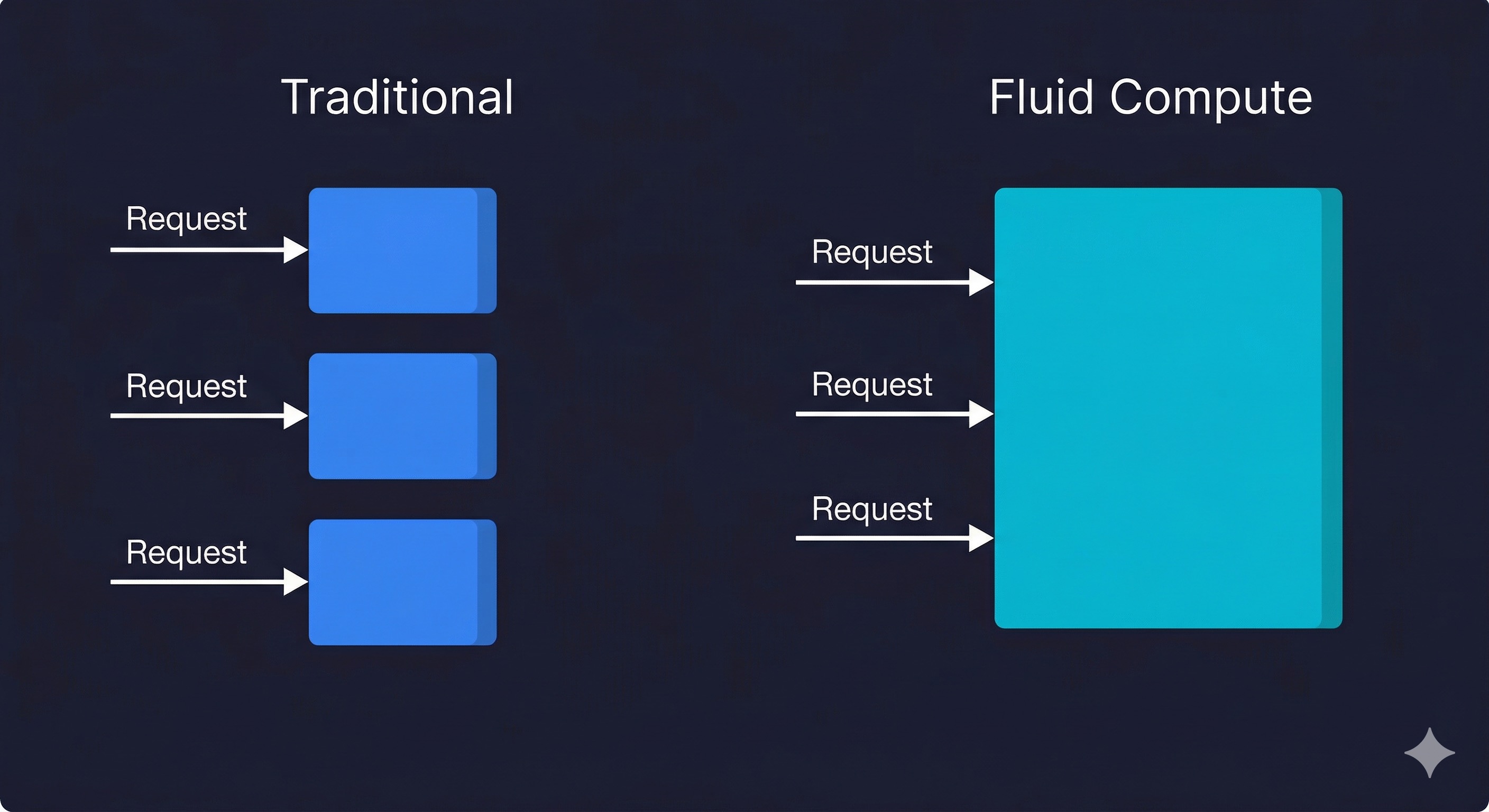
The original Vercel serverless model was one request, one container instance. A request comes in, a cold instance is either reused (if warm) or booted. The function runs, returns a response, and the container sits idle briefly before being reclaimed. Under burst traffic, Vercel scaled by spinning up more instances in parallel. Each was independent.
Fluid Compute changes that fundamental unit. A single container instance can now handle multiple concurrent requests. This is the same model Lambda has had with the REPORT durations and concurrency settings since 2020, and it is how most long-running compute environments (Node.js, Go, Python ASGI) work natively. Vercel is surfacing this model for serverless functions in a way that does not require you to manage the concurrency yourself.
The practical mechanics are three changes working together.
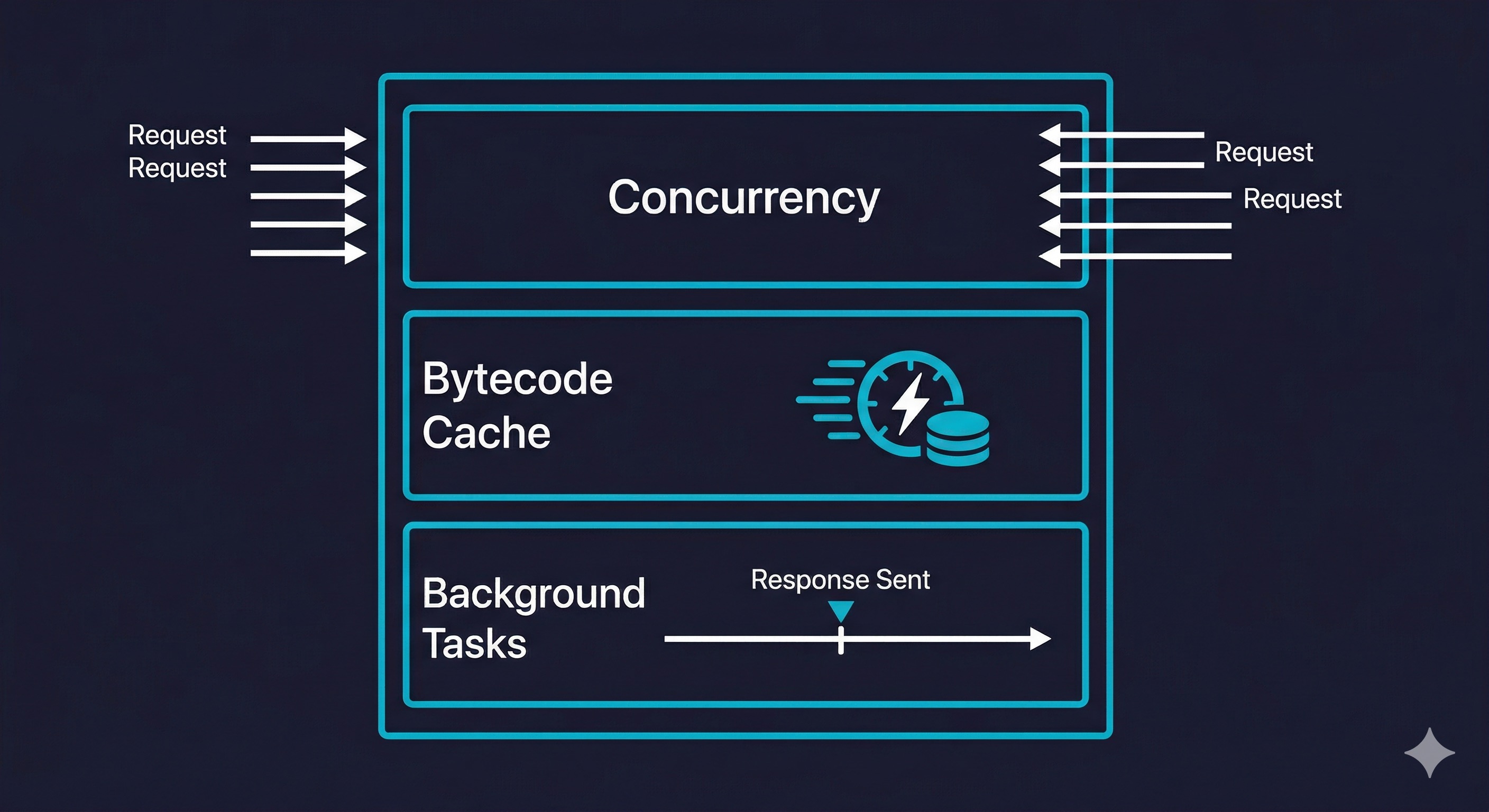
Concurrent request handling. A warm instance does not immediately go idle after serving a request. It accepts new requests while others are in flight, up to a configurable concurrency limit. For I/O-bound functions (database queries, external API calls, file reads), this is significant: the instance is spending most of its time waiting on network, so concurrent requests can share that wait time without meaningful CPU contention.
Bytecode caching. V8 compiles your JavaScript to bytecode on first execution. Without caching, every new instance boot (cold start or new deployment) recompiles from source. Fluid Compute persists the compiled bytecode across invocations on the same instance. For large Next.js applications with heavy dependency trees, this meaningfully reduces the CPU cost of cold start initialization.
Background processing via waitUntil. Functions can now continue executing after the HTTP response has been sent, using the waitUntil API from @vercel/functions. The response streams back to the client; the function keeps running in the background.
import { waitUntil } from '@vercel/functions';

export function GET(request) {
  waitUntil(logAnalyticsEvent(request));
  waitUntil(warmRelatedCaches(request.url));
  return Response.json({ status: 'ok' });
}
This was previously impossible in the original serverless model without workarounds like triggering a separate background job. Common use cases: post-response analytics events, cache warming, non-blocking webhook forwarding.
These three changes work alongside two additional cold start strategies that Vercel bundles under the Fluid Compute umbrella. Scale to One keeps at least one warm instance alive for your production deployment on Pro and Enterprise plans (up to 14 days since last invocation), preventing the most common cold start scenario entirely. Predictive scaling uses traffic pattern analysis to pre-warm additional instances before anticipated load spikes. Together, Vercel claims these five strategies eliminate cold starts for 99.37% of all requests on sustained workloads, though that number applies to production traffic patterns, not the bursty traffic typical of preview environments and CI pipelines.
Fluid Compute currently supports five runtimes: Node.js, Python, Edge, Bun, and Rust. Optimized concurrency (the multi-request-per-instance model) is available for Node.js and Python. Edge and Bun functions use V8 isolates with inherently low overhead, so the concurrency optimization is less impactful there.
Before and After: What Changes at the Application Level
The best way to understand Fluid Compute's impact is to look at it through specific workload types.
| Workload Type | Before Fluid Compute | After Fluid Compute | Net Change |
|---|---|---|---|
| I/O-bound API routes (DB queries, external calls) | One request per instance, idle wait time wasted | Concurrent requests share instance, idle time reused | Lower instance count, lower cost, similar latency |
| CPU-bound functions (image processing, crypto) | Full CPU available per request | CPU shared between concurrent requests | Higher latency under concurrent load; concurrency limit recommended |
| Cold start frequency | New instance per isolated request burst | Fewer instances needed overall, fewer cold starts | Reduced cold start frequency at sustained load |
| Background tasks (post-response work) | Not possible without separate invocation | Native background execution after response | Simpler architecture, no separate queue needed for simple cases |
| Large dependency bundles (Next.js App Router) | Full recompile per new instance | Bytecode cached per instance across invocations | Lower initialization cost on warm instances |
The pattern is clear. If your functions spend time waiting on external I/O (which most Next.js API routes do), Fluid Compute makes your infrastructure more efficient with no application code changes. If your functions are CPU-intensive, Fluid Compute can hurt you unless you configure the concurrency limit appropriately.
When to Enable Vercel Fluid Compute (and When to Be Careful)
Fluid Compute is on by default for new deployments. For existing projects, Vercel surfaces it as an opt-in in project settings. Here is how to think about whether it is right for your workload.
Enable it without hesitation for: Next.js App Router applications with server components and API routes that are primarily fetching from databases or calling third-party APIs. This is the canonical Vercel workload, and Fluid Compute is designed for it. You will see lower function invocation counts, which directly reduces cost on usage-based plans.
Enable it and tune concurrency for: Applications with mixed I/O and CPU work. The concurrency limit per instance is configurable. Setting it to 1 effectively restores the original one-request-per-instance behavior. Setting it to 10 is suitable for heavily I/O-bound functions. Finding the right number requires load testing your specific function mix.
Be careful with: Functions that maintain in-memory state and assume single-tenancy. If your function mutates a module-level variable (a common pattern for caching a database client or a config object), that variable is now shared across concurrent requests on the same instance. Race conditions that never surfaced in the original model can appear under Fluid Compute concurrency. This is not a Fluid Compute bug; it is a pre-existing code smell that isolation was hiding.
Do not expect: Zero cold starts. Vercel Fluid Compute reduces cold start frequency by reducing how many instances your traffic requires. It does not eliminate cold starts. A new region with no warm instances still boots cold. A deployment that brings new code still initializes fresh instances. The bytecode cache helps with initialization time once an instance is warm, but the first invocation in a cold instance still pays the full startup cost.
Fluid Compute vs. AWS Lambda vs. Cloudflare Workers
Most comparison coverage skips this entirely. Here is an honest read across the three platforms, AWS Lambda, Cloudflare Workers, and Vercel Fluid Compute, for teams evaluating where to run their serverless workloads.
| Dimension | Vercel Fluid Compute | AWS Lambda | Cloudflare Workers |
|---|---|---|---|
| Concurrency model | Configurable per-instance concurrency, managed by platform | One request per instance by default; SnapStart and provisioned concurrency available | Isolates per request (V8 isolates, not containers); very low overhead |
| Cold start typical p50 | 200-800ms for Next.js (Node.js runtime) | 100-500ms for Node.js; SnapStart reduces Java cold starts dramatically | Under 5ms (V8 isolates, no container boot) |
| Cold start new region | Same as p50; no special handling | Same as p50 in-region; edge Lambda has lower cold starts | Effectively zero; Workers run in 300+ locations with minimal boot overhead |
| Background processing | Native post-response execution | Requires async invocation or SQS for true background work | Native via waitUntil() in the Workers API |
| Bytecode caching | Yes, per instance | Lambda SnapStart (JVM only currently); Node.js relies on container reuse | Not applicable; V8 isolates have minimal startup overhead natively |
| Pricing unit | Active CPU time + provisioned memory + invocations | Invocation count + GB-seconds + data transfer | CPU time (not wall time); 10ms minimum billing increment |
| Max execution time | 300s default on Pro (800s max); 900s on Enterprise | 15 minutes | 30 seconds (default); up to 15 minutes with Durable Objects |
| Node.js compatibility | Full Node.js runtime | Full Node.js runtime | Partial (Workers runtime, not full Node.js) |
| Best for | Next.js apps, full-stack JS, teams already on Vercel | Complex event-driven architectures, long-running jobs, mixed runtimes | Edge-first global APIs, low-latency globally distributed logic |
Bottom line: Cloudflare Workers wins on cold start latency globally, but loses on Node.js compatibility (many npm packages do not run in the Workers runtime). AWS Lambda wins on flexibility and execution duration, but requires significantly more operational setup. Vercel Fluid Compute is the right choice when you are already on Vercel and want better efficiency without changing your infrastructure stack.
If you are evaluating these from scratch for a greenfield project: edge-first global API with minimal dependencies, Workers is worth serious consideration. Complex backend with long-running jobs or existing AWS integrations (especially if you are already using AWS CDK or CloudFormation for your infrastructure), Lambda is the natural fit. Next.js app with a team that values developer experience over raw infrastructure control, Vercel with Fluid Compute wins on simplicity.
How Fluid Compute Changes Your Preview Environment Testing
This is the part almost no one has written about.
Vercel preview deployments run the same infrastructure as production. When Fluid Compute is enabled on your project, your preview deployments also run with Fluid Compute. This has concrete implications for how you test those deployments.
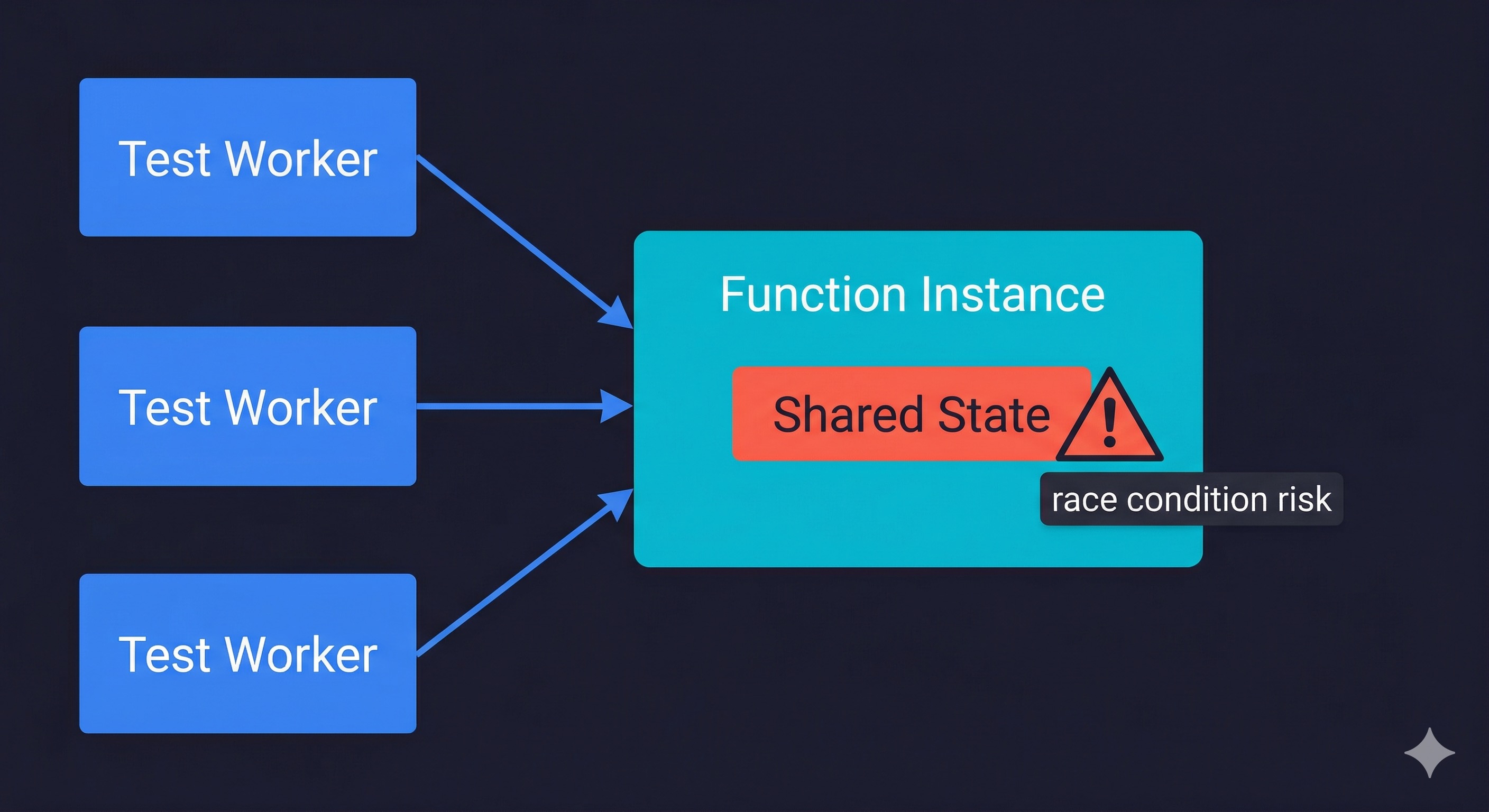
The most important one: your preview deployment can now serve multiple concurrent requests to the same function instance. If you run automated tests against a preview deployment and those tests are parallelized (multiple test workers hitting the API simultaneously), you are testing with real concurrent execution. That is good for production realism. It is also where the shared in-memory state issue surfaces.
A test suite that runs sequentially might pass. A test suite with parallel workers that share API state through module-level singletons might expose race conditions. This is not a Fluid Compute bug, it is Fluid Compute accurately reflecting how your production code will behave.
The second implication is background processing. If your functions use the new post-response background execution, tests that assert on side effects (a record written to the database, an analytics event fired, a cache invalidated) need to account for the fact that those side effects happen asynchronously after the response. A test that checks the database immediately after receiving a 200 response may see stale state.
For teams managing ephemeral environments across their development workflow, Fluid Compute adds one more configuration dimension to track: the concurrency limit needs to be consistent between preview and production, or your preview environment is testing a different execution model than what ships.
The good news: this is a solvable problem. The solution is automated tests that actually exercise concurrency and that correctly handle asynchronous side effects. That requires test infrastructure that understands your application's flows, not just a set of hand-written scripts that assume sequential execution.
This is exactly what we built Autonoma to handle, if you keep Vercel as your preview-environment provider: the Planner and Diffs Agent read your codebase (including your Vercel configuration), plan test cases that reflect concurrent execution paths, and execute them against your running preview deployment. The Planner agent handles database state setup automatically, so tests that check side effects from background processing get the timing right. When Fluid Compute changes how your functions behave, the tests adapt without requiring manual rewrites. If you run Autonoma's own managed preview environments instead, this plays out differently: that infrastructure isn't built on Vercel's runtime, so it generally isn't subject to the same Fluid Compute configuration constraints, and the same Planner-and-Diffs-Agent-generated tests carry over unchanged.
Vercel Fluid Compute Limitations and Gotchas
Beyond cold starts still existing (which is the biggest one), there are several limitations that do not surface in the official documentation.
Bytecode caching is production-only. V8 bytecode caching is not applied to preview or development deployments. This means cold starts in preview environments are slower than production even with Fluid Compute enabled. If you are benchmarking cold start improvements, measure in production, not in preview deployments. This is directly relevant for teams running test suites against preview environments: the performance characteristics you see there do not reflect what production users experience.
Regional cold starts persist. Fluid Compute improves efficiency in regions where you have warm instances. In regions where no warm instance exists (a user in a new geography, a deployment that has not received traffic in that region yet), the cold start is unchanged. If you have users globally, cold start tail latency globally is not solved by Fluid Compute alone.
Concurrency limit is per instance, not per deployment. Setting a concurrency limit of 10 means each instance handles up to 10 concurrent requests. Under high traffic, Vercel still scales by adding more instances. You are not capping total concurrency for the deployment; you are setting the per-instance limit. This matters for cost modeling.
Module-level state needs attention. Any module-level singleton (database connection pool, in-memory cache, configuration object) is now shared across concurrent requests on the same instance. This is generally fine for read access. It requires careful handling for anything mutable.
// UNSAFE under Fluid Compute concurrency
let cachedClient = null;
export function GET() {
  if (!cachedClient) cachedClient = createClient(); // race condition
  return cachedClient.query('...');
}

// SAFE: use a connection pool that manages concurrent access
import { Pool } from 'pg';
const pool = new Pool({ max: 10 }); // initialized once at module load
export function GET() {
  return pool.query('...'); // pool handles concurrency internally
}
Review your codebase for patterns like let cachedResult = null at module scope with conditional assignment inside the handler. The unsafe pattern above is the most common source of race conditions under Fluid Compute.
Error isolation is partial, not total. If one concurrent request throws an uncaught exception, the other requests currently running on that instance will complete normally, but the instance is then recycled. The broken request does not crash its neighbors, but the instance does stop accepting new work. This is better than a full crash, but it means a high error rate on one route can increase cold start frequency across all routes sharing that function.
Background tasks have no retry mechanism. Post-response background execution is fire-and-forget from the function's perspective. If the background work throws an error, there is no built-in retry. For critical background work (sending an email, charging a payment), use a proper queue (SQS, Inngest, Trigger.dev). Background execution via Fluid Compute is appropriate for non-critical, best-effort work.
Pricing model change requires re-benchmarking. Fluid Compute shifts billing to three components: Active CPU time (which pauses during I/O waits, so you pay for compute, not for waiting), Provisioned Memory (billed for the full instance lifetime), and Invocations (per-request count, with the first million included on Pro). For I/O-heavy functions, this is almost always cheaper: a function that takes 100ms of active CPU but spends 400ms waiting on a database query is billed for 100ms of CPU time, not 500ms. At 100,000 daily requests, that difference compounds significantly. For CPU-heavy functions, it can be more expensive than expected. Re-run your cost estimates if you have CPU-intensive functions.
For teams looking at how infrastructure as code approaches apply to managing Vercel configuration at scale (concurrency limits, function regions, environment variable management across deployments), the same principles apply: version your Vercel configuration, make changes through code, and validate changes in preview before they reach production.
Getting Vercel Fluid Compute Right
Enabling Fluid Compute is a single toggle in Vercel project settings, or a one-line addition to your vercel.json:
{
  "fluid": true
}
You can also configure per-function settings for routes that need different limits:
{
  "fluid": true,
  "functions": {
    "app/api/ai/route.ts": {
      "maxDuration": 800
    }
  }
}
Making it work well for your specific application requires a few more deliberate steps.
Start by profiling your existing function mix. Which routes are I/O-bound? Which are CPU-bound? For I/O-bound routes (the majority of Next.js API routes), set a concurrency limit between 5 and 20 depending on how long your average I/O operations take. For CPU-bound routes, keep concurrency at 1 until you have profiled CPU usage under concurrent load.
Next, audit module-level state. Do a codebase search for variables declared at module scope that are conditionally assigned inside handlers. These are potential race condition sources. Convert them to per-request initialization or use proper concurrency-safe patterns (a connection pool that manages its own internal state rather than a raw connection reference).
Then, update your test strategy for preview deployments. Run tests with concurrency matching your configured instance limit. Assert on side effects with appropriate polling or delay logic for background tasks. If you are running parallel test workers, check that your test database state assumptions hold under concurrent writes.
The benchmark numbers depend heavily on your specific application. For a typical Next.js App Router app with database-backed API routes (the canonical Vercel workload), the rough expectation is: 30 to 50 percent reduction in function invocation count, proportional reduction in Vercel function cost, and slightly lower p99 latency under sustained load as instances accumulate bytecode cache. The first-invocation cold start is unchanged.
Frequently Asked Questions
Vercel Fluid Compute is a serverless execution model that allows a single function instance to handle multiple concurrent requests, rather than isolating each request to its own instance. It also adds bytecode caching (which persists compiled JavaScript across invocations on the same instance) and post-response background processing. Fluid Compute shipped in early 2025 and is enabled by default on new Vercel projects. It changes the pricing model from invocation count to CPU time consumed, and typically reduces costs for I/O-bound serverless functions.
No. Fluid Compute reduces cold start frequency by making each warm instance handle more concurrent traffic, which means fewer total instances are needed. Fewer instances needed means fewer cold boots. But cold starts are not eliminated. A new deployment still boots fresh instances. A new geographic region with no warm instances still pays the full cold start cost. The bytecode caching feature reduces the CPU cost of initialization once an instance is warm, but the first invocation on a cold instance still pays the startup overhead. If you need consistently sub-100ms response times globally, you need either Cloudflare Workers (which uses V8 isolates with negligible boot times) or Vercel provisioned concurrency, not Fluid Compute alone.
Vercel preview deployments run the same infrastructure as production, including Fluid Compute when it is enabled. This means your preview deployment can serve concurrent requests to the same function instance. Parallel test workers hitting the preview API simultaneously will exercise concurrent execution, which is realistic and valuable. The risk is that module-level shared state, which was previously hidden by single-request isolation, can surface as race conditions under concurrent test load. Background processing (post-response execution) also means tests asserting on side effects need to account for asynchronous timing. Autonoma handles this automatically when you keep Vercel as your preview-environment provider: its Planner and Diffs Agent generate tests that reflect concurrent execution paths and correctly manage timing for background effects. Teams running Autonoma's own managed preview environments instead are generally less exposed to this specific issue, since that infrastructure isn't built on Vercel's runtime and so isn't subject to the same Fluid Compute configuration constraints.
AWS Lambda has had a form of concurrency control since its launch, with provisioned concurrency and reserved concurrency settings. Lambda SnapStart provides Java-specific bytecode optimization. Lambda supports true background processing via async invocation or SQS. Fluid Compute brings similar concepts to the Vercel platform without requiring you to manage the underlying infrastructure configuration. Lambda wins on flexibility (mixed runtimes, longer execution times, tighter AWS service integration) and is often cheaper at large scale. Vercel with Fluid Compute wins on developer experience, zero infrastructure configuration, and tight Next.js integration. For teams already on Vercel, Fluid Compute is the right default. For teams evaluating both from scratch with complex backend requirements, Lambda's flexibility warrants consideration.
The main limitations are: cold starts still exist for new regions and fresh deployments (Fluid Compute reduces frequency, not occurrence); module-level mutable state becomes a race condition risk under concurrent execution; background tasks are fire-and-forget with no retry (not suitable for critical work); CPU-bound functions may see higher latency under concurrent load and may cost more under the CPU-time billing model; and the concurrency limit is per instance, not a global deployment cap. Regional cold starts persist for users in geographies where no warm instance exists, which is a meaningful limitation for globally distributed applications.
No code changes are required to enable Fluid Compute. It is a platform-level execution model change. However, you should audit your codebase for module-level mutable state (variables declared at module scope that are conditionally assigned inside handlers), as these can cause race conditions under concurrent execution. You should also review any code that assumes sequential request processing. For most standard Next.js App Router applications with server components and API routes that call databases or external APIs, Fluid Compute is drop-in compatible with no code changes needed.


