

API security testing is the practice of verifying that your API enforces the security rules your code says it enforces. OWASP scanners (ZAP, Burp Suite, StackHawk) find known vulnerability signatures: missing auth headers, SQL injection patterns, exposed error messages. They do not test whether your authorization logic works correctly, whether your authentication flows reject every failure mode, or whether your responses leak sensitive fields to the wrong roles. The three categories that scanners cannot cover are authentication flow testing, authorization boundary testing, and data exposure testing. These are behavioral tests against your specific business logic, and they are exactly what enterprise security reviewers ask about when OWASP scan reports are not enough.
The questionnaire arrives. You run your DAST scanner, generate the report, attach it to the vendor assessment form. Two days later the security architect from the prospect's team responds: "We see you've run OWASP ZAP. Can you share your authorization boundary test results? Specifically, how do you verify cross-tenant data isolation?"
The scanner cannot answer that question. It found no SQL injection. It found no missing security headers. It said nothing about whether user A can access user B's records by incrementing an ID in the URL. That is not a scanner problem. That is a behavioral problem, and it requires a different kind of test.
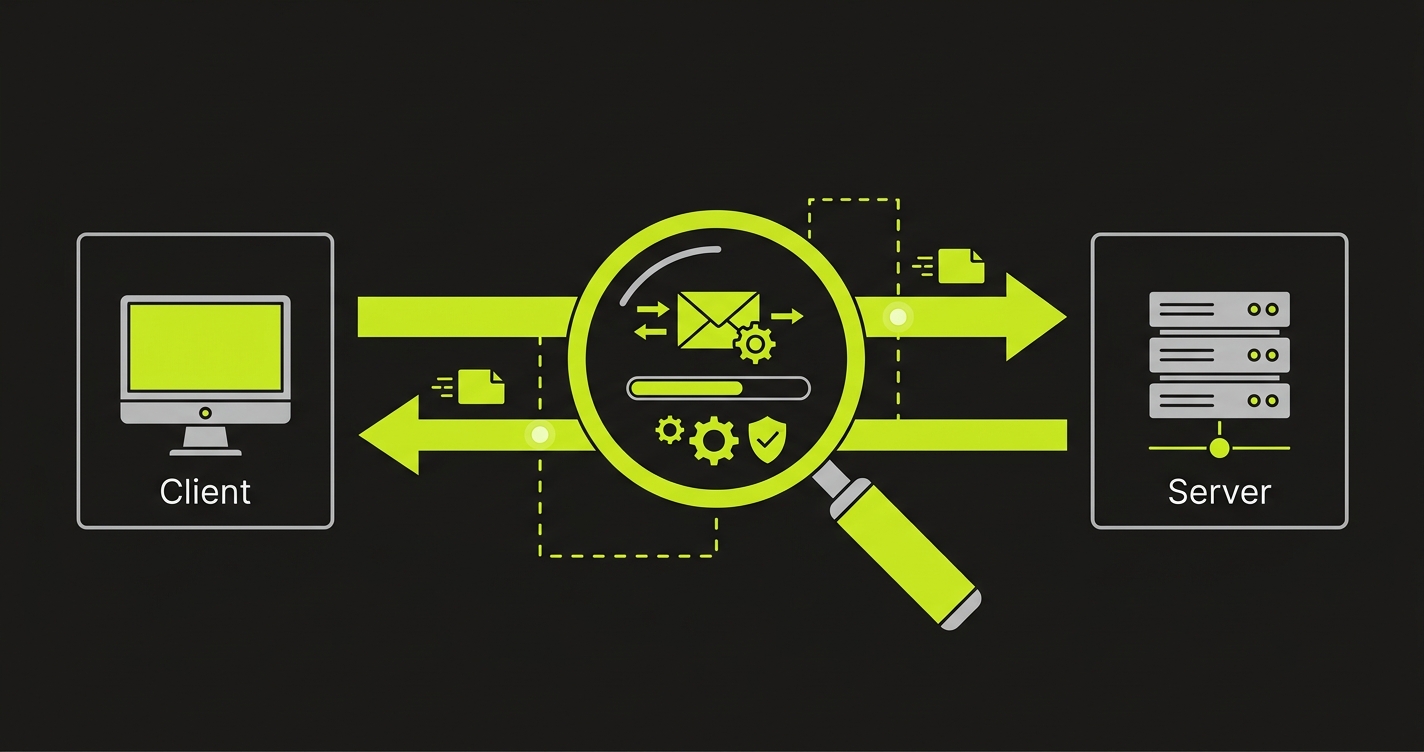
What OWASP Scanning Actually Covers
The OWASP API Security Top 10 gives security teams a shared vocabulary for the most critical API risks. Scanners like OWASP ZAP, Burp Suite, and StackHawk are built around this list. They send probe requests to your running API and look for responses that match known vulnerability signatures.
What they find is genuinely useful. API8:2023 Security Misconfiguration - missing CORS headers, verbose error messages with stack traces, endpoints responding to methods they should not accept. API2:2023 Broken Authentication - endpoints that accept requests without tokens, JWT validation that ignores signature verification, authentication endpoints that respond differently to valid vs invalid usernames (user enumeration). These are pattern-matching problems. A scanner probes for the pattern and flags what it finds.
The OWASP Top 10's most critical category tells the story of what scanners miss. API1:2023 is Broken Object Level Authorization (BOLA) - the vulnerability where a user can access another user's resource by changing an ID in the request. OWASP calls it the most prevalent and most impactful API vulnerability. Scanners cannot test for it reliably because BOLA is not a pattern in the response - it is a logic failure in your authorization layer that requires understanding your specific data model, user roles, and resource ownership rules.
The honest summary: run the scanner, fix the scanner findings, then start the testing work that the scanner cannot do.
See our SAST vs DAST comparison for how scanning tools fit into a broader security pipeline, and our guide to DAST tools for a deeper comparison of scanner capabilities, before diving into the behavioral layer.

How to Test API Authentication Flows
Authentication is not binary. Your API has a token. The question is whether every failure mode actually fails.
Most teams test the happy path: send a valid token, get a 200. The gaps are in the failure paths. What does your API return when someone sends a token signed with the wrong key? When a token has expired by 30 seconds? When a token is structurally valid but belongs to a deleted user account? When a token has the right structure but wrong scope claim for this endpoint?
Here is what a minimal authentication flow test matrix looks like:
// Authentication flow test suite
describe("POST /api/orders - authentication enforcement", () => {

    it("returns 401 when no token is provided", async () => {
        const res = await request(app).post("/api/orders").send(validPayload);
        expect(res.status).toBe(401);
    });

    it("returns 401 when token signature is tampered", async () => {
        const tampered = validToken.slice(0, -5) + "XXXXX";
        const res = await request(app)
            .post("/api/orders")
            .set("Authorization", `Bearer ${tampered}`)
            .send(validPayload);
        expect(res.status).toBe(401);
    });

    it("returns 401 when token is expired", async () => {
        const expired = generateToken({ userId: user.id, exp: Math.floor(Date.now() / 1000) - 3600 });
        const res = await request(app)
            .post("/api/orders")
            .set("Authorization", `Bearer ${expired}`)
            .send(validPayload);
        expect(res.status).toBe(401);
    });

    it("returns 401 when user account is deactivated mid-session", async () => {
        // Token was valid when issued; user was deactivated after issuance
        await db.users.update({ id: user.id }, { status: "deactivated" });
        const res = await request(app)
            .post("/api/orders")
            .set("Authorization", `Bearer ${stillValidToken}`)
            .send(validPayload);
        expect(res.status).toBe(401);
    });

    it("returns 403 when token scope does not include orders:write", async () => {
        const readOnlyToken = generateToken({ userId: user.id, scope: ["orders:read"] });
        const res = await request(app)
            .post("/api/orders")
            .set("Authorization", `Bearer ${readOnlyToken}`)
            .send(validPayload);
        expect(res.status).toBe(403);
    });

    it("returns 200 with valid token and correct scope", async () => {
        const res = await request(app)
            .post("/api/orders")
            .set("Authorization", `Bearer ${validToken}`)
            .send(validPayload);
        expect(res.status).toBe(201);
    });
});
Notice that the deactivated-user test is the one most teams miss. If your API validates the token signature and expiry without checking whether the underlying user record is still active, a deactivated employee retains access until their token expires. In most implementations that is 24 hours. For enterprise customers, that is a control failure.
The other test that reveals real bugs is the scope mismatch: a token that is perfectly valid but lacks the scope claim required for a write operation. If your authorization middleware checks authentication before scope, and a coding error skips the scope check, this test catches it before your enterprise customer's security team does.
API Authorization Boundary Testing
Authentication answers "who are you." Authorization answers "what are you allowed to do." They are separate checks, and the authorization check is where most API security bugs live in production.
BOLA is the canonical example. User A is authenticated. User A sends a GET request to /api/orders/12345. Order 12345 belongs to User B. Does your API return it?
If your authorization layer does:
// Vulnerable: checks authentication but not ownership
router.get("/api/orders/:id", authenticate, async (req, res) => {
    const order = await db.orders.findById(req.params.id);
    if (!order) return res.status(404).json({ error: "Not found" });
    return res.json(order);
});

// Secure: checks that the authenticated user owns this resource
router.get("/api/orders/:id", authenticate, async (req, res) => {
    const order = await db.orders.findOne({
        id: req.params.id,
        userId: req.user.id  // ownership check
    });
    if (!order) return res.status(404).json({ error: "Not found" });
    return res.json(order);
});
The vulnerable version passes every scanner check. No SQL injection. No missing auth header. The authentication middleware runs. The problem is that the authentication check and the ownership check are two different things, and the vulnerable version only does one of them.
Testing for this requires creating two authenticated users and verifying that cross-access fails:
describe("GET /api/orders/:id - authorization boundary", () => {

    let userA, userB, userAToken, userBToken, orderBelongingToB;

    beforeAll(async () => {
        userA = await createUser({ email: "a@test.com" });
        userB = await createUser({ email: "b@test.com" });
        userAToken = generateToken({ userId: userA.id });
        userBToken = generateToken({ userId: userB.id });
        orderBelongingToB = await createOrder({ userId: userB.id });
    });

    it("allows user B to access their own order", async () => {
        const res = await request(app)
            .get(`/api/orders/${orderBelongingToB.id}`)
            .set("Authorization", `Bearer ${userBToken}`);
        expect(res.status).toBe(200);
        expect(res.body.id).toBe(orderBelongingToB.id);
    });

    it("denies user A access to user B's order", async () => {
        const res = await request(app)
            .get(`/api/orders/${orderBelongingToB.id}`)
            .set("Authorization", `Bearer ${userAToken}`);
        // Must be 403 or 404 - never 200
        expect([403, 404]).toContain(res.status);
        // Must not leak the order data
        expect(res.body.userId).toBeUndefined();
    });
});
The second assertion matters as much as the first. A common mistake is returning a 404 for unauthorized access (good - does not confirm the resource exists) but still including partial data in the response body (bad - confirms the resource exists and exposes some fields). The test needs to verify that no data leaks through the error response.
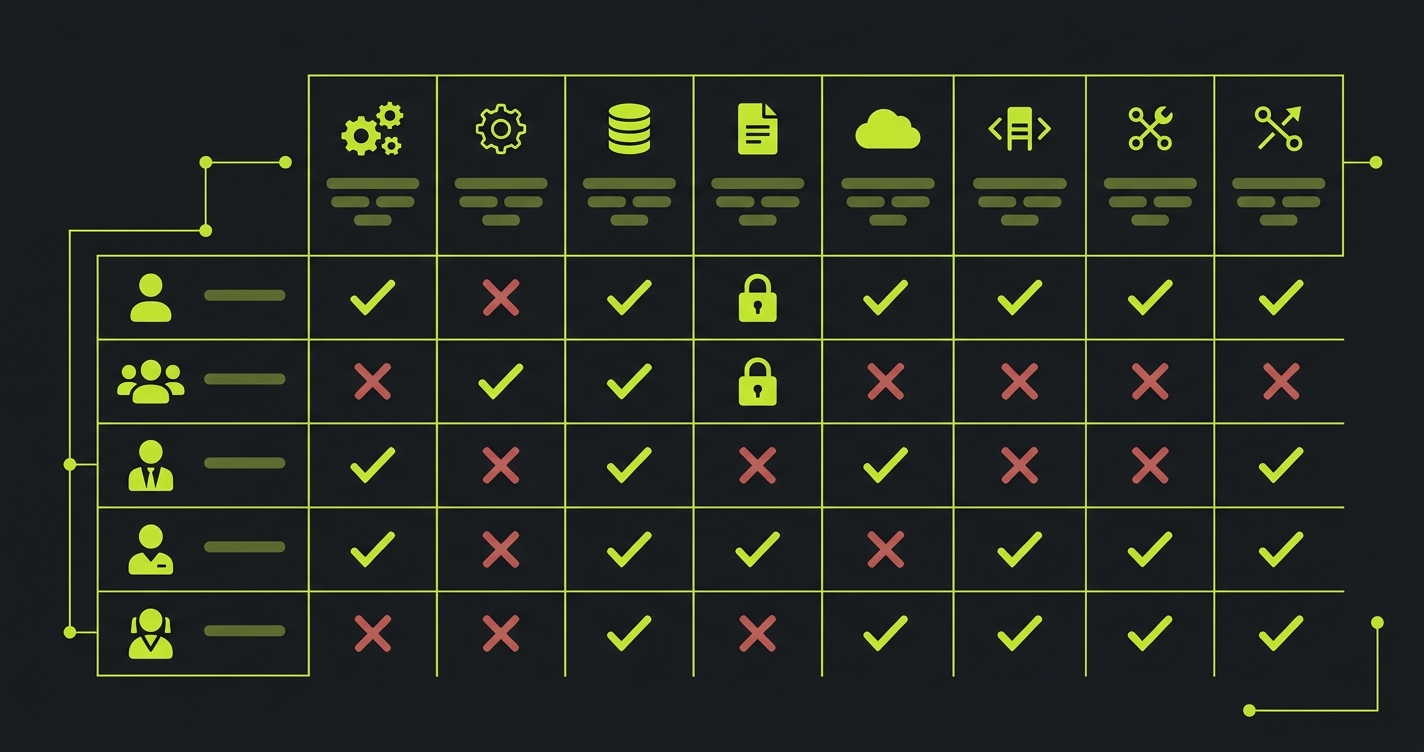
Role-Based Authorization: The Matrix Problem
BOLA is horizontal privilege escalation (user accessing another user's resources at the same privilege level). Broken Function Level Authorization (API5:2023) is vertical privilege escalation - a lower-privilege user accessing admin functions.
The challenge with role-based authorization is combinatorial. If you have 5 roles and 20 protected endpoints, you have 100 role-endpoint combinations to verify. Most teams test the happy paths (admin can do everything, viewer can only read) but skip the edge cases (can a manager promote another manager to admin? Can a billing-only role access user management endpoints?).
The approach that scales is a permission matrix test: define expected access for each role-endpoint pair, then generate tests that verify each cell:
const permissionMatrix = [
    // [role, endpoint, method, expectedStatus]
    ["admin",   "/api/users",        "GET",    200],
    ["admin",   "/api/users",        "POST",   201],
    ["admin",   "/api/users/:id",    "DELETE", 200],
    ["manager", "/api/users",        "GET",    200],
    ["manager", "/api/users",        "POST",   403],
    ["manager", "/api/users/:id",    "DELETE", 403],
    ["viewer",  "/api/users",        "GET",    200],
    ["viewer",  "/api/users",        "POST",   403],
    ["viewer",  "/api/users/:id",    "DELETE", 403],
];

describe("Role-based authorization matrix", () => {
    permissionMatrix.forEach(([role, endpoint, method, expectedStatus]) => {
        it(`${role} ${method} ${endpoint} -> ${expectedStatus}`, async () => {
            const token = generateToken({ userId: users[role].id, role });
            const res = await request(app)[method.toLowerCase()](endpoint)
                .set("Authorization", `Bearer ${token}`);
            expect(res.status).toBe(expectedStatus);
        });
    });
});
This generates 9 tests from 9 matrix entries. At 100 role-endpoint combinations it still runs in seconds. When a new endpoint is added or a role's permissions change, updating the matrix and re-running the test suite verifies the entire permission model in one step.
Data Exposure Testing
Authentication and authorization control who can reach an endpoint. Data exposure testing controls what they see when they get there.
API3:2023 (Broken Object Property Level Authorization) covers the scenario where an endpoint returns more fields than the requesting user should see. An admin route returns a user object with all fields including a hashed password, internal flags, and billing details. Someone queries the same endpoint as a regular user and gets the same response. The authorization check passed (they are allowed to GET this user's public profile). The data exposure check failed (they should not see the internal fields).
The pattern is common in ORMs and serialization layers that return the full model by default:
// Vulnerable: returns full user model regardless of caller's role
router.get("/api/users/:id", authenticate, async (req, res) => {
    const user = await db.users.findById(req.params.id);
    return res.json(user);  // includes passwordHash, internalFlags, billingToken
});

// Secure: serializes based on caller's role
router.get("/api/users/:id", authenticate, async (req, res) => {
    const user = await db.users.findById(req.params.id);
    const serialized = req.user.role === "admin"
        ? serializeUserAdmin(user)
        : serializeUserPublic(user);
    return res.json(serialized);
});
Testing for this requires verifying the shape of the response, not just the status code:
describe("GET /api/users/:id - data exposure", () => {

    it("does not expose internal fields to viewer role", async () => {
        const res = await request(app)
            .get(`/api/users/${targetUser.id}`)
            .set("Authorization", `Bearer ${viewerToken}`);

        expect(res.status).toBe(200);

        // Assert sensitive fields are absent
        expect(res.body).not.toHaveProperty("passwordHash");
        expect(res.body).not.toHaveProperty("internalFlags");
        expect(res.body).not.toHaveProperty("stripeCustomerId");
        expect(res.body).not.toHaveProperty("billingToken");

        // Assert public fields are present
        expect(res.body).toHaveProperty("id");
        expect(res.body).toHaveProperty("name");
        expect(res.body).toHaveProperty("email");
    });

    it("exposes admin fields only to admin role", async () => {
        const res = await request(app)
            .get(`/api/users/${targetUser.id}`)
            .set("Authorization", `Bearer ${adminToken}`);

        expect(res.status).toBe(200);
        expect(res.body).toHaveProperty("internalFlags");
        expect(res.body).toHaveProperty("stripeCustomerId");
    });
});
The other data exposure test that catches real bugs is pagination behavior. Cursor-based pagination is generally safe. Offset-based pagination can leak records across tenant boundaries when a user manipulates the offset to land on records they did not create. Testing this requires verifying that paginated endpoints scope results to the authenticated user's accessible records, not the full table.
API Rate Limit Testing and Resource Consumption
API4:2023 (Unrestricted Resource Consumption) covers the scenario where your API has no protection against automated abuse: a script can call your password reset endpoint ten thousand times, run up your AI inference costs, or exhaust your database connection pool.
Rate limiting tests are straightforward to write but frequently skipped because teams assume their infrastructure handles it. Infrastructure-level rate limiting (nginx, API gateway) is not the same as application-level rate limiting on specific sensitive endpoints. Test both:
describe("POST /api/auth/password-reset - rate limiting", () => {

    it("rejects requests after 5 attempts per IP within 15 minutes", async () => {
        // Send 5 requests (should succeed)
        for (let i = 0; i < 5; i++) {
            const res = await request(app)
                .post("/api/auth/password-reset")
                .set("X-Forwarded-For", "192.168.1.100")
                .send({ email: "test@example.com" });
            expect(res.status).toBe(200);
        }

        // 6th request should be rate limited
        const blocked = await request(app)
            .post("/api/auth/password-reset")
            .set("X-Forwarded-For", "192.168.1.100")
            .send({ email: "test@example.com" });

        expect(blocked.status).toBe(429);
        expect(blocked.headers["retry-after"]).toBeDefined();
    });
});
The Retry-After header assertion is worth including: enterprise customers running automated integrations with your API need to handle rate limit responses gracefully. An endpoint that returns 429 with no retry guidance is a compliance gap in some procurement requirements.
Input Validation and Injection Testing
Input validation testing verifies that your API rejects malformed, oversized, or malicious input before it reaches your business logic. This is the category where OWASP scanners perform best: SQL injection patterns, command injection, path traversal, and XXE are well-understood attack signatures that scanners detect reliably.
If your API passes user-supplied input to database queries, shell commands, or file system operations, scanner coverage for these patterns is essential. The gap is not in detection but in scope: scanners test the input vectors they know about. Custom parameters, complex nested JSON payloads, and application-specific validation rules (maximum transfer amounts, allowed characters in usernames, valid date ranges) require tests written against your business rules.
The tests in the earlier sections of this article (authentication flows, authorization boundaries, data exposure) cover what scanners cannot reach. Input validation testing is where scanners and behavioral tests overlap: scanners catch the known patterns, and your test suite verifies the application-specific validation rules that no scanner can infer from a probe request.
API Security Testing Tools Compared
| Tool | Type | OWASP Pattern Detection | Auth Flow Testing | Authorization Boundaries | Data Exposure Testing | CI/CD Integration |
|---|---|---|---|---|---|---|
| OWASP ZAP | Scanner (Free) | Strong | None | None | None | Yes |
| Burp Suite Pro | Scanner | Strong | Manual only | Manual only | Manual only | Limited |
| StackHawk | Developer DAST | Strong | None | None | None | Yes |
| Postman | Manual testing | None | Manual only | Manual only | Manual only | Partial |
| Autonoma | Behavioral testing | Complementary | Automated from code | Automated from code | Automated from code | Yes |
Scanners and behavioral testing tools are complementary. Run both: scanners for known vulnerability patterns, behavioral tests for logic failures specific to your application. The combination covers more ground than either approach alone.
How API Security Testing Fits Your Overall Testing Strategy
Security testing and functional API testing are not separate disciplines. A test that verifies your authorization boundary - user A cannot access user B's order - is simultaneously a functional test (the endpoint enforces resource ownership) and a security test (BOLA is not present).
This is the point that our API testing strategy guide makes about prioritization: the highest-value tests are the ones that sit at the intersection of critical business logic and security requirements. Auth flows and authorization boundaries qualify on both dimensions.
The practical implication is that building your API security test suite does not require a separate toolchain from your existing API tests. The same test runner, the same database setup utilities, the same fixture factories. What changes is the test design: instead of only testing what should work, you systematically test what should fail.
How Autonoma Generates These Tests From Your Codebase
Writing authentication flow tests and authorization boundary tests manually is tractable for 10 endpoints. At 100 endpoints with 5 roles, the matrix is 500 combinations. Most teams write the obvious cases and leave the edge cases untested because the setup time is prohibitive.
This is what we built Autonoma to solve. Our Planner agent reads your codebase - your route definitions, your authentication middleware, your authorization checks, your serialization layer - and plans test cases for every code path it finds. It identifies every endpoint that has authorization logic, every role that exists in your permission model, every serializer that might return sensitive fields.
The Automator agent executes those test cases against your running application. The Maintainer agent keeps them passing as your code changes. When you add a new endpoint, the Planner reads the new route and adds it to the test matrix automatically. When you change a serializer, the Maintainer detects the change and updates the data exposure assertions.
The result is coverage at a scale that manual test authoring cannot match. Not because the tests are less rigorous, but because the generation and maintenance work is handled by agents that read your code rather than by engineers who have to write tests from scratch.
For enterprise API testing coverage, the pattern looks like this: run your DAST scanner for OWASP pattern detection, run your SAST tool for code-level vulnerability scanning, and use Autonoma for behavioral API testing - the authentication flows, authorization boundaries, and data exposure rules that scanners cannot reach.
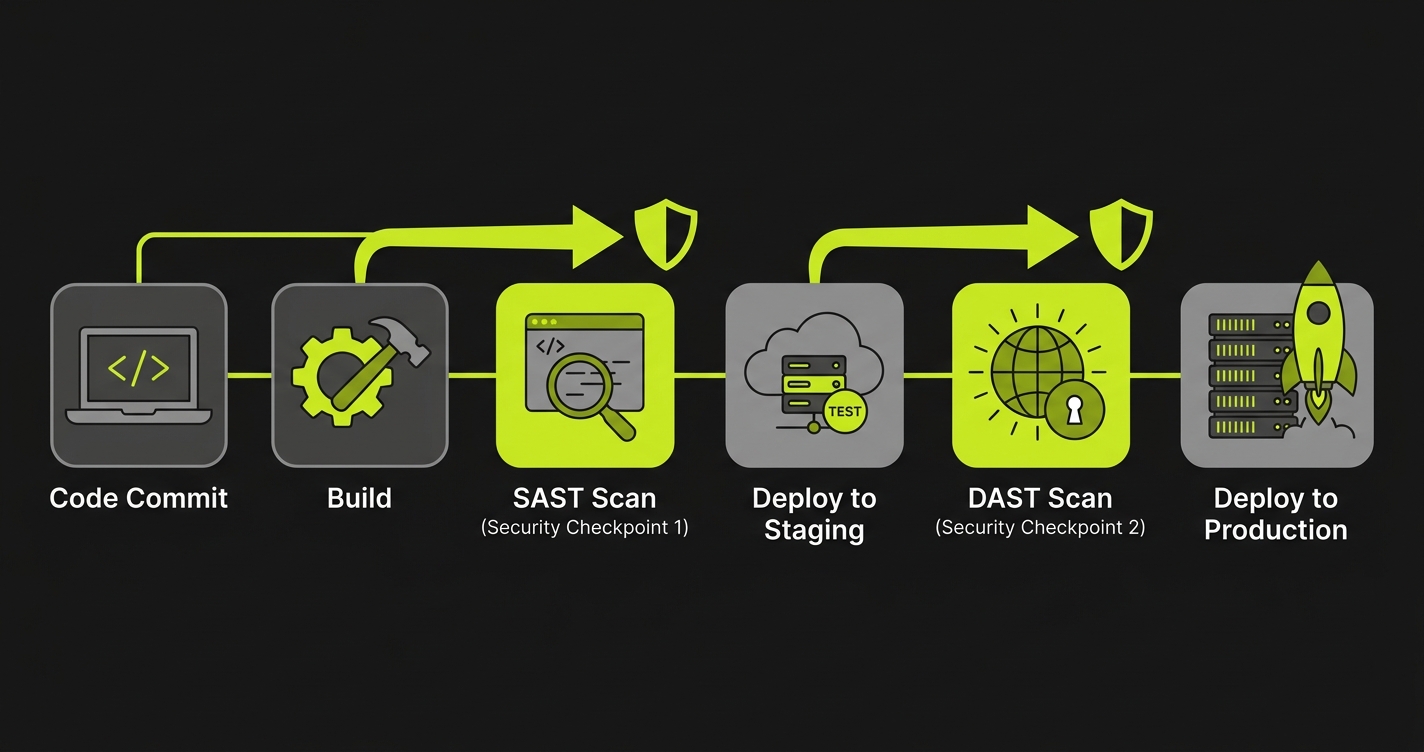
In a CI/CD pipeline, this translates to a three-stage security gate: unit tests and SAST scanning run on every commit, API security tests (authentication flows and the authorization permission matrix) run on every pull request, and DAST scanning runs on deployed preview environments. The behavioral tests generate evidence artifacts on each run, so when the security questionnaire arrives, the evidence is already produced and timestamped. Running these tests on every deployment aligns with a continuous testing approach that enterprise buyers increasingly expect.
Putting It Together for Enterprise Security Reviews
Enterprise security questionnaires have become more specific about API security. "We use OWASP ZAP" no longer closes the loop. The questions that stall deals now are:
How do you verify that your authorization layer prevents cross-user data access? What is your test coverage for authentication failure modes? How do you ensure that sensitive fields are not leaked to unauthorized roles? How do you test that rate limiting is enforced on sensitive endpoints?
Each of those questions has a specific answer: a test suite that exercises the failure cases, generates evidence, and runs on every deployment. The tests in this article are the starting point. Authentication flow testing covers question two. Authorization boundary testing covers question one. Data exposure testing covers question three. Rate limiting tests cover question four.
The same test evidence applies beyond SOC 2. PCI DSS Requirement 6.5 requires secure coding practices with verified access controls. HIPAA's Security Rule requires technical safeguards for access control and audit logging. GDPR Article 32 requires appropriate security measures including the ability to ensure ongoing confidentiality of processing systems. The authorization boundary tests and data exposure tests in this article generate evidence that satisfies all three frameworks. For a broader view of how testing fits into compliance workflows, see our compliance automation guide.
The gap that OWASP scanning leaves is not a criticism of scanning tools - they solve the problem they were designed to solve. The gap is structural: scanning finds known patterns, and the most critical API security failures are behavioral bugs in your specific logic that no pattern can detect in advance.
API Security Testing Checklist
The minimum test coverage that satisfies enterprise security questionnaires:
| Category | Test | What It Catches |
|---|---|---|
| Authentication | Expired token returns 401 | Token expiry bypass |
| Authentication | Tampered token returns 401 | Signature validation failure |
| Authentication | Wrong scope returns 403 | Scope enforcement gaps |
| Authentication | Deactivated user returns 401 | Stale session access |
| Authorization | User A cannot access User B's resource | BOLA (API1:2023) |
| Authorization | Lower role cannot access higher role endpoints | Privilege escalation (API5:2023) |
| Authorization | Permission matrix covers all role-endpoint pairs | Missing authorization checks |
| Data Exposure | Viewer role does not see internal fields | Over-exposed serialization (API3:2023) |
| Data Exposure | Pagination scoped to authenticated user | Cross-tenant data leaks |
| Rate Limiting | Sensitive endpoints return 429 after threshold | Resource exhaustion (API4:2023) |
| Rate Limiting | 429 response includes Retry-After header | Missing rate limit guidance |
| Scanner Baseline | OWASP ZAP or Burp Suite scan with zero critical findings | Known vulnerability patterns |
| Scanner Baseline | No SQL injection or command injection in custom parameters | Input validation gaps |
API security testing is the practice of verifying that your API enforces the security rules your code says it enforces. It covers three areas that OWASP scanning misses: authentication flow testing (verifying that token validation, session expiration, and MFA enforcement work correctly), authorization boundary testing (verifying that users can only access resources they are permitted to access, across all role combinations), and data exposure testing (verifying that responses do not include sensitive fields that should be restricted or omitted). OWASP scanning finds known vulnerability patterns. API security testing finds behavioral failures in your own business logic.
The OWASP API Security Top 10 is a ranked list of the most critical API security risks, maintained by the Open Web Application Security Project. The 2023 edition includes: API1 Broken Object Level Authorization (BOLA), API2 Broken Authentication, API3 Broken Object Property Level Authorization, API4 Unrestricted Resource Consumption, API5 Broken Function Level Authorization, API6 Unrestricted Access to Sensitive Business Flows, API7 Server Side Request Forgery, API8 Security Misconfiguration, API9 Improper Inventory Management, and API10 Unsafe Consumption of APIs. DAST tools scan for pattern signatures matching these categories. They cannot test whether your specific authorization logic works correctly across all role and resource combinations.
OWASP API scanning misses behavioral failures in your business logic. A scanner can detect that an endpoint exists without authentication. It cannot detect that your admin role check has a bug that allows managers to escalate privileges under specific conditions. It cannot detect that your pagination endpoint leaks records belonging to a different tenant when offset parameters are manipulated. It cannot detect that your password reset flow accepts expired tokens because your token expiry check runs before your token validity check. These are not known vulnerability patterns - they are bugs in your specific code, and they require tests that understand your specific authorization model.
API authentication flow testing means writing tests that verify every failure mode: expired tokens should return 401, tampered tokens should return 401, missing tokens should return 401, tokens with wrong scope should return 403, and valid tokens should return 200. Beyond the happy path, test the edge cases: what happens when a token is revoked mid-session, what happens when a user is deactivated while their token is still valid, what happens when the token signing key is rotated. Tools like Autonoma (https://getautonoma.com) generate these tests automatically from your codebase by reading your authentication middleware and planning test cases for every code path.
API authorization boundary testing requires creating two authenticated users and verifying that cross-access fails: user A requests user B's resource by ID, the response must be 403 or 404, and the response body must not leak any data. For role-based authorization, build a permission matrix of roles against endpoints and verify each combination. Admin can POST to /api/users, manager cannot, viewer cannot. This matrix approach scales to hundreds of combinations and generates a test for each cell automatically.
API security testing tools fall into two categories. Scanners like OWASP ZAP, Burp Suite, and StackHawk find known vulnerability patterns by sending probe requests. They are good for OWASP Top 10 coverage and known misconfigurations. Behavioral testing tools verify that your API enforces business rules correctly. Autonoma (https://getautonoma.com) connects to your codebase, reads your routes and authorization logic, and generates tests that verify authentication flows, authorization boundaries, and data exposure rules. The two categories are complementary: scanners catch known patterns, behavioral tests catch logic failures specific to your application.
SOC 2 Type II requires continuous evidence that your access controls work as designed. For API-first products, this means test evidence showing that authentication is enforced on protected endpoints, that authorization prevents cross-user data access, and that sensitive data fields are not exposed in API responses to unauthorized roles. Security auditors increasingly ask for automated test runs as evidence rather than accepting architecture documentation. A test suite covering your authentication flows and authorization boundaries generates the evidence SOC 2 auditors expect.