
Cursor vs Windsurf is the AI IDE decision most professional developers are making in 2026. Both tools accelerate code generation significantly. The question nobody asks: which one produces code you can actually ship? This article runs the same tasks through both IDEs — a REST API endpoint, a multi-file refactor, a debugging session, and a component with edge cases — and compares the output quality, not just the generation speed. Bottom line: Cursor has better context management for production codebases; Windsurf's Cascade agent takes more initiative but produces output that needs more post-generation review. Neither handles testing well on its own. When we ran both outputs through Autonoma, the verification results told a different story than the code review.
Most cursor vs windsurf (or windsurf vs cursor, same question) comparisons run different prompts in each tool and eyeball the results. That's not a comparison, it's a vibe check.
I ran four identical tasks through both IDEs: a REST API endpoint with auth and validation, a multi-file service layer extraction, a debugging session from production logs, and a React component with conditional edge cases. Same prompt, both tools, output evaluated on four dimensions -- correctness, error handling, how much cleanup was needed before shipping, and whether the code fit the patterns already in the codebase. The results weren't close on every dimension. Cursor won on context fidelity. Windsurf won on initiative. Neither won on testing.
What I didn't expect was how often "works in isolation" and "shippable" turned out to be two completely different bars.
Cursor vs Windsurf: Quick Verdict
Cursor wins on: context fidelity, codebase pattern matching, multi-file refactoring accuracy, model flexibility (Claude Sonnet 4.5, GPT-5.x, Gemini 3).
Windsurf wins on: setup speed, autonomous initiative, catching adjacent issues, lower barrier to entry, broader IDE support (40+ plugins including JetBrains).
Neither wins on: testing or automated verification. Autonoma is what closes that gap — it caught issues in both tools' output that manual review missed.
Both tools run $20/month for Pro tier as of early 2026. Cursor hit $2B ARR with 2M+ users. Windsurf was acquired by Cognition for $250M, gaining enterprise-grade compliance certifications (FedRAMP, HIPAA, ITAR). The pricing parity means the decision comes down to workflow fit, not cost.
The Setup: Same Tasks, Both IDEs
For this comparison, I ran identical prompts for four task categories and evaluated the output on dimensions that matter for production code: correctness, error handling, test coverage, and how much cleanup was needed before the code was shippable.
The tasks:
A REST API endpoint with authentication and input validation. A multi-file refactor extracting a service layer from a fat controller. A debugging session on a production error from logs. A React component with multiple conditional states and edge cases.
The codebase was a Node.js/TypeScript API with a React frontend — representative of what most teams are actually running.
Regardless of which AI coding tool you pick, automated testing of the output is critical. Autonoma handles this with AI agents that generate and run E2E tests from your codebase on every PR.
Context Management: Where the Real AI IDE Difference Lives
Before the output quality, there's the question of how each tool understands your codebase.
Cursor's approach is explicit and manual. You use @ references to pull specific files, functions, or documentation into context before you prompt. Combined with a .cursorrules file that defines your conventions and constraints, this means Cursor's output reflects what's actually in your codebase. When I added a new API endpoint, Cursor knew the existing auth middleware pattern because I'd pulled it in with @src/middleware/auth.ts. The generated code used the same pattern. No deviation.
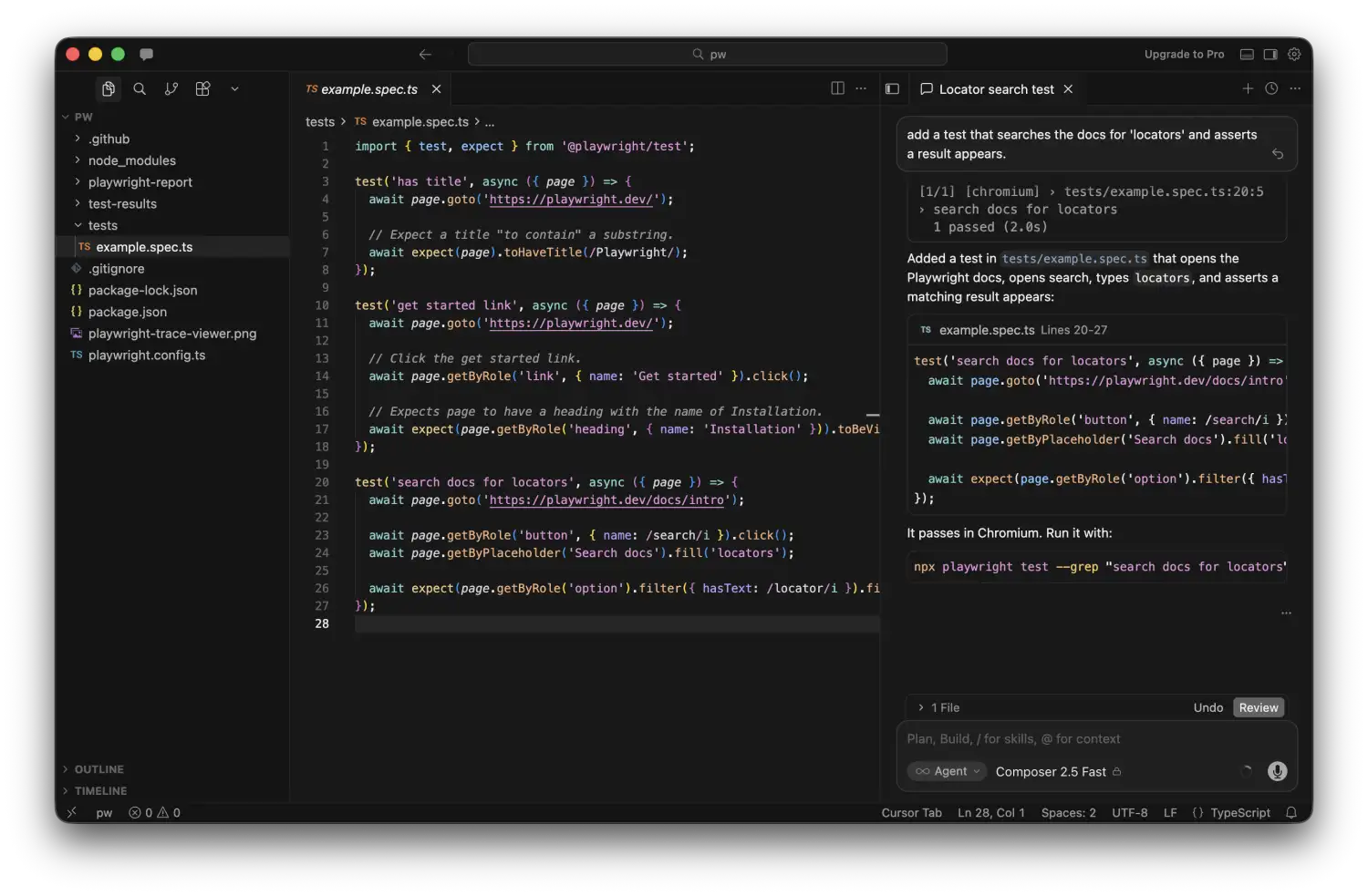
Windsurf's approach is autonomous. The Cascade agent reads your codebase, decides what's relevant, and builds its own context map. This works remarkably well for smaller tasks — Windsurf often pulls in context you didn't think to specify. On larger tasks, it occasionally misses a dependency or assumes a pattern that doesn't match your actual conventions. You notice this in the output: the generated code works in isolation but doesn't quite fit the surrounding codebase.
Neither approach is strictly better. Cursor's explicit context requires more upfront effort and discipline. Windsurf's autonomous context requires more post-generation review. Teams that invest in good .cursorrules get consistently better output from Cursor. Teams that don't bother with that setup often find Windsurf faster to use out of the box.
Task 1: REST API Endpoint with Auth and Validation
The prompt: "Add a PATCH /users/:id/profile endpoint that validates the request body, checks that the authenticated user can only update their own profile, and returns the updated profile."
Cursor's output (with auth middleware in context via @):
// Cursor output — auth pattern matched existing middleware exactly
router.patch('/users/:id/profile', authenticate, async (req: AuthRequest, res: Response) => {
  const { id } = req.params;

  if (req.user.id !== id) {
    return res.status(403).json({ error: 'Forbidden: cannot update another user\'s profile' });
  }

  const schema = z.object({
    displayName: z.string().min(1).max(100).optional(),
    bio: z.string().max(500).optional(),
    avatarUrl: z.string().url().optional(),
  });

  const parsed = schema.safeParse(req.body);
  if (!parsed.success) {
    return res.status(400).json({ error: parsed.error.flatten() });
  }

  const updated = await userService.updateProfile(id, parsed.data);
  return res.json(updated);
});
The auth check is correct, the validation schema matched the Zod patterns used elsewhere in the codebase, and the error responses matched the existing format. This is shippable with minor review.
Windsurf's output (no explicit context added):
// Windsurf output — functionally correct, different patterns
router.patch('/users/:id/profile', authMiddleware, async (req, res) => {
  try {
    if (req.user?.id !== req.params.id) {
      return res.status(403).json({ message: 'Unauthorized' });
    }

    const { displayName, bio, avatarUrl } = req.body;

    // Basic validation
    if (displayName && typeof displayName !== 'string') {
      return res.status(400).json({ message: 'Invalid displayName' });
    }

    const user = await User.findByIdAndUpdate(
      req.params.id,
      { displayName, bio, avatarUrl },
      { new: true }
    );

    res.json(user);
  } catch (error) {
    res.status(500).json({ message: 'Server error' });
  }
});
Windsurf's output is functionally correct but diverges in three ways: it uses message instead of error for error responses (inconsistent with the rest of the API), it uses bare field validation instead of Zod (inconsistent with the pattern elsewhere), and it's calling User.findByIdAndUpdate directly instead of going through the service layer. None of these are bugs. All of them create inconsistency that you'll have to clean up before the PR passes review.
This is the core Cursor vs Windsurf trade-off on production codebases: Cursor with explicit context produces output that fits the existing codebase. Windsurf produces output that works but requires normalization.
Task 2: Multi-File Refactor
The prompt: "Extract the business logic from UserController into a UserService class. The service should be injectable and the controller should delegate to it."
This is where the comparison gets more interesting, because refactoring requires understanding what changes cascade across files.
Cursor handled this cleanly. I pulled in the controller, the existing service pattern from another module, and the dependency injection setup with @ references. Cursor generated the new service file, updated the controller, and adjusted the import in the router file. The resulting diff was clean and correct.
Windsurf's Cascade agent autonomously found the relevant files and generated the refactor without any @ references from me. It correctly created the service, updated the controller, and updated the router import. The issue appeared in a test file I hadn't thought about — Windsurf updated the controller but didn't find or update the unit test that was mocking the controller's internal methods. The tests broke. Cursor would have missed this too without being told about the test file, but the explicit context model makes it easier to proactively include test files in the refactor scope.
Task 3: Debugging from Logs
The prompt: "Here's a production error: TypeError: Cannot read properties of undefined (reading 'id') in orderService.ts:147. Find the root cause and fix it."
I pasted the stack trace and the relevant log lines into both tools.
Cursor correctly identified that the error came from a missing null check on an optional relationship — order.customer could be null when a guest checkout order was queried. The fix was a null guard before accessing order.customer.id. Clean, minimal, correct.
Windsurf identified the same root cause and proposed the same fix. It also noticed a related pattern two functions lower in the file where the same null check was missing. I hadn't asked it to look there. It fixed both. This is Windsurf at its best: the autonomous agent reads beyond the immediate problem and catches adjacent issues. Whether that's useful or concerning depends on how much you trust the AI to make changes you didn't explicitly request.
Task 4: React Component with Edge Cases
The prompt: "Build a UserProfileCard component. It should handle: loading state, error state, empty profile (no bio/avatar set), and the fully populated state."
Both tools generated components that handled all four states. The quality difference was in the edge case handling for the empty state.
Cursor's output:
// Cursor — empty state with specific fallback logic
const UserProfileCard = ({ userId }: { userId: string }) => {
  const { data: profile, isLoading, error } = useProfile(userId);

  if (isLoading) return <ProfileSkeleton />;
  if (error) return <ErrorBanner message="Could not load profile" retry={refetch} />;

  const hasAvatar = Boolean(profile?.avatarUrl);
  const hasBio = Boolean(profile?.bio?.trim());

  return (
    <Card>
      {hasAvatar ? (
        <Avatar src={profile.avatarUrl} alt={profile.displayName} />
      ) : (
        <AvatarPlaceholder initials={getInitials(profile.displayName)} />
      )}
      <h2>{profile.displayName ?? 'Anonymous'}</h2>
      {hasBio ? (
        <p className="bio">{profile.bio}</p>
      ) : (
        <p className="bio bio--empty">No bio added yet.</p>
      )}
    </Card>
  );
};
Windsurf's output handled loading and error states correctly but used optional chaining throughout without explicit empty-state differentiation — {profile?.bio || 'No bio added yet.'}. Functionally equivalent for users, but it collapses the empty string case and the undefined case into the same fallback, which can mask bugs where a bio was set but later cleared.
Production Readiness: How Much Cleanup Does Each Tool Need?
This is the question the Cursor vs Windsurf comparison should be answering, and nobody measures it.
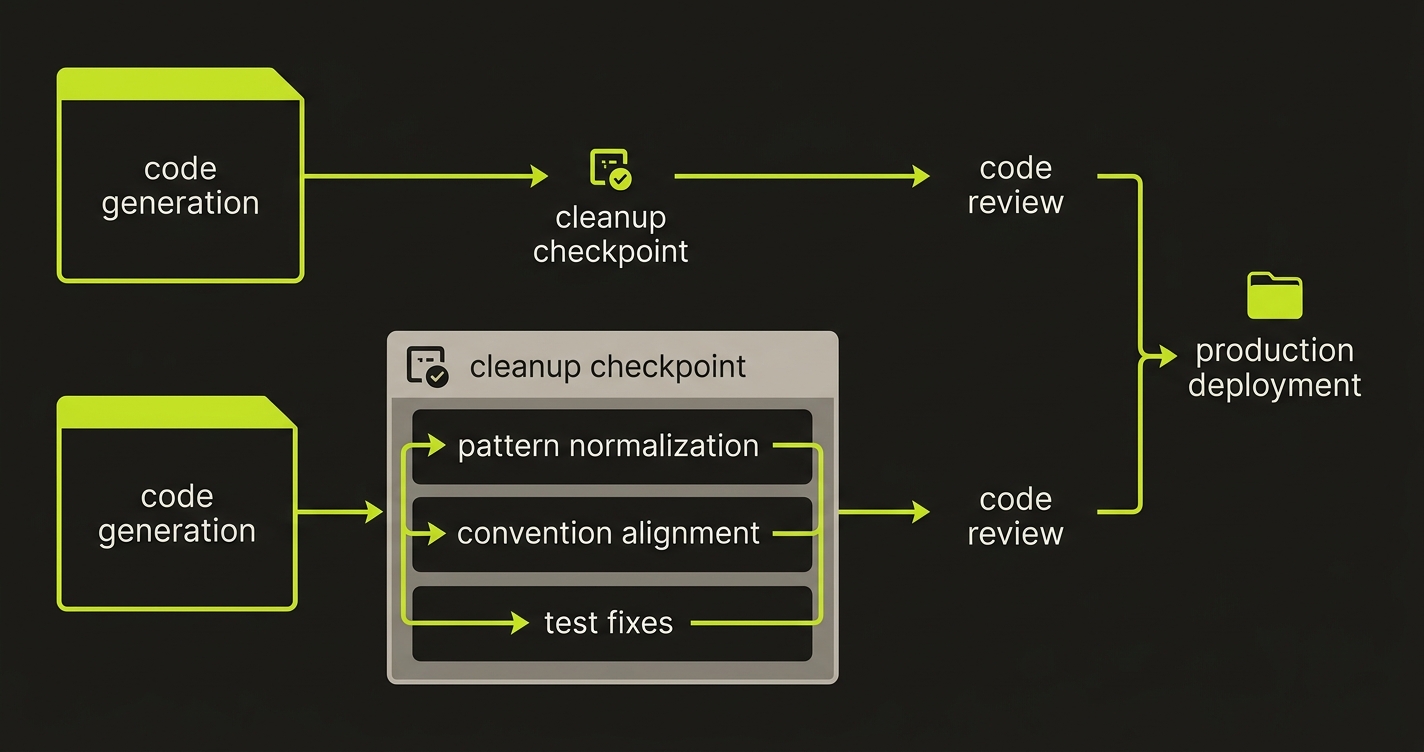
Across the four tasks, here's how I'd characterize the cleanup burden:
Cursor with good context setup (.cursorrules + @ references) produces output that closely matches your existing codebase conventions. You're mostly reviewing for correctness. The review time is roughly what you'd spend reviewing a junior engineer's PR — focused on logic, not on reformatting or pattern normalization.
Windsurf produces output faster with less setup. But on production codebases with established patterns, you're reviewing for correctness and normalizing conventions — error response formats, service layer patterns, test coverage. The review time is longer, but you also get the benefit of the Cascade agent catching adjacent issues you might have missed.
Neither tool reliably generates code that passes your existing test suite on the first attempt. This is the actual production readiness gap for both tools. The code looks correct. It passes a click-through. The edge cases in your existing test suite are a different story.
| Task | Cursor Cleanup | Windsurf Cleanup |
|---|---|---|
| REST API Endpoint | Minor review only | 3 pattern normalizations (error format, validation lib, service layer) |
| Multi-File Refactor | Clean (with explicit context) | Missed test file update, tests broke |
| Debugging | Correct, minimal fix | Correct + found adjacent issue unprompted |
| React Component | Explicit edge case handling | Optional chaining masks empty vs undefined |
| Verification (Autonoma) | All tests passed | 3 test failures flagged (auth, validation, service layer) |
Cursor vs Windsurf: Head-to-Head Comparison
| Dimension | Cursor | Windsurf |
|---|---|---|
| Pricing (Pro) | $20/month | $20/month |
| IDE Support | VS Code fork only | 40+ IDE plugins (JetBrains, Vim, XCode) |
| Context Approach | Manual @ references + .cursorrules | Automatic Cascade indexing |
| Agent Mode | Composer + Background Agents | Cascade (autonomous) |
| Model Selection | Claude 4.x, GPT-5.x, Gemini 3, Grok | Claude via Cascade, SWE-1.5 |
| Autocomplete | Supermaven (fastest in benchmarks) | Supercomplete (solid, slightly slower) |
| Codebase Pattern Fidelity | High (with setup investment) | Good (occasional drift on large codebases) |
| Post-Generation Cleanup | Less (correctness review only) | More (convention normalization needed) |
| Enterprise/Compliance | Enterprise tier available | FedRAMP, HIPAA, ITAR certified |
| Best For | Production codebases, precise control | Greenfield projects, autonomous workflows |
The Missing Dimension: What Happens When You Actually Test the Output
The four tasks above compare what each IDE generates. But comparing generation output without verifying it is like comparing two chefs by reading their recipes and never tasting the food. I ran both tools' Task 1 and Task 2 output through Autonoma to see what a verification layer actually catches.
Task 1 verification (REST API endpoint): Autonoma's Planner agent read both implementations and generated test cases covering auth boundary conditions, input validation edge cases, and error response format consistency. Cursor's output passed cleanly — the Zod validation, auth check, and error format were all consistent with the existing codebase. Windsurf's output triggered three failures: the error response used message instead of error (breaking API contract consistency), the bare field validation missed nested object validation that Zod would have caught, and the direct User.findByIdAndUpdate call bypassed the service layer, which meant the service-level logging and event hooks never fired. None of these showed up in a code review. All of them showed up under test.
Task 2 verification (multi-file refactor): Autonoma's Diffs Agent detected the broken unit test that Windsurf missed, the one mocking controller internals that now belonged to the service layer. Both outputs compiled. Both looked correct in the PR diff. Only Cursor's output passed the existing test suite. Windsurf's refactor broke three tests that nobody would have caught until CI ran, or worse, until production.
The pattern is clear: generation quality and verification quality measure different things. Cursor's explicit context model produces output that passes verification more often. Windsurf's autonomous approach produces output that needs the verification layer more urgently. But neither tool includes that layer. Autonoma reads your codebase, generates the tests, and keeps them passing as either IDE generates new code — the quality gate that makes the comparison above actually meaningful. For the full workflow, see how vibe coding best practices fit autonomous testing into the generation cycle.
Which AI IDE Should You Use?
The honest answer: it depends on what you're optimizing for, and neither is universally better.
Cursor is the better choice if you work on a complex, established codebase with existing conventions. The explicit context model means output fits your codebase when you invest in .cursorrules and consistent @ reference usage. The model flexibility (Claude Sonnet 4.5, GPT-5.x, Gemini 3) lets you match the model to the task. It's closer to a precision instrument.
Windsurf is the better choice if you want the AI to take more initiative and you're working on newer or greener codebases where there's less existing convention to match. The Cascade agent's autonomy pays off when you want the AI to explore beyond the immediate task. It's closer to an autonomous collaborator.
If you're choosing between the two for an existing team, consider where your current friction lives. If you spend time giving the AI context, Cursor's model rewards that effort. If you spend time steering the AI back to the task, Windsurf's autonomous agent might reduce that friction.
What neither tool replaces: code review, testing, and verification. For teams serious about shipping what either tool generates, Autonoma is the testing layer that pairs with both — it reads your codebase and keeps tests passing as the AI generates new code. The cursor vs copilot comparison covers a different slice of this landscape, cursor alternatives goes deeper into the full tool ecosystem, and the best vibe coding tools ranking puts both IDEs in context against no-code builders. But across all AI IDEs, the quality gap between "generated" and "shippable" remains the problem that matters most.
For professional developers working in complex, multi-file codebases, Cursor generally produces more production-ready output with better context understanding across files. Windsurf's Cascade agent handles simpler multi-step tasks with less manual steering, but Cursor's deeper integration with your codebase context gives it an edge when accuracy matters more than speed. The right choice depends on your workflow: Windsurf works well for greenfield work and rapid prototyping, Cursor works better for iterating on production code.
Cursor tends to generate code with fewer silent failure modes when given good context through its .cursorrules file and @ references. Windsurf generates faster and requires less manual context management, but the output requires more post-generation review for edge case handling. Neither tool reliably generates code that passes tests without human review — autonomous testing tools like Autonoma are the practical solution for verifying what both IDEs produce before it reaches production.
The core differences: Cursor is built on VS Code and gives developers precise control over context with @ file references and .cursorrules. Windsurf uses an autonomous Cascade agent that plans and executes multi-step tasks with less manual direction. Cursor is better for developers who want to stay in control of what gets changed. Windsurf is better for developers who want the AI to take initiative on larger tasks. Cursor's model selection (Claude Sonnet 4.5, GPT-5.x, Gemini 3) offers more flexibility. Windsurf's default model is excellent but less configurable.
Cursor handles large codebase refactoring better due to its superior multi-file context management. Using @ references, you can explicitly pull in the files the AI needs to understand before making changes. Windsurf's Cascade agent can autonomously navigate files, but on large refactors it occasionally misses downstream effects that Cursor catches when given explicit context. For refactoring work where correctness matters, Cursor with a well-configured .cursorrules file is the safer choice.
Neither Cursor nor Windsurf has strong built-in testing workflows. Both can generate test files on request, but neither automatically verifies that generated code passes tests or that new features don't break existing ones. For teams using either tool, pairing with an autonomous testing solution like Autonoma is the practical way to close the quality gap — it reads your codebase, generates tests automatically, and keeps them passing as the AI IDE generates new code.


