

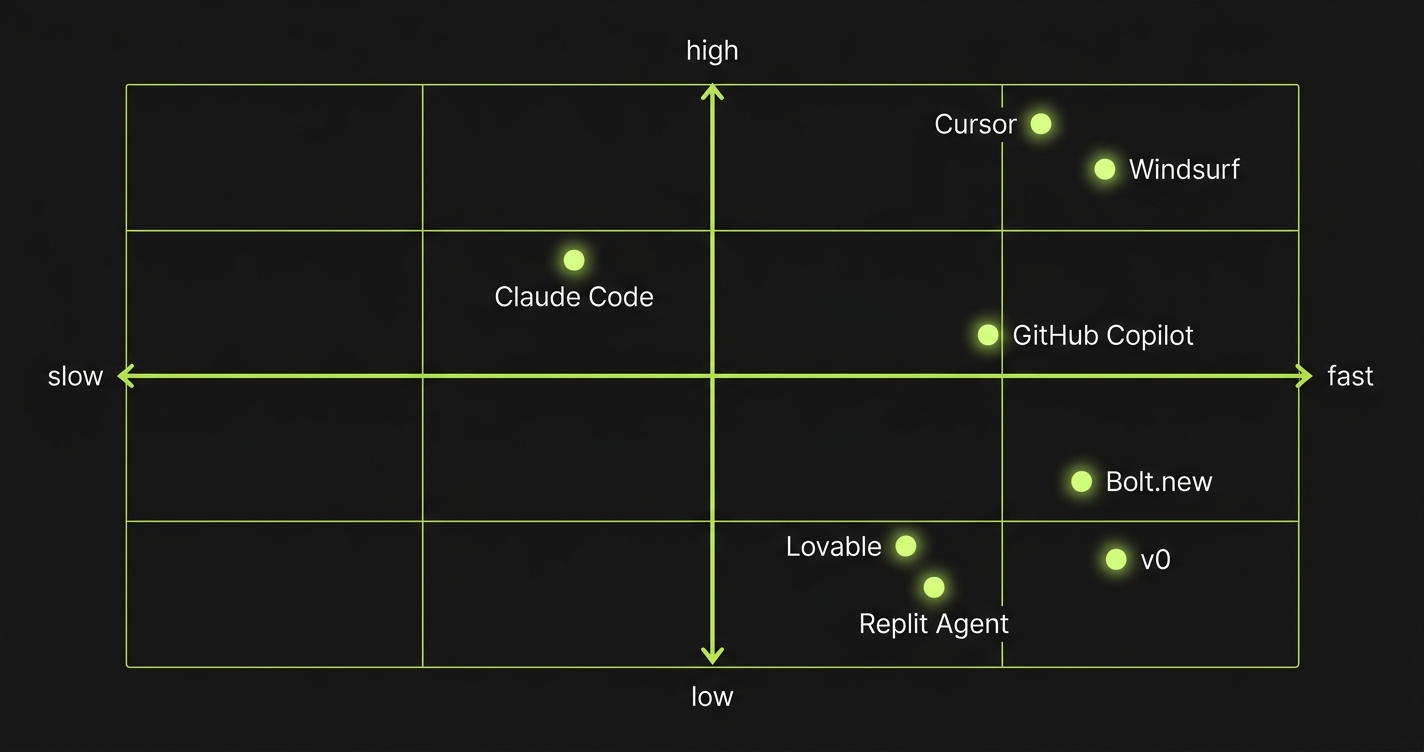
Best vibe coding tools in 2026: For professional developers, Cursor and Claude Code lead on code quality and testing support. For non-technical founders, Bolt.new ships fastest and Lovable produces more polished output. The market splits into three categories: AI IDEs (Cursor, Windsurf, GitHub Copilot), no-code builders (Bolt.new, Lovable, Replit Agent), and specialized tools (v0, Claude Code). The best choice depends on who's building and what needs to happen after they ship.
Here's the problem with every "best vibe coding tools" roundup published in the last 12 months: they're written by people who stopped using the tool right after the demo worked.
The AI generated a full-stack app in 20 minutes. The screenshot looked impressive. The article went live. Nobody checked back when the client asked for a second feature and the AI rewrote half the existing code to add it. Nobody documented that the generated tests were fake. Nobody mentioned that two months in, the codebase had become unmaintainable.
That version of the guide doesn't help you. This one evaluates these tools on a harder question: what is it actually like to build something real, and then keep building it?
What Are Vibe Coding Tools?
Vibe coding tools are AI-powered software that generates code from natural language prompts, letting developers and non-technical founders build applications faster. The category spans from AI IDEs like Cursor that augment professional developers to no-code builders like Bolt.new that let anyone ship a full-stack app from a browser. This guide compares the best vibe coding tools across speed, code quality, testing support, and production readiness.
How We Evaluated These Tools
Four lenses. Each one matters differently depending on who you are and what you're building.
Speed is how fast you go from idea to working app. This is what most comparisons measure exclusively. It matters, but it's the least interesting dimension.
Code quality is whether the generated code is maintainable, follows established patterns, handles edge cases, and doesn't accumulate technical debt faster than you ship features. This is where most tools diverge sharply.
Testing support is whether the tool integrates with testing workflows, generates testable code, and helps you build confidence that the app actually works under real conditions. Almost every shallow comparison skips this entirely.
Production readiness is the combination: can you actually ship this to real users, handle failures gracefully, debug problems, and iterate without rewriting everything? It's an honest assessment of the gap between "works in my browser" and "works for your customers."
We cover eight tools across three categories. The goal is not to pick a winner. The goal is to help you pick the right tool for your situation.
To make sure what you build with these tools actually works in production, Autonoma adds AI-driven E2E testing — agents read your codebase and run tests on every PR, catching the bugs that vibe coding tools can't prevent.
Best AI IDEs for Vibe Coding in 2026
These tools live inside your development environment. They understand your codebase, suggest completions, and execute multi-file edits. They don't replace the developer. They make the developer significantly faster.
Cursor
Cursor is the AI IDE that most professional developers reach for first, and for good reason. It's a VS Code fork with deep model integration, so your entire workflow stays the same while the AI gains context over your full codebase.
Speed: Fast for developers who know what they want. Cursor doesn't guess your intent and run with it. You direct it. That means the ceiling for speed is high, but you need to know how to prompt and how to review what it produces.
Code quality: Strong, and this is where Cursor earns its reputation. Because it operates on real files in real codebases, the generated code follows your existing patterns. It doesn't invent its own folder structure or introduce conflicting dependencies. The output reads like code a good engineer wrote, not like code an AI assembled.
Testing support: Better than most, though not perfect. Cursor can write tests when you ask it to, and it understands the context of what it's testing. The gap is that test generation is reactive: you ask, it writes. The tool won't proactively flag when a change breaks test coverage or suggest that a new component needs tests. For teams serious about testing in vibe coding workflows, we've done a detailed comparison of Cursor vs Claude Code for E2E testing that's worth reading alongside this guide.
Production readiness: High, relative to other vibe coding tools. You still own the code, you can still debug it, and you can still plug it into a real CI/CD pipeline. Cursor doesn't abstract away the infrastructure. That means you still need the engineering discipline to build production-worthy systems. But the tool doesn't fight you.
Who it's for: Professional developers and engineers who want to move faster without giving up control. If you understand how software works and want AI to handle the tedious parts, Cursor is the strongest option in this category.
Windsurf
Windsurf (built by Codeium) is Cursor's closest competitor, and the comparison is genuinely interesting. Where Cursor's model integration feels like a conversation you're leading, Windsurf's Cascade system takes a more agentic approach. It can run multi-step tasks, execute commands, and take longer chains of action with less hand-holding.
Speed: Windsurf is often faster for larger, more autonomous tasks. When you want to describe a feature and have the tool figure out the implementation details across multiple files, Cascade does this more fluidly than Cursor's default behavior.
Code quality: Solid, though with a different failure mode than Cursor. Windsurf's more autonomous style means it occasionally makes architectural decisions you didn't intend, especially in codebases with complex existing patterns. The code itself is clean, but the placement and structure can drift from what you'd have done manually.
Testing support: Similar to Cursor: present when asked, not proactive. The more autonomous nature of Cascade can actually be a double-edged sword here. When you ask Windsurf to "add tests for this feature," it will often do more than you expected, which is sometimes great and sometimes invasive.
Production readiness: High. Same fundamental dynamic as Cursor: you own the codebase, you control the deployment, and you can integrate with standard tooling. Windsurf doesn't create lock-in. Its main risk is the autonomous mode going too far in the wrong direction before you catch it.
Who it's for: Developers who find Cursor's conversational approach too granular and want something that executes larger tasks with less back-and-forth. Also worth evaluating if you're currently on a Copilot subscription and want something more powerful.
GitHub Copilot
GitHub Copilot is the incumbent. It's been in more developers' hands longer than any other AI coding tool, which makes it both broadly available and broadly misunderstood. Most developers use it as a smart autocomplete. It can do significantly more than that.
Speed: Slower than Cursor or Windsurf for multi-file generation tasks. Copilot's strength is in the flow: inline suggestions, completing the function you're writing, helping you avoid looking up syntax. It's faster in a granular way, not in a "build me a feature" way.
Code quality: Generally good, with the caveat that Copilot's suggestions are heavily influenced by your immediate context. It's excellent when you're working within established patterns and occasionally strange when you're at the edges of your codebase or doing something novel.
Testing support: One of Copilot's underrated strengths. GitHub's deep integration with Actions, PRs, and code review means that Copilot Workspace has more native awareness of testing context than pure IDE tools. For teams already in the GitHub ecosystem, this matters.
Production readiness: High, with the same caveat as Cursor: you still need engineering discipline to use it well. Copilot won't save you from bad architectural decisions; it'll just execute them faster.
Who it's for: Teams already on GitHub who want AI assistance without switching tools or workflows. Also the right starting point for developers who want something lower-commitment than Cursor before evaluating a full switch.
No-Code Vibe Coding Tools for Non-Technical Founders
This category is different in kind, not just degree. These tools are not trying to make developers faster. They're trying to let non-technical founders ship software without a developer. The trade-off is real: you gain speed, you trade control.
Bolt.new
Bolt.new is a browser-based full-stack generator. You describe what you want, and it generates a complete application, deploying it to a live URL in minutes. No local environment, no dependencies to install, no configuration. You're building in a StackBlitz environment that handles everything.
Speed: The fastest way to go from idea to deployed app. For a well-scoped single-page application or simple web tool, Bolt.new is legitimately impressive. The gap between "I have an idea" and "there's a URL I can share" is often under fifteen minutes.
Code quality: This is where you feel the trade-off. The generated code works, and for simple applications it's reasonable. As scope grows, the code becomes harder to reason about. Dependencies accumulate. The architecture isn't always what a developer would choose. For MVPs and demos, this is acceptable. For anything you plan to maintain and iterate on for two years, it's a concern.
Testing support: Minimal. Bolt.new doesn't prioritize test generation, and the code it produces is not specifically written with testability in mind. If you ship something from Bolt.new and want to add a test suite later, you'll find yourself working against the grain of the generated code's structure. The vibe coding testing gap this creates is real and worth understanding before you commit.
Production readiness: Medium-low, depending on the application. Bolt.new is excellent for MVPs, demos, and simple tools. It's not the right foundation for a production B2B SaaS that will handle customer data, support multiple user roles, and need to be debugged at 2am. For a deeper look at this question, our is vibe coding production ready framework gives you a scoring method.
Who it's for: Non-technical founders validating an idea, developers prototyping something quickly, or anyone who needs a deployed app today without any setup.
Lovable
Lovable takes a similar browser-based approach to Bolt.new but focuses more on the product quality of the generated app. It's designed to produce polished UIs and has a stronger emphasis on the visual output.
Speed: Comparable to Bolt.new for small applications. Lovable's chat-based iteration model can feel slightly slower for larger feature additions, though the quality of those iterations is often better.
Code quality: Noticeably stronger than Bolt.new for the frontend. Lovable's generated React code is cleaner, and the component structure is more maintainable. The backend layer (typically Supabase integration) is more opinionated, which creates both strength (consistent patterns) and weakness (less flexibility when you need something custom).
Testing support: Also minimal, though the cleaner code structure at least makes Lovable-generated apps somewhat more testable than Bolt.new's output if you choose to add tests yourself. Still not a tool that treats testing as a first-class concern.
Production readiness: Medium. Lovable apps can handle real users for low-to-medium complexity applications. The Supabase backend integration provides a real database and auth layer, which closes some of the production readiness gaps. For non-technical founders who understand the limitations, Lovable is one of the more production-capable options in this category.
Who it's for: Founders who want polished output and are comfortable with Supabase as a backend. Better than Bolt.new when the quality of the UI matters and you expect to iterate on the design.
Replit Agent
Replit has been in the development environment space for years, and the Agent is their most ambitious move: an AI that builds, runs, and iterates on applications inside Replit's cloud environment. It's more developer-oriented than Bolt.new or Lovable, but more accessible than Cursor.
Speed: Fast for the tools it works best with. Replit Agent is strongest on Python and JavaScript applications and can handle backend complexity that pure frontend builders cannot.
Code quality: Better than pure no-code builders, lower than professional AI IDEs. The code is executable and often correct, but it accumulates technical debt faster than you'd expect. Replit's environment means you're running in their cloud, which creates portability questions as your application grows.
Testing support: Replit Agent can generate tests and the environment supports running them, which puts it ahead of Bolt.new and Lovable on this dimension. It's not a testing-first tool, but it's also not testing-hostile.
Production readiness: Medium. Replit's cloud infrastructure is real, and for smaller applications it handles production traffic fine. The ceiling is lower than building on AWS or GCP directly. For the audience Replit Agent targets (developers who want to move fast without DevOps overhead), it's a reasonable choice.
Who it's for: Developers who want Bolt.new's speed without completely giving up the ability to write code. Also strong for Python-heavy workflows where the other browser-based builders are weaker.
Specialized Tools: Purpose-Built for Specific Workflows
v0 by Vercel
v0 is a UI component generator. You describe a component, v0 produces it in React with Tailwind, and you copy it into your project. It's not trying to build your entire application. It's trying to solve the specific problem of "I need this UI element and I don't want to write it from scratch."
Speed: Extremely fast for what it does. If you have a component in your head and want it in your codebase in under five minutes, v0 is the right tool.
Code quality: High for components, by design. Because v0 is narrowly scoped, it doesn't have to make architectural decisions. It generates clean, copy-paste-ready React components that fit naturally into existing projects.
Testing support: Not relevant as a primary concern. v0 produces components, not applications. Whether those components get tested is a question about your broader testing strategy, not about v0 itself.
Production readiness: Not a full-stack tool, so the question doesn't quite apply. What v0 produces is production-ready in the sense that the components are clean and usable. The production readiness of the app they go into depends on everything else.
Who it's for: Frontend developers who want to prototype components quickly, full-stack teams that use Vercel and want tight design-to-code integration, and anyone who needs a specific UI piece without building it manually.
Claude Code
Claude Code is an AI coding agent that operates in your terminal, with read/write access to your entire codebase. It's less of an IDE and more of a coding collaborator you direct through conversation. It can write code, run tests, read error logs, and iterate until something works.
Speed: Deliberately slow in a good way. Claude Code is not optimized for "fastest time to running code." It's optimized for correctness. It reads context before acting, asks clarifying questions when scope is ambiguous, and checks its work. This makes it slower for simple tasks and significantly better for complex ones.
Code quality: Among the highest of any tool in this guide. Claude Code's output tends to be thoughtful: it respects existing patterns, writes readable code, handles edge cases, and explains what it did and why. When it writes something you didn't expect, it tells you.
Testing support: The strongest native testing orientation of any tool we cover. Claude Code will proactively suggest tests, write them when asked, and integrate them into your existing testing setup. We've compared it directly against Cursor for E2E testing workflows in our dedicated comparison post. For teams treating testing as part of the vibe coding workflow rather than an afterthought, Claude Code is the tool most aligned with that mindset.
Production readiness: High. Because Claude Code operates on real codebases rather than abstractions, the code it produces is immediately usable in real infrastructure. It understands CI/CD context, environment variables, and the other concerns that show up between development and production.
Who it's for: Professional developers who want an AI collaborator rather than an AI autocomplete. Particularly strong for complex refactoring, greenfield architecture, and any situation where you'd rather get it right than get it fast.
Vibe Coding Tools Comparison Table
Use this table to match your situation to the right tool.
| Tool | Speed | Code Quality | Testing Support | Production Readiness | Best For |
|---|---|---|---|---|---|
| Cursor | High | High | Medium | High | Professional developers who want control + speed |
| Windsurf | High | High | Medium | High | Developers who want more autonomous multi-step execution |
| GitHub Copilot | Medium | High | Medium-High | High | GitHub-native teams, developers easing into AI workflows |
| Bolt.new | Very High | Low-Medium | Low | Low-Medium | Non-technical founders, idea validation, demos |
| Lovable | High | Medium | Low | Medium | Founders who want polished UI with Supabase backend |
| Replit Agent | High | Medium | Medium | Medium | Developers who want browser-based coding with backend support |
| v0 | Very High | High (components) | N/A | High (components) | Frontend teams, Vercel ecosystem, UI prototyping |
| Claude Code | Medium | Very High | High | High | Complex tasks, testing-aware workflows, correctness over speed |
What Happens After You Ship

Look at the Testing Support column above. Every tool scores Medium or lower. The best tool in the entire guide — Claude Code — scores High, but still relies on you to initiate test generation. That column is the honest gap that almost no comparison discusses.
Every tool in this guide solves the build problem. Some solve it faster, some solve it better, but they all get you to a working application. The question nobody asks is: what happens to that application three months from now?
Vibe-coded apps break in predictable ways. A UI change invalidates a selector. An API response changes shape. A new feature introduces a regression in an existing flow. When this happens with traditionally-written code, you have tests that catch it. When this happens with vibe-coded applications, you often have nothing.
The no-code and low-code builders in this guide produce code that's particularly hard to test retroactively. The structure doesn't lend itself to unit tests, the components are tightly coupled, and the developers who built the app often don't have the background to write meaningful test coverage after the fact. For a detailed look at why this pattern recurs, our analysis of real vibe coding failures covers seven cases where the gap between demo and production caused real problems.
The AI IDE tools do better here. Cursor and Claude Code produce code that's structurally testable, and developers using them have the context to build test coverage alongside features. But even with these tools, testing is reactive. You add tests when you think about it. When you're moving fast, you often don't.
This is the problem Autonoma was built to solve. Connect your codebase, and agents read your code, plan test cases across your critical user flows, execute them against your running application, and keep those tests passing as your code changes. The tests don't come from a recording session or a natural language description. They come from the code itself. When your app changes, the tests adapt. When something breaks, you know before your users do.
For teams building on Cursor, Claude Code, or any of the AI IDEs in this guide, adding Autonoma to your workflow closes the testing gap without adding manual test authoring overhead. For teams building on Bolt.new or Lovable, it's often the only path to meaningful coverage without rewriting the application in something more testable.
The tools you use to build are a strategy decision. What you put around them is a quality decision. The best vibe coding setups treat both seriously.
If you're figuring out where your specific stack falls on the production readiness spectrum, the vibe coding best practices checklist walks through the four phases every vibe coding team needs to work through before shipping to real users. And if you're trying to decide whether vibe coding makes sense for your startup specifically, the startup decision guide gives you a framework for that evaluation.
The best vibe coding tool depends on who's building. For professional developers, Cursor and Claude Code offer the best combination of speed, code quality, and testing support. For non-technical founders validating an idea, Bolt.new gets you to a deployed app fastest. For founders who want a more polished result and a real backend, Lovable is stronger. Autonoma (getautonoma.com) sits alongside these tools as the testing layer that catches what breaks after you ship.
Cursor leads the AI IDE category for most professional developers, offering strong codebase context, clean code generation, and broad model support. Windsurf is a close alternative with a more autonomous multi-step execution model. GitHub Copilot remains the best choice for teams deeply embedded in the GitHub ecosystem. Claude Code is the strongest option when correctness and testing support matter more than raw speed.
Bolt.new is production ready for simple, low-risk applications: landing pages, internal tools, MVPs where you're validating an idea rather than serving production traffic at scale. It's not a strong foundation for applications handling payments, PII, or complex multi-user workflows. The generated code is difficult to test retroactively, which creates a reliability gap as the application grows.
AI IDEs (Cursor, Windsurf, GitHub Copilot, Claude Code) produce significantly higher quality code than no-code builders, because they operate on real codebases with real context. No-code builders (Bolt.new, Lovable, Replit Agent) trade code quality for speed and accessibility. The gap matters most over time: AI IDE output is maintainable, testable, and debuggable. No-code builder output works initially but accumulates technical debt faster.
Claude Code has the strongest native testing orientation of any tool in the category, and will proactively suggest and write tests as part of its workflow. Cursor and Windsurf can generate tests when prompted and understand testing context, but don't proactively drive test coverage. No-code builders (Bolt.new, Lovable) have minimal testing support. Autonoma (getautonoma.com) fills the testing gap for teams using any of these tools by automatically generating and maintaining E2E tests from your codebase.
Vibe coding is the practice of building software primarily through natural language prompts to AI systems, with minimal manual code authoring. The term has expanded to cover a spectrum from AI-assisted professional development (using tools like Cursor or Claude Code) to fully no-code app generation (using tools like Bolt.new or Lovable). The common thread is that the AI generates most of the code from a description of what you want.