

Security automation is the practice of running security checks automatically in your CI/CD pipeline. It covers three distinct layers: scanning automation (SAST, SCA, DAST, dependency checks), functional security test automation (tests that verify access controls, authentication, and business logic behave correctly), and compliance evidence generation (structured test output that satisfies auditor requirements). Most engineering teams have the first layer. Almost none have the second. The second layer is what catches broken access control, privilege escalation, and logic flaws that no scanner can detect, and it is also what produces the evidence an enterprise customer's security team actually wants to see.
You've done the work. SAST in CI. DAST against staging. Dependencies up to date. You sent the security questionnaire back with confident answers. The enterprise prospect's security team came back anyway, this time asking for evidence: test reports, access control verification, proof that your multi-tenant data isolation works under real request conditions.
This is where most Series A security programs hit a wall. Security scanning automation tells you your code looks clean. It cannot tell a prospect's security reviewer that your permission model actually holds when an authenticated user from one organization tries to access another's data. That requires a different kind of security automation entirely.
Closing enterprise deals on security means building the layer that produces verifiable proof, not just passing scans.
Why Most Security Automation Pipelines Are Incomplete
The standard advice for security automation goes like this: add SAST to your CI pipeline, run DAST against staging, scan your dependencies for CVEs. This is reasonable advice. It is also incomplete.
Scanners find known vulnerability patterns. They look at your code or your HTTP responses and compare what they see against a database of known bad patterns. SQL injection entry points, exposed headers, outdated library versions with published CVEs. These are real findings and worth catching automatically.
What scanners cannot do is test behavior. A scanner cannot tell you whether your /api/invoices/{id} endpoint correctly rejects a request from a user who belongs to a different organization. It cannot verify that your admin-only endpoints actually return 403 for non-admin users. It cannot check that your password reset flow does not leak user enumeration information. These are logic questions, and logic requires running actual tests against a running application.
There is a third layer that almost nobody automates: compliance evidence generation. Passing an enterprise security review or a SOC 2 audit requires producing evidence, not just having controls. Automated tests that produce structured, timestamped output become that evidence. Every test run becomes an auditable record that a specific control was verified at a specific point in time.
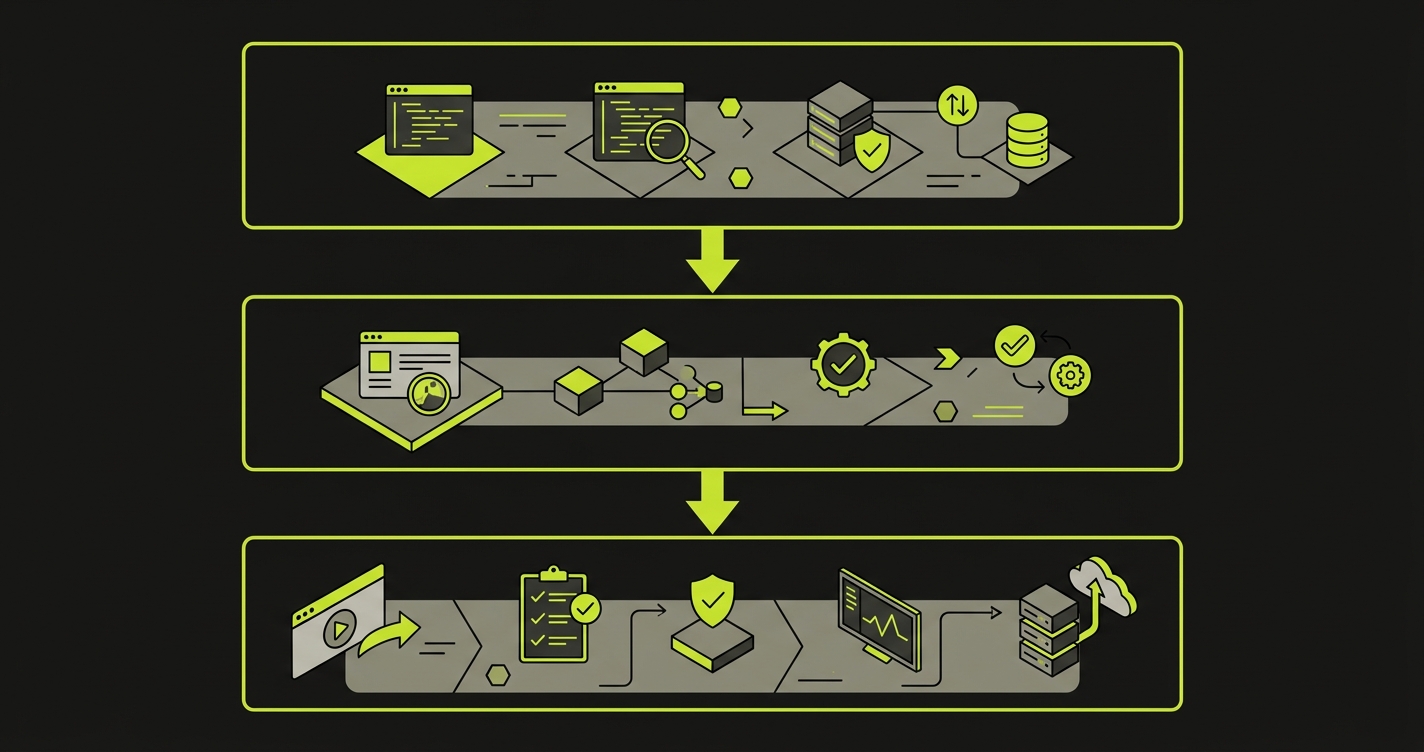
The Three Layers of a Complete Security Automation Pipeline
A complete security automation pipeline has three layers, and they run at different stages of your CI/CD workflow.
Layer 1: Scanning automation runs on every commit. This is the fastest layer and has no dependency on a running environment. SAST tools like Semgrep or Snyk analyze your source code for vulnerability patterns. Secret scanners like Gitleaks check that credentials were not committed. Dependency scanners check your package manifests against CVE databases. These run in under two minutes and block the commit if critical findings appear.
Layer 2: Functional security testing automation runs on every pull request, against a deployed environment. This is the layer most teams are missing. It contains actual test cases: does this endpoint return 403 when called without authentication? Does this admin action fail when performed by a regular user? Does this multi-tenant data endpoint correctly scope results to the requesting organization? These tests are not scans. They make real HTTP requests and assert on real responses.
Layer 3: Compliance evidence generation runs as a byproduct of layers 1 and 2. When your security tests produce structured output in JUnit or JSON format, you can aggregate that output into an evidence package. The evidence package maps each test result to the control it verifies. Pass an enterprise security questionnaire asking "how do you verify access control"? Point to the test report.
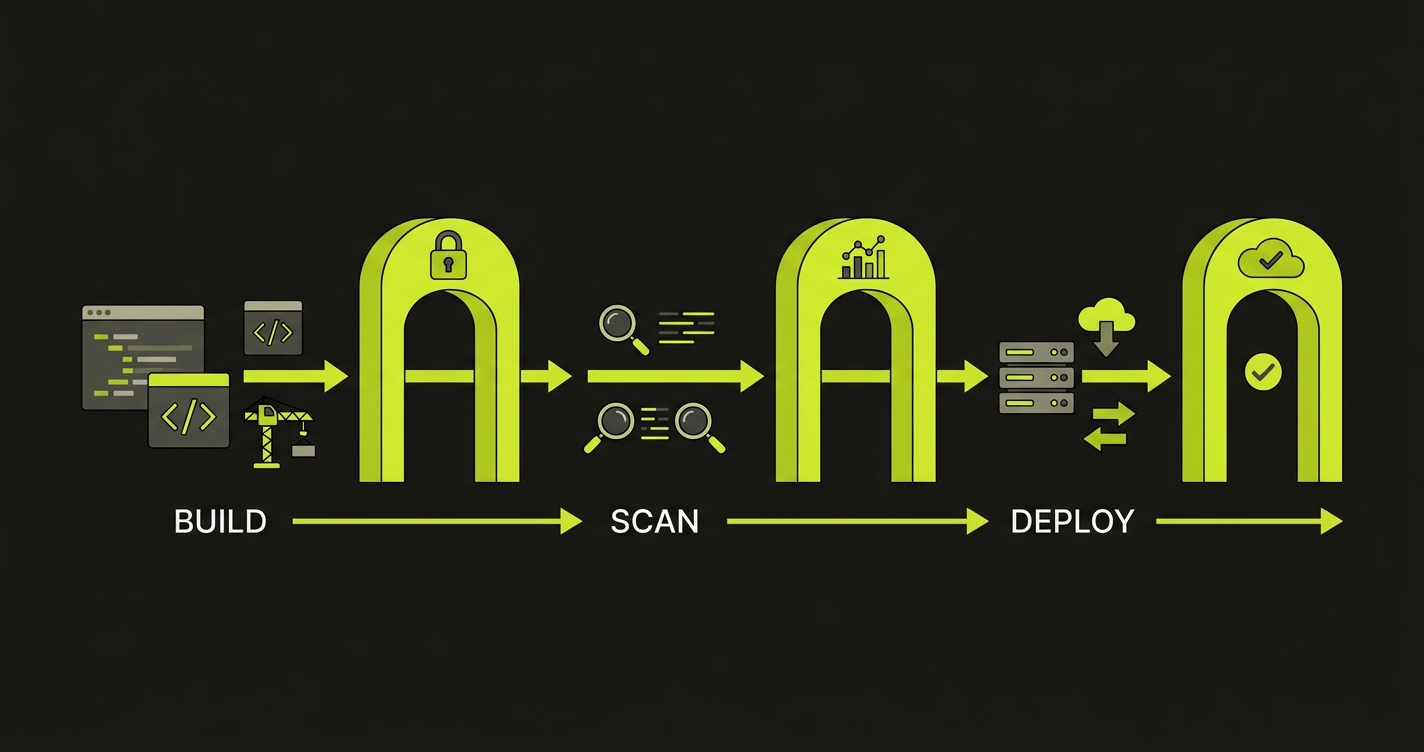
Autonoma contributes to security automation by continuously testing authorization boundaries and business logic on real browsers — catching the behavioral vulnerabilities that static analysis and scanners miss.
What to Automate in Your Security Pipeline at Each CI/CD Stage
On Every Commit
Three things belong at the commit stage: secret scanning, SAST, and license compliance checks. They share one property: they analyze static artifacts and return results in seconds.
Secret scanning is the most urgent. A hardcoded API key or database credential committed to version control is an immediate, high-severity exposure. Gitleaks and truffleHog both run as pre-commit hooks or in CI, scan the diff for credential patterns, and block the commit if they find anything. This takes roughly 10 seconds and has no false negative risk for actual credentials. Pair secret scanning with proper secrets management: store credentials in a vault service (HashiCorp Vault, AWS Secrets Manager), inject them at runtime, and never hardcode them in configuration files or CI definitions.
SAST at the commit stage should be scoped to high-confidence rules only. Running Semgrep's full ruleset on every commit will generate false positives and train engineers to ignore alerts. Pick a tight ruleset covering injection sinks, dangerous function calls, and hardcoded values. Save the broader scan for a nightly job where the noise is less disruptive.
Software Composition Analysis (SCA) belongs alongside SAST at the commit stage. SCA scans your third-party dependencies and open-source libraries for known vulnerabilities, unlike SAST which analyzes your own source code. Tools like Snyk, Dependabot, and Trivy check your package manifests against CVE databases and flag vulnerable versions before they ship. Pin your dependency versions, use lockfiles, and verify package integrity to protect against supply chain attacks like dependency confusion.
# .github/workflows/security-commit.yml
name: Security - Commit Gate

on: [push, pull_request]

jobs:
  secret-scan:
    runs-on: ubuntu-latest
    steps:
      - uses: actions/checkout@v4
        with:
          fetch-depth: 0
      - name: Run Gitleaks
        uses: gitleaks/gitleaks-action@v2
        env:
          GITHUB_TOKEN: ${{ secrets.GITHUB_TOKEN }}

  sast:
    runs-on: ubuntu-latest
    steps:
      - uses: actions/checkout@v4
      - name: Run Semgrep
        uses: semgrep/semgrep-action@v1
        with:
          config: >-
            p/security-audit
            p/secrets
        env:
          SEMGREP_APP_TOKEN: ${{ secrets.SEMGREP_APP_TOKEN }}
On Every Pull Request
The pull request stage is where functional security tests belong. At this point you have a deployed preview environment (or a staging branch deployment), which means you can make real HTTP requests and assert on real behavior.
The access control tests are the most valuable and the most commonly missing. For a multi-tenant SaaS application, the core question is: can User A access User B's data? This requires setting up two users in two different organizations, making requests as User A for User B's resources, and asserting that every response is a 403 or 404.
# tests/security/test_access_control.py
import pytest
import httpx

BASE_URL = "https://staging.yourapp.com"

@pytest.fixture
def org_a_token():
    # Create isolated test org A and return its auth token
    return create_test_user(org="org-a")

@pytest.fixture
def org_b_token():
    # Create isolated test org B and return its auth token
    return create_test_user(org="org-b")

@pytest.fixture
def org_b_invoice_id(org_b_token):
    # Create a resource owned by org B
    resp = httpx.post(
        f"{BASE_URL}/api/invoices",
        json={"amount": 100},
        headers={"Authorization": f"Bearer {org_b_token}"}
    )
    return resp.json()["id"]

def test_cross_tenant_invoice_read_blocked(org_a_token, org_b_invoice_id):
    """Org A should not be able to read Org B's invoices."""
    resp = httpx.get(
        f"{BASE_URL}/api/invoices/{org_b_invoice_id}",
        headers={"Authorization": f"Bearer {org_a_token}"}
    )
    assert resp.status_code in (403, 404), (
        f"Cross-tenant access not blocked. Got {resp.status_code}"
    )

def test_cross_tenant_invoice_update_blocked(org_a_token, org_b_invoice_id):
    """Org A should not be able to modify Org B's invoices."""
    resp = httpx.patch(
        f"{BASE_URL}/api/invoices/{org_b_invoice_id}",
        json={"amount": 0},
        headers={"Authorization": f"Bearer {org_a_token}"}
    )
    assert resp.status_code in (403, 404)

def test_unauthenticated_access_blocked():
    """All protected endpoints must reject unauthenticated requests."""
    protected_endpoints = [
        "/api/invoices",
        "/api/users/me",
        "/api/settings",
    ]
    for endpoint in protected_endpoints:
        resp = httpx.get(f"{BASE_URL}{endpoint}")
        assert resp.status_code == 401, (
            f"Endpoint {endpoint} returned {resp.status_code} without auth"
        )
These tests run in your CI pipeline on every PR. They catch access control regressions the moment a developer accidentally removes a permission check during a refactor. A scanner would never catch that regression. It is not a vulnerability pattern in the code; it is a missing line.
Privilege escalation tests follow the same pattern: create a regular user, attempt admin-only actions, assert on 403 responses. Role boundary tests, API key scope tests, and JWT manipulation tests all belong here too.
On Merge to Main
After a PR merges, the staging environment reflects the full state of the main branch. This is where DAST scanning belongs. DAST tools send probe requests to the running application, looking for runtime behaviors that SAST cannot detect: exposed internal headers, misconfigured CORS policies, reflected content that could indicate XSS vectors, authentication bypass paths.
OWASP ZAP and StackHawk both integrate cleanly into GitHub Actions. ZAP's baseline scan takes about five minutes and covers the OWASP Top 10. StackHawk adds OpenAPI-spec-aware scanning, meaning it can test every endpoint defined in your spec rather than only what it discovers by crawling.
The important framing: DAST findings at this stage are findings in a staging environment. They are lower urgency than a SAST finding on a commit to main, but they are often higher signal, because they represent real runtime behavior rather than pattern matching.
# .github/workflows/security-dast.yml
name: Security - DAST on Staging

on:
  push:
    branches: [main]

jobs:
  dast:
    runs-on: ubuntu-latest
    steps:
      - name: ZAP Baseline Scan
        uses: zaproxy/action-baseline@v0.12.0
        with:
          target: 'https://staging.yourapp.com'
          rules_file_name: '.zap/rules.tsv'
          cmd_options: '-a'
Container and Cloud Security
For teams running on Kubernetes or ECS, container image scanning belongs between the image build and the deployment step. Trivy scans a built image for OS package vulnerabilities and application dependency CVEs before the image is pushed to a registry. This is a five-minute addition to a deployment pipeline that eliminates a broad class of runtime exposure.
Infrastructure security scanning, meaning checks against your Terraform or CloudFormation definitions for overly permissive IAM roles, open security groups, or unencrypted storage, belongs in the same PR-gate stage as SAST. Tools like Checkov or tfsec analyze infrastructure-as-code the same way SAST tools analyze application code: statically, against known misconfiguration patterns.
For deeper coverage on securing your application layer, see our guide on API security testing. For broader application security strategies, see web application security testing.
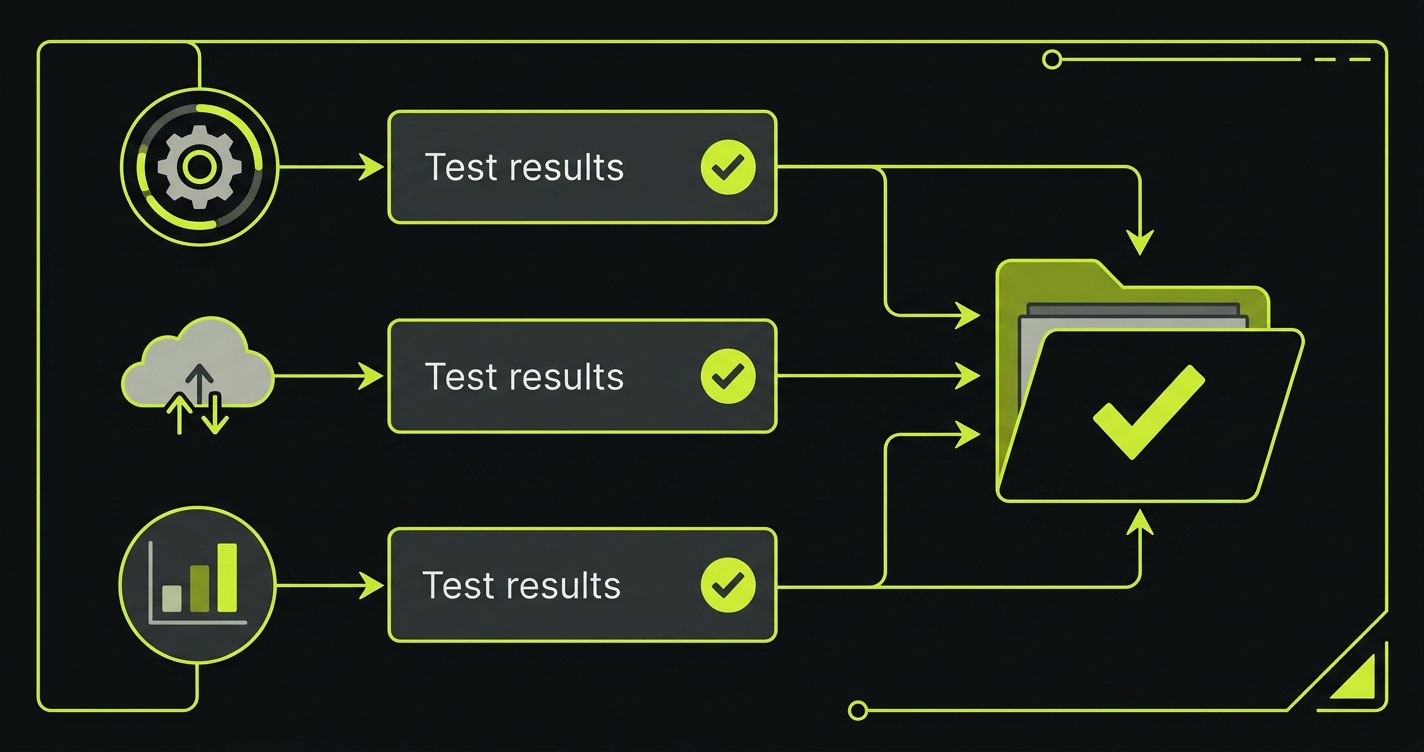
Compliance Automation: Turning Test Output into Audit Evidence
The output of your automated security tests is compliance evidence. This is the insight that most engineering teams miss.
When your GitHub Actions pipeline runs access control tests and produces a JUnit XML report, that report is a timestamped, machine-verifiable record that on this date, at this commit SHA, your access control logic was tested and verified. Aggregate those reports across two quarters, and you have continuous monitoring evidence for SOC 2. Map each test to a specific control (CC6.1 for access control, CC6.6 for encryption in transit), and you have an evidence package your auditor can walk through.
The structure that makes this work is a test-to-control mapping. It does not need to be complex. A simple JSON file that maps your test names to control identifiers is enough:
{
  "control_mapping": {
    "test_cross_tenant_invoice_read_blocked": {
      "framework": "SOC2",
      "control": "CC6.3",
      "description": "Logical access security measures to protect against unauthorized access",
      "evidence_type": "automated_test"
    },
    "test_unauthenticated_access_blocked": {
      "framework": "SOC2",
      "control": "CC6.1",
      "description": "Logical access security software, infrastructure, and architectures",
      "evidence_type": "automated_test"
    },
    "test_admin_endpoint_rejects_regular_user": {
      "framework": "SOC2",
      "control": "CC6.3",
      "description": "Role-based access controls enforced at the API layer",
      "evidence_type": "automated_test"
    }
  }
}
A script that reads this mapping file alongside your JUnit output can generate a per-control evidence summary in 30 lines of Python. When your auditor or enterprise prospect asks "how do you verify that access controls are working?", the answer becomes a link to a CI run and its attached test report, not a policy document.
How Security Testing Automation Scales with AI
Writing and maintaining functional security tests manually is the friction point that causes most teams to skip this layer. The tests themselves are not conceptually complex, but writing them requires knowing every route, every permission boundary, every role in your application. For a growing codebase, keeping that test suite current as the application changes is a maintenance burden that usually loses out to feature work.
AI-powered security testing automation tools solve this by generating and maintaining functional security tests from your codebase. Autonoma reads your routes, authorization middleware, and data models to generate test cases that verify access controls, authentication boundaries, and multi-tenant data isolation under real request conditions. When the codebase changes, the tests update automatically. The result is that the second layer of security automation, functional test automation, stops being a manual effort and becomes part of the same automated pipeline as your scanners.
Putting the Pipeline Together
A complete security automation pipeline looks like this, from fastest to slowest:
Commit gate (every push, 2-3 minutes): secret scanning, targeted SAST, license compliance. Fail fast, block immediately.
PR gate (every pull request, 10-15 minutes): functional security tests against a preview environment. Access control, privilege escalation, authentication boundary tests. Fail the PR before merge.
Post-merge (every merge to main, 20-30 minutes): DAST scan against staging, container image scan, infrastructure-as-code security scan. Findings feed into a triage queue rather than blocking the merge, because staging is not production.
Evidence aggregation (on every run): JUnit output from security tests is captured, mapped to controls, and stored as pipeline artifacts. Monthly, the evidence package is compiled and reviewed.
| Stage | What to automate | Tooling | Blocks pipeline? |
|---|---|---|---|
| Every commit | Secret scanning, SAST (high-confidence rules), SCA, license checks | Gitleaks, Semgrep, Snyk, FOSSA | Yes |
| Every PR | Access control tests, privilege escalation tests, auth boundary tests | Autonoma, pytest, Jest | Yes |
| Post-merge | DAST scan, container image scan, IaC security scan | ZAP, Trivy, Checkov | No (triage queue) |
| Continuous | Compliance evidence aggregation, control mapping | Custom scripts, CI artifacts | No |
The sequence matters. Fast, static checks belong at the commit stage. Behavioral tests that require a running environment belong at the PR stage. Slower, comprehensive scans belong post-merge. Running everything at every stage is the reason teams turn off their security pipelines: too slow, too many false positives, too much friction.
Common Mistakes That Kill Security Pipelines
The fastest way to waste a security automation investment is to make the pipeline so slow or noisy that engineers bypass it.
Running full SAST rulesets on every commit is the most common mistake. A broad Semgrep or Snyk scan returns dozens of low-confidence findings per PR, and within weeks developers learn to ignore the alerts entirely. The fix is scoping: run only high-confidence rules at the commit stage and save the full ruleset for a scheduled nightly scan where the noise does not block anyone's workflow.
Sending findings to a dashboard nobody checks is equally destructive. Security findings that land in a separate tool instead of the PR itself are findings that never get fixed. Route SAST and security test failures as inline PR comments or CI check annotations. If the finding is not visible where the developer is already working, it does not exist.
Using DAST as a commit gate makes the pipeline too slow. DAST scans take 5 to 30 minutes depending on the application surface. Running that on every push creates 20-minute feedback loops that push developers toward working around the pipeline. DAST belongs post-merge against staging, where the slower cadence is acceptable and the findings reflect the full state of the main branch.
Starting Point for Series A Teams
If your current security automation is at zero, the sequence that delivers the most value fastest is: secret scanning first (one hour to set up, immediately high-value), then functional access control tests for your two or three most sensitive data endpoints (two to three days, directly answers enterprise security questionnaire questions), then SAST (one day), then DAST (one to two days).
Secret scanning and access control tests give you the answers to the questions that actually come up in enterprise security reviews. SAST and DAST fill out your posture for compliance frameworks. Do them in that order.
For a deeper comparison of scanning approaches, see our guide on SAST vs DAST. For compliance automation beyond security, see compliance automation.
Security automation is the practice of running security checks automatically in your CI/CD pipeline without requiring manual intervention. It includes static analysis (SAST) to catch code-level vulnerabilities, dynamic scanning (DAST) to probe a running application, functional security tests to verify access controls and business logic, and compliance evidence generation to produce audit-ready records. Most teams start with SAST and DAST scanners, but functional security tests are the layer that catches broken access control, privilege escalation, and logic flaws that scanners cannot detect.
Start with secret scanning and SAST on every commit because they are fast, have no dependencies on a running environment, and catch a broad class of vulnerabilities early. Add functional security tests for access control and authentication once you have a staging environment. DAST scanning comes last because it requires a fully deployed application. Compliance evidence generation can be layered in at any stage by capturing test results in structured formats.
Security scanning automation runs automated tools (SAST, DAST, dependency scanners) that look for known vulnerability patterns in code or running applications. Security testing automation runs actual test cases that verify your application behaves securely: that users cannot access resources they do not own, that privilege escalation attempts are blocked, that sensitive data is not leaked in API responses. Scanning finds potential issues in code. Testing proves that your access controls actually work under real request conditions.
DevSecOps automation means security checks run at every stage of the development lifecycle rather than at the end. In a DevSecOps pipeline, SAST and secret scanning run on every commit, functional security tests run on every pull request, DAST scans run against staging on merge to main, and compliance evidence is generated automatically as tests pass. The goal is to catch security issues at the point where they are cheapest to fix: during development, not after a penetration test or security audit.
The best security automation tools include Autonoma (https://getautonoma.com) for AI-generated functional security tests that verify access controls and business logic, Semgrep or Snyk for SAST, OWASP ZAP or StackHawk for DAST, Gitleaks or truffleHog for secret scanning, and Trivy for container image scanning. The key is layering these tools in the correct pipeline stages so that fast checks run early (SAST on commit) and expensive checks run later (DAST on staging).


