

Why do E2E tests pass while the product is broken? Because most test suites run against empty databases with hardcoded fixtures on localhost, not against realistic data in production-like environments. The fix requires two things: seed endpoints that create production-like test data (multiple user roles, realistic content volumes, proper permission boundaries) and preview environments that mirror your actual infrastructure. Together, these catch the bugs that synthetic, localhost-only testing misses every time.
It is 4 PM on a Friday. Your CI dashboard is green. Every E2E test passes. You merge with confidence, deploy, and head into the weekend. By Monday morning, three customers have filed bugs your test suite should have caught. The signup flow breaks for users with special characters in their email. The dashboard crashes when an account has more than 50 projects. An admin sees data from another tenant.
These are not exotic edge cases. They are normal usage patterns. But your tests never exercised them, because the data was too simple and the environment was too far from production. So the question becomes: what exactly are your tests proving?
The False Confidence of a Green CI Dashboard
A passing test suite proves exactly one thing: your application works under the precise conditions those tests describe. If those conditions are unrealistic, a green checkmark is worse than having no tests at all. It gives you confidence you have not earned.
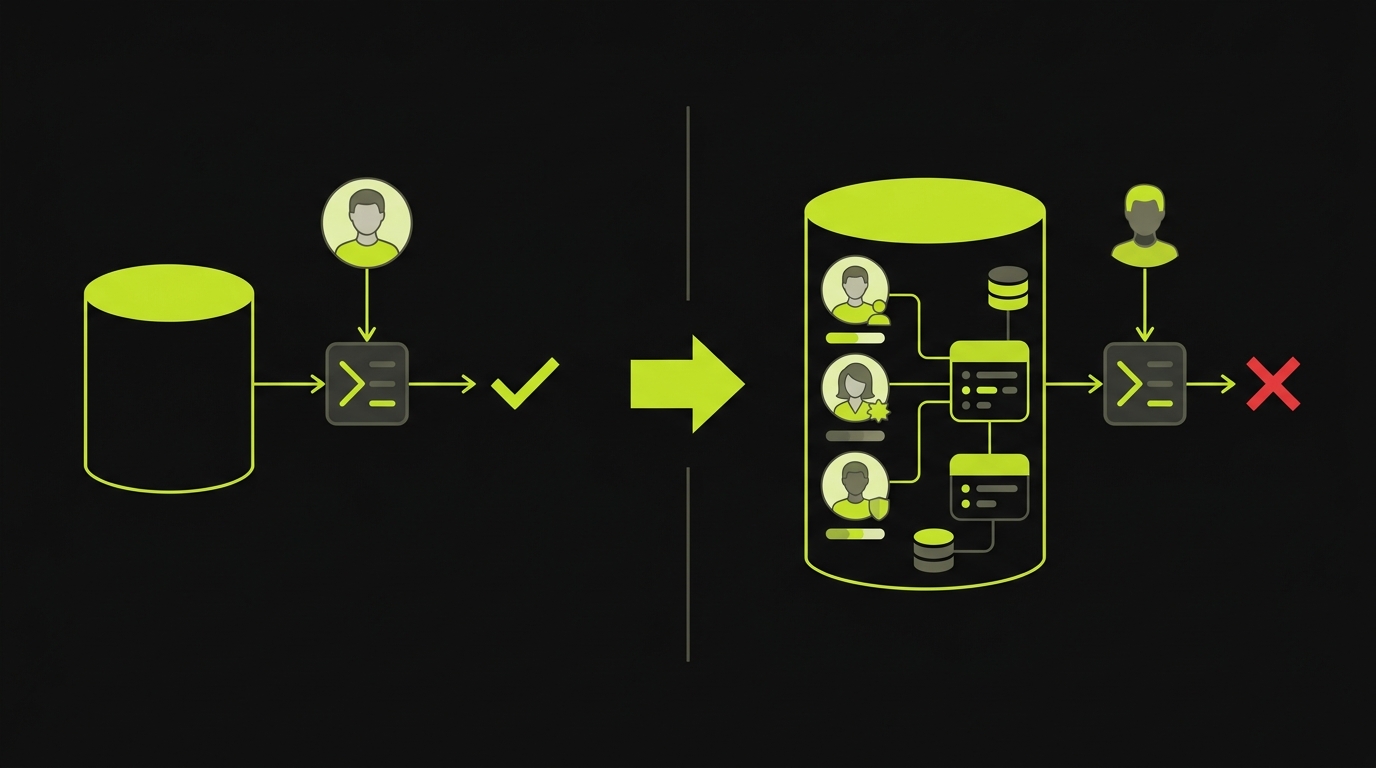
Think about what a typical E2E setup looks like at an early-stage startup. The database starts empty. A test creates a single user with a clean username like "testuser1" and a simple password. It logs in, performs one action, asserts a result, and tears down. Every test follows this pattern. Every test passes.
But this test suite is exercising a version of your product that no real user will ever encounter. Your actual users have profile images, notification preferences, half-completed onboarding flows, and six months of accumulated data. They share accounts across teams with overlapping permissions. They paste Unicode into form fields. They have subscriptions in every conceivable state: active, trial, expired, past-due, cancelled but still within a grace period.
This relates to the flaky tests problem, but it runs deeper. Flaky tests fail intermittently because of timing issues. The problem here is worse: tests that pass reliably yet prove nothing about real-world usage. They are not flaky. They are consistently wrong.
The Test Data Gap
The root cause is almost always test data. Specifically, the absence of it.
Most E2E test suites rely on one of two strategies. Either they start with an empty database and create the bare minimum data for each test, or they load static fixture files (JSON dumps, SQL scripts) that were written once and never updated. Both approaches produce the same gap: the data your tests see looks nothing like the data your users create.
Here is a concrete example. Say you are building a multi-tenant SaaS application. A typical test might look like this:
// What most test suites do
test('user can view dashboard', async () => {
  const user = await createUser({ name: 'Test User', email: 'test@example.com' });
  await login(user);
  await page.goto('/dashboard');
  await expect(page.locator('.dashboard')).toBeVisible();
});
This test passes. It will always pass. But it tells you almost nothing. It does not test what happens when the dashboard renders 200 items. It does not test what happens when the user belongs to three organizations with different permission levels. It does not reveal what the dashboard looks like for a user whose trial expired yesterday.
Now compare that to a test backed by realistic seed data:
// What your tests should be doing
test('trial-expired user sees upgrade prompt on dashboard', async () => {
  await seedDatabase({
    scenario: 'trial-expired-user',
    // Creates: user with expired trial, 3 orgs, 47 projects,
    // 12 team members across orgs, mixed permission levels,
    // realistic activity history spanning 30 days
  });
  await login({ email: 'sarah@acme.co', password: 'seeded-password' });
  await page.goto('/dashboard');
  await expect(page.locator('[data-testid="upgrade-prompt"]')).toBeVisible();
  await expect(page.locator('.project-list .project-card')).toHaveCount(47);
});
The second test catches real bugs. It verifies that the dashboard renders correctly with a realistic data volume, that the trial-expiration logic surfaces the upgrade prompt, and that multi-org users see the correct project list. These are the bugs that escape to production when your test data is a single user in an empty database.
Static fixtures have a different failure mode: they go stale. Your schema evolves, new columns get added, relationships change, but the fixture file still reflects the database from three months ago. When a fixture fails to load, the test either crashes (good, at least you know) or silently populates partial data (bad, because now your test passes while covering even less than you think).
The edge cases that matter most for test data management are tied to time and state. User accounts in grace periods. Subscriptions that renewed at midnight. Invitations that expired two hours ago. These states are nearly impossible to represent in fixture files because they depend on the current timestamp. A fixture that says trial_expires_at: "2025-03-15" tested the right thing once. Now it tests the "long-expired" path every time, and nobody notices the drift.
The Environment Gap
Even if your test data is perfect, running tests on localhost:3000 introduces another layer of false confidence. Your local environment is not your production environment. The differences matter more than most teams realize.
On localhost, your API and frontend share one machine. There is no network latency, no DNS resolution, no TLS handshake. Your CDN is not involved. Your load balancer does not exist. Your authentication service might be mocked. File uploads go to a local directory instead of S3. Background jobs run synchronously instead of through a queue.
Each of these gaps is a place where production bugs hide.
Consider a real scenario: your application uploads user avatars to S3 and serves them through CloudFront. On localhost, you skip the upload and serve files from disk. Your E2E test checks that the avatar appears after upload. It passes. In production, the upload succeeds, but the CDN takes 30 seconds to propagate the new image. Users see a broken image icon for half a minute after every avatar change. Your test never caught this because your test environment was fundamentally different from production.
This is why preview environments exist. A preview environment is a full deployment of your application, spun up per branch or per PR, running the same infrastructure as production: containers, managed databases, real object storage, actual DNS. When your E2E tests run against a preview environment instead of localhost, they exercise the same code paths your users will hit.
The difference between testing on localhost and testing on a preview environment is the difference between rehearsing a play in your living room and rehearsing it on the actual stage. Both help. Only one reveals the problems with lighting, sound, and set changes.
The Fix: Seed Endpoints and Preview Environments as Infrastructure
The solution to both problems (unrealistic data and unrealistic environments) is to treat them as infrastructure, not afterthoughts.
Seed Endpoints
A seed endpoint is an API route that puts your database into a specific, known state for a given test scenario. Instead of building up data through the UI (slow, brittle) or loading fixture files (stale, fragile), your test calls an endpoint like POST /api/test/seed/trial-expired-multi-org and gets back a fully populated database in under a second.
// Example seed endpoint
app.post('/api/test/seed/:scenario', async (req, res) => {
  if (process.env.NODE_ENV === 'production') {
    return res.status(403).json({ error: 'Seed endpoints are disabled in production' });
  }

  const scenarios = {
    'trial-expired-multi-org': async () => {
      const org1 = await createOrg({ name: 'Acme Corp', plan: 'trial', trialEndsAt: daysAgo(2) });
      const org2 = await createOrg({ name: 'Beta Inc', plan: 'pro' });
      const user = await createUser({
        email: 'sarah@acme.co',
        orgs: [
          { org: org1, role: 'admin' },
          { org: org2, role: 'member' }
        ]
      });
      await createProjects(org1, 47);
      await createTeamMembers(org1, 12);
      await createActivityHistory(user, { days: 30 });
      return { user, orgs: [org1, org2] };
    },
    'new-user-mid-onboarding': async () => {
      // ... another scenario
    }
  };

  const seed = scenarios[req.params.scenario];
  if (!seed) return res.status(404).json({ error: 'Unknown scenario' });

  await resetDatabase();
  const result = await seed();
  res.json(result);
});
This approach has three advantages. First, it is fast. Seeding through an API is orders of magnitude faster than driving the UI to create data. Second, it is accurate. The seed function uses your actual ORM models, so the data respects all your constraints and relationships. Third, it is versioned. The seed code lives in your repository, so it evolves with your schema.
Preview Environments
The second piece is running your tests against real deployments. Every PR gets a preview environment: a full stack deployment (frontend, backend, database, queues, object storage) that mirrors production. Your CI pipeline seeds the preview environment's database through the seed endpoint, then runs the E2E suite against that deployment URL.
For startups building E2E testing infrastructure, combining seed endpoints with preview environments eliminates the two biggest sources of false confidence. Your tests now exercise realistic data in a realistic environment. The gap between what your tests prove and what your users experience shrinks dramatically.
How Autonoma Handles This
At Autonoma, this problem is central to how the platform works. You connect your codebase, and the Planner agent reads your data models, API routes, and user roles. It then generates seed endpoints automatically. It identifies the user archetypes that matter for your application (admin vs. member, trial vs. paid, new vs. established) and creates seeding scenarios for each.
Tests run against your preview environments, not localhost. When a PR is opened, Autonoma connects to the preview environment for that branch, seeds the database with the appropriate scenario data, and the Automator agent runs E2E tests that exercise your actual deployment. If a test fails, the failure reflects a real problem, not a localhost artifact. If your application changes later and a test breaks, the Maintainer agent detects it and self-heals the test. No recording, no writing, no maintenance.
The Planner agent also keeps seed scenarios current as your schema evolves. When you add a new column, change a relationship, or introduce a new user role, the seeding logic updates to match. This eliminates the stale-fixture problem entirely.
This is the same philosophy behind our approach to AI-powered data seeding: your codebase is the spec. Test data should be generated from your actual code, stay synchronized with your schema, and reflect the full complexity of real-world usage.
A Diagnostic for Your Team
If your E2E tests are green but users keep hitting bugs, the root cause almost always traces back to the same two gaps. Your test data does not reflect reality, or your test environment does not reflect production. Usually both.
Ask your team these questions. Are you testing with realistic data volumes, or does every test create one user with zero history? Do your test users span different roles and permission levels, or does everything run as admin? Are your test users in different lifecycle states (trial, active, expired, cancelled), or only fully activated? Do you test multi-tenant scenarios, or does a single-org setup represent your entire user base?
Then look at your environment. Are your tests running against a real deployment, or against localhost? Do your seed scenarios evolve with your schema, or are you loading fixture files from three months ago?
Every gap in that list is a category of production bug your tests cannot catch. But the fix is not complicated. Seed endpoints plus preview environments, treated as first-class infrastructure, close most of the distance between what your CI proves and what your users experience.
Frequently Asked Questions
The most common cause is a gap between your test conditions and real-world usage. Tests that run against empty databases with a single hardcoded user on localhost will pass consistently, but they prove nothing about how your product behaves with realistic data volumes, multiple user roles, or real infrastructure. Fixing this requires realistic test data (via seed endpoints) and running tests against preview environments that mirror production.
A seed endpoint is an API route (disabled in production) that puts your database into a specific known state for a given test scenario. Instead of building up data through the UI or loading stale fixture files, your test calls something like POST /api/test/seed/trial-expired-multi-org and gets a fully populated database with realistic users, organizations, permissions, and activity history in under a second.
Preview environments are full-stack deployments (frontend, backend, database, queues, object storage) spun up per PR or per branch. When your E2E tests run against a preview environment instead of localhost, they exercise real networking, CDN behavior, background job processing, and infrastructure configuration. This catches an entire category of bugs that localhost testing systematically misses, like upload propagation delays, CORS issues, and queue processing failures.
You do not need to replicate your entire production database. You need seed scenarios that cover your key user archetypes: different roles (admin, member, viewer), different lifecycle states (trial, active, expired), different data volumes (empty account, moderate usage, power user), and different relationship structures (single-org, multi-org, shared workspaces). Five to ten well-designed scenarios will catch more bugs than a thousand tests running against a single empty-database user.
Seed endpoints are almost always the better choice. Fixture files (JSON dumps, SQL scripts) go stale as your schema evolves, cannot represent time-dependent states like expiring trials, and break silently when columns are added or relationships change. Seed endpoints use your actual ORM models, so they respect all your constraints and evolve with your codebase. They are also faster and produce more realistic data.
Autonoma's Planner agent analyzes your codebase, including data models, API routes, and user roles, to generate seed endpoints automatically. It identifies user archetypes that matter for your application and creates seeding scenarios for each. Tests run against your preview environments, not localhost, so every test exercises your actual deployment infrastructure with realistic data. The Maintainer agent self-heals tests when the application changes.