

Playwright vs Jest is a false comparison. Jest is a JavaScript test runner for unit and integration tests. It runs in Node, never touches a browser, and is fast precisely because of that constraint. Playwright is a browser automation framework for end-to-end tests. It drives real Chromium, Firefox, or WebKit and is the right tool for testing what a user actually experiences. They belong at different layers of the testing pyramid. Most teams need both. The confusion comes from the "vs" framing, not from the tools themselves.
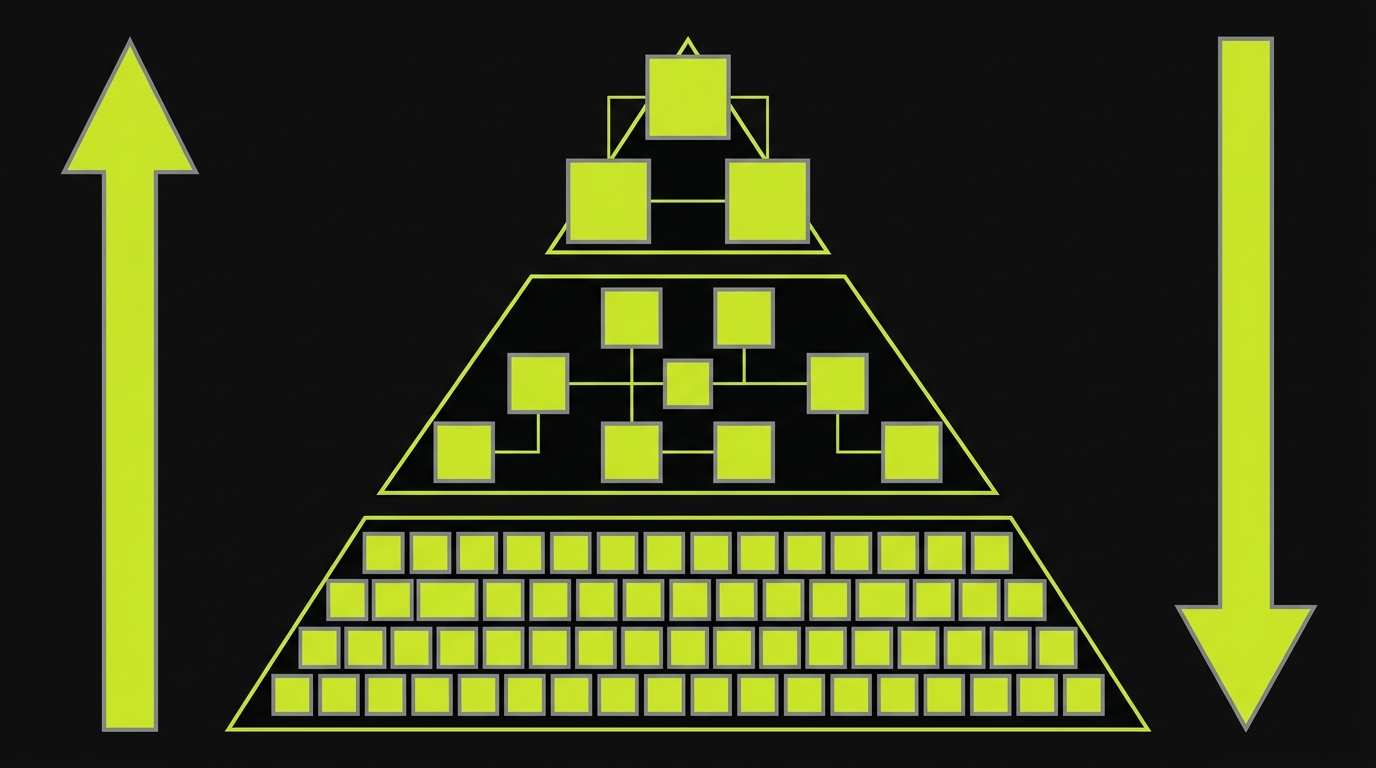
The testing pyramid has a canonical ratio: roughly 70% unit tests, 20% integration tests, 10% end-to-end tests. Teams that follow it ship faster, break less, and spend less time debugging flaky CI. Teams that ignore it tend to either over-invest in slow E2E suites that become maintenance burdens, or under-invest in browser-level coverage and discover checkout bugs in production on a Friday.
Jest owns the 70 and the 20. Playwright owns the 10. Those are not interchangeable numbers. Each tier has a different cost profile, a different failure mode, and a different answer to the question of what exactly is being tested. Conflating the tools means collapsing those distinctions, and you pay for it in CI minutes, debugging time, and missed coverage.
The ratio is not a hard rule. Some applications are entirely backend logic and run closer to 90/10/0. Others are complex multi-step user flows where 15% E2E is more appropriate. But the underlying principle holds: different layers of the pyramid need different tools, and Jest and Playwright were each designed for their respective layer. This article walks through exactly which layer each owns, what happens when teams get it wrong, and the one layer most teams skip entirely.
What Jest Is For
Jest is a test runner. It executes JavaScript or TypeScript in a Node.js process, gives you a describe/test/expect API, and ships with mocking, code coverage, and watch mode built in. It does not open a browser. It does not render HTML. It has no concept of a DOM unless you add one via jsdom, and even then it is a simulated DOM, not a real one.
That constraint is a feature, not a limitation. Because Jest never leaves Node, it is fast. A test suite with hundreds of unit tests runs in seconds. There are no browser startup times, no network round trips, no rendering pipelines. You can run Jest on every keystroke if you want. Most CI pipelines complete a full Jest suite in under two minutes.
Jest owns the unit layer. A unit test in Jest imports a function, calls it with specific inputs, and asserts on the outputs. The function under test might be a cart calculation, a date formatter, a discount rule, a data transformer. Whatever it is, it has no dependencies on the DOM or a running server. Jest verifies the logic in complete isolation.
Jest also owns integration tests when paired with MSW. Mock Service Worker intercepts HTTP requests at the network layer and returns fixture responses, which means you can test a component that fetches real data from a real API shape, without a running backend. This is the integration layer: modules working together, boundary inputs and outputs verified, but still in Node, still fast, still deterministic.
Here is a cart module tested with Jest and MSW. It covers three scenarios: adding items to the cart and checking the total, applying a discount code, and fetching product data from a mocked API endpoint. The entire suite runs in Node with no browser, no server, and no flakiness:
What Jest cannot test. Jest cannot verify that your checkout button actually submits the form. It cannot assert that a CSS transition completes before the modal is interactive. It cannot catch a race condition that only appears when two asynchronous requests resolve in a specific order under real network latency. It cannot test what a user with a screen reader experiences when navigating your page. For all of that, you need a browser.
What Playwright Is For
Playwright is a browser automation framework. It drives real browser instances, Chromium, Firefox, and WebKit, and exposes an API for navigating pages, clicking elements, filling forms, and asserting on page state. The key word is real. Playwright does not simulate a browser. It controls an actual one.
That matters because a real browser enforces everything your application depends on: CSS layout, JavaScript event bubbling, browser storage APIs, network request handling, service workers, accessibility trees. Jest with jsdom can approximate some of these. Playwright does not approximate. It exercises the same code path a real user would.
Playwright owns the E2E layer. An E2E test in Playwright opens a browser, navigates to a URL, interacts with the UI, and asserts on what the user sees. It tests the whole stack from the frontend down: the component renders correctly, the API call succeeds, the response is displayed accurately, the state persists across a page reload. No mocking. No shortcuts.
The cost of that fidelity is time. A Playwright suite is slower than a Jest suite. Browser launch, page navigation, and network requests all take real wall-clock time. A thorough Playwright suite might take five to fifteen minutes in CI where Jest takes thirty seconds. That is the correct tradeoff for the E2E layer, but it means you do not write Playwright tests for everything. You write them for the critical paths.
Below is a Playwright test against the same cart application. It opens the shop in a real browser, adds two items, navigates to checkout, fills the shipping form, and asserts the confirmation page renders the correct order summary. The same flow Jest verified at the unit and integration layers, now verified end-to-end in a real browser:
What Playwright cannot replace. Playwright is not the right tool for testing a pure JavaScript function. Running a browser to assert that calculateTotal([item1, item2]) returns the correct number is wasteful. It is also fragile. If your layout changes, the test breaks even if the logic is correct. Playwright tests are also slower to write. Setting up browser contexts, dealing with selector stability, and handling async timing adds authorship overhead that is not justified for logic that Jest can verify in milliseconds.
That same authorship overhead is what stops most teams from having a real E2E layer at all. Writing Playwright tests is slow. Maintaining them as selectors rot and the DOM shifts is slower. A large portion of the teams we talk to have a Jest suite that is healthy and a Playwright suite that quietly atrophied. That is the exact gap we built Autonoma to close.
The Testing Pyramid: Where Both Fit
The testing pyramid is the principle (originally attributed to Mike Cohn, later popularized by Martin Fowler) that your test suite should have more unit tests than integration tests, and more integration tests than E2E tests. The canonical ratio is 70% unit, 20% integration, 10% E2E. Those are not hard rules. They are a heuristic for where you get the most signal per dollar of CI time. For a deeper breakdown of what distinguishes each layer, see unit vs integration vs E2E testing.
| Layer | Tool | What It Tests | Speed | Ideal Share |
|---|---|---|---|---|
| Unit | Jest | Pure functions, isolated modules, business logic | Very fast (milliseconds per test) | ~70% |
| Integration | Jest + MSW | Modules working together, API contracts, component data flow | Fast (seconds per suite) | ~20% |
| E2E | Playwright | Full user flows in a real browser, cross-layer behavior | Slow (minutes per suite) | ~10% |
The pyramid shape exists because bugs are cheaper to catch at lower layers. A unit test that catches a discount calculation error costs nothing to run and pinpoints the exact function. A Playwright test that catches the same bug costs minutes of CI time and tells you the checkout page is broken, but not why. Both are valuable. The pyramid just tells you to lean toward the cheaper signal first.
The common failure mode. Teams either skip Jest entirely (writing Playwright tests for everything, which is slow and expensive) or skip Playwright entirely (trusting unit tests to catch integration failures, which they cannot). The teams with the best coverage write both and place them correctly.
For a deeper look at the pyramid itself and how to balance investment at each layer, the testing pyramid guide is the canonical reference.
A Real Project Using Both
The companion repo at github.com/Autonoma-Tools/playwright-vs-jest-when-to-use-each combines both tools in a single project. It is a minimal cart application with a Node backend, and the test suite has three layers:
The unit layer uses Jest to test the cart module directly. Adding an item, removing an item, applying a discount, calculating a total with tax. These tests run against the module in isolation, no HTTP, no DOM. They run in under two seconds and catch regressions in the business logic the moment they are introduced.
The integration layer adds MSW to test the React components that consume the cart API. The component renders, makes a fetch call, and MSW intercepts it with a fixture response. The test asserts the correct items render, the total is displayed, and the "Add to cart" button updates state. This layer catches issues at the component boundary without a running backend.
The E2E layer uses Playwright to run the full checkout flow in a real browser. The test navigates to the shop, adds two items, fills the checkout form, and asserts the confirmation page. This layer catches things neither lower layer can: layout regressions, form submission failures, navigation bugs, and anything that depends on the browser environment.
The three layers answer three different questions. Together, they give you high confidence without redundant coverage.
When You Might Use Only One
There are legitimate cases where you reach for one tool and skip the other.
Jest only makes sense for backend services with no meaningful UI. A Node API that transforms data, validates inputs, and writes to a database has no browser behavior to test. Jest covers the logic completely. Playwright would add no signal.
It also makes sense for pure utility libraries. A date formatting library, a validation schema, a calculation module. These are all Jest territory. There is no browser layer to exercise. If you are evaluating Jest against newer runners, the Jest vs Vitest comparison covers the performance and API differences.
Playwright only is rare but not wrong for very small teams building simple frontline apps where the UI is the entire product. If your application is essentially a form over an API and the business logic lives server-side, a focused set of Playwright E2E tests might be all you need in the frontend repo. The tradeoff is slower feedback on logic errors. Acceptable for some teams at early stage. Teams migrating from older browser drivers should also read the Playwright vs Selenium comparison for the key differences.
The case for skipping E2E entirely is much weaker. Every application has critical user flows. Checkout, authentication, onboarding, core feature workflows. Those flows involve the full stack. Jest cannot verify them. Skipping Playwright means you find out about checkout failures in production. Teams that reach for Autonoma are typically the ones who tried to skip the E2E layer because authoring Playwright suites was too expensive, then discovered the cost of not having one was higher.
The E2E Maintenance Problem
Playwright E2E tests are the right tool for critical flows. They are also the most expensive tests to maintain. Selectors break when the DOM changes. Timing assumptions fail under CI load. API responses change shape. A test suite that was green on Monday is red on Thursday because a designer renamed a button's class.
This maintenance burden is why many teams let their E2E suite atrophy. They write the initial tests, the selectors rot, the tests start flaking, and eventually someone comments out the failing tests to unblock a deploy. The suite is technically present but no longer providing signal. For a deeper look at why E2E suites go flaky and what to do about it, the flaky tests guide covers root causes and remediation strategies.
This is exactly the problem we built Autonoma to solve. Rather than maintaining a hand-authored Playwright suite, our agents read your codebase, plan test scenarios from your routes and components, and execute them against your running application in a real browser. When your code changes, the Maintainer agent updates the tests to match. The selectors don't rot because no one wrote selectors by hand in the first place. If you are comparing Playwright vs Cypress for your E2E layer, the Playwright vs Cypress comparison covers the tradeoffs in detail.
Jest vs Playwright: Side-by-Side Feature Matrix
| Dimension | Jest | Playwright |
|---|---|---|
| Runtime | Node.js | Real browser (Chromium, Firefox, WebKit) |
| Speed | Very fast (ms per test) | Slower (browser launch + navigation time) |
| What it tests | Functions, modules, components in isolation | Full user flows, real browser behavior |
| Cannot test | CSS, browser APIs, real network, actual DOM rendering | Pure logic efficiently; not worth it for isolated functions |
| Mocking | Built-in; deep module and function mocking | Network interception (page.route), storage state |
| CI cost | Low | Higher (browser binaries, longer run time) |
| Debugging | Console output, stack traces | Trace viewer, video, screenshots on failure |
| Pyramid layer | Unit + Integration | E2E |
| Language support | JavaScript / TypeScript | JavaScript, TypeScript, Python, Java, C# |
| Learning curve | Low (standard test runner APIs) | Medium (selector strategies, async patterns, browser contexts) |
| Typical suite time | 30–120 seconds | 5–20 minutes |
FAQ
For most web applications, yes. Jest covers unit and integration tests, which are the bulk of your suite. Playwright covers end-to-end tests for your critical user flows. Skipping Jest means slow, fragile tests for simple logic that should run in milliseconds. Skipping Playwright means your checkout, authentication, and onboarding flows are untested in a real browser. The two tools are complementary, not redundant. The exception is backend-only services with no UI, where Jest alone is sufficient.
Technically, yes. You can pair Jest with Puppeteer or Playwright's Node API and drive a browser from a Jest test. But this is uncommon and not recommended. Playwright's own test runner (built on the same engine) is better suited for E2E: it handles parallelism, retries, trace collection, and browser lifecycle out of the box. Use Jest for unit and integration tests. Use Playwright's test runner for E2E.
No. Playwright cannot efficiently replace Jest for unit and integration testing. Opening a real browser to test a discount calculation function is wasteful. It's 100x slower and makes failures harder to diagnose. Jest's strength is fast, isolated, logic-level verification. Playwright's strength is full-stack, real-browser, user-flow verification. They are not substitutes.
Mock Service Worker (MSW) is a library that intercepts HTTP requests at the service worker level (in the browser) or via Node.js interceptors (in Jest). When used with Jest, it lets you test components or modules that make API calls without running a real backend. Your Jest test fires a fetch, MSW intercepts it and returns a fixture, and your test asserts on what the component does with that response. This makes integration tests fast, deterministic, and backend-independent.
Focus on critical user flows: the paths that, if broken, directly affect revenue or core functionality. Checkout, authentication, onboarding, key feature workflows. Cover each happy path and the most impactful error states. Avoid writing Playwright tests for every UI variation. That coverage belongs at the unit or integration layer with Jest. A good heuristic: if it involves a real user completing a meaningful task, it belongs in Playwright. If it's verifying a function's output, it belongs in Jest.
Autonoma replaces the authoring and maintenance burden of a Playwright suite, not Playwright itself. Under the hood, our agents use real browser automation to execute test scenarios. What you eliminate is writing selectors by hand, updating tests when the DOM changes, and debugging flaky timing issues. If you need fine-grained control over browser primitives (network interception rules, storage state setup, Playwright traces for debugging specific failures), a hand-authored Playwright suite gives you that control. If you want comprehensive E2E coverage without maintaining it yourself, Autonoma is the right layer.
It's a heuristic, not a law. Backend-heavy projects with minimal UI might run 85% unit tests and skip E2E almost entirely. UI-heavy consumer apps might push more weight toward integration and E2E. The principle underneath the ratio is sound: slower, broader tests should be fewer in number because they are more expensive to run and harder to diagnose. Start with the heuristic and adjust based on where your bugs actually surface.