

If writing and maintaining Cypress tests is slowing your React development cycle, Autonoma offers a scriptless alternative — AI agents read your codebase and generate E2E coverage for your critical flows automatically.
Table of Contents
- Introduction
- Why Use Cypress for React E2E Testing?
- Setting Up Cypress for React
- Core Cypress React Testing Patterns and Best Practices
- Testing React-Specific Features: Components, Hooks, and State
- Advanced Patterns for React E2E Testing
- Common Problems and Solutions
- Debugging Failed Tests
- CI/CD Integration
- Best Practices
- Conclusion
- Frequently Asked Questions
Introduction
When you need to test React apps with Cypress, you're looking for more than unit tests. You need end-to-end confidence that your entire application works the way users experience it.
You've built a React app. Jest and React Testing Library pass all their tests. You deploy to production. Then users report a bug: the checkout button doesn't work when you navigate using the browser's back button.
Unit tests didn't catch it. They test components in isolation, not how users actually navigate through your app.
This complete Cypress React testing guide shows you how to test your application in real browsers, with real user interactions, with the test code running alongside your React app. You'll learn exactly how to set up Cypress for React, test React-specific features like hooks and state management, and solve common problems developers face. As Autonoma's CEO with 8+ years implementing test automation at scale, I've seen how Cypress React testing catches bugs that unit tests miss, saving companies millions in production incidents.
Why Use Cypress for React E2E Testing?
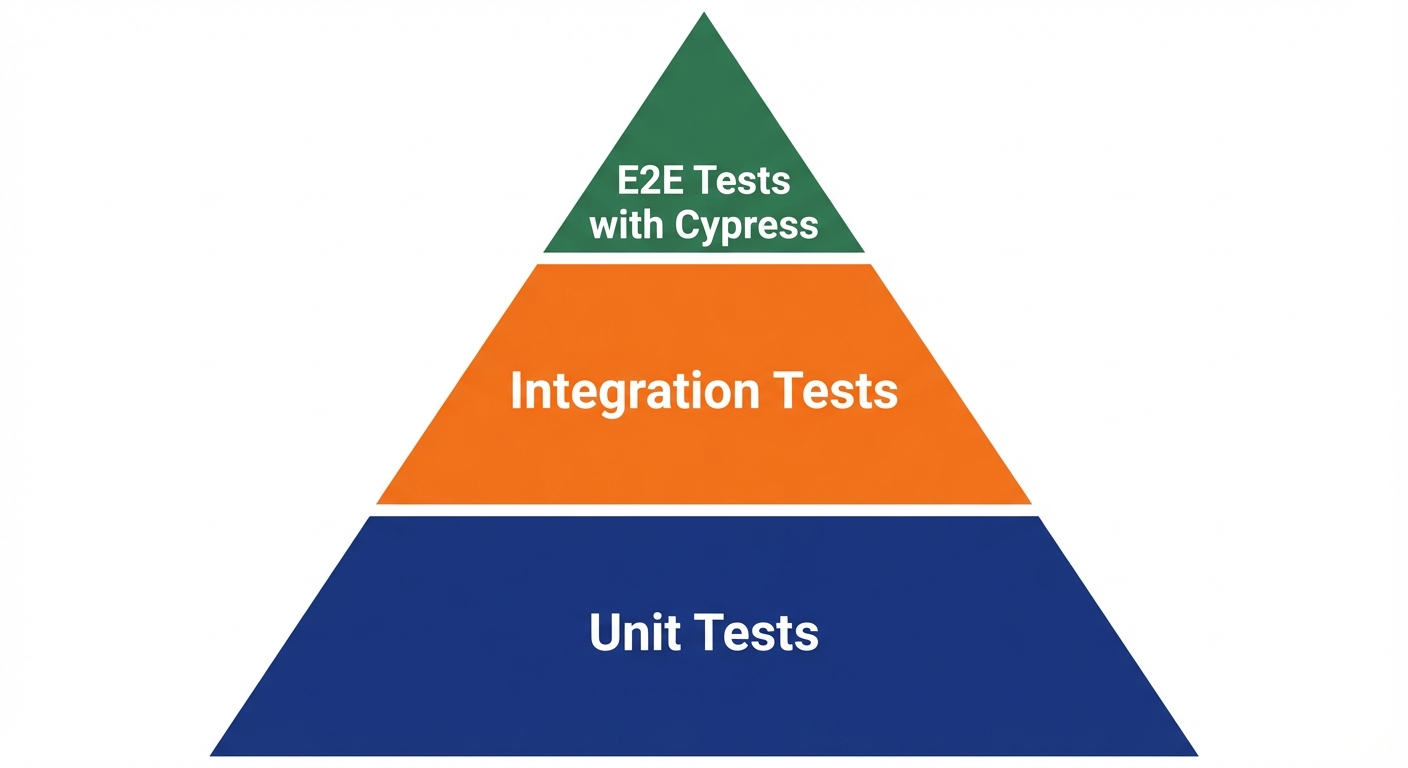
You already have unit tests. They're fast. They catch logic errors in individual components. A button's onClick handler fires, state updates, the component re-renders.
Then you ship to production. The button works in isolation. In production, clicking it triggers a network request that updates Redux store, which triggers a side effect in a different component, which updates the URL, which renders a new route with React Router. Your unit tests never tested this flow.
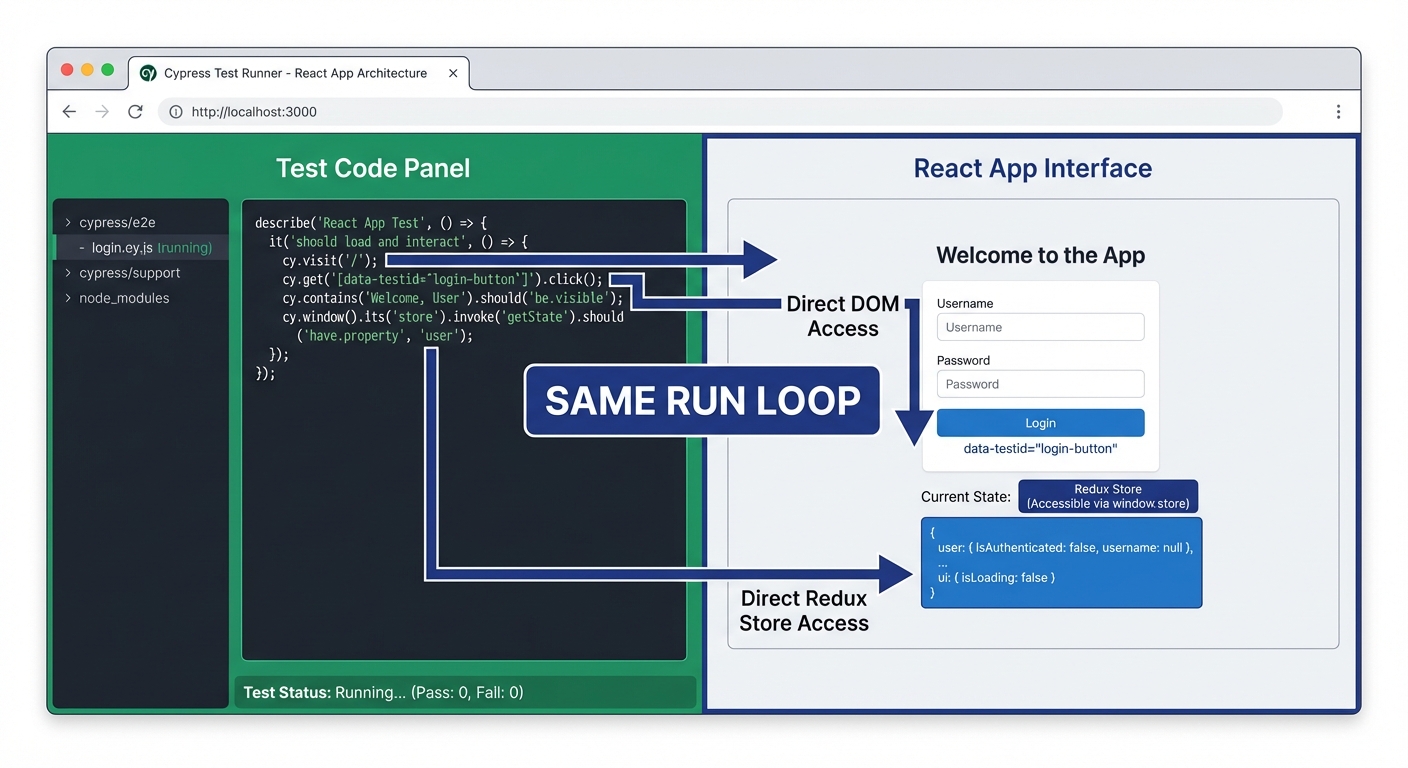
Cypress tests the entire chain. It runs your actual React application in a real browser. The test code runs in the same run loop as your app. Cypress has direct access to your window object, your Redux store, even your component internals. When it finds a bug, you know it's a bug users will encounter.
When to use each approach:
Unit tests catch component-level logic errors and are great for testing utilities, pure functions, and component behavior in isolation. They're fast; hundreds run in seconds. Cypress is slower but catches integration bugs: how components work together, how routing behaves, how your app handles network responses. Unit tests give you speed. Cypress gives you confidence that the whole system works. Learn more about integration testing vs E2E testing to understand when to use each approach.
Comparing React testing frameworks: If you need broader browser support including older browsers, check out our guide on testing React apps with Selenium. For cross-browser testing with auto-waiting, see our React Playwright testing guide.
Setting Up Cypress for React
Installation and Configuration
First, install Cypress in your Create React App project:
npm install cypress --save-devOpen Cypress for the first time to generate configuration files:
npx cypress openThis creates a cypress.config.ts file and a cypress directory. Now configure Cypress to work with your React development server. Open cypress.config.ts:
import { defineConfig } from 'cypress';

export default defineConfig({
  e2e: {
    baseUrl: 'http://localhost:3000',
    viewportWidth: 1280,
    viewportHeight: 720,
    video: false,
    screenshotOnRunFailure: true,

    setupNodeEvents(on, config) {
      // implement node event listeners here
    },
  },

  component: {
    devServer: {
      framework: 'create-react-app',
      bundler: 'webpack',
    },
  },
});
This configuration sets your React dev server's URL as the base URL. Cypress will prefix all cy.visit() commands with this URL. The component testing configuration enables Cypress Component Testing, a unique feature that mounts individual React components in isolation.
Starting Your Dev Server
Unlike some testing frameworks, Cypress doesn't start your dev server automatically. Before running tests, start your React app:
npm startYour React app runs on http://localhost:3000. Cypress connects to it when tests run. For CI/CD, you'll use tools like start-server-and-test to automate this (covered in the CI/CD section).
Project Structure
Create your test files in cypress/e2e. Use descriptive names ending in .cy.ts:
your-react-app/
├── src/
├── public/
├── cypress/
│   ├── e2e/
│   │   ├── auth/
│   │   │   ├── login.cy.ts
│   │   │   └── signup.cy.ts
│   │   ├── checkout/
│   │   │   └── purchase-flow.cy.ts
│   │   └── homepage.cy.ts
│   ├── fixtures/
│   └── support/
├── cypress.config.ts
└── package.json
The .cy.ts extension tells Cypress these are test files. The fixtures folder stores test data. The support folder contains custom commands and global configuration.
Your First Test
Create cypress/e2e/homepage.cy.ts:
describe('Homepage', () => {
  it('loads and displays title', () => {
    cy.visit('/');

    cy.title().should('include', 'React App');
    cy.get('h1').should('be.visible');
  });
});
Run it in the Cypress Test Runner:
npx cypress openSelect "E2E Testing," choose a browser (Chrome recommended), and click your test file. Cypress opens a browser, navigates to your app, and verifies the title appears. The Test Runner shows each command, with screenshots at each step, and you can time-travel through test execution by clicking commands.
Core Cypress React Testing Patterns and Best Practices
Selector Strategies: The Cypress Way
The biggest mistake developers make when moving from other frameworks to Cypress is using fragile selectors. Your UI changes, your tests break.
Cypress's philosophy: select elements by what users see, not by implementation details. Unlike Playwright's getByRole(), Cypress uses cy.get() and cy.contains() with data attributes or visible text.
Bad approach:
// Breaks when you change CSS classes
cy.get('.submit-btn').click();

// Breaks when DOM structure changes
cy.get('form > div:nth-child(2) > button').click();
Good approach:
// Works with data-cy attributes (most resilient)
cy.get('[data-cy="submit-button"]').click();

// Or by visible text
cy.contains('Submit').click();

// For inputs, use labels
cy.get('label').contains('Email').parent().find('input').type('[email protected]');
Selector priority hierarchy:
Use selectors in this order of preference:
data-cyattributes - Most resilient, explicit test hookscy.contains()with visible text - Good for buttons, linksaria-labelorroleattributes - Accessibility-focusedidattributes - When you control the markup- CSS classes or tag names - Last resort only
Here's a complete login form test using best practices:
describe('Login', () => {
  it('user can log in with valid credentials', () => {
    cy.visit('/login');

    // Use data-cy attributes for form inputs
    cy.get('[data-cy="email-input"]').type('[email protected]');
    cy.get('[data-cy="password-input"]').type('securePassword123');

    // Use contains for buttons with text
    cy.contains('button', 'Sign In').click();

    // Verify successful login
    cy.url().should('include', '/dashboard');
    cy.contains('Welcome back').should('be.visible');
  });
});
Add data-cy attributes to your React components:
<input
  data-cy="email-input"
  type="email"
  placeholder="Email"
/>
Testing User Interactions
Cypress provides commands that simulate real user behavior with automatic retry-ability built in:
describe('Checkout Flow', () => {
  it('user completes purchase', () => {
    cy.visit('/products');

    // Click product link
    cy.contains('Premium Plan').click();

    // Fill form fields
    cy.get('[data-cy="card-number"]').type('4242424242424242');
    cy.get('[data-cy="expiry-date"]').type('12/25');
    cy.get('[data-cy="cvc"]').type('123');

    // Select from dropdown
    cy.get('[data-cy="country-select"]').select('US');

    // Check checkbox
    cy.get('[data-cy="terms-checkbox"]').check();

    // Submit
    cy.contains('button', 'Complete Purchase').click();

    // Verify success
    cy.contains('Payment successful').should('be.visible');
  });
});
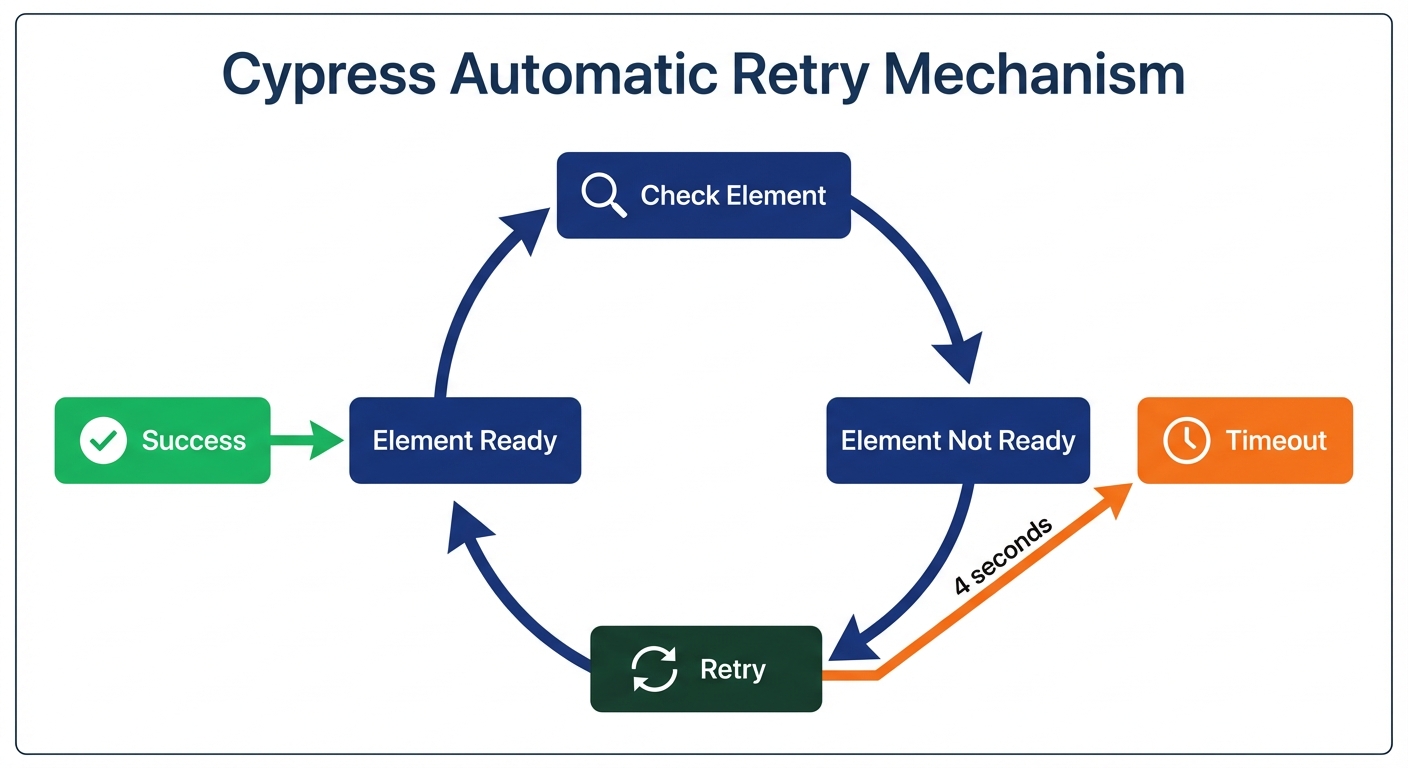
Each command automatically retries until the element is actionable (visible, not disabled, not covered by another element). If the element isn't ready, Cypress waits up to 4 seconds by default before failing.
Assertions and Automatic Retry-ability
Cypress's assertions automatically retry until they pass or timeout. This is crucial for testing React's asynchronous rendering:
describe('Dynamic Content', () => {
  it('displays users after API call', () => {
    cy.visit('/users');

    // Click button that triggers API call
    cy.contains('button', 'Load Users').click();

    // Cypress retries until the list appears (even if API takes 2 seconds)
    cy.get('[data-cy="user-list"]').should('be.visible');
    cy.get('[data-cy="user-item"]').should('have.length', 10);

    // Text assertions also auto-retry
    cy.contains('John Doe').should('be.visible');

    // URL assertions
    cy.url().should('include', 'users');
  });
});
Common assertions you'll use:
.should('be.visible')- Element exists and is visible.should('have.text', 'exact text')- Exact text match.should('contain', 'partial text')- Partial text match.should('have.value', 'value')- For input values.should('be.enabled')/.should('be.disabled').should('have.length', n)- For lists of elements.should('include', 'path')- For URL assertions
Testing React-Specific Features: Components, Hooks, and State
Components with State
React components update state asynchronously. Cypress's automatic retry-ability handles this without manual waits:
describe('Counter', () => {
  it('increments when button clicked', () => {
    cy.visit('/counter');

    // Initial state
    cy.get('[data-cy="count"]').should('have.text', '0');

    // Click triggers setState
    cy.contains('button', 'Increment').click();

    // Auto-waits for React re-render
    cy.get('[data-cy="count"]').should('have.text', '1');

    // Multiple clicks
    cy.contains('button', 'Increment').click();
    cy.contains('button', 'Increment').click();

    cy.get('[data-cy="count"]').should('have.text', '3');
  });
});
No manual waits needed. Cypress checks the DOM repeatedly until the text updates or timeout occurs.
Testing React Hooks (useEffect, useState)
Components with useEffect often trigger API calls after render. Test the behavior users see, not the implementation:
describe('User Profile', () => {
  it('loads data from API', () => {
    cy.visit('/profile/123');

    // Component mounts, useEffect fires, API call starts
    // Loading state appears
    cy.contains('Loading...').should('be.visible');

    // Wait for API to complete and data to render
    cy.contains('Jane Smith').should('be.visible');
    cy.contains('[email protected]').should('be.visible');

    // Loading state should disappear
    cy.contains('Loading...').should('not.exist');
  });
});
This test doesn't know about useEffect. It verifies what users experience: loading state appears, then data appears.
Testing Forms and Controlled Components
React controlled components require proper event sequences. Cypress handles this correctly with .type(), .clear(), and .blur():
describe('Signup Form', () => {
  it('validates input and shows errors', () => {
    cy.visit('/signup');

    // Submit without filling - validation errors appear
    cy.contains('button', 'Create Account').click();

    cy.contains('Email is required').should('be.visible');
    cy.contains('Password is required').should('be.visible');

    // Fill invalid email
    cy.get('[data-cy="email-input"]').type('notanemail');
    cy.get('[data-cy="email-input"]').blur(); // Trigger onBlur validation

    cy.contains('Invalid email address').should('be.visible');

    // Fill valid email
    cy.get('[data-cy="email-input"]').clear().type('[email protected]');
    cy.contains('Invalid email address').should('not.exist');

    // Fill short password
    cy.get('[data-cy="password-input"]').type('123');
    cy.get('[data-cy="password-input"]').blur();

    cy.contains('Password must be at least 8 characters').should('be.visible');

    // Fill valid password
    cy.get('[data-cy="password-input"]').clear().type('securePass123');

    // Submit valid form
    cy.contains('button', 'Create Account').click();

    cy.url().should('include', '/dashboard');
  });
});
Cypress's .type() method triggers all React synthetic events (onChange, onInput, onBlur). Use .blur() to explicitly trigger onBlur validation.
Testing React Router Navigation
React Router navigation is asynchronous. Wait for both URL change and content to load:
describe('Navigation', () => {
  it('user navigates through application routes', () => {
    cy.visit('/');

    // Navigate to products page
    cy.contains('a', 'Products').click();

    // Wait for URL and content
    cy.url().should('include', '/products');
    cy.contains('h1', 'Our Products').should('be.visible');

    // Navigate to specific product
    cy.contains('a', 'Premium Plan').click();

    cy.url().should('match', /\/products\/\d+/);
    cy.contains('h1', 'Premium Plan').should('be.visible');

    // Use back button
    cy.go('back');

    cy.url().should('include', '/products');
  });
});
The .should('include') and .should('match') assertions work with URLs. Use regex patterns for dynamic routes.
Advanced Patterns for React E2E Testing
API Mocking and Network Interception
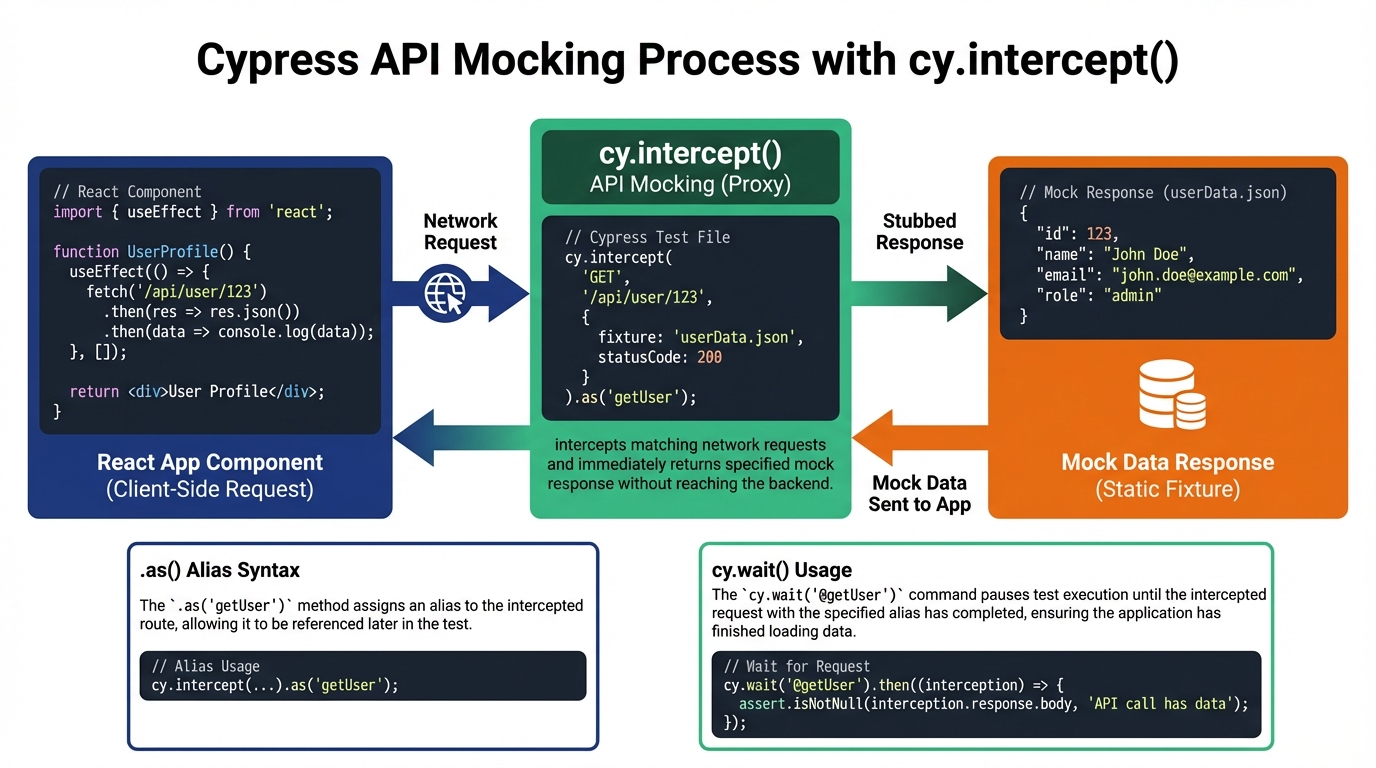
Testing against real APIs is slow and unpredictable. Use cy.intercept() to mock them (especially important when testing in fintech):
describe('User List', () => {
  it('displays users from mocked API', () => {
    // Intercept API call before visiting page
    cy.intercept('GET', '**/api/users', {
      statusCode: 200,
      body: [
        { id: 1, name: 'Alice Johnson', email: '[email protected]' },
        { id: 2, name: 'Bob Smith', email: '[email protected]' },
      ],
    }).as('getUsers');

    cy.visit('/users');

    // Wait for intercept to complete
    cy.wait('@getUsers');

    // React component receives mock data from "API"
    cy.contains('Alice Johnson').should('be.visible');
    cy.contains('Bob Smith').should('be.visible');
  });

  it('handles API error gracefully', () => {
    // Mock API failure
    cy.intercept('GET', '**/api/users', {
      statusCode: 500,
      body: { error: 'Internal server error' },
    }).as('getUsersError');

    cy.visit('/users');

    cy.wait('@getUsersError');

    // Verify error message displays
    cy.contains('Failed to load users').should('be.visible');
    cy.contains('button', 'Retry').should('be.visible');
  });
});
Set up intercepts before visiting the page. If the component makes an API call in useEffect on mount, the intercept must be ready first. The .as() method creates an alias you can wait for with cy.wait().
Cypress Component Testing: Testing in Isolation
Unlike E2E tests that run the entire app, Cypress Component Testing mounts individual React components in isolation. This is faster than E2E tests but slower than unit tests with React Testing Library.
Create src/Counter.cy.tsx next to your component:
import Counter from './Counter';

describe('Counter Component', () => {
  it('increments count when button clicked', () => {
    // Mount component in isolation
    cy.mount(<Counter initialCount={0} />);

    // Test component behavior
    cy.get('[data-cy="count"]').should('have.text', '0');
    cy.contains('button', 'Increment').click();
    cy.get('[data-cy="count"]').should('have.text', '1');
  });

  it('accepts initial count prop', () => {
    cy.mount(<Counter initialCount={5} />);

    cy.get('[data-cy="count"]').should('have.text', '5');
  });

  it('calls onCountChange callback', () => {
    const onCountChange = cy.stub().as('onCountChange');
    cy.mount(<Counter initialCount={0} onCountChange={onCountChange} />);

    cy.contains('button', 'Increment').click();
    cy.get('@onCountChange').should('have.been.calledWith', 1);
  });
});
Component tests run in a real browser but mount components without the full app context. They're great for testing component logic, props, and events without testing the entire application flow.
Testing Portals and Modals
React portals render outside the normal component tree, typically to document.body. Cypress finds them automatically:
describe('Settings Modal', () => {
  it('opens and closes correctly', () => {
    cy.visit('/dashboard');

    // Modal not visible initially
    cy.get('[data-cy="settings-modal"]').should('not.exist');

    // Open modal
    cy.contains('button', 'Open Settings').click();

    // Modal appears (even though it's rendered in a portal)
    cy.get('[data-cy="settings-modal"]').should('be.visible');
    cy.contains('h2', 'Settings').should('be.visible');

    // Interact with modal content
    cy.get('[data-cy="notifications-toggle"]').check();

    // Close modal by clicking close button
    cy.get('[data-cy="close-modal"]').click();

    cy.get('[data-cy="settings-modal"]').should('not.exist');
  });

  it('closes when clicking overlay', () => {
    cy.visit('/dashboard');

    cy.contains('button', 'Open Settings').click();
    cy.get('[data-cy="settings-modal"]').should('be.visible');

    // Click the backdrop/overlay
    cy.get('[data-cy="modal-backdrop"]').click({ force: true });

    cy.get('[data-cy="settings-modal"]').should('not.exist');
  });
});
Cypress searches the entire document, so portal location doesn't matter. Use data-cy attributes to identify modals reliably.
Testing Lazy-Loaded Components
React.lazy() components load asynchronously. Cypress's automatic retry-ability handles the delay:
describe('Lazy Dashboard', () => {
  it('renders after code split loads', () => {
    cy.visit('/');

    // Click navigation to route with lazy-loaded component
    cy.contains('a', 'Dashboard').click();

    // Cypress waits for code chunk to download and component to render
    cy.contains('h1', 'Dashboard').should('be.visible');
    cy.contains('Welcome to your dashboard').should('be.visible');

    // Verify lazy component's functionality
    cy.contains('button', 'Load Analytics').should('be.enabled');
  });

  it('shows loading state while component loads', () => {
    // Throttle network to make loading visible
    cy.intercept('**/static/js/dashboard.*.chunk.js', (req) => {
      req.reply((res) => {
        res.delay = 1000; // 1 second delay
      });
    });

    cy.visit('/');
    cy.contains('a', 'Dashboard').click();

    // Suspense fallback appears
    cy.contains('Loading...').should('be.visible');

    // Then actual component renders
    cy.contains('h1', 'Dashboard').should('be.visible');
    cy.contains('Loading...').should('not.exist');
  });
});
Testing with Context Providers
If your component needs Context (theme, auth, Redux), the real app provides it. Your test just navigates to the real app:
describe('Theme Toggle', () => {
  it('switches between light and dark mode', () => {
    cy.visit('/');

    // App loads with default theme (from ThemeProvider)
    cy.get('body').should('have.attr', 'data-theme', 'light');

    // Toggle theme
    cy.get('[data-cy="theme-toggle"]').click();

    // Context updates, app re-renders with dark theme
    cy.get('body').should('have.attr', 'data-theme', 'dark');

    // Toggle back
    cy.get('[data-cy="theme-toggle"]').click();
    cy.get('body').should('have.attr', 'data-theme', 'light');
  });
});
Unlike unit tests where you manually wrap components in providers, E2E tests use your actual app setup. Context just works.
For component tests, you can wrap the component in providers:
import { ThemeProvider } from './ThemeContext';
import Header from './Header';

describe('Header Component', () => {
  it('renders with theme from context', () => {
    cy.mount(
      <ThemeProvider initialTheme="dark">
        <Header />
      </ThemeProvider>
    );

    cy.get('[data-cy="header"]').should('have.class', 'dark-theme');
  });
});
Common Problems and Solutions
Timing Issues: When Tests Fail Randomly
Three related problems plague Cypress + React testing: timeout errors, flaky tests, and state update delays. They all stem from the same root cause: checking before React finishes rendering.
Timeout errors happen when you wait for something that never appears:
// ❌ WRONG - Times out if API is slow
describe('Users List', () => {
  it('loads users', () => {
    cy.visit('/users');
    cy.contains('John Doe', { timeout: 2000 }).should('be.visible');
  });
});
The default timeout is 4 seconds, but this test only waits 2. If your API takes 3 seconds, the test fails. Solution: remove the timeout override or increase it, and ensure you're waiting for the right thing:
// ✅ CORRECT - Waits for loading to complete, then checks data
describe('Users List', () => {
  it('loads users', () => {
    cy.visit('/users');

    // Wait for loading state to disappear (means data loaded)
    cy.contains('Loading...').should('not.exist');

    // Now check for data
    cy.contains('John Doe').should('be.visible');
  });
});
Flaky tests pass sometimes, fail other times. Usually caused by race conditions where you check before React updates state:
// ❌ WRONG - Might check before React re-renders
describe('Counter', () => {
  it('increments', () => {
    cy.visit('/counter');
    cy.contains('button', 'Increment').click();

    // This might check before React updates the DOM
    cy.get('[data-cy="count"]').invoke('text').should('eq', '1');
  });
});
The problem: .invoke('text') and .then() don't retry. They run once. Solution: use Cypress assertions that automatically retry:
// ✅ CORRECT - Auto-retries until text becomes '1'
describe('Counter', () => {
  it('increments', () => {
    cy.visit('/counter');
    cy.contains('button', 'Increment').click();

    cy.get('[data-cy="count"]').should('have.text', '1');
  });
});
State not updating happens when you interact with elements before they're ready. React might still be processing the previous state update:
// ❌ WRONG - Clicks before button re-enables after first click
describe('Form Submission', () => {
  it('submits twice', () => {
    cy.visit('/form');

    cy.contains('button', 'Submit').click();
    // Button disables during submission, re-enables when done
    cy.contains('button', 'Submit').click(); // Fails - button still disabled
  });
});
Solution: wait for the element's state to change before interacting:
// ✅ CORRECT - Waits for button to re-enable
describe('Form Submission', () => {
  it('submits twice', () => {
    cy.visit('/form');

    cy.contains('button', 'Submit').click();
    cy.contains('button', 'Submit').should('be.enabled'); // Waits for re-enable
    cy.contains('button', 'Submit').click();
  });
});
General rule: Never use cy.wait(5000) for arbitrary delays. Always wait for a specific condition using Cypress assertions. For more strategies, see our guide on reducing test flakiness or eliminate flaky tests entirely with autonomous testing.
Selector Issues: When Tests Can't Find Elements
Two common selector problems: using fragile selectors, and selectors matching multiple elements.
Fragile selectors break when CSS or DOM structure changes:
// ❌ WRONG - Breaks when you change CSS classes
cy.get('.submit-btn').click();
When you rename that class to .primary-button, the test fails. Solution: use data-cy attributes:
// ✅ CORRECT - Works regardless of CSS classes
cy.get('[data-cy="submit-button"]').click();
Multiple element errors occur when your selector matches more than one element:
// ❌ WRONG - Error: found 5 elements, expected 1
describe('Products', () => {
  it('clicks first product', () => {
    cy.visit('/products');
    cy.contains('button', 'Add to Cart').click();
  });
});
Five products, five "Add to Cart" buttons. Cypress doesn't know which to click. Solutions: be more specific or use .first():
// ✅ CORRECT - Option 1: Use .first()
describe('Products', () => {
  it('clicks first product', () => {
    cy.visit('/products');
    cy.contains('button', 'Add to Cart').first().click();
  });
});

// ✅ CORRECT - Option 2: Use data-cy with unique identifiers
describe('Products', () => {
  it('clicks specific product', () => {
    cy.visit('/products');
    cy.get('[data-cy="product-123"]')
      .find('[data-cy="add-to-cart"]')
      .click();
  });
});
React-Specific Challenges
Testing hooks with side effects: Don't test the hook directly. Test what users see after the side effect runs:
// Component with useEffect that fetches data
describe('Dashboard', () => {
  it('displays fetched data', () => {
    cy.visit('/dashboard');

    // useEffect runs, fetches data, updates state
    // Just verify the result appears
    cy.contains('h2', 'Sales: $1,234').should('be.visible');
  });
});
Conditional rendering issues: Elements that appear/disappear based on state can cause "element not found" errors:
// ✅ CORRECT - Tests both success and error states
describe('Form Submission', () => {
  it('shows success message on valid submission', () => {
    cy.visit('/form');

    cy.get('[data-cy="email-input"]').type('[email protected]');
    cy.contains('button', 'Submit').click();

    cy.contains('Form submitted').should('be.visible');
    cy.contains('Error').should('not.exist');
  });

  it('shows error message on invalid submission', () => {
    cy.visit('/form');

    // Don't fill required field
    cy.contains('button', 'Submit').click();

    cy.contains('Email is required').should('be.visible');
    cy.contains('Form submitted').should('not.exist');
  });
});
Portal/modal issues: Already covered in Advanced Patterns. Use data-cy attributes and Cypress finds them regardless of portal placement.
Integration Challenges
Event handlers not triggering: Usually happens when clicking covered or disabled elements:
// ❌ WRONG - Clicks overlay instead of button underneath
describe('Button Click', () => {
  it('clicks button', () => {
    cy.visit('/app');
    cy.contains('button', 'Submit').click({ force: true });
  });
});
The force: true option bypasses actionability checks. It clicks even if an overlay covers the button. The click doesn't reach the button. Solution: wait for the overlay to disappear:
// ✅ CORRECT - Waits for loading overlay to disappear
describe('Button Click', () => {
  it('clicks button', () => {
    cy.visit('/app');

    cy.get('[data-cy="loading-overlay"]').should('not.exist');
    cy.contains('button', 'Submit').click();
  });
});
API mocking timing: Set up intercepts before navigation, not after:
// ❌ WRONG - Race condition: page might call API before intercept is set
describe('API Mock', () => {
  it('mocks API', () => {
    cy.visit('/users');

    cy.intercept('GET', '**/api/users', []);

    // Too late - useEffect already called real API
  });
});

// ✅ CORRECT - Intercept ready before page loads
describe('API Mock', () => {
  it('mocks API', () => {
    cy.intercept('GET', '**/api/users', []).as('getUsers');

    cy.visit('/users');
    // Now useEffect calls mocked API
  });
});
React Router navigation: Wait for both URL change and content load:
// ✅ CORRECT - Checks URL and content
describe('Navigation', () => {
  it('navigates to products', () => {
    cy.visit('/');
    cy.contains('a', 'Products').click();

    cy.url().should('include', '/products');
    cy.contains('h1', 'Our Products').should('be.visible');
  });
});
Debugging Failed Tests
When a test fails, Cypress gives you powerful debugging tools unique to its architecture.
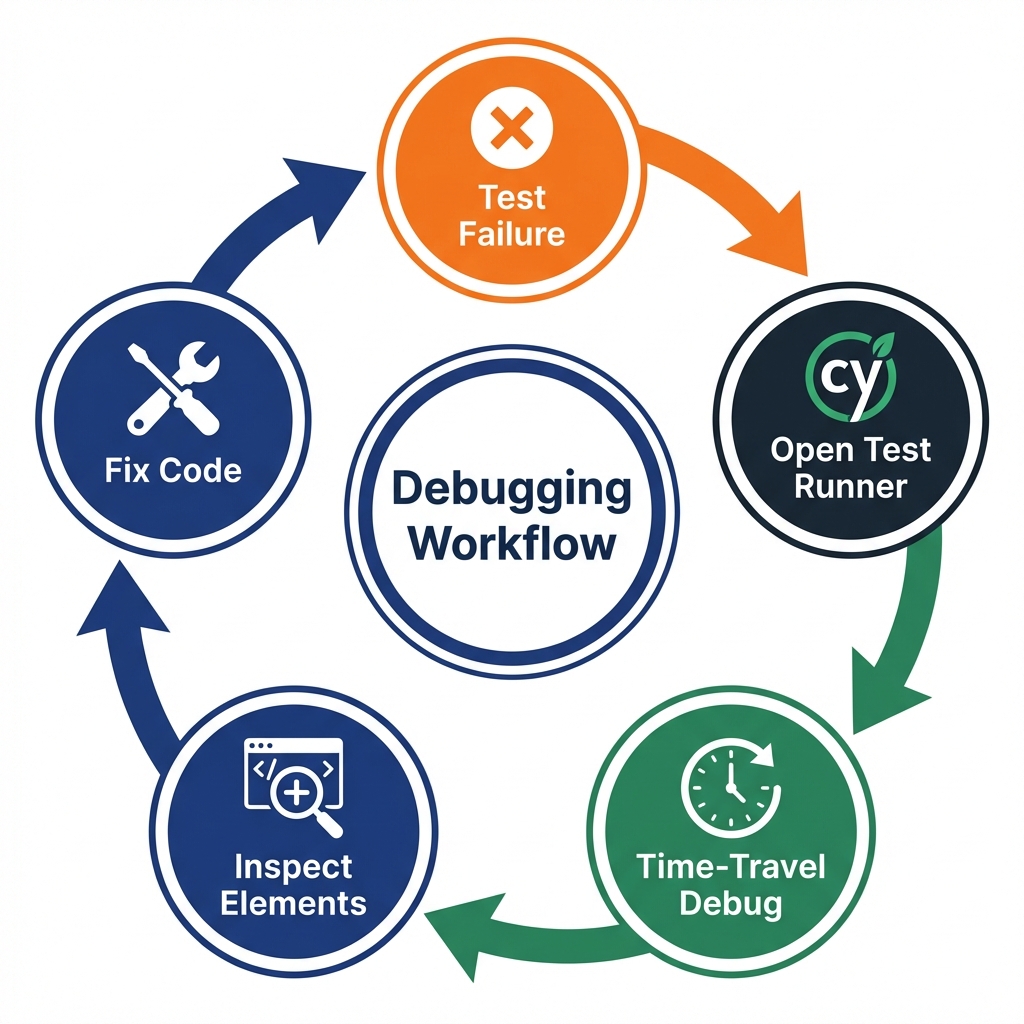
Cypress Test Runner: Time-Travel Debugging
Run tests in the Test Runner (not headless mode):
npx cypress openThe Test Runner shows each command in a list. Click any command to see:
- A snapshot of the DOM at that moment
- Console logs from that point in time
- Network requests made before that command
- Screenshots of the app state
This "time-travel" debugging lets you see exactly what the app looked like when a command ran. You can inspect elements, check network responses, and understand why a test failed.
Using .debug() for Breakpoints
Add .debug() anywhere in your test:
describe('Debug Example', () => {
  it('debugs specific interaction', () => {
    cy.visit('/form');
    cy.get('[data-cy="email-input"]').type('[email protected]');

    cy.debug(); // Execution pauses here

    cy.contains('button', 'Submit').click();
  });
});
The test pauses at that line. The browser DevTools automatically open. You can inspect the application state, run commands in the console, and step through execution.
Screenshots and Videos on Failure
Cypress automatically takes screenshots when tests fail. Configure video recording in cypress.config.ts:
export default defineConfig({
  e2e: {
    video: true,
    screenshotOnRunFailure: true,
  },
});
Failed tests save screenshots to cypress/screenshots/ and videos to cypress/videos/. Visual proof of what went wrong.
Console Logs and Network Inspection
Cypress captures all console logs and network requests. View them in the Test Runner's left sidebar:
- Console: Shows all
console.log(), errors, and warnings - Network: Shows all XHR/fetch requests with request/response details
Click any network request to see headers, body, and status code. This is invaluable for debugging API integration issues.
CI/CD Integration
Run Cypress tests in GitHub Actions to catch bugs before deployment. For Vercel users, check out our Vercel preview deployment testing strategy.
Installing start-server-and-test
Cypress doesn't start your dev server automatically. Use start-server-and-test to automate this:
npm install --save-dev start-server-and-testAdd to package.json:
{
  "scripts": {
    "start": "react-scripts start",
    "cy:run": "cypress run",
    "test:e2e": "start-server-and-test start http://localhost:3000 cy:run"
  }
}
Now npm run test:e2e starts your React app, waits for it to be ready, runs Cypress tests, then shuts down the server.
GitHub Actions Workflow
Create .github/workflows/cypress.yml:
name: Cypress Tests
on:
  push:
    branches: [ main, dev ]
  pull_request:
    branches: [ main ]

jobs:
  test:
    timeout-minutes: 60
    runs-on: ubuntu-latest

    steps:
    - uses: actions/checkout@v4

    - uses: actions/setup-node@v4
      with:
        node-version: 18

    - name: Install dependencies
      run: npm ci

    - name: Build React app
      run: npm run build

    - name: Run Cypress tests
      run: npm run test:e2e

    - uses: actions/upload-artifact@v4
      if: failure()
      with:
        name: cypress-screenshots
        path: cypress/screenshots
        retention-days: 30

    - uses: actions/upload-artifact@v4
      if: failure()
      with:
        name: cypress-videos
        path: cypress/videos
        retention-days: 30
This workflow:
- Installs dependencies
- Builds your React app
- Starts the server and runs all Cypress tests
- Uploads screenshots and videos as artifacts if tests fail (visible in GitHub Actions UI)
Parallelization: Cypress can split tests across multiple machines. Use Cypress Cloud or GitHub Actions matrix strategy for faster runs.
Best Practices
Quick reference for writing maintainable Cypress tests:
Use data-cy attributes for stable selectors: Add data-cy attributes to elements you'll test. They're explicit, don't change with CSS, and make tests resilient.
Never use hard-coded waits: cy.wait(3000) makes tests slow and flaky. Use assertions that auto-retry: .should('be.visible').
Test user flows, not implementation details: Don't test that useState was called. Test that clicking a button changes visible text.
Mock external APIs: Don't hit real endpoints. Use cy.intercept() to provide predictable responses.
Keep tests independent: Each test should run in isolation. Don't rely on state from previous tests. Use beforeEach() for setup.
Use custom commands for repetitive actions: When you repeat the same action in many tests, extract it into a custom command. Create cypress/support/commands.ts:
Cypress.Commands.add('login', (email: string, password: string) => {
  cy.visit('/login');
  cy.get('[data-cy="email-input"]').type(email);
  cy.get('[data-cy="password-input"]').type(password);
  cy.contains('button', 'Sign In').click();
  cy.url().should('include', '/dashboard');
});
Use it in tests:
describe('Dashboard', () => {
  beforeEach(() => {
    cy.login('[email protected]', 'password123');
  });

  it('displays user data', () => {
    cy.contains('Welcome back, John').should('be.visible');
  });
});
For larger projects, consider implementing a Page Object Model to organize your tests effectively.
Conclusion
You now have everything you need to test React applications with Cypress. You know how to set up Cypress in a Create React App project, write tests using stable selectors, handle React-specific features like hooks and routing, mock APIs for predictable tests, use Cypress Component Testing for isolated component tests, and debug failures with time-travel debugging.
Start small. Pick one critical user flow (login, checkout, signup). Write a test. Run it in the Test Runner. Watch it catch a bug you didn't know existed. Then add more.
The confidence you gain from end-to-end tests is worth the investment. Your unit tests tell you components work in isolation. Cypress tells you your app works for users, and it runs right alongside your React app, giving you access to everything.
Want to skip the maintenance burden? While Cypress is powerful, maintaining test suites as your React app evolves takes significant time. Autonoma AI's autonomous testing eliminates test maintenance entirely. Our AI agents write, run, and maintain tests automatically, adapting to UI changes without breaking. Get the confidence of E2E testing without the overhead.
Next steps:
- Add Cypress to your current React project
- Write one test for your most critical user flow
- Set up CI to run tests on every commit (see our regression testing strategies)
- Try Cypress Component Testing for complex components
- Gradually expand coverage to other flows
- Or skip the complexity: Try Autonoma AI's autonomous testing to get production-ready tests without writing code. Tests that never break and adapt to your app automatically
Resources:
- Cypress Documentation
- React Testing Best Practices
- Cypress Discord Community
- Test Automation Frameworks Guide - Compare Playwright, Selenium, and Cypress
The tools are ready. Your app is waiting. Start testing.
Frequently Asked Questions
Run npm install cypress --save-dev in your project root, then npx cypress open to initialize. Configure cypress.config.ts with baseUrl pointing to http://localhost:3000 (your React dev server). Start your React app with npm start, then run Cypress tests.
React Testing Library tests components in isolation using jsdom (a simulated browser environment). It's fast and great for unit testing. Cypress tests your entire app in real browsers with real user interactions, running in the same run loop as your React application. Cypress catches integration issues like routing bugs, API integration problems, and state management issues that unit tests miss.
Don't test hooks directly. Test what users see after the hook runs. If a component uses useEffect to fetch data, use cy.visit() to navigate to the page and wait for the data to appear using assertions like cy.contains('data').should('be.visible'). Cypress's automatic retry-ability handles the async nature of hooks automatically.
Timeout errors usually mean you're waiting for something that never appears. Solution: Wait for loading states to disappear before checking for content, use Cypress's default 4-second timeout (or increase with {timeout: 10000}), ensure you're selecting the correct element with proper selectors, and check that API intercepts are set up before visiting the page.
Use cy.intercept() to intercept network requests before visiting the page. Set up intercepts before navigation so they're ready when React components make API calls in useEffect. Example: cy.intercept('GET', '**/api/users', []).as('getUsers'), then cy.visit('/users'), then optionally cy.wait('@getUsers').
Click navigation links and wait for both URL change and content to load. Use cy.url().should('include', '/products') to verify the URL, then cy.contains('h1', 'Our Products').should('be.visible') to confirm content rendered. This ensures both routing and data loading completed. Use cy.go('back') to test back button navigation.
Flaky tests fail randomly due to timing issues. Fix them by: using Cypress assertions that auto-retry (.should('be.visible')) instead of non-retrying commands (.invoke(), .then()), never using cy.wait() with arbitrary delays, waiting for elements to be enabled/visible before interacting, and setting up API intercepts before page navigation.
Cypress Component Testing lets you mount individual React components in isolation in a real browser, similar to unit tests but with real DOM. Use cy.mount(<Component />) instead of cy.visit(). It's faster than E2E tests but slower than React Testing Library. Great for testing component props, events, and behavior without running the full application.
Install start-server-and-test with npm install --save-dev start-server-and-test. Add a script: test:e2e: 'start-server-and-test start http://localhost:3000 cy:run'. Create a GitHub Actions workflow that installs dependencies, builds your React app, and runs npm run test:e2e. Upload screenshots and videos as artifacts on failure.
Run npx cypress open to open the Test Runner. Click any command to time-travel and see the DOM state at that moment. Add cy.debug() in your test to pause execution and open DevTools. View console logs and network requests in the Test Runner's sidebar. Screenshots and videos are automatically saved to cypress/screenshots/ and cypress/videos/ on test failure.
Use selectors in this priority: data-cy attributes (most resilient and explicit), cy.contains() with visible text for buttons/links, aria-label or role attributes for accessibility, id attributes when you control the markup, and CSS classes or tag names only as a last resort. Add data-cy attributes to your React components for stable test selectors.
Use cy.get('[data-cy="input"]').type('text') to fill inputs (triggers onChange, onInput), .clear() to clear values, .blur() to explicitly trigger onBlur validation, .select() for dropdowns, and .check()/.uncheck() for checkboxes. Cypress triggers all React synthetic events correctly. Wait for validation messages with .should('be.visible') or .should('not.exist').
Yes. Cypress searches the entire document, so portal location doesn't matter. Use data-cy attributes to identify modals: cy.get('[data-cy="modal"]').should('be.visible'). Test modal opening, content interaction, and closing. Use .should('not.exist') to verify modals are closed. Click overlays with cy.get('[data-cy="backdrop"]').click().
Cypress's automatic retry-ability handles code-splitting delays automatically. Navigate to the route with cy.contains('a', 'Dashboard').click(), then wait for content with cy.contains('h1', 'Dashboard').should('be.visible'). To test Suspense fallbacks, throttle network with cy.intercept() using req.reply with a delay, then verify the loading state appears before the component.
Both work well for React. Cypress runs in the browser alongside your app, giving direct access to window, Redux store, and React components. It has great time-travel debugging and Component Testing. Playwright runs out-of-process with better multi-browser support and faster execution. Choose Cypress if you value debugging experience and in-browser access. Choose Playwright if you need cross-browser testing and speed. See our Playwright alternatives comparison for detailed differences.


