

Testing a vibe-coded app means verifying that the software you built with AI tools (Cursor, Lovable, Bolt, Replit, or similar) actually does what it is supposed to do before your users find out it doesn't. You don't need to write code to test your app. You need to identify the critical paths users take through your product, define what "working" looks like at each step, and run those paths against your live app systematically. AI testing tools can automate this entirely: connect your codebase, let agents read your code and generate the tests, and get results without ever opening a terminal. The goal is simple: catch bugs before your users do.
You built an app without learning to code. That part went surprisingly well. Now someone tells you the app needs to be "tested" before you launch, and suddenly you are reading documentation written for people with computer science degrees.
Most testing guides assume you already know what a test suite is, why CI/CD matters, and how to run commands in a terminal. Those guides are not for you. This one is.
Testing a vibe-coded app is not about becoming technical. It is about knowing what your users are supposed to be able to do, walking those paths systematically, and catching the places where things silently break before your users find them. You can do all of this without touching the code. This is no-code app testing at its most practical. Here is how.
What Does Testing a Vibe-Coded App Actually Mean?
Before anything else, it helps to strip away the jargon. When engineers talk about testing, they mean one thing: does the app do what it's supposed to do? That's it.
There are fancy frameworks and methodologies that add complexity, but the core question is always the same. Does the signup flow work? Does the payment go through? Does the dashboard load the right data? When you test these things, you are verifying that the app behaves correctly for a real user in real conditions.
The reason testing matters specifically for vibe-coded apps is that AI tools generate code optimized for "make this work" rather than "make this robust." The happy path (the main thing you asked it to do) usually works. The edges don't. A user who types their email with a capital letter might fail a validation check. A user who clicks the back button mid-checkout might corrupt their session. These are not exotic scenarios. They are common user behaviors that vibe-coded apps miss because nobody thought to check them. The vibe coding testing gap is well-documented: AI-generated code ships at speed, but the coverage that catches edge cases doesn't follow automatically.
You don't need to understand the code to test it. You need to understand what your users are supposed to be able to do.
Step 1: Map Your Vibe-Coded App's Critical Paths
Before you test anything, you need a list of the things your app is supposed to do. Not a technical spec. Just a plain-language list of user actions.
Think about your app and answer: what are the three to five things a user absolutely must be able to do for your product to work? For most apps, the list looks something like this. A user can sign up and log in. A user can complete the core action your app exists to provide (place an order, create a project, send a message). A user can access their account and see their data after logging in. A user can complete any payment flow if one exists.
Write these down in plain language, action by action. "User goes to signup page. User enters email and password. User clicks 'Create Account'. User is redirected to dashboard. Dashboard shows their name."
That list is your test plan. Everything else follows from it.
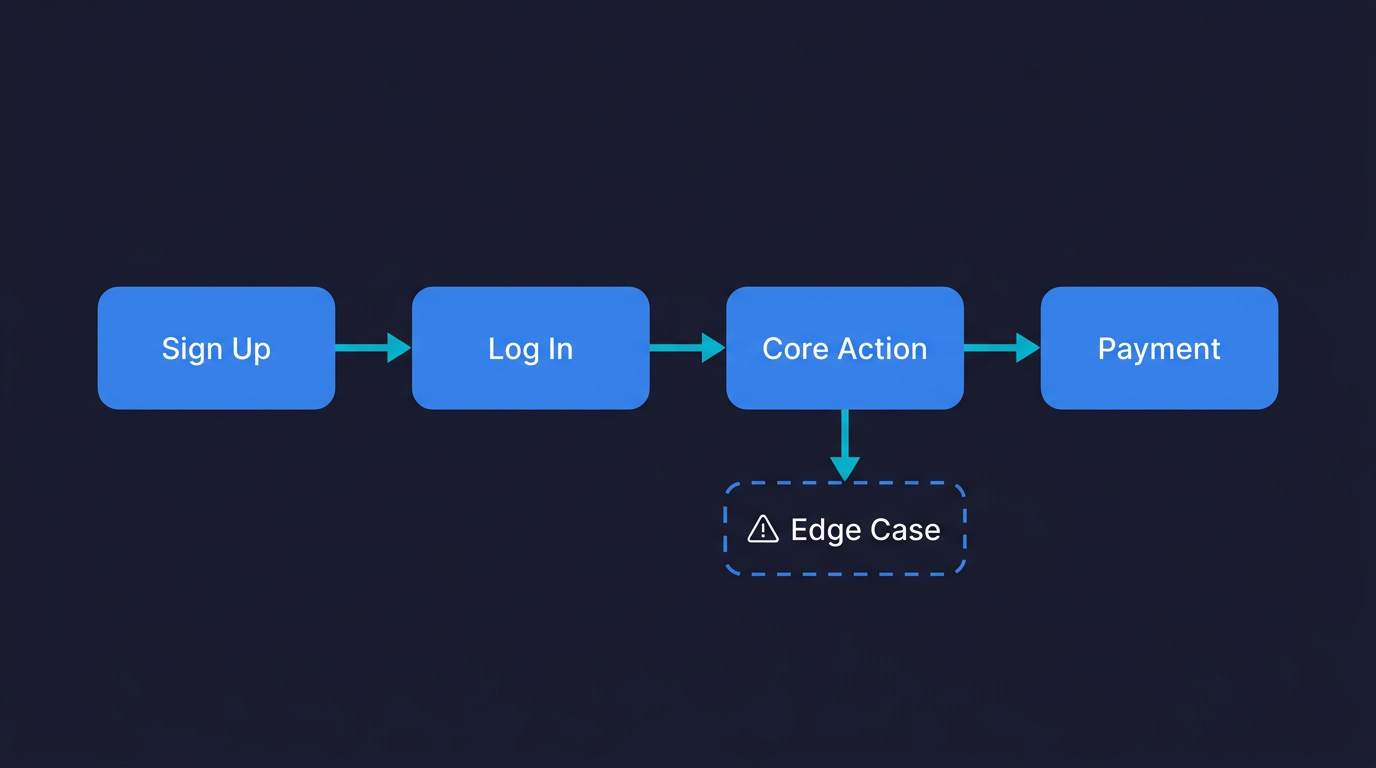
The reason this step matters: if you don't define what "working" looks like, you can't tell when something is broken. And vibe-coded apps fail in ways that aren't always obvious. The page might load but show the wrong data. The button might respond but not actually trigger the action. You need a specific definition of success for each step.
Once you have your critical paths documented, you have everything an AI testing agent needs to get started. Autonoma reads your codebase and those paths, then runs tests against your live application automatically — no test code required from you.
Step 2: Manually Test Your App (The Human Pass)
Before involving any tools, do one complete walkthrough of each critical path yourself. Use a browser you don't normally use (to avoid any cached state from development). Use a fresh account. Follow your steps exactly as a user would, not as someone who built the app.
What to pay attention to: does each action produce the expected result? Do error messages make sense? What happens if you do something slightly unexpected, like clicking a button twice, or going back after a form submission?
Keep a simple doc open and note anything that looks wrong, even if it seems minor. A button that's slightly off-center might not matter. A form that doesn't clear after submission might. The goal here is not to find every bug. It is to find the obvious ones before you add users.
This takes about 30 minutes for a typical early-stage app. It is not scalable as a permanent solution (you can't do this after every update), but it is the right first pass. And it gives you a baseline: you now know your app works today. The problem is you won't know if it still works tomorrow after your next prompt to Cursor.
That's the problem manual testing can't solve. That's where automation matters.
Step 3: How AI Testing Tools Automate QA for Non-Engineers
Automated testing means a program runs your critical paths for you, on a schedule, and tells you when something breaks. You don't need to be there. You don't need to click anything.
Traditionally, setting up automated tests required writing code. A test script that opens a browser, navigates to your signup page, fills in the form fields, clicks the button, and checks that the right page appeared. That's why non-engineers historically skipped this step. It required skills they didn't have.
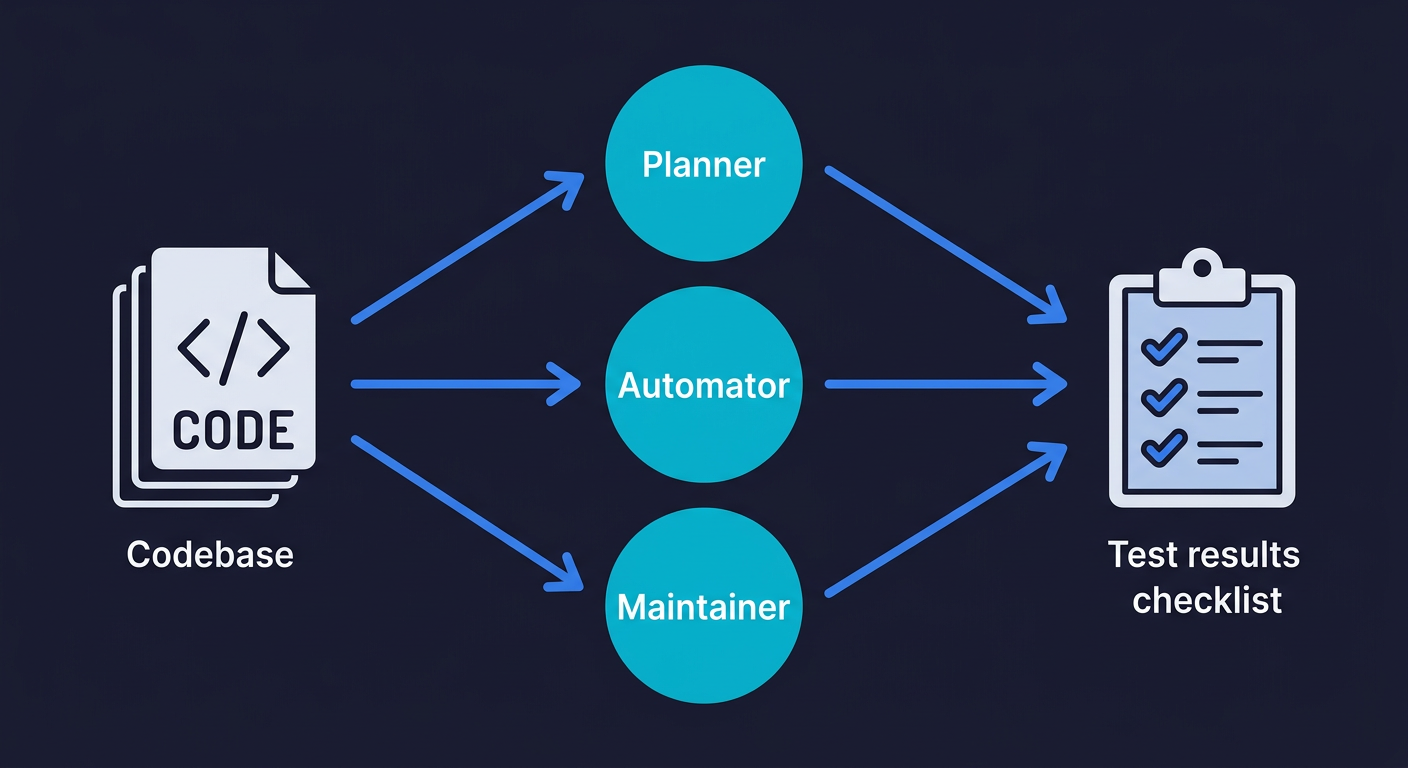
This has changed. AI-powered testing tools now read your codebase, understand what your app does, and generate those test scripts automatically. You connect your repository. Agents analyze your routes, your components, your user flows. They write tests based on what they find. This is QA for non-engineers in practice: you set up the connection, the agents handle the technical work.
Autonoma is built specifically for this. You connect your codebase, and a Planner agent reads your code to understand what flows exist and what each path is supposed to do. An Automator agent runs those tests against your live app. A Maintainer agent keeps the tests updated as your code changes. The whole thing is hands-off. Your codebase is the spec. The agents figure out the rest.
This approach is sometimes called "vibe testing": testing software built with AI coding tools using the same plain-language, AI-driven approach that built it. It is meaningful for vibe-coded apps specifically because the code changes constantly. Every time you prompt your AI coding tool to add a feature or fix something, the codebase shifts. Manual tests written once become outdated instantly. Tests that self-heal when the code changes are the only sustainable option.
Step 4: What to Test First in a Vibe-Coded App
Not everything is equally important to test. You have limited time and attention, and you want the highest return on whatever you invest in testing infrastructure. Here's how to prioritize.
If your app has any payment functionality, that is the top testing priority. A broken checkout is a direct revenue leak. Users don't file support tickets when a payment fails. They leave and don't come back. Automated tests that run on your checkout flow after every update are non-negotiable once you have paying customers.
Signup and login are close behind. If a user can't get into your app, they can't use it. Signup failures often happen silently, especially for users who hit an edge case you didn't build for (email aliases, special characters in passwords, specific mobile browsers). A broken auth flow can kill user acquisition without you knowing for days.
The core action of your app is the third priority. Whatever your product does, that main flow needs to work reliably. A user who successfully signs up but can't do the thing they signed up to do will churn immediately. Payments, auth, and core action are the three that cover the scenarios where a bug creates real, measurable damage. Everything else can wait.
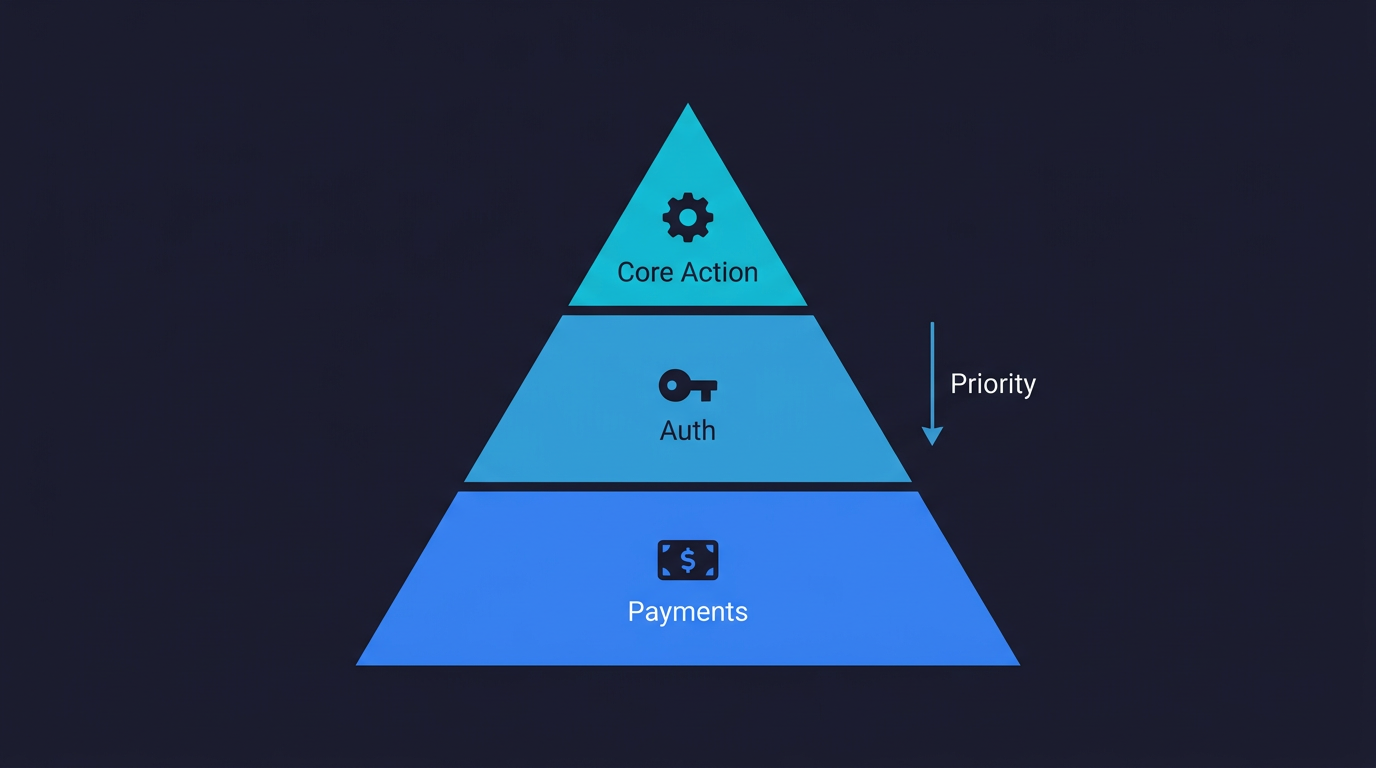
This prioritization holds whether you are a solo founder or a startup team. When vibe coding works at startups, it is because the critical paths are covered. When it breaks, it is because they aren't.
Step 5: Recognizing Silent Failures in Vibe-Coded Apps
One of the trickier parts of testing a vibe-coded app is recognizing failure. Not every bug is obvious. Some fail silently.
Obvious failures: The page shows an error message. The app crashes. Nothing happens when you click a button. These are easy to catch.
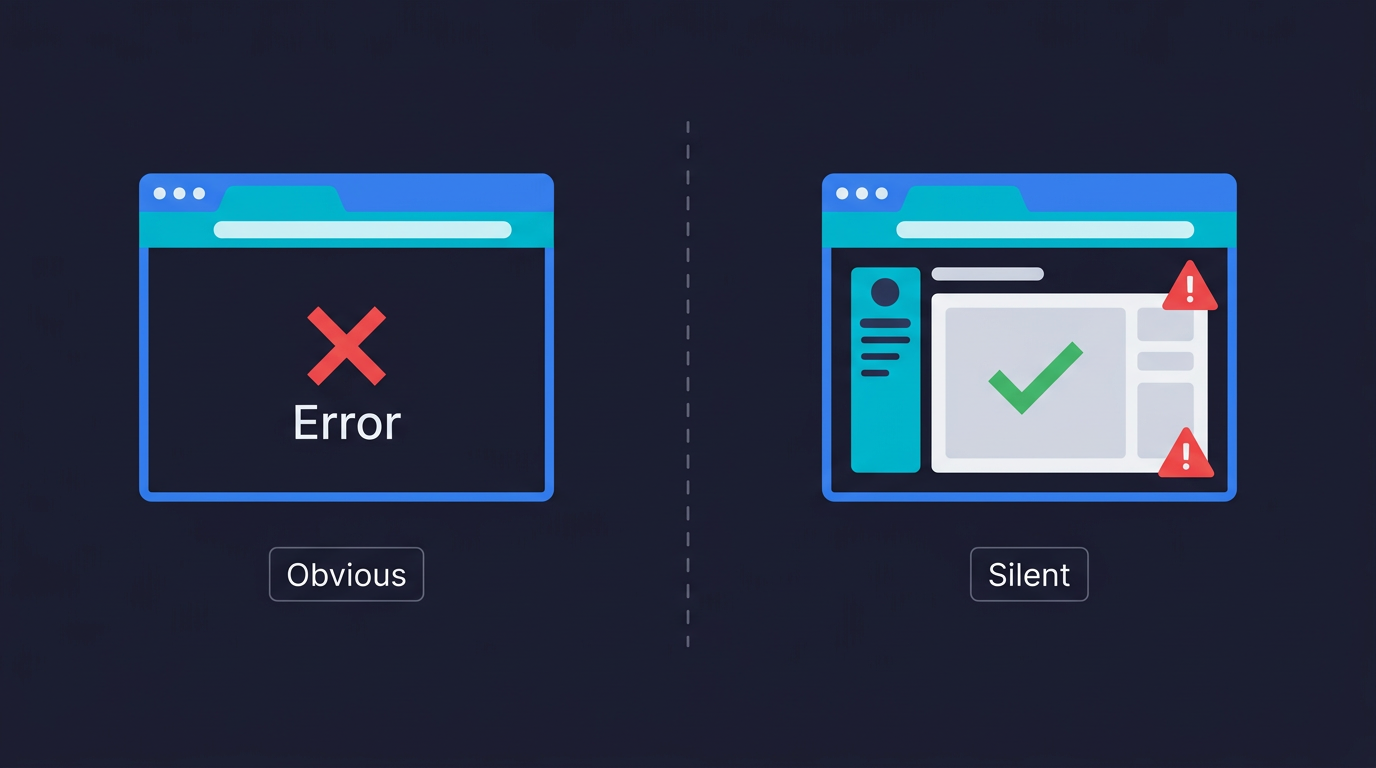
Silent failures: The form submits but the data doesn't save. The email confirmation never arrives. The dashboard loads but shows data from a different account. The payment charges the card but doesn't update the subscription status. These require you to check the outcome, not just whether the action ran.
This is why test definitions matter. When you wrote your critical path steps, you should have included the expected outcome for each one. "User clicks 'Create Account'" is incomplete as a test step. "User clicks 'Create Account' and is redirected to the dashboard with their name visible in the top right" is testable. The second version tells you exactly what to verify.
AI testing agents do this naturally. Because they read your codebase, they understand what each endpoint is supposed to return, what state changes are expected after each action, and what a successful outcome looks like at the code level. They're not just checking whether a button is clickable. They're checking whether the right thing happened as a result of clicking it.
Step 6: Test Your Vibe-Coded App After Every Update
This is where the permanent solution lives. Not the one-time manual walkthrough. Not the setup you do once and forget. The discipline of running your critical path tests every time you change something.
Every time you open Cursor and prompt a new feature or bug fix, you are changing the behavior of your app. The most common way vibe-coded apps break is not a catastrophic failure. It is a small change in one place that breaks an unexpected path somewhere else. You fix the onboarding flow and accidentally break the password reset. You add a new field to a form and the validation on an old field stops working.
This is what the vibe coding bubble actually looks like: builders who ship constantly without any systematic way to verify that yesterday's working features still work today. The apps that survive this phase are the ones that add testing infrastructure while they still can.
For non-engineers, the practical version of this is: connect your codebase to an AI testing tool, let it generate your baseline coverage, and run tests on every deploy. You don't need to manage the tests yourself. The agents maintain them. You just need to look at the results and act on failures.
What Good Coverage Looks Like for a Vibe-Coded App
Here is a practical benchmark for an early-stage app with no QA history:
| What to Cover | Why It Matters | When to Add It |
|---|---|---|
| Signup and login flows | New user acquisition depends on this working | Before launch |
| Core product action | If this breaks, your product doesn't work | Before launch |
| Payment and checkout | Direct revenue impact; silent failures are common | Before first paid user |
| Account settings and data access | Users need to see and manage their own data | After first 10 users |
| Error states and edge cases | Catch what happy-path testing misses | After first user complaints |
You do not need to cover everything at once. Coverage built incrementally, prioritized by impact, is more sustainable than a burst of effort that produces brittle tests nobody maintains.
Security Testing for AI-Generated Apps
Testing functionality (does this work?) is only part of the picture. The other part is security: can someone misuse your app in ways you didn't intend?
Vibe-coded apps have a documented security problem. 53% of AI-generated code has security vulnerabilities that pass initial review. These aren't theoretical risks. They are authentication edge cases, authorization gaps, and data exposure issues that come from AI optimizing for "make this work" rather than "make this safe."
As a non-engineer, you probably can't audit your own code for security flaws. But you can test for the most common ones without understanding the code.
Start with access control. If your app has URLs like /profile/123 or /order/456, change the number. You should see an error or get redirected, not another user's data. Then open an incognito window and copy the URL of a page that requires login. You should be redirected to the login page, not shown the content. These two checks catch the most common vibe-coded auth gaps.
Session management is the next area. Log in as one user, log out, then log in as a different user. Verify you see the second user's data, not the first. Then try clicking a payment or action button twice rapidly. Double-submissions cause duplicate charges and duplicate records, and AI-generated code often doesn't guard against them.
Finally, try typing <script>alert('test')</script> into a text input. The app should display it as plain text. If it executes (you see a browser popup), you have a cross-site scripting vulnerability that needs attention before you have real users.
These are behavioral tests, not code reviews. You can run them manually or set up automated tests that verify your app enforces boundaries correctly. Either way, the point is that security testing is part of app testing, not a separate advanced topic you can defer.
Is Vibe Coding Production Ready Without Testing?
The short answer is no. The longer answer is in our honest quality engineer's assessment of production readiness. But the relevant point for this article is simpler: "production ready" means users can rely on your app to work consistently. That's a property you can only guarantee through systematic testing.
Without tests, you have an app that works in your last manual walkthrough. With tests, you have an app that you know worked as of the last time your tests ran. The difference matters as soon as you have users who depend on it.
QA is changing as vibe coding spreads, but the fundamental job hasn't changed: someone, or something, needs to verify that the app works before users depend on it. The question is just whether that's you clicking through the app yourself before every deploy (not scalable) or an automated system doing it continuously (the only sustainable answer for a vibe-coded product that changes constantly).
Start Testing Your Vibe-Coded App in an Afternoon
The practical path for a non-engineer who wants to go from "no testing" to "my critical paths are covered" is not a long project. It fits in an afternoon.
Start with the list of your critical paths (30 minutes). Write the steps and expected outcomes for each one in plain language. Then do one manual walkthrough of each path in a clean browser (30 minutes). Note anything that looks wrong. Fix whatever is obviously broken.
Then connect your codebase to Autonoma. The Planner agent reads your routes and components and generates test cases based on what it finds. You don't need to describe your app or prompt anything. The codebase is the spec. Within a short time, you have automated coverage on your critical paths running against your live app. When something breaks after a future update, you'll know before your users do.
The goal isn't a comprehensive QA program from day one. It's coverage on the things that matter, running automatically, so you can keep building with confidence.
Frequently Asked Questions About Testing Vibe-Coded Apps
No. Testing an app and writing code for an app are different skills. You need to understand what your app is supposed to do for users, not how the code makes it happen. A non-engineer can define critical paths, run manual walkthroughs, and use AI testing tools that generate automated tests from the codebase automatically. Tools like Autonoma connect to your repository and have agents read your code to generate tests without any scripting required from you.
The same way you'd test any app, starting with the things that matter most to your users. Identify your critical paths (signup, login, core product action, payments), walk through each one manually in a clean browser, note what's working and what isn't, then set up automated tests to run those paths continuously. For vibe-coded apps specifically, automated tests that self-heal when the code changes are more sustainable than manually maintained scripts, because the code changes constantly.
Prioritize in this order: payment and checkout (direct revenue impact, silent failures are common), signup and login (if users can't get in, everything else is irrelevant), and the core action your app exists to provide. These three flows cover the scenarios where a bug creates real, measurable damage. Everything else can wait for a second pass.
After every meaningful change. If you're using Cursor, Bolt, or any AI coding tool to add features or fix bugs, your app changes. Any change can break an existing flow in an unexpected place. The practical solution is automated tests that run on every deploy so you don't need to remember to test manually. The tests run, you see the results, you fix failures before users encounter them.
Silent failures are bugs where the app appears to work but doesn't actually complete the intended action. Common examples: a form submits but the data doesn't save to the database, a payment processes but the subscription status doesn't update, an email confirmation is triggered but never delivered, or a user logs out and back in but still sees data from their previous session. These require you to check the outcome, not just whether the action completed. AI testing agents catch these by verifying expected state changes, not just UI responses.
Yes. Research shows 53% of AI-generated code has security vulnerabilities that pass initial review. Common issues in vibe-coded apps include authentication gaps (pages that should require login but don't), authorization failures (users who can access other users' data by modifying URL parameters), and session management problems (stale data visible after logout). You can test these behaviorally without reading the code: try to access protected pages without logging in, try modifying URL parameters to see other users' data, and verify your app clears session state correctly on logout.
The best tools for testing a vibe-coded app without writing test scripts are AI-native testing platforms that read your codebase and generate tests automatically. Autonoma is built specifically for this: connect your repository, and agents plan test cases from your code, run them against your live app, and keep tests updated as your code changes. Because the tests are derived from the codebase itself, coverage stays current even as your app evolves rapidly. Your codebase is the spec. No scripting, no recording, no maintenance on your end.


