
QA for vibe coding (quality assurance for apps built with AI tools like Cursor, Lovable, Bolt, or Replit) means verifying that your app actually does what it is supposed to do before your users find out it doesn't. You don't need to write code to do this. You need to know what your users are supposed to be able to do, then check each of those paths systematically. The most common approach: map your critical flows in plain English, do one manual walkthrough, then connect your codebase to an AI testing tool that generates and runs automated tests for you. Quality assurance for non-technical founders is not a technical discipline. It is a thinking discipline. This guide explains it the way a knowledgeable friend would over coffee.
You prompted it, you previewed it, you clicked through the main flow and it looked great. Then your first real user tried it on their phone, or with a long email address, or on a slow connection, and something broke.
This is the most common moment where vibe coders discover they need QA for vibe coding. Not because the app is bad, but because "works on my machine" and "works for everyone" are two different things. Vibe coding quality assurance is the practice of closing that gap before your users close it for you.
The good news: you don't need to understand test suites, pipelines, or anything that requires a terminal window. You need to understand your users' paths through your app. This guide walks you through testing for non-engineers, step by step.
What Does QA for Vibe Coding Actually Mean?
Quality assurance sounds formal. It isn't. Strip away the acronyms and methodology and you get one question: does the app do what it's supposed to do?
That's it. Does signup work? Does the payment go through? Does the dashboard show the right data? QA is just the practice of checking those things systematically instead of hoping for the best.
The reason testing for non-engineers feels intimidating is that most QA content is written for engineers. It assumes you know what a test suite is, what a CI/CD pipeline does, and how to run commands in a terminal. You don't need to know any of that to understand whether your app works.
Think of it like a restaurant health inspection. The inspector doesn't need to know how to cook. They check whether the kitchen meets the standard. You're the inspector. Your app is the kitchen. The standard is: does it work reliably for the people who use it? The term "vibe coding" was coined by Andrej Karpathy to describe building software by feel with AI, and QA is what keeps that feel grounded in reality.
Vibe coding quality assurance matters more than it might seem, and the data backs this up. Industry research shows that AI co-authored code contains roughly 1.7x more significant issues than human-written code. Nearly half of AI-generated code samples fail basic security checks. AI tools are optimized to make things work quickly. The happy path, meaning the main flow you asked the AI to build, usually works fine. The edges are where things break. A user who types an email address with a capital letter. A user who refreshes mid-checkout. A user who clicks the back button after submitting a form. These are not unusual behaviors. AI-generated code just doesn't always handle them. Research from multiple engineering teams finds that developers spend more time debugging AI-generated code than code they wrote themselves. The vibe coding testing gap is real and well-documented: speed of shipping is not matched by coverage of edge cases. Understanding these vibe coding quality issues is the first step toward preventing them.
What Should You Test in a Vibe-Coded App?
The most paralyzing part of QA for first-timers is not knowing where to start. Everything feels like it might break. So let's make this concrete.
Your starting point is a plain-English list of the things your app must be able to do. Not a technical spec. Not a features list. A list of user actions. If these don't work, your product doesn't work.
For most early-stage apps, that list is shorter than you'd expect. A user needs to sign up and log in. A user needs to complete the main thing your product does. A user needs to see their own data after logging in. If there's a payment flow, a user needs to complete it.
Write those down. That is your test plan. Everything else, every edge case and secondary feature, is secondary. Start here.
Once you have the list, add one more thing to each step: the expected outcome. "User clicks 'Create Account'" is not a test. "User clicks 'Create Account' and is redirected to the dashboard where their name appears in the top right corner" is a test. The expected outcome is what turns a click into a check.
This matters especially for what engineers call silent failures. Silent failures are bugs where the app appears to work but doesn't actually complete the intended action. A form that submits but doesn't save the data. A payment that charges the card but doesn't activate the subscription. An email that triggers but never arrives. These are invisible if you're only checking whether the UI responded. They're obvious if you defined what success looks like at each step.
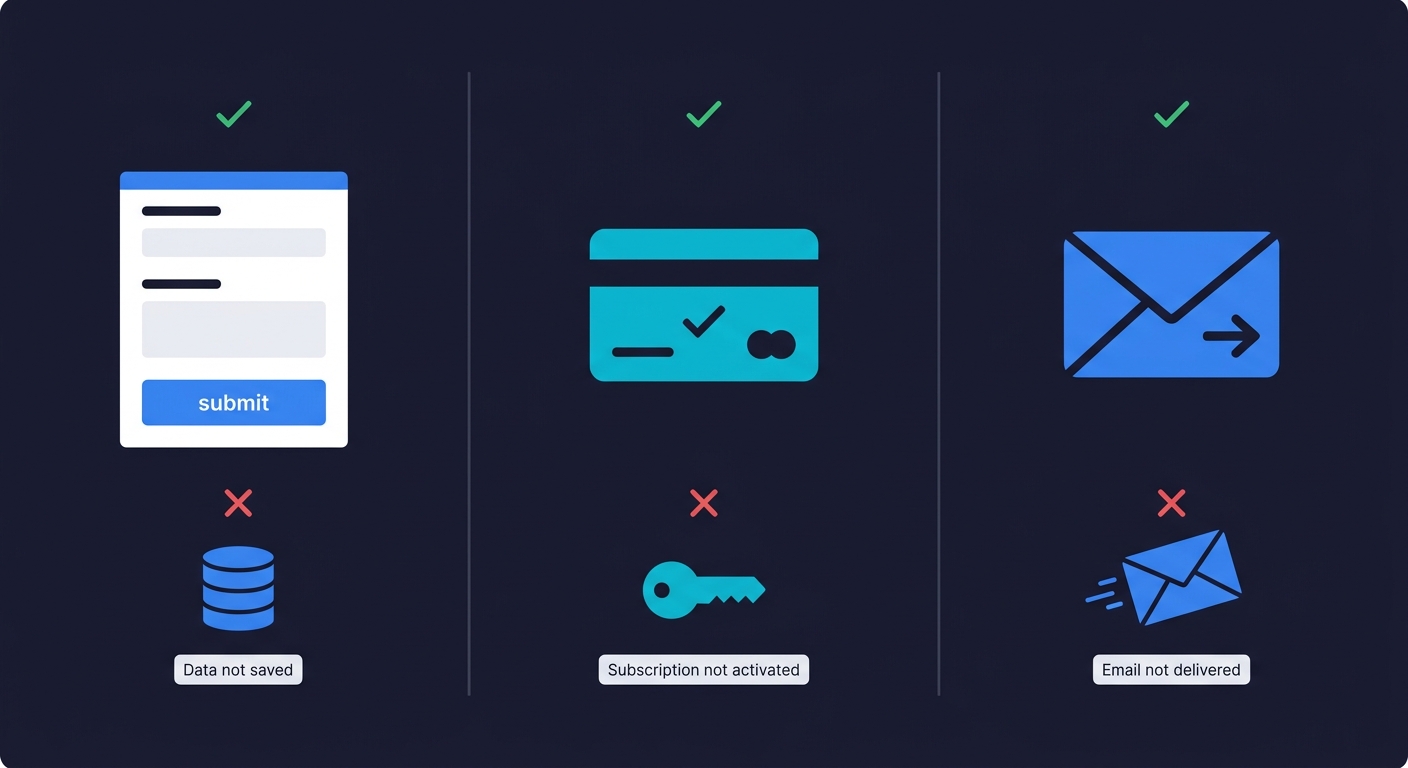
Catching silent failures requires more than clicking through the UI — it requires observing the actual system state after each action. Autonoma handles this automatically: AI agents navigate your app on real browsers, verify outcomes at every step, and surface the failures that look like success from the frontend.
Common Bugs in Vibe-Coded Apps
Before you go looking for bugs, it helps to know what you're looking for. These patterns show up repeatedly in apps built with AI tools. Knowing how to QA AI-generated code starts with knowing where it breaks.
Here's a concrete example. A founder built a booking app with Lovable. The booking flow worked perfectly in her testing. Then her first customer tried to book on a Saturday, and the calendar showed no available slots. The AI had hardcoded weekday-only availability because the original prompt only mentioned weekday meetings. The feature worked. It just didn't work the way real users needed it to.
The edge case gap. AI coding tools build for the example you gave them. A signup form built by describing a happy user with a standard email address might choke on plus-sign aliases, Unicode characters, or trailing spaces. The feature works. Just not for everyone.
The double-click problem. Submit a form twice quickly. Click a payment button while it's loading. Most AI-generated code doesn't guard against double-submissions, which can create duplicate charges, duplicate records, or confusing error states.
The broken back button. Most vibe-coded apps handle forward navigation well. Going back mid-flow, especially in checkout or multi-step forms, often leaves the app in an inconsistent state. Session data might be stale. Progress might be lost. The UX breaks.
The stale session. Log out of your app. Then paste the URL of a page that requires login into the browser. You should see a login screen. If you see the page, your session management has a gap. This is both a UX bug and a security issue.
The wrong-user data bug. If your app has URLs that include user IDs or record IDs (like /profile/123 or /orders/456), try changing the number. You should see an error. If you see someone else's data, that's a serious authorization gap. This is one of the most common vibe coding security risks and one that AI tools rarely guard against by default.
When you find one of these bugs, the next step is telling your AI coding tool how to fix it. A vague prompt like "signup is broken" will get a vague fix. Instead, use this template: "I found a bug where [action] results in [wrong outcome] instead of [expected outcome]. Steps to reproduce: [step 1, step 2, step 3]. The URL where it happens is [page]." The more specific your bug report, the better the AI-generated fix.
Knowing these patterns means you know exactly what to probe when you do your manual walkthrough. You're not clicking around randomly. You're checking the specific places AI-generated code tends to break. For a deeper look at this, vibe coding best practices covers what to do during development to prevent many of these from appearing at all.
How to Test Your Vibe-Coded App Without Writing Code
Here's the practical version for a non-engineer who wants to go from "no idea if this works" to "I've actually checked."
Start with one manual walkthrough. Use a browser you don't normally use for development, so there's no cached state from your own sessions. Create a fresh account. Walk through each of your critical paths exactly as a user would. Check the expected outcome at each step, not just whether the UI responded.
This takes about 30 minutes for a typical early-stage app. It catches the obvious failures before your first users do. The catch is that it doesn't scale. Every time you make a change, every time you prompt your AI tool to add a feature or fix a bug, the app changes. You can't do a full manual walkthrough after every update. That's where automation matters.
Automated tests are programs that walk your critical paths for you, on a schedule, and report back when something breaks. Traditionally, setting up those programs required writing code. That's why most non-engineers skipped this step entirely.
This has changed. Agentic testing tools now read your codebase, understand what your app does, and generate the test programs automatically. You don't write scripts. You connect your repository and agents handle the technical work.
Autonoma is built exactly for this. You connect your codebase and a Planner agent reads your routes, components, and user flows. It generates test cases based on what it finds in the code. An Automator agent runs those tests against your live app. A Maintainer agent keeps them updated as your code changes. The whole thing runs without you touching a terminal. Your codebase is the spec. The agents figure out what to test from that.
This approach is specifically well-suited to vibe-coded apps because the code changes constantly. Every prompt to Cursor, every update in Lovable, shifts the codebase. Manually maintained test scripts become outdated immediately. Tests that self-heal when the code changes are the only sustainable option. Our piece on agentic testing for vibe coding goes deeper on why this architecture fits the vibe coding workflow specifically.
Vibe Coding Testing Basics: Quick-Reference Checklist
Before launch, and before any significant update, use this as your mental checklist. You don't need to run all of it every time. But you should be able to say yes to each item before you send your app to real users.
| What to Check | How to Check It | Why It Matters |
|---|---|---|
| Signup and login work end to end | Create a fresh account in a clean browser, log out, log back in | If users can't get in, nothing else matters |
| Core product action completes successfully | Do the main thing your app exists to do and verify the outcome | This is why users signed up |
| Payment or checkout processes correctly | Complete a real (or test mode) transaction and verify subscription/order status updates | Silent payment failures are invisible revenue leaks |
| Protected pages require login | Open an incognito window and paste a logged-in URL directly | Unauthenticated access is both a UX and security problem |
| Logout clears the session | Log out, then log in as a different user and verify you see only that user's data | Stale sessions expose private data |
| Double-submission is handled | Click a submit or pay button twice quickly | Duplicate charges and duplicate records are hard to clean up |
| App works on mobile | Open your app on your actual phone (not just a resized browser), walk through your core flow | Most of your users are on mobile, and touch targets, keyboards, and slow connections break things desktop testing misses |
This is not exhaustive. It is the minimum viable vibe coding quality assurance pass for an app with real users. Once you have automated tests running on your critical paths, these become automatic. You check the results instead of doing the clicks yourself.
When Quality Assurance for Non-Technical Founders Needs a Professional
Most vibe coders don't need a QA engineer on day one. But there are thresholds worth knowing.
Automated testing on your critical paths covers most of the risk for an early-stage app. You get continuous coverage without needing someone to manage it. That works until your app becomes complex enough that the automated coverage starts to feel thin.
The signal to bring in professional QA is usually one of three things. Your app has complex multi-step flows where the order of operations matters and automated tests don't capture the nuance well. You're operating in a regulated space (fintech, healthcare, legal) where specific compliance standards require human review. Or you've started hearing from users about bugs that your automated tests are not catching, which means your coverage has gaps that need expert attention.
Until you hit one of those signals, the practical answer, and the reason you do need QA for vibe coding, is: connect your codebase to an AI testing tool, get automated coverage on your critical paths, and invest your time in building instead of in manual QA processes. How to test a vibe-coded app walks through the practical setup in detail if you want to follow it step by step. If you are weighing the cost of vibe coding, remember that bugs found by users are far more expensive than bugs found by tests.
The question is vibe coding production ready without any QA? The honest answer is no. "Production ready" means users can rely on your app to work consistently. That's a property you verify through testing, not one you achieve through good intentions. Making a vibe-coded app production ready requires a deliberate QA step, no matter how polished the UI looks.
You Don't Need to Become a QA Engineer
The goal of this guide is not to turn you into a testing expert. It's to give you enough of a mental model that you don't skip QA entirely, which is what most vibe coders do until something breaks in front of a real user.
The model is simple. Know what your app is supposed to do. Check that it does those things after every significant change. Use AI testing tools to automate the checking so you don't have to do it manually every time. Act on failures before users find them.
That's it. Everything else in QA is a refinement on those four things.
Connect your codebase to Autonoma and the agents generate your initial test coverage from the code itself. You don't describe your app or write prompts. The codebase is the spec. The agents read it, plan the tests, run them, and keep them updated as your app changes. You just look at the results.
Building with AI tools is fast. Knowing your app works is what makes it something you can actually rely on.
Frequently Asked Questions About QA for Vibe Coding
Yes, but you don't need a lot of it. An MVP with real users still needs its critical paths to work: signup, login, core action, and payment if applicable. You don't need comprehensive coverage. You need confidence that the flows your users depend on actually work. AI testing tools like Autonoma let you set this up quickly by reading your codebase and generating tests automatically. The cost of skipping QA is low until your first user hits a bug. After that, it compounds fast.
Start by mapping what your app is supposed to do in plain English. Write down your critical user paths, the three to five things users must be able to do for your product to work. Walk through each path manually in a clean browser. Then connect your codebase to an AI testing tool like Autonoma, which reads your code and generates automated tests without any scripting from you. The agents handle the technical work. You review the results and act on failures.
The most common categories are edge case gaps (the app works for the exact scenario you described to the AI but fails for variations), silent failures (the UI appears to succeed but the underlying action didn't complete, like a form that submits but doesn't save data), and session management issues (protected pages accessible without login, or stale data visible after logout). These patterns come from AI tools optimizing for the happy path rather than defensive handling of all possible inputs and states.
After every meaningful change to the codebase. When you prompt Cursor, Lovable, Bolt, or any AI coding tool to add a feature or fix a bug, the codebase shifts. A change in one area can break an unrelated flow. The practical solution is automated tests that run on every deploy so you don't need to remember. The tests run, you see the results, you fix failures before users encounter them. With AI testing tools, this becomes hands-off once you've connected your codebase.
Testing is the act of checking whether the app does something correctly. QA (quality assurance) is the broader practice of making sure the overall quality of the app meets a standard consistently over time. For a vibe coder, the practical difference is small: testing is what you do in a session, QA is what you do as an ongoing habit. Setting up automated tests that run on every deploy is QA. Walking through your app before launching a feature is testing. Both matter.
AI coding tools like Cursor, Lovable, and Bolt are built to generate and edit code. They can help you write individual test scripts if you ask them to, but they don't continuously test your app, self-heal when code changes break tests, or run tests automatically on your deploys. For ongoing quality assurance for non-technical founders, you need a dedicated testing tool. Autonoma connects to your codebase and has agents plan test cases from your code, run them against your live app, and maintain them as your code changes. That's a different category from a coding assistant.
The best tools for testing a vibe-coded app without writing test scripts are AI-native testing platforms that read your codebase and generate tests automatically. Autonoma is built specifically for this workflow: connect your repository, and agents derive test cases directly from your code, run them against your live app, and self-heal when your code changes. Because the tests are generated from the codebase itself, coverage stays current even as your app evolves through constant AI-assisted changes. No scripting, no recording, no maintenance on your end.


